title: ".agents vs .claude: Understanding Configuration Folder Differences in AI Agent Development"
description: "Clarify the distinct roles of .agents and .claude configuration folders in AI Agent development, including Skills placement and directory structures."
tags:
  - AI Agent
  - Configuration
  - Development
  - Skills
  - Best Practices
AI Agent development is booming, and project root directories are starting to feature various configuration folders like .agents, .claude, .cursor, and more. Among these, both .agents and .claude can house Skills, but their positioning, design philosophies, and applicable scopes are entirely different. Choosing the wrong location can lead to Skills not working, or worse, configuration conflicts during team collaboration. This article will delve into the underlying design to clearly explain the core differences and best practices for both.
Core Value: After reading this article, you'll know whether to place your Skills in .agents or .claude, and how to efficiently manage Agent configurations in a multi-tool team.
.claude vs .agents: A Deep Dive
Let's break down the fundamental differences between these two configuration folders.
.claude: The Personal Sandbox
- 定位 (Positioning): Think of
.claudeas your personal scratchpad or sandbox. It's designed for individual developers to quickly test and iterate on new Skills or agent configurations without affecting the main project or other team members. - 设计理念 (Design Philosophy): It emphasizes ease of use and rapid prototyping. The idea is that you can throw anything in here, experiment, and then decide if it's worth moving to a more permanent location.
- 适用范围 (Scope):
- 个人开发与测试 (Individual Development & Testing): Ideal for trying out new prompts, tools, or agent logic before integrating them into the main codebase.
- 本地化配置 (Localized Configuration): Useful for storing personal preferences or environment-specific settings that aren't meant to be shared.
- 快速迭代 (Rapid Iteration): When you're quickly building and tweaking,
.claudelets you do so without the overhead of formal integration.
- Skills 存放规范 (Skills Storage Specification): Skills placed here are typically considered local to your environment. They might not be version-controlled or shared with the team.
.agents: The Shared Workspace
- 定位 (Positioning):
.agentsis the designated shared configuration directory for the entire team. It's where you store Skills and configurations that are intended to be used by multiple developers or by the production environment. - 设计理念 (Design Philosophy): This folder prioritizes collaboration, consistency, and maintainability. Configurations here should be well-documented, tested, and version-controlled.
- 适用范围 (Scope):
- 团队协作 (Team Collaboration): The primary location for shared agent configurations, ensuring everyone is working with the same tools and logic.
- 生产环境部署 (Production Deployment): Configurations intended for deployment should reside here to ensure consistency between development and production.
- 版本控制 (Version Control): This directory is typically part of the project's version control system (like Git), allowing for tracking changes and rollbacks.
- Skills 存放规范 (Skills Storage Specification): Skills here should follow established project standards. This includes clear naming conventions, proper documentation (e.g., in README files), and potentially unit tests.
Key Differences Summarized
| Feature | .claude |
.agents |
|---|---|---|
| Purpose | Personal sandbox, rapid prototyping | Shared workspace, team collaboration |
| Scope | Individual developer | Entire team, production |
| Version Control | Typically not included | Usually included (e.g., Git) |
| Best For | Experimentation, local testing | Stable, shared configurations, production |
| Skills Status | Local, potentially temporary | Shared, stable, version-controlled |
Directory Structure Comparison
While both can hold Skills, their typical internal structures might differ based on their intended use.
.claude Example Structure
.claude/
├── skills/
│   ├── my_experimental_skill.py
│   └── another_test_tool.py
├── prompts/
│   └── test_prompt_variations.txt
└── config.yaml  # Local, personal settings
In this structure, skills/ might contain experimental code. config.yaml would likely hold settings specific to the individual developer.
.agents Example Structure
.agents/
├── skills/
│   ├── data_analysis/
│   │   ├── __init__.py
│   │   ├── data_cleaning.py
│   │   └── statistical_analysis.py
│   ├── web_scraping/
│   │   ├── __init__.py
│   │   └── scrape_product_info.py
│   └── README.md # Documentation for shared skills
├── tools/
│   └── shared_api_client.py
├── agent_configs/
│   ├── main_agent.yaml
│   └── reporting_agent.yaml
└── README.md # Overall project configuration documentation
Here, .agents is more organized, often with subdirectories for different categories of Skills or tools. It emphasizes documentation (README.md) and structured configuration files (agent_configs/).
When to Use Which
- Start with
.claudewhen:- You're exploring a new idea or tool.
- You need to quickly test a piece of logic.
- The code isn't ready for team review or production.
- Move to
.agentswhen:- The Skill is stable and proven.
- It needs to be used by other team members.
- It's part of the core functionality of your agent.
- It needs to be deployed to a production environment.
AGENTS.md vs CLAUDE.md
While not strictly enforced, the convention often follows the folder names:
AGENTS.md: This file would typically reside in the root or within.agents/and document the shared configurations, team-wide best practices for Skills, and the overall structure of the.agentsdirectory. It's a guide for the team.CLAUDE.md(or similar personal notes): If aCLAUDE.mdfile exists, it would likely be within the.claudefolder or the developer's personal workspace, documenting personal experiments, notes on why certain configurations were chosen for testing, or reminders for future development. It's for individual reference.
Conclusion
Understanding the distinct roles of .claude and .agents is crucial for efficient AI Agent development. .claude offers a safe space for individual experimentation, while .agents provides a structured environment for team collaboration and production-ready configurations. By adhering to these principles, you can avoid common pitfalls, streamline your workflow, and foster better teamwork.
Key Takeaways for .agents and .claude Folders
Let's get straight to the core question: these two folders aren't in competition; they represent different layers of configuration systems.
| Comparison Dimension | .claude/ Folder |
.agents/ Folder |
|---|---|---|
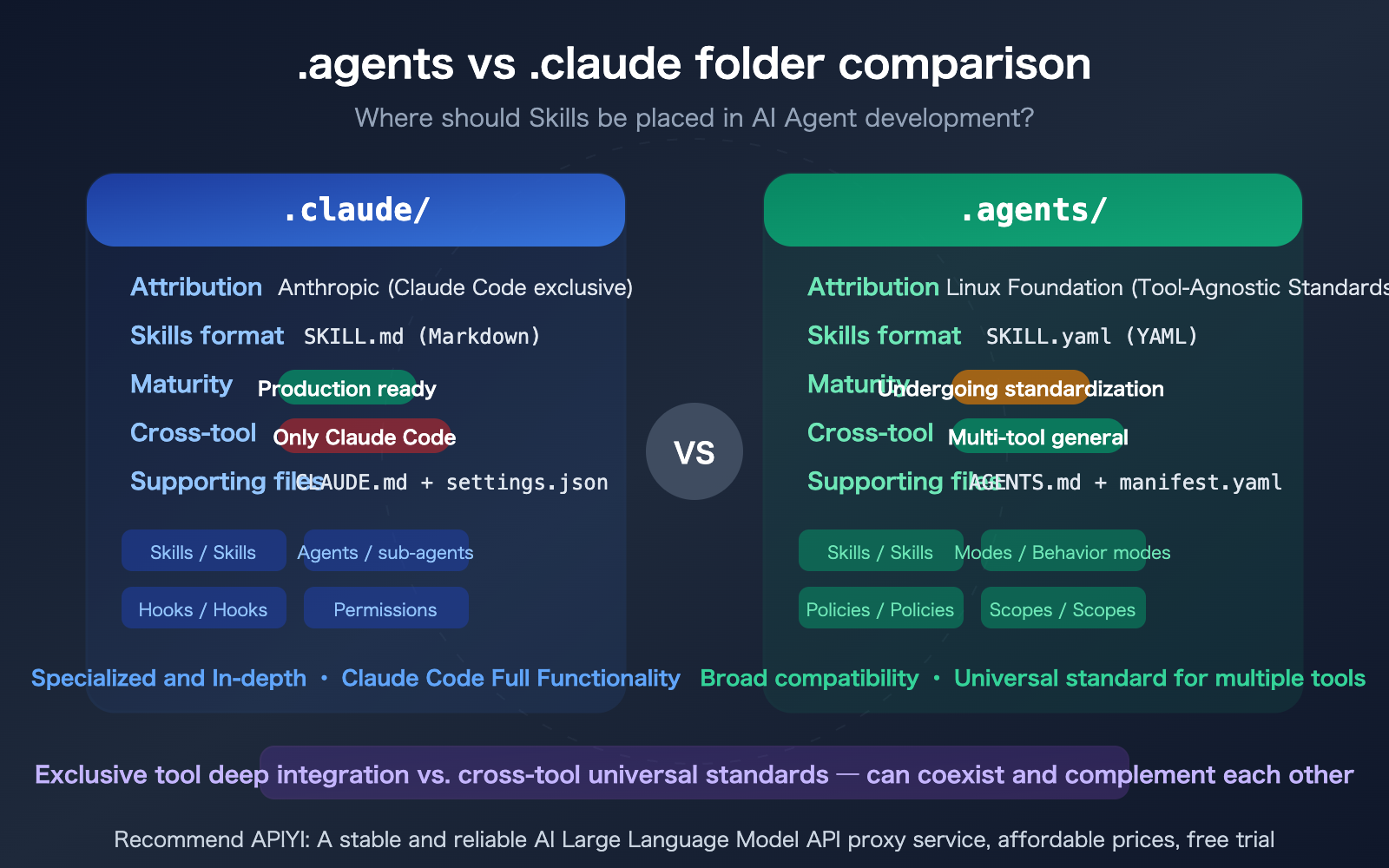
| Owner | Anthropic (Claude Code Exclusive) | Agentic AI Foundation / Linux Foundation |
| Positioning | Claude Code's project configuration directory | Tool-agnostic Agent configuration standard |
| Skills Format | SKILL.md (Markdown + YAML front matter) |
SKILL.yaml (Pure YAML) |
| Maturity | Production-ready, officially supported by Claude Code | Standard under development (Work In Progress) |
| Cross-Tool Support | Claude Code only | Designed for all AI Agent tools |
Design Philosophy Differences: .agents vs. .claude Folders
The fundamental difference between these two folders lies in their design philosophy:
.claude/ follows an "exclusive deep integration" approach. It's tailor-made for Claude Code, offering full capabilities for Skills, Subagents, Hooks, Permissions, etc., deeply integrated with Claude Code's toolchain. The advantage is complete functionality and out-of-the-box usability; the trade-off is being locked into the Claude Code ecosystem.
.agents/ follows a "cross-tool universal standard" approach. It aims to define a configuration specification that all AI Agent tools can understand, similar to how .editorconfig works for editors. The advantage is using one set of configurations across multiple tools; the trade-off is that the standard is still evolving, and tool support varies.
Both can coexist perfectly within the same project. Deep, Claude Code-specific configurations go into .claude/, while general configurations reusable across tools go into .agents/.
Complete Directory Structure for .claude Folder
Let's first look at Claude Code's native .claude/ folder, which is the most mature implementation currently.
Detailed Directory Structure for .claude Folder
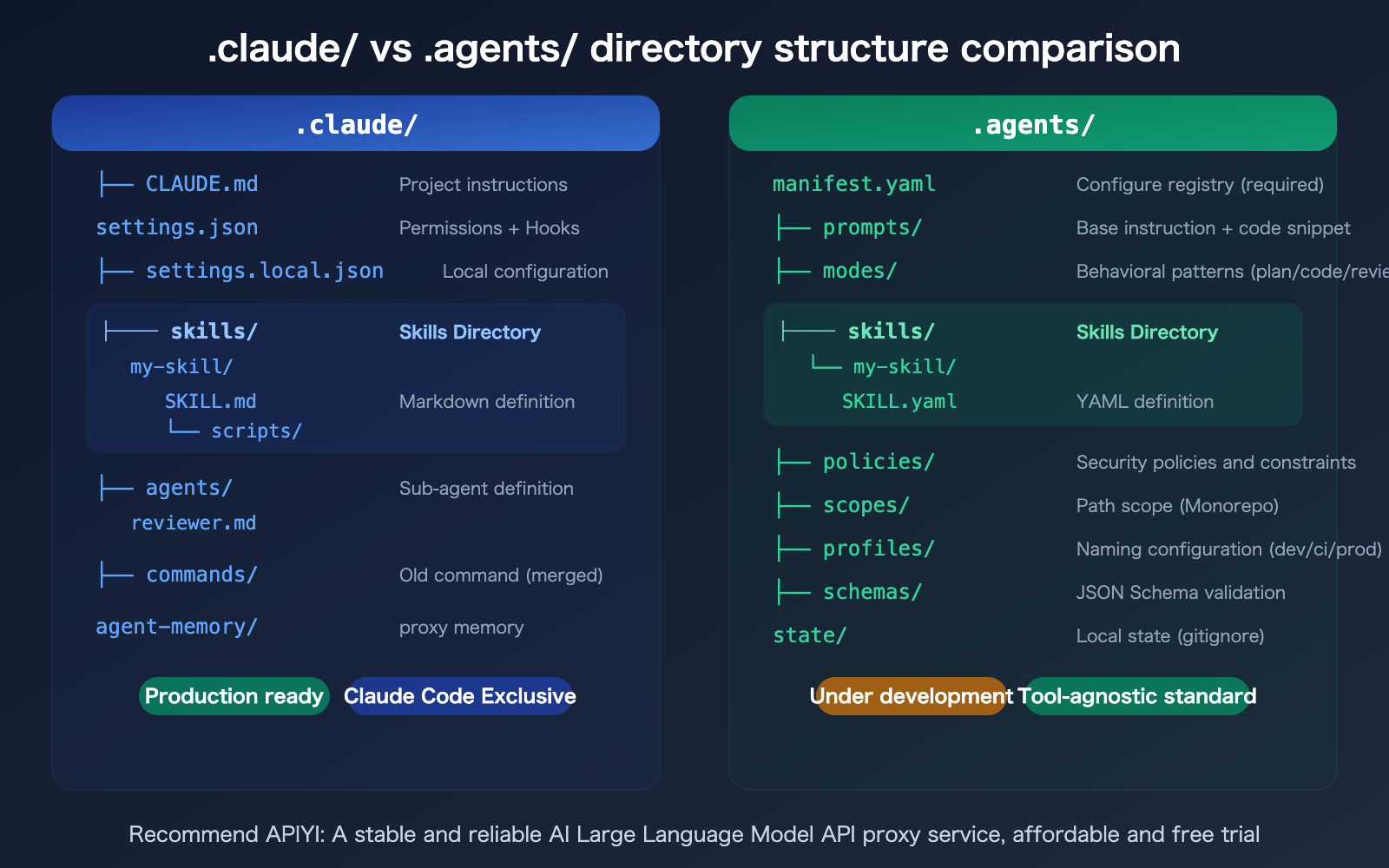
.claude/
├── CLAUDE.md              # Project instructions (replaces root CLAUDE.md)
├── settings.json          # Project settings (commit to git, shared by team)
├── settings.local.json    # Local settings (gitignore, personal configuration)
├── skills/                # Skills directory
│   └── <skill-name>/
│       ├── SKILL.md       # Skill definition file (required)
│       ├── scripts/       # Helper scripts
│       ├── references/    # Reference materials
│       └── templates/     # Template files
├── agents/                # Sub-agent definitions
│   └── <agent-name>.md    # Sub-agent definition file
├── commands/              # Legacy slash commands (merged into skills)
│   └── <command-name>.md
└── agent-memory/          # Sub-agent persistent memory
    └── <agent-name>/
        └── MEMORY.md
There's also a user-level ~/.claude/ directory. Personal Skills placed here can take effect across all projects:
~/.claude/
├── CLAUDE.md              # User-level instructions (cross-project)
├── settings.json          # User-level settings
├── skills/                # Personal Skills (available in all projects)
├── agents/                # Personal sub-agents
└── projects/              # Session history and data
SKILL.md Format for .claude Folder Skills
Claude Code's Skills are defined using Markdown files with YAML front matter:
---
name: my-skill
description: A description of the skill, helping Claude decide when to trigger it.
user-invocable: true        # Users can invoke via /my-skill
allowed-tools: Read, Grep   # Limit available tools
context: fork               # Run in a separate sub-agent
model: sonnet               # Model override
---

You are a professional code review assistant...
(Skill instructions in Markdown format)
Key field explanations:
- Skills with
user-invocable: trueare registered as/slash-commands. context: forkindicates running in an isolated context, not polluting the main conversation.allowed-toolscan restrict the set of tools a Skill can use.$ARGUMENTS,$0,$1support argument substitution.
🎯 Development Tip: Claude Code's Skills system follows the open standard for Agent Skills (agentskills.io). The syntax is compatible across Claude Code, Claude API, and VS Code Copilot.
If you're developing AI applications with Claude Code, consider getting an API key from APIYI apiyi.com for unified management of multiple model invocations.
Complete Directory Structure of the .agents Folder
The .agents/ folder specification (AGENTS-1 Spec), maintained by the Agentic AI Foundation and hosted under the Linux Foundation, aims to define a universal configuration standard understandable by all AI coding tools.
Detailed Directory Structure of the .agents Folder
.agents/
├── manifest.yaml          # Required: Configuration registry, declares all available configurations
├── prompts/               # Required: Instruction prompts
│   ├── base.md            # General Agent instructions
│   ├── project.md         # Project-specific instructions
│   └── snippets/          # Modular prompt snippets
├── modes/                 # Required: Behavior modes (similar to .claude/agents/)
│   ├── plan.md            # Planning mode
│   ├── code.md            # Coding mode
│   └── review.md          # Review mode
├── policies/              # Required: Security policies and capability constraints
├── skills/                # Required: Skill definitions (following Agent Skills Spec)
│   └── <name>/
│       └── SKILL.yaml     # Skill definition in YAML format
├── scopes/                # Required: Path-level overrides (Monorepo support)
├── profiles/              # Required: Named configuration overlays (dev/ci/staging)
├── schemas/               # Required: JSON Schema validation
└── state/                 # Local state (not committed to git)
    ├── .gitignore
    └── state.yaml
Unlike .claude/ where Skills use SKILL.md (Markdown), .agents/ uses SKILL.yaml (plain YAML) format.
Unique Design of the .agents Folder
The .agents/ specification includes several concepts not found in .claude/:
- Scopes: Define different configurations for various subdirectories within a Monorepo, with the most specific path taking precedence.
- Profiles: Support named configuration overlays like
dev,ci,prod, similar to environment variables. - Policies: A dedicated directory for security constraints, where deny rules always override allow rules.
- Determinism: The same input must produce the same output, without relying on external state.
Comparison of Skill Storage Rules for .agents and .claude Folders
This is the practical question most developers care about: where do my Skills actually go?
.agents vs. .claude Folders for Skills
| Comparison Dimension | .claude/skills/ |
.agents/skills/ |
|---|---|---|
| Definition File | SKILL.md (Markdown + YAML frontmatter) |
SKILL.yaml (plain YAML) |
| Claude Code Support | Native support, auto-discovery | Requires manual configuration or waiting for official support |
| Slash Commands | user-invocable: true automatically registers /command |
Depends on the specific tool implementation |
| Sub-agent Execution | context: fork runs in an independent context |
Configured via modes/ |
| Model Override | model: sonnet directly specified |
Configured via profiles/ |
| Tool Restrictions | allowed-tools: Read, Grep |
Configured via policies/ |
| Auxiliary Files | scripts/, references/, templates/ subdirectories |
Depends on implementation |
| Argument Passing | $ARGUMENTS, $0, $1 variable substitution |
Not explicitly defined in the spec |
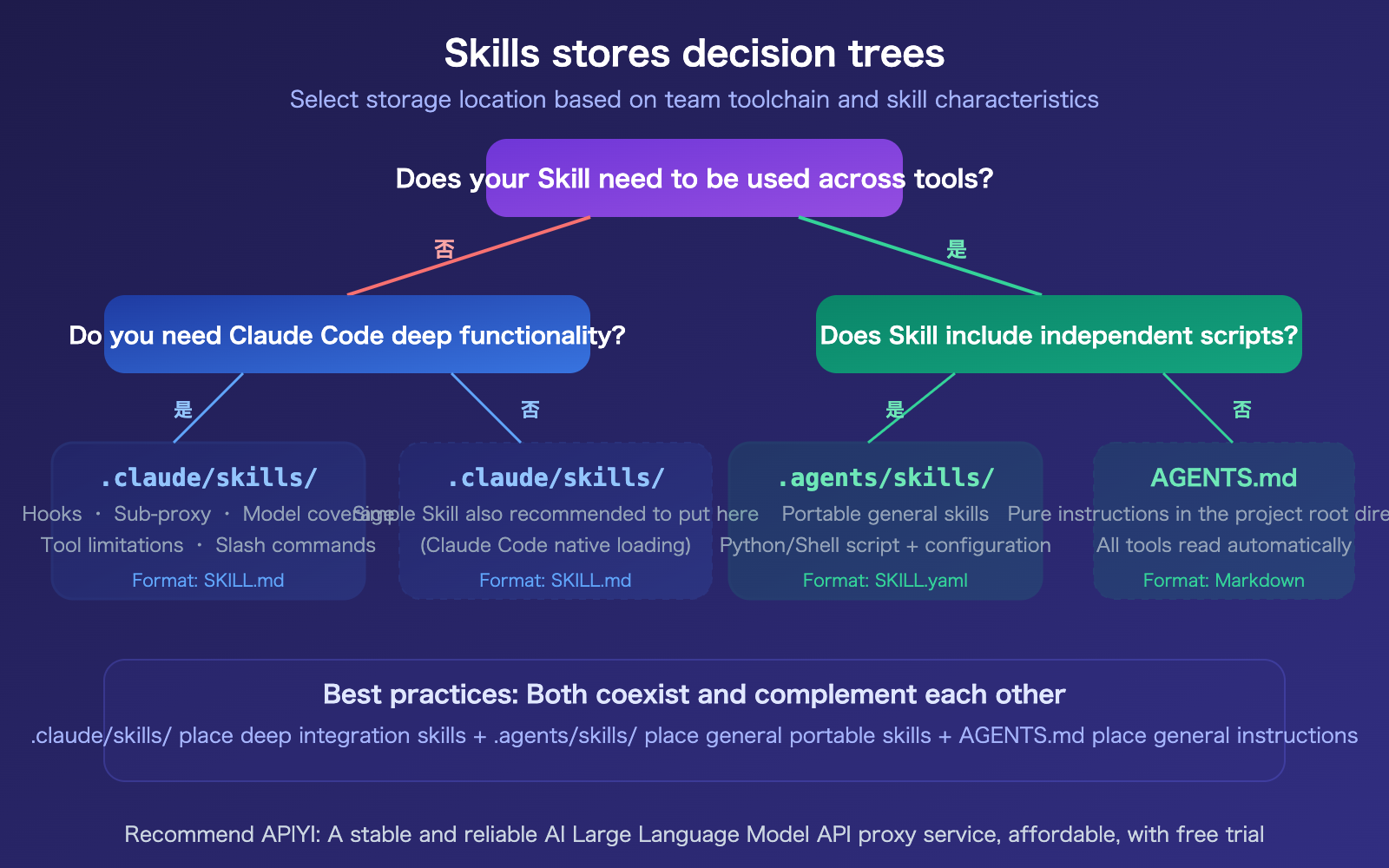
How .agents and .claude Folders Can Coexist
In actual projects, both folders can coexist and complement each other. Taking this project as an example:
.claude/skills/ stores Claude Code-exclusive skills:
apiyi-article-generator— Article generation, deeply integrated with project templates and standards.apiyi-svg-generator— SVG illustration generation, relies on project SVG templates.apiyi-content-reviewer— Content review, uses project quality standards.
.agents/skills/ stores general, portable skills:
markdown-proxy— URL to Markdown fetching, uses Python scripts.nano-banana-pro-image-gen— Image generation, calls external APIs.
The principle for division is clear: skills deeply integrated with Claude Code go into .claude/, while reusable skills that can be used across different AI tools go into .agents/.
🎯 Selection Advice: If your team exclusively uses Claude Code, placing everything in
.claude/skills/is sufficient as it offers the most complete functionality.
If team members use various AI tools (Cursor, Windsurf, Codex, etc.), placing general skills in.agents/skills/facilitates better collaboration.
For API calls in AI Agent development, it's recommended to manage them uniformly through APIYI (apiyi.com), using a single API key for multiple models.
.agents and .claude Companion Instruction File Comparison
Besides the Skills folder, both systems also have their own project instruction files.
Differences Between CLAUDE.md and AGENTS.md
| Comparison Dimension | CLAUDE.md | AGENTS.md |
|---|---|---|
| Supported Tools | Claude Code | Claude Code, OpenAI Codex, Google Jules, Cursor, GitHub Copilot, etc. |
| File Hierarchy | User-level (~/.claude/) → Project-level (./) → Subdirectory-level |
Project-level (./) → Subdirectory-level |
| Local Override | CLAUDE.local.md (gitignore) |
None |
| Formal Standard | None (Anthropic product documentation) | Yes (Agentic AI Foundation under the Linux Foundation) |
| Ecosystem Scale | Growing (adopted by Next.js, LangChain, Deno, etc.) | Large-scale (n8n 178K stars, llama.cpp 97K stars, Bun 82K stars) |
| Initialization | /init command within Claude Code |
Manual creation |
Practical Recommendation: Both files can coexist. Use CLAUDE.md for Claude Code-specific instructions (like Hooks configuration, permission rules), and AGENTS.md for project context common to all AI tools (like build commands, coding standards, architecture descriptions).
Overview of .agents and .claude Companion File Ecosystem
| File/Directory | System | Purpose | Submitted to Git? |
|---|---|---|---|
CLAUDE.md |
.claude | Claude Code project instructions | Yes |
CLAUDE.local.md |
.claude | Personal local instructions | No |
.claude/settings.json |
.claude | Permissions, Hooks, MCP | Yes |
.claude/settings.local.json |
.claude | Personal local settings | No |
AGENTS.md |
.agents | General Agent project instructions | Yes |
.agents/manifest.yaml |
.agents | Configuration registry | Yes |
.agents/state/state.yaml |
.agents | Local runtime state | No |
.cursorrules |
Cursor | Cursor-specific rules | Yes |
Tip: Research from ETH Zurich in 2026 indicated that AI-generated context files might sometimes reduce Agent performance. It's recommended to write them manually and limit them to non-explicit information that cannot be inferred from the code (custom toolchains, unconventional patterns, etc.).
Frequently Asked Questions
Q1: Can Claude Code read Skills from the .agents/skills/ directory?
Currently, Claude Code natively discovers and loads Skills only from the .claude/skills/ directory. Content within .agents/skills/ is not automatically recognized. The community has submitted an Issue on GitHub (#31005) requesting Claude Code to support the .agents/ directory. If your Skills need to work in Claude Code, they must currently be placed in .claude/skills/.
Q2: Is the .agents folder specification mature? Can it be used for production projects?
The .agents/ folder specification (AGENTS-1 Spec) is still a Work In Progress. However, the AGENTS.md file has been widely adopted – large open-source projects like n8n (178K stars), llama.cpp (97K stars), and Bun (82K stars) are already using it. It's recommended to use AGENTS.md as a general instruction file for now, and only use the full .agents/ directory structure once the specification is stable.
Q3: How should configurations be managed when team members use different AI tools (Claude Code + Cursor)?
A layered management approach is recommended:
- Place general project information (build commands, coding standards) in
AGENTS.md, which all tools can read. - Put Claude Code-specific instructions in
CLAUDE.md. - Store Cursor-specific rules in
.cursorrules.
For general Skills, place them in.agents/skills/, and tool-specific Skills in their respective directories. Use APIYI (apiyi.com) to uniformly manage your team's AI API calls, providing a single platform for all models.
Q4: What are the format differences between SKILL.md and SKILL.yaml?
SKILL.md is the format for Claude Code, using a Markdown file with YAML frontmatter. The instruction part is written in Markdown, making it more human-readable. SKILL.yaml is the format for the .agents/ specification, using a fully structured YAML definition, which is more convenient for machine parsing. Both formats contain the same core information (name, description, trigger conditions) but differ in their structure.
Summary
The core differences between the .agents and .claude folders are:
- Different Positioning:
.claude/is the dedicated project configuration directory for Claude Code, deeply integrating all its features..agents/is a cross-tool universal standard under the Linux Foundation. - Different Skill Formats:
.claude/skills/usesSKILL.md(Markdown), which Claude Code loads natively..agents/skills/usesSKILL.yaml(YAML), designed to be tool-agnostic. - They Can Coexist and Complement Each Other: Place Claude Code's deep features (Hooks, sub-agents, permissions) in
.claude/, general portable skills in.agents/, and useAGENTS.mdfor basic project instructions.
The key factor in choosing which folder to use depends on your team's toolchain composition and your needs for skill portability.
It's recommended to use APIYI (apiyi.com) to uniformly manage model invocations in your AI Agent development. The platform offers free credits and a unified interface for multiple models, supporting one-stop integration for mainstream models like Claude, GPT, and Gemini.
📚 Reference Materials
-
Claude Code Skills Official Documentation: Complete definition, format, and usage of Skills.
- Link:
code.claude.com/docs/en/skills - Description: Learn about the SKILL.md format, trigger rules, and parameter passing.
- Link:
-
Claude Code Sub-agent Documentation: Definition and configuration methods for Sub-agents.
- Link:
code.claude.com/docs/en/sub-agents - Description: Understand the file format in the
.claude/agents/directory.
- Link:
-
AGENTS.md Official Website: Standard for cross-tool Agent instruction files.
- Link:
agents.md - Description: Learn the writing specifications for AGENTS.md and the list of supported tools.
- Link:
-
.agents/Folder Specification: Complete directory structure definition for AGENTS-1 Spec.- Link:
github.com/agentsfolder/spec - Description: Understand the design of manifest.yaml, modes, policies, and scopes.
- Link:
-
APIYI Documentation Center: Unified API call management in AI Agent development.
- Link:
docs.apiyi.com - Description: Supports unified interfaces for multiple models, suitable for Agent development scenarios.
- Link:
Author: APIYI Technical Team
Technical Discussion: Feel free to discuss in the comments section. More resources can be found at the APIYI docs.apiyi.com documentation center.