Author’s note: The product with the most monthly active users isn’t necessarily the best fit for you. This article looks beyond the rankings and lays out a way to evaluate office agents in seven days.
According to QuestMobile’s September 2026 data, AI office tools have reached 142 million monthly active users, up 50.6% year over year. The top three office agents are Tencent WorkBuddy with 32.353 million, Baidu Dazi with 9.77 million, and Qianwen Office with 7.905 million. These are third-party estimates for the Chinese market, but the selection method works in other markets too.
Here are three takeaways upfront: office agents are competing to become the starting point for tasks, not just chats; the PC landscape is shifting, with delivery moving from the web (46.3%) toward desktop clients (12.8%); and the rankings use different measurement criteria, so they can’t be compared directly.
This isn’t another article that just repeats a ranking. The conclusion is straightforward: start with the collaboration tools you use every day, choose a product format based on the deliverables you need, and look at monthly active user rankings last.
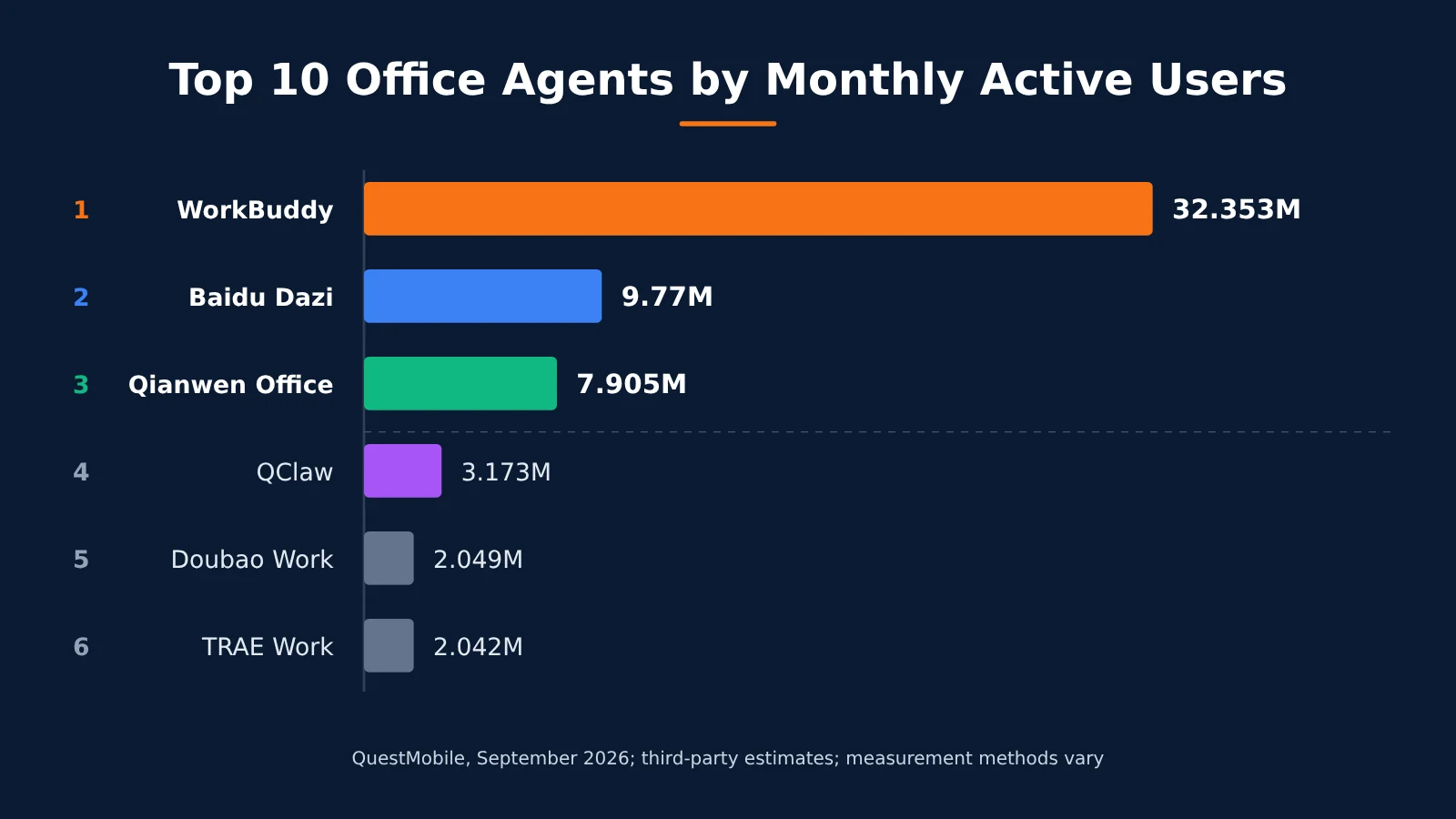
Top 10 Office Agents by Monthly Active Users: Check the Metrics Before the Rankings
Use this table as a starting point for evaluating your options. Monthly active user figures come from QuestMobile’s September 2026 data. Prices are based on official websites as of 2026-11-03 and exclude promotional offers.
| Rank | Product | Vendor | September MAU | Platforms | Ecosystem ties | Starting price for individuals | Can you switch models? |
|---|---|---|---|---|---|---|---|
| 1 | WorkBuddy | Tencent | 32.353 million | App + web + PC | WeCom, Tencent Docs | RMB 99/month | Yes |
| 2 | Baidu Dazi | Baidu | 9.77 million | App + web + PC | No proprietary collaboration entry point; accessible through multiple channels | RMB 59/month | Yes (enterprise customization) |
| 3 | Qwen Office | Alibaba | 7.905 million | PC + web + DingTalk | DingTalk; also connects to WeCom and Feishu | RMB 98/month | No publicly available option found |
| 4 | QClaw (shutting down) | Tencent | 3.173 million | Desktop + remote access via WeChat | Tencent | No longer sold | Not recommended for new users |
| 5 | Doubao Work | ByteDance | 2.049 million (PC only) | PC + Doubao App and Feishu | Feishu | RMB 68/month | No publicly available option found |
| 6 | TRAE Work (now part of TRAE) | ByteDance | 2.042 million (PC only) | Integrated Agent + IDE | No strong ecosystem ties | $20/month | Yes |
| 7 | QoderWork | Alibaba | Undisclosed, declining | Desktop + remote access via IM | No strong ecosystem ties; connects to DingTalk and Feishu | $10/month | BYOK in trial version |
| 8 | AutoClaw | Zhipu AI | Undisclosed, declining | Desktop + remote access via IM | No strong ecosystem ties | 200 million tokens on sign-up | Yes |
| 9 | QwenPaw | Alibaba | Undisclosed, declining | Local or cloud deployment | No ecosystem ties | Open source; model costs paid separately | Yes |
| 10 | LobsterAI | NetEase Youdao | 75,000 | Desktop + remote access via IM | No ecosystem ties | Open source; membership sold separately | Yes |
Three Statistical Traps in Office Agent Monthly Active User Rankings
First, the measurement methods differ. WorkBuddy, Baidu Dazi, and Qwen Office count users across platforms, while Doubao Work and TRAE Work count only PC client users. So you can’t say Doubao Work has just 6% of WorkBuddy’s users—the two figures aren’t directly comparable. Qwen Office also deserves a closer look: although it counts users across platforms, it doesn’t have a standalone mobile app. The product is primarily available through its PC website and desktop client.
Second, monthly active users aren’t a buying recommendation. QClaw ranks fourth and grew 57.9% quarter over quarter, but it has announced that it will shut down on 2026-12-24. TRAE Work was also merged into the new TRAE on October 9, so the name on the list has already changed.
Third, look at growth rates and starting bases separately. WorkBuddy grew 647.1% quarter over quarter, Baidu Dazi grew 1567.5%, and LobsterAI grew 79.5%. Baidu Dazi had the highest growth rate, but LobsterAI’s starting base was just 75,000 users. You can’t assess their growth on the same terms.
Two other figures are easy to confuse. The disclosed monthly active user counts on the list add up to roughly 57 million, while the category total is 142 million. That suggests many AI capabilities are embedded in office software, IM apps, and operating systems and aren’t listed separately. Baidu Dazi’s claim that its “user base grew ninefold compared with the previous period as of October 26” comes from the vendor; don’t conflate it with QuestMobile’s 1567.5% figure.
WorkBuddy does have 3.3 times as many monthly active users as the runner-up. That’s a lead, but it only tells you more people use it. Monthly active users can’t tell you whether it can read your documents, create the tables you need, or connect to your approval workflow. Task completion, retention, and paid conversion rates haven’t been made public either.
Key Differences Between Office Agents: Platforms, Ecosystems, Models, and Pricing
Office Agent Platforms: Choose Where Your Work Happens
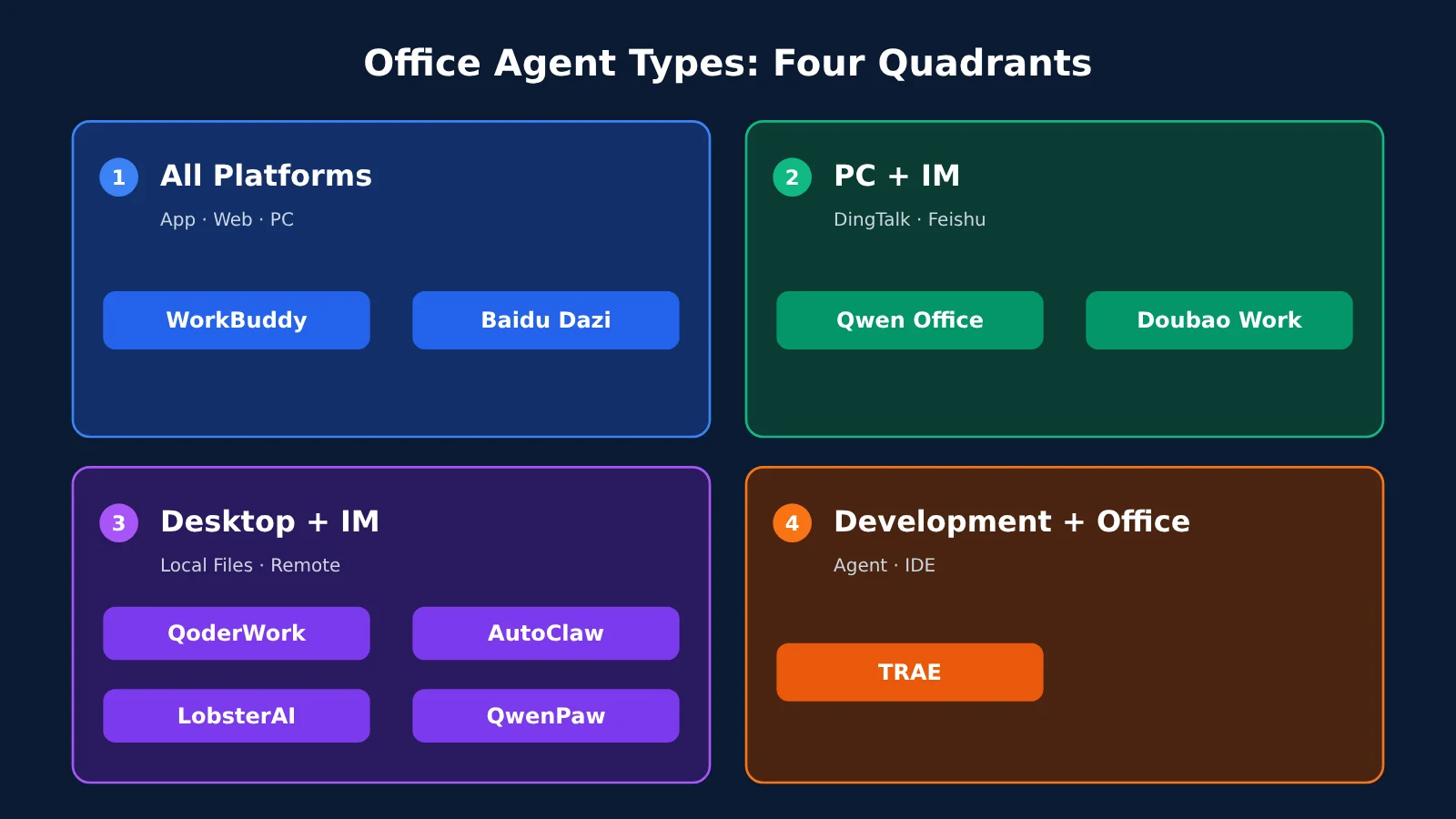
The takeaway: More platforms aren’t always better. Choose based on where you do your work. The top 10 products roughly fall into four categories:
- App + web + PC: WorkBuddy and Baidu Dazi suit people who need to switch between devices.
- PC + web + IM access: Qianwen Office works through DingTalk, while Doubao Work uses Lark and the Doubao app. These are a good fit when your team’s documents are already concentrated in collaboration software.
- Desktop + remote IM access: QoderWork, AutoClaw, LobsterAI, and QClaw, which is being discontinued. QwenPaw can also be deployed locally and connected to conversations across multiple channels. These suit people whose files are on a local computer but who are often away from it.
- Development + office work in one: TRAE offers both Agent and IDE modes through a single entry point, making it a good fit for people who write both code and documents.
For example, if you organize local contracts and reports every week, a desktop client’s ability to read and write files matters more than a mobile app. If you’re often out meeting clients, the essential feature might be sending an IM message to get your computer at home to do the work.
Changes on PC are also worth watching. QuestMobile says AI office services are shifting from the web (46.3%) toward desktop clients (12.8%). AI applications’ PC clients have 26 million monthly active users, up 82.3% year over year. The report summary doesn’t specify the denominator for those percentages, so treat them as a sign of the trend, not as market share figures.
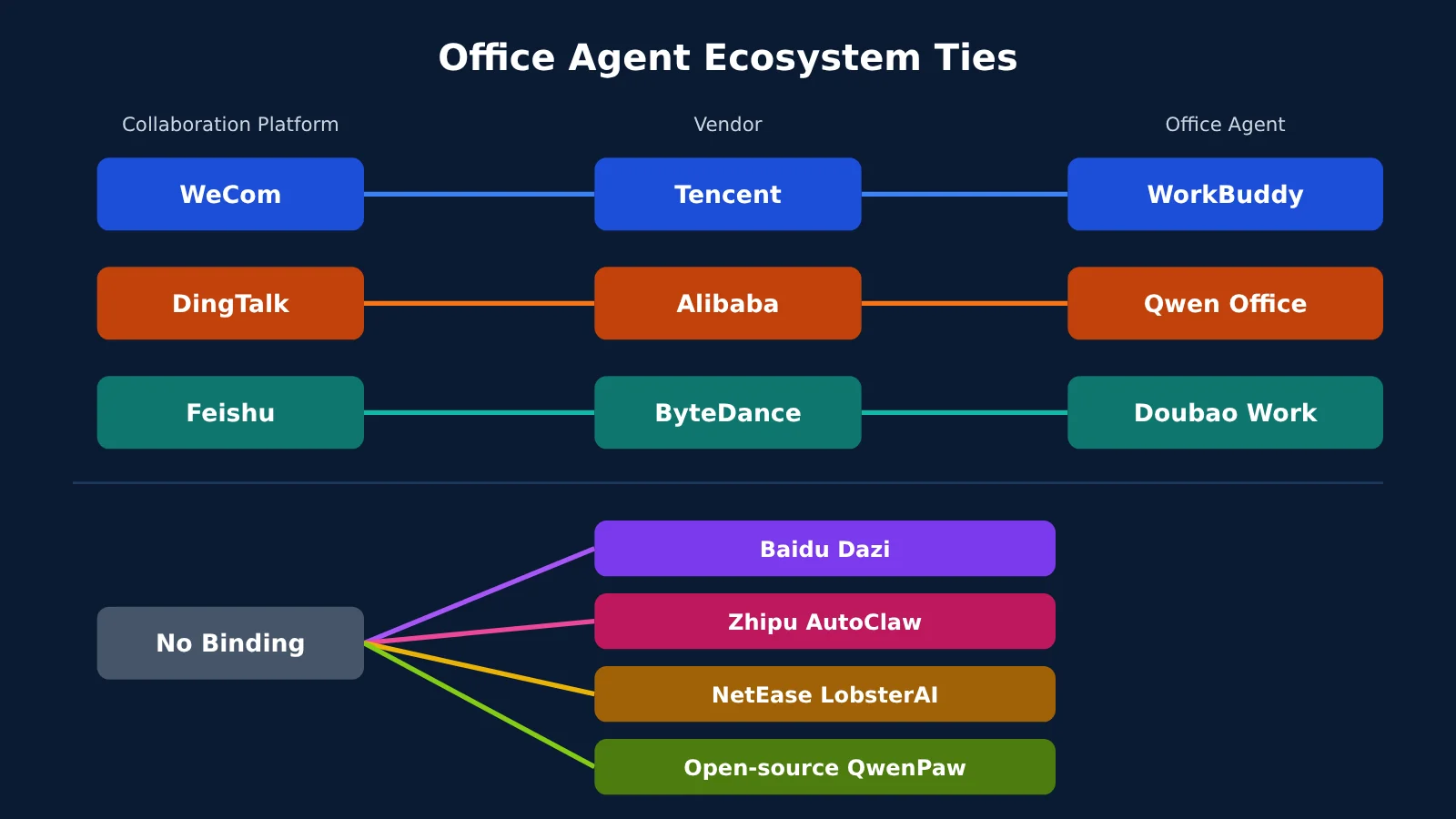
Office Agent Ecosystems: What They Can Read and Where Their Output Goes
The bottom line: the ecosystem determines what context an Agent can access and how its output gets back to your team. It’s worth evaluating before the model itself.
- WeCom ecosystem (Tencent): WorkBuddy can connect to WeCom messages, email, documents, calendars, meetings, and to-dos, as well as Tencent Docs, Lexiang, and cloud storage. Starting October 14, employees can assign tasks through the WeCom directory just as they would to a colleague.
- DingTalk ecosystem (Alibaba): Qianwen Office can be launched directly in DingTalk, and results from scheduled cloud tasks can be pushed to DingTalk. It also offers 25 enterprise IM capabilities.
- Feishu ecosystem (ByteDance): Doubao Work reads enterprise knowledge in Feishu according to the requester’s permissions, and its output goes back to Feishu. That’s useful for teams with finely defined access controls.
- No single-platform binding: Baidu Dazi connects through channels including Feishu, WeChat, Ruliu, DingTalk, and WeCom, and links to specialized agents such as Miaoda and Famou. QoderWork, AutoClaw, LobsterAI, and QwenPaw aren’t tied to a single collaboration platform either; they rely on connectors or local files for enterprise knowledge.
One distinction is easy to miss: being able to connect doesn’t mean full integration. After connecting to WeCom on August 18, Qianwen Office covered all three major collaboration platforms; WorkBuddy’s enterprise Agent also supports Feishu and DingTalk channels. But sending and receiving IM messages is different from reading your enterprise knowledge according to permissions. Test those capabilities separately.
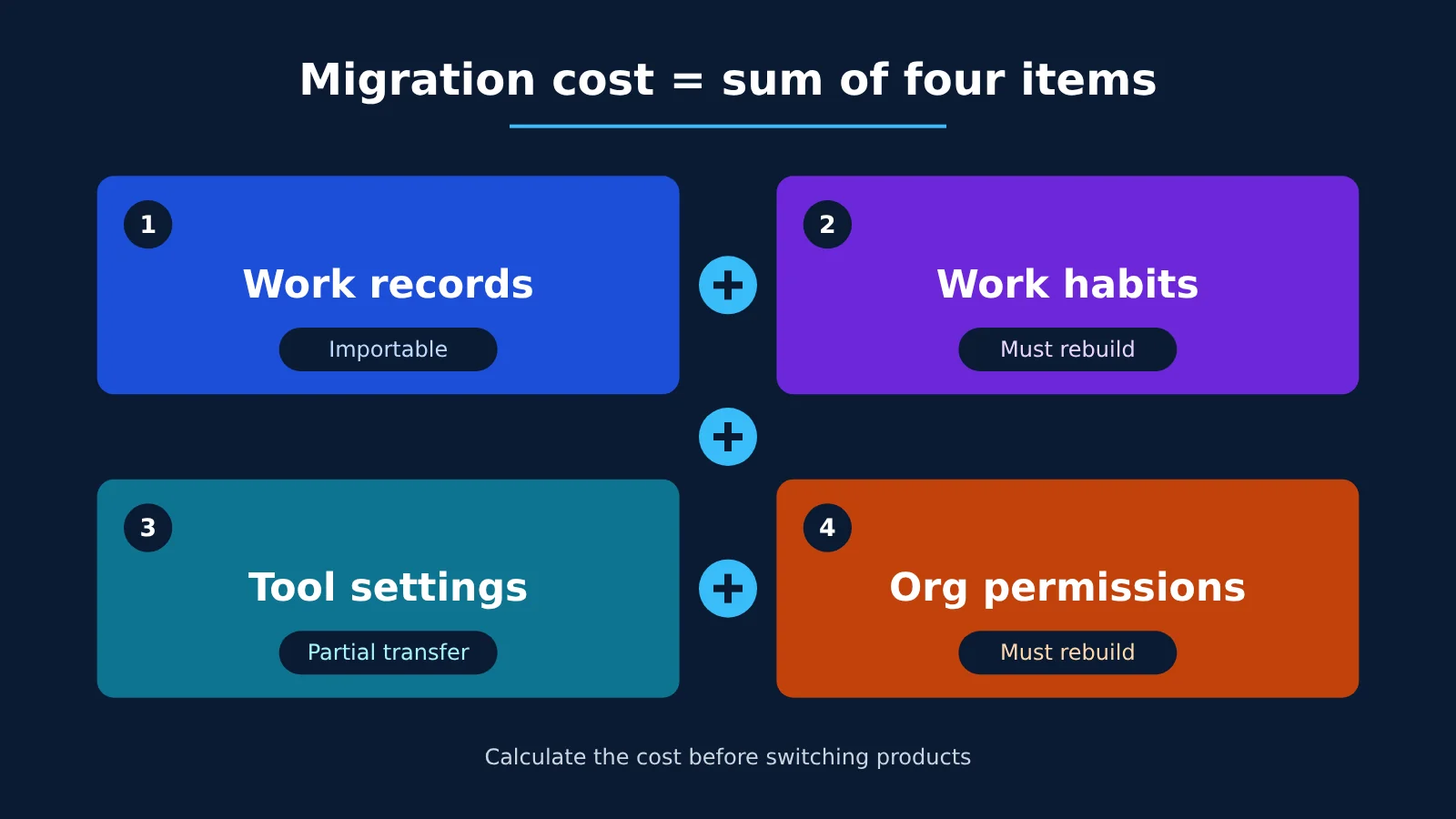
It’s also worth calculating the cost of switching products upfront. In short: migration cost = work records + usage habits + tool configurations + organizational permissions. Qianwen Office supports importing local historical data from WorkBuddy, while Doubao Work can import conversations, skills, and work memories from other AI tools. But usage habits and organizational permissions still need to be rebuilt.
Office Agent Model Differences: Switching Models Is Useful, but It’s Not the First Decision
Bottom line: The model isn’t the decisive barrier to entry. Zhang Yi, chief analyst at iiMedia Research, believes the stronger barriers are more likely to come from workflow integration, accumulated organizational context, and the quality of delivery in specific industries. Think of it this way: the model is the engine, and the ecosystem is the road network. Even the best engine can’t get you to the office if the roads don’t connect.
Being able to switch the underlying model still has value—for example, when you want to choose models by task, control costs, or give your team a single entry point for model invocations. Based on currently available public information, here’s how model switching works across the top 10 products:
| Category | Product | Can You Switch Models? | What to Know |
|---|---|---|---|
| Built-in + customizable | WorkBuddy | Yes | 13 built-in models; also supports third-party models and Ollama. Keys are stored locally. |
| Built-in + customizable | Baidu Dazi | Yes, mainly for enterprise users | Uses the OpenAI Chat Completions format; administrators can control permissions and visibility. |
| Built-in + customizable | AutoClaw | Yes | Includes GLM models; also supports Coding Plan and custom models. |
| Built-in + customizable | TRAE | Yes | Supports OpenAI and Anthropic protocols, but not Responses. |
| Shared credits + BYOK | QoderWork | Partially | The trial version supports your own API key; other usage is billed in Qoder Credits. |
| Built-in, single model family | Qianwen Office | No public option found | Uses Qianwen models. |
| Built-in, single model family | Doubao Work | No public option found | Seed 2.1, Seedream 5.0 Pro, Seedance 2.5 |
| Open source, self-configured | LobsterAI, QwenPaw | Yes | You configure the models yourself and are also responsible for costs and maintenance. |
If you want to switch models yourself, you can use a single API key from APIYI at apiyi.com to access models from multiple providers, without maintaining separate accounts in every tool. Here’s how:
- WorkBuddy: Open Settings → Models → Add Model, select “Custom” as the provider, and use the OpenAI-compatible protocol. The base URL is
https://api.apiyi.com/v1; check the integration documentation for the exact configuration. The settings and API key are stored only on your local machine inworkbuddy/models.json. Custom model usage is billed through APIYI and doesn’t use WorkBuddy credits. - TRAE: The Base URL must include the full path, such as
https://api.apiyi.com/v1/chat/completions. Entering only the domain will cause an error. It doesn’t support the Responses protocol, so keep that in mind when choosing a protocol. - QoderWork: The trial version supports BYOK. Before connecting, confirm whether your current version accepts a third-party compatible URL. Check its billing documentation for credit and quota details.
Office Agent Pricing: Don’t Compare Credits at Face Value
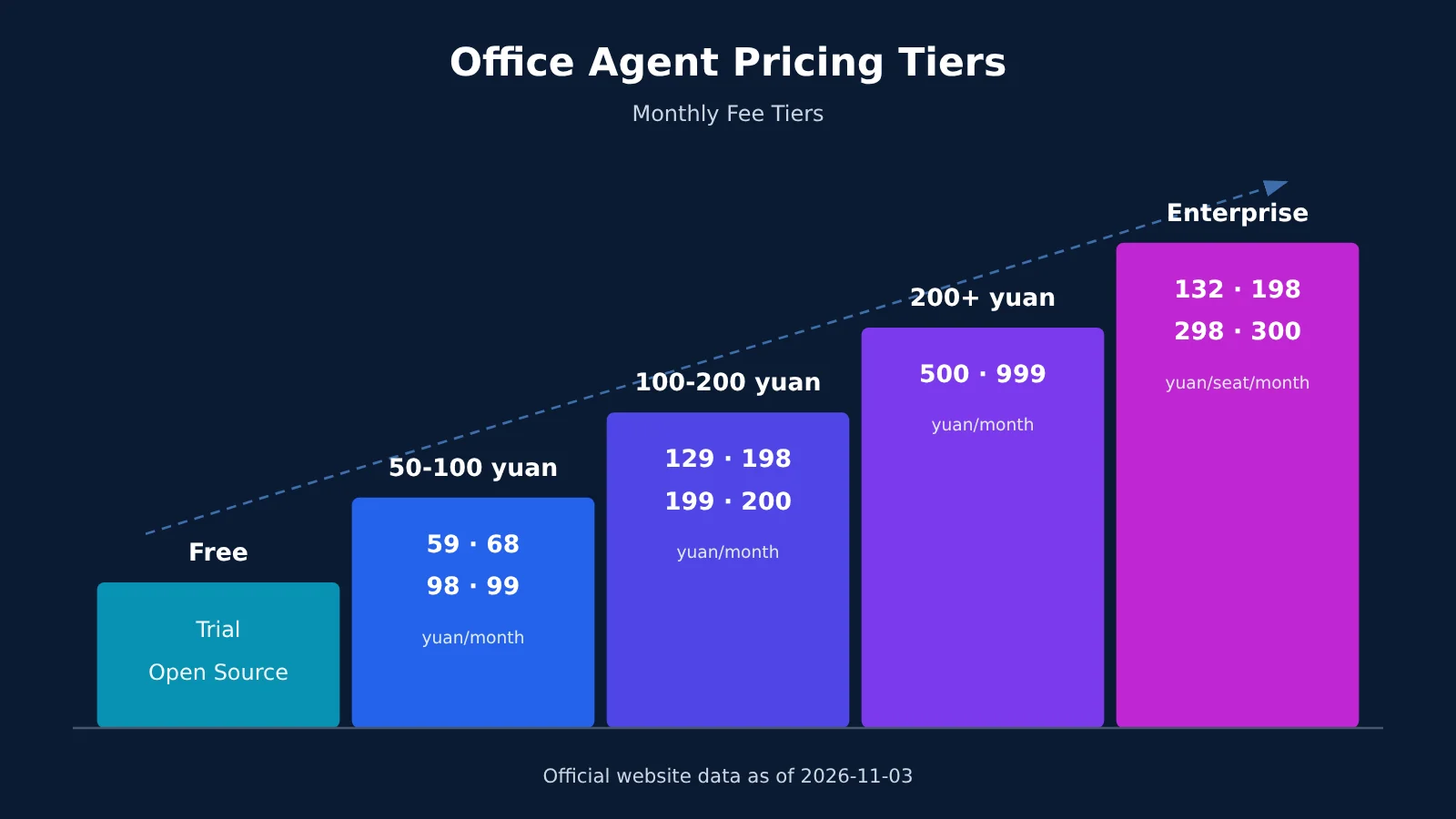
Bottom line: Look at how many credits your tasks consume before comparing monthly fees. All figures below are based on official website information as of 2026-11-03. Check the purchase page for first-month and limited-time prices.
| Tier | Options | What you get |
|---|---|---|
| Free | WorkBuddy Trial (500 credits), Baidu Dazi Trial, Qianwen Office Free (2,000 credits on signup, valid for 90 days; 100 credits daily), Doubao Work Free, TRAE Free, Qoder Trial, AutoClaw (200 million tokens on signup), open-source LobsterAI and QwenPaw | Enough to test a round of real-world tasks |
| 50–100 yuan | Baidu Dazi Pro 59 (9.9 for the first month, 25,000 credits), Doubao Work Standard 68, Qianwen Office Standard 98, WorkBuddy Standard 99 | Light to moderate daily use by individuals |
| 100–200 yuan | Baidu Dazi Max 129 (69 for the first month, 100,000 credits), Qianwen Office Advanced 198, WorkBuddy Advanced 199, Doubao Work Enhanced 200 | Frequent use by individuals |
| Above 200 yuan | Doubao Work Advanced 500, WorkBuddy Flagship 999 | Heavy individual use; check your usage before buying |
| Priced in USD | Qoder Lite $10, Qoder Pro $20, TRAE Pro $20 | Mixed development and office work |
| Enterprise | Baidu Dazi 132 (30% off for a limited time, originally 189), WorkBuddy 198, Qianwen Office 198/298 (50-seat minimum for the 298 tier), Doubao Teams 1,988 yuan/seat/year, QoderWork Teams 300 | Seat management, organization permissions, and team quotas |
Two examples make the point. Qianwen Office credit packs cost 0.05 yuan per credit, while Baidu Dazi’s add-on pack costs 10 yuan for 5,000 credits, or 0.002 yuan per credit—a 25-fold difference in face value. But the two services have different credit consumption rules, so you can’t conclude that Baidu is 25 times cheaper.
There are differences within the same product, too. In the WorkBuddy mini program documentation, the multiplier for DeepSeek-V4-Flash is x0.06, while Kimi-K3 is x1.62—a 27-fold difference. The only reliable comparison is to run the same task and record the consumption.
Auto-renewing monthly plans can also cost less: WorkBuddy Standard is 70 yuan per month, and Qianwen Office Standard is 78 yuan per month. Qianwen Office also has a Singles’ Day promotion starting at 29.9 yuan, subject to purchase limits and new-customer conditions. Check the promotion page for details.
Office Agent Recommendations: Pick One Based on Where You Work Every Day
| Scenario | First choice | Alternative | Avoid |
|---|---|---|---|
| WeCom-based work | WorkBuddy | Qwen Office | Doubao Work as your primary tool |
| DingTalk-based work | Qwen Office | QoderWork | Doubao Work as your primary tool |
| Lark teams | Doubao Work | WorkBuddy Enterprise | Self-hosting QwenPaw without an operations team |
| Individuals with no existing ecosystem commitments | Baidu Dazi | WorkBuddy | Buying a plan over RMB 500 right away |
| A mix of development and office work | TRAE | QoderWork | Using a product without an IDE mode as your primary tool |
| Need private deployment or auditability | WorkBuddy private deployment (contact for pricing) or LobsterAI | QwenPaw | Solutions whose data flows you haven’t verified |
| Migrating from QClaw | WorkBuddy | LobsterAI, Baidu Dazi | Staying on QClaw |
WeCom-based work. Choose WorkBuddy: messages, documents, calendars, and meetings are all in the Tencent ecosystem, and you can use it directly from the sidebar in WeCom 5.0.12 or later. When not to choose it: if most of your documents are in Lark, picking WorkBuddy just because it has the most monthly active users adds an extra step to accessing your context.
DingTalk-based work. Choose Qwen Office: you can launch it directly in DingTalk, and scheduled task results can be sent back there too. When not to choose it: if you need a standalone mobile app, or your team has fewer than 50 seats but wants the RMB 298 flagship plan—that tier has a minimum purchase requirement.
Lark teams. Choose Doubao Work: it reads Lark knowledge according to the permissions of the person asking and sends results back to Lark. For example, a weekly report can stay right in the team space. When not to choose it: if you specifically want to switch models freely within the tool, current public information focuses on the Seed series, and there’s no apparent option for custom models.
Individuals with no existing ecosystem commitments. Choose Baidu Dazi: the entry-level plan starts at a relatively low RMB 59, and it connects to multiple channels, including WeChat, Lark, and DingTalk. When not to choose it: if your everyday materials are already concentrated in Tencent Docs or DingTalk, a product from the corresponding ecosystem will be more convenient.
A mix of development and office work. Choose TRAE: you can switch between Agent mode and IDE mode from the same interface. Debug APIs in the morning and write a proposal in the afternoon without changing tools. When not to choose it: if you don’t write code at all and only work on PPTs and documents, you won’t need its IDE capabilities.
Need private deployment or auditability. Larger teams can inquire about WorkBuddy private deployment; the dedicated edition has a 100-seat minimum. Smaller teams can look at LobsterAI: its data stays local, and tool calls have gated approval records. When not to choose an open-source option: if no one on your team can maintain it, you’ll have to handle model costs, upgrades, and troubleshooting yourself. Also note that while QoderWork performs file operations locally, text content is still sent to the model API. Running locally doesn’t mean data never leaves the device.
Migrating from QClaw. Choose WorkBuddy: it’s the official migration path. Migrating users receive 1,000 credits, refunds are available for purchased but unused services, and data export is available until 2027-03-24 at the latest. When not to choose it: if you rely heavily on controlling the agent remotely through WeChat, check before migrating—WorkBuddy’s publicly listed remote channels are WeCom, QQ, Lark, and DingTalk. Both LobsterAI and Baidu Dazi list WeChat as a channel, making them alternatives. Whichever you choose, make sure you’ve handled the transition before December 24 at 00:00.
Office Agent Recommendations: A Three-Step Selection Process and Five-Dimension Scorecard
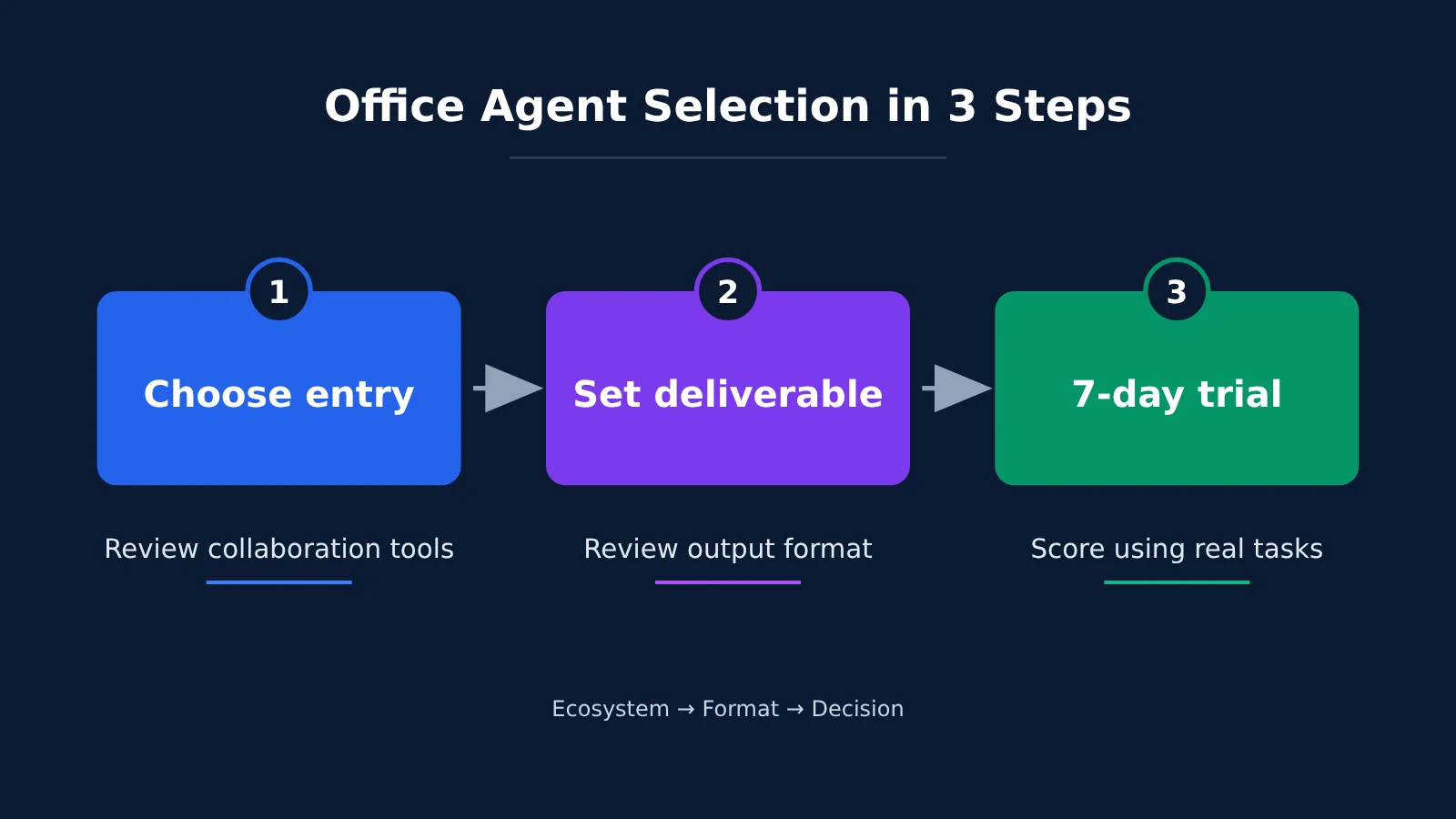
How to Choose an Office Agent in Three Steps
- Choose your entry point: Track the collaboration tools you and your team open most often over a week. This will largely determine which ecosystem to choose.
- Define your deliverables: List the three types of output you deliver most often each week, such as documents, spreadsheets, and PowerPoint presentations. Then decide whether they need to live locally or in a shared team workspace. This determines the format you need.
- Run a 7-day trial: Pick 2–3 products and test them on real tasks for a week. Skip the demo exercises.
Here’s one way to structure the seven days: Set up accounts and permissions on day 1; run the same set of tasks through each product on days 2–4, recording credit usage and the number of revisions needed; ask 2–3 colleagues to use them on days 5–6; and score the options and make a decision on day 7.
Five-Dimension Scorecard and Example
Suppose a 10-person team primarily uses Feishu and produces 20 documents a week. The table below shows example scores based on public information, not hands-on test results. Replace the deliverables score with your own trial results.
| Dimension | 1 point | 5 points | Doubao Work | WorkBuddy | Qwen Office |
|---|---|---|---|---|---|
| Entry point | Requires switching to another tool | Built into the team’s main tool | 5 | 3 | 3 |
| Deliverables | Requires extensive rework | Basically ready to use | 4 | 4 | 4 |
| Model | Cannot be changed | Freely configurable | 2 | 5 | 2 |
| Data | Permissions and data flows are unclear | Permissions are clear and controllable | 4 | 3 | 3 |
| Price | Clearly over budget | Usage costs are manageable | 4 | 3 | 3 |
| Total | – | – | 19 | 18 | 15 |
For the price dimension, here’s the math for this team: a 10-seat Doubao Team subscription costs 19,880 yuan/year, WorkBuddy Enterprise Flagship costs 23,760 yuan/year, and Qwen Office Standard also costs 23,760 yuan/year at the monthly rate. Qwen Office’s 298-yuan Flagship plan requires a minimum purchase of 50 seats, so it isn’t a practical option for a 10-person team.
You can also estimate usage in advance. Doubao Team provides 2,000 credits per seat per month, or 20,000 credits for 10 seats. At roughly 80 documents a month, each document must use no more than 250 credits if the entire allowance goes toward writing documents. Pay close attention to that number during the trial; if you exceed it, budget for additional credits.
In this example, the team would try Doubao Work first and keep WorkBuddy as a backup. If choosing your own model matters a lot to your team, you could give the model dimension more weight, which might reverse the result. The point of the scorecard isn’t the scores themselves—it’s to help the team make its trade-offs explicit.
💡 Tip for switching models: If you choose WorkBuddy or TRAE and want to compare different models, register with APIYI at apiyi.com to claim a trial credit allowance, then run the same set of tasks using the same API key. Recording the model, time taken, and number of revisions during your trial is far more useful than relying on rankings.
Office Agent FAQ
Q1: What is an office Agent, and how is it different from a general-purpose AI assistant?
A general-purpose assistant mainly answers questions. An office Agent takes on tasks, plans its approach, uses tools, and delivers documents, spreadsheets, or presentations. QuestMobile also sees AI applications shifting from “Q&A tools” to entities that carry out tasks.
Q2: WorkBuddy has 3.3 times as many monthly active users as the runner-up. Should I choose it?
Not on that basis alone. The figure tells you it has a large user base, but not whether it works with your collaboration tools or produces the deliverables you need. If you work in WeCom, it’s worth trying first. If you use Feishu or DingTalk, it makes more sense to start with a product in that ecosystem.
Q3: The ranking only covers the Chinese market. Is it useful to readers elsewhere?
The ranking data only reflects the Chinese market, but you can still use the same approach: consider where you’ll access the product, what it delivers, and how it performs in a trial. If you’re outside mainland China, check regional availability, account requirements, and billing currency first.
Q4: Are QoderWork and Qianwen Office the same product?
No. 36Kr reports that Qianwen Office was formed by integrating Qoder Work, MuleRun, and Wukong. However, QuestMobile’s September ranking still lists QoderWork separately, and it has its own documentation and pricing. The boundaries between the brands are still evolving, so check the current product offerings on the official website before buying.
Q5: How can I connect a model of my choice to an office Agent?
First, check that the product supports custom models. Then prepare the API endpoint, API key, and model name. With WorkBuddy, for example, you can register at APIYI apiyi.com to get a key, then select “Custom” in the model settings to finish setup. When configuring it for the first time, start with a simple task to verify that it works.
Q6: How are custom models billed?
It depends on the product. WorkBuddy’s integration documentation says custom model charges are billed directly by APIYI and don’t consume WorkBuddy credits. For TRAE, QoderWork, and others, check their respective billing policies. For model prices, refer to the model pages in the APIYI apiyi.com documentation on the day of use.
Q7: What are the current limitations of office Agents?
The biggest uncertainties are data security and execution reliability. Even if an Agent can complete a task, a company may not be willing to entrust it with core business operations. Treat vendor-reported figures with caution, too: WorkBuddy’s cumulative 9 billion task requests and Qianwen Office’s 55 million enterprise users are vendor claims, not independently audited findings.
Key Takeaways for Choosing an Office Agent
- Selection order: Choose the collaboration platform first, the deliverables second, and check monthly active users last.
- Ranking methodology: The top three combine usage across devices; ranks 5 and 6 count PC usage only.
- Limits of monthly active users: QClaw ranks fourth, but it will shut down on December 24.
- Ecosystem fit: Connecting to an instant messaging platform doesn’t mean an agent can understand your organization’s knowledge.
- Model choice: Being able to switch the underlying model is valuable, but ecosystem fit comes first.
- Price comparison: Compare the cost of completing the same task, not the face value of credits.
- Migration costs: Account for work history, operating habits, tool configurations, and organizational permissions.
How to Choose an Office Agent: Summary
The takeaway: Start with where you work every day, then choose an agent that can deliver the results you need. Treat monthly active user rankings as a reference only.
Here are three things you can do next:
- Today: Write down your team’s most-used collaboration tools and the three types of deliverables you produce most often each week. Shortlist 2–3 candidates.
- This week: Run a seven-day trial using real tasks, fill out a five-dimension scorecard, and record the cost of each task.
- Before December 24: If you’re still using QClaw, export and migrate your data, and check whether you can maintain your existing remote work habits.
If you find the built-in models aren’t enough during the trial, you can use APIYI at apiyi.com to connect other models and compare them. Get the collaboration platform and deliverables right first—you can always switch the underlying model later.
📚 References
- QuestMobile Q3 2026 AI Application Market Development Report: Overall market data and the top three office Agent products
- Link:
questmobile.com.cn/research/report/2112396781593624578 -
Note: Third-party estimates; refer to the report for its monthly active user methodology
-
AIX财经, “3 Giants, 19 Apps: Competing for the First Ticket to the AI Era”: Monthly active user rankings and methodology
- Link:
36kr.com/p/4035697724266375 -
Note: Used to verify rankings 4–10 and differences in cross-platform and PC statistics
-
36氪, “AI Office Tools Go Head-to-Head: After the Battle for Entry Points, Renewals Will Be the Real Test”: Industry consolidation timeline
- Link:
36kr.com/p/4052064472585348 -
Note: Includes vendor-reported data from Baidu Dazi and others; cite the source when using it
-
QClaw official website: Shutdown announcement and migration instructions
- Link:
qclaw.qq.com -
Note: Existing users should check the deadlines for migration, refunds, and data export
-
Product pricing pages: Prices as of 2026-11-03
- Links:
workbuddy.cn/pricing,dumate.cn,qwenwork.cn/pricing,trae.ai/pricing,docs.qoder.com/zh/account/pricing -
Note: Check the purchase page for current promotions and limited-time prices
-
APIYI WorkBuddy integration guide: Custom model configuration
- Link:
docs.apiyi.com/scenarios/chat/workbuddy -
Note: Covers where to configure the model, local storage, and billing
-
APIYI TRAE integration guide: Custom model configuration
- Link:
docs.apiyi.com/scenarios/programming/trae - Note: Covers supported protocols and Base URL requirements
Author: APIYI Technical Team
Technical support: For model integration details, visit the docs.apiyi.com documentation center