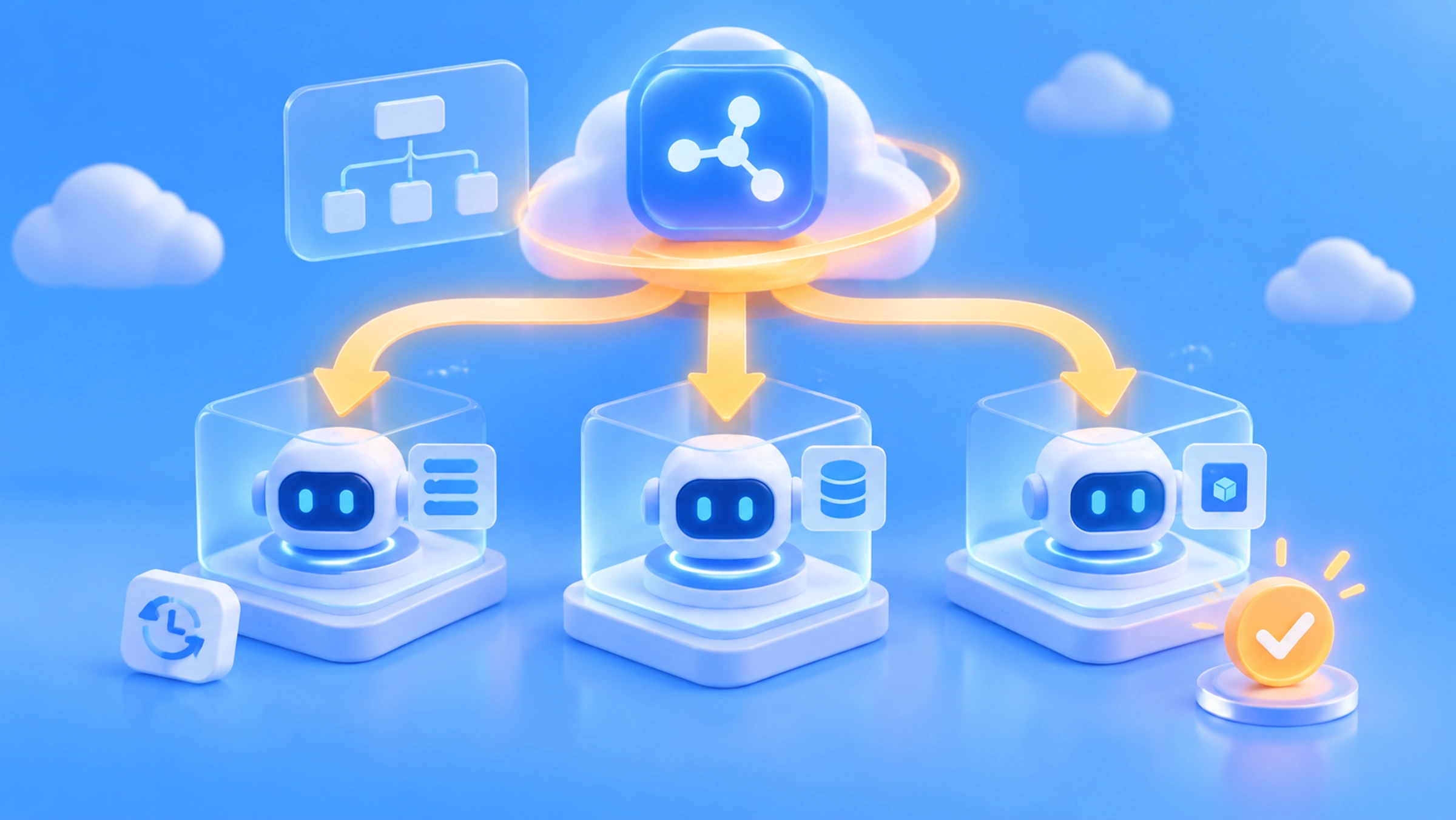
Author’s note: This article explores DeepSeek Super-agent’s two-layer Router + Worker architecture, how it separates global coordination from independent execution, and when developers might want to use a similar design in their own Agent systems.
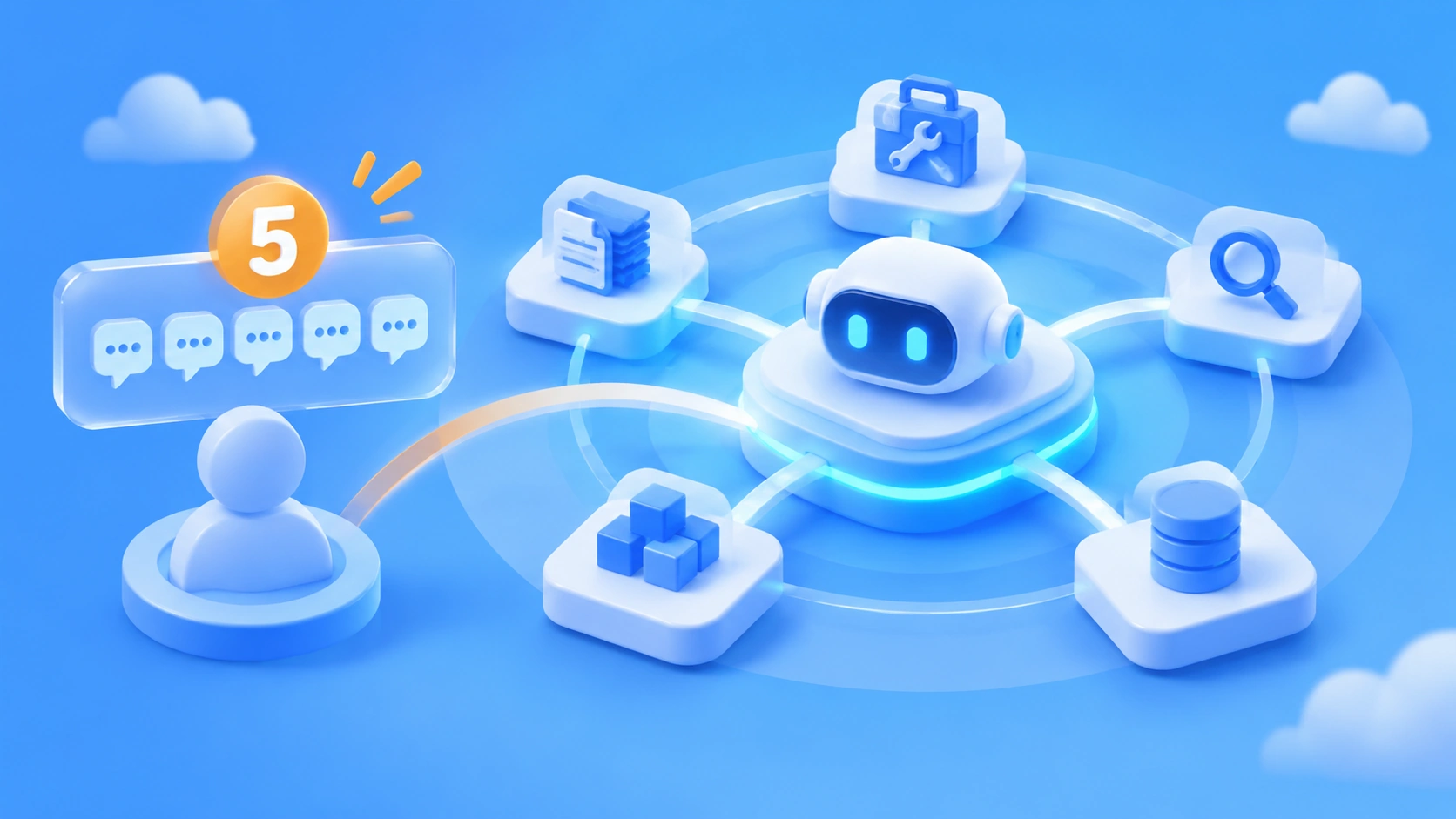
If you have four or five Coding Agent windows open at once, you’ll run into a practical problem. One window is fixing a login bug, another is reviewing a database migration, and a third is waiting for CI results. You have to remember what each window is doing, which ones are waiting for your response, and which tasks are related. Models are getting better at working independently, but the burden of managing these sessions still falls on you.
On October 31, 2026, the DeepSeek Harness team published the technical article “Exploring Super-agent Design: Toward More Autonomous Agent Systems” and open-sourced the research prototype dsh-superagent-prototype under the MIT license. Its central design is a two-layer Router + Worker architecture: an always-on Router handles global coordination, while multiple isolated Workers carry out individual tasks.
This isn’t a gimmick to make one AI do more things at once. Super-agent uses system architecture to separate global coordination from independent execution, reducing the burden of managing multiple sessions. Following a “problem, mechanism, evidence, engineering value” structure, this article breaks down the design rationale, key mechanisms, official experimental results, and implications for API calls and cost management.
Key takeaway: By the end of this article, you’ll understand the problem the Router + Worker architecture solves and be able to judge when a similar design is worthwhile for your own Agent system.
Router + Worker at a Glance
Before diving into the architecture, let’s establish the basics of this release. One important distinction: DeepSeek has open-sourced a research prototype, not a commercial product or a new foundation model.
| Item | Details |
|---|---|
| Release date | October 31, 2026 (technical article and GitHub repository published on the same day) |
| Released by | DeepSeek Harness team |
| Project name | dsh-superagent-prototype, written primarily in TypeScript and licensed under MIT |
| Project status | Research prototype, not a commercial product; depends on DeepSeek Harness |
| Core architecture | Two layers: a Router for global coordination and Workers for isolated execution |
| Current support | Monitoring a single GitHub repository, optional Feishu integration, Ticket management, independent Worker sessions, and PR generation |
| Community interest | About 8,900 stars and 898 forks as of November 2 (numbers continue to change) |
DeepSeek has defined four goals for the Super-agent: Continuous (maintaining context across channels), Productive (working on multiple tasks in parallel), Proactive (responding to events within authorized boundaries), and Persistent (staying online and recovering from some failures). These are design goals, not features that the open-source prototype has necessarily implemented in full.
Why an AI Agent Shouldn’t Have Just One Session
The DeepSeek team believes the bottleneck for AI coding tools is shifting from “model capability” to “human attention.” Based on the team’s day-to-day observations, one person can usually keep track of only about 3–5 active Agent sessions effectively. That’s an estimate based on the team’s experience, not a published large-scale user study, but it reflects what many developers experience.
The Single-Session vs. Multi-Session Trade-Off
The two common approaches each have major drawbacks. Router + Worker aims to balance “global context continuity” with “parallel processing in the background.”
| Architecture | Advantages | Core problem |
|---|---|---|
| One Session for all work | Global context stays continuous naturally | Task information interferes with other tasks; long-running tool calls block new tasks; constrained by a single ReAct Loop |
| One independent Session per task | Parallel execution and isolated contexts | No global memory; people must remember how tasks relate; conversations and notifications are scattered across windows |
| Router + Worker two-layer architecture | Centralized global state + isolated execution contexts | Higher inference resource consumption; the Router may become a bottleneck |
A single Session gets “clogged”; multiple Sessions get “scattered.” The first forces one context window to hold the intermediate steps for every task. The second shifts all the coordination work onto the person. DeepSeek’s approach is to introduce a role dedicated to “remembering the big picture,” so the executors can focus on execution.
How the Router + Worker Architecture Works
Router: The Global Coordination Layer
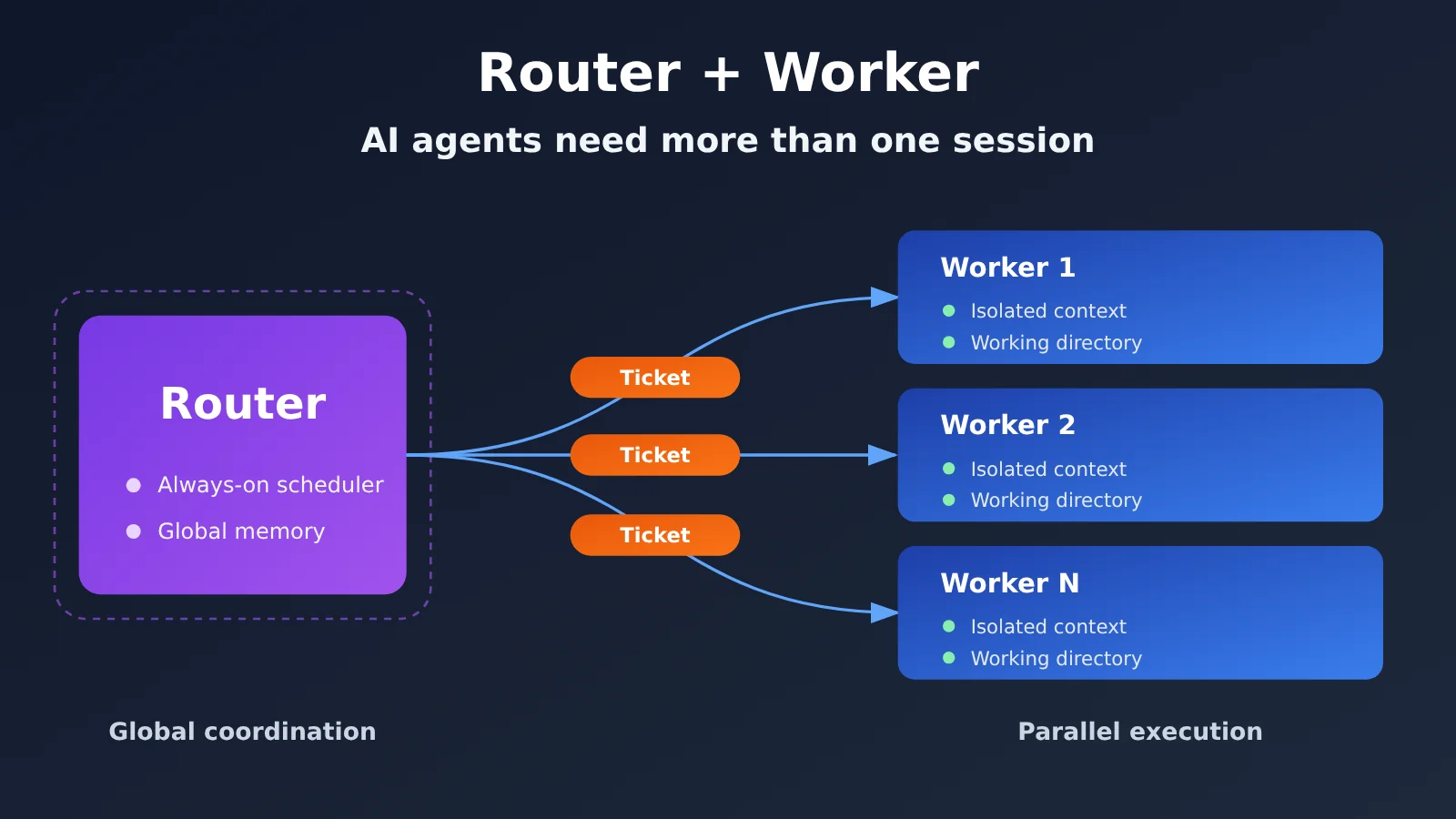
The Router is a long-running logical layer. In the current architecture exploration, it’s implemented primarily as a persistent LLM Session, though conceptually it doesn’t have to be tied to a single model session. Its job is to manage work, not do it:
- Receive user messages and external events from GitHub, IM, CI, and other sources;
- Maintain links between tasks and decide whether new work needs to be created;
- Check authorization, assign tasks to Workers, and coordinate across tasks;
- Compile information for human delivery and retrieve context from previous tasks when needed.
One important detail: the official design suggests the Router may not even need a Bash tool. Keeping it from doing complex programming itself prevents it from being blocked by long-running tool calls. Router tasks also often don’t require the strongest reasoning model—a lighter model can sometimes handle interaction and dispatch, providing a technical basis for configuring different models for different roles.
Worker: The Isolated Execution Layer
Workers handle the actual work. In the public prototype, each Ticket maps to an Executor Session and has its own working directory. Within its authorized scope, a Worker modifies code, runs tests, and handles follow-up feedback, then produces a Report. When a human decision is needed, it sets an Attention status. Results are delivered through the original channel, such as a GitHub PR.
Each Worker has its own model context, so intermediate steps from different tasks don’t get mixed into the same window. But separate Sessions and directories don’t equal strong security isolation. The official deployment documentation says Workers run commands as the operator’s operating system user by default.
How a GitHub Issue Moves Through the Router + Worker Flow
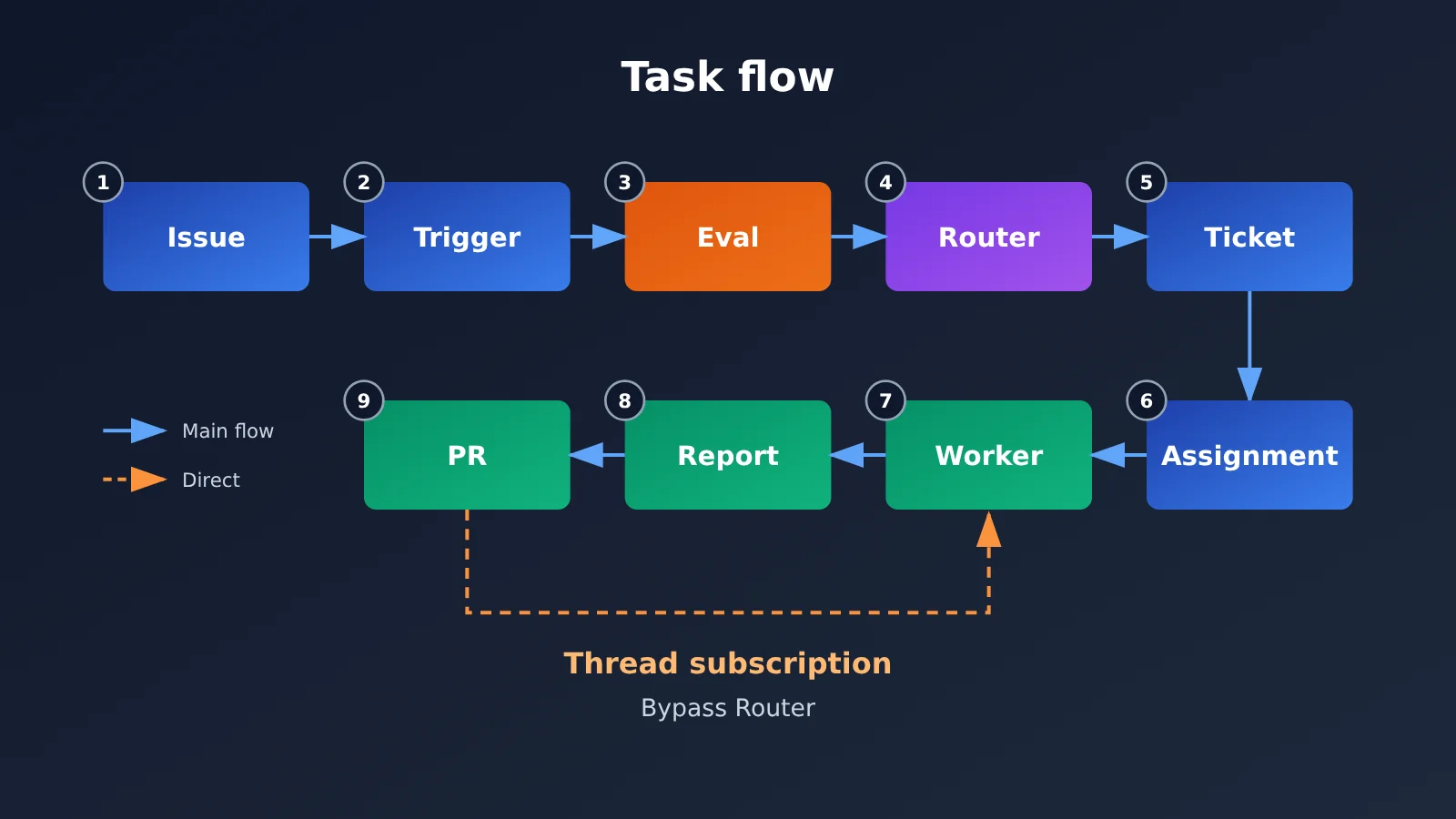
According to the open-source implementation’s Domain Model, the task flow is Source → Trigger → Eval → Decision → Ticket → Assignment → Executor → Report. Here’s what happens when an authorized user requests a bug fix in a GitHub Issue:
- The GitHub Source receives an Issue comment and generates a Trigger;
- The system first filters permissions using deterministic rules, then a model decides whether the request meets the criteria for accepting work;
- The Router accepts the task and creates a Ticket, recording its scope and authorization (Mandate);
- The system creates an Assignment for the Ticket and assigns it to the appropriate Worker;
- The Executor performs the fix in a separate directory and Session;
- The Worker reports progress or submits the result, generating a PR;
- The system delivers the result to the user through the original Issue or PR thread.
If the user later requests changes in the PR, the new message can be automatically linked to the original task. The user doesn’t have to track down which Agent session was handling it—a concrete example of how the two-layer architecture reduces the human management burden.
4 Key Design Choices in Router + Worker
The two-layer architecture is just the skeleton. A few targeted engineering decisions make it practical, each addressing a specific problem:
| Design | Engineering problem | Core mechanism |
|---|---|---|
| Direct Thread subscriptions | Routing every follow-up message through the Router overloads the central node | Workers subscribe to the Threads they own, so relevant events are delivered directly |
| Router batching | Processing events one at a time limits throughput during bursts | Triggers that arrive during inference are combined and analyzed as a batch |
| Inline & Spill | Context windows are limited, and injecting everything is expensive | Put essential recent information in the window; keep only summaries and retrieval pointers for longer content |
| Chain of Recall | Historical task information is hard to retrieve | Trace associations between Triggers, Threads, Tickets, and Workers step by step |
Direct Thread Subscriptions: Reducing Repeated Routing
Suppose Worker A is responsible for a PR. Subsequent comments and CI results for that PR can go directly to Worker A based on Thread ownership, so the Router doesn’t have to make a new decision for every related message. It’s a classic example of offloading frequent, low-value decisions from a central node.
But direct subscriptions have a clear authorization boundary. The official authorization documentation states that subscription messages can provide context, but they cannot expand the original Ticket’s Mandate. If a follow-up comment requests new work outside the authorized scope, the Worker should send it back to the system for reassessment. This is important for guarding against unauthorized instructions in external comments.
Router Batching: Handling Event Bursts
While the Router is running an inference round, newly arriving Triggers queue up and are analyzed together in the next round. This turns “one model invocation per message” into “several messages per inference round,” significantly reducing the inference overhead per decision when events come in rapid succession.
Inline & Spill and Chain of Recall: Treating Context as a Cache
DeepSeek treats the context window as a cache. Inline puts information that’s likely to be needed soon directly into the window, such as the latest comments on the current task, relevant lines of code, and necessary surrounding code. Spill keeps infrequently used or overly long content outside the window, retaining only a summary, associated IDs, and a way to retrieve it—for example, a lengthy historical discussion. Unrelated historical messages don’t need to be injected every time.
This approach extends to Chain of Recall: the model can follow object associations from Trigger → Thread → Ticket → Worker to retrieve historical information step by step, as needed. This uses less context than “stuffing in the entire history every time” and is closer to querying a database through an index. However, DeepSeek also acknowledges that memory spanning months or longer remains an unsolved problem.
Interpreting the Router + Worker Experimental Data
DeepSeek ran a preliminary set of synthetic workload experiments. Each simulated run contained about 300 messages, roughly 20 of which were work requests. The rest were chat, follow-up feedback, cancellation requests, and CI messages. Each setup was run five times. Programming work was replaced by time-consuming simulated tools, so the results measure scheduling performance, not code generation quality.
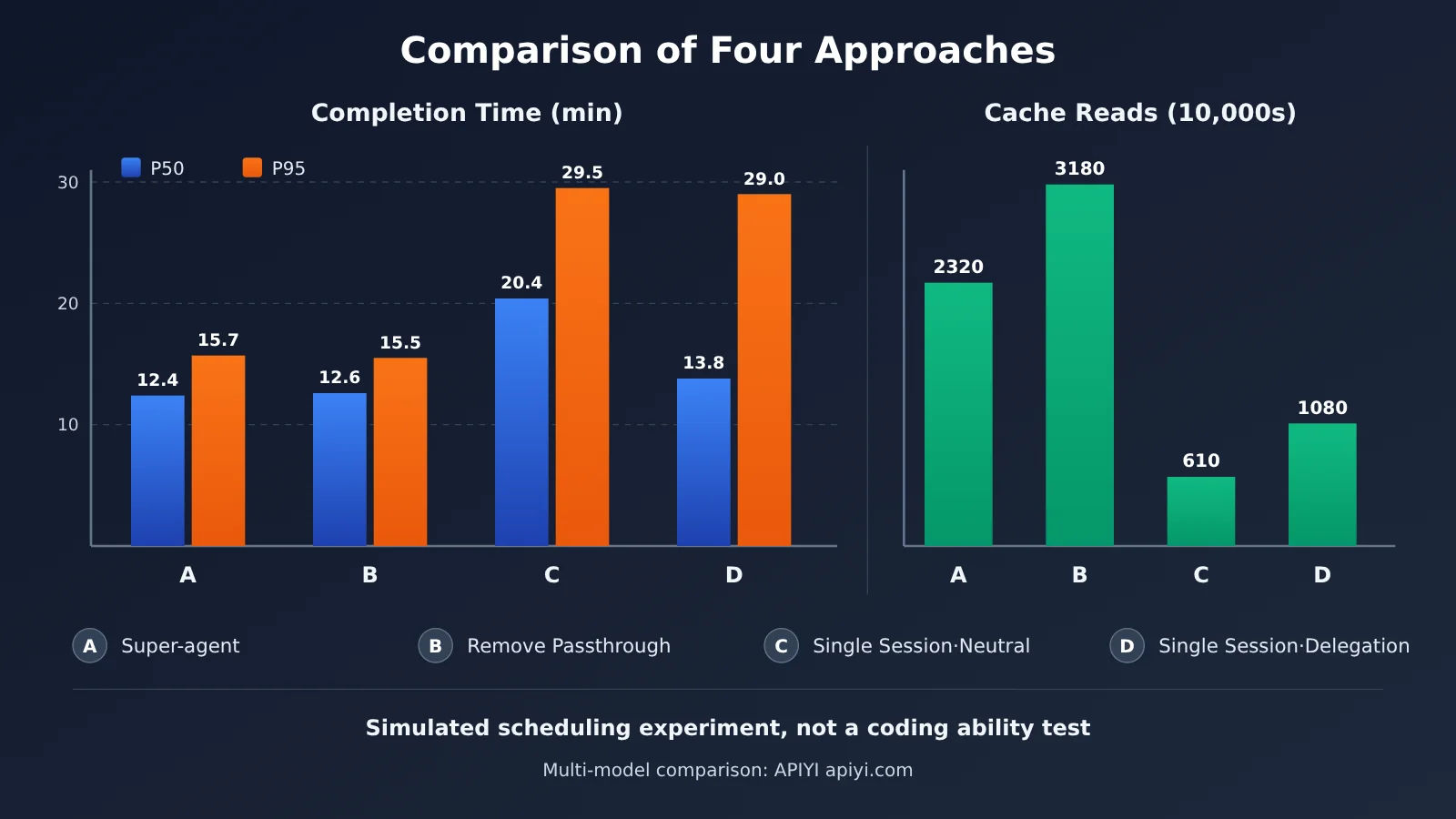
End-to-End Scheduling Comparison
| Setup | P50 Completion Time | P95 Completion Time | Cache-Read Tokens per Run |
|---|---|---|---|
| Super-agent | 12.4 minutes | 15.7 minutes | ~23.2 million |
| Super-agent without subscription passthrough | 12.6 minutes | 15.5 minutes | ~31.8 million |
| Single Session + Subagent, neutral prompt | 20.4 minutes | 29.5 minutes | ~6.1 million |
| Single Session + Subagent, delegation-first prompt | 13.8 minutes | 29.0 minutes | ~10.8 million |
Compared with the single-session setup using a neutral prompt, Super-agent reduced P50 completion time by about 39% and P95 by about 47%. Compared with the delegation-first single-session setup, its P50 advantage was modest, but its P95 was substantially lower. In other words, the biggest benefit of the two-layer architecture is preventing the slowest tasks from dragging on.
The trade-off is clear, too: Super-agent used about 3.8 times as many cache-read tokens as the neutral single-session setup. It trades more parallel sessions and inference resources for shorter, more consistent completion times. But that doesn’t mean the total cost is 3.8 times higher. Actual spending also depends on model pricing, cache hits, regular input and output tokens, the models chosen for the Router and Workers, and tool calls. DeepSeek hasn’t published the average API cost for real-world work requests.
The subscription passthrough ablation is also worth a closer look. Removing it increased the number of decisions the Router had to handle by about 30% and cache-read tokens by about 37%, while completion times stayed nearly the same. The takeaway: in this test, subscription passthrough mainly saved Router model invocations and context overhead, rather than directly improving speed.
Router Batching Stress Test
In this test, the Router used a real model, while the Workers used simulated models:
| Metric | Low Event Density | High Event Density |
|---|---|---|
| Event arrival rate | ~1 per minute | ~40 per minute |
| Average batch size | 1.0 | 2.8 |
| Time per model request | 2.5 seconds | 3.9 seconds |
| Amortized inference time per decision | 6.4 seconds | 1.6 seconds |
At higher event density, individual requests took longer, but the amortized inference time per decision fell, showing that batching improved effective throughput. DeepSeek’s conclusion is cautious: one Router is sufficient for now at the team’s current scale, but that doesn’t mean a single Router can handle an unlimited volume of messages.
What Router + Worker Means for Developers
Model Tiers: Use a Lightweight Model for the Router and Choose Worker Models by Task
The most direct engineering takeaway from a two-layer architecture is that different roles don’t have to use the same model. The Router mainly handles classification, dispatch, and summarization, making it a good fit for a fast, low-cost model. Workers can use models with stronger reasoning capabilities based on task complexity. The prototype also supports specifying separate model providers and models for the Router and Workers.
Here’s a minimal example that uses an OpenAI-compatible interface to let the Router make a dispatch decision:
import openai

client = openai.OpenAI(
    api_key="YOUR_API_KEY",
    base_url="https://api.apiyi.com/v1"  # APIYI unified interface: switch between providers with one key
)

ROUTER_MODEL = "your-fast-cheap-model"   # Replace with a lightweight model available in the console

resp = client.chat.completions.create(
    model=ROUTER_MODEL,
    messages=[{"role": "user", "content": "判断这条 Issue 评论是否需要新建 Ticket:修复登录页 500 错误"}]
)
print(resp.choices[0].message.content)
See the Router + Worker model-tiering example
import json
import openai
from typing import Dict

client = openai.OpenAI(
    api_key="YOUR_API_KEY",
    base_url="https://api.apiyi.com/v1"
)

# Role and model tiers: replace model names with models you have access to
ROLE_MODELS: Dict[str, str] = {
    "router": "your-fast-cheap-model",
    "worker_simple": "your-mid-tier-model",
    "worker_complex": "your-strong-reasoning-model",
}

usage_log = []  # Track token usage by ticket

def call(role: str, ticket_id: str, prompt: str) -> str:
    resp = client.chat.completions.create(
        model=ROLE_MODELS[role],
        messages=[{"role": "user", "content": prompt}],
    )
    u = resp.usage
    usage_log.append({
        "ticket": ticket_id, "role": role,
        "input": u.prompt_tokens, "output": u.completion_tokens,
    })
    return resp.choices[0].message.content

def router_dispatch(ticket_id: str, event: str) -> str:
    prompt = (
        "你是任务调度器,只做分类,不执行任务。"
        "输出 JSON:{\"accept\": bool, \"complexity\": \"simple\"|\"complex\"}\n"
        f"事件:{event}"
    )
    decision = json.loads(call("router", ticket_id, prompt))
    if not decision["accept"]:
        return "ignored"
    role = "worker_complex" if decision["complexity"] == "complex" else "worker_simple"
    return call(role, ticket_id, f"在授权范围内处理任务:{event}")

print(router_dispatch("T-001", "CI 失败:单元测试 test_login 超时"))
print(usage_log)
🎯 Technical tip: When building a tiered agent system, use APIYI at apiyi.com to test lightweight and strong reasoning models in Router and Worker roles with the same API key before settling on a configuration. This helps you avoid using the most expensive model for every role.
Cost Control: Track Spending by Ticket, Not Just the Total
Official experiments show that a two-layer architecture consumes more inference resources, so it calls for more granular cost management. Here are some practical approaches:
- Track tokens by Ticket: Separate Router decision-making overhead from Worker execution costs to identify which types of tasks are most expensive;
- Break down costs by type: Track model costs, tool costs (such as search and web page retrieval), and execution environment costs separately;
- Monitor cache hits: Most of a Super-agent’s token usage comes from cache reads, and the per-token price can differ substantially between cache hits and misses. DeepSeek’s official pricing, for example, shows a difference of tens of times;
- Reduce unnecessary decisions: Use a subscription-based routing approach to send follow-up events directly to the responsible Worker, eliminating repeated dispatch decisions by the Router.
💰 Cost optimization: Running multiple Workers in parallel can multiply the number of calls. With APIYI apiyi.com, you can access models from multiple providers on a pay-as-you-go basis and compare actual spending across roles and models on the same bill, making it easier to optimize costs at each layer.
When Is Router + Worker Worth Using?
A two-layer architecture isn’t necessarily better just because it’s more complex. Use these guidelines to decide:
- A good fit: You have multiple independent work items running at the same time (for example, Ticket A fixes a bug, Ticket B reviews a migration, and Ticket C handles CI), and events arrive through multiple channels and require continuous responses;
- Consider holding off: You have only a few tasks, the tasks are tightly dependent on one another, or the work mainly involves splitting up a single complex task. A single Agent or a traditional Agent Team will use fewer resources;
- Build the infrastructure first: If permission isolation, file modification conflict handling, or per-task billing logs aren’t ready, rushing into parallel execution can amplify the risks.
It’s also worth noting that Router + Worker and a typical Agent Team have different priorities. A typical Agent Team often splits one complex task among roles such as research, coding, and testing. A Super-agent’s Router focuses more on coordinating multiple independent work items without getting into the technical details of each one. DeepSeek also notes that if the main session of a typical Agent Team handles only unified interaction and cross-task dispatch, it can form a similar structure. The two-layer architecture isn’t exclusive to DeepSeek.
Limitations of the Router + Worker Architecture and the Prototype’s Boundaries
When explaining an architecture like this, it’s easy to mistake the full blueprint in a design article for features already available in the open-source prototype. The sources draw a clear distinction:
- Supported by the prototype: Monitoring a single GitHub repository, optional Feishu integration, Ticket management, independent Worker sessions and directories, PR generation, a dashboard showing tasks that need human attention, and continued work based on follow-up messages;
- Designed but not shown to be fully implemented: Automated management of multiple repositories, production-grade continuous cloud operation and cross-device environments, and complete autonomous repair by an independent Watchdog. The asynchronous ReAct Loop is implemented in the Harness but isn’t enabled by default;
- Proactivity has limits: Inferred work uses
observemode by default, meaning it’s recorded but not executed. Automatic PR merging is also disabled by default.
Several architectural challenges remain openly acknowledged. First is scaling a single Router: the project team says it’s sufficient for their current team size, but there’s no answer yet for how to shard it at a larger scale. Second is long-term memory: Inline & Spill and chained retrieval address short- and medium-term context, but memory spanning months remains unsolved. Third is permission boundaries: the Router and Worker presets run in danger-full-access mode and execute as the operator’s system user by default. The project team recommends using a separate system user. Prompt injection from external comments and credential management are also listed as unresolved issues. A third-party source code audit report targeting a specific commit has also appeared in the community, but the full attack process hasn’t been independently reproduced, so it can only be considered a potential risk.
Community testing reinforces its status as a prototype. One user followed SETUP.md from a fresh clone and successfully ran the end-to-end flow from Issue to PR. They also reported problems with Node.js 24 process identification, missed messages due to GitHub notification delays, and test assertion failures caused by a Chinese system language.
Frequently Asked Questions
Q1: What is the two-layer Router + Worker architecture?
It’s the foundation of DeepSeek Super-agent. The Router is a persistent global coordination layer that receives events, tracks task relationships, and delegates work. Workers are an isolated execution layer: each Ticket is handled in its own Session and directory. The key idea is to separate global coordination from independent execution.
Q2: How does Router + Worker differ from a typical multi-agent team?
A typical Agent Team breaks a complex task down among roles such as research, coding, and testing. Router + Worker focuses more on coordinating multiple independent work items, while the Router stays out of the details of each task. If a conventional team’s main session handles only unified interaction and cross-task delegation, it can also form a similar two-layer structure.
Q3: Does the official experiment prove that Super-agent improves coding efficiency by 47%?
No. The experiment used simulated coding tools, ran each approach only five times, and measured task scheduling completion time—not code quality or coding ability. The roughly 47% reduction in P95 only shows that long-tail scheduling times were shorter under that synthetic workload. It can’t be extrapolated to a real-world improvement in coding efficiency or used to compare coding ability with Claude Code or Codex.
Q4: Will Router + Worker save money?
Not necessarily. In the official synthetic experiment, Super-agent’s cache reads were about 3.8 times those of the neutral single-session approach. It trades more resources for speed and stability. The opportunity to save money lies in model tiering: use a lightweight model for the Router and choose Worker models based on task complexity. You can use APIYI at apiyi.com to test the actual cost of different model combinations through a unified interface, then decide which trade-off works best.
Q5: How can I quickly test model tiering for Router + Worker in my own project?
Try these steps:
1. Register an account with APIYI at apiyi.com to get an API key and free test credits;
2. Use the code in this article and set base_url to `https://api.apiyi.com/v1`;
3. Configure different models for the Router and Workers, record token consumption by Ticket, and compare the results.
The OpenAI-compatible interface means you only need to change the model parameter to switch models.
Q6: Can the open-source prototype be used directly in enterprise production environments?
It’s not recommended for production use yet. It’s a research prototype, and Workers run with the operator’s elevated privileges by default. It also doesn’t support GitHub Enterprise Server, and the community has reported issues such as missed notifications and potential security concerns. A better approach is to validate the workflow design in an isolated environment.
Router + Worker: Key Takeaways
- What it is: A super-agent is a system architecture built around models. The open-source release is a research prototype, not a commercial product.
- The core problem: The bottleneck has shifted from model capability to human attention. A single session gets congested; multiple sessions scatter information.
- Separate responsibilities: The Router handles global coordination and may not even have access to Bash. Workers execute tasks independently in isolated sessions.
- Key mechanisms: Subscription pass-through offloads decisions from the Router, batching amortizes inference overhead, and Inline & Spill treats context as a cache.
- What the data shows: Scheduling experiments show shorter long-tail completion times, but higher token consumption. They don’t measure coding ability.
- Getting started: Use APIYI’s unified interface at apiyi.com to configure different models for different roles and manage costs by ticket.
Summary
DeepSeek uses Router + Worker to answer the question: “Why shouldn’t an AI agent have just one session?”
- Architectural value: Separate global coordination from independent execution, so the system remembers task relationships instead of relying on people to do it.
- Engineering design: Subscription pass-through, batching, Inline & Spill, and chained recall address central workload, burst throughput, context capacity, and historical recall, respectively.
- Keep the results in perspective: The experiments demonstrate a trade-off between scheduling efficiency and resource consumption. Single-Router scalability, long-term memory, and permission isolation remain open challenges.
If your system already needs to handle multiple independent tasks at once, the two-layer architecture is worth considering. If you have a small number of focused tasks, a single agent is still the more economical choice. Either way, using different model tiers and tracking costs by task are key to controlling spending.
Try APIYI at apiyi.com to quickly test different models in Router and Worker roles. The platform offers an OpenAI-compatible interface, pay-as-you-go pricing, and free testing credits for new users.
📚 References
- DeepSeek’s official architecture article: Exploring the Super-agent Design: Toward More Autonomous Agent Systems
- Link:
x.com/DeepSeekHarness/article/2116857257245987236 -
Details: The primary source for the two-layer architecture, five modules, experimental data, and unresolved questions
-
DeepSeek’s official GitHub repository: dsh-superagent-prototype
- Link:
github.com/deepseek-ai/dsh-superagent-prototype -
Details: Project status, source code, license, and current scope
-
Open-source Domain Model documentation: Task objects and workflow models
- Link:
github.com/deepseek-ai/dsh-superagent-prototype/blob/main/docs/001-domain.md -
Details: Definitions of core concepts, including Source, Trigger, Ticket, and Assignment
-
Authorization and subscription documentation: Mandate and Thread subscription rules
- Link:
github.com/deepseek-ai/dsh-superagent-prototype/blob/main/docs/002-authorization.md -
Details: Official clarification that subscription messages cannot expand authorization scope
-
Deployment documentation: Dependencies, accounts, and security guidance
- Link:
github.com/deepseek-ai/dsh-superagent-prototype/blob/main/docs/006-deployment.md -
Details: High-privilege operation and recommendations for a separate system user
-
Official DeepSeek API pricing: Model and tool prices
- Link:
api-docs.deepseek.com/quick_start/pricing - Details: Pricing differences between cache hits and misses, for cost estimates
Author: APIYI Technical Team
Technical discussions: Contact us through the APIYI homepage at apiyi.com to discuss Agent architecture and multi-model invocation practices. For more resources, visit the documentation center at docs.apiyi.com.