Author’s note: There are at least three ways to measure how “fast” Gemini 4 Neon is. This article breaks them down separately by time to first token, tokens per second, and time to finish a task, and notes where each number comes from.
Gemini 4 Neon launched on 2026-11-18. Sundar Pichai’s launch post said it can finish tasks faster in complex software engineering, knowledge work, and scientific workflows. Many people read that as “fastest across the board.” In reality, there are at least three ways to measure speed, and they don’t produce the same rankings.
All speed numbers in this article come from Artificial Analysis model pages and Artificial Analysis articles; benchmark scores come from official self-reports and model cards. None of them were run by us. Numbers from different sources and methodologies are listed side by side. We don’t average them or synthesize new numbers.
Key takeaway: After reading this, you’ll be able to tell what Gemini 4 Neon’s time to first token, tokens per second, and per-task time are; understand how the four thinking levels affect speed and scores; and know which metric to look at when choosing a model.
Gemini 4 Neon Speed: Key Points
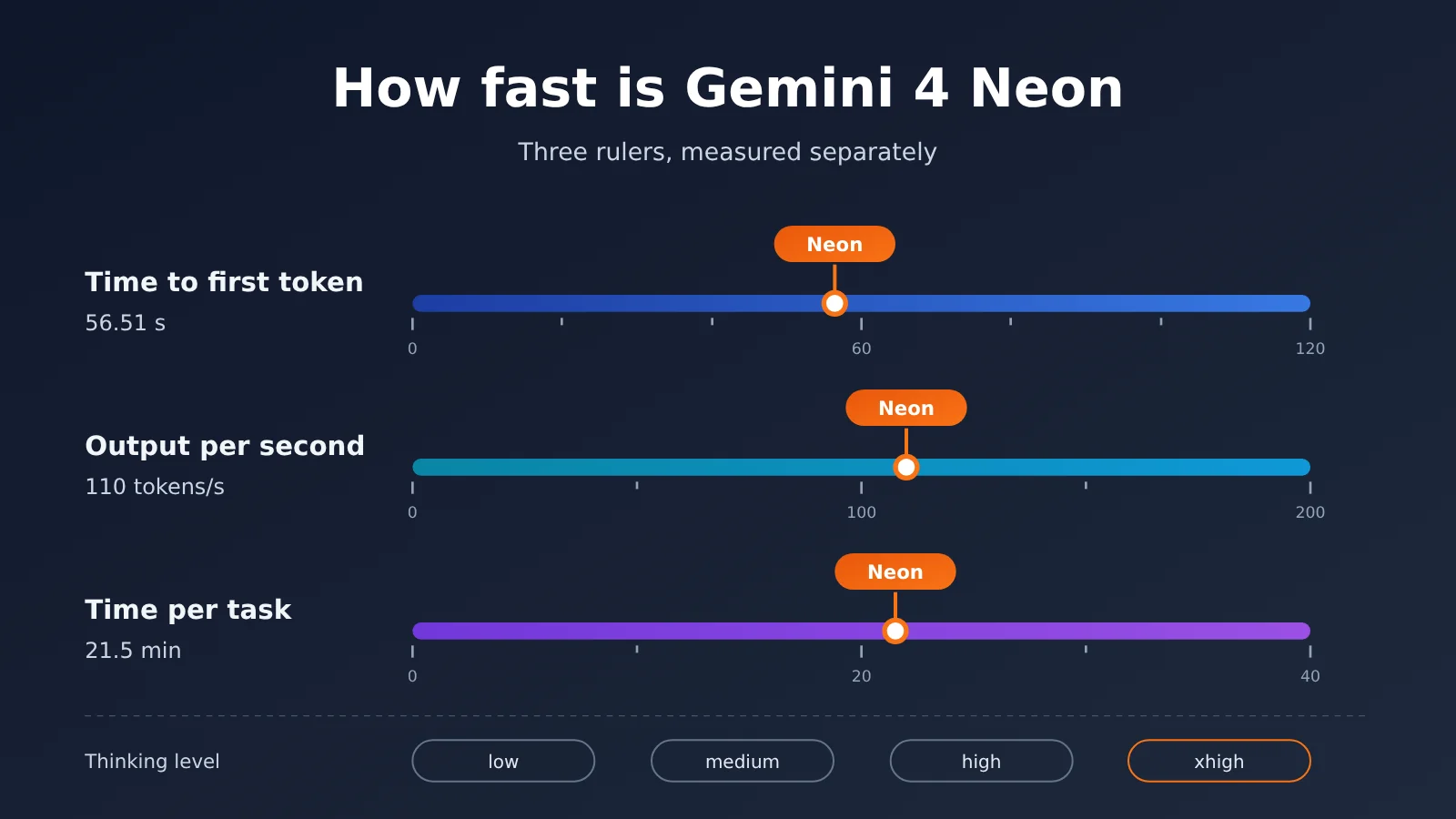
Let’s start by separating the three metrics that are easy to confuse. The Neon values in the table below are all at the xhigh tier, taken from the Artificial Analysis model page (read on 2026-11-19, index v5.0.1).
| Metric | Meaning | Gemini 4 Neon xhigh value | User experience |
|---|---|---|---|
| Time to first token | The wait from sending a request to seeing the first answer token | 56.51 seconds | In an interaction, “how long it hangs before text starts appearing” |
| Output per second | How many tokens are generated each second once output begins | 110 tokens/sec | How fast the stream “fills in” |
| Time per task | Average time to finish one problem in the index | 21.5 minutes | “How long until a task is delivered” |
| Output volume for the index run | Total tokens output to run the full index | 283 million tokens | The other half of what determines time per task |
Why the Three Gemini 4 Neon Speed Metrics Need to Be Read Separately
Time to first token matters most for chat-style interactions. Reasoning models have to complete a stretch of reasoning before they emit the first answer token, so time to first token is often measured in seconds—or even minutes—and is strongly tied to the thinking tier.
Output per second only measures throughput “after text starts appearing,” regardless of how much the model has to say. Time per task is driven by two things at once: how many tokens can be produced per second, and how many tokens the problem requires in total. A model can have a high output rate per second and still finish a problem more slowly if it tends to write very long chains of thought. The later comparison between Neon and GPT-6.2 Sol and GPT-6.2 Astra is exactly this situation.
Gemini 4 Neon core features: family positioning and four thinking levels
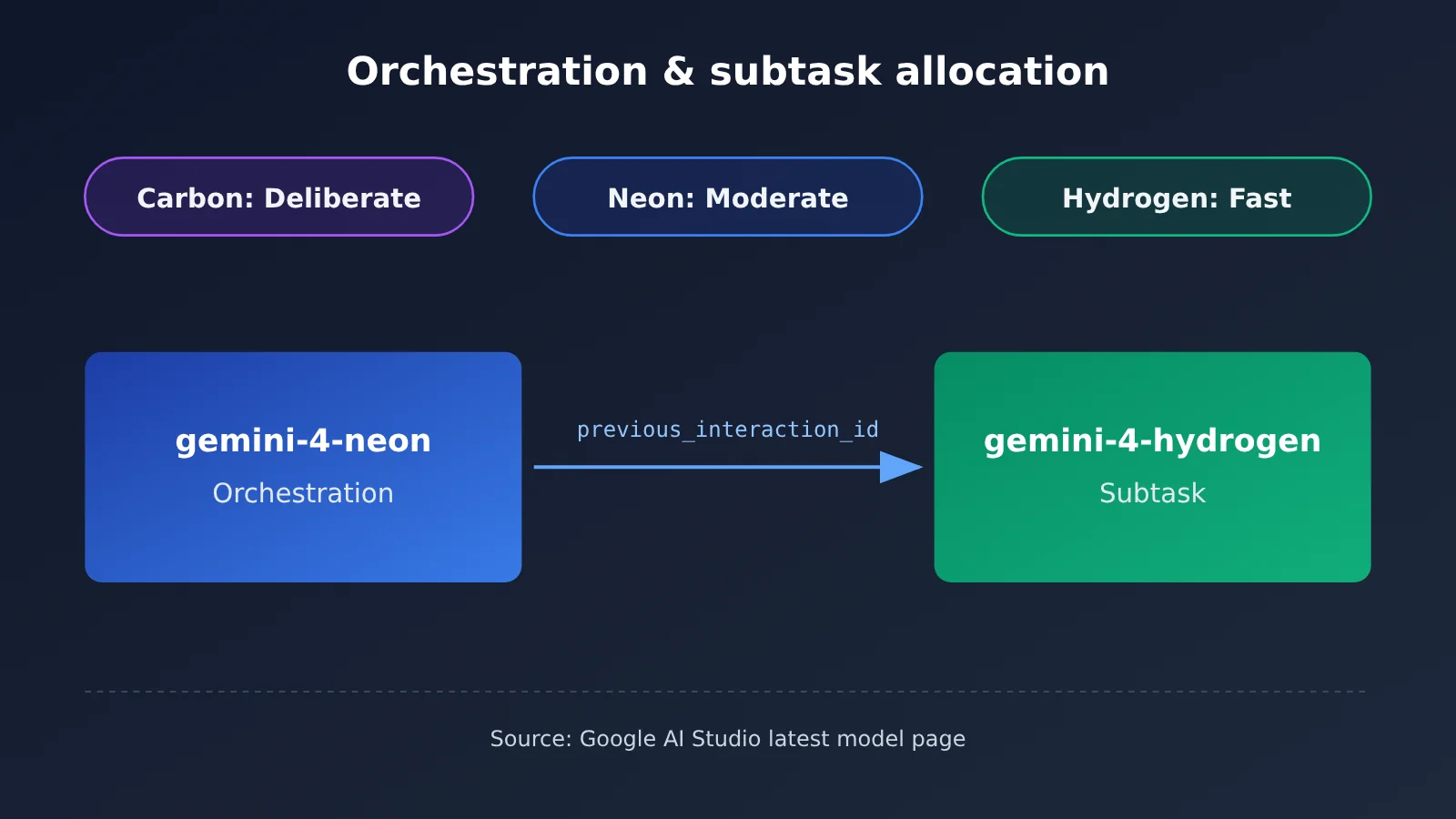
The latest model page in Google AI Studio gives the three Gemini 4 models qualitative speed labels: Carbon is Deliberate, Neon is Moderate, and Hydrogen is Fast. In other words, by Google’s own characterization, Neon sits in the middle of the family, and Hydrogen is the one labeled Fast. The Google blog likewise positions Carbon for the hardest long-horizon tasks, Hydrogen for fast everyday execution, and Neon as the compromise for high-frequency complex workflows.
| Model | AI Studio speed designation | Thinking levels | Default level | Family positioning (Google blog / developer guide) |
|---|---|---|---|---|
| Gemini 4 Carbon | Deliberate | low, medium, high | medium | Complex long-horizon tasks |
| Gemini 4 Neon | Moderate | low, medium, high, xhigh | high | Compromise for high-frequency complex workflows |
| Gemini 4 Hydrogen | Fast | Not detailed in the materials | Not detailed in the materials | Fast everyday loops |
Gemini 4 Neon capabilities and specs
According to the model card, Gemini 4 Neon is adapted from Gemini 4 Carbon, with a knowledge cutoff of March 2026. It accepts text, images, audio, and video as input, and its unified context window is up to 1 million tokens. By default, synchronous output is capped at 64,000 tokens, while background long-form decoding can reach up to 1 million tokens. The Google Cloud developer guide lists the model ID as gemini-4-neon, with a unified limit of 1048576 tokens including input and output. Output itself includes thinking, function calls, and the final response.
On capabilities, the officially self-reported Artificial Analysis Intelligence Index is 61 at the xhigh setting, ranking 3rd overall, and the blog also acknowledges that it trails larger, slower models. The comparison table in the model card has only three columns: Neon, Claude Opus 5.5, and GPT-6.2 Sol. Non-Gemini results are taken by default from each vendor’s self-reported numbers, so that table is an official aggregation, not a same-day retest by a single lab. The table also shows areas where Neon trails. For example, on Terminal-bench 4.1 cheat-adjusted accuracy, Opus 5.5 scores 65.8%, above Neon’s 65.2%.
The developer guide also offers an orchestration pattern: use gemini-4-neon as the main controller and pass previous_interaction_id to gemini-4-hydrogen to run faster subtasks. If you find Neon isn’t fast enough, this route is worth considering more than simply lowering the thinking level (this is our judgment, not the guide’s exact wording).
Gemini 4 Neon Speed Data: A Tier-by-Tier Breakdown of the Four Thinking Levels
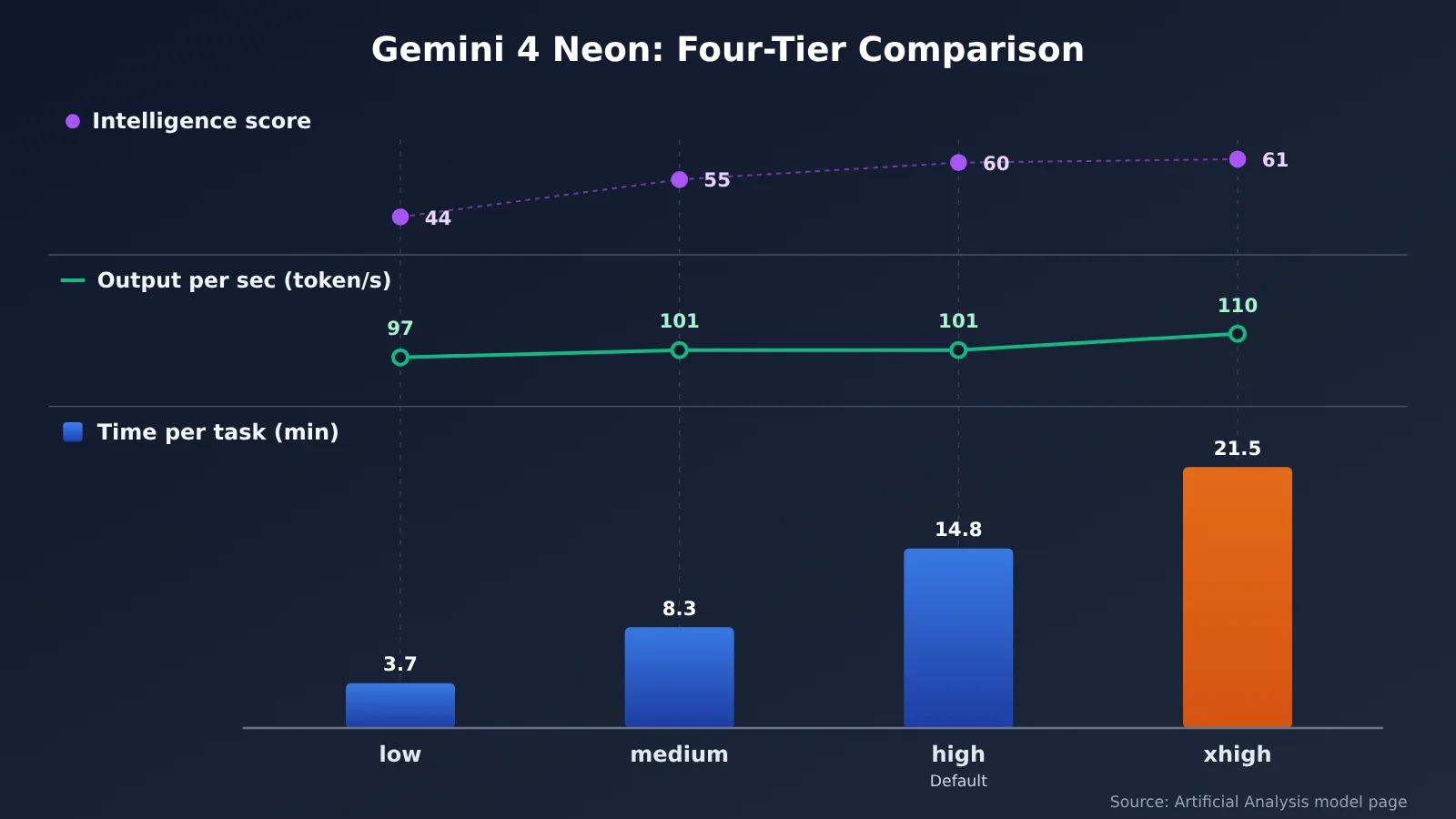
The table below comes from the Artificial Analysis model page. One note on the last column: the summary table on that page only gives the 56.51 seconds for xhigh. The time-to-first-token figures for high, medium, and low come from the FAQ section of that same page, which sits in a different column from the summary table — please keep that source distinction when you cite them.
| Thinking level | Intelligence score | Time per task | Output per second | Time to first token (model page FAQ section) |
|---|---|---|---|---|
| xhigh | 61 | 21.5 minutes | 110 tokens/sec | 56.51 seconds |
| high (default) | 60 | 14.8 minutes | 101 tokens/sec | 40.64 seconds |
| medium | 55 | 8.3 minutes | 101 tokens/sec | 20.14 seconds |
| low | 44 | 3.7 minutes | 97 tokens/sec | 13.93 seconds |
Looking at this table, output speed across the four levels only ranges from 97 to 110 tokens/sec, yet time per task stretches from 3.7 minutes all the way to 21.5 minutes. What the level switch mainly changes is “how much thinking is needed,” not “how fast it writes per second.” That’s an inference drawn from the numbers in the table — the model page itself doesn’t say this.
The score cost is just as clear. Dropping from the default high at 60 down to medium loses only 5 points, but going down to low takes you to 44. xhigh gains 1 point over high while adding nearly 7 minutes of time per task — whether that’s worth it depends on your task.
Gemini 4 Neon Is Faster Per Second — So Why Can a Single Task Still Take Longer?
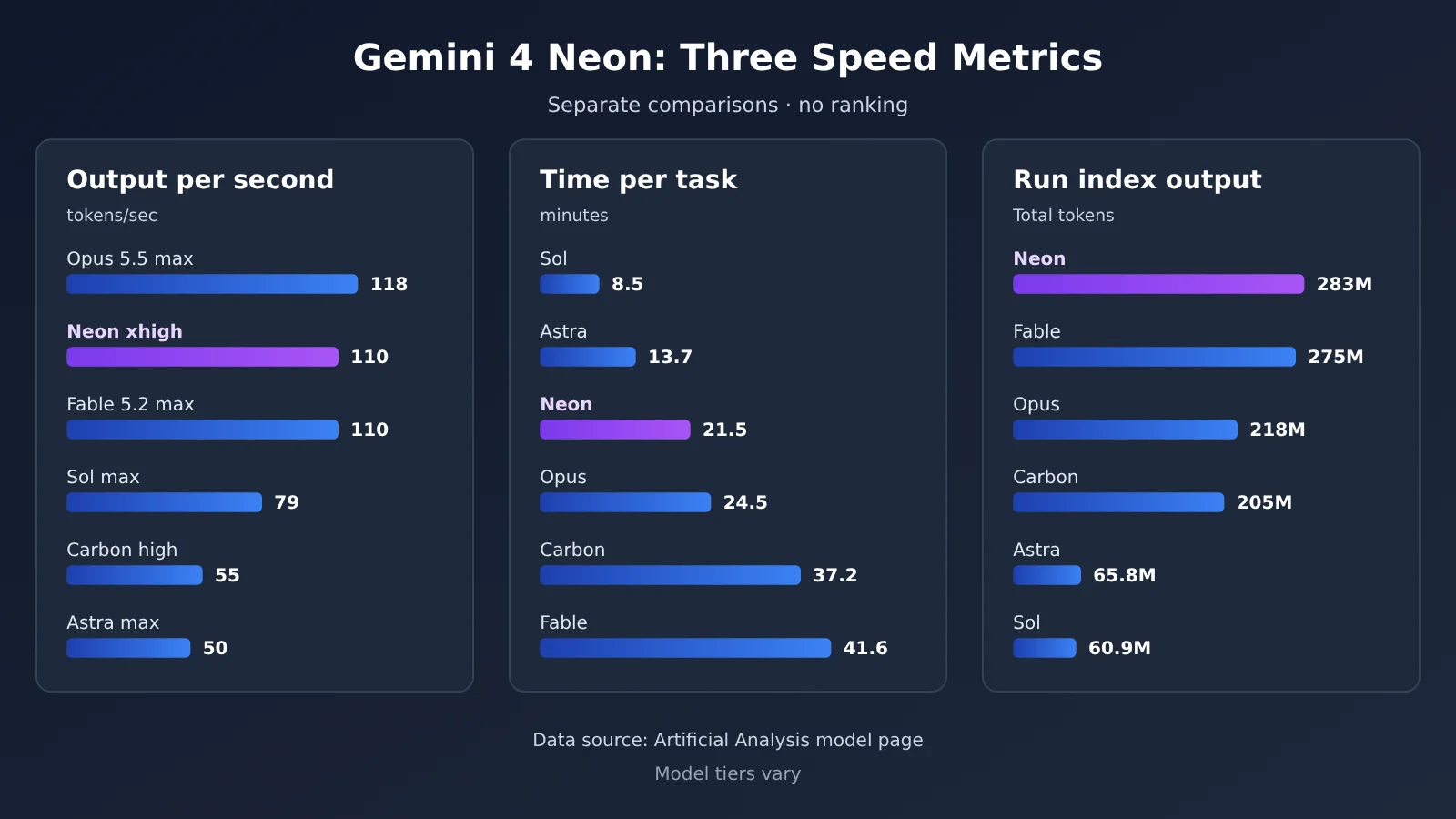
The Artificial Analysis model page records that Neon xhigh outputs 283 million tokens and takes in 8.12 billion tokens across the full index run. The more output tokens there are, the longer the total time stretches out — even at 110 per second. GPT-6.2 Astra at the max setting manages only 50 tokens per second, but it outputs just 65.8 million tokens for the index run, with a per-task time of 13.7 minutes. GPT-6.2 Sol at max does 79 tokens per second, outputs 60.9 million tokens, and takes 8.5 minutes per task.
So “higher output tokens/second” and “the task finishes sooner” are two different things. Compare Neon with those two GPT models: Neon has the higher per-second output, yet its per-task time is longer. The reason is simply that Neon outputs far more tokens.
Comparing Gemini 4 Neon Against the Reference Models, One Metric at a Time
All the numbers in the table below come from the Artificial Analysis model page. Each model ran at a different setting (Neon on xhigh, Carbon on high, the rest on max), so you can only read the relative relationships within a single column — this isn’t a same-conditions contest.
| Model (setting) | Intelligence score | Time per task | Output per second | Time to first token | Output tokens for the index run |
|---|---|---|---|---|---|
| Gemini 4 Neon (xhigh) | 61 | 21.5 minutes | 110 | 56.51 seconds | 283 million |
| Gemini 4 Carbon (high) | 60 | 37.2 minutes | 55 | 73.04 seconds | 205 million |
| Claude Opus 5.5 (max) | 59 | 24.5 minutes | 118 | 335.85 seconds | 218 million |
| Claude Fable 5.2 (max) | 65 | 41.6 minutes | 110 | 247.46 seconds | 275 million |
| GPT-6.2 Astra (max) | 62 | 13.7 minutes | 50 | 197.65 seconds | 65.8 million |
| GPT-6.2 Sol (max) | 57 | 8.5 minutes | 79 | 75.06 seconds | 60.9 million |
Taking each of the three metrics in turn:
- Output per second: Claude Opus 5.5 at max hits 118 tokens/second, higher than Neon xhigh’s 110; Claude Fable 5.2 at max ties Neon at 110.
- Time per task: GPT-6.2 Sol at max at 8.5 minutes and GPT-6.2 Astra at max at 13.7 minutes are both shorter than Neon xhigh’s 21.5 minutes.
- Time to first token: Neon xhigh’s 56.51 seconds is the smallest value in this table, but since each row uses a different setting, you can’t conclude from that that it leads across the board.
The speedup of Neon over Carbon gets tallied two different ways. The Artificial Analysis model page gives Carbon high at 55 tokens/second and 37.2 minutes. The Artificial Analysis article gives approximate figures: Neon takes about 21 minutes per task, roughly 40% less than Carbon’s roughly 36 minutes, and the speedup comes from output speed of about 110 versus about 57 tokens/second, while Neon also outputs about 15% more tokens per task. The two sets of Carbon numbers rest on different bases, so we’re not subtracting one from the other here.
How to Get Up and Running Quickly: Gemini 4 Neon Tier Selection and Speed-Testing Methods
gemini-4-neon currently has to be invoked through Google’s official channel. The steps below are in two parts: first, how to choose Neon’s tier; then, how to set up a speed-testing workflow using the Gemini 4 models already available on APIYI, so you can just swap in the model once Neon is available.
Step 1: Understand Neon’s four thinking tiers. The Google Cloud developer guide states that gemini-4-neon only has low, medium, high, and xhigh thinking tiers, with high as the default. Passing thinking_budget or MINIMAL returns HTTP 400—this is the easiest trap for code migrated from older Gemini versions.
Step 2: Drop to a lower tier if you need more speed. If it feels too slow, you can go from the default high down to medium or low. According to the Artificial Analysis model page, per-task time drops from 14.8 minutes at high to 8.3 minutes or 3.7 minutes, while the intelligence score falls from 61 at xhigh (60 at the default high) to 55 or 44. The score drop at low is quite large, so before downgrading, it’s best to sample a few of your own tasks to confirm.
Step 3: Prepare an APIYI account and key. Register at APIYI (apiyi.com) and get an API key, put the key in an environment variable (for example, APIYI_API_KEY), and only read it from the environment in your code—never hardcode it in plaintext.
Step 4: Choose how to make the call. For the OpenAI-compatible interface, set base_url to https://api.apiyi.com/v1 and use one of the available model names, gemini-4-carbon or gemini-4-hydrogen. If you’re using Gemini’s native protocol, use https://api.apiyi.com as the endpoint and v1beta as the API version.
Step 5: Record three metrics separately. Turn on stream streaming output and record, separately, the time until the first answer token arrives, the tokens per second after output begins, and the total elapsed time until the whole task finishes. Also record the total number of output tokens for this run. Only with the output token count can you tell whether a long duration means “writing slowly” or “writing a lot.”
🚀 Quick-start tip: It’s best to get the speed-testing workflow working on the already-available Gemini 4 models first. APIYI covers Gemini, Claude, and GPT series with a single key, so once you write the script that records the three metrics, you can compare multiple models side by side. When Neon becomes available, you only need to change the model ID.
Gemini 4 Neon Pricing and APIYI Model Cross-Check
Gemini 4 Neon’s official list price (from the Google AI Studio pricing page) is $3 per million input tokens and $15 per million output tokens.
Here at APIYI, we checked two sources: the APIYI master list (docs.apiyi.com/models.md, page marked as updated on 2026-11-16 09:39, UTC+8), and the pricing API queried on 2026-11-19 (api.apiyi.com/api/pricing, version shell-api-modelmak-v1, 285 models total). Below are the listed models that appear in both sources. Prices are in USD per million tokens.
| Model ID | Input | Cache read | Output | Endpoints | Notes (source) |
|---|---|---|---|---|---|
gemini-4-carbon |
2 | 0.1 | 10 | chat, gemini | Matches Google’s introductory price through 2026-11-30 (APIYI master list) |
gemini-4-hydrogen |
1.5 | 0.075 | 7.5 | chat, gemini | APIYI master list |
claude-opus-5-5 / claude-opus-5-5-thinking |
4 | 0.2 | 20 | chat, messages | APIYI master list |
claude-fable-5-2 / claude-fable-5-2-thinking |
8 | 0.2 | 40 | chat, messages | APIYI master list |
gpt-6.2-sol |
2 (3 above 272000) | 0.1 | 10 (about 11.25 at the higher tier in the pricing API) | responses (recommended), chat | Master list only shows the input tier jump |
gpt-6.2-astra |
8 (16 above 272000) | 0.4 | 40 (about 60 at the higher tier in the pricing API) | responses, chat | Master list only shows the input tier jump |
A few details are worth noting. The listed price for gemini-4-carbon matches Google’s introductory price, not the later standard price of 4/20. The group names aren’t written exactly the same way in both sources: for Gemini models, the master list uses Default and SVIP, while the pricing API uses default and svip. For Claude models, the master list uses ClaudeCode, Claude_Reverse, Claude_Enterprise, Default, and SVIP, while the pricing API uses ClaudeCode, ClaudeCodeReverse, ClaudeOfficial, default, and svip. The higher-tier output prices for GPT models only appear in the pricing API; when tokens exceed 272000, CompletionRatio in the pricing API changes from 5 to 3.75.
gemini-4-neon doesn’t appear in either the APIYI master list or the pricing API, and it hasn’t been listed yet. We’ll get this model listed as soon as possible. Model IDs and prices are subject to the platform’s model list.
Gemini 4 Neon Pros and Cons
Strengths
- Higher output speed than earlier models in the family: The Artificial Analysis model page shows Neon xhigh at 110 tokens/sec and Carbon high at 55 tokens/sec.
- Relatively short time to first token: xhigh’s time to first token is 56.51 seconds, the lowest figure in the comparison table above (different tiers, so for reference only).
- Fine-grained tiers: Four thinking levels, from 3.7 minutes on low to 21.5 minutes on xhigh, so you can choose based on the task.
- Complete specs: The model card lists text, image, audio, and video input plus a unified 1-million-token context window; the developer guide notes that implicit caching applies automatically to shared prefixes over 4096 tokens.
Limitations
- Output token count runs high: It racked up 283 million output tokens on the index, which makes xhigh take longer per task than Sol and Astra. The fix is to drop down a tier or hand subtasks to Hydrogen.
- Officially rated only Moderate: AI Studio gives the Fast label to Hydrogen, so scenarios that prioritize the fastest interaction should try Hydrogen first.
- Some configurations aren’t supported: The developer guide states that explicit context caching isn’t supported, and
thinking_budgetandMINIMALwill return400. - No free tier: The AI Studio pricing page states that
gemini-4-neonhas no free tier. - Benchmark figures use mixed methodologies: Coding Agent Index is 58.6 on Google’s blog and 59 in the Artificial Analysis article; SWE-sweep’s 12.8% and 39.0% come from two different harnesses. Check the source when reading the numbers.
Frequently Asked Questions (FAQ)
Q1: Is Gemini 4 Neon the fastest model in the Gemini 4 family?
Based on how Google AI Studio’s latest model page characterizes things, Hydrogen is Fast, Neon is Moderate, and Carbon is Deliberate. The official claim of “finishing faster” is mainly a comparison against Carbon.
Q2: How long do you wait for the first token with Gemini 4 Neon?
The summary table on the Artificial Analysis model page gives 56.51 seconds to first token at xhigh. The FAQ column on that same page separately lists 40.64 seconds for high, 20.14 seconds for medium, and 13.93 seconds for low — those three figures come from the FAQ column, not from the same column as the summary table.
Q3: Why does Gemini 4 Neon output 110 tokens per second yet still need 21.5 minutes per task?
Because it outputs far more tokens. The Artificial Analysis model page records that Neon at xhigh consumes 283 million tokens running the Index, while Sol max uses only 60.9 million and Astra max only 65.8 million — so the latter two are slower per second, yet take less time per task.
Q4: Which tier does Gemini 4 Neon use by default? How do I make it faster?
The developer guide states the default is high. If you want more speed, you can drop to medium or low. Per the Artificial Analysis model page, task time becomes 8.3 minutes and 3.7 minutes respectively, while the intelligence score falls from 61 at xhigh (60 at high) to 55 or 44.
Q5: Can I call Gemini 4 Neon through APIYI right now?
As of 2026-11-19, `gemini-4-neon` hasn’t appeared in APIYI’s master list or pricing endpoint, so it isn’t listed yet — we’ll get it up as soon as we can. In the meantime, you can register at apiyi.com and use the already-listed `gemini-4-carbon` or `gemini-4-hydrogen` to set up your speed-testing flow; the OpenAI-compatible endpoint is the same as in the quick start above.
Q6: How much cheaper is Gemini 4 Neon than Carbon?
There are three sets of numbers here: Google’s blog says the default high tier costs 32% less per task than Carbon; the Artificial Analysis article says roughly 17% less than Carbon’s non-discounted price; and the Artificial Analysis model page calculates Carbon at high as $4.90 per task at list price. These use different bases, so you can’t combine them into a single figure.
Q7: Can I compare Gemini 4 Neon’s benchmark scores directly against competitors?
Be careful. The model card notes that non-Gemini results come by default from each vendor’s self-reported numbers — an official aggregation, not a same-day retest; and the Artificial Analysis comparisons involve tier mismatches (xhigh, high, and max mixed together).
Gemini 4 Neon Key Takeaways
- Three kinds of speed: time to first token, tokens per second, and per-task time are all independent, so their rankings can contradict each other.
- The official rating sits in the middle: AI Studio labels Neon as Moderate — Hydrogen is the one marked Fast.
- xhigh data: the Artificial Analysis model page reports a score of 61, 21.5 minutes, 110 tokens/second, and 56.51 seconds to first token.
- Output volume stretches out the time: 283 million output tokens make Neon’s per-task time longer than Sol and Astra.
- Not the fastest per second: Opus 5.5 max at 118 tokens/second beats Neon’s 110.
- Drop a tier, gain speed: medium takes 8.3 minutes and scores 55; low takes 3.7 minutes and scores 44; the default is high.
- Availability today: APIYI hasn’t listed Neon yet, so you can start with the Gemini 4 models that are already listed and get your speed-testing workflow in place first.
Summary
The core conclusions about Gemini 4 Neon’s speed:
- It really is fast compared with Carbon: both sets of Artificial Analysis data show Neon’s tokens per second at roughly twice Carbon’s, with noticeably shorter per-task times.
- Zoom out and it isn’t ahead everywhere: tokens per second trail Opus 5.5 max, and per-task time is longer than Sol max and Astra max.
- The tier is the main dial: tokens per second barely changes across the four tiers — the difference in elapsed time comes mainly from how many thinking tokens are used.
Our take: for interactive scenarios, look at time to first token; for batch processing, look at per-task time; only for streaming experience should you focus on tokens per second. Whether Neon is “fast enough” depends on which of these you care about. We recommend getting the recording workflow for all three metrics working through APIYI apiyi.com using the existing Gemini 4 models — once Neon is listed, you can swap in the model name and compare directly.
📚 References
-
Sundar Pichai’s announcement post: Gemini 4 Neon launch and availability
- Link:
x.com/sundarpichai/status/2123167780988125621 - Notes: The launch channel and the official “get things done faster” phrasing
- Link:
-
Google blog “Introducing Gemini 4 Neon”: Officially self-reported benchmarks, pricing, and family positioning
- Link:
blog.google/innovation-and-ai/models-and-research/gemini-models/introducing-gemini-4-neon - Notes: All numbers are officially self-reported
- Link:
-
DeepMind model card: Specs and the three-column comparison table
- Link:
deepmind.google/models/model-cards/gemini-4-neon/ - Notes: Non-Gemini results come from each vendor’s own reporting by default
- Link:
-
Google Cloud developer guide: Model IDs, thinking levels, and error explanations
- Link:
docs.cloud.google.com/gemini-enterprise-agent-platform/models/guides/gemini-4-neon - Notes: Four thinking levels, default is high, and the conditions that trigger HTTP 400
- Link:
-
Google AI Studio pricing and latest models page: Official list prices and qualitative speed
- Link:
aistudio.google.com/docs/pricing,aistudio.google.com/docs/latest-model - Notes: The three qualitative tiers Deliberate, Moderate, and Fast
- Link:
-
Artificial Analysis article: Third-party comparison of Neon and Carbon
- Link:
artificialanalysis.ai/articles/gemini-4-neon-intelligence-gain - Notes: Approximate figures like about 21 minutes, about 36 minutes, and about 57 tokens/sec
- Link:
-
Artificial Analysis model page: Four-tier speed and comparison model data
- Link:
artificialanalysis.ai/models/gemini-4-neon - Notes: Read on 2026-11-19, index v5.0.1; the FAQ section also lists time-to-first-token for each tier
- Link:
-
APIYI master table: Listed models and pricing
- Link:
docs.apiyi.com/models.md - Notes: Models and prices are subject to the platform’s model list
- Link:
Author: APIYI Technical Team
Technical discussion: For questions about Gemini 4 Neon listing progress and model availability, feel free to contact us via the APIYI homepage at apiyi.com