Author’s note: Using Google’s official pricing, this breaks down the three Gemini 4 Neon pricing cells—input, implicit cache, and output—explains that thinking tokens count toward output, there’s no free tier, and explicit caching isn’t supported, and provides an integer-token worked example plus how to cross-check against the APIYI master table.
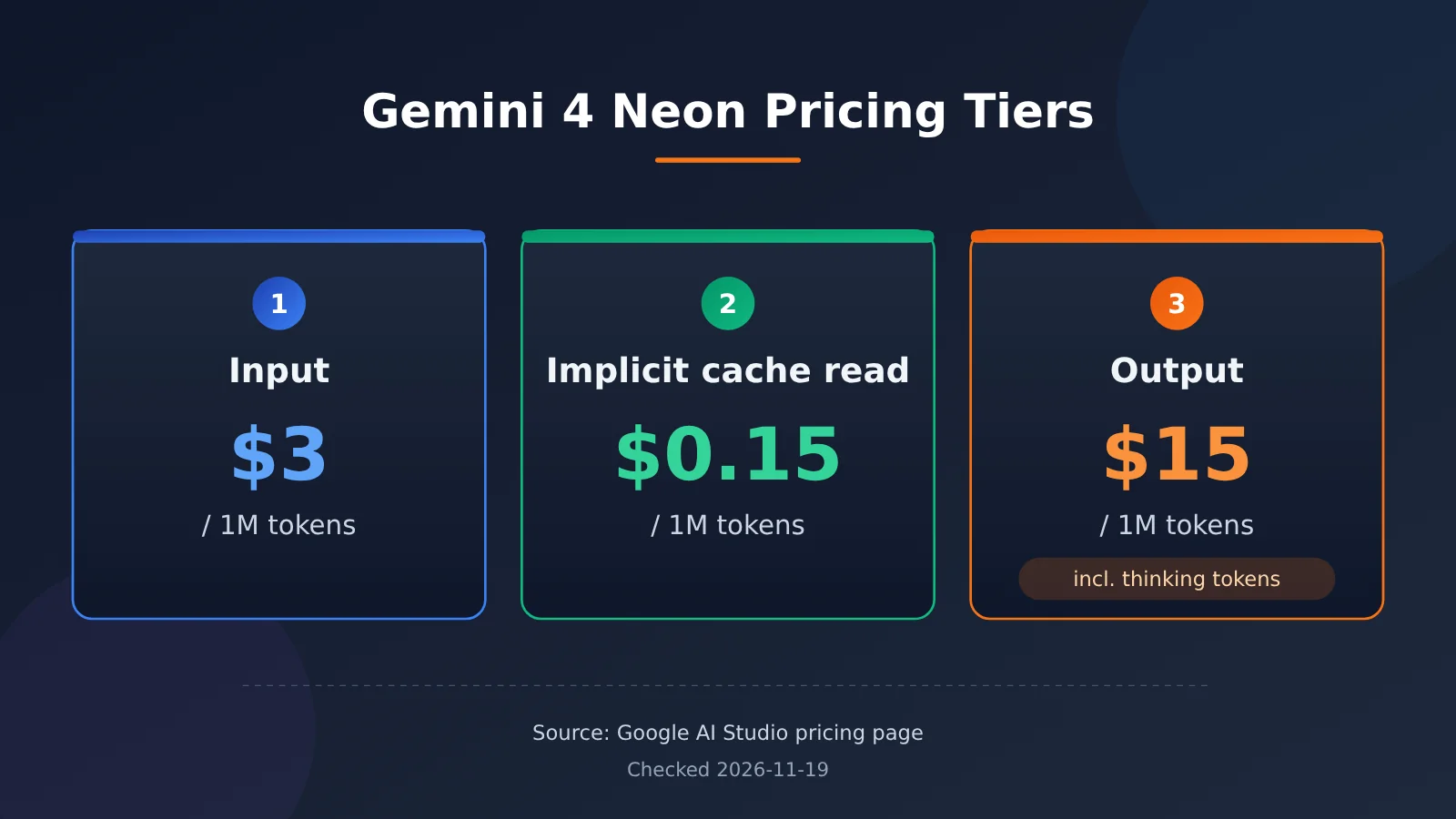
After Gemini 4 Neon launched on 2026-11-18, many developers first need to figure out how much a single call costs. The “cost per task” shown on leaderboards is a weighted result from running an entire evaluation index, and it’s a different thing from a single request on your bill. This article breaks down the three Gemini 4 Neon pricing cells: $3 for input, $0.15 for implicit cache reads, and $15 for output one by one, and explains which cell thinking tokens fall into.
The pricing information in this article comes from the Google AI Studio pricing page, Google Cloud developer guide, DeepMind model card, Artificial Analysis article and model page, and the APIYI master table and pricing API. The data was verified on 2026-11-19; every number cites its source, and where definitions don’t line up, both sets are retained.
Key value: After reading this article, you can plug your own token counts into the formula to calculate the per-call cost of Gemini 4 Neon, know which pricing cell a cache hit saves you money in, and know how to look up shelf prices for same-family models in the APIYI apiyi.com master table.
Gemini 4 Neon Pricing: Key Points
Let’s put the official pricing conditions into a single table first. The prices and caching rules below come from the Google AI Studio pricing page and the Google Cloud developer guide; the context and output limits come from the developer guide and the model card.
| Item | Official description | What it means for your bill |
|---|---|---|
| Input | $3.00 per million tokens (AI Studio pricing page) | Prompts, documents, and message history all fall into this bucket |
| Cached input | $0.15 per million tokens, implicit caching only (AI Studio pricing page) | A hit shared prefix is charged at $0.15, a 95% discount versus $3 (Google blog, Google’s own figure) |
| Output | $15.00 per million tokens, including thinking tokens (AI Studio pricing page) | The deeper the thinking, the bigger this bucket |
| Free tier | No free tier (AI Studio pricing page) | You’re billed from the very first call |
| Explicit caching | Explicit context caching is not supported (Google Cloud developer guide) | You can’t manually create cache objects; you have to rely on automatic hits |
| Implicit cache threshold | Shared prefixes over 4096 tokens kick in automatically; persistent cache is on by default (developer guide) | Short prompts basically don’t get the cached rate |
| Context | Unified limit of 1048576 tokens, including input and output (developer guide); the model card says a unified window up to 1 million | In long-document scenarios, the input bucket will make up a large share |
Thinking Tokens in Gemini 4 Neon Pricing
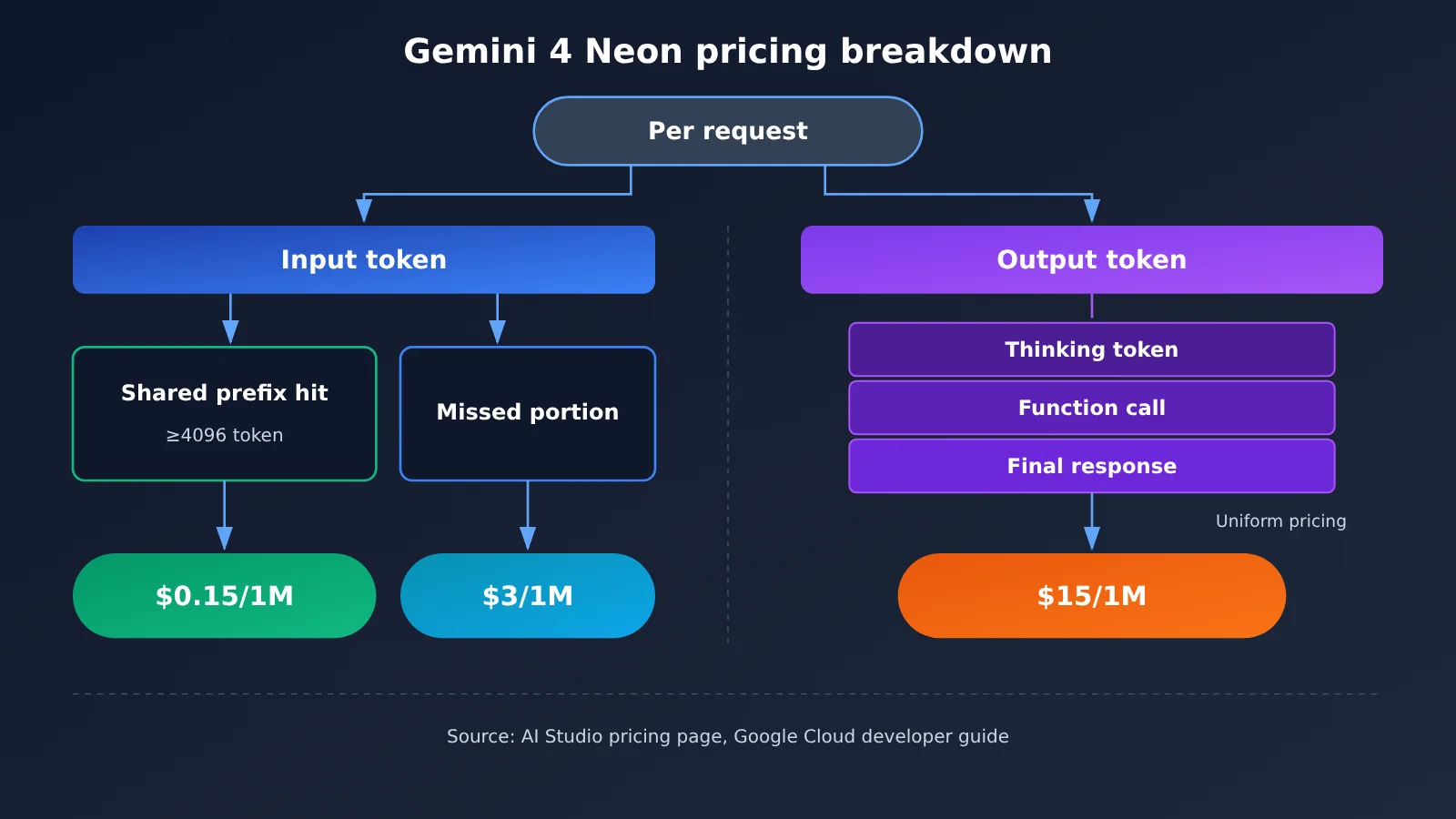
The Google Cloud developer guide states that output includes three parts: thinking, function calls, and the final response, with a default max of 65536 tokens per segment. The AI Studio pricing page also counts thinking tokens in the $15 output bucket, so the output token count on your bill will usually be much longer than the response you actually see.
Neon only has four thinking levels: low, medium, high, and xhigh, with high as the default. The developer guide also warns that passing thinking_budget or MINIMAL returns HTTP 400. The Google blog (Google’s own description) says the higher the level, the deeper the thinking and the more tokens, which directly hits the output bucket.
Implicit Caching in Gemini 4 Neon Pricing
Implicit caching targets the identical beginning across requests — for example, a fixed system prompt, the same long document, or the same set of tool definitions. The threshold in the developer guide is a shared prefix over 4096 tokens; once met, it’s automatically billed at the cached rate, with no extra API call required.
That leads to a very practical writing tip: put stable, unchanging content at the front of the message, and put the user question that changes each time at the end. The longer and more stable the prefix, the larger the share billed at $0.15. The cache discount only applies to input; output is always billed at $15.
Gemini 4 Neon pricing and how it differs from Carbon and Hydrogen
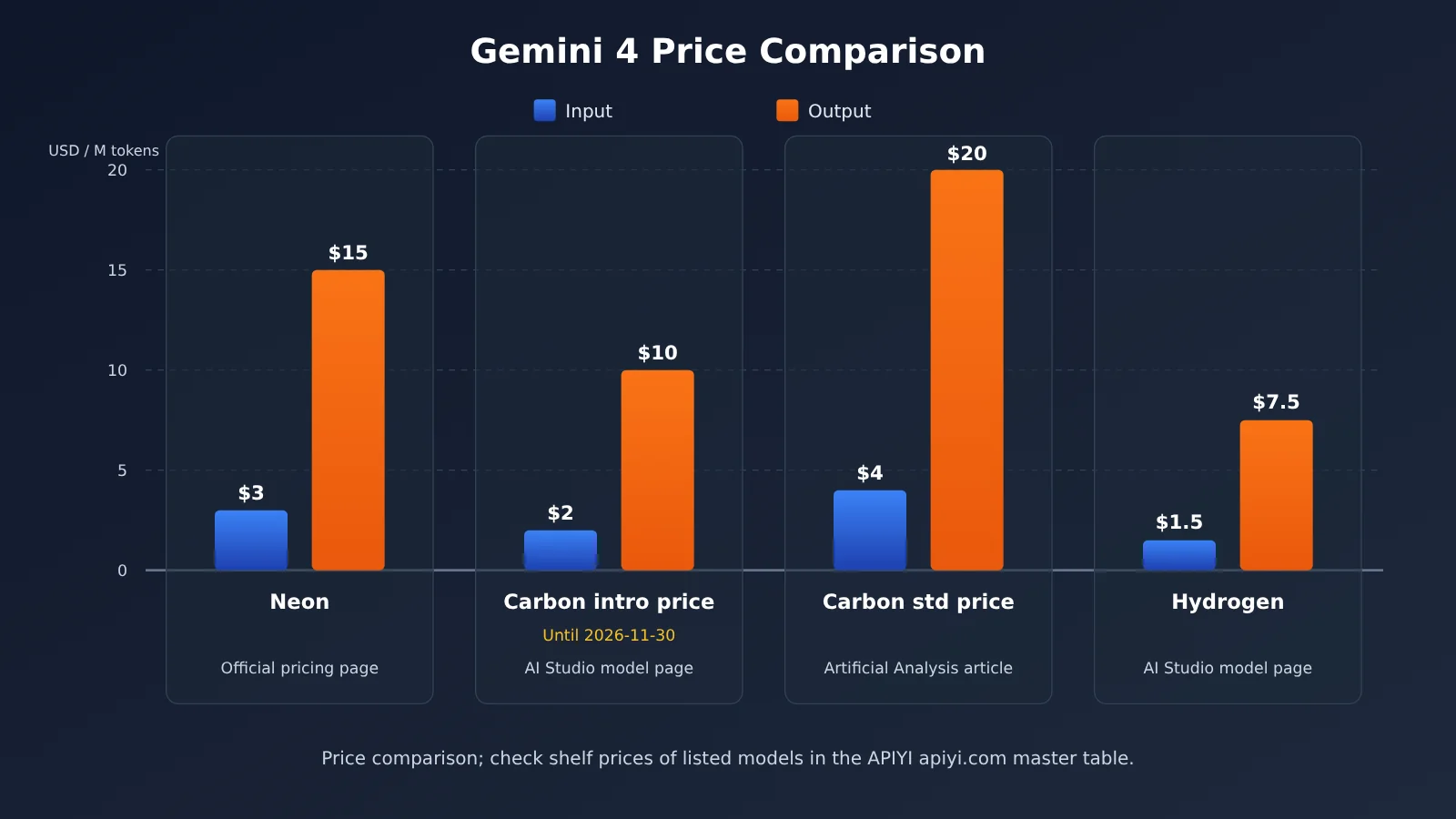
Neon sits between Hydrogen and Carbon in the family. According to Google’s blog, Carbon handles the hardest long-horizon tasks, Hydrogen handles everyday fast execution, and Neon is the middle ground for high-frequency complex workflows. Pricing follows the same order, but Carbon has both an introductory price and a standard price, so you need to look at them separately.
| Model | Input / 1M | Output / 1M | Price basis and source |
|---|---|---|---|
| Gemini 4 Neon | US$3.00 | US$15.00 | AI Studio pricing page, official list price |
| Gemini 4 Carbon (introductory price) | US$2.00 | US$10.00 | AI Studio latest models page, valid through 2026-11-30 |
| Gemini 4 Carbon (standard price) | US$4 | US$20 | Standard price cited in the Artificial Analysis article |
| Gemini 4 Hydrogen | US$1.50 | US$7.50 | AI Studio latest models page |
Based on this, the Artificial Analysis article gives two comparisons: Neon’s 3/15 is 25% lower than Carbon’s standard 4/20; compared with Carbon’s discounted 2/10 price through November 30, Neon’s unit price is 50% higher. Both comparisons are valid — the only difference is which Carbon price you compare against.
There are also two versions of the cache discount. The Artificial Analysis model page lists Neon’s cache discount at 95% and Carbon’s at 90%. In the APIYI master table, the cached read price for gemini-4-carbon is US$0.1, which is 5% of the US$2 input price. These two numbers come from different pages; this article lists them as-is and doesn’t normalize them.
Gemini 4 Neon Pricing Quick Start
Here’s a four-step approach: first plug in the official three rates, then estimate how the thinking levels affect output, then cross-check against the same-family models already available in the APIYI master table, and finally confirm whether Neon itself is listed.
Step 1: Calculate a Single Call with the Official Three Rates
The formula is simple: input cost = uncached input tokens ÷ 1 million × 3; cache cost = cached input tokens ÷ 1 million × 0.15; output cost = output tokens (including thinking) ÷ 1 million × 15. Adding the three gives the cost of the request.
- No-cache example: 1000000 input tokens, 100000 output tokens. Input 1000000 ÷ 1000000 × 3 = $3, output 100000 ÷ 1000000 × 15 = $1.50, total $4.50.
- Cache-hit example: same 1000000 input tokens, of which 800000 tokens are a cached shared prefix. The cached portion 800000 ÷ 1000000 × 0.15 = $0.12, the uncached 200000 tokens = $0.60, output stays at $1.50, total $2.22.
- Same token volume at Carbon introductory rates: 1000000 × 2 plus 100000 × 10 = $3 total; at Carbon standard rates 4/20, $6 total; at Hydrogen 1.5/7.5, $2.25 total.
One thing to keep in mind: under the same task, different models don’t produce the same number of tokens. The Artificial Analysis article notes that Neon’s output tokens per task run roughly 15% higher than Carbon’s, so comparing at equal token volume only shows the per-unit price difference. Your actual bill still has to be multiplied by each model’s own token usage.
Step 2: Estimating how much the thinking level inflates the output cell
The thinking level decides how big the output cell gets. Google’s blog post (their own claim) only says that higher levels mean more tokens — it doesn’t give a specific token count for each level. The Artificial Analysis model page does list the per-task time each level takes to finish the index, which works as supporting evidence that deeper thinking means a longer process.
| Thinking level | Default? | Time per task (Artificial Analysis model page) | Output speed |
|---|---|---|---|
low |
No | 3.7 minutes | 97 tokens/sec |
medium |
No | 8.3 minutes | 101 tokens/sec |
high |
Yes (developer guide) | 14.8 minutes | 101 tokens/sec |
xhigh |
No | 21.5 minutes | 110 tokens/sec |
In the worked example from step 1, if a higher thinking level pushes output from 100,000 tokens to 200,000, the output cell goes from $1.50 to $3. How much it actually grows depends on your task — I’d suggest running a few different levels against your own prompts and checking the usage field in the response before you settle on a default level.
Step 3: Cross-checking sibling models in the APIYI master table
Open the APIYI master table at docs.apiyi.com/models.md (the page says it was updated 2026-11-16 09:39, UTC+8), or query the pricing endpoint api.apiyi.com/api/pricing (queried 2026-11-19, version shell-api-modelmak-v1, 285 models total) to see the listed prices for the Gemini 4 family models that are already available.
| Model ID | Input / 1M | Cache read / 1M | Output / 1M | Endpoints | Available platform |
|---|---|---|---|---|---|
gemini-4-carbon |
$2 | $0.1 | $10 | chat, gemini | APIYI apiyi.com |
gemini-4-hydrogen |
$1.5 | $0.075 | $7.5 | chat, gemini | APIYI apiyi.com |
gemini-4-neon |
— | — | — | — | Not listed in either the master table or the pricing endpoint |
The 2/0.1/10 for gemini-4-carbon in the APIYI master table is the current listed price, and it matches Google’s introductory pricing through 2026-11-30 — this isn’t the same set as the standard 4/20 pricing. On groups, the master table says Default and SVIP, while the pricing endpoint says default and svip. The model page also lists a context window of 1048576, max output of 65536, and a knowledge cutoff of 2026-03.
The pricing endpoint expresses prices as multipliers: a model_ratio of 1 corresponds to $2 per million input tokens, and a completion_ratio of 5 means output costs 5x input. By that conversion, a model with $2 input and $10 output maps to 1 and 5, which lines up with the first row of the master table.
Step 4: Confirm whether Gemini 4 Neon is listed
gemini-4-neon doesn’t show up in the APIYI master table or the pricing endpoint, and it has no standalone model page. It isn’t listed yet — we’ll get it up as soon as we can. For now, the model list on the platform is the source of truth for model names and prices.
While you wait, you can get your call chain working with an already-listed model like gemini-4-carbon or gemini-4-hydrogen. Here’s how to call them:
- OpenAI-compatible endpoint: set
base_urltohttps://api.apiyi.com/v1andmodeltogemini-4-carbon. - Gemini native API: use
https://api.apiyi.comas the address andv1betaas the API version. - Read the key from an environment variable, e.g.
api_key=os.environ["APIYI_API_KEY"]— never hardcode it in plain text. - After the response comes back, read the input, cache-hit, and output token counts from
usageand check the cost against the formula from Step 1.
🚀 Quick start: Sign up at APIYI apiyi.com to get free trial credits, then run
gemini-4-carbonthrough thehttps://api.apiyi.com/v1call and usage tracking first. Once Neon is listed, all you need to change is themodelfield.
The three sets of numbers behind Gemini 4 Neon pricing
Beyond unit prices, Google and Artificial Analysis have each published “cost per task” comparisons. These ratios use different bases, so you can’t convert one into another.
| Claim | Figure | Source and basis |
|---|---|---|
| Neon default high cost per task is lower than Carbon | 32% | Google blog, self-reported; doesn’t say whether Carbon uses the introductory or standard price |
| Neon xhigh cost per task is less than Carbon’s non-discounted price | about 17% | Artificial Analysis article, Carbon at the standard price of $7.76 |
| Neon high vs. Carbon high cost per task | less than half | Artificial Analysis article, Carbon at standard price |
| Carbon high cost per task | $4.90 | Artificial Analysis model page, based on the page’s current introductory price |
These four numbers come from three different ledgers, with different tiers and different Carbon price bases. This article doesn’t average 32% and 17%, and it doesn’t subtract 4.90 from 7.76. For your project, the most reliable approach is to plug your own token counts into the formula from Step 1.
💡 Recommendation: A unit price table only tells you the cost per token — how many tokens a task actually burns is something you have to measure with your own requests. On APIYI apiyi.com, call the already-listed Carbon and Hydrogen with the same set of prompts, record the usage, and then estimate the cost range for Neon.
FAQ
Q1: How is Gemini 4 Neon priced — how many line items are there?
According to the Google AI Studio pricing page, Gemini 4 Neon has three line items: input at $3.00 per million tokens, cached input at $0.15, and output at $15.00. Thinking tokens are billed in the output line item, and there’s no free tier.
Q2: How do I actually get caching to work on Gemini 4 Neon?
The Google Cloud developer guide states that only implicit caching is supported. It kicks in automatically for shared prefixes of 4096 tokens or more, persistent caching is on by default, and explicit context caching isn’t supported. Put your fixed system prompt and long documents at the start of the message and you’ll get a higher hit rate.
Q3: Is the $6.44 on the leaderboard the price of one request?
$6.44 is the weighted per-task cost Artificial Analysis arrived at after running its intelligence index at the xhigh setting — and one index includes a lot of long tasks. For your own chat or single API request, work out the cost from your input, cached, and output token counts against the official three line items.
Q4: How much does a thinking level add to the Gemini 4 Neon bill?
Google doesn’t publish token counts per level. The developer guide confirms four levels — `low`, `medium`, `high` (the default), and `xhigh` — and Google’s blog says higher levels mean more tokens. Test each level on your own tasks and go by the output tokens in `usage`.
Q5: How do I check Gemini 4 family pricing and call it through APIYI?
Open the APIYI apiyi.com master table at `docs.apiyi.com/models.md`, or query the pricing endpoint, and you’ll see `gemini-4-carbon` (2/0.1/10) and `gemini-4-hydrogen` (1.5/0.075/7.5). To call them, point the OpenAI-compatible base URL at `https://api.apiyi.com/v1`. `gemini-4-neon` isn’t listed yet — we’ll get this model up as soon as we can; model names and prices are subject to the platform’s model list.
Q6: How should I read APIYI’s Carbon price after November 30?
The current Carbon shelf price of 2/0.1/10 in the APIYI master table matches Google’s introductory pricing through 2026-11-30. The master table doesn’t say anything about adjustments after that date, so at that point go by the live data in the APIYI apiyi.com master table and pricing endpoint.
Q7: What limitations should I watch out for with Gemini 4 Neon pricing?
There are four main ones:
– **No free tier**: the AI Studio pricing page states that billing starts from the first call.
– **No explicit caching**: you can only rely on implicit hits for prefixes of 4096 tokens or more.
– **Thinking counts as output**: a single turn defaults to a maximum of 65536 tokens, and thinking eats into that budget.
– **Parameter restrictions**: passing `thinking_budget` or `MINIMAL` returns HTTP `400`.
Q8: Why do some pages list a blended price of $2.21 for Neon?
That’s a single price Artificial Analysis calculated on its model page using its blended formula, to make side-by-side comparison easier. Your actual bill is still settled separately across the input, cached, and output line items, so when you’re working out your own costs it’s best to use the three unit prices directly.
Gemini 4 Neon Pricing: Key Takeaways
- Official three buckets: input at $3, implicit cache read at $0.15, and output at $15, all per million tokens.
- What counts as output: thinking tokens, function calls, and the final response all count toward the output bucket.
- Caching rules: implicit caching only; shared prefixes of 4096 tokens or more take effect automatically.
- No free tier: the AI Studio pricing page states that Neon has no free tier.
- Worked example: 1M input tokens plus 100K output tokens costs $4.50; with 800K tokens hitting cache, it’s $2.22.
- Carbon has two price sets: introductory pricing of 2/10 is listed through 2026-11-30, while standard pricing of 4/20 comes from an Artificial Analysis article.
- Availability check: verify the listed prices for
gemini-4-carbonandgemini-4-hydrogenin the APIYI apiyi.com master table.
Summary
The key points of Gemini 4 Neon pricing:
- Three buckets calculated separately: uncached input is $3, cached input is $0.15, and output including thinking is $15.
- Thinking level determines the output bucket: the default is
high; the higher the level, the more output tokens it produces, and the cost rises with it. - Keep the accounting separate: Google’s 32%, Artificial Analysis’s roughly 17%, and $4.90 come from three separate ledgers; per-task cost and your per-request bill also need to be understood separately.
If you want to estimate your own costs, the most direct approach is to run a set of real prompts to produce usage data, then apply the three bucket rates. gemini-4-neon is not yet listed on APIYI; we’ll list this model as soon as possible. Model names and pricing are subject to the platform’s model list. For now, we recommend using APIYI apiyi.com to get the pipeline working with the already-listed Carbon and Hydrogen first; once Neon goes live, you’ll only need to change the model ID.
📚 References
-
Google AI Studio pricing page and latest models page: Neon’s three-tier pricing, free tier and caching notes, Carbon’s introductory price, and Hydrogen pricing
- Link:
aistudio.google.com/docs/pricing - Link:
aistudio.google.com/docs/latest-model - Note: The primary source for the official unit prices in this article
- Link:
-
Google Cloud developer guide – Gemini 4 Neon: model ID, context limit, thinking tiers, implicit caching threshold
- Link:
docs.cloud.google.com/gemini-enterprise-agent-platform/models/guides/gemini-4-neon - Note: Source for output composition and parameter limits
- Link:
-
Google blog – Introducing Gemini 4 Neon: release details and the official self-reported cost comparison
- Link:
blog.google/innovation-and-ai/models-and-research/gemini-models/introducing-gemini-4-neon - Note: Source for the 95% caching discount and the 32% lower cost per task
- Link:
-
DeepMind model card – Gemini 4 Neon: context window, output limit, and knowledge cutoff
- Link:
deepmind.google/models/model-cards/gemini-4-neon - Note: Reference for model specifications
- Link:
-
Artificial Analysis article and model page: third-party measured cost per task, latency by tier, and Carbon’s standard pricing
- Link:
artificialanalysis.ai/articles/gemini-4-neon-intelligence-gain - Link:
artificialanalysis.ai/models/gemini-4-neon - Note: The article and the model page use different methodologies, so they should be cited separately
- Link:
-
APIYI master list and pricing API: list prices and multipliers for models currently available
- Link:
docs.apiyi.com/models.md - Note: Look up Gemini 4 family model IDs and prices
- Link:
Author: APIYI Technical Team
Technical discussion: Feel free to reach us through the APIYI apiyi.com homepage; for more integration guides, check out the docs.apiyi.com documentation center