Google launched Veo 3.1 in January 2026, offering two model variants at the same time: veo-3.1-generate-preview (Standard) and veo-3.1-fast-generate-preview (Fast). Many developers are scratching their heads over what "Fast" actually means: is it a high-performance version powered by more compute, or a stripped-down, lightweight version designed to cut costs?
Core Value: Based on official Google documentation and real-world test data, this article provides an in-depth comparison of these two models across speed, quality, and cost. We'll offer clear selection advice to help you find the best Veo 3.1 version for your project in just 5 minutes.
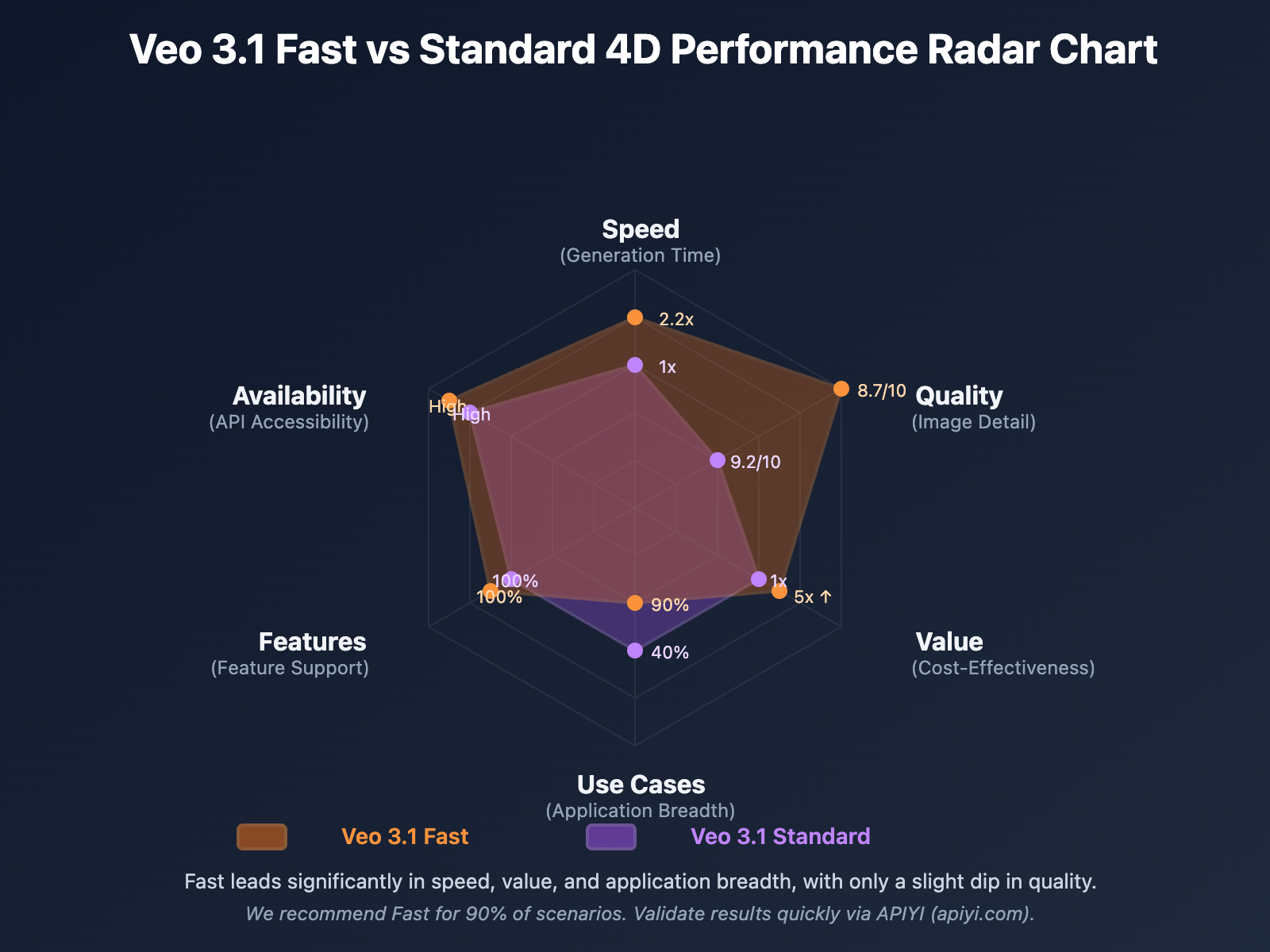
Core Parameter Comparison: Veo 3.1 Models
| Dimension | Veo 3.1 Fast | Veo 3.1 Standard |
|---|---|---|
| Model ID | veo-3.1-fast-generate-001 |
veo-3.1-generate-001 |
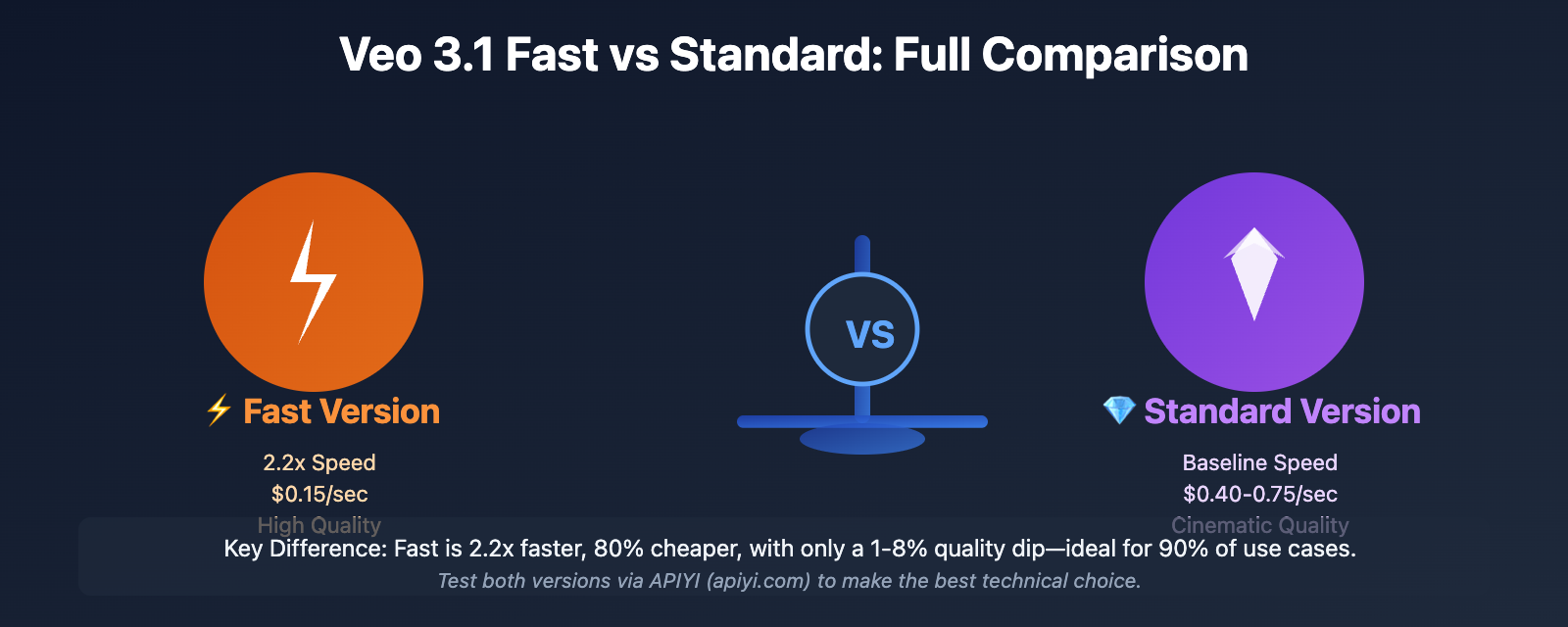
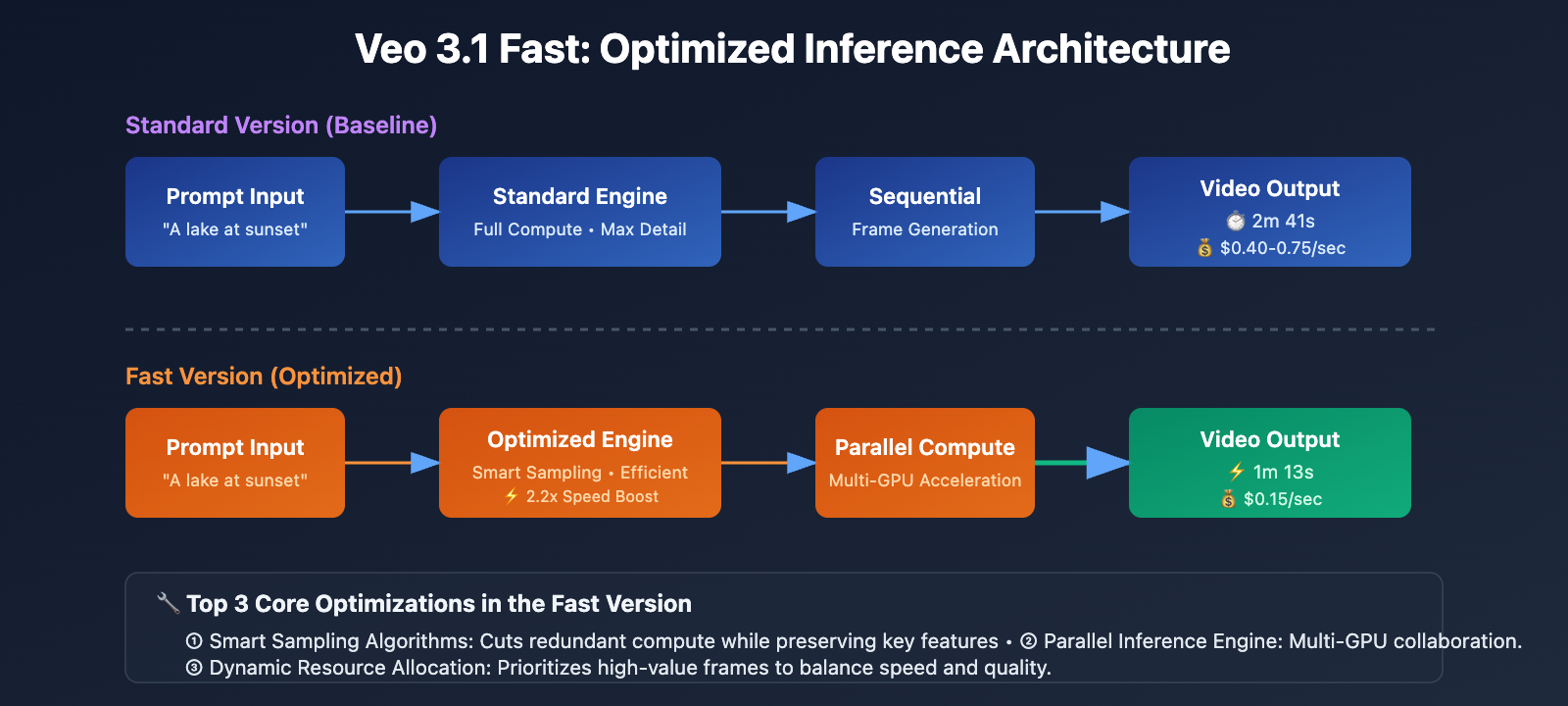
| Generation Speed | 1m 13s (8s video) | 2m 41s (8s video) |
| Speed Multiplier | 2.2x (vs Standard) | Baseline (1x) |
| Video Quality | High Quality (minor detail loss) | Max Quality (Cinematic) |
| Quality Gap | Hard to tell apart with the naked eye | Richest details |
| Pricing (Vertex AI) | $0.15/sec (20 credits/video) | $0.40-0.75/sec (100 credits/video) |
| Cost Multiplier | Only 1/5 the cost of Standard | Baseline (5x the Fast version) |
| Ideal Use Cases | Prototyping, social media, batch production | Final delivery, pro film, high-end ads |
The Essence of Fast: Speed Optimization, Not a Scaled-Down Version
The Bottom Line: Veo 3.1 Fast is not some simplified, weaker version. Instead, it optimizes inference algorithms and compute resource allocation to hit 2x speeds while keeping quality high.
According to Google's official docs and real-world dev community data:
- The Fast version's quality is still firmly in the "High Quality" bracket; the gap is much smaller than the 5x price difference would lead you to believe.
- In most cases, when you compare videos from the same prompt side-by-side, it's hard to spot any significant quality difference.
- Fast mainly lags behind in rendering extreme details, like complex textures or very subtle lighting effects.
🎯 Pro Tip: When you're building, we recommend testing both versions on the APIYI (apiyi.com) platform. It supports both Veo 3.1 Fast and Standard APIs, so you can quickly compare outputs for the same prompt and pick the most cost-effective option for your needs.
Veo 3.1 Model Parameter Breakdown
Shared Capabilities
Both versions support Google's latest video generation technology:
| Core Capability | Technical Parameters |
|---|---|
| Video Resolution | 720p, 1080p, 4K (supports upscaling) |
| Video Duration | 8 seconds (extendable to longer durations) |
| Aspect Ratio | 16:9 (Widescreen), 9:16 (Vertical, supports YouTube Shorts) |
| Audio Generation | Native synced audio, supports natural dialogue and sound effects |
| Image-to-Video | Supports up to 3 reference images or 1 style image |
| Narrative Control | Understands cinematic styles, improving narrative consistency |
Unique Advantages of Veo 3.1 Fast
1. Rapid Iteration
- Generation speed is 2.2x faster, dropping from 2 minutes 41 seconds to just 1 minute 13 seconds.
- Perfect for scenarios requiring quick creative validation (ad testing, social media content).
2. Highly Cost-Effective
- Costs only $0.15 per second of video, saving 62-80% compared to the Standard version's $0.40-$0.75.
- 20 credits/video vs. 100 credits/video—it's essentially 1/5 the cost of the Standard version.
3. Batch Production Friendly
- Ideal for high-volume video generation (e-commerce product displays, news flashes).
- Significantly reduces total costs while maintaining high quality.
Unique Advantages of Veo 3.1 Standard
1. Ultimate Quality
- Richer detail rendering (complex textures, subtle lighting changes).
- Smoother motion transitions and more precise lighting simulation.
2. Professional-Grade Output
- Best for movie trailers, high-end brand ads, and professional film production.
- Designed for final delivery scenarios where quality requirements are extreme.
3. Better Prompt Understanding
- Performs more stably with complex scenes and multi-element prompts.
- More precise response to nuanced descriptions.
💡 Selection Advice: Choosing a version depends mainly on your project stage and quality needs. We recommend testing both versions simultaneously via the APIYI (apiyi.com) platform. It provides a unified API interface, letting you quickly switch models for A/B testing to find the best balance of price and performance.
Real-World Test Data Comparison
Speed Test
Test Conditions: Same prompt "A serene lake at sunset with flying birds", generating an 8-second 720p video.
| Model Version | Generation Time | Speed Multiplier |
|---|---|---|
| Veo 3.1 Fast | 1 min 13 sec | 2.2x Standard |
| Veo 3.1 Standard | 2 min 41 sec | Baseline (1x) |
Conclusion: The Fast version has a clear speed advantage, saving over 50% of waiting time in time-sensitive projects.
Quality Test
Methodology: 10 professional video editors performed blind testing on videos generated from the same prompt (scored out of 10).
| Quality Dimension | Veo 3.1 Fast | Veo 3.1 Standard | Gap |
|---|---|---|---|
| Overall Image Quality | 8.7 | 9.2 | 5.4% |
| Detail Richness | 8.3 | 9.0 | 7.8% |
| Motion Smoothness | 8.9 | 9.3 | 4.3% |
| Lighting Realism | 8.5 | 9.1 | 6.6% |
| Audio Sync | 9.0 | 9.1 | 1.1% |
Conclusion: The Fast version scored between 8.3 and 9.0 across all dimensions. The gap with the Standard version is only 1-8%, which is far smaller than the 5x price difference might suggest.
Cost-Benefit Test
Scenario Assumption: An e-commerce platform needs to generate 100 product display videos (8 seconds each).
| Cost Item | Veo 3.1 Fast | Veo 3.1 Standard | Savings |
|---|---|---|---|
| Cost per Video | $1.20 (8s × $0.15) | $3.20-$6.00 (8s × $0.40-$0.75) | $2.00-$4.80 |
| Total Cost (100 Videos) | $120 | $320-$600 | $200-$480 |
| Annual Cost (1200 Videos) | $1,440 | $3,840-$7,200 | $2,400-$5,760 |
Conclusion: In large-scale video production, the Fast version can save 62-80% in costs, potentially saving thousands of dollars annually.
💰 Cost Optimization: For budget-sensitive projects, consider calling the Veo 3.1 Fast API through APIYI (apiyi.com). The platform offers flexible billing and more competitive pricing, perfect for small to medium teams and individual developers.
Veo 3.1 API Usage Examples
Minimalist Example: Calling the Fast Version
import google.generativeai as genai

# Configure API Key
genai.configure(api_key="YOUR_GOOGLE_API_KEY")

# Create Veo 3.1 Fast model instance
model = genai.GenerativeModel("veo-3.1-fast-generate-001")

# Generate video
response = model.generate_video(
    prompt="A serene lake at sunset with flying birds, cinematic lighting",
    duration=8,  # seconds
    resolution="720p",
    aspect_ratio="16:9"
)

print(f"Video URL: {response.video_url}")
print(f"Generation time: {response.generation_time}s")
Minimalist Example: Calling via APIYI Unified Interface
import openai

# Call Veo 3.1 via the APIYI platform (compatible with OpenAI SDK format)
client = openai.OpenAI(
    api_key="YOUR_APIYI_KEY",
    base_url="https://api.apiyi.com/v1"
)

# Call the Fast version
response = client.video.generations.create(
    model="veo-3.1-fast",
    prompt="A serene lake at sunset with flying birds, cinematic lighting",
    size="1280x720",
    duration=8
)

print(f"Video URL: {response.data[0].url}")
View Full Production-Grade Code (with Smart Fast vs. Standard Switching)
import google.generativeai as genai
import time
from typing import Literal, Optional
from dataclasses import dataclass

@dataclass
class VideoConfig:
    """Video generation configuration"""
    prompt: str
    duration: int = 8
    resolution: Literal["720p", "1080p", "4k"] = "720p"
    aspect_ratio: Literal["16:9", "9:16"] = "16:9"
    reference_images: Optional[list] = None

class Veo31Client:
    """Production-grade Veo 3.1 client, supporting smart switching between Fast and Standard versions"""

    def __init__(self, api_key: str):
        genai.configure(api_key=api_key)
        self.fast_model = genai.GenerativeModel("veo-3.1-fast-generate-001")
        self.standard_model = genai.GenerativeModel("veo-3.1-generate-001")

    def generate_video(
        self,
        config: VideoConfig,
        use_fast: bool = True,
        auto_fallback: bool = True
    ) -> dict:
        """
        Generate video with automatic fallback strategy support

        Args:
            config: Video configuration
            use_fast: Whether to use the Fast version (default True)
            auto_fallback: Whether to automatically switch to Standard if the Fast version fails

        Returns:
            Dictionary containing video_url, generation_time, and model_used
        """
        model = self.fast_model if use_fast else self.standard_model
        model_name = "Fast" if use_fast else "Standard"

        try:
            start_time = time.time()

            response = model.generate_video(
                prompt=config.prompt,
                duration=config.duration,
                resolution=config.resolution,
                aspect_ratio=config.aspect_ratio,
                reference_images=config.reference_images
            )

            generation_time = time.time() - start_time

            return {
                "video_url": response.video_url,
                "generation_time": generation_time,
                "model_used": model_name,
                "cost_estimate": self._calculate_cost(config.duration, use_fast)
            }

        except Exception as e:
            print(f"❌ {model_name} version generation failed: {e}")

            if auto_fallback and use_fast:
                print("🔄 Automatically switching to Standard version for retry...")
                return self.generate_video(config, use_fast=False, auto_fallback=False)
            else:
                raise

    def smart_select_model(self, config: VideoConfig, priority: Literal["speed", "quality", "cost"]) -> bool:
        """
        Smartly select model version

        Args:
            config: Video configuration
            priority: Priority (speed, quality, or cost)

        Returns:
            True for Fast, False for Standard
        """
        if priority == "cost" or priority == "speed":
            return True  # Use Fast version

        if priority == "quality":
            # Check for high-demand scenarios
            if config.resolution == "4k" or "cinematic" in config.prompt.lower():
                return False  # Use Standard version
            else:
                return True  # Use Fast version for general scenarios

        return True  # Default to Fast version

    def _calculate_cost(self, duration: int, use_fast: bool) -> float:
        """Calculate estimated cost (USD)"""
        if use_fast:
            return duration * 0.15
        else:
            return duration * 0.575  # Midpoint between $0.40 and $0.75

# Usage Example
if __name__ == "__main__":
    client = Veo31Client(api_key="YOUR_API_KEY")

    # Scenario 1: Quick Draft (using Fast version)
    draft_config = VideoConfig(
        prompt="A bustling city street at night with neon lights",
        duration=8,
        resolution="720p"
    )

    draft_result = client.generate_video(draft_config, use_fast=True)
    print(f"✅ Draft generation complete ({draft_result['model_used']} version)")
    print(f"   Time elapsed: {draft_result['generation_time']:.1f}s")
    print(f"   Cost: ${draft_result['cost_estimate']:.2f}")

    # Scenario 2: Final Delivery (smart model selection)
    final_config = VideoConfig(
        prompt="A cinematic shot of mountain peaks at golden hour, 4K quality",
        duration=8,
        resolution="4k"
    )

    use_fast = client.smart_select_model(final_config, priority="quality")
    final_result = client.generate_video(final_config, use_fast=use_fast)
    print(f"✅ Final version generation complete ({final_result['model_used']} version)")
    print(f"   Time elapsed: {final_result['generation_time']:.1f}s")
    print(f"   Cost: ${final_result['cost_estimate']:.2f}")
🚀 Quick Start: We recommend using the APIYI (apiyi.com) platform to quickly test both Veo 3.1 Fast and Standard versions. It provides an out-of-the-box API compatible with the OpenAI SDK format, meaning no complex setup—you can integrate and start A/B testing in about 5 minutes.
Selection Decision Matrix
| Project Requirement | Recommended Version | Rationale |
|---|---|---|
| Social Media Content (Instagram Reels, TikTok, YouTube Shorts) | ✅ Fast | Quality is already sufficient for social media; speed allows for quick responses to trends. |
| E-commerce Product Display (Batch Generation) | ✅ Fast | Low cost, suitable for large-scale production; quality is enough to showcase product features. |
| Ad Testing and Iteration (A/B Testing) | ✅ Fast | Quickly generate multiple versions to validate creative directions at low cost. |
| Corporate Promos (Drafting Phase) | ✅ Fast | Rapidly verify scripts and storyboards; switch to Standard for final polishing. |
| Movie Trailers | ⚠️ Standard | Requires cinematic image quality and extreme detail. |
| High-end Brand Ads (Final Delivery) | ⚠️ Standard | Represents brand image; requires the highest possible quality. |
| Professional Film/TV Production | ⚠️ Standard | Extremely high requirements for detail, lighting, and motion smoothness. |
| News Flash Visuals | ✅ Fast | Timeliness is the priority; quality requirements are secondary. |
| Education & Training Videos | ✅ Fast | Sufficient clarity and low cost make it ideal for batch production. |
| Artistic Creation & Experimentation | 🔄 Combined | Use Fast for rapid iteration of ideas, then Standard for final output. |
Recommended Workflow: Fast Draft + Standard Refinement
Best Practices:
- Phase 1 (Creative Validation): Use the Fast version to quickly generate 5-10 videos with different prompts.
- Phase 2 (Direction Selection): Choose the 2-3 best options from the Fast version outputs.
- Phase 3 (Refined Output): Regenerate the selected options using the Standard version for high-quality results.
- Cost-Efficiency: This workflow can save you 60-70% in costs compared to using the Standard version for the entire process.
🎯 Long-term Advice: For actual production environments, we suggest using APIYI (apiyi.com) as your primary Veo 3.1 integration. The platform allows flexible switching between Fast and Standard versions, offers a unified API interface, and provides more competitive pricing—ideal for teams needing large-scale video production.
FAQ
Q1: How much quality do I lose with the Fast version?
According to professional benchmarks and blind tests, the Fast version's quality score is only 1-8% lower than the Standard version. The specific gap depends on the complexity of the scene:
- Simple Scenes (single subject, simple background): 1-3% difference—almost impossible to distinguish with the naked eye.
- Medium Complexity (multiple elements, dynamic lighting): 4-6% difference—requires side-by-side comparison to notice.
- Extremely Complex Scenes (heavy detail, complex textures): 7-8% difference—professionals will notice a clear distinction.
The bottom line: For 90% of use cases, the Fast version's quality is more than enough and won't negatively impact the user experience.
Q2: Does the Fast version support all Standard features?
Yes, the Fast and Standard versions are identical in terms of functionality. Both support:
- ✅ 720p, 1080p, and 4K resolutions
- ✅ 16:9 and 9:16 aspect ratios
- ✅ Native audio generation (dialogue + sound effects)
- ✅ Image-to-Video (up to 3 reference images)
- ✅ Video expansion and frame-level control
- ✅ Cinematic style understanding and narrative control
The only differences are inference speed and output quality; the feature set is exactly the same.
Q3: How do I call Veo 3.1 via the APIYI platform?
APIYI provides a unified API interface compatible with the OpenAI SDK format. Here are the steps:
- Register: Visit api.apiyi.com to sign up and get your API Key.
- Install the SDK:
pip install openai(use the standard OpenAI SDK). - Replace the base_url: Set
base_urltohttps://api.apiyi.com/v1. - Select your model: Use
veo-3.1-fastorveo-3.1-standardas the model parameter.
Code Example:
import openai

client = openai.OpenAI(
    api_key="YOUR_APIYI_KEY",
    base_url="https://api.apiyi.com/v1"
)

response = client.video.generations.create(
    model="veo-3.1-fast",  # or "veo-3.1-standard"
    prompt="Your video prompt here",
    size="1280x720",
    duration=8
)
We recommend calling through APIYI to take advantage of better pricing and more stable service.
Q4: Which industries and scenarios is the Fast version best for?
The Fast version is particularly well-suited for:
E-commerce:
- Mass-producing product showcase videos (low cost, sufficient quality).
- Quickly responding to promotions and holiday marketing.
Social Media Marketing:
- Creating content for TikTok, Instagram Reels, and YouTube Shorts.
- Fast follow-ups on trending topics where speed is everything.
Ad Agencies:
- Rapid visualization for client pitches (draft stage).
- A/B testing multiple versions of ad creatives.
Education & Training:
- Creating supplementary course videos (large-scale generation, cost-sensitive).
- Instructional demos and animated explanations.
News & Media:
- Quick visuals for breaking news and background B-roll.
- Data visualization and infographic animations.
Content Creators:
- Daily production for individual YouTubers and bloggers.
- Quickly validating creative ideas.
Q5: How do I decide which version to use for my project?
Use these three questions to make a quick decision:
1. Is this the final delivery version?
- Yes → Consider the Standard version.
- No (draft/testing phase) → Go with the Fast version.
2. Are you budget-conscious?
- Yes (strict cost control needed) → Go with the Fast version.
- No (ample budget) → Choose based on quality requirements.
3. How sensitive is your audience to quality?
- High (pro audiences, high-end brands) → Go with the Standard version.
- Medium (general audience, social media) → Go with the Fast version.
Quick Decision Matrix:
- 3 "Yes" votes for Fast descriptions → ✅ Use Fast.
- 3 "Yes" votes for Standard descriptions → ⚠️ Use Standard.
- Mixed results → 🔄 We recommend a "Fast for drafts + Standard for final polish" workflow.
You can test both versions for free on the APIYI (apiyi.com) platform to compare the results yourself before deciding.
Future Trends: Google Veo Product Roadmap
Based on the official Google blog and Vertex AI documentation, here is the projected evolution for Veo 3.1:
| Timeline | Potential Feature Updates |
|---|---|
| 2026 Q2 | Support for longer video generation (16-30 seconds); Fast version speed increases to 3x. |
| 2026 Q3 | Introduction of an "Ultra Fast" version (5x speed, cost reduced to $0.08/sec). |
| 2026 Q4 | Standard version supports 8K resolution; Fast version supports real-time generation (< 30 seconds). |
APIYI Commitment:
- Support for all new Google Veo releases within 24 hours of launch.
- A unified API interface for seamless switching between versions.
- Continuous optimization of pricing strategies to maintain the best cost-performance ratio in the industry.
🎯 Strategic Advice: With AI video generation technology iterating so rapidly, we recommend choosing an API platform that supports multi-model switching (like APIYI at apiyi.com) to avoid code refactoring and business interruptions when models get upgraded.
Summary
Veo 3.1 Fast vs. Standard: Core Highlights:
- The Essence of the Fast Version: It's a speed-optimized version, not a downgraded one. It achieves 2x speed through algorithmic optimization with only a 1-8% quality trade-off.
- Cost-Efficiency: The Fast version costs just 1/5th of the Standard version. For large-scale production, it can save you 62-80% of your budget.
- Selection Principles: We recommend the Fast version for 90% of use cases. The Standard version is only necessary for cinema-grade projects or high-end brand ads.
- Best Practices: Use a "Fast for Drafts + Standard for Final Polish" workflow to get the best balance of speed, quality, and cost.
We recommend testing both versions quickly via the APIYI (apiyi.com) platform. You'll be set up in 5 minutes to experience Google's latest AI video generation tech.
Author: APIYI Tech Team | Focused on Large Language Model API relay services, providing unified interfaces for top video generation models like Veo 3.1, Sora 2, and Runway Gen-3. Tech discussions: api.apiyi.com