If you're seeing the error message "Unable to generate — Hmmm something didn't look right with your request" when using Sora 2, don't panic! Even Plus and Pro members run into this. This article breaks down 7 common reasons why Sora 2 might fail to generate videos and offers solutions.
Core Value: Pinpoint your Sora 2 error in 3 minutes and quickly get back to generating videos.
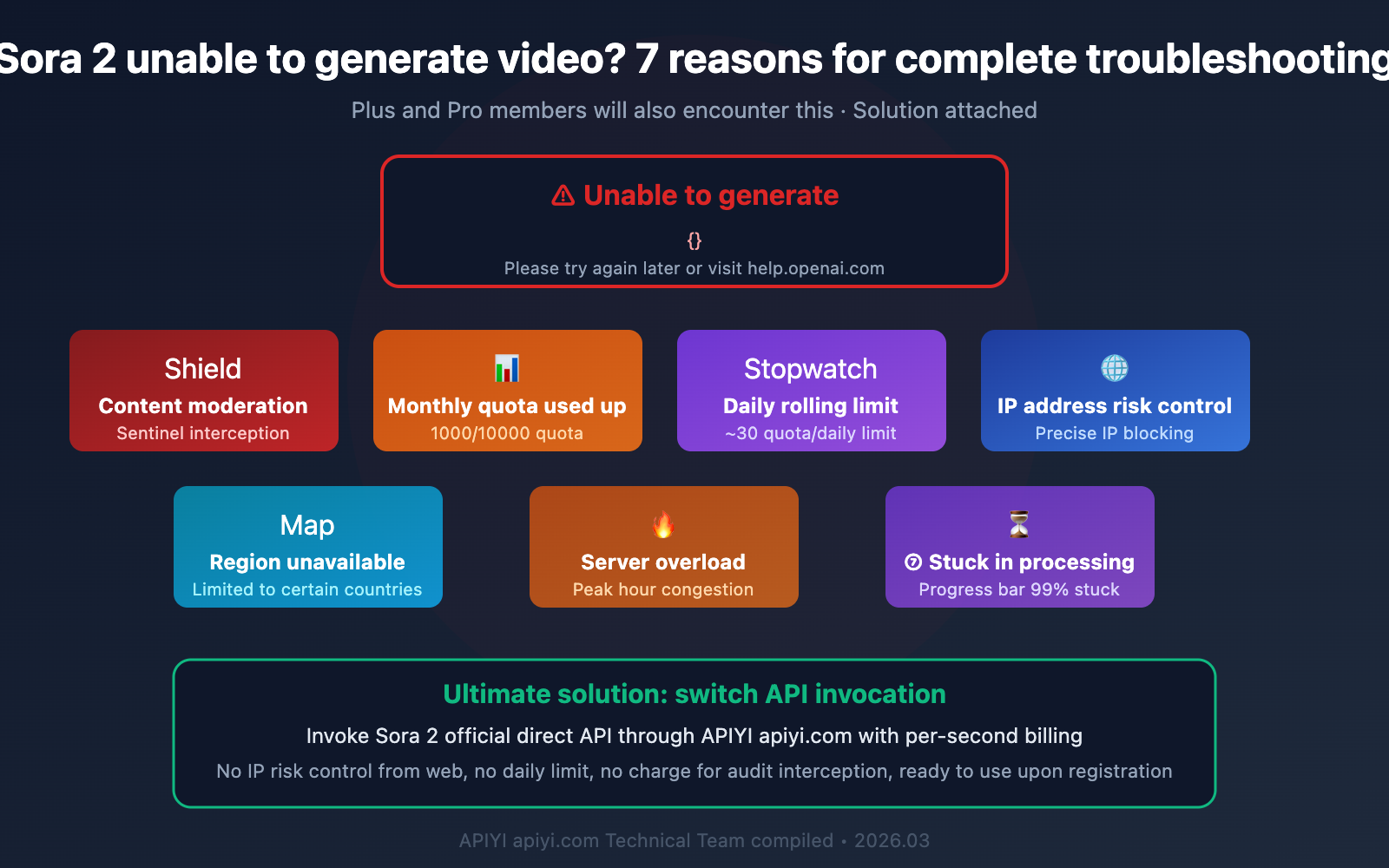
Overview of 7 Reasons Why Sora 2 Fails to Generate Videos
Let's quickly figure out which situation your error falls into:
| No. | Reason | Error Message | Scope | Difficulty |
|---|---|---|---|---|
| 1 | Content Safety Review (Sentinel) | something didn't look right | All Users | ⭐ Easy |
| 2 | Monthly Quota Exhausted | Unable to Generate / Button Grayed Out | Plus/Pro | ⭐ Easy |
| 3 | Daily Rolling Limit | Generation Frequency Limited | Plus/Pro | ⭐ Easy |
| 4 | IP Address Risk Control | Request Exception / Try Again Later | Specific IP Ranges | ⭐⭐ Medium |
| 5 | Region Unavailable | not available in your country | Non-Open Regions | ⭐⭐ Medium |
| 6 | Server Overload | under heavy load | All Users | ⭐ Wait |
| 7 | Video Stuck in Processing | Progress Bar Stuck at 99% | API Users | ⭐⭐ Medium |
Reason 1: Sora 2 Content Safety Review Trigger (Sentinel)
This is the most common reason for errors, and it's likely the cause of the "Hmmm something didn't look right with your request" error you're seeing in your screenshot.
Sora 2 Sentinel Content Review Mechanism
OpenAI has deployed a content safety system called Sentinel for Sora 2. This system scans your prompt before video generation, employing a conservative "better safe than sorry" strategy. The error code is sentinel_block, and your request gets blocked right at the prompt stage.
Which Prompts Trigger Sentinel Review
| Trigger Type | Example Scenarios | Strictness Level |
|---|---|---|
| Violent Content | Descriptions of combat, explosions, weapons, etc. | 🔴 Strict |
| Adult Content | Any sexually suggestive or nude descriptions | 🔴 Strict |
| Real People | Names of celebrities, political figures | 🔴 Strict |
| Copyrighted Characters | Character names like Disney, Marvel, etc. | 🟡 Moderately Strict |
| Accidental Combinations | Seemingly harmless but trigger keyword combinations | 🟡 Common |
| Medical/Drugs | Surgery scenes, drug names | 🟡 Moderately Strict |
| Extreme Weather | Descriptions of certain disaster scenarios | 🟢 Occasional |
Solutions
Method 1: Modify Your Prompt Wording
Avoid sensitive keywords and use more abstract or artistic phrasing instead. For example:
- ❌ "A person fighting" → ✅ "Two characters performing martial arts"
- ❌ "explosion in the city" → ✅ "dramatic fireworks display over a cityscape"
- ❌ "Elon Musk walking" → ✅ "a businessman in a dark suit walking confidently"
Method 2: Call via API
When you call via API, a sentinel_block won't incur charges, so you can confidently optimize your prompt and retry multiple times.
🎯 Pro Tip: When invoking the Sora 2 API through the APIYI (apiyi.com) platform, Sentinel review triggers don't incur charges. You can repeatedly adjust your prompt until it passes the review, without worrying about wasting credits.
Reason 2: Sora 2 Monthly Credit Exhaustion
Even for paid members, Sora 2's video generation has credit limits.
Sora 2 Monthly Credit Comparison Across Versions
| Subscription Version | Monthly Credits | Videos Generatable (480p/5s) | Videos Generatable (720p/5s) | Credits Roll Over? |
|---|---|---|---|---|
| Free User | 0 Credits | ❌ Cannot generate at all | ❌ Cannot generate at all | — |
| ChatGPT Plus | 1,000 Credits | ~50 videos | ~12 videos | ❌ Don't roll over |
| ChatGPT Pro | 10,000 Credits | ~500 videos | ~125 videos | ❌ Don't roll over |
| API Pay-per-second | Top-up as needed | Unlimited | Unlimited | ✅ Balance remains valid |
Key Details
- Credits don't roll over: They reset on the 1st of each month, and any unused credits from the previous month expire.
- Resolution consumes credits: 720p videos consume about 4 times the credits of 480p videos.
- Duration consumes credits: Longer videos consume more credits.
Solutions
If you've confirmed your credits are exhausted:
- Wait for next month's credit reset.
- Upgrade from Plus to Pro for 10x the credits.
- Switch to API pay-per-second mode for on-demand usage without monthly limits.
💰 Cost Optimization: If your video generation needs are inconsistent, invoking the Sora 2 API through the APIYI (apiyi.com) platform on a pay-per-second basis is more flexible. You're not bound by monthly credit limits; you pay for what you use, and your balance remains valid without expiring.
Reason 3: Sora 2 Daily Rolling Limit
Many people don't know that besides the monthly quota, Sora 2 also has a daily rolling limit (around 30 credits).
Daily Limit Mechanism
This mechanism is designed to prevent users from burning through their entire monthly quota in a short period. Even if your monthly quota is sufficient, generating too many videos in one day will trigger this limit.
Symptoms
- You might be able to generate normally in the morning, but suddenly can't in the afternoon.
- Error messages might be vague and easily confused with other issues.
- It usually recovers automatically after a few hours.
Solutions
- Wait a few hours and try again (the rolling limit will gradually reset).
- Distribute your daily generation volume reasonably.
- For bulk generation needs, using API calls is more stable.
Reason 4: Sora 2 IP Address Risk Control
On January 20, 2026, a large number of Sora 2 users suddenly encountered risk control errors. This wasn't a server issue, but rather OpenAI's precise risk control strategy targeting specific IP addresses.
Symptoms of IP Risk Control
- Error message: "processing_error – We're under heavy load, please try again later"
- Actual reason: It's not a server load issue, but rather your IP being flagged.
- Characteristic: You can use it normally after switching to a different IP address.
Which IPs are Prone to Risk Control
- Data center IPs (cloud server IPs)
- VPN nodes shared by many users
- IPs with excessively high request frequency in a short period
- IP ranges with a history of abnormal behavior
Solutions
- Switch to a different network environment.
- Use high-quality, dedicated IP nodes.
- Clear browser cache and cookies (sometimes browser cache can cause location detection errors).
- Bypass web-side IP restrictions via API calls.
🔒 Stable Solution: Invoke the Sora 2 API via the APIYI apiyi.com platform, unaffected by client IP risk control, and offers higher API stability. The platform maintains a direct connection channel with OpenAI, preventing request failures caused by client-side IP issues.
Reason 5: Sora 2 Region Unavailable
Sora 2 isn't globally available right now. As of March 2026, its availability is limited to certain regions.
Sora 2 Available Regions
Currently, Sora 2 is available in the following countries/regions: the United States, Canada, Japan, South Korea, Taiwan, Thailand, Vietnam, and others.
If you're not in one of these regions, visiting sora.com will show you a message saying "Sora is not available in your country yet".
Solutions
- Access it using a network node from an available region.
- API calls aren't restricted by region.
- Use a third-party integration platform to access Sora 2's capabilities.
Reason 6: Sora 2 Server Overload
During peak hours, Sora 2 can indeed experience server overload.
How to Tell
- The error message includes "under heavy load" and isn't due to IP rate limiting.
- Many users are reporting the same issue simultaneously (check the OpenAI status page).
- It usually resolves itself within 2 hours.
Solutions
- Wait 15-30 minutes and then try again.
- Avoid peak hours (9 AM – 3 PM US time).
- Using API calls is generally more stable than the web interface.
Reason 7: Sora 2 Video Stuck in Processing
This issue primarily affects API users. Video generation tasks are submitted, but the status remains in_progress, getting stuck at 99%.
Known Issues
Community developers have reported Sora 2 and Sora 2 Pro video generation tasks staying in in_progress status for over 7 hours, neither transitioning to completed nor failed.
Solutions
- Set a reasonable timeout (10-15 minutes is recommended).
- Resubmit the task after a timeout.
- Retry after shortening the video duration or lowering the resolution.
- Contact OpenAI support (via help.openai.com).
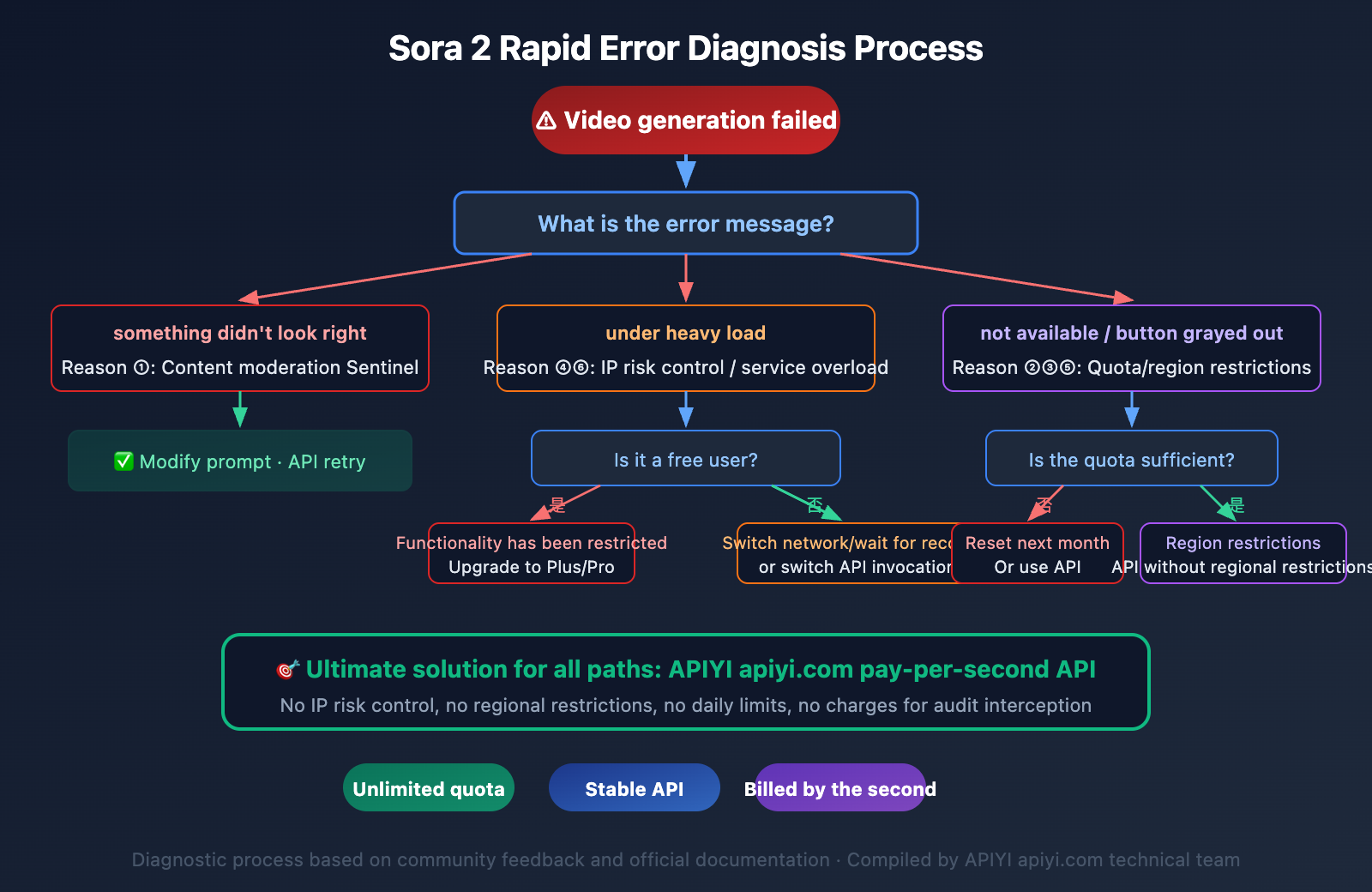
Quick Troubleshooting Guide for Sora 2 Video Generation Failures
Follow these steps in order to quickly pinpoint the problem:
Step 1: Check the Error Message
- "something didn't look right" → content moderation (Reason 1)
- "under heavy load" → service overload or IP risk control (Reasons 4/6)
- "not available in your country" → region restrictions (Reason 5)
- Button grayed out/no clear error → quota issues (Reasons 2/3)
Step 2: Check Your Quota
- Confirm your subscription status (Plus/Pro).
- Check your remaining monthly quota.
- Confirm if you've generated a large number of videos today.
Step 3: Try a Different Approach
- Modify the prompt wording and retry.
- Try a different network environment.
- Attempt API invocation instead of the web interface.
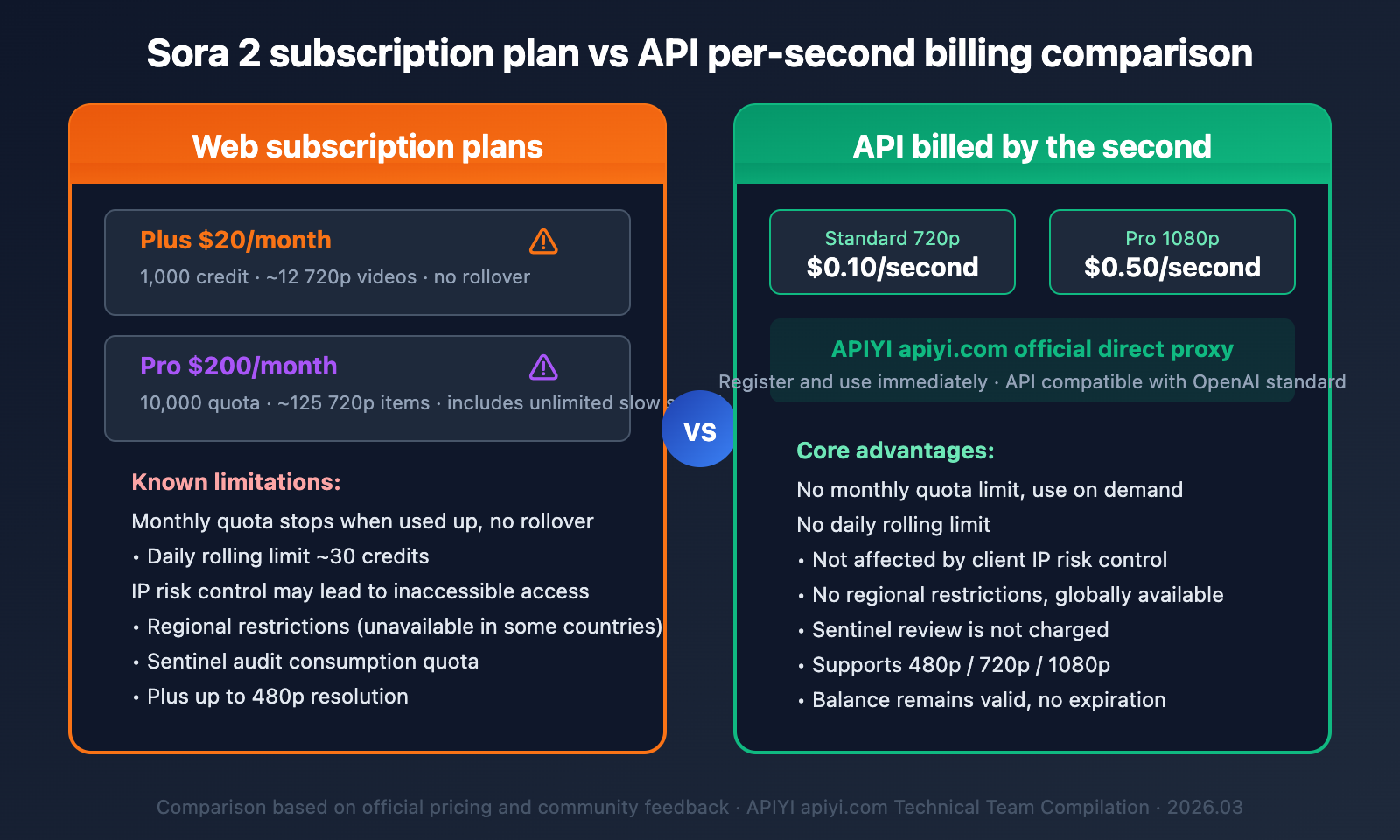
🚀 Ultimate Solution: If you frequently encounter various restrictions and errors with the Sora 2 web interface, the most stable way is to switch to API invocation. Through the APIYI apiyi.com platform, you can directly invoke the official Sora 2 API proxy service with pay-per-second billing, free from web interface IP risk control, daily quotas, and other restrictions. You can start using it right after registration.
Common Issues with Sora 2 Video Generation Failures
Q1: Why do Plus members also get ‘Unable to generate’ errors?
The most common reason Plus members encounter 'Unable to generate' is that their prompt triggers the Sentinel content moderation system. This isn't related to your subscription level—even Pro members will be blocked if their prompt contains sensitive vocabulary or triggers specific keyword combinations. The solution is to modify your prompt's wording to avoid sensitive terms. If you believe your prompt is perfectly fine but was mistakenly blocked, you can retry by invoking the API through the APIYI apiyi.com platform; Sentinel moderation won't incur charges there.
Q2: Can free users still use Sora 2?
No, they can't. As of January 10, 2026, OpenAI has completely restricted free users from accessing Sora's video and image generation features. The 'under heavy load' message free users see is actually a feature restriction, not a server issue. You'll need to upgrade to ChatGPT Plus ($20/month) or Pro ($200/month), or use Sora 2 via API on a pay-per-second basis.
Q3: Do Sora 2 API invocations also trigger content moderation?
Yes, API invocations also go through Sentinel content moderation. The difference is that when an API invocation triggers moderation, it doesn't incur charges, so you can repeatedly modify your prompt until it passes. On the other hand, each failure on the web interface might consume your quota. By invoking the Sora 2 API through the APIYI apiyi.com platform, Sentinel blocks won't be charged, allowing you to debug your prompt with peace of mind.
Q4: How can I check my remaining Sora 2 quota?
After logging into sora.com, you can check your current subscription's remaining quota on the settings page. Plus users get 1,000 quota per month, and Pro users get 10,000 quota per month; neither rolls over. If the page doesn't explicitly show your remaining quota, you can try generating the shortest, lowest-resolution video as a test.
Q5: Why am I still getting errors after changing the prompt?
If you're getting errors even after trying multiple different prompts, the issue might not be content moderation but rather IP risk control or regional restrictions. Try switching your network environment, or clear your browser cache and cookies and then retry. If it still doesn't work, we recommend switching to API invocation to bypass the web interface's limitations.
Summary of Sora 2 Video Generation Issues
There are various reasons why Sora 2 might throw an 'Unable to generate' error, but most situations can be categorized into these three types:
- Content Moderation Triggered — This can be resolved by modifying your prompt's wording; API invocations aren't charged, so you can retry repeatedly.
- Quota or Restrictions — Confirm your subscription status and remaining quota, and upgrade or switch to API if necessary.
- Network or Environment — IP risk control, regional restrictions; switch networks or use API invocation to bypass them.
For developers and creators who frequently use Sora 2, we recommend invoking the official Sora 2 direct-transfer API through the APIYI apiyi.com platform on a pay-per-second basis. This can effectively circumvent various web interface restrictions and provide a more stable video generation experience.
References
-
OpenAI Sora 2 Common Error Troubleshooting: Detailed Explanation of 8 API Error Codes
- Link:
help.apiyi.com/en/sora-2-api-error-messages-complete-guide-en.html - Description: Includes a complete analysis of errors like
sentinel_blockandrate_limit.
- Link:
-
OpenAI Community – Sora Video Generation Lag: Developer Feedback
- Link:
community.openai.comSora-related discussion threads - Description: Includes community discussions on issues like 99% lag and abnormal API status.
- Link:
-
Sora 2 Content Moderation Restrictions Explained: Security Policy Description
- Link:
glbgpt.com/hub/sora-2-content-restrictions-explained - Description: The Sentinel system's moderation mechanism and response strategies.
- Link:
-
Sora 2 Risk Control Upgrade and IP Restrictions: Latest Solutions for 2026
- Link:
help.apiyi.com/en/sora-2-api-rate-limit-solution-2026-en.html - Description: Analysis of IP risk control mechanisms and solutions.
- Link:
📝 This article was written by the APIYI Team. For more Sora 2 usage tutorials and API integration guides, visit APIYI apiyi.com for the latest content and technical support.