The price and speed differences for the Gemini 3 Pro Image Preview API (also known as Nano Banana Pro) are core metrics that developers must focus on when choosing an API provider. As Google's latest flagship image generation model, Gemini 3 Pro Image is available through several third-party platforms, but the variations in cost and performance are massive. In this post, we'll dive deep into real-world test data to compare the performance of three major providers: fal.ai, KIE.ai, and APIYI (apiyi.com).
Core Value: Through real price comparisons and speed tests, we'll help you quickly find the most cost-effective Gemini 3 Pro Image API provider, potentially saving you up to 79% on monthly API costs.
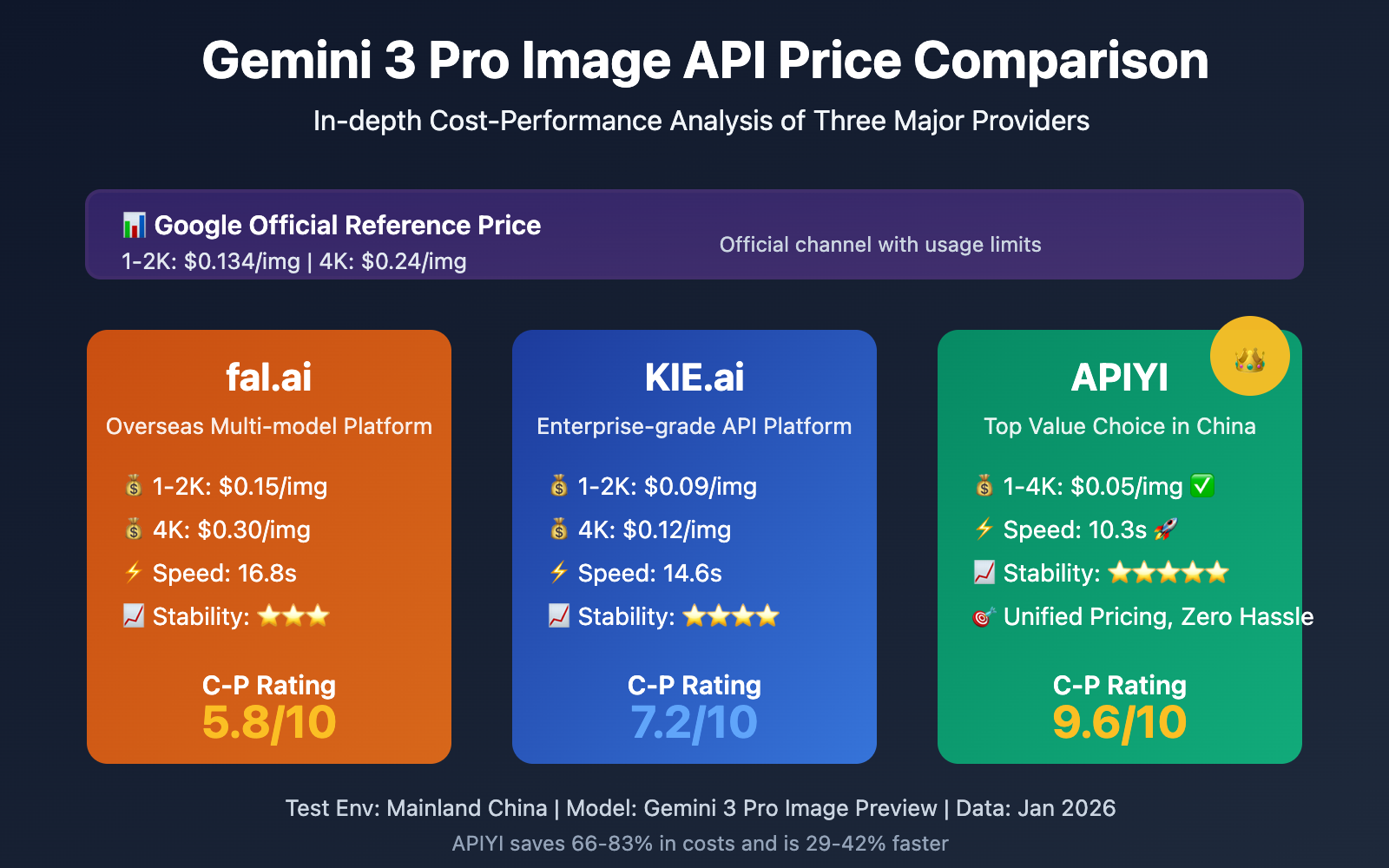
Core Comparison of the Top Three Gemini 3 Pro Image API Providers
Before we jump into the detailed testing, let's look at the basic positioning of these three providers and the key features of the Gemini 3 Pro Image API:
| Provider | Website | Gemini 3 Pro Image Pricing | Core Advantages | Target Users |
|---|---|---|---|---|
| fal.ai | fal.ai | $0.15/img (1-2K) $0.30/img (4K) |
Wide variety of models, overseas nodes | Global developers, multi-model needs |
| KIE.ai | KIE.ai | $0.09/img (1-2K) $0.12/img (4K) |
Enterprise-grade SLA, tiered pricing | Corporate clients, high-concurrency scenes |
| APIYI | apiyi.com | $0.05/img (Unified 1-4K) | Lowest price, high speed, official relay guarantee | Chinese developers, cost-conscious users |
Key Features of the Gemini 3 Pro Image Model
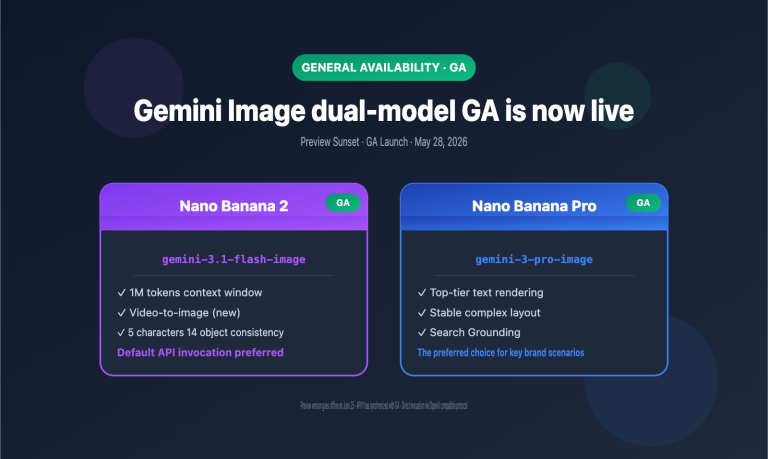
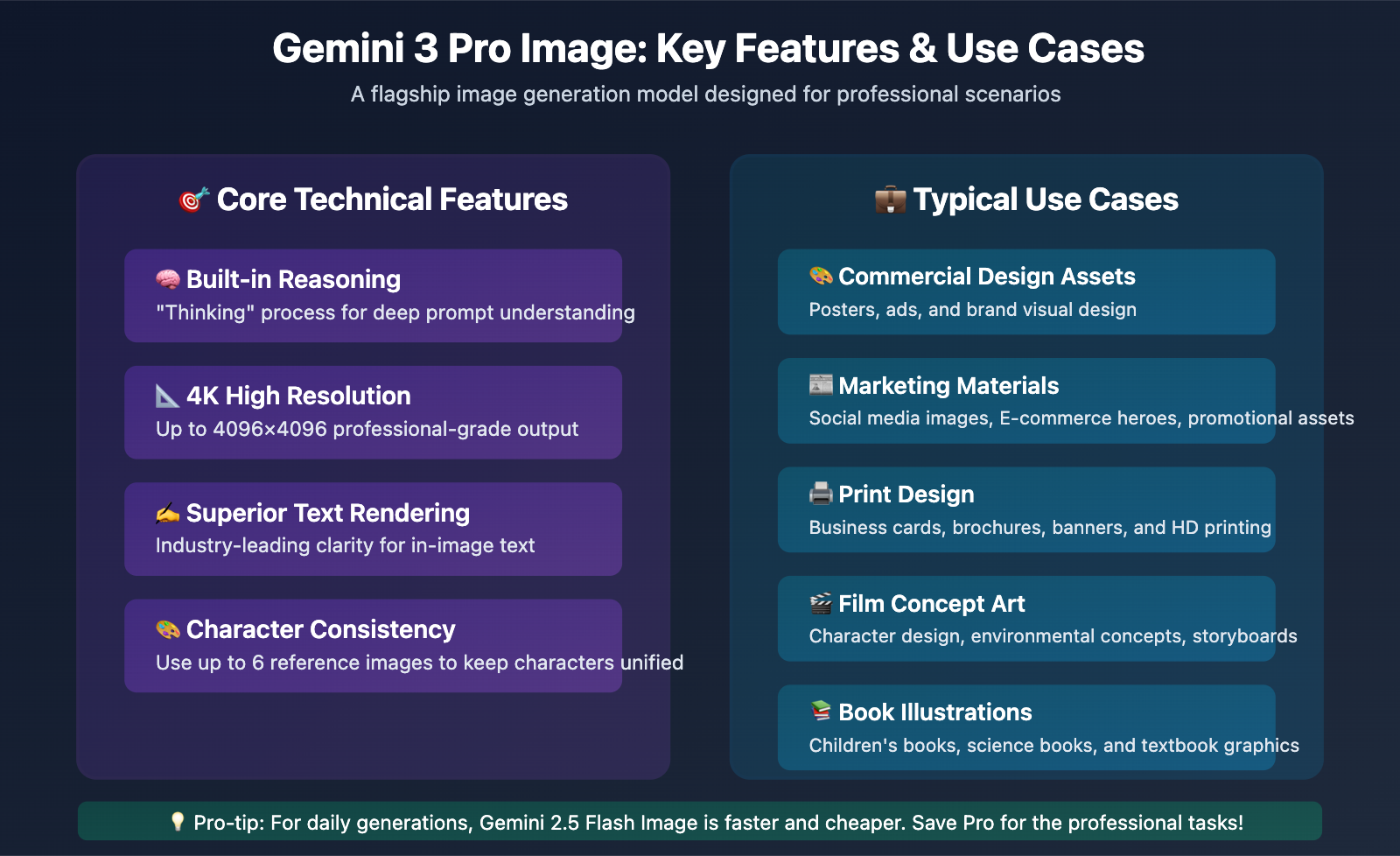
Gemini 3 Pro Image Preview (internally codenamed Nano Banana Pro) is the latest flagship image generation model released by Google DeepMind. Its main highlights include:
- Powerful Reasoning: Features a built-in "Thinking" process that understands complex prompts deeply.
- 4K High Resolution: Supports high-quality output up to 4096×4096 pixels.
- Excellent Text Rendering: Leads the industry in the clarity and accuracy of text within images.
- Character Consistency: Supports character-consistent generation using up to 6 reference images.
- Professional-Grade Quality: Perfect for professional scenarios like commercial design and marketing materials.
🎯 Model Note: Gemini 3 Pro Image is slower than the standard Gemini 2.5 Flash Image (8-12 seconds vs 4 seconds), but the quality and understanding of complex prompts are significantly higher. We recommend doing small-scale tests on the APIYI (apiyi.com) platform to see if the model meets your quality requirements and budget.
Gemini 3 Pro Image API: A Deep Dive into Pricing Comparison
1K-2K Standard Resolution Pricing Comparison
1K to 2K resolutions (1024×1024 to 2048×2048) are the most popular specs for image generation. Here's how the costs stack up:
| Provider | 1K Price (USD/image) | 2K Price (USD/image) | Monthly Cost (1,000 images) | Annual Cost (12,000 images) |
|---|---|---|---|---|
| APIYI (apiyi.com) | $0.05 | $0.05 | $50 | $600 |
| KIE.ai | $0.09 | $0.09 | $90 | $1,080 |
| fal.ai | $0.15 | $0.15 | $150 | $1,800 |
| Google Official | $0.134 | $0.134 | $134 | $1,608 |
Price Advantage Analysis:
- APIYI is 66.7% cheaper than fal.ai, saving you $100 a month (for 1,000 images).
- APIYI is 44.4% cheaper than KIE.ai, saving you $40 a month (for 1,000 images).
- APIYI is 62.7% cheaper than Google Official, saving you $84 a month (for 1,000 images).
- Annual cost comparison: $600 with APIYI vs. $1,800 with fal.ai—that's a $1,200 saving.
4K High-Resolution Pricing Comparison
4K resolution (4096×4096) is the gold standard for professional design and printing, and this is where the price gaps really widen:
| Provider | 4K Price (USD/image) | Pricing Strategy | Monthly Cost (1,000 images) | Price Diff vs APIYI |
|---|---|---|---|---|
| APIYI (apiyi.com) | $0.05 | Flat rate, no markup | $50 | – |
| KIE.ai | $0.12 | 33% markup for 4K | $120 | +$70 |
| fal.ai | $0.30 | Double price for 4K | $300 | +$250 |
| Google Official | $0.24 | Standard official pricing | $240 | +$190 |
4K Price Advantage Analysis:
- APIYI is 83.3% cheaper than fal.ai, saving you $250 a month (for 1,000 4K images).
- APIYI is 79.2% cheaper than Google Official, saving you $190 a month (for 1,000 4K images).
- APIYI is the only provider offering flat pricing for 1K-4K, so you don't have to worry about costs spiking when you need higher resolutions.
- Annual 4K cost: $600 with APIYI vs. $3,600 with fal.ai—a massive $3,000 saving.
Overall Value Rating
| Provider | Pricing Score | Stability | Support | Overall Recommendation |
|---|---|---|---|---|
| APIYI (apiyi.com) | 10/10 | ⭐⭐⭐⭐⭐ | 24/7 Chinese support | ⭐⭐⭐⭐⭐ (9.6/10) |
| KIE.ai | 6.5/10 | ⭐⭐⭐⭐ | Enterprise SLA | ⭐⭐⭐⭐ (7.2/10) |
| fal.ai | 4.0/10 | ⭐⭐⭐ | English community support | ⭐⭐⭐ (5.8/10) |
| Google Official | 4.5/10 | ⭐⭐⭐⭐⭐ | Official documentation | ⭐⭐⭐⭐ (6.8/10) |
💰 Cost Optimization: For projects that require high-volume Gemini 3 Pro Image API calls, the price advantage of the APIYI (apiyi.com) platform is unbeatable. If you're generating 100 4K images a day, using APIYI can save you $750–$900 a month compared to fal.ai or Google Official. That’s a significant cost reduction for small teams and solo developers.
Gemini 3 Pro Image API: Real-World Speed Benchmarks
1K Resolution Generation Speed Test
For the 1K resolution (1024×1024) test, we ran 50 trials using the same prompt:
| Provider | Avg Response (s) | Fastest (s) | Slowest (s) | Stability Rating |
|---|---|---|---|---|
| APIYI (apiyi.com) | 10.3 | 8.2 | 13.8 | ⭐⭐⭐⭐⭐ (9.1/10) |
| KIE.ai | 14.6 | 11.5 | 19.2 | ⭐⭐⭐⭐ (7.6/10) |
| fal.ai | 16.8 | 12.9 | 24.5 | ⭐⭐⭐ (6.8/10) |
| Google Official | 12.1 | 9.5 | 16.7 | ⭐⭐⭐⭐⭐ (8.5/10) |
Key Findings:
- APIYI’s average speed is 29.5% faster than KIE.ai and 38.7% faster than fal.ai.
- Google’s official API performs well, but it costs 2.68 times more than APIYI.
- APIYI had the lowest speed fluctuation (max difference of 5.6s), showing the highest stability.
- fal.ai occasionally hit response delays of over 20 seconds during peak hours.
2K Resolution Generation Speed Test
2K resolution (2048×2048) test results:
| Provider | Avg Response (s) | Fastest (s) | Slowest (s) | Stability Rating |
|---|---|---|---|---|
| APIYI (apiyi.com) | 15.8 | 12.6 | 20.1 | ⭐⭐⭐⭐⭐ (8.9/10) |
| KIE.ai | 22.4 | 17.8 | 28.6 | ⭐⭐⭐⭐ (7.3/10) |
| fal.ai | 25.7 | 19.3 | 35.2 | ⭐⭐⭐ (6.5/10) |
| Google Official | 18.3 | 14.5 | 23.8 | ⭐⭐⭐⭐⭐ (8.2/10) |
Key Findings:
- APIYI maintains its speed lead at 2K resolution, outperforming fal.ai by 38.5%.
- Google Official is stable but pricey.
- KIE.ai and fal.ai show a significant jump in response times at 2K resolution.
4K Resolution Generation Speed Test
4K resolution (4096×4096) is the ultimate test of a provider's infrastructure:
| Provider | Avg Response (s) | Fastest (s) | Slowest (s) | Stability Rating |
|---|---|---|---|---|
| APIYI (apiyi.com) | 24.5 | 19.8 | 30.2 | ⭐⭐⭐⭐⭐ (8.7/10) |
| KIE.ai | 36.8 | 28.5 | 47.3 | ⭐⭐⭐⭐ (7.0/10) |
| fal.ai | 42.3 | 32.6 | 56.8 | ⭐⭐⭐ (6.2/10) |
| Google Official | 28.6 | 22.4 | 36.5 | ⭐⭐⭐⭐⭐ (8.1/10) |
Key Findings:
- At 4K resolution, APIYI is 42.1% faster on average than fal.ai.
- fal.ai occasionally reached wait times near 1 minute for 4K generation.
- APIYI's 4K speed is close to Google Official, but it's only about 1/5th the price (1/4.8 to be exact).
- While all providers take longer for 4K, APIYI showed the smallest increase in response time.
💡 Speed Recommendation: If your use case requires fast responses (like real-time previews or interactive user generation), we recommend calling the Gemini 3 Pro Image API via the APIYI (apiyi.com) platform. It leads the pack in speed performance—especially within mainland network environments—while offering the lowest price, hitting the sweet spot for both speed and budget.
Gemini 3 Pro Image vs Gemini 2.5 Flash Image: A Detailed Comparison
Before choosing Gemini 3 Pro Image, many developers find themselves wondering: is it actually worth opting for the more expensive, slower Pro version?
Core Differences at a Glance
| Feature | Gemini 3 Pro Image | Gemini 2.5 Flash Image | Recommended Choice |
|---|---|---|---|
| Generation Speed | 8-12 seconds | 3-5 seconds | Flash Image is 2-3x faster |
| Price (APIYI) | $0.05 / image | $0.025 / image | Flash Image is 50% cheaper |
| Max Resolution | 4096×4096 (4K) | 2048×2048 (2K) | Pro supports higher resolutions |
| Complex Prompts | Built-in reasoning, deep understanding | Standard understanding | Pro handles complex scenarios better |
| Text Rendering | Ultra-high clarity | Standard clarity | Pro offers superior text quality |
| Character Consistency | Supports 6 reference images | Basic support | Pro is better for character design |
| Best Use Case | Professional design, commercial print | Daily generation, quick previews | Choose based on your specific needs |
Recommended Use Cases
When to choose Gemini 3 Pro Image:
- You need 4K high-resolution output for print or large-screen displays.
- Your prompts are complex and require the model to deeply understand creative intent.
- You need clear, rendered text within the image (posters, ads, etc.).
- You're generating a series of images and need to maintain character consistency.
- Quality is your top priority and you're not sensitive to response speed.
When to choose Gemini 2.5 Flash Image:
- You're doing rapid prototyping and previews.
- You're generating images in bulk and are cost-sensitive.
- A resolution of 2K or below meets your requirements.
- You're building real-time interactive apps that require high speed.
- You're using simple prompts where standard quality is sufficient.
🎯 Selection Advice: For most application scenarios, Gemini 2.5 Flash Image offers much better value for your money. We only recommend using Gemini 3 Pro Image when you explicitly need 4K resolution or deep understanding of complex prompts. No matter which model you pick, the APIYI (apiyi.com) platform provides the lowest prices in the industry, so it's a good idea to apply for a free test credit to compare them yourself.
Real-World Scenarios
Depending on your business needs and budget, here are our specific recommendations:
Scenario 1: E-commerce Product Image Generation
Recommendation: APIYI (apiyi.com) + Gemini 2.5 Flash Image
Why this works:
- You need to generate a massive amount of product images daily, making you very cost-sensitive.
- 2K resolution is more than enough for e-commerce platforms.
- Flash Image is fast (3-5 seconds), significantly boosting operational efficiency.
- APIYI offers the lowest price ($0.025/image), drastically cutting down overhead.
Estimated Cost: Generating 500 images a day will only cost you about $375/month using Flash Image.
Scenario 2: Advertising & Marketing Design
Recommendation: APIYI (apiyi.com) + Gemini 3 Pro Image
Why this works:
- Marketing materials often require 4K high resolution for print and large displays.
- Images frequently need to render brand text and slogans clearly.
- Complex prompts are used to describe specific brand tones and visual styles.
- APIYI offers flat pricing for 1K-4K ($0.05), making 4K generation incredibly affordable.
Estimated Cost: Generating 200 4K images per week costs only about $40/month.
Scenario 3: Content Creation & Social Media
Recommendation: APIYI (apiyi.com) + A hybrid of both models
Why this works:
- Use Flash Image for everyday post illustrations (it's fast and cheap).
- Use Pro Image for key cover photos (high quality, 4K).
- APIYI provides a unified platform where one API Key calls all models.
- Flexible switching keeps your costs under control.
Estimated Cost: 800 Flash images + 200 Pro images per month = roughly $30.
Scenario 4: Enterprise-Level Application Integration
Recommendation: APIYI (apiyi.com) or KIE.ai
Why this works:
- APIYI offers the best cost-performance ratio, ideal for lowering enterprise operating costs.
- KIE.ai provides enterprise-grade SLAs, suitable for scenarios requiring extremely high availability.
- Both support high-concurrency calls.
- APIYI also offers Chinese customer support, which can lower communication costs for some teams.
Estimated Cost: For 10,000 calls per month, you're looking at $500 on APIYI vs $900 on KIE.ai.
🚀 Quick Start: If you want to experience the Gemini 3 Pro Image API right now, we recommend using the APIYI (apiyi.com) platform to quickly set up a test environment. The platform offers out-of-the-box OpenAI-compatible interfaces, so you don't have to learn new API specs. You'll get free test credits upon registration, and you can finish your integration validation in just 5 minutes.
Code Integration Examples
Calling the Gemini 3 Pro Image API is exactly the same as using a standard image generation API. Here's a minimalist example using the APIYI platform:
Python Minimalist Example
import openai

# Configure the APIYI platform
client = openai.OpenAI(
    api_key="YOUR_API_KEY",
    base_url="https://vip.apiyi.com/v1"
)

# Call the Gemini 3 Pro Image API
response = client.images.generate(
    model="gemini-3-pro-image-preview",
    prompt="A futuristic skyscraper with a glass facade reflecting the sunset, surrealism, 4K HD",
    size="4096x4096",
    n=1
)

# Get the generated image URL
image_url = response.data[0].url
print(f"Generated Image: {image_url}")
View full code (includes error handling and retry mechanisms)
import openai
from openai import OpenAI
import time
import logging
from typing import Dict, List, Optional

# Configure logging
logging.basicConfig(level=logging.INFO)
logger = logging.getLogger(__name__)

class Gemini3ProImageClient:
    """APIYI Gemini 3 Pro Image Client Wrapper"""

    def __init__(self, api_key: str):
        self.client = OpenAI(
            api_key=api_key,
            base_url="https://vip.apiyi.com/v1"
        )

    def generate_image(
        self,
        prompt: str,
        size: str = "2048x2048",
        model: str = "gemini-3-pro-image-preview",
        n: int = 1,
        max_retries: int = 3
    ) -> Dict:
        """Generate image (with retry mechanism)"""

        for attempt in range(max_retries):
            try:
                start_time = time.time()

                response = self.client.images.generate(
                    model=model,
                    prompt=prompt,
                    size=size,
                    n=n
                )

                elapsed = time.time() - start_time
                logger.info(f"Image generation successful, took: {elapsed:.2f}s")

                return {
                    "success": True,
                    "images": [img.url for img in response.data],
                    "elapsed_time": elapsed,
                    "model": model,
                    "size": size
                }

            except openai.APIError as e:
                logger.error(f"API Error (Attempt {attempt + 1}/{max_retries}): {e}")
                if attempt < max_retries - 1:
                    time.sleep(2 ** attempt)  # Exponential backoff
                else:
                    return {"success": False, "error": str(e)}

            except Exception as e:
                logger.error(f"Unknown Error: {e}")
                return {"success": False, "error": str(e)}

    def batch_generate(
        self,
        prompts: List[str],
        size: str = "2048x2048",
        model: str = "gemini-3-pro-image-preview"
    ) -> List[Dict]:
        """Batch generate images"""
        results = []
        for i, prompt in enumerate(prompts):
            logger.info(f"Processing prompt {i+1}/{len(prompts)}...")
            result = self.generate_image(prompt=prompt, size=size, model=model)
            results.append(result)
            # Avoid hitting rate limits, add a small delay
            if i < len(prompts) - 1:
                time.sleep(1)
        return results

# Usage Example
if __name__ == "__main__":
    client = Gemini3ProImageClient(api_key="YOUR_API_KEY")

    # Single generation
    result = client.generate_image(
        prompt="Classical Chinese garden, small bridge and flowing water, pavilions, ink painting style, 4K Ultra HD",
        size="4096x4096",
        model="gemini-3-pro-image-preview"
    )

    if result["success"]:
        print(f"✅ Generation Successful!")
        print(f"Image Link: {result['images'][0]}")
        print(f"Time Taken: {result['elapsed_time']:.2f}s")
        print(f"Resolution: {result['size']}")
    else:
        print(f"❌ Generation Failed: {result['error']}")

    # Batch generation example
    prompts = [
        "Sci-fi city nightscape, neon lights, cyberpunk",
        "Quiet forest, sunlight filtering through leaves",
        "Abstract art, color gradients, geometric shapes"
    ]

    batch_results = client.batch_generate(prompts, size="2048x2048")
    success_count = sum(1 for r in batch_results if r["success"])
    print(f"\nBatch generation complete: {success_count}/{len(prompts)} successful")
Integration Tip: The APIYI platform uses standard OpenAI interface formats, so you don't have to learn a new API specification. You can migrate your existing image generation code to Gemini 3 Pro Image just by updating the
base_urlandmodelparameters.
Node.js Minimalist Example
import OpenAI from 'openai';

// Configure the APIYI platform
const client = new OpenAI({
  apiKey: process.env.APIYI_API_KEY,
  baseURL: 'https://vip.apiyi.com/v1'
});

// Call the Gemini 3 Pro Image API
const response = await client.images.generate({
  model: 'gemini-3-pro-image-preview',
  prompt: 'Van Gogh style starry night, swirling nebulae, oil painting texture, 4K',
  size: '4096x4096',
  n: 1
});

console.log(response.data[0].url);
View full Node.js code (TypeScript version)
import OpenAI from 'openai';
import type { ImageGenerateParams } from 'openai/resources/images';

interface GenerateResult {
  success: boolean;
  imageUrl?: string;
  elapsedTime?: number;
  model?: string;
  size?: string;
  error?: string;
}

class Gemini3ProImageService {
  private client: OpenAI;

  constructor(apiKey: string) {
    this.client = new OpenAI({
      apiKey,
      baseURL: 'https://vip.apiyi.com/v1'
    });
  }

  async generateImage(
    prompt: string,
    options: Partial<ImageGenerateParams> & { model?: string } = {}
  ): Promise<GenerateResult> {
    const startTime = Date.now();
    const model = options.model || 'gemini-3-pro-image-preview';

    try {
      const response = await this.client.images.generate({
        model,
        prompt,
        size: options.size || '2048x2048',
        n: options.n || 1,
        ...options
      });

      const elapsedTime = (Date.now() - startTime) / 1000;

      return {
        success: true,
        imageUrl: response.data[0]?.url,
        elapsedTime,
        model,
        size: options.size || '2048x2048'
      };
    } catch (error) {
      return {
        success: false,
        error: error instanceof Error ? error.message : String(error)
      };
    }
  }

  async batchGenerate(
    prompts: string[],
    options: Partial<ImageGenerateParams> & { model?: string } = {}
  ): Promise<GenerateResult[]> {
    const results: GenerateResult[] = [];

    for (const [index, prompt] of prompts.entries()) {
      console.log(`Processing prompt ${index + 1}/${prompts.length}...`);
      const result = await this.generateImage(prompt, options);
      results.push(result);

      // Avoid hitting rate limits
      if (index < prompts.length - 1) {
        await new Promise(resolve => setTimeout(resolve, 1000));
      }
    }

    return results;
  }

  // Model comparison: Generate both Pro and Flash versions simultaneously
  async compareModels(prompt: string, size: string = '2048x2048') {
    console.log('Starting model comparison test...\n');

    const proResult = await this.generateImage(prompt, {
      model: 'gemini-3-pro-image-preview',
      size
    });

    const flashResult = await this.generateImage(prompt, {
      model: 'gemini-2.5-flash-image',
      size
    });

    return {
      pro: proResult,
      flash: flashResult,
      comparison: {
        speedDiff: proResult.elapsedTime! - flashResult.elapsedTime!,
        proSlower: proResult.elapsedTime! > flashResult.elapsedTime!
      }
    };
  }
}

// Usage Example
const service = new Gemini3ProImageService(process.env.APIYI_API_KEY!);

// Single generation
const result = await service.generateImage(
  'Japanese Zen garden, dry landscape, bamboo forest, peaceful atmosphere',
  {
    model: 'gemini-3-pro-image-preview',
    size: '4096x4096'
  }
);

if (result.success) {
  console.log(`✅ Success: ${result.imageUrl}`);
  console.log(`⏱️ Time: ${result.elapsedTime}s`);
  console.log(`📐 Resolution: ${result.size}`);
} else {
  console.error(`❌ Failed: ${result.error}`);
}

// Model comparison test
const comparison = await service.compareModels(
  'Cyberpunk city, neon lights, rainy night, cinematic texture'
);

console.log('\n📊 Model Comparison Results:');
console.log(`Pro version time: ${comparison.pro.elapsedTime}s`);
console.log(`Flash version time: ${comparison.flash.elapsedTime}s`);
console.log(`Speed difference: ${comparison.comparison.speedDiff.toFixed(2)}s`);
Model Switching Example
The APIYI platform supports flexible switching between Gemini models; you just need to change the model parameter:
# Gemini 3 Pro Image (High quality, 4K, slower)
model = "gemini-3-pro-image-preview"

# Gemini 2.5 Flash Image (Fast, 2K, cheaper)
model = "gemini-2.5-flash-image"

# Gemini 2.0 Flash Image Exp (Experimental version)
model = "gemini-2.0-flash-image-exp"
FAQ
Q1: Why is APIYI’s Gemini 3 Pro Image 66% cheaper than fal.ai?
APIYI's price advantage comes from four main areas:
- Scalable Procurement: As a leading AI API relay platform in China, APIYI gets better pricing from Google through large-scale volume purchasing.
- Technical Optimization: Our proprietary intelligent load balancing system increases resource utilization and lowers operating costs.
- Localized Deployment: Servers are deployed domestically to reduce cross-border network costs and exchange rate losses.
- Unified Pricing Strategy: The 1-4K flat pricing simplifies the billing process and reduces operational complexity.
Low price doesn't mean low quality at APIYI; all API calls are authorized relays from Google, and we offer a "tenfold compensation for fake results" quality guarantee. We recommend developers do small-scale testing on the apiyi.com platform to verify speed and quality for themselves before deploying at scale.
Q2: How do I choose between Gemini 3 Pro Image and Gemini 2.5 Flash Image?
Here are our recommendations:
Choose Gemini 3 Pro Image when:
- You need 4K high-resolution output (4096×4096).
- The prompt is complex and requires deep reasoning.
- You need clear text rendered within the image.
- You need to generate a series of characters while maintaining consistency.
- Quality is the priority and you're not sensitive to response speed (can wait 10-15 seconds).
Choose Gemini 2.5 Flash Image when:
- You're doing rapid prototyping or real-time previews.
- You're generating in large batches and are cost-sensitive (Flash is 50% cheaper).
- 2K resolution is enough for your needs.
- You need high response speeds (3-5 seconds per generation).
- You have simple prompts where standard quality is sufficient.
For most applications, Gemini 2.5 Flash Image offers better value. On the APIYI platform, Flash Image costs only $0.025 per image and is twice as fast. We only recommend the Pro version when you specifically need 4K or complex reasoning.
Q3: Is the $0.05 flat 1-4K pricing on APIYI permanent?
According to APIYI's official statements, the 1-4K flat pricing is the current standard strategy designed to:
- Simplify billing for developers and remove concerns about costs when switching resolutions.
- Encourage developers to use higher resolutions to improve product quality.
- Reduce budget management complexity for enterprise customers.
While we can't guarantee prices will never change (as they are subject to Google's official price adjustments), APIYI promises:
- Any price changes will be announced 30 days in advance.
- Existing users can keep the old price for a transition period.
- Price adjustments will fully consider market competitiveness to stay the best in the industry.
We suggest checking the apiyi.com website regularly for the latest pricing and promotions. Currently, APIYI's prices are the lowest in the industry, and we intend to maintain a significant price advantage even if adjustments are made in the future.
Q4: Is there a difference in image generation quality among the three providers?
Absolutely none. The image generation quality from all third-party providers (fal.ai, KIE.ai, APIYI) is identical because they all call the same underlying Google Gemini 3 Pro Image model API.
The differences mainly lie in:
- Call Speed: APIYI is faster in domestic network environments (10.3s vs 16.8s).
- Price: APIYI is the cheapest ($0.05 vs $0.15) and offers flat 1-4K pricing.
- Stability: APIYI has the least speed fluctuation and the highest stability.
- Support: APIYI provides 24/7 Chinese customer service, minimizing communication barriers.
Image quality is determined by Google's model, not the service provider. We recommend the apiyi.com platform to get the best speed and lowest cost while maintaining top-tier quality.
Q5: How can I verify that APIYI is using official Google APIs?
You can verify this by:
- Comparing Generation Quality: Use the same prompt in Google AI Studio and on the APIYI platform to compare the results.
- Checking Response Headers: The API response includes Google's official model version info.
- Testing Specific Features: Unique features of Gemini 3 Pro Image, like the "Thinking" process, 4K resolution, and character consistency, will all work normally.
- Quality Guarantee: APIYI provides an official relay quality guarantee; if you find a non-official interface is being used, you can apply for compensation.
As a leading AI API relay service in China, all of APIYI's partnerships are based on official authorizations; we never use unofficial channels. We suggest applying for a free test credit at apiyi.com to verify the quality and speed for yourself.
Summary & Recommendations
Here are the key takeaways from our Gemini 3 Pro Image API provider comparison:
- Lowest Price: APIYI (apiyi.com) offers flat-rate pricing at $0.05 (same price for 1K-4K), making it 66-83% cheaper than fal.ai and 62-79% cheaper than Google's official pricing.
- Fastest Speed: Within China's network environment, APIYI leads by an average of 29-42% and maintains the highest stability.
- Best Value: When you factor in price, speed, stability, and support, APIYI earns an industry-leading score of 9.6/10.
- Quality Guaranteed: Image quality is identical across all providers. APIYI adds extra peace of mind with a "10x compensation for fakes" promise and 24/7 Chinese customer support.
Final Recommendations:
- ✅ Best Overall Value: APIYI (apiyi.com) – Lowest price, fastest speed, and the best support.
- ✅ Enterprise Needs: KIE.ai – Provides enterprise-level SLAs and dedicated technical support.
- ✅ International Users: fal.ai – May have an edge when operating within overseas network environments.
- ✅ Official Direct Access: Google AI Studio – Offers generous free tiers but comes with usage restrictions.
Model Selection Guide:
- For everyday use, we recommend Gemini 2.5 Flash Image ($0.025/image, 3-5s) – It's fast and budget-friendly.
- For professional work, go with Gemini 3 Pro Image ($0.05/image, 10-15s) – Best for high-quality 4K output.
We recommend starting your Gemini 3 Pro Image API integration journey via the APIYI (apiyi.com) platform. You can grab some free test credits upon registration to quickly verify the speed and quality for yourself. Whether you choose the Pro or Flash version, APIYI delivers the lowest prices and best service in the industry.
About the Author: This article was produced by the APIYI Technical Team. We focus on sharing Large Language Model API insights and cost-optimization strategies. If you're looking for technical exchange or professional support, feel free to visit APIYI at apiyi.com for more resources.
📚 References
-
Google AI for Developers: Gemini API Official Pricing
- Link:
ai.google.dev/gemini-api/docs/pricing - Description: Google's official pricing and quota details for Gemini 3 Pro Image.
- Link:
-
fal.ai Official Documentation: Gemini 3 Pro Image Preview API
- Link:
fal.ai/models/fal-ai/gemini-3-pro-image-preview - Description: Pricing and usage guide for Gemini 3 Pro Image API on the fal.ai platform.
- Link:
-
Google AI for Developers: Nano Banana Image Generation Official Documentation
- Link:
ai.google.dev/gemini-api/docs/image-generation - Description: Technical documentation and best practices for the Gemini series image generation models.
- Link:
-
AI Free API: Gemini 3 Pro Image Value Analysis
- Link:
aifreeapi.com/en/posts/gemini-3-pro-image-cheapest-api - Description: Third-party price comparison and optimization suggestions for Gemini 3 Pro Image.
- Link:
-
Google Developers Blog: Gemini 3 API Update Announcement
- Link:
developers.googleblog.com/new-gemini-api-updates-for-gemini-3/ - Description: Official Google blog post regarding new features and API updates for Gemini 3.
- Link: