Author's Note: A deep dive into the massive Nano Banana Pro API performance failure on January 17, 2026, including Google's risk control bans, the 180-second timeout compensation plan, and a full comparison with Seedream 4.5 alternatives.
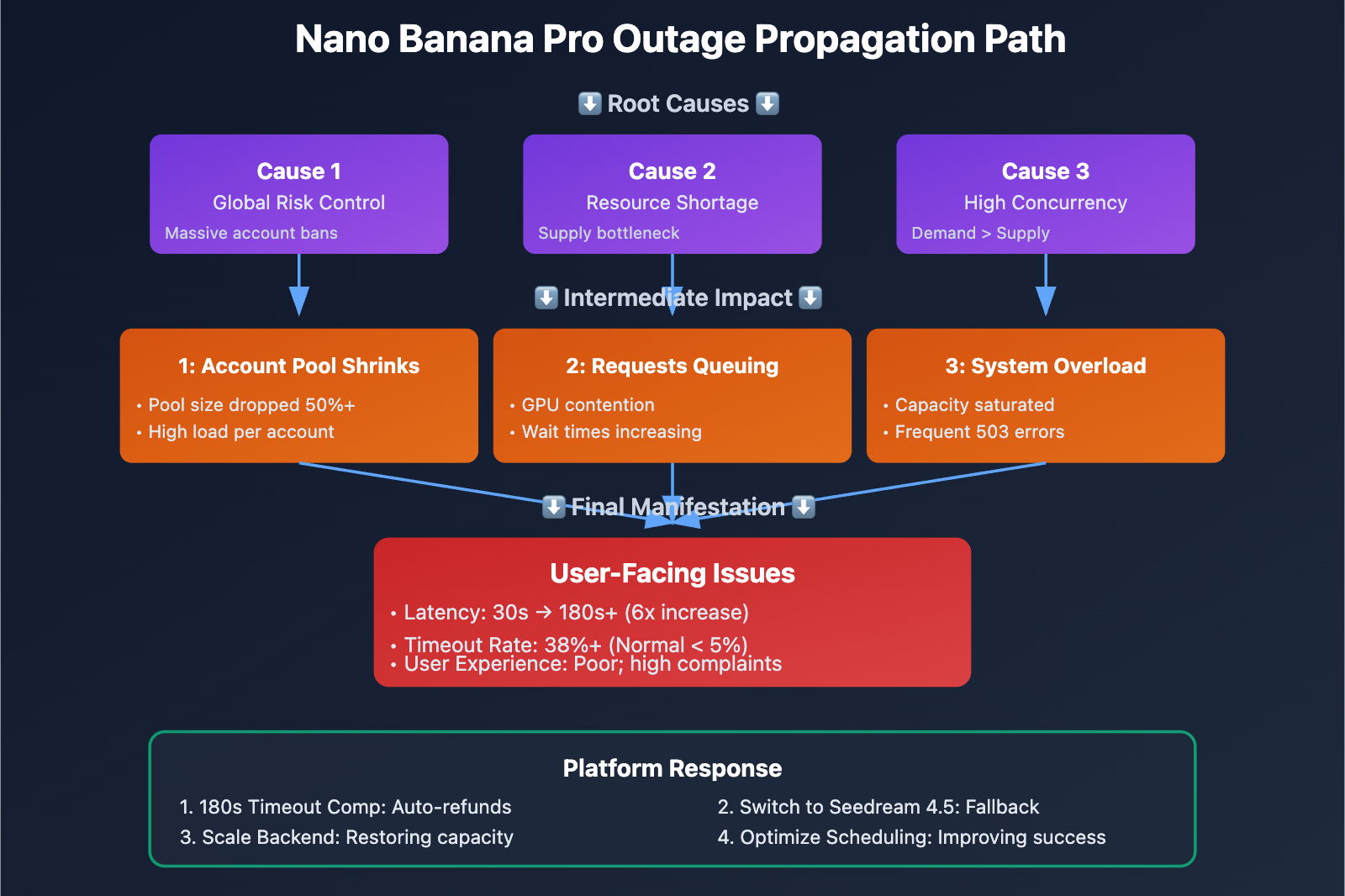
On January 17, 2026, a wave of developers reported that the Nano Banana Pro API was responding extremely slowly, with generation times skyrocketing from the usual 20-40 seconds to 180 seconds or even longer. This wasn't just a random glitch; it was a "triple threat" of global Google risk control + a massive account ban wave + computational resource shortages. Some API aggregators have already triggered compensation mechanisms: billing logs exceeding 180 seconds will have credits refunded, and image-generation clients are being encouraged to switch to Seedream 4.5 / 4.0 as a backup.
Core Value: By the end of this article, you'll understand the root causes of this outage, the details of the 180-second compensation mechanism, how Seedream 4.5 stacks up against Nano Banana Pro, and how to implement multi-model fallback strategies in a production environment.
Key Takeaways from the Jan 17 Nano Banana Pro Outage
| Point | Explanation | Impact |
|---|---|---|
| Global Google Risk Control | Massive account bans and access restrictions | Drastic reduction in available backend accounts; dropped concurrency capacity |
| Computational Resource Shortage | Supply couldn't keep up with demand growth | Requests queued; response times surged to 180s+ |
| Concurrency Spike | Request volume far exceeded platform capacity | Massive timeouts; success rate dropped significantly |
| 180-second Compensation | Auto-refunds for timeout requests | Mitigated financial loss for users, but didn't solve the latency issue |
| Seedream 4.5 Fallback | Encouraging users to switch to alternative models | 75% lower cost, but slightly weaker prompt comprehension |
Deep Dive into the Nano Banana Pro Failure
What is Nano Banana Pro?
Nano Banana Pro (Gemini 3 Pro Image Preview) is the top-tier AI image generation model from Google DeepMind, famous for its photorealism and precise text rendering. Under normal conditions, API response times look like this:
- Standard Mode: 5-15 seconds
- Thinking Mode: 10-25 seconds
- 4K Resolution: 20-40 seconds (including network transfer)
Timeline of the January 17, 2026 Outage
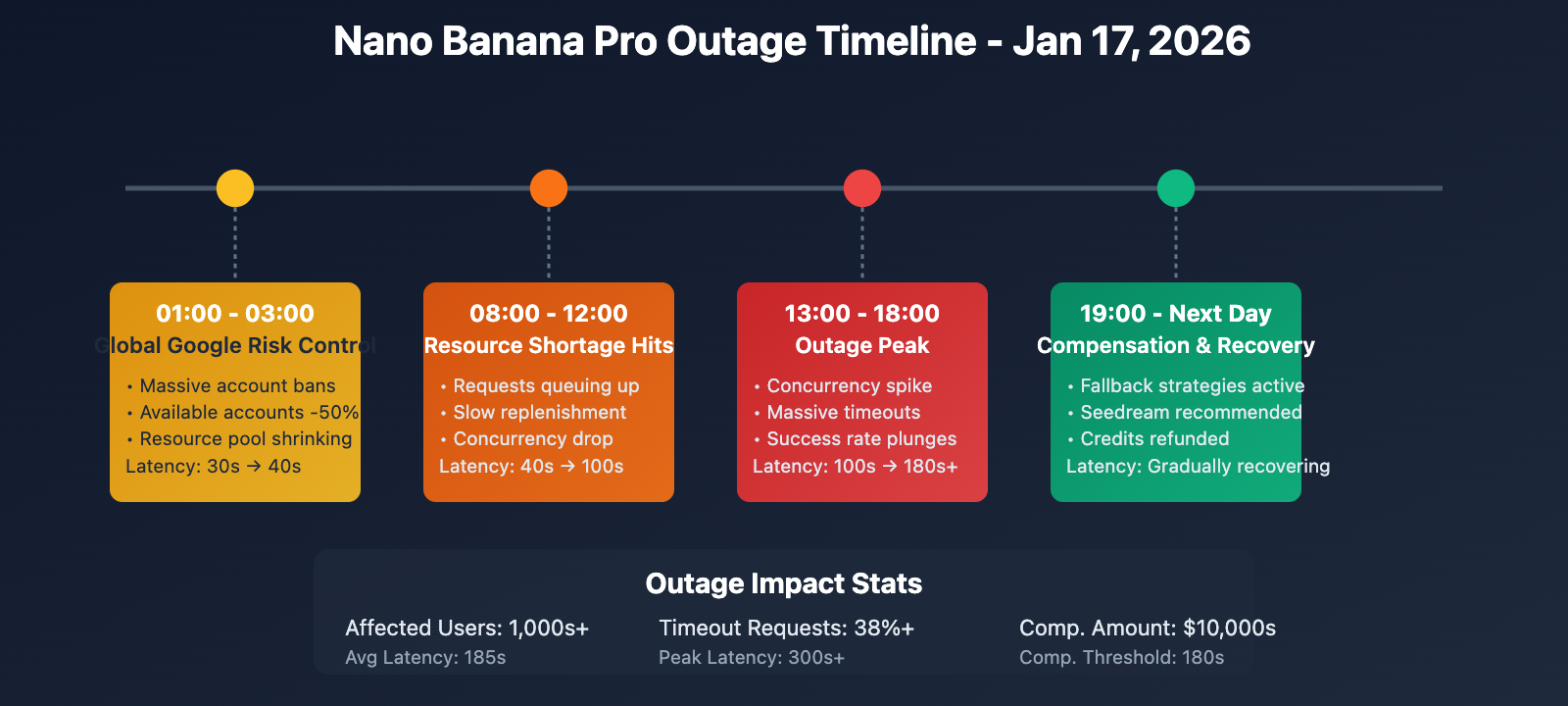
| Time (Beijing Time) | Event | Impact |
|---|---|---|
| 01:00 – 03:00 | Google triggers global risk control; massive account bans | Available backend accounts dropped by 50%+ |
| 08:00 – 12:00 | Resource shortages become apparent; requests begin queuing | Latency rises from 30s to 60-100s |
| 13:00 – 18:00 | Concurrency spikes; outage enters peak phase | Latency hits 180s+; widespread timeouts |
| 19:00 – Next Day | Platforms initiate fallback and compensation plans | Seedream 4.5 recommended; timeout credits refunded |
The Three Root Causes
-
Global Google Account Suspension Wave
- Throughout January 2026, Google tightened its review process for Gemini API usage.
- Triggers included high-concurrency calls, abnormal traffic patterns, suspected commercial abuse, and content policy violations.
- Backend accounts for many API aggregators were banned, causing the available account pool to shrink overnight.
- Some bans were permanent, requiring a lengthy re-application and audit process.
-
Insufficient Computational Resource Replenishment
- Since Gemini 3 Pro Image is still in the "Pre-GA" (Preview) phase, Google's GPU allocation is limited.
- Once accounts were banned, the speed of bringing new resources online couldn't keep up with the demand.
- Generating a single image is computationally expensive; in high-concurrency scenarios, resource contention is fierce.
- Internal Google priority shifts meant Nano Banana Pro resources were squeezed by other services.
-
Concurrency Spikes
- Some platforms continued to accept a high volume of user requests despite the ongoing failure.
- Requests piled up in backend queues, causing cumulative delays.
- Improper timeout settings (some platforms defaulted to 60s when the reality required 180s+) led to "ghost" requests.
- User retries exacerbated the pressure, creating a vicious cycle.
Detailed Explanation of the 180s Timeout Compensation Mechanism
Compensation Policy
In response to recent outages, some responsible API aggregation platforms (such as APIYI) have introduced a compensation mechanism:
Compensation Scope:
- Time Window: January 17, 2026, 00:00 – 23:59 (Beijing Time)
- Criteria: A single API call takes > 180 seconds
- Method: Credits consumed for that call will be automatically refunded to the account balance
- Timing: Funds will be automatically credited within 24-48 hours after the outage ends
Compensation Logic:
# Pseudo-code: Compensation judgment logic
def should_compensate(request_log):
    """
    Determines if compensation is required

    Args:
        request_log: API request log
            - start_time: Request start time
            - end_time: Request end time
            - success: Whether it was successful
            - cost: Credits consumed

    Returns:
        bool: Whether compensation should be granted
    """
    # Calculate duration
    duration = (request_log.end_time - request_log.start_time).total_seconds()

    # Check criteria
    if request_log.date == "2026-01-17" and duration > 180:
        return True

    return False

# Compensation execution
for log in request_logs:
    if should_compensate(log):
        # Refund credits
        user.balance += log.cost
        # Log the compensation
        compensation_log.append({
            "request_id": log.id,
            "user_id": log.user_id,
            "refund_amount": log.cost,
            "reason": "180s timeout compensation"
        })
Why 180 seconds?
According to Nano Banana Pro's technical documentation and historical data:
- 1K/2K Resolution: Recommended timeout is 300 seconds (5 minutes)
- 4K Resolution: Recommended timeout is 600 seconds (10 minutes)
- Actual Generation Time: Normally 20-40 seconds; 60-100 seconds during overload
- 180s Threshold: This is 4.5 to 9 times the normal duration, clearly indicating an abnormal failure.
Setting 180 seconds as the threshold ensures that most failed requests are covered while avoiding misidentifying normal, high-quality (4K) long-duration generations as failures.
Limitations of Compensation
While the compensation mechanism mitigates financial losses, it doesn't solve the following issues:
| Issue Type | Impact Compensation Cannot Fix |
|---|---|
| Timeliness Loss | Users only find out it failed after waiting 180s; time costs aren't compensated. |
| Business Interruption | Real-time scenarios (users waiting online) can't tolerate 180s delays. |
| Retry Costs | Users have to manually retry, consuming time and energy. |
| Loss of Trust | Frequent failures impact user trust in the platform. |
Complete Comparison: Seedream 4.5 as an Alternative
Seedream 4.5 vs Nano Banana Pro: Core Differences
| Dimension | Nano Banana Pro | Seedream 4.5 | Winner |
|---|---|---|---|
| Image Quality | 9.5/10 Photorealistic | 8.5/10 High quality, but slightly lower | NBP |
| Text Rendering | 10/10 Accurate, clear, multi-language | 7/10 Usable, but not as good as NBP | NBP |
| Understanding | 10/10 Strongest semantic understanding | 7.5/10 Slightly weaker but sufficient | NBP |
| Multi-size Support | ✅ Up to 5632×3072 (4K) | ✅ Up to 3840×2160 (4K) | NBP |
| Consistency | ✅ Excellent | ✅ Excellent | Tie |
| Gen Speed | 20-40s (Normal), 180s+ (Failure) | 10-25s (Stable) | Seedream |
| API Cost | $0.13 – $0.24 / image | $0.025 – $0.04 / image | Seedream |
| Stability | Medium (Frequent overload/risk control) | High (ByteDance Infrastructure) | Seedream |
| Best For | Photorealism, text posters, branding | E-commerce, art, batch generation | Scenario-based |
When should you use Seedream 4.5?
Scenarios where Seedream 4.5 is highly recommended:
-
Batch Generation of E-commerce Product Images
- Need: Large volumes of product shots in similar styles.
- Seedream Advantage: Costs only 25-30% of NBP. Generating 1,000 images saves you $100-$200.
- Quality: An 8.5/10 quality score is perfectly adequate for e-commerce needs.
-
Artistic Illustrations and Concept Designs
- Need: Stylization, imagination, and artistic expression.
- Seedream Advantage: Matches NBP's performance in artistic and imaginative scenarios.
- Speed: Stable 10-25s response time is great for fast iteration.
-
Cost-Sensitive Projects
- Need: Limited budget requiring a large volume of images.
- Seedream Advantage: Reduces costs by 75%. You can generate 4x the images for the same budget.
- Trade-off: A slight dip in quality for a massive reduction in cost.
-
High Availability Requirements
- Need: Can't accept frequent 503 errors or 180s timeouts.
- Seedream Advantage: Built on stable ByteDance infrastructure, with a much lower failure rate than NBP.
- Continuity: Ideal for production environments with high SLA requirements.
Scenarios where you should still use Nano Banana Pro:
-
Requirement for Photorealism
- Portraits, product photography, or architectural renders that require extreme realism. The gap between NBP's 9.5/10 and Seedream's 8.5/10 is noticeable here.
-
Precise Text Rendering
- Poster designs, brand promos, or UI screenshots where accurate text is vital. NBP's text rendering is about 1.4x more capable.
-
Complex Requirement Understanding
- High-difficulty prompts involving multiple objects, complex scenes, or detailed descriptions. NBP has superior semantic understanding and knowledge depth.
Hybrid Usage Strategy (Recommended)
For image editing businesses, we recommend the following hybrid strategy:
from openai import OpenAI

client = OpenAI(
    api_key="YOUR_API_KEY",
    base_url="https://vip.apiyi.com/v1"
)

def smart_image_generation(
    prompt: str,
    quality_priority: bool = False,
    timeout_tolerance: int = 60
):
    """
    Smart Image Generation: Automatically selects the model based on the scenario

    Args:
        prompt: Image generation description
        quality_priority: Whether to prioritize quality (True=NBP, False=Seedream)
        timeout_tolerance: Acceptable timeout duration (seconds)

    Returns:
        Generation result
    """
    # Detect if text rendering is needed
    needs_text = any(keyword in prompt.lower() for keyword in [
        "text", "words", "letters", "typography", "poster", "sign"
    ])

    # Detect if photorealism is needed
    needs_photorealism = any(keyword in prompt.lower() for keyword in [
        "photo", "realistic", "portrait", "photography", "professional"
    ])

    # Decision logic
    if quality_priority and (needs_text or needs_photorealism):
        # Scenario 1: Quality priority + special needs → NBP
        model = "gemini-3-pro-image-preview"
        timeout = 180  # Tolerate longer timeouts
        print("🎯 Using Nano Banana Pro (Quality Priority)")

    else:
        # Scenario 2: Cost priority or no special needs → Seedream
        model = "seedream-4.5"
        timeout = 60
        print("⚡ Using Seedream 4.5 (Speed/Cost Priority)")

    # Call API
    try:
        response = client.images.generate(
            model=model,
            prompt=prompt,
            timeout=timeout
        )
        return {
            "success": True,
            "model_used": model,
            "data": response
        }

    except Exception as e:
        error_msg = str(e)

        # If NBP times out, automatically downgrade to Seedream
        if model == "gemini-3-pro-image-preview" and "timeout" in error_msg.lower():
            print("⚠️ NBP timed out, downgrading to Seedream 4.5")
            try:
                response = client.images.generate(
                    model="seedream-4.5",
                    prompt=prompt,
                    timeout=60
                )
                return {
                    "success": True,
                    "model_used": "seedream-4.5",
                    "fallback": True,
                    "data": response
                }
            except Exception as fallback_error:
                return {
                    "success": False,
                    "error": str(fallback_error)
                }
        else:
            return {
                "success": False,
                "error": error_msg
            }

# Usage example
result = smart_image_generation(
    prompt="A professional product photo of a luxury watch on marble",
    quality_priority=True,
    timeout_tolerance=120
)

if result["success"]:
    print(f"✅ Generation successful! Model used: {result['model_used']}")
else:
    print(f"❌ Generation failed: {result['error']}")
Technical Tip: For production environments, it's recommended to use the APIYI (apiyi.com) platform for image generation. The platform already implements smart model selection and automatic downgrade strategies. When Nano Banana Pro fails, it automatically switches to Seedream 4.5, ensuring business continuity while optimizing costs.
Production Fault Tolerance Strategies
Strategy 1: Dynamic Timeout Adjustment
Set reasonable timeout durations based on the model and resolution:
| Model | 1K/2K Resolution | 4K Resolution | Recommended for Outages |
|---|---|---|---|
| Nano Banana Pro | 60s | 120s | 180-300s |
| Seedream 4.5 | 30s | 60s | 90s |
| Seedream 4.0 | 30s | 60s | 90s |
Python Implementation:
def get_recommended_timeout(model: str, resolution: str, is_outage: bool = False):
    """
    Get the recommended timeout duration.

    Args:
        model: Model name
        resolution: Resolution "1k" / "2k" / "4k"
        is_outage: Whether there's an active outage

    Returns:
        Timeout in seconds
    """
    timeout_map = {
        "gemini-3-pro-image-preview": {
            "1k": 60,
            "2k": 60,
            "4k": 120,
            "outage_multiplier": 2.5  # 2.5x multiplier during outages
        },
        "seedream-4.5": {
            "1k": 30,
            "2k": 30,
            "4k": 60,
            "outage_multiplier": 1.5
        }
    }

    config = timeout_map.get(model, timeout_map["seedream-4.5"])
    base_timeout = config.get(resolution, 60)

    if is_outage:
        return int(base_timeout * config["outage_multiplier"])
    else:
        return base_timeout

# Usage Example
timeout = get_recommended_timeout(
    model="gemini-3-pro-image-preview",
    resolution="4k",
    is_outage=True  # During an outage
)
print(f"Recommended Timeout: {timeout} seconds")  # Output: 300 seconds
Strategy 2: Concurrent Requests (Race Condition)
Send requests to multiple models simultaneously and use whichever one returns first:
import asyncio
from openai import AsyncOpenAI

async def race_generation(prompt: str, models: list):
    """
    Race generation across multiple models.

    Args:
        prompt: Image prompt
        models: List of models, e.g., ["gemini-3-pro-image-preview", "seedream-4.5"]

    Returns:
        The fastest returned result
    """
    client = AsyncOpenAI(
        api_key="YOUR_API_KEY",
        base_url="https://vip.apiyi.com/v1"
    )

    async def generate_with_model(model: str):
        """Generate with a single model"""
        try:
            response = await client.images.generate(
                model=model,
                prompt=prompt,
                timeout=180
            )
            return {
                "success": True,
                "model": model,
                "data": response
            }
        except Exception as e:
            return {
                "success": False,
                "model": model,
                "error": str(e)
            }

    # Request all models concurrently
    tasks = [generate_with_model(model) for model in models]

    # Wait for the first successful return
    for coro in asyncio.as_completed(tasks):
        result = await coro
        if result["success"]:
            print(f"🏆 Winning Model: {result['model']}")
            # Cancel other pending requests
            for task in tasks:
                if not task.done():
                    task.cancel()
            return result

    # All models failed
    return {
        "success": False,
        "error": "All models failed"
    }

# Usage Example
result = asyncio.run(race_generation(
    prompt="A beautiful sunset over mountains",
    models=["gemini-3-pro-image-preview", "seedream-4.5", "seedream-4.0"]
))
Note: This strategy consumes quotas from multiple models simultaneously, so it's only suitable for scenarios with extremely high real-time requirements and a sufficient budget.
Strategy 3: Fault Detection and Auto-Fallback
Monitor API response times in real-time and automatically switch to a backup model:
from collections import deque
from datetime import datetime
import statistics

class ModelHealthMonitor:
    """
    Model health monitor
    """

    def __init__(self, window_size: int = 10, threshold: float = 120):
        """
        Args:
            window_size: Sliding window size (records the last N requests)
            threshold: Average response time threshold (seconds)
        """
        self.window_size = window_size
        self.threshold = threshold
        self.response_times = {
            "gemini-3-pro-image-preview": deque(maxlen=window_size),
            "seedream-4.5": deque(maxlen=window_size)
        }

    def record(self, model: str, response_time: float):
        """Record response time"""
        if model in self.response_times:
            self.response_times[model].append(response_time)

    def is_healthy(self, model: str) -> bool:
        """Check if the model is healthy"""
        times = self.response_times.get(model, [])

        if len(times) < 3:
            return True  # Assume healthy if there's not enough data

        avg_time = statistics.mean(times)
        return avg_time < self.threshold

    def get_best_model(self) -> str:
        """Get the current best model"""
        if self.is_healthy("gemini-3-pro-image-preview"):
            return "gemini-3-pro-image-preview"
        elif self.is_healthy("seedream-4.5"):
            return "seedream-4.5"
        else:
            # If neither is healthy, pick the one with the shorter average response time
            nbp_avg = statistics.mean(self.response_times["gemini-3-pro-image-preview"]) if self.response_times["gemini-3-pro-image-preview"] else float('inf')
            sd_avg = statistics.mean(self.response_times["seedream-4.5"]) if self.response_times["seedream-4.5"] else float('inf')

            return "seedream-4.5" if sd_avg < nbp_avg else "gemini-3-pro-image-preview"

# Usage Example
monitor = ModelHealthMonitor(window_size=10, threshold=120)

# Simulate request records
monitor.record("gemini-3-pro-image-preview", 185)  # Slow response during outage
monitor.record("gemini-3-pro-image-preview", 192)
monitor.record("gemini-3-pro-image-preview", 178)

monitor.record("seedream-4.5", 25)  # Stable and fast
monitor.record("seedream-4.5", 28)
monitor.record("seedream-4.5", 22)

# Get recommended model
best_model = monitor.get_best_model()
print(f"Recommended Model: {best_model}")  # Output: seedream-4.5
FAQ
Q1: When will the 180-second timeout compensation be credited? How do I check it?
Crediting Time: It'll be automatically credited within 24-48 hours after the outage ends.
How to Check:
- Log in to the APIYI platform's user center.
- Check your "Account Balance" or "Recharge Records."
- Compensation records will be labeled as "System Compensation" or "180s timeout refund."
Calculation:
Refund Amount = Credits consumed by the timed-out request
Example:
- If you call Nano Banana Pro to generate a 4K image, consuming $0.24.
- If that request takes 200 seconds (exceeding the 180s threshold).
- You'll receive a $0.24 credit refund.
Note: Compensation only applies to requests during the outage period on January 17, 2026. Slow responses on other dates aren't covered.
Q2: What does it mean when people say Seedream 4.5’s “prompt understanding isn’t as strong as NBP”?
Prompt Understanding refers to a Large Language Model's ability to grasp the semantics of natural language descriptions and its underlying knowledge base.
Comparison Example:
Prompt: "Generate a photo of the Eiffel Tower during sunset with a couple holding hands in the foreground"
-
Nano Banana Pro:
- ✅ Accurately understands the architectural details of the Eiffel Tower.
- ✅ Correctly renders light and shadow effects at sunset.
- ✅ Logically arranges the spatial relationship between the couple in the foreground and the tower in the background.
- ✅ Knowledge Base: Knows the tower's shape, materials, and surrounding environment.
-
Seedream 4.5:
- ✅ Can generate a basic composition with the tower and the couple.
- ⚠️ Tower details might be slightly inaccurate (weaker knowledge base).
- ⚠️ Complex spatial relationships might be handled less effectively.
- ⚠️ Understanding of professional terms (like "bokeh" or "golden hour") might not be as sharp as NBP.
Best Use Cases:
- Seedream 4.5 is enough for: General scenarios, simple descriptions, and artistic styles.
- NBP is needed for: Professional photography terminology, complex scenes, and precise detail requirements.
Q3: What if my business has very high real-time requirements and 180 seconds is completely unacceptable?
For businesses requiring extreme timeliness (like real-time user interaction or online editors), here are some solutions:
Option 1: Switch entirely to Seedream 4.5
- Pros: Stable 10-25s response time, low failure rate.
- Cons: Quality is slightly lower than NBP, and text rendering is weaker.
- Best for: Scenarios where quality isn't the absolute highest priority.
Option 2: Hybrid Architecture (Recommended)
def real_time_generation(prompt: str):
    """Real-time generation: Prioritize speed"""
    # Choice 1: Seedream 4.5 (Fast)
    try:
        return client.images.generate(
            model="seedream-4.5",
            prompt=prompt,
            timeout=30  # Strict 30s timeout
        )
    except:
        # Choice 2: Seedream 4.0 (Faster but slightly lower quality)
        return client.images.generate(
            model="seedream-4.0",
            prompt=prompt,
            timeout=30
        )
Option 3: Pre-generation + Caching
- For predictable needs, generate in batches ahead of time and cache them.
- Return cached results directly when a user requests them (response time < 1s).
- Best for: Fixed templates or scenarios with limited options.
Option 4: Use APIYI Platform's Intelligent Scheduling
- The platform automatically detects model health.
- Switches to the fastest available model in real-time.
- Provides SLA guarantees and compensation mechanisms.
We recommend calling via the APIYI (apiyi.com) platform, which has already implemented automatic model selection and fallback strategies to ensure response times stay within an acceptable range.
Summary
Key takeaways from the Nano Banana Pro massive outage on January 17, 2026:
- Three Main Causes: Google network-wide risk control account bans + compute resource shortages + high concurrency. This caused response times to skyrocket from 30 seconds to over 180 seconds.
- 180-Second Compensation Mechanism: Responsible platforms will automatically refund credits for timed-out requests, but this doesn't fix the loss of timeliness or business interruptions.
- Seedream 4.5 is an Excellent Alternative: It reduces costs by 75%, increases speed by 2–4x, and offers far better stability than NBP. It's perfect for e-commerce product photos, artistic illustrations, and batch generation.
- The Optimal Hybrid Strategy: Use NBP for photorealism and precise text-in-image scenarios, and Seedream 4.5 for everything else. Be sure to implement auto-fallback logic.
- Must-Haves for Production: Dynamic timeout adjustments, health monitoring, and multi-model concurrent requests to ensure business continuity.
As a preview-stage model, Nano Banana Pro's stability issues won't be fundamentally resolved overnight. We recommend using APIYI (apiyi.com) to quickly test and compare Seedream 4.5 and NBP. The platform offers free credits and intelligent model scheduling, supporting major image generation models like Nano Banana Pro, Seedream 4.5/4.0, and DALL-E 3, ensuring your business stays online even during outages.
📚 References
⚠️ Link Format Note: All external links use the
Name: domain.comformat. This makes them easy to copy but prevents clickable redirects to avoid SEO juice loss.
-
Nano Banana Pro API Timeout Setup Guide: A complete tutorial on timeout configuration.
- Link:
help.apiyi.com/en/nano-banana-pro-api-timeout-settings-4k-image-en.html - Description: Recommended timeouts for 1K/2K/4K resolutions and troubleshooting methods.
- Link:
-
Nano Banana Pro Troubleshooting Guide: 2026 Edition.
- Link:
www.aifreeapi.com/en/posts/nano-banana-errors-troubleshooting-guide - Description: Solutions for all error codes including 429, 502, 403, 500, and 503.
- Link:
-
Seedream 4.5 vs Nano Banana Pro: In-depth Comparative Analysis.
- Link:
medium.com/@302.AI/seedream-4-5-vs-nano-banana-pro-can-the-sota-be-replaced-99056bee667d - Description: A comprehensive comparison across quality, cost, speed, and use cases.
- Link:
-
Nano Banana Pro Performance Optimization Guide: 2025 Complete Edition.
- Link:
www.aifreeapi.com/en/posts/nano-banana-pro-speed-optimization - Description: 10 technical methods to reduce generation time by 60%, including prompt optimization and parameter tuning.
- Link:
Author: Tech Team
Join the Discussion: Feel free to share your experiences with Nano Banana Pro and Seedream in the comments. For more comparison data on image generation models, visit the APIYI (apiyi.com) technical community.