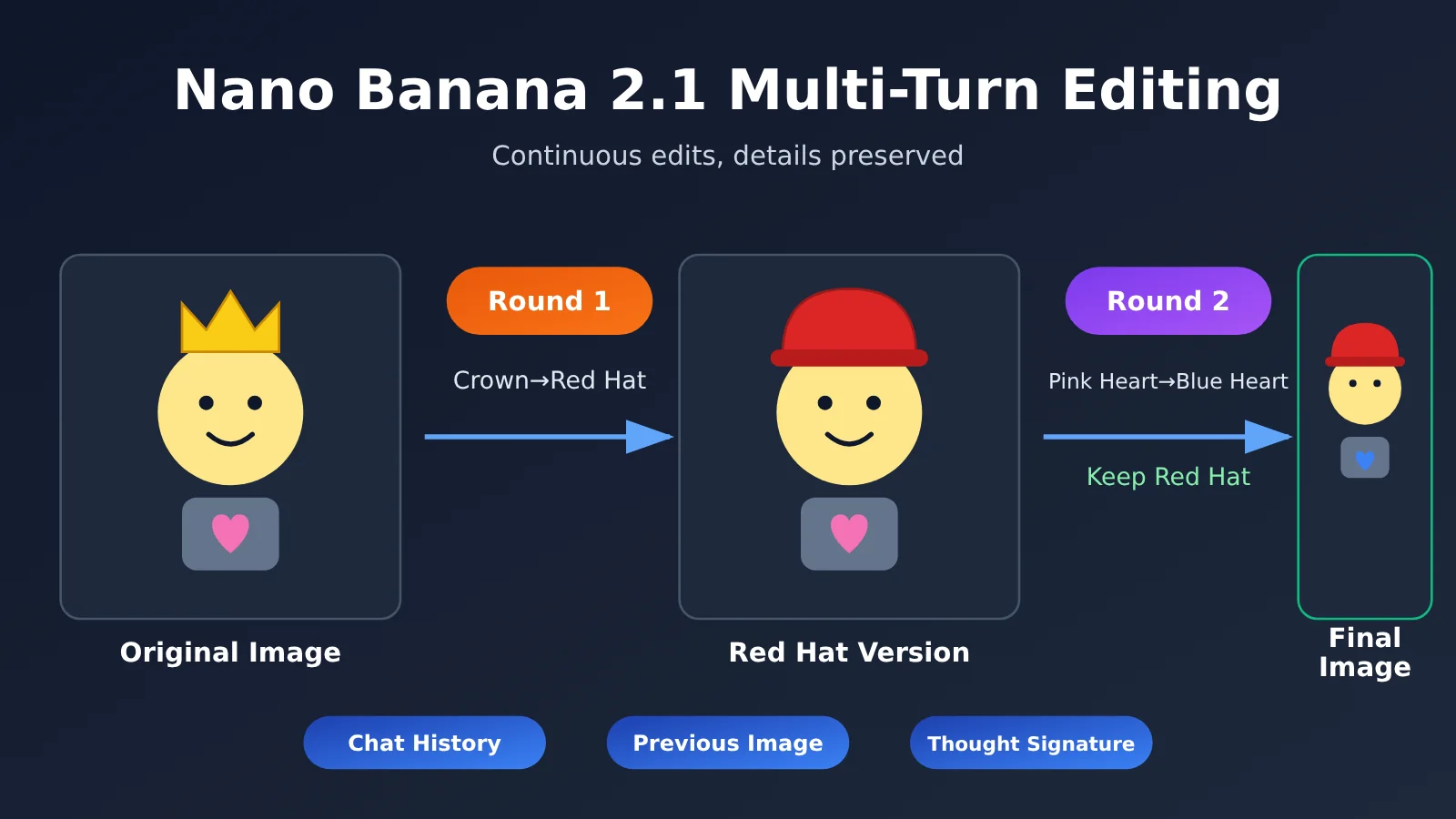
Author’s note: This complete example—“replace the crown with a red hat, then change the pink heart to blue”—explains what conversation history, the previous turn’s image, and the thought signature you need to pass back with each turn in Nano Banana 2.1. That way, local edits preserve the results of previous turns.
Many developers run into the same problem the first time they use gemini-nano-banana-2.1 to edit an image: the first edit looks great, but when they try to tweak one small detail in the second turn, the previous edit gets “overwritten,” or the entire image is redrawn in a different style. This article explains the right way to pass data back for multi-turn editing with Nano Banana 2.1, so you can make two consecutive edits without losing details.
This isn’t another high-level overview. It walks through a reproducible example: in the first turn, replace the crown on a character’s head with a red hat; in the second, change only the pink heart to blue while keeping the red hat. We’ll provide the complete code for both requests and explain exactly what data to include in each turn.
What you’ll learn: By the end, you’ll understand how multi-turn editing works in Nano Banana 2.1, know the three items you need to pass back with each request, and be able to use the code directly to make consecutive, localized edits.
Key Points for Multi-Turn Editing with Nano Banana 2.1
Let’s clarify the terminology first. What’s often called “native multi-turn” editing with Nano Banana 2.1 is more accurately described as “iterative editing”: each turn is a separate API request. The model can “remember” what changed in the previous turn because you include the full context in the request—not because the server saves the session for you.
| Key point | Explanation | Benefit |
|---|---|---|
| Full conversation history | The contents in the second request must include the first user instruction and the model’s reply |
The model knows what it did before, so it won’t redraw everything from scratch |
| Image output from the previous turn | Include the image returned in the model’s reply in the conversation history, unchanged | The second turn builds on the red-hat version instead of the original image |
| Thought signature | Pass back the signature field attached to a part of the model’s reply, unchanged | Preserves the model’s internal reasoning state and improves consistency in localized edits |
| Stateless requests | It hasn’t been verified that the server automatically remembers context | The client must assemble the history itself to keep behavior predictable |
| Native format requests | Build contents using Gemini’s native generateContent format |
The signature and image parts can be passed back in their original structure without losing fields |
Why Nano Banana 2.1 Multi-Turn Editing Can “Lose Details”
The most common mistake is to send only “Change the pink heart to blue” in the second turn, along with the original image. The model still sees the original image with the crown, so it naturally keeps the crown—and the red hat from the first turn disappears. Another mistake is to include only the image output from the first turn without the conversation history. The model gets the version with the red hat, but doesn’t know that the hat was deliberately changed just now and needs to be preserved. It may then alter the hat’s color or shape while making the second edit.
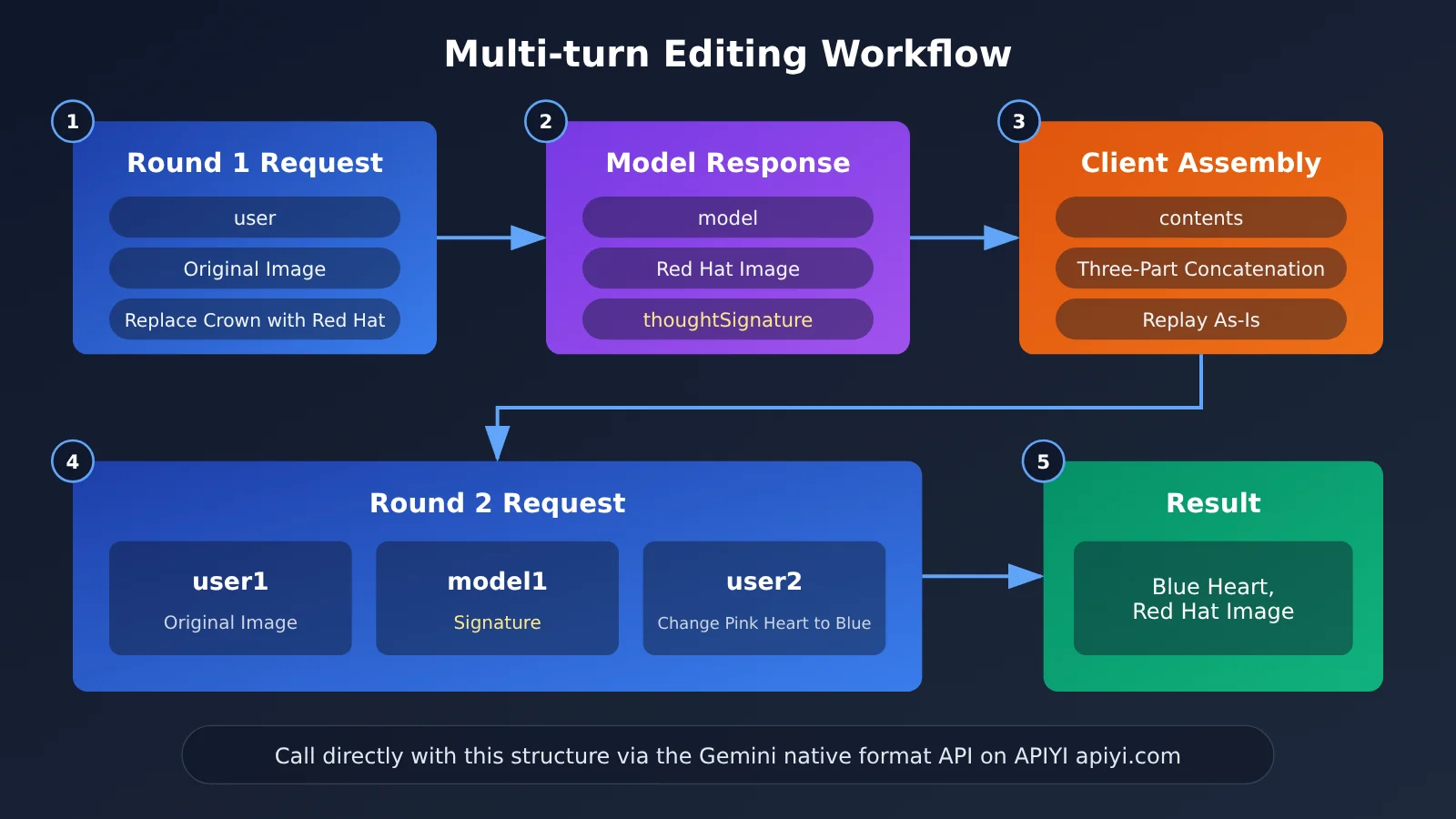
The reliable approach is to send the complete first interaction back as conversation history: what the user said, which image the model returned, and the signature attached to the model’s reply. Google’s official documentation describes multi-turn image editing in the same way: the model uses the signature in the history to carry forward its reasoning context, so it changes only the specified area.
Request Structure for Multi-Turn Editing with Nano Banana 2.1
The contents in the second request is an array ordered by time and contains at least three parts: the first-turn user message (original image and instruction), the first-turn model reply (including the output image and signature), and the new user instruction for the second turn. The key is to replay the model reply exactly as it was. Don’t extract just the image base64 and rebuild the reply, or the signature field can easily get lost in the conversion.
Getting Started with Nano Banana 2.1 Multi-Turn Editing
This guide uses Python and the requests library to call Gemini’s native generateContent format directly. We’re not using the OpenAI-compatible chat format because multi-turn editing needs to pass back thought signatures and image parts. The native format preserves these fields in their original structure as much as possible.
Getting Ready
| Requirement | Description | Notes |
|---|---|---|
| API key | Create one in the APIYI console | New users get free testing credits |
| Model name | gemini-nano-banana-2.1 |
Check the model list in the console |
| Original image | In this example, an image of a character wearing a crown with a pink heart on its chest | PNG or JPEG |
| Call format | Gemini native generateContent |
Makes it easier to pass back signatures and images intact |
| Runtime environment | Python 3 + requests |
No additional SDK required |
Minimal Example: Round 1—Replace the Crown with a Red Hat
The first round is a standard image-editing request: a single user message containing the original image and an instruction. The key is to save the returned model content in full so you can use it in the next round.
import base64, requests

BASE_URL = "https://api.apiyi.com/v1"  # APIYI unified endpoint; see the documentation for the native-format path
API_KEY = "YOUR_API_KEY"
MODEL = "gemini-nano-banana-2.1"
URL = f"{BASE_URL}/models/{MODEL}:generateContent"
HEADERS = {"Authorization": f"Bearer {API_KEY}", "Content-Type": "application/json"}

img_b64 = base64.b64encode(open("origin.png", "rb").read()).decode()
user1 = {"role": "user", "parts": [
    {"inline_data": {"mime_type": "image/png", "data": img_b64}},
    {"text": "Replace the crown on the character's head with a red hat, and leave everything else unchanged."}]}

resp = requests.post(URL, headers=HEADERS, json={
    "contents": [user1],
    "generationConfig": {"responseModalities": ["TEXT", "IMAGE"]}}).json()
model1 = resp["candidates"][0]["content"]  # Save as-is, including the image and thoughtSignature
The most important detail is the last line: model1 takes the entire candidates[0].content object, rather than just the image data it contains. Its parts may include text, images, and a thoughtSignature field. Saving the object as-is ensures nothing gets left out.
Complete Example: Change Only the Pink Heart to Blue in Round 2, Keeping the Red Hat
The key to the second round is assembling contents as [user1, model1, user2]. The complete code below includes both rounds, a signature check, and image saving, and is ready to run.
View the complete code for two-round Nano Banana 2.1 editing
import base64
import requests

BASE_URL = "https://api.apiyi.com/v1"  # Call through APIYI; see docs.apiyi.com for the native-format path
API_KEY = "YOUR_API_KEY"
MODEL = "gemini-nano-banana-2.1"
URL = f"{BASE_URL}/models/{MODEL}:generateContent"
HEADERS = {"Authorization": f"Bearer {API_KEY}", "Content-Type": "application/json"}
GEN_CONFIG = {"responseModalities": ["TEXT", "IMAGE"]}


def call(contents):
    """Send a generateContent request and return the complete content object from the model's reply."""
    r = requests.post(URL, headers=HEADERS,
                      json={"contents": contents, "generationConfig": GEN_CONFIG},
                      timeout=180)
    r.raise_for_status()
    return r.json()["candidates"][0]["content"]


def save_image(content, path):
    """Extract the image from the model's reply and save it."""
    for part in content.get("parts", []):
        data = part.get("inlineData") or part.get("inline_data")
        if data:
            open(path, "wb").write(base64.b64decode(data["data"]))
            return True
    return False


def has_signature(content):
    """Check whether the reply contains a thought signature."""
    return any("thoughtSignature" in p or "thought_signature" in p
               for p in content.get("parts", []))


# ---------- Round 1: crown → red hat ----------
img_b64 = base64.b64encode(open("origin.png", "rb").read()).decode()
user1 = {"role": "user", "parts": [
    {"inline_data": {"mime_type": "image/png", "data": img_b64}},
    {"text": "Replace the crown on the character's head with a red hat. Keep everything else unchanged."}]}

model1 = call([user1])
save_image(model1, "round1_red_hat.png")
print("Round 1 signature present:", has_signature(model1))

# ---------- Round 2: pink heart → blue heart, keep the red hat ----------
user2 = {"role": "user", "parts": [
    {"text": "Based on the previous image, change only the pink heart on the character's chest to blue. "
             "Keep the red hat and all other details unchanged."}]}

# Key: include the full history and pass model1 back unchanged (including the previous image and signature)
history = [user1, model1, user2]
model2 = call(history)
save_image(model2, "round2_blue_heart.png")
print("Round 2 signature present:", has_signature(model2))

# To add a third round, continue with: history += [model2, user3]
🚀 Get started quickly: We recommend first running the two-round example above with the free testing quota on APIYI at apiyi.com. Confirm that the red hat remains in the round 2 image and only the heart changes color, then integrate it into your own workflow.
Tips for Writing the Second-Round Instruction
Whether continuous editing can “change only part of the image” depends not only on how you pass the conversation history back, but also on how you phrase the instruction. In the second-round prompt, we recommend clearly stating three things: which image to edit, what to change, and what must stay the same. For example, “Starting from the previous image, change only the pink heart to blue. Keep the red hat and all other details unchanged” is much more reliable than simply saying “Change it to blue.”
Also, don’t attach the original image again in the second round. It’s already included in user1. If you include it again in user2, the model may interpret it as a new reference image and revert to the crown version.
Comparing Three Ways to Pass Back Multi-Turn Edits with Nano Banana 2.1
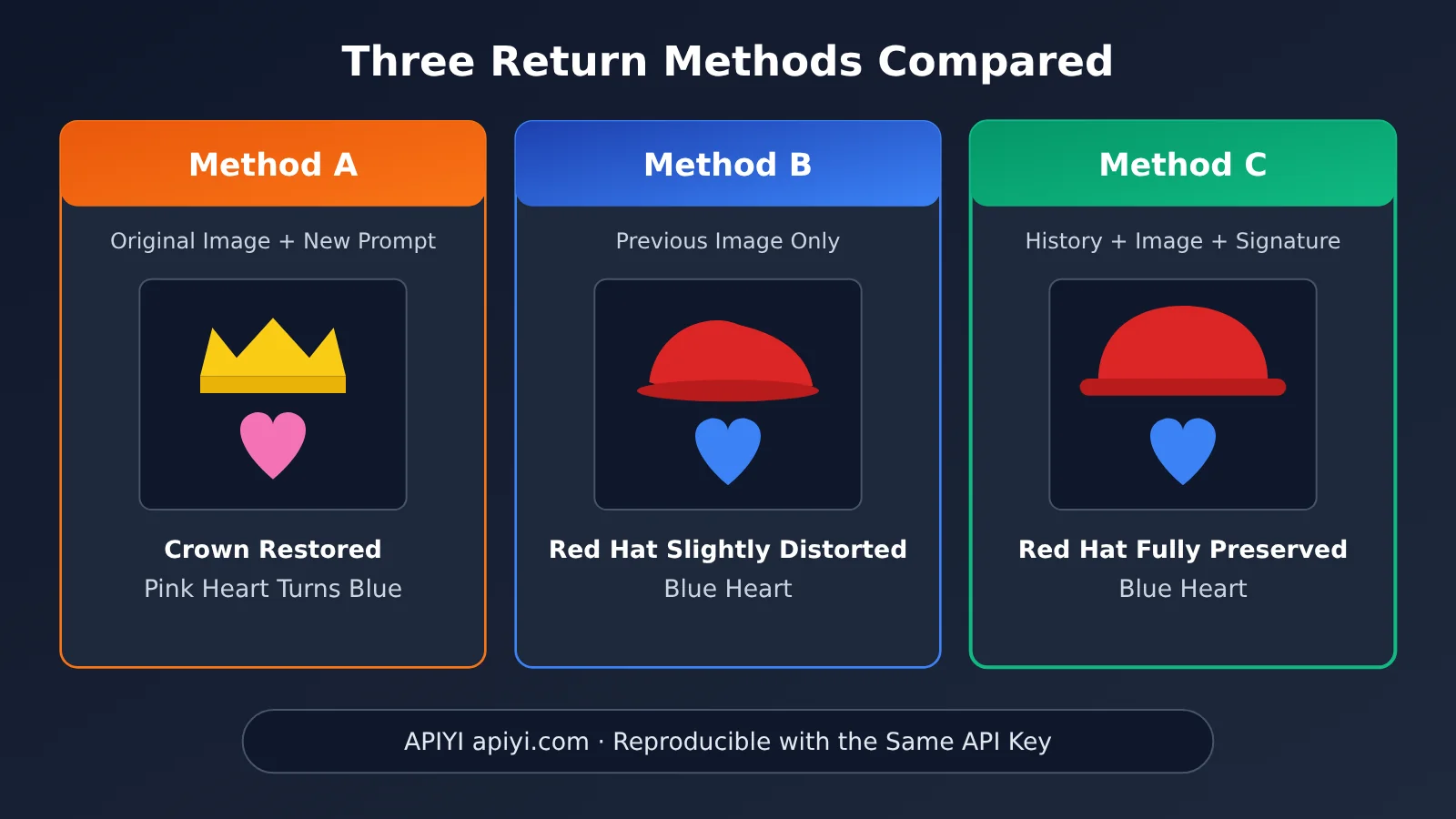
To show why all “three elements” need to be included, we’ve compared three common approaches below. The table describes their typical behavior and can help you quickly identify which approach your code uses.
| Method | Second-round request contents | Typical result | Recommendation |
|---|---|---|---|
| Method A: Resend the original image | Original image + new instruction | First-round edits are lost and the crown returns | Not recommended |
| Method B: Continue with a single image | First-round output image + new instruction, no history | The red hat is mostly preserved, but details may be changed along the way | Fine for simple scenarios |
| Method C: Pass back the full history | user1 + model1 (including image and signature) + user2 |
Only the heart’s color changes; the red hat and other details stay the same | Recommended ✅ |
Comparison
Method A in practice: Method A is the easiest to implement because each round is an independent request. But the model can’t see the first-round result, so it effectively performs another single-round edit from scratch. By contrast, passing back the full history lets the second round build on the first-round result.
Method B in practice: Method B keeps the request size small by sending just one image. But the model lacks the context that the red hat was an intentional edit, and it doesn’t receive the signature either, so there’s no guarantee of local consistency. For scenarios that require multiple rounds of refinement, such as design drafts and e-commerce product images, Method C is still the more reliable choice.
💡 Recommendation: If your use case involves more than two consecutive editing rounds, we recommend using Method C from the start. You can run all three approaches with the same code on APIYI apiyi.com and compare the output images—the differences will be easy to see.
Choosing Between Nano Banana 2.1 and Other Models in the Series
APIYI offers several models in the Nano Banana series. Continuous editing is an advanced use of their editing capabilities. The table below can help you choose a model from the series.
| Model | Positioning | Recommendation for continuous editing | Available platform |
|---|---|---|---|
| gemini-nano-banana-2.1 | The featured model in this article, with support for continuous editing based on history and signatures | We recommend passing back the history using Method C | APIYI apiyi.com |
| Nano Banana 2 (gemini-3.1-flash-image) | Image generation and editing model in the same series | Assemble the history using the same native format | APIYI apiyi.com |
| Other Nano Banana models | Choose based on your speed and image quality requirements | See the series development guide | APIYI apiyi.com |
Common Pitfalls in Nano Banana 2.1 Multi-Turn Editing
In practice, most cases where edits seem to “disappear” can be traced back to a handful of common causes. Use this checklist to work through them one by one.
- Signature lost: You convert the model’s reply into your own data structure and then piece it back together, changing the field capitalization or nesting structure and losing
thoughtSignature. To avoid this, save and resend the originalcontentobject directly. - Incorrect role: You label the model’s first reply with the
userrole. The model then treats its own output as a newly uploaded image from the user. Model replies must retainrole: model. - Reversed order:
contentsmust be listed in chronological order: user1, model1, user2. Don’t put the latest instruction first. - Mixed formats: You use the OpenAI-compatible format for one turn, then switch to the native format for the next. Converting fields between formats can easily drop the signature. It’s best to use the native Gemini format throughout the entire multi-turn workflow.
- Too much history: The more turns there are, the more images the request carries, increasing both payload size and latency. For workflows that run longer than two or three turns, consider treating the current result as a new original image at a key point and starting a fresh conversation history.
🎯 Technical tip: When troubleshooting, first print the
partsstructure from model1 and confirm that thethoughtSignaturefield is present. Then check that it’s included unchanged in the second request body. The APIYI documentation center at apiyi.com has examples of assembling requests in the native Gemini format for multi-turn conversations that you can use for comparison.
Frequently Asked Questions (FAQ)
Q1: What is Nano Banana 2.1 multi-turn editing?
It means using gemini-nano-banana-2.1 to make a series of edits to the same image, changing only specific parts in each round based on the previous result. More precisely, this is “continuous editing”: each round is a separate request, and the client carries over the context by sending the full history, the previous round’s image, and the thought signature.
Q2: What’s the difference between multi-turn and single-turn editing?
Single-turn editing only needs to handle “the original image plus one instruction.” Multi-turn editing requires the model to understand previous changes and preserve them in the next round. Single-turn editing doesn’t need history, but multi-turn editing must include the history and signature. Otherwise, the model will effectively start over and edit the original image again.
Q3: Does the server automatically remember the context from the previous round?
We haven’t verified that the server automatically remembers the context, so don’t rely on it. The safest approach is to treat each request as stateless and have the client maintain the contents array. This also matches the continuous editing approach in Google’s official documentation.
Q4: What scenarios are best suited to Nano Banana 2.1 multi-turn editing?
It’s mainly suited to scenarios like these:
– **E-commerce product image refinement**: Change the background first, then adjust the product color separately while keeping the composition unchanged
– **Character design iteration**: Change accessories first, then refine clothing details while keeping the character’s face consistent
– **Marketing poster adjustments**: Change the main visual element first, then fine-tune local color blocks without regenerating the entire image
Q5: How can I quickly call Nano Banana 2.1 multi-turn editing through the API?
We recommend following these steps to test it:
1. Visit APIYI at apiyi.com, create an account, and generate an API key
2. Claim the free testing credits for new users
3. Run the complete code in this article. Set `base_url` to `https://api.apiyi.com/v1`. For the native-format path, refer to the documentation center
You can also use the same API key to call other models in the Nano Banana series and compare their continuous editing results.
Q6: What are the limitations of Nano Banana 2.1 multi-turn editing?
– **Request size**: Each additional round adds another image to the request, making it larger and slower to process
– **Consistency limits**: The examples in this article validate two consecutive editing rounds. Test your own assets to evaluate stability over more rounds
– **Alternative approach**: For longer workflows, use the current result as a new original image at key points and start a fresh history
Nano Banana 2.1 Multi-Turn Editing: Key Takeaways
- It’s a continuous editing process: Each turn is a separate request, and the client maintains context by sending it back.
- All three elements are essential: The complete conversation history, the image generated in the previous turn, and the thought signature.
- Send the model content back unchanged: Save
candidates[0].contentdirectly to avoid losing the signature. - Use the native format: The
contentsstructure ingenerateContentis best suited for sending images and signatures back. - Be clear about what to preserve: In the second turn, explicitly state what to change and what should stay the same for more reliable edits.
- Don’t attach the original image again: Including it in the second turn can cause the model to revert to the pre-edit version.
- Test at low cost: Use APIYI apiyi.com’s free credits to get two turns working before launch.
Summary
Key points for multi-turn editing with Nano Banana 2.1:
- Mechanism: Multi-turn editing is a continuous editing process that relies on the client sending context back. Automatic server-side memory hasn’t been verified, so don’t rely on it.
- What to send back: The second request must include
user1, the unchangedmodel1(including the image and thought signature), anduser2. - Practical tips: Use Gemini’s native format throughout, specify what to preserve in your instructions, and don’t attach the original image again in a new turn.
Once you’ve got these three points down, you can reliably reproduce two-turn edits like “replace the crown with a red hat, then turn the pink heart blue.” The same structure can also be extended to more turns.
We recommend using APIYI apiyi.com to quickly test the results. The platform provides both OpenAI-compatible and Gemini-native format APIs. With a single API key, you can call the Nano Banana series and other leading models. Pay-as-you-go pricing makes it easy to start with a small-scale test and gradually move into production.
📚 References
- Google Gemini API Image Generation and Editing Documentation: Official guide to multi-turn image editing
- Link:
ai.google.dev/gemini-api/docs/image-generation -
Description: Explains the request structure for image editing and how to edit images across multiple turns
-
Google Gemini API Thought Signatures Documentation: Guide to the thought signature mechanism
- Link:
ai.google.dev/gemini-api/docs/thought-signatures -
Description: Explains what thought signatures are used for and how to pass them back in multi-turn requests
-
APIYI Documentation Center: Developer guides for the Nano Banana series, implementing multi-turn conversations, and calling Gemini in its native format
- Link:
docs.apiyi.com - Description: Includes integration endpoints, native-format paths, and examples of assembling conversation history—the references used to implement the code in this article
Author: APIYI Technical Team
Technical Support: Contact us via the APIYI website homepage. For more Nano Banana integration resources, visit the documentation center at docs.apiyi.com