The biggest cost sink in running LLM applications isn't output tokens—it's the redundant retransmission of system prompts and long documents. Both OpenAI and Anthropic have provided a solution: prompt caching. However, their billing philosophies are completely different: OpenAI follows a "zero-configuration, moderate discount" path, while Claude follows an "explicit declaration, deep discount" path.
This article is based on the latest official documentation and developer test data from May 2026. We systematically compare the caching billing rules of OpenAI and Claude across six dimensions: minimum prompt length, prompt structure requirements, write surcharges, read discounts, TTL control, and caching granularity. We also calculate exactly how much money both solutions can save using a real-world scenario involving 100,000 tokens.
Core Value: After reading this, you'll be able to immediately determine which caching solution your business should use, how much you can save, and what engineering changes are required.
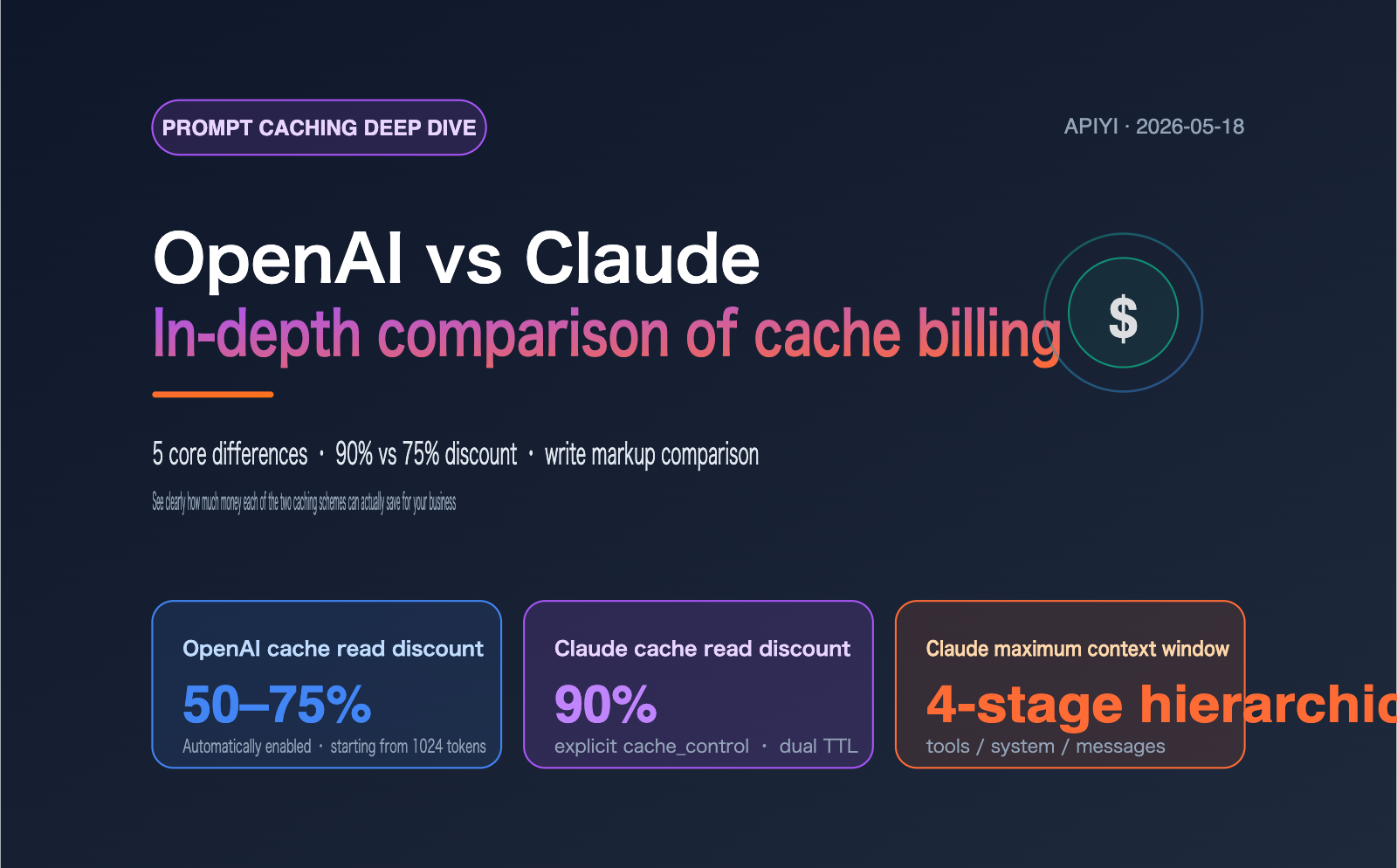
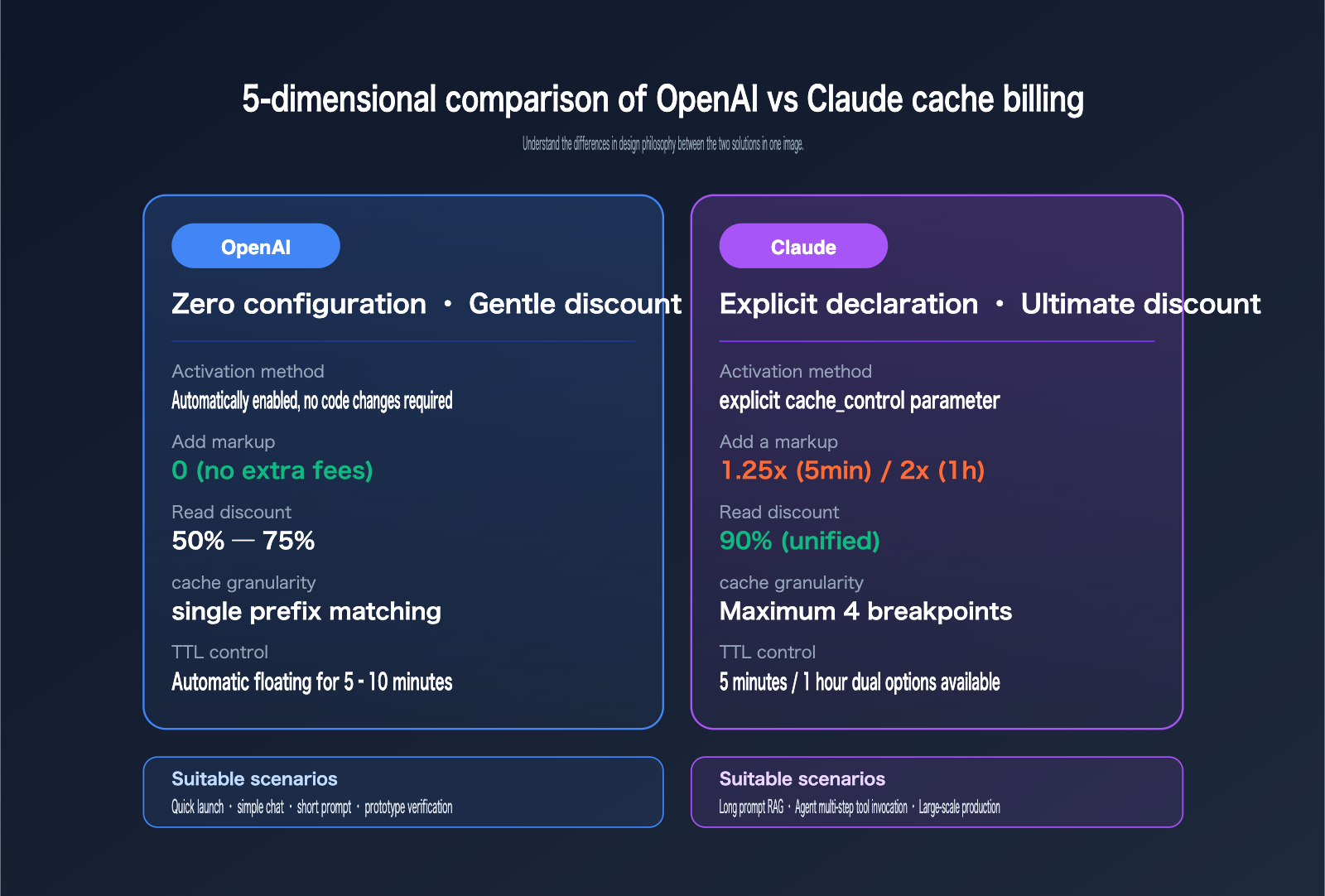
5 Core Differences in OpenAI and Claude Caching Billing
While both caching solutions appear to be about "discounted cache reads," the design philosophy behind each rule determines their true economic efficiency in different business scenarios. The table below summarizes the 5 core differences we've compiled from official pricing documentation.
| Dimension | OpenAI Caching | Claude Caching |
|---|---|---|
| Activation | Fully automatic, zero-config | Explicit cache_control parameter |
| Min. Prompt Length | 1024 tokens (uniform) | 1024 / 4096 tokens (model-dependent) |
| Write Surcharge | 0 (no markup) | 1.25× (5min) or 2× (1h) base input price |
| Read Discount | 50% – 75% off | 90% off (uniform) |
| Caching Granularity | Single prefix matching | Up to 4-breakpoint layering |
| TTL Control | 5–10 min automatic floating | 5min and 1h options available |
Once you understand this table, you'll grasp the bottom line: OpenAI lets you integrate with a "free-ride" approach, while Claude requires an "investment" approach. OpenAI is suitable for rapid deployment where budget and engineering resources are limited; Claude is better suited for large-scale, controllable, long-term production workloads.
🎯 Quick Comparison Tip: If you want to stress-test the caching billing effects of both OpenAI and Claude in the same project, we recommend using APIYI (apiyi.com). The platform provides OpenAI-compatible protocols for both vendors, allowing you to use a single codebase, switch via the
modelfield, and directly compare thecached_tokensandcache_read_input_tokensmetrics between the two.
OpenAI API Caching Billing Details
OpenAI's caching billing design is incredibly straightforward. The core rule is: As long as your prompt prefix is ≥ 1024 tokens and matches the previous request exactly, the system automatically applies a discount without requiring any code or header changes.
OpenAI Caching Billing: Prompt Length and Structure Requirements
OpenAI's cache hit conditions can be broken down into two hard constraints: the prompt must be at least 1024 tokens long, and caching only matches the prefix of the request. Any dynamic content must be placed at the end of the prompt. The specific rules are as follows:
- Minimum Length: The total prompt length must be ≥ 1024 tokens. If it's shorter, it won't be cached, and no error will be triggered.
- Prefix Matching: The system compares the prompt token-by-token from the beginning. If any part in the middle changes, everything after that point is billed at the standard rate.
- 128-Token Increments: Cache hits are calculated in 128-token increments. Beyond the initial 1024 tokens, every additional 128 identical tokens continue to count toward the cache hit.
- Exact Match: This includes system messages, tool definitions, historical messages, and images. Any character difference will break the cache.
- Automatic Maintenance: No
cache_idor manual invalidation is needed. The cache is automatically cleared after 5–10 minutes of inactivity, which can extend to 1 hour during off-peak times.
This means if your business logic places dynamic content like timestamps or user IDs right after the system prompt, the entire cache will be invalidated. Moving dynamic content to the end and keeping static content at the front is the key to making OpenAI's caching effective.
OpenAI Caching Billing: Real Discount Tiers
OpenAI's read discount isn't a single flat rate; it varies by model. Some newer models, like GPT-5.5, offer a more aggressive 75% discount. The table below shows the cache pricing for mainstream OpenAI models as of May 2026.
| Model | Standard Input ($/M) | Cache Read ($/M) | Discount Rate |
|---|---|---|---|
| GPT-5.5 | 5.00 | 1.25 | 75% |
| GPT-5.5 mini | 0.25 | 0.0625 | 75% |
| GPT-4o | 2.50 | 1.25 | 50% |
| GPT-4o mini | 0.15 | 0.075 | 50% |
| o1-preview | 15.00 | 7.50 | 50% |
OpenAI returns the actual number of cached tokens in the usage.prompt_tokens_details.cached_tokens field of the response. You can use this field directly to calculate your savings. Full automation + moderate discounts is the core value proposition of OpenAI's caching.
Claude API Caching Billing Details
Claude's approach to caching is more of an "explicit commitment": You must explicitly tell the model "I want to cache this section," and in return, the model gives you a massive 90% discount, though you pay a premium for the initial write.
Claude Caching Billing: Minimum Token Requirements (Model-Dependent)
While OpenAI has a one-size-fits-all 1024-token requirement, Claude differentiates by model tier. Here are the minimum cache token thresholds for current Claude models:
| Model | Min. Cacheable Tokens | Standard Input ($/M) | 5min Write ($/M) | Cache Read ($/M) |
|---|---|---|---|---|
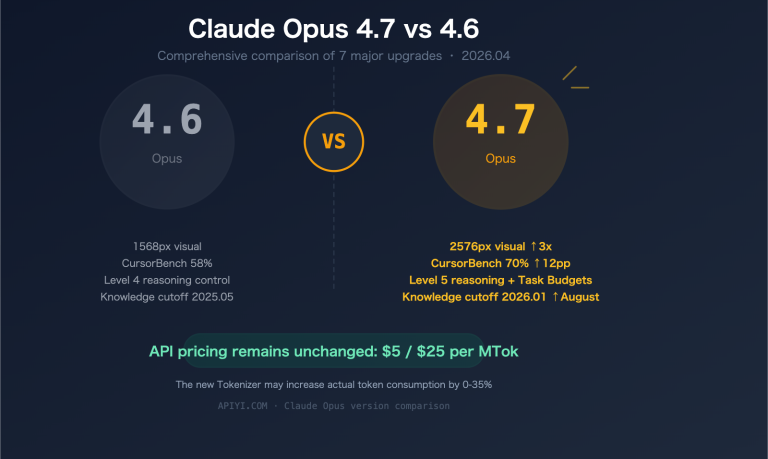
| Claude Opus 4.7 / 4.6 / 4.5 | 4096 | 5.00 | 6.25 | 0.50 |
| Claude Sonnet 4.6 / 4.5 | 1024 | 3.00 | 3.75 | 0.30 |
| Claude Opus 4.1 | 1024 | 15.00 | 18.75 | 1.50 |
| Claude Haiku 4.5 | 4096 | 1.00 | 1.25 | 0.10 |
This means if you're using the latest Opus or Haiku models, a 3000-token system prompt won't be cached at all. You'll need to pad it with extra content (like full tool definitions or example dialogues) to reach the 4096-token threshold. For the Sonnet series, this isn't necessary, as 1024 tokens will trigger it.
Claude Caching Billing: TTL Tiers and Break-even Rules
Another key feature of Claude is the choice between two TTL (Time-To-Live) tiers, with significant price differences:
- 5-minute TTL: Write premium is 25%. You only need one subsequent read to break even. This is ideal for high-frequency Q&A and chatbots.
- 1-hour TTL: Write premium is 100% (2x price). You need ≥ 2 reads to break even. This is better for batch processing, agentic multi-step tasks, and scheduled reports.
- Mixed TTL: Long TTLs must be placed before short TTLs, allowing you to enjoy different caching strategies simultaneously.
Note that the 5-minute TTL automatically renews after every successful read. As long as your request frequency stays within the 5-minute window, the cache stays "alive" indefinitely, and you only pay the write fee once.
Claude Caching Billing: Hierarchy and Breakpoint Control
Claude's "killer feature" is the ability to use up to 4 cache breakpoints, allowing you to slice your prompt into multiple independently managed layers. This is crucial for complex applications. The hierarchy strictly follows the top-down order: tools → system → messages. The tools layer holds function schemas, the system layer holds system prompts and role definitions, and the messages layer carries historical dialogue and context.
Crucially, invalidating an upper layer invalidates all layers below it. If you change one line in your tool definition, the system and messages cache will be wiped. Conversely, changing only the user's last message leaves the previous layers intact. Architecturally, you should move the least frequently changed content to the top; this rule directly determines your cache hit rate.
Also, keep in mind that each breakpoint has a lookback window of approximately 20 blocks. The system searches backward from the breakpoint for 20 content blocks; if it finds an identical historical prompt within that window, it hits the cache. If your conversation exceeds 20 turns, we recommend adding another breakpoint in the middle to prevent the history from falling out of the cache.
💡 Architectural Advice: For complex applications using multiple models, we recommend testing via the APIYI (apiyi.com) platform to make the best choice for your needs. The platform supports unified interface calls for both OpenAI and Claude, allowing you to compare the actual billing for the same workload across both caching mechanisms without rewriting your code.
Real-World Cost Analysis: OpenAI vs. Claude Prompt Caching
Theoretical analysis is one thing, but real-world savings depend on your specific use case. Let's break down a common business scenario:
- Static system prompt: 100,000 tokens (technical documentation + few-shot examples)
- Per user request: 100 input tokens (actual question) + 1,000 output tokens
- Call frequency: 1,000 requests per day, evenly distributed throughout working hours
- Models compared: GPT-5.5 vs. Claude Sonnet 4.6 (the "workhorses" for each provider)
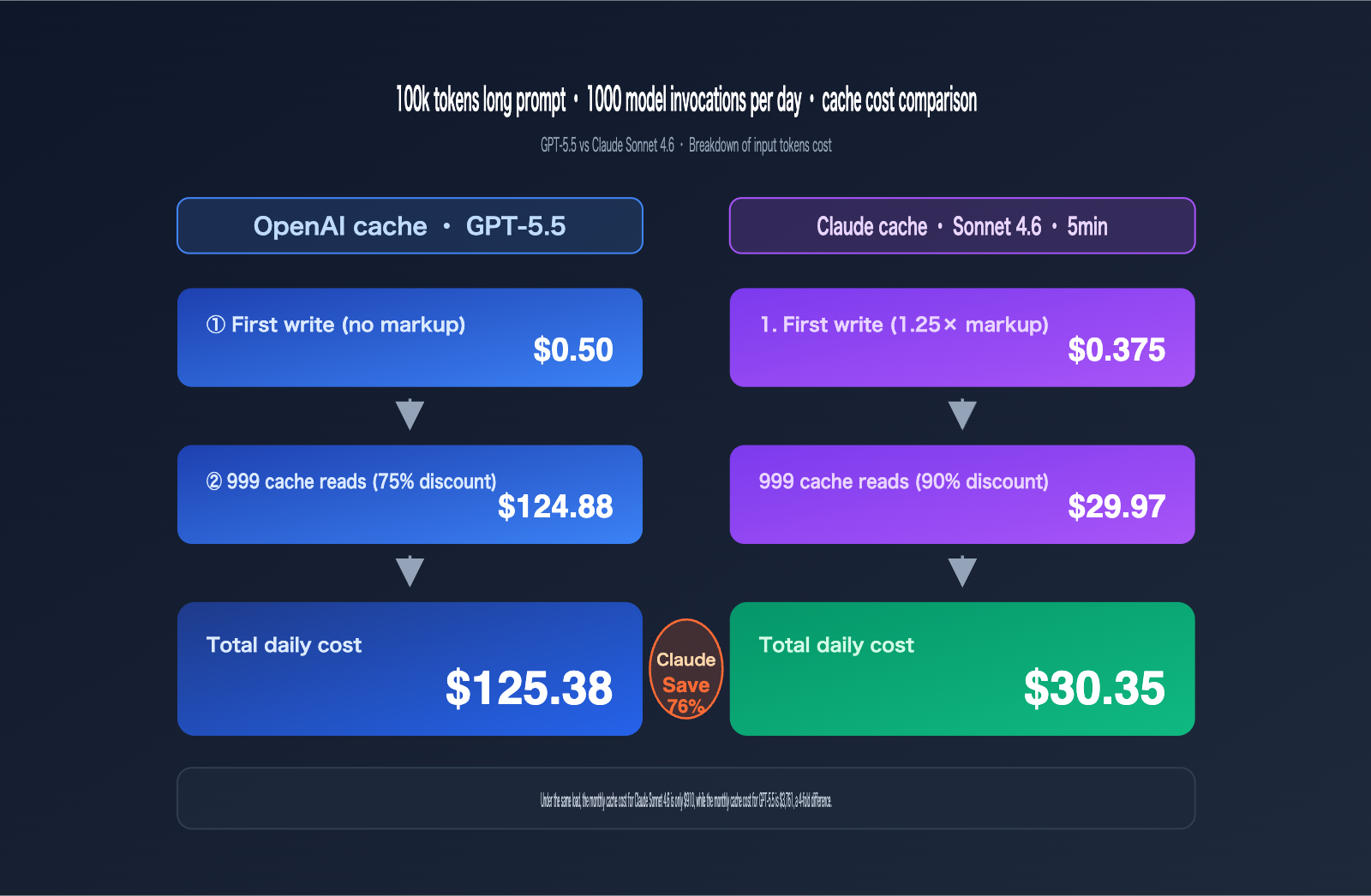
Daily Cost Comparison: OpenAI vs. Claude Prompt Caching
The table below breaks down the key costs for the scenario above. Note that all figures represent input token costs only, excluding output tokens (as both providers have similar output pricing, which can be calculated separately).
| Item | GPT-5.5 (No Cache) | OpenAI (With Cache) | Sonnet 4.6 (No Cache) | Claude (5min Cache) |
|---|---|---|---|---|
| Initial Write Cost | — | $0.50 | — | $0.375 |
| Subsequent Reads (999) | $499.50 | $124.875 | $299.70 | $29.97 |
| Daily Input Cost | $500.00 | $125.38 | $300.00 | $30.35 |
| Savings | 0% | 75% | 0% | 90% |
| Monthly Cost (30 days) | $15,000 | $3,761 | $9,000 | $910 |
The conclusion is clear: For the same workload, the monthly cost of Claude Sonnet 4.6 with caching enabled is only about 24% of the cost of GPT-5.5 with caching. If your business model relies on "long system prompts + short Q&A," Claude's cost advantage will scale linearly with your usage.
However, keep two caveats in mind:
- Cache hit rate is critical: If your system prompt changes frequently, the savings for both providers will shrink significantly.
- Model performance varies: Output quality between GPT-5.5 and Sonnet 4.6 isn't always identical for every task, so you should evaluate them based on your specific business metrics.
💰 Cost Optimization Tip: For budget-sensitive projects, consider using the APIYI (apiyi.com) platform to invoke APIs. It offers flexible billing and more competitive pricing, making it ideal for small teams and individual developers to quickly validate the ROI of caching strategies without needing to manage complex billing systems yourself.
Recommendations for OpenAI and Claude Caching Scenarios
Price is just one variable. You also need to consider whether it's worth the engineering effort to implement caching, whether you can guarantee stable cache hits, and if it's compatible with your multi-model architecture. Here are some clear recommendations based on different business scenarios.
Typical Scenarios for Choosing OpenAI Caching
The biggest appeal of OpenAI caching is its "seamless integration." It's perfect for teams that don't have the engineering bandwidth for prompt optimization or for early-stage projects where business requirements are still shifting.
- Simple chatbots or customer service FAQs where the system prompt is short but the call volume is high.
- Rapid prototyping phases where you want to reduce development friction and see results before focusing on optimization.
- Projects already heavily integrated into the OpenAI ecosystem (using function calling, structured outputs, etc.) where you don't want to introduce a new SDK.
- Multi-team environments where you can't guarantee everyone will correctly implement the
cache_controlparameter.
Typical Scenarios for Choosing Claude Caching
The advantages of Claude caching really shine in scenarios involving long prompts, high-frequency reads, and controllable production loads.
- Long system prompts + long document RAG: For example, if you're feeding an entire product manual into the system prompt, the 90% discount is incredibly attractive.
- Multi-turn Agent tool calling: Both tool definitions and system prompts can be cached independently, which is ideal for long-chain reasoning.
- Batch / Offline tasks: A 1-hour TTL combined with low-frequency reads (a few times per minute) perfectly maximizes the 2x write surcharge.
- Multi-layered prompt applications: You can break your templates, knowledge bases, and user context into four separate breakpoints for granular control over expiration.
OpenAI vs. Claude Caching Comparison Table
The table below provides a side-by-side comparison of the key decision-making factors for both providers to help you evaluate them against your project requirements.
| Decision Factor | OpenAI Caching | Claude Caching | Recommended |
|---|---|---|---|
| Engineering Effort | Almost zero | Requires cache_control |
OpenAI |
| Savings | 50%–75% | 90% | Claude |
| Long Prompt Friendliness | Moderate | Excellent | Claude |
| Short Prompt Adaptation | 1024 tokens | 4096 (Opus/Haiku) | OpenAI |
| Agent / Tool Use | Tool definitions occupy prompt | Tools cached separately | Claude |
| Low Prompt Maturity | Less prone to errors | Higher learning curve | OpenAI |
| TTL Control | Not supported | 5min / 1h options | Claude |
Practical Guide to OpenAI and Claude Cache Billing
We've covered the theory, but what you really need to get up and running are a few dozen lines of code that actually work. Below are the minimal viable implementations for both, which you can copy and paste directly into your project.
OpenAI Cache Billing Code Example
OpenAI doesn't require any specific cache parameters. The key is to place static content at the beginning and dynamic content at the end, then verify the hit using usage.prompt_tokens_details.cached_tokens.
from openai import OpenAI

client = OpenAI(
    api_key="YOUR_API_KEY",
    base_url="https://api.apiyi.com/v1"
)

# Your 100k token long system prompt, must be placed at the start and remain identical every time
LONG_SYSTEM = "(Your 100k tokens long system prompt)"

response = client.chat.completions.create(
    model="gpt-5.5",
    messages=[
        {"role": "system", "content": LONG_SYSTEM},
        {"role": "user", "content": "What's the weather like today?"}  # Place dynamic content at the end
    ],
)

# Verify cache hit
print(response.usage.prompt_tokens_details.cached_tokens)
Claude Cache Billing Code Example
Claude requires an explicit cache_control tag, which must be applied to the content blocks within your system or messages. Below is the typical "system + 1 breakpoint" usage.
import anthropic

client = anthropic.Anthropic(
    api_key="YOUR_API_KEY",
    base_url="https://api.apiyi.com"
)

response = client.messages.create(
    model="claude-sonnet-4-6",
    max_tokens=1024,
    system=[
        {
            "type": "text",
            "text": "(4096+ tokens long system prompt, must be at the very beginning)",
            "cache_control": {"type": "ephemeral"}   # 5-minute default, can be changed to ttl="1h"
        }
    ],
    messages=[{"role": "user", "content": "What's the weather like today?"}],
)

# Verify cache hit
print(response.usage.cache_read_input_tokens,
      response.usage.cache_creation_input_tokens)
View full code for multi-layer caching with 4 breakpoints
import anthropic

client = anthropic.Anthropic(
    api_key="YOUR_API_KEY",
    base_url="https://api.apiyi.com"
)

response = client.messages.create(
    model="claude-sonnet-4-6",
    max_tokens=1024,
    tools=[
        {
            "name": "search_db",
            "description": "...",
            "input_schema": {...},
            "cache_control": {"type": "ephemeral", "ttl": "1h"}  # Longest TTL at the top
        }
    ],
    system=[
        {
            "type": "text",
            "text": "Company knowledge base summary (static)",
            "cache_control": {"type": "ephemeral", "ttl": "1h"}
        },
        {
            "type": "text",
            "text": "Daily dynamic instructions (updated once a day)",
            "cache_control": {"type": "ephemeral"}   # 5-minute default
        }
    ],
    messages=[
        {
            "role": "user",
            "content": [
                {"type": "text", "text": "Key data from last week's financial report..."},
                {
                    "type": "text",
                    "text": "Please summarize this for me",
                    "cache_control": {"type": "ephemeral"}
                }
            ]
        }
    ]
)
The core difference is that OpenAI is completely unaware of the cache, while Claude forces developers to actively define cache boundaries. With a unified access layer, you can switch between models just by changing the model field, allowing your business logic to remain unchanged.
Decision Guide: OpenAI vs. Claude Cache Billing
If I had to give you one piece of advice: The more complex your business, the longer your prompts, and the higher your call frequency, the more value you'll get from Claude's 90% discount. If your business is simple, your prompts are short, and you're in a rush to launch, OpenAI's zero-configuration approach is the way to go.
Here is a recommended three-step implementation plan:
- Step 1: Measure real-world load. Calculate the average number of tokens in your system prompt and your daily call volume. These two numbers determine how much money caching will save you.
- Step 2: Select your primary model. As long as the model meets your business requirements, prioritize the one with the deeper caching discounts.
- Step 3: Optimize your prompt engineering. Move all "content that repeats every time" to the front, and place "content that changes" at the end or behind a separate breakpoint.
🚀 Quick Start Tip: We recommend using the APIYI (apiyi.com) platform to quickly build your prototype. It provides a unified interface for both OpenAI and Claude, so you don't have to integrate two different SDKs. You can switch models by simply changing the
modelfield in your code, and the cache billing fields are returned via the OpenAI-compatible protocol, making it easy to compare and evaluate performance.
FAQ: OpenAI and Claude Cache Billing
Q1: Why isn’t OpenAI caching working for me?
There are three common culprits: First, your prompt is shorter than 1024 tokens. Second, dynamic content (like timestamps or user IDs) is placed at the beginning of your prompt, which makes the prefix inconsistent every time. Third, the interval between two consecutive requests exceeded 5–10 minutes, causing the cache to be cleared automatically. I recommend sending the same prompt twice in a row and checking if cached_tokens is non-zero to quickly rule out environment issues.
Q2: Can I bypass Claude’s 4096-token minimum threshold?
No, you can't. Opus 4.7/4.6/4.5 and Haiku 4.5 require at least 4096 tokens to trigger caching. If your system prompt is only around 2000 tokens, I suggest two options: either switch to Sonnet 4.6 (which starts caching at 1024 tokens) or pad your system prompt with tool definitions, example dialogues, or style guides to hit that 4096+ threshold.
Q3: Is the 25% premium for cache writes worth it?
In the vast majority of cases, yes. Claude's 5-minute cache write is only 25% more expensive than standard input, but reading from the cache is 90% cheaper. This means that as long as the content is read once, the cache write premium pays for itself. A 1-hour cache pays for itself after just two reads. If you're worried about hit rates, pull a 24-hour report of cache_read_input_tokens from your production environment; the data will show you exactly how much you're saving.
Q4: Can I enable caching for both OpenAI and Claude at the same time?
Yes, and it's highly recommended. Their caching mechanisms are independent, so you can choose different models for different business modules within the same project. For example, use OpenAI for intent recognition (short prompts, high frequency) and Claude for long-document summarization (long prompts, deep reasoning). By using a unified access layer to share your prompt template system, you can avoid the hassle of maintaining two separate caching strategies.
Q5: How can developers in China quickly test OpenAI and Claude caching?
The most direct path is to use a unified access platform accessible within China. I recommend APIYI (apiyi.com). It provides OpenAI-compatible protocol interfaces for both OpenAI and Claude while passing through their respective cache billing fields (cached_tokens and cache_read_input_tokens). You can run both models in a single script and directly compare the actual cost savings without needing to apply for and maintain separate accounts for each provider.
Summary: How to Choose Between OpenAI and Claude Cache Billing
Back to the core conflict: Saving money vs. saving effort is the fundamental divide between OpenAI and Claude when it comes to cache billing. OpenAI covers 80% of common scenarios with zero-config and moderate discounts, while Claude wins over large-scale, long-prompt, and high-frequency production workloads with explicit configuration and deep discounts.
A three-point decision guide:
- Prompt < 4096 tokens and simple business logic → Choose OpenAI caching for an instant 50–75% discount.
- Prompt > 4096 tokens and multiple reads per minute → Choose Claude 5-minute caching for a 90% discount.
- Agent / Batch / Cross-hour calls → Choose Claude 1-hour caching; it pays for itself in just 2 reads.
My engineering advice: Optimize your prompt structure first, then talk about cache discounts. Move static content to the front and dynamic content to the back, then run parallel stress tests for both providers to make your final decision based on real bills.
I recommend using APIYI (apiyi.com) to quickly verify performance. It allows you to find the caching strategy that best fits your business without locking yourself into a single vendor.
Author: APIYI Technical Team — Focused on AI Large Language Model API engineering. For more cost and performance data on OpenAI, Claude, and Gemini models in real-world business scenarios, visit APIYI (apiyi.com) for the latest evaluation reports and free testing credits.