Author's Note: This guide breaks down the newly released Claude Code Agent View (Research Preview), covering its core capabilities, a 4-step quick start, a comparison with tmux multi-window workflows, and important billing considerations for background sessions.
If you've ever run multiple Claude Code tasks simultaneously, you've likely been in this situation: six terminal tabs open, each waiting for the AI to write code or run tests, and you're frantically switching between them, terrified you'll miss a prompt asking "Should I continue?". tmux splits can help, but they don't solve the real problem—the issue isn't the window management; it's that you have no idea which sessions are active and which are waiting for your input.
On May 11, 2026, Anthropic launched the Claude Code Agent View (Research Preview) to address exactly this pain point. It consolidates all your running Claude Code sessions into a single dashboard, giving you an at-a-glance view of their status—who's working, who's waiting for input, and who's finished. This guide will walk you through its features, how to use it, and how it compares to the old-school tmux multi-window workflow, so you can decide if it's time to upgrade your setup.
What is Claude Code Agent View?
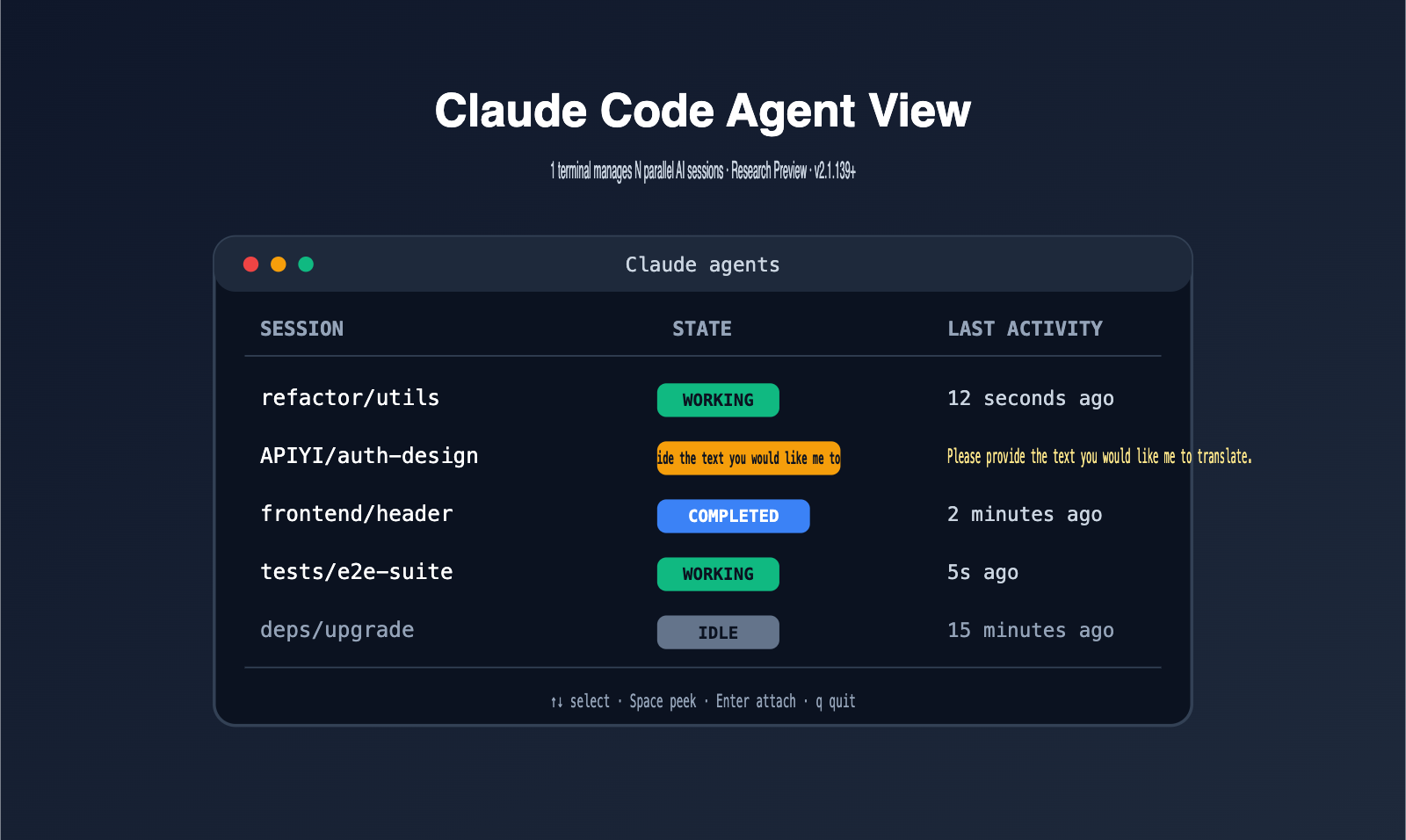
Claude Code Agent View is a built-in session dashboard for the Claude Code CLI, requiring Claude Code v2.1.139 or higher. It organizes multiple Claude Code sessions into a "roster" on a single screen, with each row displaying the session status, recent activity, and what it's currently waiting for.
It's not a separate tool, but an integral part of Claude Code itself. You no longer need to open extra tmux panes or iTerm2 splits for parallel tasks; a single claude agents command launches the dashboard, bringing all your sessions into one unified view. For developers, this is the first official solution for managing AI sessions.
It's worth noting that Agent View is currently in Research Preview, available to Pro, Max, Team, and Enterprise subscribers, as well as Claude API users. If you're a developer accessing Claude models via APIYI (apiyi.com), you can point your Claude Code ANTHROPIC_BASE_URL to APIYI. This allows you to enjoy stable domestic network performance and the 0.1x cost advantage of prompt caching without bypassing the official Anthropic CLI.
Another way to understand Agent View is by looking at how it relates to existing solutions. Previously, developers running multiple Claude Code instances usually relied on three methods: opening multiple terminal tabs, using tmux splits, or writing shell scripts to manage background processes. Each of these has drawbacks: too many tabs are hard to track, tmux has a steep learning curve, and custom scripts require you to handle PIDs, logs, and state synchronization manually. Agent View takes over all three, providing an experience much closer to a dedicated "AI Task Manager."
5 Core Capabilities of Claude Code Agent View
Agent View might look like a simple list interface, but it actually consolidates capabilities that were previously scattered across multiple tools. The table below summarizes the 5 core capabilities you should keep in mind.
| Capability | Behavior | Pain Point Solved |
|---|---|---|
| Session Roster | Lists all Claude Code sessions and their statuses | Too many tmux tabs to keep track of |
| Status Visibility | Working / Waiting for input / Completed / Failed / Idle / Stopped | Not knowing which session needs your attention |
| Background Execution | /bg, claude --bg moves sessions out of the foreground |
No need to hog terminal windows |
| Quick Preview | Arrow keys to select + Space to Peek | See the latest output without entering the session |
| Automatic Worktree | Automatically isolates files to .claude/worktrees/ |
No conflicts when modifying files across parallel sessions |
🎯 Usage Tip: When trying Agent View for the first time, I recommend starting two background sessions for different tasks to observe the status changes before scaling up to 4-5 parallel tasks. By using the Claude model access provided by APIYI (apiyi.com), you can enjoy the long-running capabilities of Agent View more stably within China.
The Session Roster is the most intuitive feature of Agent View. In the past, you had to memorize things like "the top tab is for frontend changes, the bottom one is for running tests." Now, the dashboard tells you the session name and its most recent activity directly. Status visibility is its "soul"—that column of status labels lets you see at a glance which sessions need immediate attention, saving you from "polling every window." Once you're familiar with the 6 common statuses (working / waiting / completed / failed / idle / stopped), you'll find you rarely need to manually attach to any session.
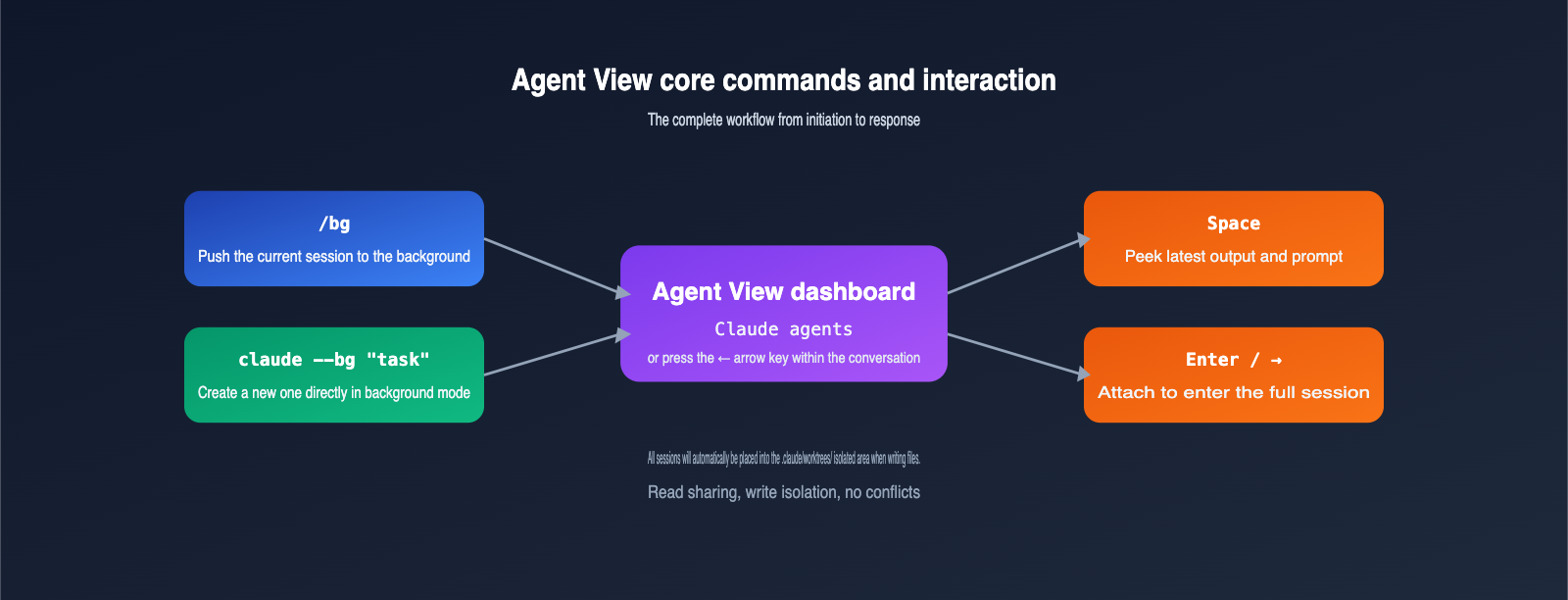
Background execution is the key reason Agent View can truly replace tmux. /bg pushes the current session to the background, and claude --bg "<task>" starts a new task directly in background mode; both allow Claude Code to continue working without a terminal attachment. Combined with automatic worktree isolation, multiple sessions can write to the same repository without overwriting each other.
The Peek preview is also worth highlighting. Previously, if you wanted to check on a session's progress, you had to attach to it and wait for the screen to re-render the entire transcript—by which time a few seconds might have passed, and you might have missed an upcoming prompt. The Agent View Peek panel only displays the "latest output" or "the question it's waiting for you to answer," providing an experience similar to message previews, which is much more efficient.
How to Enable and Use Claude Code Agent View
The barrier to entry for Agent View is very low; you can get the full workflow running in just 4 steps. Here is a beginner-friendly quick-start guide.
| Step | Command or Action | Purpose |
|---|---|---|
| 1. Upgrade Version | claude --version (check and upgrade to ≥ v2.1.139) |
Meet the requirements for Agent View |
| 2. Enter Dashboard | Type claude agents in the terminal, or press the left arrow key inside a session |
Open the session roster |
| 3. Background Start | claude --bg "Refactor utils directory" |
Directly generate a background session |
| 4. Switch & Respond | Arrow keys to select row → Space to preview → Enter to join | Check progress, answer prompts, get results |
🎯 Quick Start Tip: Set the
ANTHROPIC_BASE_URLfor Claude Code tohttps://api.apiyi.com/v1and use the Claude model key provided by APIYI (apiyi.com) to run Agent View smoothly in China. Cache billing at 0.1x means the cost of running multiple long-term sessions will be significantly lower than using the official API directly.
Below is a demonstration of a common workflow. Suppose you are working on a full-stack project and need to run two independent tasks: "Backend API Design" and "Frontend Component Rewrite." You can organize them like this:
# Start two background sessions
claude --bg "Design the backend REST API for the user login module, write the OpenAPI description"
claude --bg "Rewrite the Header component, add the new user menu"

# Open Agent View at any time to check progress
claude agents
Once you enter Agent View, you'll see the two sessions listed as rows. When the status of a row changes to Waiting for input, it means Claude needs you to confirm a decision, such as "Do you want to add a new field?" At this point, use the arrow keys to select the row, press Space to preview, and once you've understood the question, press Enter to enter the session and respond.
If you are using a Claude key from APIYI (apiyi.com), the entire experience is identical to connecting directly to the official API. However, in the Chinese network environment, long-running background sessions won't be interrupted by occasional network jitters—this is crucial for developers who really want to run "unattended overnight" workflows.
The most common mistake beginners make is not distinguishing between the use cases for /bg and claude --bg. /bg is a command entered within an already open session; its purpose is to "move the current session to the background and keep it running," which is perfect for when you've been chatting for a while and suddenly want to leave the terminal. claude --bg "<task>" is used directly in the shell to start a new background task, so it doesn't occupy the foreground terminal from the start. The former is more like "suspending the current conversation," while the latter is more like "assigning a new employee to work independently."
Comparing Claude Code Agent View and tmux Multi-Window
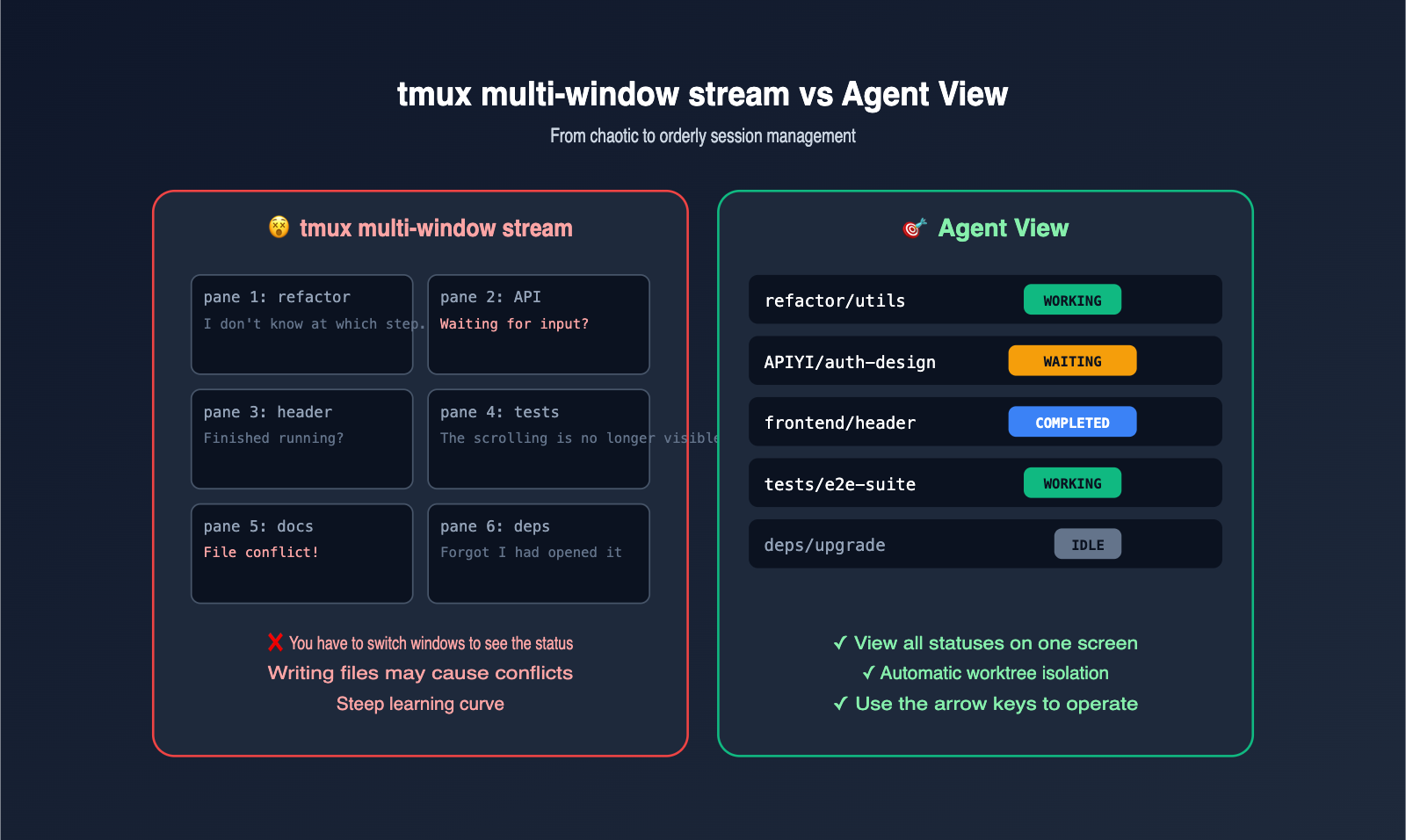
Another way to understand Agent View is to look at what it replaces. The table below compares the "old-school tmux multi-window flow" with the "new-school Agent View flow" in terms of key user experience.
| Dimension | tmux Multi-window | Claude Code Agent View |
|---|---|---|
| State Awareness | Need to cycle through windows | View all session states on one screen |
| Launch Background Session | Manual pane creation + scripts | claude --bg "<task>" (one command) |
| Input Prompts | Easy to miss and stall | Dashboard highlights "Waiting for input" |
| Multi-session File Writing | Prone to overwriting | Automatic worktree isolation |
| Learning Curve | Requires mastery of shortcuts | Arrow keys / Space / Enter |
| Complex Team Collaboration | Flexible but requires custom scripts | Further extensible via Agent Teams |
🎯 Recommendation: For parallel tasks in solo development, Agent View is more than enough. If you need multiple agents to collaborate (team mode), Anthropic's Agent Teams still requires tmux or iTerm2 for split-screen management. The two aren't mutually exclusive. APIYI (apiyi.com) connects to the same Claude models, so it works seamlessly regardless of your preferred workflow.
It's worth diving into the details of "session isolation." In Agent View mode, whenever a session attempts to modify a file, Claude Code automatically places it into an independent worktree under .claude/worktrees/. All parallel sessions share the "read" access of the original checkout but maintain separate "write" areas. Once a session concludes, you decide which changes to merge. This "read-shared, write-isolated" pattern is exactly the best practice that advanced developers have long championed when manually building multi-agent workflows.
This mechanism is identical to the "one git worktree per parallel task" approach used by senior developers, but Anthropic has turned it into an out-of-the-box default. For beginners, this means you can safely run multiple Claude Code tasks in parallel without needing to understand git worktrees.
To help you decide if Agent View fits your daily workflow, the table below summarizes the scenarios where it shines and where it might not be the best fit.
| Type | Recommended? | Reason |
|---|---|---|
| Long-running cross-directory refactoring | ✅ Highly Recommended | Automatic worktree + background execution is a perfect match |
| Automated documentation/test generation | ✅ Recommended | One session per module, state is clear at a glance |
| Batch dependency upgrades | ✅ Recommended | One agent per repository, no interference |
| Data analysis exploration | ⚠️ Depends | Less cost-effective for short, high-frequency tasks |
| Real-time chat/Q&A | ❌ Not Recommended | A single session is sufficient; multiple agents are redundant |
| Multi-agent team collaboration | ⚠️ Use Agent Teams | Requires split-screen coordination; still needs tmux/iTerm2 |
Claude Code Agent View FAQ
Q1: Is Agent View free? Does it count towards my subscription quota?
Agent View itself is free, but every background session consumes your Claude subscription quota or API balance just like a foreground session. If you run 10 agents simultaneously, your quota will be consumed at roughly 10x the speed. You'll need to estimate your costs beforehand—Pro plan users, in particular, should be careful about managing the number of concurrent sessions.
Q2: Do background sessions run indefinitely? Can they continue after I shut down my computer?
Background sessions run locally on your machine. If your computer goes to sleep, shuts down, or you exit the Claude Code process, the sessions will stop. These aren't cloud-based agents; if you suspend your computer and come back later, you'll need to resume the sessions. For true "unattended" long-running tasks, you must ensure your machine stays awake.
Q3: Are Agent View and Agent Teams the same thing?
No. Agent View is a dashboard that lets you "manage multiple sessions on one screen," where each session remains an independent task. Agent Teams is a multi-role mechanism where a lead coordinates multiple teammates to advance a task together; this still requires tmux or iTerm2 for split-screen management. Both can coexist without conflict: the former solves "multi-task management," while the latter solves "multi-role collaboration."
Q4: Can I use Agent View reliably in China?
Agent View is a local CLI feature, but the underlying model invocation goes through the Anthropic API, which may be affected by network conditions if connected directly. We recommend accessing Claude models via the API proxy service provided by APIYI (apiyi.com). By pointing ANTHROPIC_BASE_URL to APIYI, you can resolve issues with long-running sessions dropping, as the platform is already running stably.
Q5: How can I prevent 10 background agents from burning through my quota?
Here are three practical tips: clearly define the expected workload for each task before running claude --bg, regularly clean up sessions that are in an idle state within Agent View, and front-load cacheable system prompts to trigger the 0.1x cache pricing. APIYI (apiyi.com) enables caching strategies by default, which can significantly lower your bill for long-running tasks.
Q6: Can I reply to the AI directly from Agent View?
Yes. Select a waiting session and press the spacebar to "Peek" at what it's asking. If it's a simple "yes/no" decision, you can type your response (e.g., "yes, ship it") directly in the Peek panel, and the session will immediately continue without needing to enter the full transcript. This is especially helpful for long tasks where the AI might only ask a question every 10 minutes.
Q7: What scenarios is Agent View best suited for?
It's best for three types of tasks: long-running code refactoring (running multiple directories at once), automated documentation/test generation (one session per module), and dependency upgrades (one session per repository). The common thread here is that these tasks are "time-consuming, require the AI to progress autonomously, and only need human intervention at key nodes," which perfectly matches the session roster experience of Agent View. We recommend connecting to Claude via APIYI (apiyi.com) before running background tasks to ensure a more stable long-running connection.
Q8: Should I still use tmux after using Agent View?
Yes, but the usage will change. tmux remains the foundation for Agent Teams collaboration and is the simplest way to keep sessions alive on remote servers. However, for local parallel tasks by a single developer, Agent View can largely replace the role tmux plays in that specific area.
Key Highlights of Claude Code Agent View
- Agent View is an official dashboard introduced in Claude Code v2.1.139 that centralizes multiple sessions into a single screen.
- Launched as a Research Preview on May 11, 2026, and is available to Pro, Max, Team, Enterprise, and API users.
- 5 Core Capabilities: Session roster, status visualization, background execution, Peek quick preview, and automatic worktree isolation.
- Easy access: Use the
claude agentscommand or press the left arrow key in any session. - Background commands
/bgandclaude --bg "<task>"allow sessions to continue running after detaching from the foreground terminal. - Background sessions consume subscription quota, so be sure to estimate costs and clean up idle sessions.
- By connecting to Claude models via APIYI (apiyi.com) and using it with Agent View, you can solve stability issues in China and take advantage of 0.1x cache pricing.
Summary
The significance of Claude Code Agent View lies in its ability to consolidate "multi-AI session management"—a task previously handled by a messy mix of tmux, custom daemon scripts, and manual memory—directly into Claude Code itself. For beginners, this means you don't need to master an entire Unix toolchain to gracefully run multiple Claude tasks on a single machine. For veterans, it turns worktree isolation, background sessions, and state awareness into default behaviors, saving you from a mountain of repetitive work. In other words, Agent View transforms "driving multiple AIs simultaneously" from an advanced skill requiring significant engineering background into a standard capability accessible to everyone.
If you're planning to use Agent View seriously, I recommend switching your Claude Code ANTHROPIC_BASE_URL to APIYI (apiyi.com). This not only solves the issue of stable access within China but also lets you leverage cache billing at 0.1x to keep costs down for long-running background tasks. It’s currently the most seamless setup for developers in China to get started with Agent View.
— APIYI Technical Team. For more hands-on AI model tutorials, visit APIYI at apiyi.com.