What’s the most frustrating part of building AI applications these days? It’s almost certainly this scenario: you’ve tweaked your prompt for the 17th time, run a few test cases, and it feels solid. Then, you push it to production, and a user hits you with an edge case you never saw coming, causing the whole thing to crumble. This is exactly the problem OpenAI aimed to solve in their October 2025 Cookbook article, "Building resilient prompts using an evaluation flywheel."
OpenAI engineer Neel Kapse and renowned ML educator Hamel Husain introduced the Evaluation Flywheel concept in this piece. By borrowing a proven methodology from qualitative sociological research, they’re helping developers move AI application development from "prompt-and-pray" to a rigorous engineering discipline. In this article, I’ll break down the OpenAI Evaluation Flywheel framework in plain English to help you figure out how to implement it in your own projects.
🎯 Quick Guide: The cookbook uses a real-world "Apartment Rental Assistant" as a case study, demonstrating the entire workflow from failure analysis to automated graders and CI integration. The Evals API and Prompt Optimizer tools mentioned are advanced capabilities of the OpenAI platform, which you can access directly via API proxy services like APIYI (apiyi.com). Domestic developers can follow the cookbook’s workflow step-by-step to get this running.
The Apartment Rental Assistant: A Real-World AI App Crushed by Edge Cases
The case study in the cookbook is highly relatable: an AI assistant designed to answer tenant questions about apartment sizes, viewing appointments, and facility details. While it sounds like a standard chatbot, it failed in bizarre ways once it hit production.
The article lists several representative failure types that will likely resonate with anyone who has built an AI app:
| Failure Type | Symptom | Consequence |
|---|---|---|
| Scheduling Error | Recommended non-existent viewing slots | Tenants show up for nothing; complaints skyrocket |
| State Confusion | Failed to cancel original appointment when rescheduling | Double bookings; messy sales leads |
| Formatting Break | Facility lists collapsed into a wall of text | Poor UX; information is unreadable |
| Broken Links | Floor plan links return 404 errors | User churn to competitors |
| Data Drift | Business hours don't match real-time data | Misleading users; legal risks |
If you’ve ever built an AI application, you know these aren't things you intentionally ignore—you simply didn't realize they could happen. The Fractional team, in their accompanying "Receipt Inspection" case study, summarized this perfectly: running a few "happy path" tests will never catch the long-tail bugs in production. You must build a systematic loop of failure collection → pattern induction → automated measurement.
This loop is the core problem the Evaluation Flywheel is designed to solve.
The Core Definition of the OpenAI Evals Flywheel: Engineering Discipline Over "Prompt-and-Pray"
The cookbook defines the Evals flywheel concisely: a continuous iteration process that replaces guesswork with structured engineering discipline. It consists of three stages, functioning like a real wheel that keeps turning, with the system becoming more resilient with every rotation.
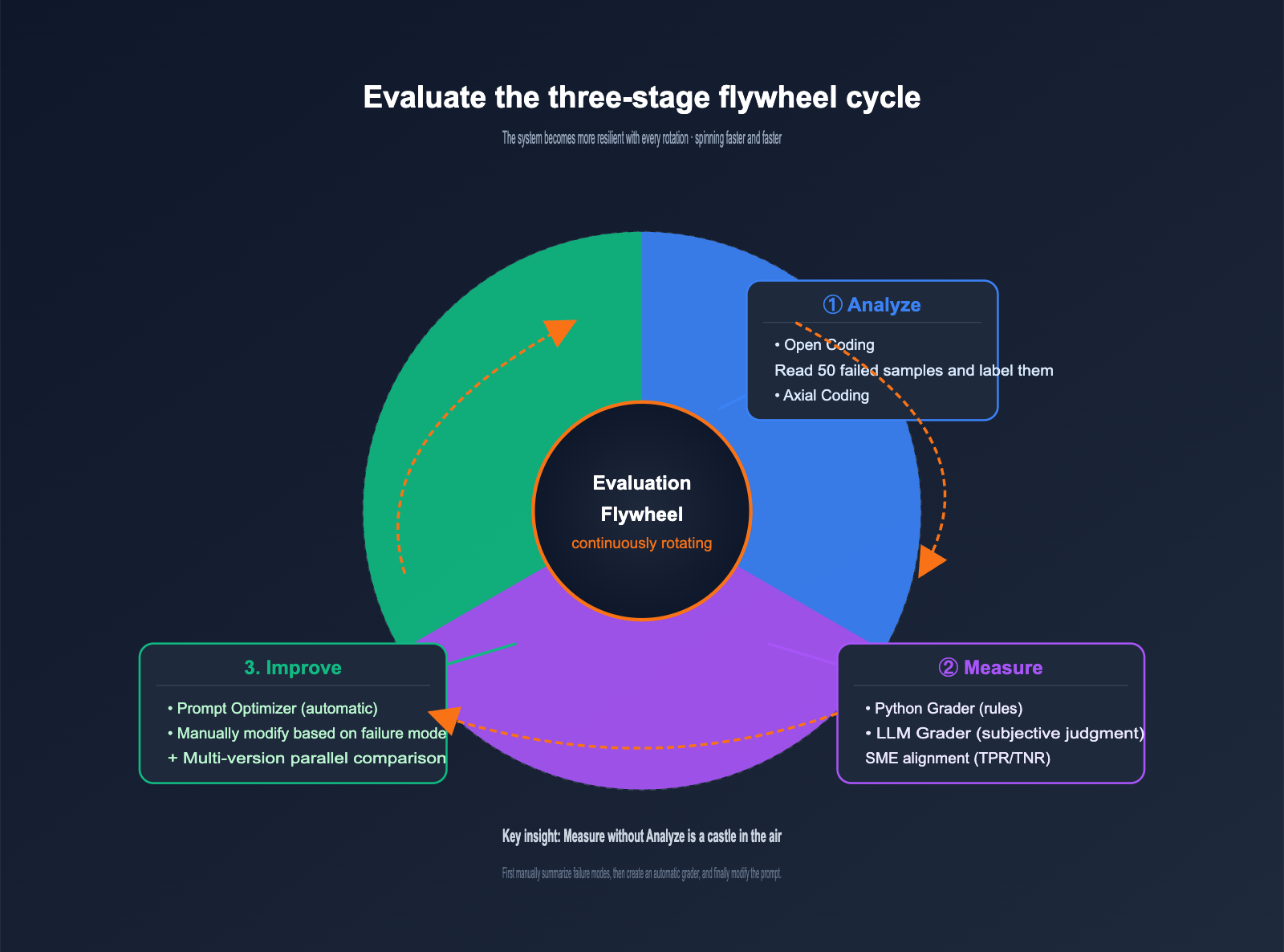
The responsibilities of the three stages are crystal clear, each addressing a specific problem:
| Stage | Core Question | Main Activity | Output |
|---|---|---|---|
| Analyze | "Why did it fail?" | Manually review failed samples, summarize failure patterns | Failure classification list + distribution |
| Measure | "How severe is the failure?" | Create a grader, run datasets | Quantitative metrics + baseline |
| Improve | "How do I fix it?" | Modify prompt, re-run evaluation | New version + metric comparison |
Many teams skip the Analyze stage and jump straight into automated evaluation, which is the most common reason for Evals flywheel failure. Automated measurement without qualitative analysis is a castle in the air, because you have no idea what you're actually measuring. This is the core insight of this cookbook and what sets it apart from generic Evals tutorials.
💡 Analogy: The Evals flywheel is like the PDCA cycle familiar to product managers, but with a concrete methodology applied to prompt engineering. Analyze corresponds to "finding the problem," Measure to "quantifying the problem," and Improve to "fixing the problem"—all three are indispensable. We recommend that when you use APIYI (apiyi.com) to perform model invocations for OpenAI Evals, you solidify the Analyze stage before starting your measurements.
The Two-Step Annotation Method for the Analyze Stage
The Analyze stage is the most overlooked yet critical part of the Evals flywheel. The cookbook introduces a highly professional method here: Open Coding → Axial Coding. This approach originates from qualitative research in sociology and has been a proven paradigm for analyzing unstructured text data for decades.
Step 1: Open Coding is straightforward: read 50 failed samples, and without any preconceived categories, assign a descriptive label to each failure. For example:
- "Recommended a non-existent viewing time"
- "Facility list is a wall of text"
- "Rescheduling didn't cancel the original appointment"
- "Answered with dimensions not belonging to this apartment"
- "Floor plan link is broken"
Note that you intentionally avoid seeking neat categories at this stage. You only need to honestly describe what you see. Open Coding is like writing reading notes—keep your thinking fluid and unconstrained, as premature categorization will cause you to lose sight of edge-case patterns.
Step 2: Axial Coding is where you start to structure things. You merge the scattered labels from the first step into meaningful high-level categories. The cookbook's example categories are:
- Viewing Scheduling Issues (Merged: wrong time, failure to cancel, double booking) → 35% of failures
- Formatting Errors (Merged: broken layout, dead links) → 10% of failures
- Data Accuracy Issues (Merged: wrong business hours, wrong dimensions) → X% of failures
Axial Coding is like organizing a table of contents, allowing you to see the "terrain" of your failures. That 35% figure immediately tells you which category to prioritize, as it offers the highest ROI.
| Annotation Method | Goal | Mindset | Output |
|---|---|---|---|
| Open Coding | Discovery | Fluid, no pre-set categories | 50+ descriptive labels |
| Axial Coding | Structure | Inductive, building categories | 5-8 high-level failure categories |
🔧 Practical Advice: When domestic developers perform the Analyze stage, you can pipe production logs directly into the Evals API platform's dataset annotation interface via an OpenAI proxy service (like apiyi.com), saving you from writing your own backend. Use a "Feedback" type column for Open Coding and a "Label" type column for Axial Coding; the workflow is identical to the cookbook.
OpenAI Evaluation Flywheel Phase 2: Choosing Between Two Types of Graders
Now that you've identified "what failure looks like" during the Analyze phase, the Measure phase is all about turning those failures into automated detection code. The cookbook provides a guide for two types of graders, which is often where engineers get tripped up.
| Grader Type | Use Case | Pros | Cons |
|---|---|---|---|
| Python Grader | Deterministic rules (strings, regex, API validation) | Stable results, zero hallucinations, zero extra cost | Cannot evaluate subjective dimensions |
| LLM Grader | Subjective judgment (formatting, semantic alignment, reasoning quality) | Flexible, evaluates hard-to-code dimensions | Requires SME alignment, incurs token costs |
Take an apartment assistant as an example; both types of graders have their place:
- "Is the recommended time within the actual available slot?" → Python Grader (check database or API)
- "Is the facility list formatted nicely?" → LLM Grader (score 0-10)
- "Is the floor plan link accessible?" → Python Grader (HEAD request)
- "Does the tone match the brand voice?" → LLM Grader (score based on a rubric)
The cookbook highlights a crucial engineering practice: LLM Graders must undergo SME (Subject Matter Expert) alignment validation; you shouldn't blindly trust GPT-4o's scores. The specific method involves splitting data into train/validation/test sets and checking two metrics:
- High TPR (True Positive Rate): Successfully catching actual failures.
- High TNR (True Negative Rate): Avoiding false positives on samples that are actually correct.
Looking only at accuracy can mask a high baseline; you must align using both metrics. This is the watershed moment that takes "LLM-as-a-Judge" from "looks like it works" to "actually works."
📊 Validation Workflow: SME annotates 100 samples as ground truth → LLM Grader scores the same samples → Calculate TPR/TNR → Adjust the grader prompt until both metrics meet the standard. This workflow is natively supported on the APIYI Evals platform, as the Evals API is fully compatible with the official OpenAI protocol.
OpenAI Evaluation Flywheel Phase 3: Dual-Track Experiments for Improvement
In the third phase, you can finally start tweaking your prompts. The cookbook suggests two parallel paths for improvement; these aren't mutually exclusive, but rather meant to be used in tandem.
Path 1: Automated Prompt Optimization
The OpenAI platform includes a built-in Prompt Optimizer tool. You provide it with a set of failure samples and your original prompt, and it automatically tests a series of rewriting strategies (adding few-shot examples, chain-of-thought, adjusting instruction order, etc.) and evaluates the improvements using your grader. The benefit of this path is that it's effortless, making it a great starting point for initial exploration.
Path 2: Manual Prompt Refinement Based on Failure Patterns
Engineers manually refine prompts to address specific failure patterns identified during the Analyze phase. For example:
- Scheduling errors → Add a mandatory step in the prompt to "check the availability schedule."
- Formatting issues → Use XML tags to explicitly specify the output format.
- Failure to cancel appointments → Add state machine instructions like "cancel the existing appointment before booking a new one."
The advantage of the manual path is precision; you know exactly which change targets which failure pattern, giving you peace of mind during debugging.
Once both paths are complete, you'll have N candidate versions of your prompt. This is where the most critical step of the Improve phase comes in: run all versions on the same dataset using the same set of graders, and select the one with the best metrics. You cannot skip this step, as humans have a strong "confirmation bias" regarding their own prompt edits; the only way to correct this is through hard data.
After running all versions, you've completed one full turn of the flywheel. You'll likely discover new failure patterns (because as the system improves, it exposes deeper edge cases), and then you head back to the Analyze phase to start the next loop. This is the essence of the "flywheel"—it never stops; it just spins faster and becomes more resilient.
The Fundamental Difference Between Resilient and Fragile Prompts
The term "resilient prompt" mentioned in the title is a crucial concept. As defined in the cookbook, it is: a prompt that consistently delivers high-quality responses across all possible inputs. While it sounds simple, it actually sets a very high engineering standard.
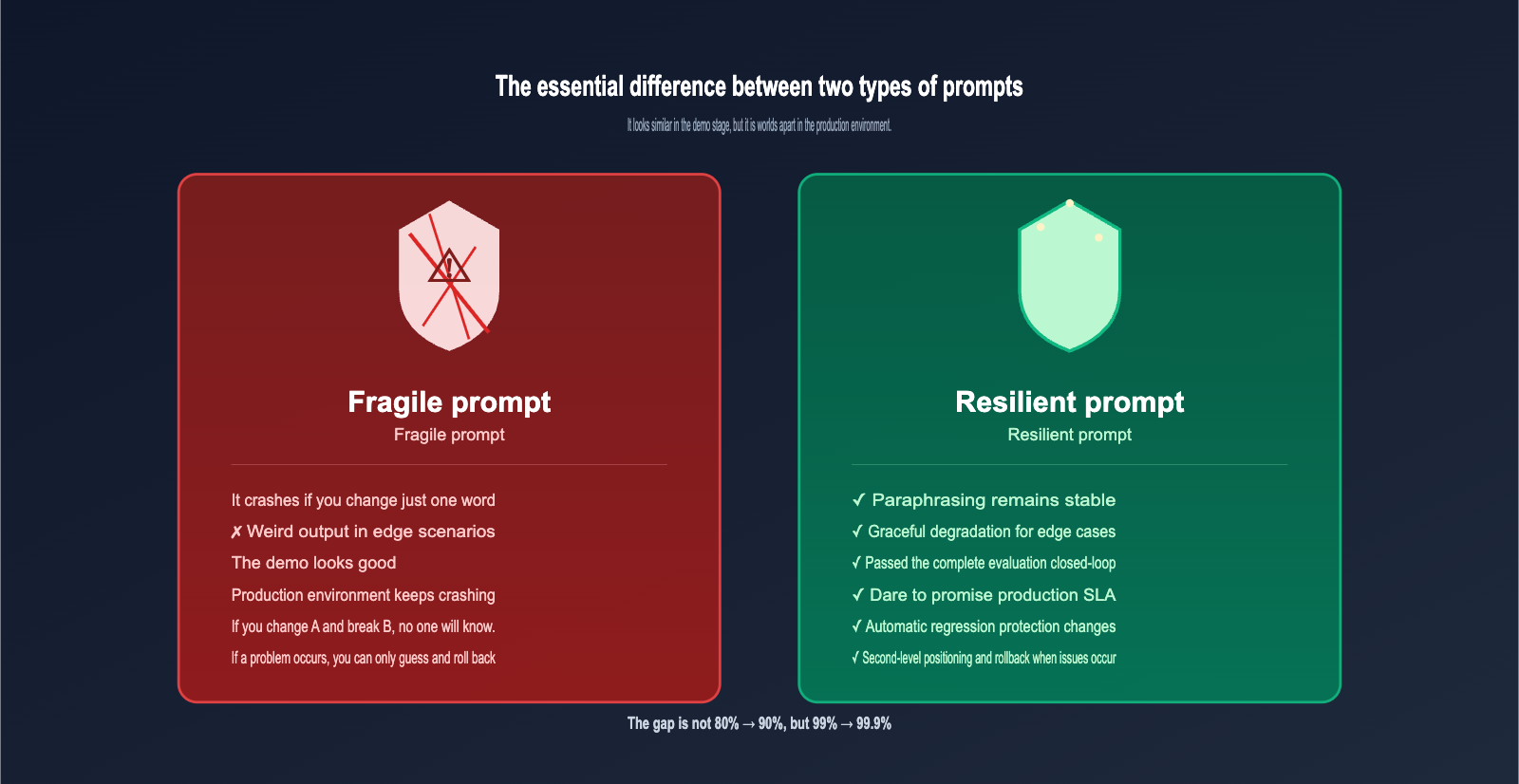
The differences between resilience and fragility are mainly reflected in five dimensions:
| Comparison Dimension | Fragile Prompt | Resilient Prompt |
|---|---|---|
| Input Robustness | Breaks with a single word change | Stable even with synonymous rewrites |
| Edge Cases | Bizarre output or hallucinations | Graceful degradation or human hand-off |
| Observability | Black box; errors are just guesses | Fully traceable with complete graders |
| Production Readiness | Demo performance ≠ Production performance | Verified through a complete evaluation loop |
| Evolvability | Fixing A breaks B | Protected by automated regression testing |
Engineers often have the intuition that a prompt is "good enough," but in production, you'll encounter issues with a 0.1% probability. While 0.1% seems small, it translates to 1,000 incidents in a million calls. The engineering value of a resilient prompt isn't just moving from 80% to 90%, but pushing from 99% to 99.9%.
🚀 Integration Tip: To push your prompt to 99.9% resilience, you must automate the evaluation loop. This requires stable usage of the OpenAI Evals API and Prompt Optimizer tools. We recommend using an API proxy service like apiyi.com for your OpenAI model invocations; the interface is perfectly synchronized with the official one, and domestic IDC nodes ensure that long-running evaluation tasks won't drop.
CI/CD Integration and Production Monitoring for the OpenAI Evaluation Flywheel
The final step emphasized at the end of the cookbook is: turning the evaluation flywheel into a daily engineering discipline. This is implemented in two parts:
Part 1: CI/CD Integration
Connect your grader suite to your CI pipeline so that every prompt change automatically triggers an evaluation. If metrics degrade beyond a threshold, the PR is automatically blocked from merging. This step shifts "evaluation" from an ad-hoc research activity to a standard development practice, marking the true transition of prompts into professional engineering.
| CI Threshold Type | Recommended Setting | Description |
|---|---|---|
| Overall Accuracy | Degradation ≤ 1% | Prevents overall regression |
| Key Grader | Degradation ≤ 0.5% | Strict control for high-priority failure modes |
| New Pattern Detection | Warning, not blocking | Encourages discovery of new issues |
| Latency P95 | Growth ≤ 10% | Controls cost and user experience |
Part 2: Production Monitoring
Beyond CI, you need to continuously sample production traffic to discover "wild" failure modes not covered in your CI set. These new patterns should be added back into your evaluation set to drive the next turn of the flywheel.
The specific approach is to sample production logs at a certain rate (e.g., 1%), run them through the same grader suite, and perform manual analysis when anomalies are detected. Newly discovered failure modes are processed through Open Coding and Axial Coding before being added to the test set, keeping the flywheel spinning.
This cycle ensures your prompt system is always becoming more resilient rather than stagnating after deployment. This is the core engineering discipline the cookbook leaves for all AI engineers.
5 Practical Insights for Local Developers from the OpenAI Evaluation Flywheel
After reading through the cookbook, I’ve distilled five insights that offer direct guidance for developers in China:
Insight 1: Start with Analysis, Not Measurement
Many teams jump straight into configuring graders and chasing metrics, skipping the manual analysis phase entirely. This leads to graders measuring things that aren't actually the root cause of failure—the numbers look great, but users are still complaining. Don't start automated evaluation until you've manually performed Open Coding on at least 50 samples.
Insight 2: Keep GPT Out of the Open Coding Phase
Open Coding must be done by humans. If you let GPT handle the induction phase, it will pollute your labels with biases from its training data. The earliest point to involve an LLM is after Axial Coding, when you're implementing the grader. The "discovery" phase of analysis is strictly for humans.
Insight 3: Python Graders Beat LLM Graders
If you can cover a case with deterministic rules, don't use an LLM Grader. There are three reasons: it's more stable, cheaper, and doesn't require SME (Subject Matter Expert) alignment. Save LLM Graders for dimensions that are truly subjective and impossible to cover with rules.
Insight 4: Tie Metrics to Business Impact
"35% scheduling issues" or "10% formatting errors"—these percentages only have decision-making value when converted into "user churn rate" or "complaint rate." Metrics themselves are meaningless; it's the business consequences they represent that matter.
Insight 5: Make the Flywheel Automated, Not a One-Off Project
The ROI of a single spin of the flywheel might not be huge, but the long-term compound interest is significant. Turn your graders into CI tasks, make production sampling a scheduled job, and set up automated alerts for new failure patterns. Let the flywheel spin 24/7.
Python Code Skeleton for Replicating the OpenAI Evaluation Flywheel Locally
While the cookbook primarily demonstrates the OpenAI Platform UI workflow, programmatic calls to the Evals API are fully supported. The following Python code skeleton shows how to call the Evals API to create a grader and run an evaluation, which is perfect for local developers who prefer a code-first workflow:
from openai import AsyncOpenAI

client = AsyncOpenAI(
    base_url="https://vip.apiyi.com/v1",  # Switch to the APIYI gateway
    api_key="Your APIYI Key"
)

# 1. Create an evaluation task (define the set of graders)
eval_cfg = await client.evals.create(
    name="leasing_assistant_v1",
    data_source_config={
        "type": "stored_completions",
        "metadata": {"version": "v1"}
    },
    testing_criteria=[
        {  # Python Grader example
            "type": "string_check",
            "name": "tour_time_valid",
            "input": "{{sample.output}}",
            "operation": "eq",
            "reference": "{{item.expected_time}}"
        },
        {  # LLM Grader example
            "type": "score_model",
            "name": "format_quality",
            "model": "gpt-4o",
            "input": "{{sample.output}}",
            "instructions": "Score 0-10 on output formatting clarity"
        }
    ]
)

# 2. Run the evaluation
run = await client.evals.runs.create(
    eval_id=eval_cfg.id,
    name="baseline_run",
    data_source={"type": "completions"}
)

# 3. Retrieve evaluation results
result = await client.evals.runs.retrieve(eval_id=eval_cfg.id, run_id=run.id)
print(f"Pass rate: {result.report_url}")
There are three key points in this code. First, the base_url switch; this line determines whether you can run long-term evaluation tasks stably within China. Second, the testing_criteria array allows you to configure all your graders and run them in one go. Third, the Evals API is asynchronous. Running evaluations on large datasets can take anywhere from a few minutes to tens of minutes, so make sure your program handles waiting and retries appropriately.
OpenAI Evaluation Flywheel FAQ
Q1: Is there a difference between the Evaluation Flywheel and platforms like LangSmith or Weights & Biases?
They have different focuses. LangSmith is primarily about "tooling for evaluation," while the Evaluation Flywheel is about the "methodology of evaluation." The former tells you how to implement, while the latter tells you how to think. You can definitely use them together—using the tools to carry out the methodology.
Q2: Are 50 failure samples enough? Isn't that too few?
For the Open Coding phase, 50 is plenty because the goal is to discover patterns, not to achieve exhaustive statistical significance. The number of samples required for the Measure phase depends on your failure rate: if your failure rate is 5%, you'll need 1,000 samples to get a stable confidence interval; if it's 30%, 200 samples will suffice.
Q3: Can Prompt Optimizer automatically replace manual adjustments?
No. Automated tools excel at local optimization based on known graders, but they struggle to understand business constraints (like implicit rules such as "the client requires every response to be under 80 characters"). Combining manual adjustments with automated optimization is the best practice.
Q4: Is it stable to call the Evals API from within China?
Directly connecting to OpenAI for long-running tasks (evaluations often take minutes to hours) frequently leads to connection resets. We recommend using an API proxy service like apiyi.com. Their domestic IDC nodes are specifically optimized for long-lived connections, which significantly reduces the interruption rate for evaluation tasks.
Q5: What team size is the Evaluation Flywheel suitable for?
It's suitable for everyone, from a one-person project to a 100-person team. The only difference is the frequency at which the flywheel turns. A solo developer might complete one cycle every two weeks, while a large team can iterate on a daily or even hourly basis. The key is establishing discipline, not the size of the team.
Q6: Who is Hamel Husain, and why is this cookbook getting so much attention?
Hamel is a highly influential educator in the machine learning community who has long promoted engineering best practices for LLM applications. This cookbook marks the first time OpenAI has systematically introduced qualitative research methodologies (like Open Coding) to prompt engineering, which is why it's generating so much discussion in the industry.
Summary
The true value of the OpenAI Evaluation Flywheel methodology is that it provides a standard answer for the Chinese AI engineering community on "what professional prompt engineering actually looks like." It's not just a specific tool; it's an engineering discipline that transforms prompt development from "craftsmanship based on intuition" into "traceable engineering practice."
By embedding the Analyze → Measure → Improve stages into your development workflow, your AI application evolves from a "looks good as a demo" project into a product that you can confidently deploy to production and back with an SLA. Behind this upgrade is a complete closed loop where failures are systematically collected, patterns are structured and summarized, and improvements are automatically measured and verified.
If you're building any prompt-driven AI application, I highly recommend setting up this flywheel. We suggest using an API proxy service like apiyi.com to call the Evals API and Prompt Optimizer directly. With just a single base_url change, you can run through the entire cookbook process without worrying about network stability issues in China.
Once you build this "flywheel" into your muscle memory, your prompts will start their journey toward becoming truly resilient, starting today.
📌 Author: APIYI Team — We track engineering practices for OpenAI, Anthropic, and Google multimodal APIs. For more cookbook deep dives and Evals API integration guides, visit the apiyi.com documentation center.