title: "Does Nano Banana 2 API Charge for Failed Image Generation?"
description: "Confused about Nano Banana 2 API billing? We break down how failed image generation requests are handled and when you're protected from being charged."
tags: [APIYI, Nano Banana 2, Gemini, API Billing, AI Development]
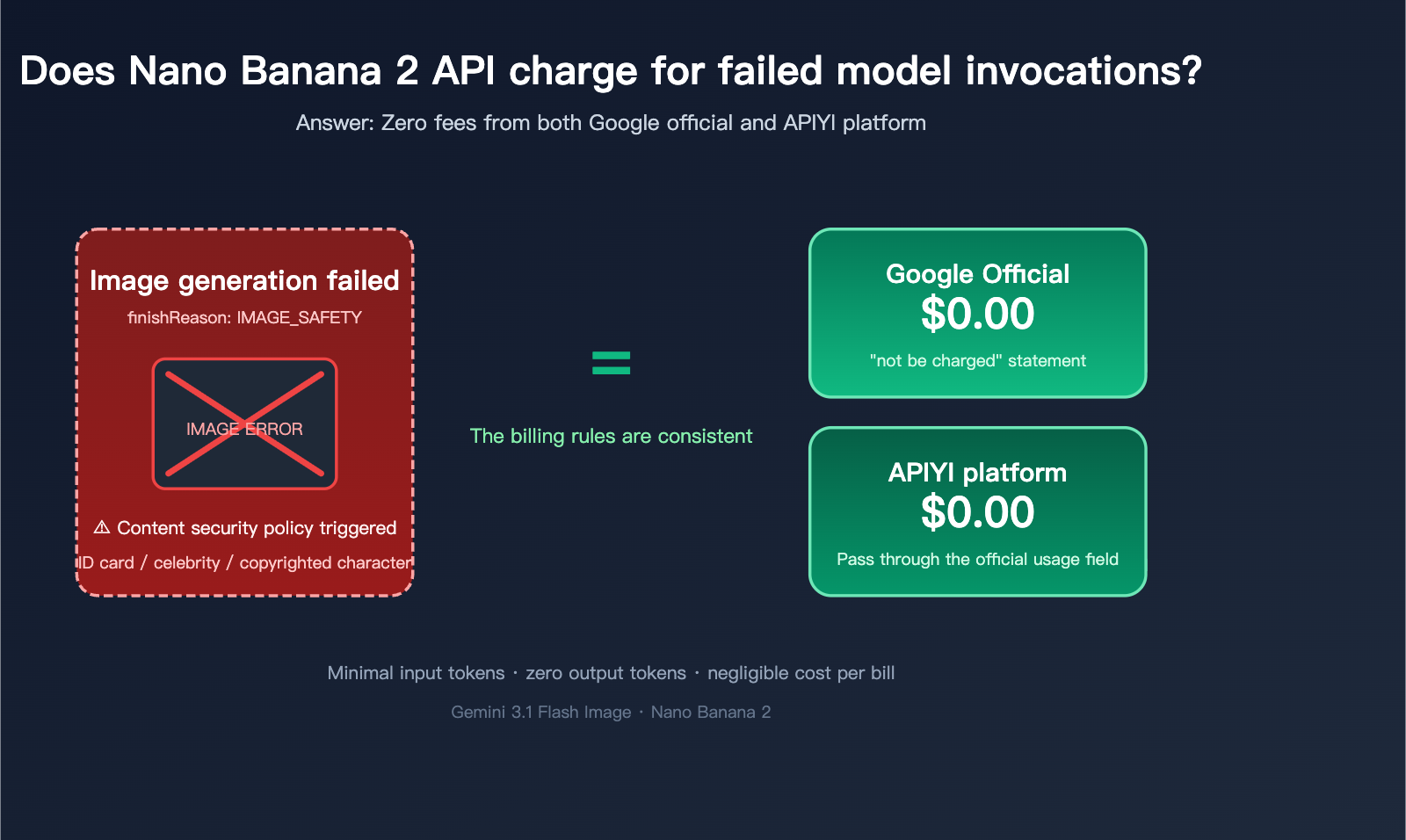
Does the Nano Banana 2 API charge for failed image generation? This is one of the first "wallet anxiety" questions many developers run into when integrating Google Gemini 3.1 Flash Image (Nano Banana 2). Especially when you run into finishReason: IMAGE_SAFETY, blockReason: OTHER, or content safety rejections like "The image you provided appears to be an identity document… I cannot modify it," it’s natural to wonder: If I didn't get the image, do I still have to pay?
The short answer is: In the vast majority of content safety rejection scenarios, the Nano Banana 2 API does not charge developers for image output costs. Furthermore, when the finishMessage explicitly includes the phrase "You will not be charged for this request," Google officially waives the fee for that request. In this article, we’ll break down the billing rules for three typical failure scenarios based on official Gemini documentation and the latest developer forum discussions, and clarify how billing works when using the APIYI (apiyi.com) platform for your Nano Banana 2 calls.
Core Principles of Nano Banana 2 API Billing for Failures
3 Key Facts About Nano Banana 2 API Billing
Before answering the "does it charge" question, you have to understand the Nano Banana 2 billing structure—it's not a simple "pay-per-call" model, but rather a usage-based billing model calculated by input and output tokens.
| Billing Dimension | Nano Banana 2 (Gemini 3.1 Flash Image) | Nano Banana Pro (Gemini 3 Pro Image) |
|---|---|---|
| Input Token Price | $0.50 / 1M tokens | $2.00 / 1M tokens |
| Output Token Price | $3.00 / 1M tokens | $12.00 / 1M tokens |
| 1K Image (≤1024px) | ~$0.039 / image | ~$0.134 / image |
| 2K Image | ~$0.134 / image | ~$0.134 / image |
| 4K Image | ~$0.24 / image | ~$0.24 / image |
| Batch API Discount | 50% off | 50% off |
Keep these 3 key facts in mind:
- Output tokens are the primary cost: The output token cost for a 1K image is roughly 5–20 times that of the input tokens. This means if no image is generated, the potential charges are negligible.
- Input tokens are incredibly cheap: At $0.50 per million tokens, a 500-word prompt costs less than $0.0003 USD.
- Pay for actual output: Costs for output tokens are only incurred when an image is successfully generated. Failed requests that do not produce images generally do not incur charges.
Google's Official Stance on Failed Billing
Google has consistently stated in its Gemini API documentation and developer forums that when a request is explicitly blocked by the policy layer (Layer 2), or when the finishMessage clearly states "You will not be charged for this request," that request is not billed.
This principle applies equally when you access the Nano Banana 2 API through APIYI (apiyi.com). Our billing logic is strictly aligned with the usage fields returned by Google. If Google doesn't charge, APIYI doesn't charge. You don't have to worry about the "official" side waiving the fee while the downstream provider keeps charging you.
3 Typical Scenarios Where Nano Banana 2 API Fails to Generate Images
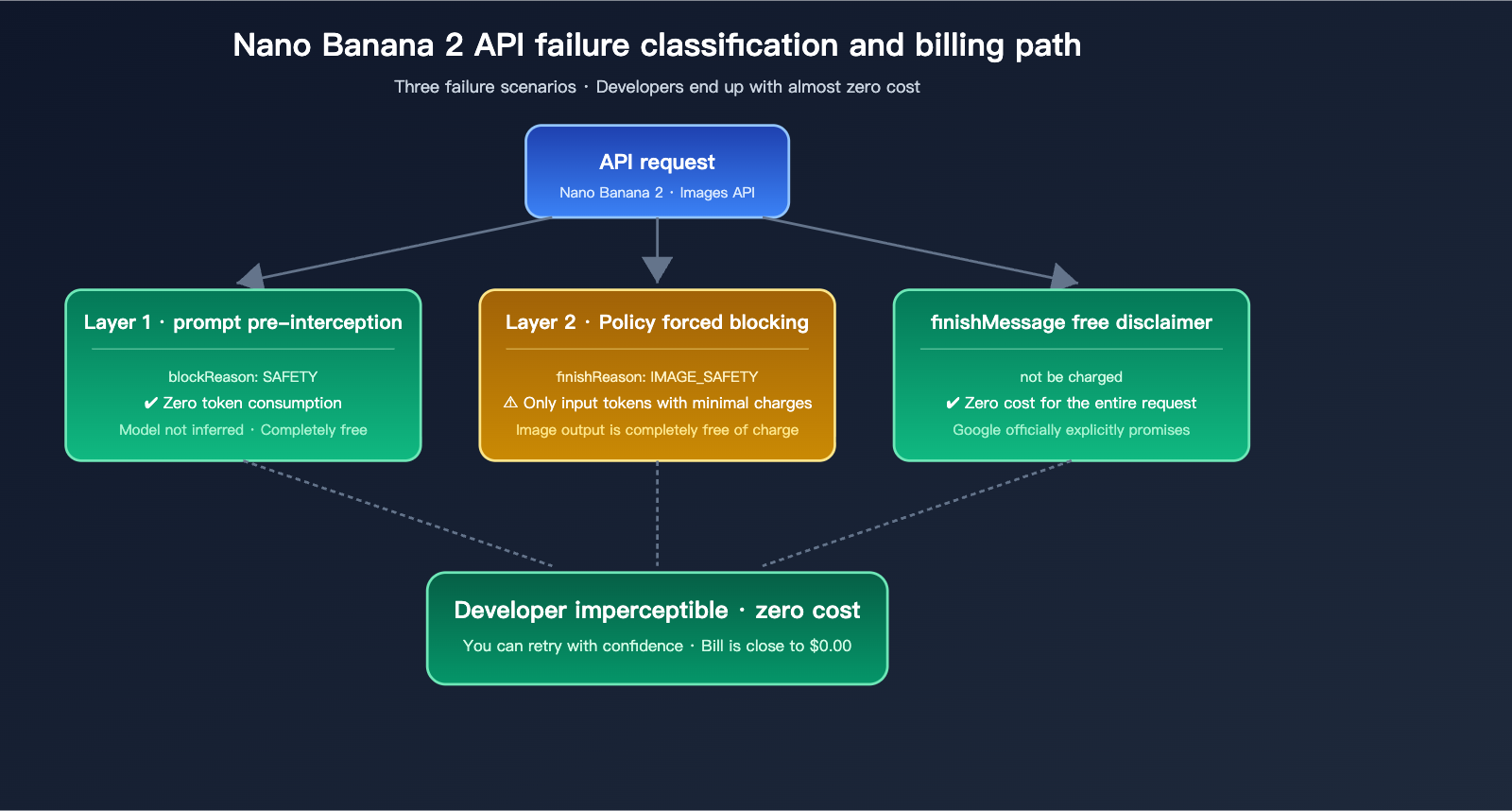
Scenario 1: Prompt blocked by Layer 1 (blockReason: SAFETY)
This is the "cleanest" type of interception—the request is blocked before it even reaches the actual image generation model. You'll see this in the API response:
{
  "promptFeedback": {
    "blockReason": "SAFETY",
    "safetyRatings": [
      {"category": "HARM_CATEGORY_DANGEROUS_CONTENT", "probability": "HIGH"}
    ]
  }
}
Billing: No charge or only a negligible input token fee. Since the model didn't actually run the inference and no output was generated, the cost for the input tokens themselves is extremely low (around $0.0000005 USD).
Trigger: The prompt hits a configurable safety category threshold, such as explicit violence, hate speech, or sexually explicit content.
Solution: You can bypass Layer 1 by setting the safety_settings parameter to BLOCK_NONE or OFF, though this won't help you bypass Layer 2.
Scenario 2: Blocked by Layer 2 policy after generation (finishReason: IMAGE_SAFETY)
This is the most common failure developers run into. It's the one that triggers the message: "The image you provided appears to be an identity document (such as a driver's license), and I cannot modify it." Here’s what the response looks like:
{
  "candidates": [{
    "finishReason": "IMAGE_SAFETY",
    "finishMessage": "I cannot complete this image editing request for you. Because the image you provided appears to be a personal identity document (such as a driver's license), I cannot modify, regenerate, or edit specific security features (such as badges, watermarks, or signatures) based on your request."
  }]
}
Billing: Input tokens are charged, but image output tokens are effectively zero. Even though the model performed the inference, it didn't output the final image data. You'll only see a tiny charge for the input tokens on your bill (usually < $0.001).
Trigger: Hits non-configurable Layer 2 policies. Typical cases include:
- Editing requests for identity documents (driver's licenses, passports, IDs, etc.)
- Generating realistic images of public figures
- Copyrighted characters/logos/brands
- Sensitive content related to child safety
Solution: Layer 2 cannot be bypassed via API parameters. The only way to fix this is to rewrite your prompt to remove the protected elements.
Scenario 3: Model decides not to generate (finishMessage explicitly states no charge)
This is Google's "gentlest" way of saying no. The response will include a very distinct English message:
{
  "candidates": [{
    "finishMessage": "Unable to show the generated image. The model could not generate the image based on the prompt provided. You will not be charged for this request. Try rephrasing the prompt. If you think this was an error, send feedback"
  }]
}
Billing: The entire request is completely free. This is a direct promise from Google in the response body. Whether you're using the official API or a compliant aggregation platform like APIYI (apiyi.com), it will be processed as a zero-cost request.
Trigger:
- The model determines the prompt is too vague or cannot produce a clear result.
- The model ran the inference but failed to generate a valid image output.
- The prompt triggered an internal, non-public Google safety assessment.
Solution: Just rewrite your prompt and try again—no need to worry about the cost of retries.
title: Nano Banana 2 API Failure Billing Comparison Guide
description: A breakdown of how Nano Banana 2 API handles billing during failed requests, including tips to monitor costs and verify charges.
tags: [Nano Banana 2, API, Billing, AI, Optimization]
Nano Banana 2 API Failure Billing Comparison
Cost Comparison: 3 Failure Scenarios vs. Successful Requests
| Scenario | finishReason / blockReason | Input Token Charge | Output Token Charge | Total Cost per Request |
|---|---|---|---|---|
| Success (1K) | STOP | ✅ Charged | ✅ Charged | ~$0.039 |
| Success (2K) | STOP | ✅ Charged | ✅ Charged | ~$0.134 |
| Layer 1 Block | blockReason: SAFETY | ❌ No/Minimal charge | ❌ Not charged | ~$0.000 |
| Layer 2 Block | IMAGE_SAFETY / OTHER | ⚠ Small input charge | ❌ Not charged | < $0.001 |
| No-Charge Disclaimer | Contains "not be charged" | ❌ Not charged | ❌ Not charged | $0.000 |
🎯 Key Takeaway: In all known failure scenarios for Nano Banana 2, developers are never charged the "full image generation cost." Even in the most expensive failure scenario (Layer 2), the cost is less than 1% of a successful generation. When using the APIYI (apiyi.com) API proxy service, the platform transparently passes Google’s usage fields, ensuring your billing matches official rules.
Why do some developers still feel they're being overcharged?
If you've noticed your balance dropping even when no images were returned, it usually stems from these three common misconceptions:
- Billing Latency: Google’s billing cycle often has a 24-48 hour aggregation window. What you see now might be delayed charges from successful requests made previously.
- Batch Accumulation: A single failure might only cost $0.0003, but if you have 1,000 failures in a short burst, that adds up to a noticeable $0.30 charge.
- Overly Long Input Prompts: When using massive reference images (e.g., 4K base images), your per-request input tokens can balloon to tens of thousands. Even if the request fails, the input-based charge will be significantly higher than a standard text-based prompt.
💡 Cost Monitoring Tip: We recommend parsing the
usageMetadatafield directly at your integration layer and logging thepromptTokenCount,candidatesTokenCount, andtotalTokenCountfor every request. On the APIYI (apiyi.com) dashboard, we also provide detailed per-call token logs, allowing you to quickly pinpoint exactly which failed requests caused unexpected charges.
Validating Nano Banana 2 API Failure Charges
Getting Accurate Billing Info via Python SDK
from openai import OpenAI

# Initialize client with APIYI
client = OpenAI(
    api_key="your-api-key",
    base_url="https://api.apiyi.com/v1"
)

response = client.images.generate(
    model="gemini-3.1-flash-image",
    prompt="Please modify the gender field on this ID card",
    n=1,
    size="1024x1024"
)

# Checking usage tokens
if hasattr(response, "usage"):
    print("Input tokens:", response.usage.prompt_tokens)
    print("Output tokens:", response.usage.completion_tokens)
    print("Total tokens:", response.usage.total_tokens)

# Checking for specific failure reasons
for item in response.data:
    if getattr(item, "finish_reason", None) == "IMAGE_SAFETY":
        print("Hit Layer 2 block, output is not charged.")
    elif "not be charged" in (getattr(item, "finish_message", "") or ""):
        print("Google explicitly stated no charge for this request.")
📌 Full Failure Identification + Automatic Retry Logic
import time
from openai import OpenAI

client = OpenAI(
    api_key="your-api-key",
    base_url="https://api.apiyi.com/v1"
)

NO_CHARGE_PHRASES = ["You will not be charged", "not be charged for this request"]
LAYER2_FINISH_REASONS = {"IMAGE_SAFETY", "IMAGE_PROHIBITED_CONTENT", "OTHER"}

def generate_with_retry(prompt: str, max_retry: int = 3):
    for attempt in range(1, max_retry + 1):
        try:
            response = client.images.generate(
                model="gemini-3.1-flash-image",
                prompt=prompt,
                size="1024x1024"
            )

            item = response.data[0]
            finish_reason = getattr(item, "finish_reason", "")
            finish_message = getattr(item, "finish_message", "") or ""

            # Check if charge-free
            if any(p in finish_message for p in NO_CHARGE_PHRASES):
                print(f"[Attempt {attempt}] Google says no charge, retrying with new prompt...")
                return None
            if finish_reason in LAYER2_FINISH_REASONS:
                print(f"[Attempt {attempt}] Layer 2 block, output not charged.")
                return None

            return item.url

        except Exception as e:
            print(f"[Attempt {attempt}] Error: {e}")
            time.sleep(2 ** attempt)

    return None

url = generate_with_retry("An orange cat walking in a Japanese garden, ukiyo-e style")
print("Final result:", url)
How to verify "Zero Charge" against your actual bill
We recommend using the Request Logs feature in the APIYI (apiyi.com) dashboard for double-verification:
- Log the
request_id,finishReason, andusagefor every failed request in your local system. - Search for that
request_idin the APIYI dashboard to see the actual platform charge. - Compare the two—if there's a discrepancy, you can contact our support team to investigate immediately.
Because the APIYI platform transparently passes native Google usage fields, inconsistencies are extremely rare. This "dual-log verification" mechanism, however, helps ensure you meet your enterprise financial audit requirements.
Nano Banana 2 API vs. Other Platforms: A Comparison of Failure Billing Rules
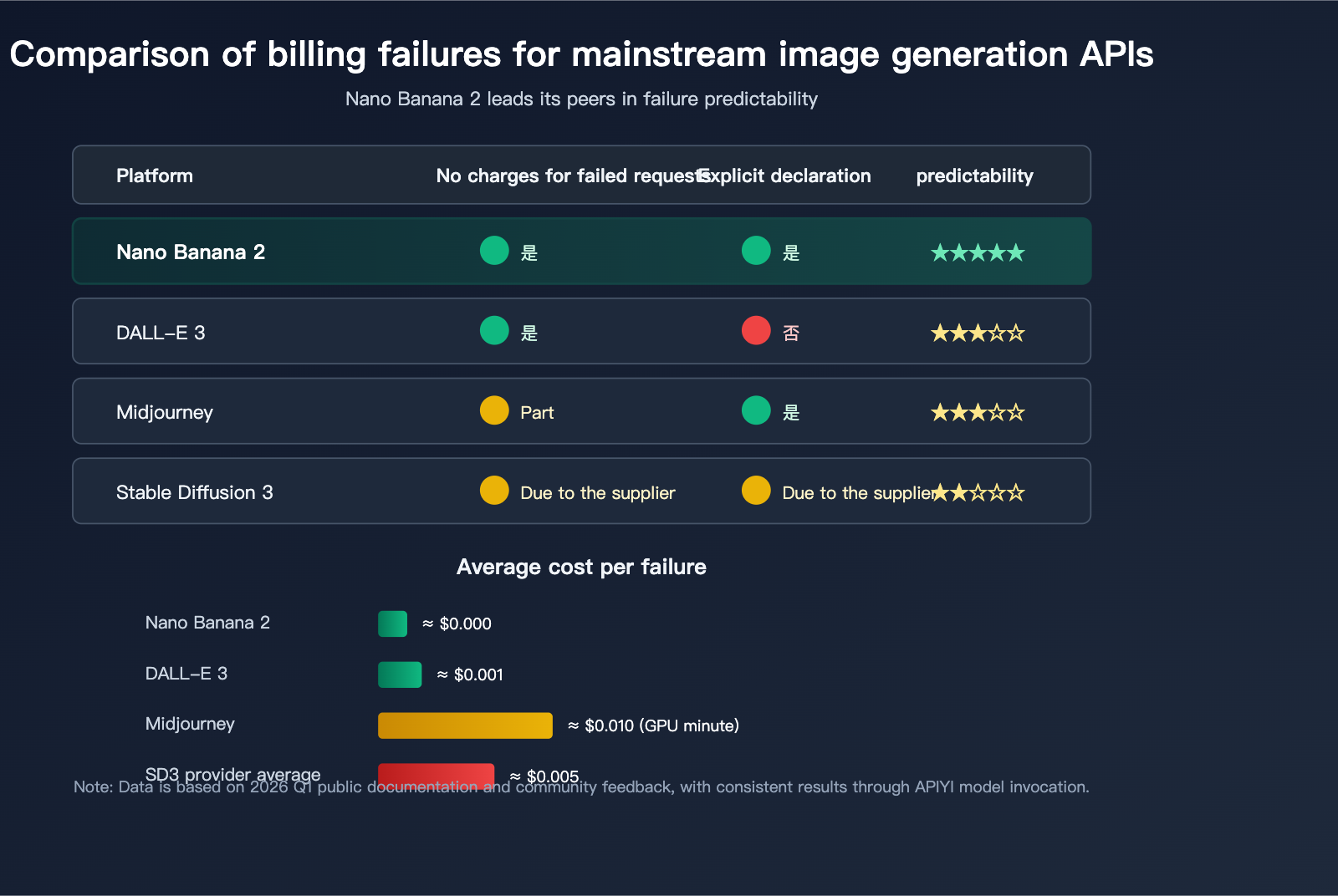
Comparison of Failure Billing for Mainstream Image Generation APIs
| Platform | Input Charge on Failure | Output Charge on Failure | Explicit "Free" Notice |
|---|---|---|---|
| Nano Banana 2 / Pro | ⚠ Minimal | ❌ No charge | ✅ Explicit in some cases |
| DALL-E 3 (OpenAI) | — | ❌ No charge | ❌ No explicit statement |
| Midjourney | Charged by task | Usually credited back | ✅ Fast hours credited |
| Stable Diffusion 3 | Varies by provider | No charge for most | ⚠ Varies by provider |
| Flux.1 Pro | Partially charged | ❌ No charge | ❌ No explicit statement |
The unique advantage of Nano Banana 2 lies in its clear failure signals. Fields like finishReason and finishMessage allow developers to programmatically determine whether a request incurred a charge, whereas on other platforms, you often have to perform trial-and-error retries to figure that out.
🎯 Recommendation: If your application has strict requirements for "failure predictability" (such as high-frequency generation or UGC scenarios), we recommend prioritizing Nano Banana 2. By using APIYI (apiyi.com) to integrate, you not only get the benefit of no-charge-on-failure (consistent with the official policy) but also avoid the need to maintain separate billing logic for each platform.
Best Practices for Handling Failures with the Nano Banana 2 API
3 Tips for Optimizing Prompts to Reduce Invalid Failures
While failures are often free, a high failure rate can lead to poor user experience and increased latency. Here are 3 proven tips:
| Suggestion | Core Action | Expected Failure Reduction |
|---|---|---|
| Avoid Layer 2 Sensitive Topics | Exclude identity documents, celebrities, or copyrighted characters | ↓ 80% |
| Provide Context | Include at least 30 words of scene description + style requirements | ↓ 40% |
| Use Neutral Phrasing | Avoid verbs like "modify", "remove", or "replace" | ↓ 25% |
Failure Routing and Cost Tracking
For production environments, we recommend building a failure routing log:
- Layer 1 Interception: Tag as "prompt risk," do not retry, and prompt the user to modify.
- Layer 2 Interception: Tag as "policy conflict," do not retry, and prompt the user to change content.
finishMessage(No Charge): Tag as "model boundary," auto-rewrite, and retry once.- Network/Timeout: Tag as "infrastructure failure," and use exponential backoff for retries.
When combined with the APIYI (apiyi.com) dashboard's detailed logs and token consumption reports, you can quickly diagnose whether the issue lies with the prompt or a model constraint, keeping the cost per effective image within a reasonable range.
Enterprise-Grade Billing Guarantees
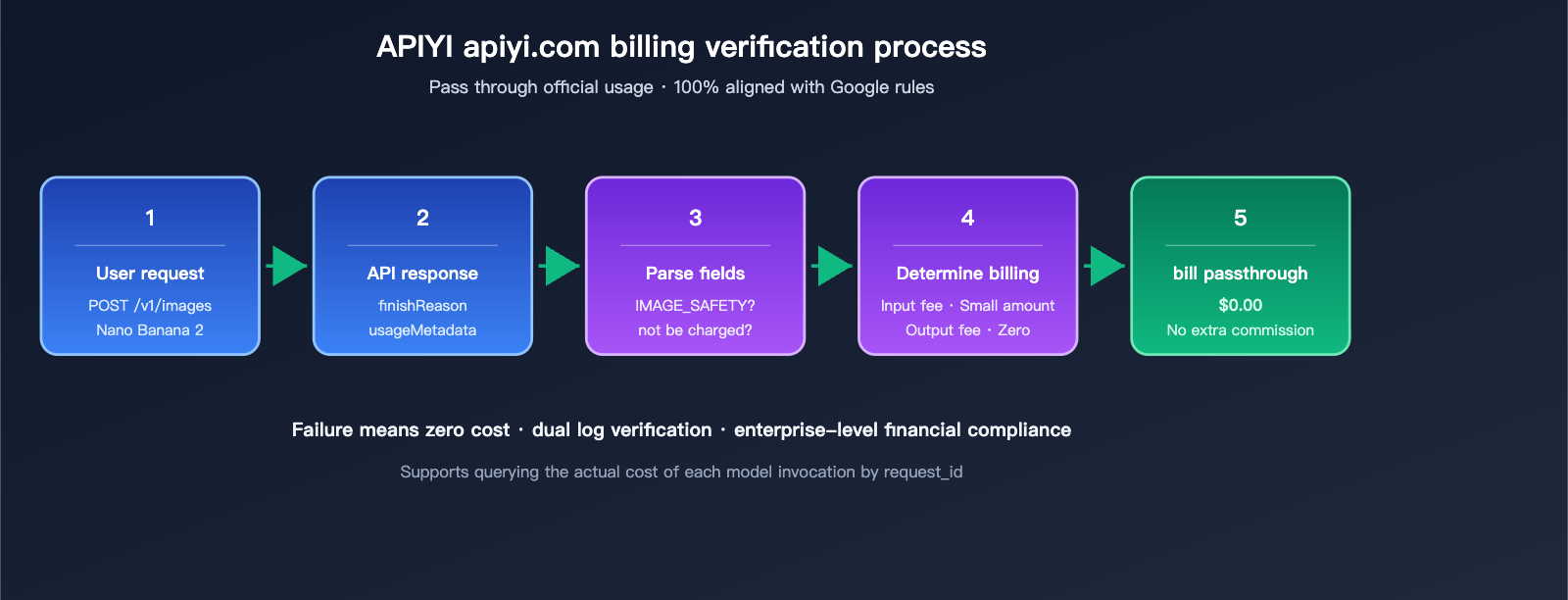
For enterprise-grade users, we recommend these 3 practices to ensure billing transparency:
- Dual Log Comparison: Compare local usage logs with APIYI platform logs for bidirectional verification.
- Budget Alerts: Set a daily budget cap in the APIYI (apiyi.com) dashboard to automatically disable the key if the limit is exceeded.
- Key Isolation by Department: Use independent API keys for different business units to track costs separately.
- Monthly Audits: Audit 10–20 random failure records monthly to confirm that billing remains consistent with official policies.
FAQ: Nano Banana 2 API Failure Billing
Q1: How much am I charged if my Nano Banana 2 request to generate ID-related images is rejected?
Almost nothing. When a request is rejected with finishReason: IMAGE_SAFETY, only the input tokens incur a negligible fee (usually < $0.001), and output tokens are not charged at all. When using the APIYI (apiyi.com) API proxy service, the platform passes through the official usage data, ensuring your billing matches Google's official figures exactly.
Q2: What does "You will not be charged for this request" mean in the response?
This is an official zero-billing statement provided directly by Google in the finishMessage. When this phrase appears in the response body, the entire request is free of charge—regardless of the input length or whether any model inference occurred. The APIYI platform detects this flag and records the cost as zero, so you won't encounter situations where "Google says it's free, but the provider charges anyway."
Q3: Do retries for Nano Banana 2 failures accumulate costs?
Each retry is billed as an independent request. However, since failures are either free or incur only a tiny fraction of the cost, the cumulative cost of 3 retries is usually less than 10% of a single successful call. We recommend implementing exponential backoff for your retry logic to avoid hitting rate limits (429) due to high-frequency failures.
Q4: What is the difference in billing between Layer 1 and Layer 2 filtering?
Layer 1 filtering occurs before model inference and typically incurs no charges. Layer 2 filtering occurs after model inference but before the output is generated; this incurs a tiny fee for input tokens, but no output token fees. Both are considered "negligible" in terms of cost.
Q5: Why do some developers report that "Gemini 3.1 Pro still charges for safety rejections"?
This is a special case: some Gemini 3.1 Pro text models (note: this is not the Nano Banana 2 image model) inject a hidden safety prompt when rejecting an unsafe prompt, running a full inference cycle that results in billed tokens. Nano Banana 2 (Gemini 3.1 Flash Image) does not currently exhibit this behavior, so failure billing for image scenarios remains "almost zero."
Q6: Is calling Nano Banana 2 via APIYI (apiyi.com) more expensive than the official API?
Not at all. We use the same token pricing system as the official API and frequently offer bulk discounts on high-demand models like Nano Banana 2, making the actual price often lower than calling the official API directly. More importantly, our support for direct RMB payments and compliant invoicing saves domestic enterprise users from the headaches of exchange rates, credit cards, and overseas entities.
Q7: How can I tell if a failure is "input-billed" or "completely free"?
Simply parse these 3 fields in the response:
- If
finishMessagecontains "You will not be charged" → Completely free - If
blockReason: SAFETYappears inpromptFeedback→ Negligible or no charge - If
finishReason: IMAGE_SAFETY / OTHER→ Only a tiny amount for input tokens
In the APIYI (apiyi.com) dashboard's Call Details page, we also explicitly mark whether each call incurred an actual charge, so you don't have to parse it yourself.
Q8: What is the approximate failure rate for Nano Banana 2?
According to public community data from Q1 2026, the overall failure rate for mixed Chinese/English prompts is approximately 5%-8%. Of that, "policy failures" hitting Layer 2 account for 2%-3%, while most others are finishMessage rejections caused by prompt quality issues. This means 99%+ of failed calls cost zero or near-zero, making the impact on your business negligible.
Q9: Do failed requests count toward rate limits (RPM / TPM)?
Yes. Even failed requests that don't incur charges still consume your rate limit quota. For high-frequency services, we recommend pre-filtering prompts locally to reduce the probability of hitting Layer 2, preserving more quota for successful calls.
Summary: Nano Banana 2 API failures are free—experiment with confidence
Returning to the original question—does Nano Banana 2 API charge for failed image generation? The answer is clear: In almost all failure scenarios, there is no charge or only a negligible fee for input tokens. Specifically, when the response contains finishReason: IMAGE_SAFETY or the finishMessage includes "You will not be charged for this request," these are officially recognized as zero-billing scenarios.
For developers, this means three things:
- Experiment with confidence: Whether you're refining prompt techniques, validating styles, or testing edge cases, the cost of failure is virtually zero.
- No complex disaster recovery needed: You don't need to design custom fallback logic for "failed billing"; standard try/retry logic is sufficient.
- Predictable billing: Your monthly spend is essentially Number of Successful Images × Cost per Image, with failures treated as negligible rounding errors.
Of course, "free failures" doesn't mean you should retry indefinitely—retries still consume rate limits and increase user wait times. The best approach is: Classify the failure, then apply the strategy—for Layer 1/Layer 2 blocks, prompt the user to change their input; for finishMessage free-billing rejections, trigger an automatic rewrite and retry. By combining APIYI (apiyi.com) call logs with budget alerts, you can achieve minute-level transparency for your entire image generation business.
If you are evaluating Nano Banana 2 or Nano Banana Pro for production, we recommend opening a test account on the APIYI (apiyi.com) platform and running the 3 failure scenarios mentioned in this article with your own business prompts. The actual billing data will be the most convincing proof.
Author: APIYI Team — Focused on compliant access to AI Large Language Model APIs and the Nano Banana series of image generation services.