title: "What is Claude Design: The New AI Visualization Tool from Anthropic"
description: "Anthropic has launched Claude Design, an AI-powered visualization tool. Learn how it helps non-designers turn ideas into professional visuals."
tags: [AI, Claude, Anthropic, Design, Visualization]
What is Claude Design: The New AI Visualization Tool from Anthropic
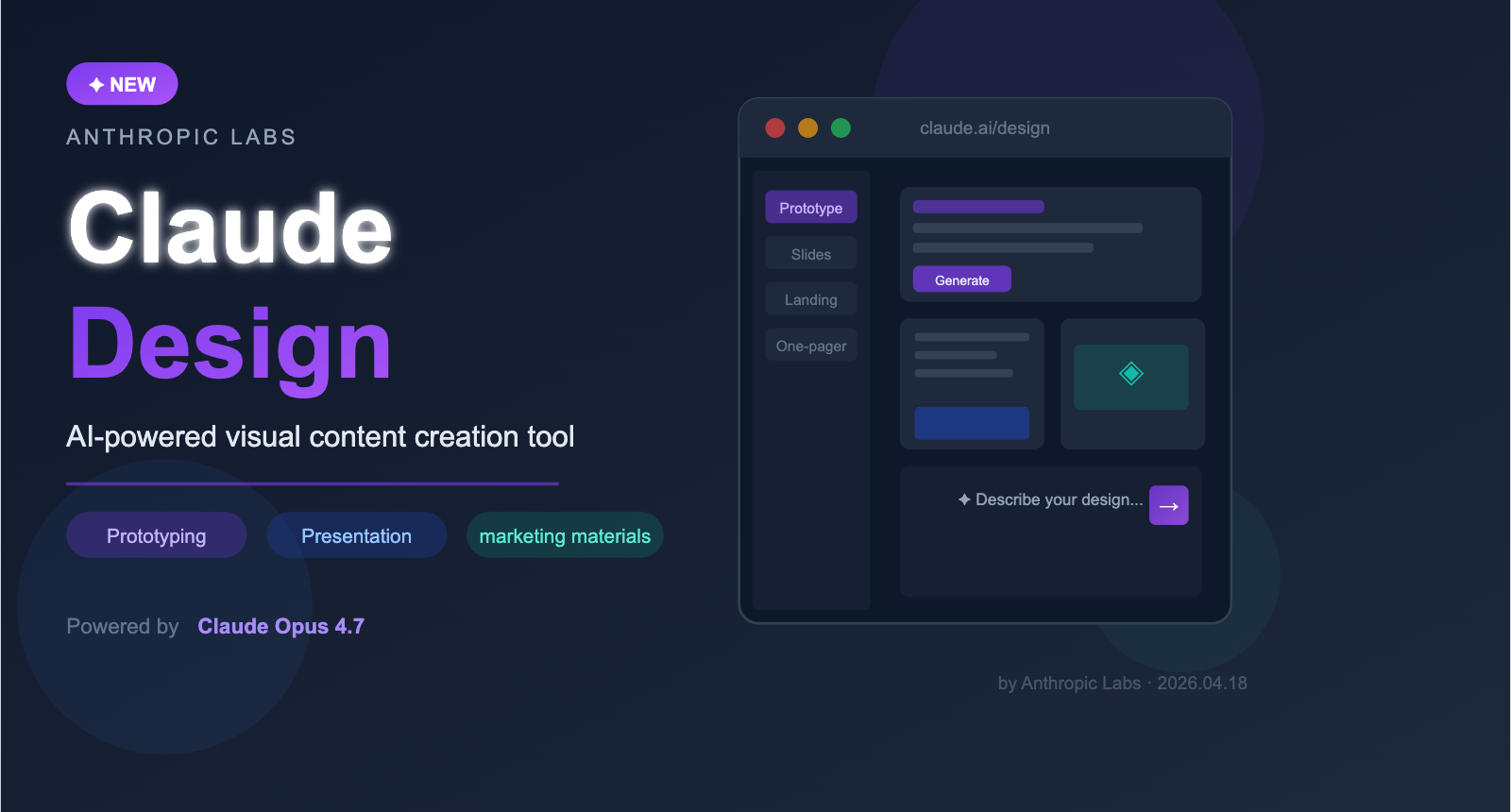
On April 18, 2026, Anthropic officially launched its first visualization content creation tool, Claude Design. As an experimental product incubated by Anthropic Labs, it's now available in a research preview for Claude Pro, Max, Team, and Enterprise subscribers at claude.ai/design.
Powered by Claude Opus 4.7, Claude Design has a clear mission: to help those without a design background—founders, product managers, and marketers—quickly turn their ideas into visual content. Whether you're working on product prototypes, presentations, landing pages, or social media assets, you can simply describe your needs in natural language, and Claude Design will generate an initial version that you can then refine through conversation.
It's worth noting that Anthropic has clarified that Claude Design is intended as a "complement" to professional tools like Canva and Figma, not a replacement. It's specifically designed for those who need to jump straight from an idea to a visual representation without having to open complex design software from scratch.
🎯 Quick Access: Claude Pro subscribers and above can head over to claude.ai/design to try the research preview. If you're looking to perform custom development using Claude Opus 4.7 via API, we recommend using the APIYI (apiyi.com) platform for a unified API interface, which supports direct connection from China and pay-as-you-go pricing.
Claude Design Core Specifications
| Dimension | Details |
|---|---|
| Product Type | AI Visualization Content Creation Tool (Research Preview) |
| Release Date | April 18, 2026 |
| Model | Claude Opus 4.7 |
| Access URL | claude.ai/design |
| Target Audience | Founders, Product Managers, Marketing Teams, Non-designers |
| Subscription | Claude Pro / Max / Team / Enterprise |
| Official Positioning | A complement, not a replacement, for tools like Canva and Figma |
| Enterprise Note | Disabled by default; administrators must enable it in settings |
Deep Dive into the 5 Core Features of Claude Design
Feature 1: Intelligent Design System Integration
One of the most distinctive capabilities of Claude Design is its ability to automatically read your team's codebase and design files to build a dedicated brand design system. Once established, it automatically applies your company's brand colors, fonts, and component specifications to every new project, ensuring that all output remains perfectly aligned with your brand's visual identity.
For enterprise users, this means no more manual setup of brand guidelines every time, and no more worrying about AI-generated content clashing with your brand tone. An organization can maintain multiple design systems simultaneously, tailored for different product lines or brand scenarios.
Feature 2: Flexible Multimodal Creation
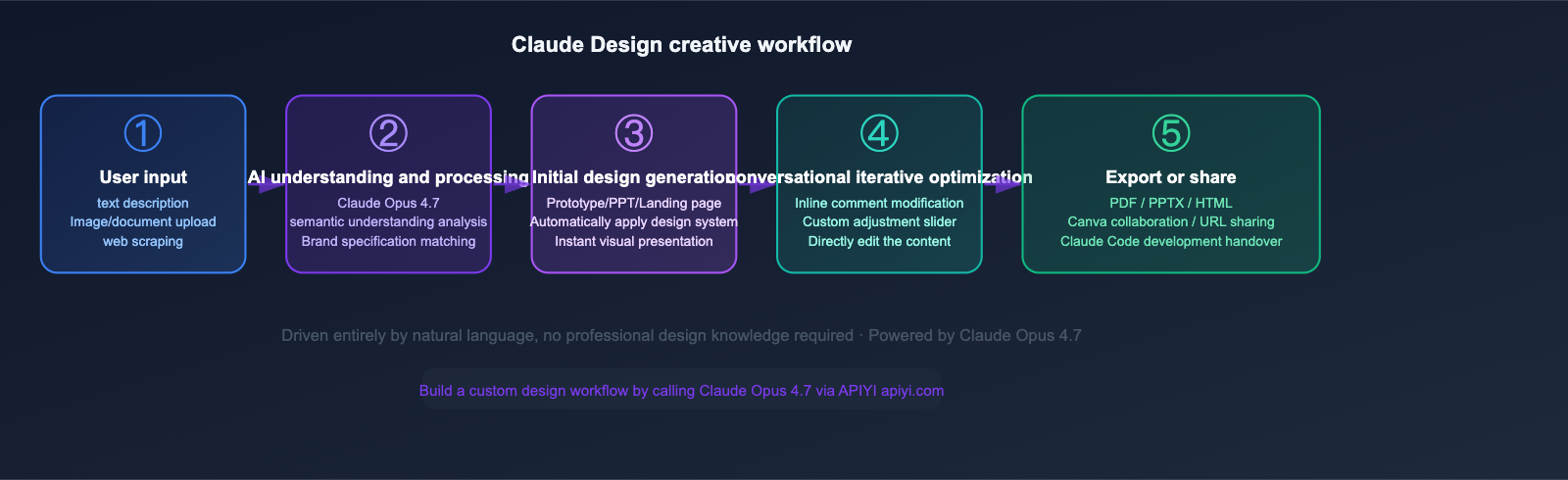
Claude Design supports a variety of input methods, allowing you to kick off your creative process from any angle:
- Natural Language Descriptions: Simply describe what you want, and Claude handles the implementation.
- Image Uploads: Upload reference images, screenshots, or sketches as a visual foundation.
- Document Import: Supports content import in DOCX, PPTX, and XLSX formats.
- Web Capture Tool: Extract visual elements directly from target websites via Web Capture.
- Codebase Integration: Reference existing frontend codebases as design inspiration.
Feature 3: Intuitive Real-time Optimization Tools
Once Claude Design generates an initial draft, it offers several ways to refine your work:
Inline Comments: Annotate design elements with feedback directly, similar to the comment feature in Google Docs.
Direct Editing: Click and edit text content directly, just like you would in a document—no need to go through a chat interface.
Custom Adjustment Sliders: Claude automatically generates adjustment knobs based on the design content, allowing you to tweak spacing, colors, font sizes, and layout parameters in real-time.
Conversational Iteration: Continue chatting with Claude to describe your modification needs, supporting multi-turn iterations until you're satisfied.
🔧 Developer Tip: If you want to integrate the design understanding capabilities of Claude Opus 4.7 into your own tools or workflows, you can call it via the APIYI (apiyi.com) platform. It's compatible with the OpenAI SDK format, and you can get free testing credits upon registration.
Feature 4: Team Collaboration and Multi-format Export
| Feature Type | Specific Capability |
|---|---|
| Team Sharing | Generate internal URL links with customizable view or edit permissions |
| In-group Collaboration | Create group chats within designs for real-time team communication |
| PDF Export | Suitable for printed materials and official document archiving |
| PPTX Export | Generate PowerPoint files directly for further editing |
| HTML Export | Export as standalone HTML files for immediate deployment as static pages |
| Canva Integration | One-click send to Canva for continued collaboration and refinement |
| Developer Handoff | Generate a Handoff Bundle for direct implementation via Claude Code |
Feature 5: Code-Driven Prototyping and Developer Handoff
For technical teams, Claude Design supports the generation of code-driven high-fidelity prototypes. These aren't just static wireframes; they can integrate:
- Voice interaction modules
- Embedded video functionality
- 3D effect elements
- AI functional components
It also includes a built-in Handoff Bundle feature, which passes design specifications directly to Claude Code. This creates a seamless transition from design to development, significantly reducing communication costs during the implementation phase.
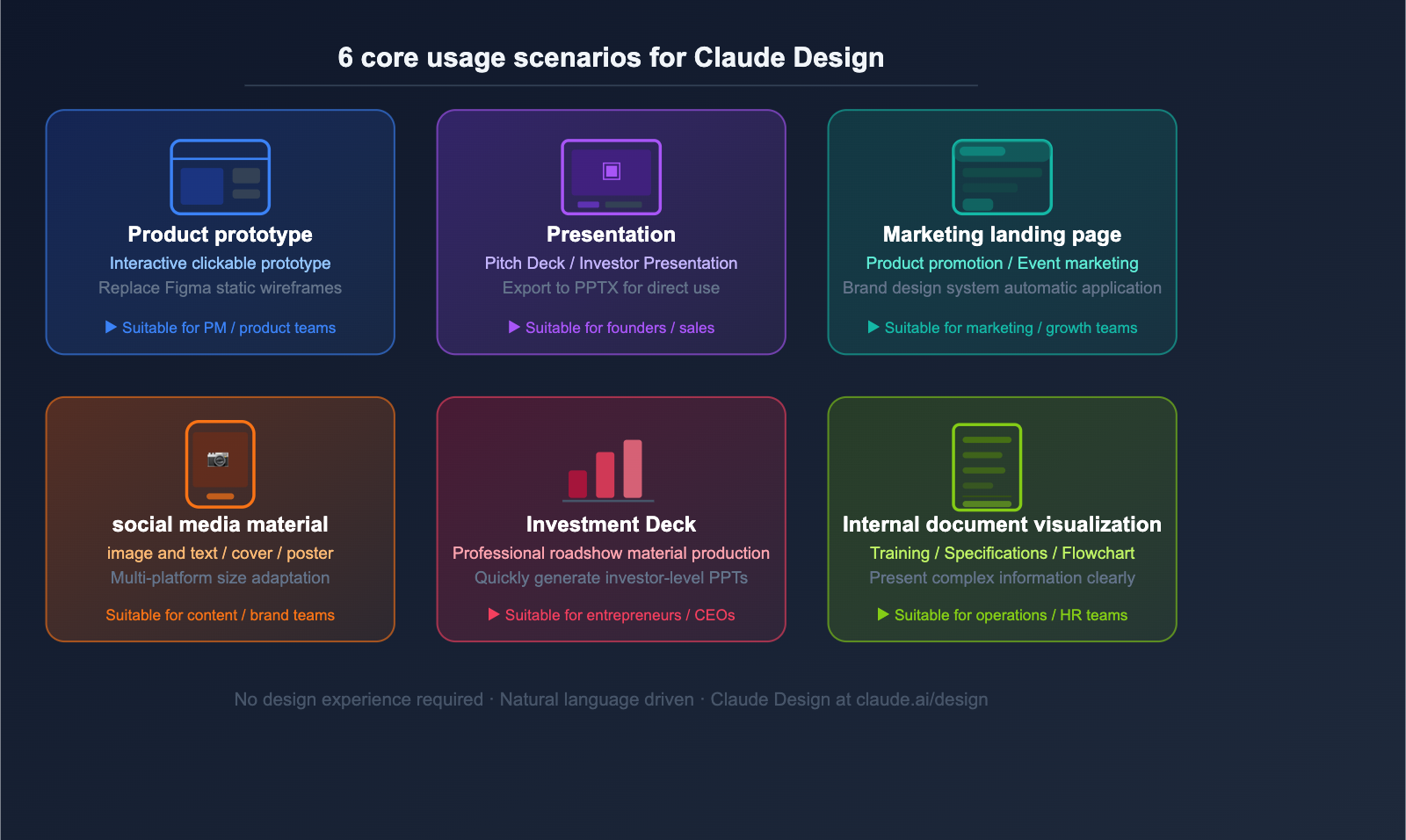
What Claude Design Can Do: 6 Core Use Cases
Scenario 1: Product Prototyping and Interaction Design
Product managers and startup teams can use Claude Design to quickly create clickable, interactive prototypes without waiting for designers or learning complex tools like Figma. Simply describe your product's functional flow, and Claude Design will generate a visual prototype interface, even supporting code-driven, high-fidelity effects.
Scenario 2: Presentations and Pitch Decks
This is a high-frequency need for founders. By providing company background and product data, Claude Design automatically generates professional, visually consistent presentations that can be exported as PPTX files for further refinement in PowerPoint or Keynote.
Scenario 3: Marketing Landing Pages and Brand Assets
Marketing teams can rapidly produce:
- Landing pages for new product launches
- Promotional posters for events
- Social media graphics (optimized for Instagram, LinkedIn, and Twitter)
- Brand one-pagers
All output automatically adheres to your configured brand design system, ensuring visual consistency across the board.
Scenario 4: Sales Proposals and Client-Tailored Materials
When sales teams face unique client requirements, they no longer need to request design resources every time. They can use Claude Design to quickly generate custom proposal materials, significantly shortening the response cycle.
Scenario 5: Internal Training and Document Visualization
Visualizing technical documentation, product specifications, and internal training materials helps teams communicate complex information more effectively, reducing the "wall of text" fatigue for readers.
Scenario 6: Wireframing and Functional Flow Mapping
During the early stages of product development, you can use Claude Design to quickly sketch out functional flowcharts and page wireframes. It’s a great replacement for whiteboard sketches and helps streamline the requirements review process.
Claude Design vs. Leading Design Tools: A Core Comparison
Anthropic officially positions Claude Design as a "supplement, not a replacement." Even so, with so many tools on the market, it’s helpful to understand where it really fits:
| Tool | Primary User | Best For | Relationship with Claude Design |
|---|---|---|---|
| Figma | Professional UI/UX Designers | Pixel-perfect design, collaborative design systems | Complementary—Figma handles fine-tuning and high-fidelity work |
| Adobe | Creative Professionals | Branding, complex graphic effects | Complementary—Adobe is for high-end creative production |
| Canva | SMBs, Non-designers | Quick template-based content creation | Complementary—Claude Design can export directly to Canva |
| PowerPoint | General Office Users | Presentations | Compatible—Supports two-way PPTX export |
| Claude Design | Founders, PMs, Marketing Teams | AI-driven rapid prototyping and content creation | The fastest path from idea to visual presentation |
In short: Claude Design is your starting point, while Figma, Adobe, and Canva are your refinement tools. Together, they form a complete design workflow.
💡 Workflow Suggestion: Use Claude Design to quickly generate your first draft. Once you're happy with it, export it to Canva for team collaboration and final tweaks, or bring it into Figma for pixel-perfect adjustments. If you want to integrate Claude Opus 4.7 into your own workflow, you can do so via APIYI (apiyi.com). We recommend running a few tests to compare how Opus 4.7 stacks up against other models in design-oriented tasks.
5 Steps to Get Started with Claude Design
Step 1: Check Your Subscription
Claude Design is currently available for the following subscription plans:
- Claude Pro: Individual premium subscription
- Claude Max: Individual flagship subscription
- Claude Team: Team subscription (5+ users)
- Claude Enterprise: Enterprise custom subscription
A Note for Enterprise Users: The Claude Design feature is disabled by default on Enterprise accounts. Admins must enable it in "Organization Settings" before team members can access it.
Step 2: Access Claude Design
Once you're logged into your Claude account, just head over to claude.ai/design in your browser to enter the main interface. There’s no need to install any plugins or extra apps.
Step 3: Upload Your Brand Design System (Recommended)
If your team has brand guidelines, it’s a great idea to set up your design system right from the start:
- Upload your frontend code repo or design files (Figma exports, brand manuals, etc.).
- Claude Design will automatically detect your brand colors, typography, and component styles.
- Every piece of content created from then on will automatically stick to your brand identity.
This step is optional, but we highly recommend it for enterprise users.
Step 4: Describe Your Creative Needs in Plain Language
To start creating, just describe what you need. No design software expertise required:
Example prompts (results are often better in English):

"Create a 10-slide pitch deck for our B2B SaaS startup,
 include problem, solution, market size, product demo,
 pricing, and team slides. Use our company design system."

"Design a mobile app prototype for a food delivery app,
 showing the main order flow from browse to checkout."

"Make a one-pager product introduction for our AI API platform,
 targeting enterprise clients, include pricing table and features."
Once Claude Design generates the first draft, you can keep adjusting it through conversation, inline comments, or slider tools until it’s perfect.
Step 5: Export or Share
| Use Case | Recommended Export |
|---|---|
| Internal team review | Copy the internal URL and set access permissions |
| Client presentation | Export as a PPTX file and present in PowerPoint |
| Formal documentation | Export as a PDF |
| Further refinement | Send to Canva for collaborative editing |
| Frontend development | Generate a Handoff Bundle and import into Claude Code |
| Direct deployment | Export as a standalone HTML file |
🚀 Pro Tip: If you want to integrate the visual comprehension and design capabilities of Claude Opus 4.7 into your internal enterprise tools or automated workflows, you can call the relevant APIs via APIYI (apiyi.com). The platform supports pay-as-you-go pricing, saving you from expensive subscription costs. Just head to apiyi.com and sign up to start testing for free.
title: The Profound Impact of Claude Design on the AI Design Tool Market
description: Explore how Claude Design is lowering the barrier to visual content creation and what its launch signals for Anthropic's product strategy.
tags: [AI, Claude Design, Anthropic, Design Tools, Product Strategy]
The Profound Impact of Claude Design on the AI Design Tool Market
Lowering the Barrier to Visual Content Creation
The release of Claude Design marks a systematic shift in how AI tools are lowering the professional barrier to visual content creation. Tasks that once required specialized design skills or significant time can now be accomplished by anyone using natural language.
This has the most significant impact on the following groups:
| Group | Original Pain Point | Changes Brought by Claude Design |
|---|---|---|
| Early-stage Founders | No design budget; poor presentation quality hinders fundraising | Self-generate professional decks to improve first impressions during roadshows |
| Product Managers | Prototyping relies on designer availability; long iteration cycles | Independently generate prototypes quickly, accelerating product exploration |
| Marketing Teams | Long content production cycles; high outsourcing costs | Rapidly generate marketing materials, reducing production costs |
| Sales Teams | Unable to respond promptly to client requests for custom materials | Real-time generation of client-specific presentation materials |
| Technical Teams | Low efficiency in design-to-development handoffs; poor fidelity | Handoff Bundle enables direct implementation via Claude Code |
Signals from Anthropic's Product Strategy
The launch of Claude Design also reveals the direction of Anthropic's product roadmap: moving from a pure API and model provider toward enterprise-grade vertical AI applications. Following the Claude.ai chat interface and the Claude Code development tool, Claude Design is the third product incubated by Anthropic Labs for specific workflows, and its first foray into the creative design space.
This aligns perfectly with OpenAI's launch of Canvas and Sora, and Google's deepening integration of AI into Workspace—AI companies are all competing to become the entry point for users' daily workflows.
📊 API Invocation Reference: Claude Opus 4.7 is the core model powering Claude Design. If you want to explore its capabilities in design understanding and visual content generation via API, you can obtain access through the APIYI (apiyi.com) platform. It supports unified interface management for various mainstream models, making it easy to compare and switch between them quickly.
Frequently Asked Questions (FAQ)
Q1: Will Claude Design replace designers?
No. Claude Design is positioned to help non-designers quickly generate initial versions of visual content. Professional designers remain indispensable—brand depth, user experience details, and pixel-perfect refinements all require the professional judgment of a human designer. Claude Design is more of an intelligent assistant than a replacement.
Q2: What stage is Claude Design currently in, and how stable is it?
It is currently in a Research Preview stage, meaning features are iterating rapidly and may be unstable. Anthropic has explicitly stated that this is an experimental product suitable for exploratory use; it is not currently recommended for critical business scenarios.
Q3: How do Enterprise users enable Claude Design?
Claude Design is disabled by default for Enterprise accounts. Users with administrator privileges need to log in to the Anthropic console, navigate to "Organization Settings," and manually toggle the Claude Design feature. Once enabled, all members of the organization will have access.
Q4: How is the usage quota for Claude Design calculated?
Claude Design shares the usage quota associated with your subscription plan and does not incur extra fees. If you need more usage, you can purchase additional capacity. Please refer to the official Anthropic pricing page for details.
Q5: How can I call Claude Opus 4.7 via API?
You can call Claude Opus 4.7 through the APIYI (apiyi.com) platform. The platform provides a standard API interface compatible with the OpenAI format and supports direct connections from within China. You can receive free testing credits upon registration. Visit apiyi.com for detailed documentation and pricing information.
Summary: Is Claude Design Worth the Hype?
As the brand-new AI visualization tool released by Anthropic, Claude Design represents a significant evolution in AI-assisted design. Here are three reasons why it’s worth keeping an eye on:
- Extremely Low Barrier to Entry: Driven by natural language, it requires no prior design experience, allowing anyone to quickly generate professional visual content.
- Comprehensive Scenario Coverage: From product prototypes to presentations, and from marketing materials to developer handoffs, it covers core creative workflows in one place.
- Enterprise-Grade Design Capabilities: With features like brand design system integration, multi-user collaboration, and multi-format export, it meets the real-world needs of professional teams.
For Claude Pro subscribers and above, you can head over to claude.ai/design right now to try out the free research preview.
For teams looking to integrate the capabilities of Claude Opus 4.7 into their own products or workflows via API, we recommend using the APIYI (apiyi.com) platform. It supports direct domestic connections, pay-as-you-go pricing, and is compatible with the OpenAI interface format, making it the top choice for developers to quickly access the latest Claude models.
Information in this article is sourced from official Anthropic announcements and tech media reports as of April 18, 2026. Product features and pricing specifications are subject to the latest official announcements from Anthropic.
Author: Technical Team | Wentuo API Blog blog.wentuo.ai | Technical Support: APIYI apiyi.com