description: A deep dive into the new Claude Opus 4.7 xhigh effort level, comparing performance across tiers and providing best practices for Agentic coding.
Author's Note: This is a comprehensive guide to the all-new xhigh effort level in Claude Opus 4.7. We'll compare the five tiers—low, medium, high, xhigh, and max—and provide best practices and code examples for programming and Agentic scenarios.
Many developers, after upgrading to Claude Opus 4.7, have noticed a new, unfamiliar value for the effort parameter: xhigh. It’s not the default high, nor is it the ceiling max. So, when should you actually use it? In this article, we’ll dive deep into the design principles, performance curves, and practical configurations of the Claude Opus 4.7 xhigh mode to help you find the sweet spot for "intelligence vs. cost" in Agentic coding and long-running tasks.
Core Value: By the end of this article, you'll understand the differences between xhigh and the other four effort tiers, when to switch, how to enable it in Claude Code and the Messages API, and how to avoid the common pitfalls of "over-reasoning" and "token waste."
Claude Opus 4.7 xhigh Mode: Key Takeaways
| Feature | Description | Use Case |
|---|---|---|
| New Tier Positioning | A brand new effort level between high and max |
Tasks needing deeper reasoning without the max cost |
| Recommended Starting Point | Anthropic recommends xhigh for programming and Agentic tasks |
Claude Code, long-running Agents, RAG |
| Token Consumption | Significantly higher than high, but much lower than max |
Can reduce token waste by over 50% in long tasks |
| Exclusive Support | Only available in Claude Opus 4.7 | Requires updating model ID to claude-opus-4-7 |
| Integrated Mechanism | Works with adaptive thinking and task budgets | Task self-scheduling, visible token budgets |
Design Motivation for Claude Opus 4.7 xhigh Mode
The introduction of xhigh solves a real pain point: in the Opus 4.6 era, developers running long-running Agentic programming tasks were forced to choose between high and max. high sometimes lacked the "depth" for complex multi-step reasoning, while max caused token usage to skyrocket, leading to uncontrollable costs. Anthropic designed this "long-range-leaning" effort level in 4.7 to ensure high-quality output during multi-turn tool calls, long-context retrieval, and cross-session memory, all while keeping token consumption within an acceptable range.
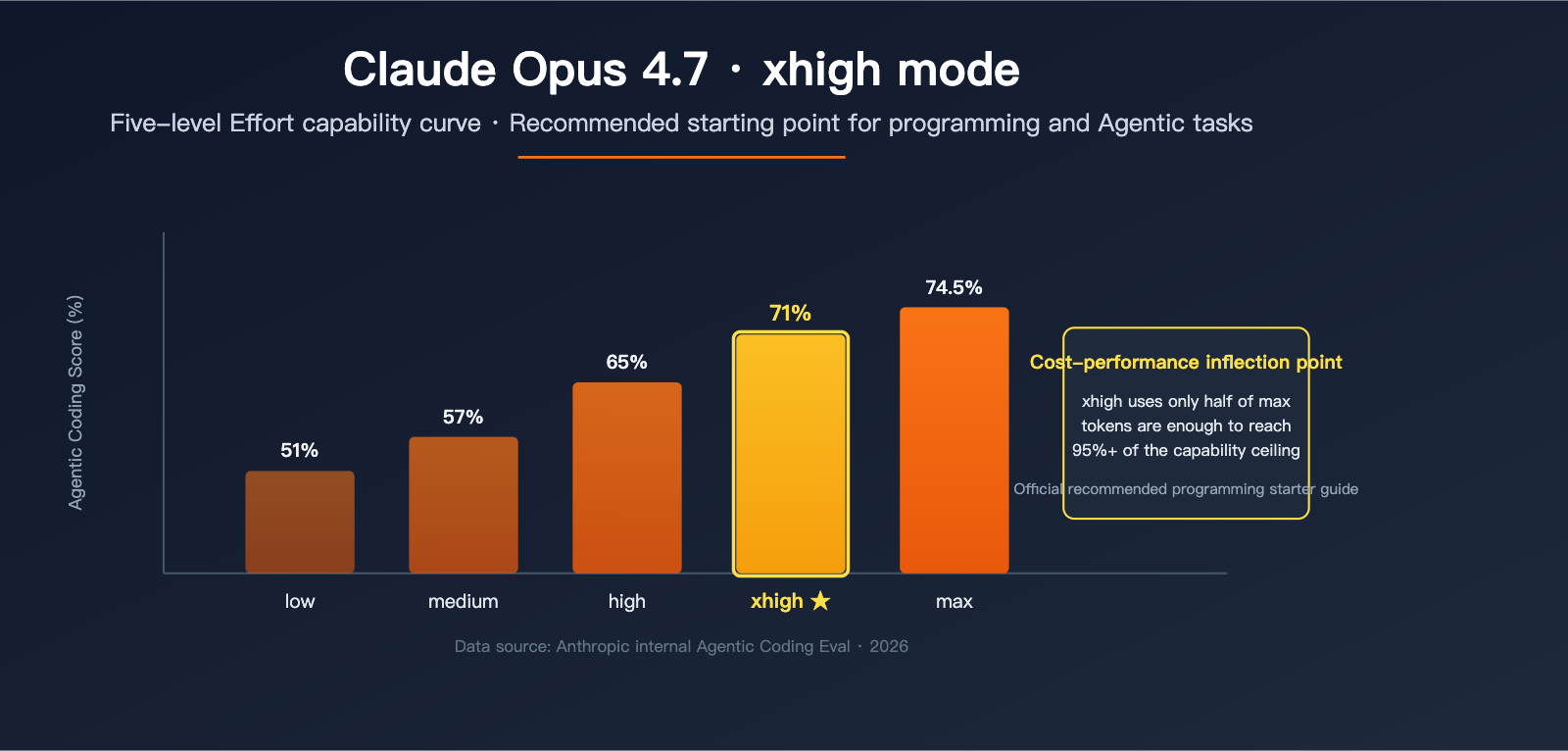
According to official internal Agentic Coding benchmark curves, Opus 4.7 scores approximately 71% at the xhigh level (consuming ~100k tokens), while the max level only improves that to ~74.5% (but consumes over 200k tokens). In other words, moving from xhigh to max only nets you an average 3% gain while nearly doubling your token costs. This is why xhigh has become the "officially recommended starting point."
Claude Opus 4.7 xhigh Mode: A Five-Level Comparison
The table below compares the official positioning and practical recommendations for all five effort levels of Opus 4.7:
| Effort Level | Positioning Description | Recommended Use Case | Relative Token Consumption |
|---|---|---|---|
low |
Highest efficiency, significantly reduced reasoning | Short tasks, sub-agents, classification tasks | Baseline 1x |
medium |
Balanced, reduces cost while maintaining quality | General chat, single-step code generation | ~1.3x |
high |
API default, complex reasoning and programming | General intelligence-sensitive tasks | ~2x |
xhigh |
Recommended starting point for long-range coding & Agentic tasks | Claude Code, multi-turn tool calls | ~3x |
max |
Absolute capability ceiling, no token constraints | Cutting-edge challenges, research tasks | ~6x+ |
🎯 Pro Tip: For programming tasks, I recommend starting your evaluation directly at
xhigh, then deciding whether to scale up tomaxor down tohighbased on the results. You can use the APIYI (apiyi.com) platform to invoke theclaude-opus-4-7model directly and quickly compare the performance differences across effort levels. The platform provides a unified OpenAI-compatible interface, making it easy to toggle theeffortparameter for testing.
Key Differences: Claude Opus 4.7 xhigh vs. high
Many people ask: If high is already the default, why do we need xhigh? There are three key differences:
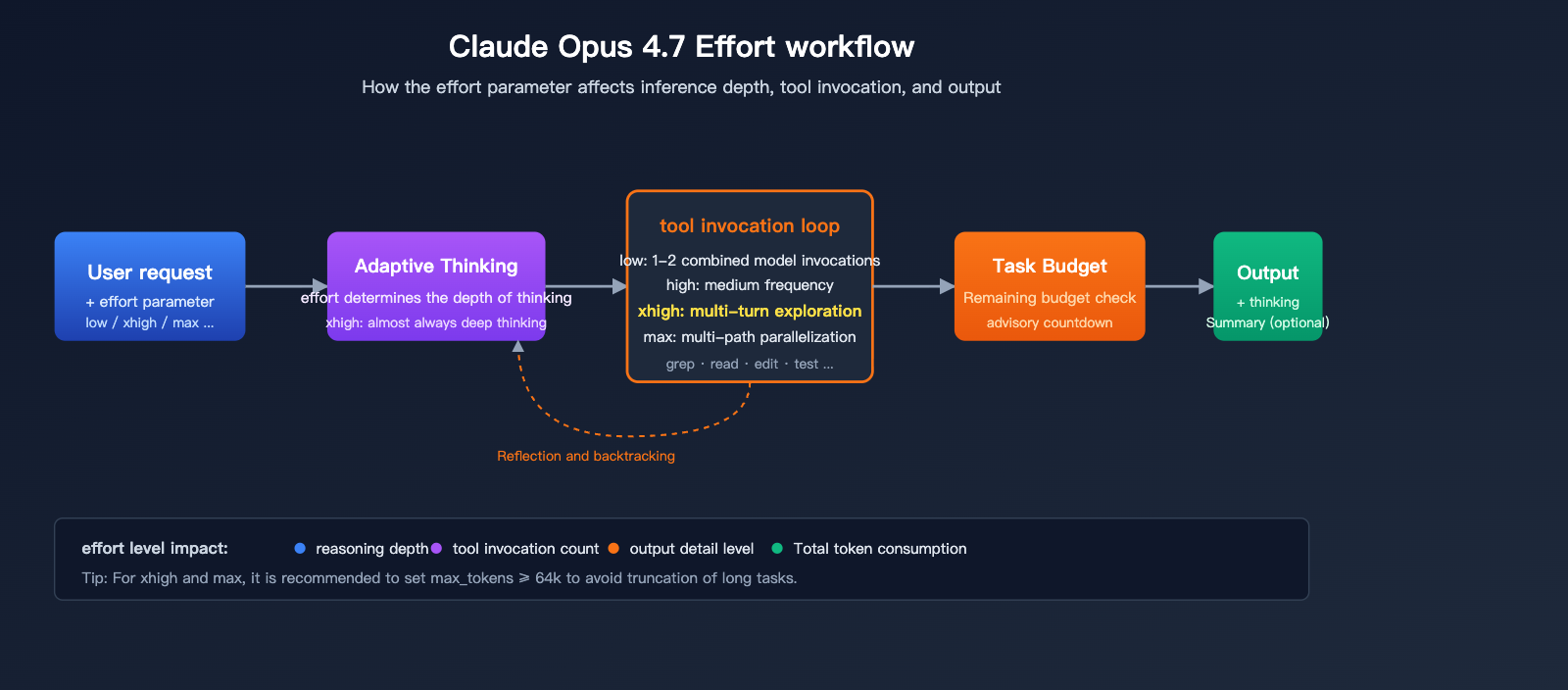
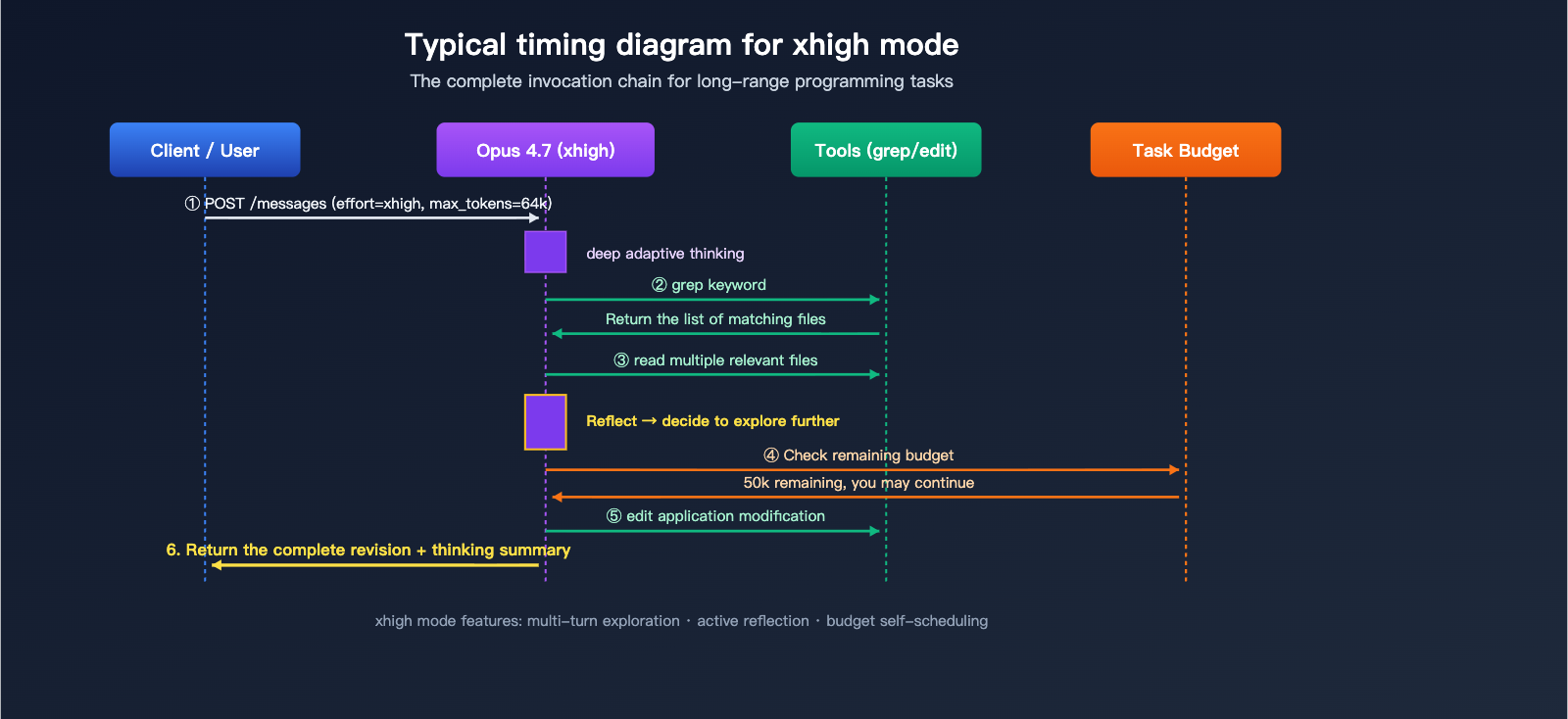
First, the depth of reasoning. Under xhigh, Opus 4.7 triggers its adaptive thinking deep mode more frequently. The model will proactively reflect on intermediate results and backtrack on failed tool call paths. In contrast, high leans toward "getting it right the first time," which might skip deep thinking for tasks of moderate complexity.
Second, tool calling strategy. xhigh encourages the model to initiate more exploratory tool calls (e.g., grep, reading multiple files, tracing dependencies), whereas high tends to minimize calls to save tokens. For large-scale code refactoring or cross-file bug localization, the exploratory advantage of xhigh is significant.
Third, performance in long-range tasks. For Agentic tasks that run for over 30 minutes and involve millions of tokens, the stability of xhigh is significantly higher than high. The model is less likely to "lose its way" or terminate prematurely midway through the process.
Getting Started with Claude Opus 4.7 xhigh Mode
Minimal Invocation Example
Here is the minimal code (under 10 lines) to invoke the Opus 4.7 xhigh mode via the OpenAI-compatible interface:
import openai

client = openai.OpenAI(
    api_key="YOUR_API_KEY",
    base_url="https://vip.apiyi.com/v1"
)

response = client.chat.completions.create(
    model="claude-opus-4-7",
    messages=[{"role": "user", "content": "Help me refactor this Python code:..."}],
    extra_body={"effort": "xhigh"}
)
print(response.choices[0].message.content)
View Full Anthropic Native SDK Invocation Example
import anthropic

client = anthropic.Anthropic(api_key="YOUR_API_KEY")

response = client.messages.create(
    model="claude-opus-4-7",
    max_tokens=64000,
    messages=[
        {
            "role": "user",
            "content": "Please analyze the code structure of this repository and suggest three design pattern improvements."
        }
    ],
    output_config={
        "effort": "xhigh"
    },
    thinking={
        "type": "adaptive",
        "display": "summarized"
    }
)

# 4.7 hides thinking content by default; you need to explicitly opt-in
for block in response.content:
    if block.type == "text":
        print(block.text)
    elif block.type == "thinking":
        print(f"[Thinking Summary]: {block.thinking}")
Key Parameter Notes:
model: Must useclaude-opus-4-7; the olderclaude-opus-4-6does not supportxhigh.output_config.effort: Set to"xhigh".max_tokens: Forxhigh, we recommend at least 64k to give the model enough space for reasoning and tool calls.thinking.display: Set to"summarized"to see the reasoning summary;"omitted"is the default hidden state.
Recommendation: In
xhighmode, it's best to increasemax_tokensto 64k or higher; otherwise, the model might truncate prematurely due to insufficient output space. You can register for a free account at APIYI (apiyi.com) to test the actual performance of Opus 4.7xhigh. The platform has already pre-configured the effort parameter pass-through to match Anthropic's implementation.
Using Claude Opus 4.7 xhigh Mode in Claude Code
Changes to Claude Code Defaults
With the upgrade to Opus 4.7, Claude Code has adjusted its built-in default effort level from high to xhigh. This means that if you simply run the claude command to enter interactive mode, your requests are already using xhigh by default. Here’s how you’ll notice the difference:
- Significantly higher success rates for complex tasks (especially bug fixes spanning multiple files).
- Token consumption per session is more than double what it was in the 4.6 era.
- Success rates for long-running tasks (like full repository refactoring) have jumped from about 55% to roughly 71%.
Manually Specifying the Effort Level
If you want to explicitly control the effort level in Claude Code, you can adjust it in your configuration file:
{
  "model": "claude-opus-4-7",
  "effort": "xhigh",
  "max_tokens": 96000,
  "thinking_display": "summarized"
}
Recommended effort levels for different task types:
| Task Type | Recommended Effort | Reason |
|---|---|---|
| Single-file bug fix | high or xhigh |
Requires solid reasoning but not extensive exploration |
| Cross-file refactoring | xhigh |
Needs multiple rounds of grep, file reading, and dependency tracking |
| Full-repo design review | xhigh or max |
Long-range, multi-step reasoning; quality is the priority |
| Simple code formatting | low |
Pattern-based task; saves tokens |
| Documentation generation | medium |
Balances quality and speed |
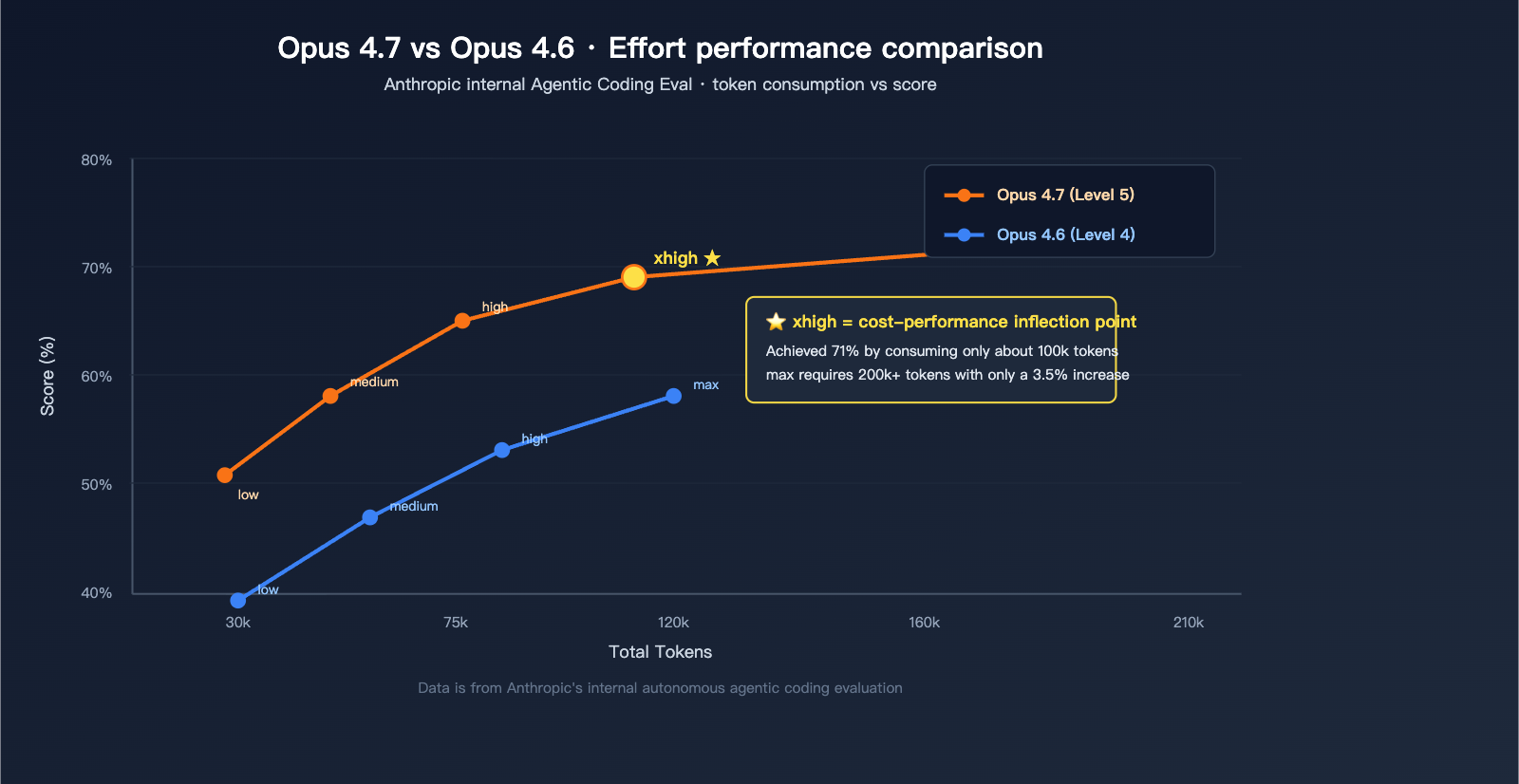
Data Note: The chart above is based on Anthropic's publicly available internal Agentic Coding Eval data, which you can reproduce and verify using the same prompt on the APIYI platform (apiyi.com).
Claude Opus 4.7 xhigh Mode and Supporting Mechanisms
Synergy with Adaptive Thinking
Opus 4.7 has removed the legacy budget_tokens parameter; the only supported thinking mode is adaptive thinking. The effort parameter now effectively acts as the master dial for "depth of thought":
| Effort | Adaptive Thinking Behavior |
|---|---|
low |
Skips thinking for most requests, outputs directly |
medium |
Triggers thinking only for complex problems |
high |
Almost always thinks, with moderate depth |
xhigh |
Almost always performs deep thinking, including reflection and backtracking |
max |
Deep thinking + multi-path exploration |
Note: By default, 4.7 hides thinking content (the thinking field in the response stream is empty). If your application needs to display the thinking process to users, you must explicitly set thinking.display = "summarized", otherwise users will experience a long "empty response window."
Working with Task Budgets
Opus 4.7 also introduces the task_budget parameter (in beta), which is particularly useful when paired with xhigh:
response = client.beta.messages.create(
    model="claude-opus-4-7",
    max_tokens=128000,
    output_config={
        "effort": "xhigh",
        "task_budget": {"type": "tokens", "total": 200000}
    },
    messages=[{"role": "user", "content": "Refactor the entire user authentication module"}],
    betas=["task-budgets-2026-03-13"]
)
task_budget is an "advisory" limit—the model sees the remaining budget and prioritizes its work accordingly—whereas max_tokens is a "hard limit" that triggers truncation. Used together, xhigh mode can self-regulate during long-running tasks to prevent token usage from spiraling out of control.
xhigh and the 1M Context Window
Opus 4.7 supports a 1M token context window with no long-context premium. In xhigh mode, the model can perform complex codebase understanding tasks within that 1M context without needing to frequently compress history. This means:
- You can load hundreds of thousands of lines of code at once for holistic analysis.
- Memory tools across sessions can reliably retain context.
- Information loss from context compression is significantly reduced.
Best Practices for Claude Opus 4.7 xhigh Mode
Recommendation 1: Start with xhigh for Coding Tasks
The official Anthropic documentation explicitly states: "Start with xhigh for coding and agentic use cases." This is because coding tasks typically involve multi-file reading, dependency analysis, running tests, and other multi-turn tool invocations. In these scenarios, xhigh offers significantly better exploration capabilities than high.
If you were accustomed to using high as your default for programming on Opus 4.6, I recommend switching directly to xhigh when migrating to 4.7, then adjusting back if the actual results don't require that level of depth.
Recommendation 2: Set max_tokens to at least 64k
Both xhigh and max require ample output space. The official recommendation is to start at 64k and adjust upward based on task complexity. If your max_tokens is still set to 4096, xhigh will frequently truncate during long tasks, leading to a worse experience than high.
Recommendation 3: Enable Thinking Summaries
thinking = {
    "type": "adaptive",
    "display": "summarized"
}
Although 4.7 hides the thinking process by default, enabling summarized display in debugging and production scenarios lets users know the model is actively working, preventing the "it looks like it's frozen" experience.
Recommendation 4: Choose Effort Dynamically Based on Task Complexity
Don't use the same effort level for every request. Here’s a recommended strategy:
def pick_effort(task_type: str, complexity: str) -> str:
    # Select the effort level based on the task type and complexity
    if task_type == "classification" or complexity == "trivial":
        return "low"
    elif task_type == "chat" and complexity == "simple":
        return "medium"
    elif task_type == "coding" and complexity == "moderate":
        return "high"
    elif task_type == "coding" and complexity in ("complex", "agentic"):
        return "xhigh"
    elif task_type == "research" and complexity == "frontier":
        return "max"
    return "high"
Optimization Tip: When accessing Opus 4.7 via APIYI (apiyi.com), you can dynamically switch the
effortlevel at the request layer based on business tags. Use the unified usage dashboard to monitor the cost-benefit ratio across different tiers.
Recommendation 5: Be Aware of Tokenizer Changes
Opus 4.7 uses a new tokenizer, which may consume 1.0 to 1.35 times more tokens than 4.6 for the same text. When estimating costs, remember to reserve a 35% token buffer on top of your 4.6 baseline; otherwise, you might find your billing higher than expected.
Common Misconceptions About Claude Opus 4.7 xhigh Mode
Misconception 1: xhigh is always better than high
Not necessarily. For simple single-turn Q&A or structured output tasks (like JSON extraction), xhigh might trigger "over-reasoning," which slows down response times without improving quality. Use medium or low for these types of tasks.
Misconception 2: max is always the most powerful
While max does score highest in benchmarks, the improvement is marginal (about 3 percentage points) while the cost doubles. Anthropic officially advises: "Reserve max for genuinely frontier problems." For daily programming tasks, xhigh is more than enough; using max blindly is a classic waste of resources.
Misconception 3: You can continue using budget_tokens
Opus 4.7 has removed the thinking.budget_tokens parameter; passing it will return a 400 error. All control over thinking depth must now be handled via the effort parameter.
Misconception 4: xhigh works on Sonnet 4.6
xhigh is exclusive to Opus 4.7. The effort levels for Sonnet 4.6 only support low/medium/high/max; calling xhigh will be rejected.
| Model | Supported Effort Levels |
|---|---|
| Claude Opus 4.7 | low / medium / high / xhigh / max |
| Claude Opus 4.6 | low / medium / high / max |
| Claude Sonnet 4.6 | low / medium / high / max |
| Claude Opus 4.5 | low / medium / high |
FAQ
Q1: How much more expensive is xhigh compared to high? When is it worth it?
According to the official curve, xhigh consumes about 1.5 times the tokens of high (depending on task complexity), but it delivers a 5-6% performance boost in Agentic Coding evaluations. For scenarios like cross-file refactoring, long-range tasks, and multi-turn tool invocations, this trade-off is definitely worth it. However, for single-step code generation or document writing, high is usually sufficient.
Q2: How do I pass the effort parameter using the OpenAI-compatible interface?
The OpenAI SDK doesn't recognize effort by default, so you'll need to pass it through the extra_body field. For example:
client.chat.completions.create(
    model="claude-opus-4-7",
    messages=[...],
    extra_body={"effort": "xhigh"}
)
If you're using an API proxy service like APIYI (apiyi.com), please confirm that the platform supports passing through the effort parameter (APIYI already supports this).
Q3: Will the response latency be very slow in xhigh mode?
It will be about 50-80% slower than high because the model requires deeper reasoning and more tool invocations. However, for long-range Agentic tasks, the total completion time might actually decrease because you'll spend less time on manual corrections and retries. If you're latency-sensitive, you can enable thinking summaries (display: "summarized") to give users a sense of progress.
Q4: How can I quickly test the performance of Opus 4.7 xhigh?
We recommend using an API proxy service that supports passing through the effort parameter for a quick comparison:
- Visit APIYI (apiyi.com) and register an account.
- Select the
claude-opus-4-7model. - Use the same prompt to test the high, xhigh, and max tiers respectively.
- Compare the output quality, token consumption, and response latency.
By comparing them in practice, you can quickly find the effort configuration that best suits your business needs.
Q5: What code changes are needed when upgrading from 4.6 to 4.7?
Besides adding effort: xhigh, keep an eye on a few breaking changes:
- Remove
thinking.budget_tokensand usethinking.type: "adaptive"instead. - Remove
temperature/top_p/top_k(setting non-default values will trigger a 400 error). - Thinking content is hidden by default; you need to opt-in by setting
display: "summarized". - It's recommended to increase
max_tokensto at least 64k.
Summary
Key takeaways for Claude Opus 4.7 xhigh mode:
- Precise Positioning: It sits between high and max, specifically designed for long-range programming and Agentic tasks.
- Sweet Spot for Value: Significantly more powerful than high and much more cost-effective than max; it's the recommended starting point for programming tasks.
- Comprehensive Support: Works in tandem with adaptive thinking, task budgets, and the 1M context window.
- Exclusive to 4.7: Only supported by
claude-opus-4-7; not available in 4.6 or Sonnet 4.6. - Low Barrier to Entry: Simply set
output_config.effortto"xhigh"to enable it.
For developers looking to upgrade to Opus 4.7, we recommend starting your evaluation with xhigh, paired with 64k+ max_tokens and adaptive thinking. You'll immediately notice the leap in 4.7's capabilities across most programming tasks.
We recommend using APIYI (apiyi.com) to quickly integrate Claude Opus 4.7 xhigh mode. The platform already supports effort parameter pass-through and 1M context window calls, and it offers free testing credits, making it easy to benchmark the real-world performance of 4.7 versus 4.6 for your specific use cases.
📚 References
-
Anthropic Official
effortParameter Documentation: Detailed definitions and recommended usage for the five effort levels.- Link:
platform.claude.com/docs/en/build-with-claude/effort - Description: Official authoritative definitions and best practices for levels like
xhigh.
- Link:
-
What's new in Claude Opus 4.7: Complete changelog for version 4.7.
- Link:
platform.claude.com/docs/en/about-claude/models/whats-new-claude-4-6 - Description: Includes the background of the
xhighintroduction, breaking changes, and migration advice.
- Link:
-
Adaptive Thinking Documentation: The only thinking mode supported by 4.7.
- Link:
platform.claude.com/docs/en/build-with-claude/adaptive-thinking - Description: Key to understanding how
effortandthinkingwork together.
- Link:
-
Task Budgets Beta Documentation: Budget control for use with
xhigh.- Link:
platform.claude.com/docs/en/build-with-claude/task-budgets - Description: Practical tools for managing token consumption in long-running tasks.
- Link:
-
APIYI Claude Model Integration Documentation: A quick-start guide for developers in China.
- Link:
help.apiyi.com - Description: Includes practical configurations such as
effortparameter passthrough and 1M context window model invocation.
- Link:
Author: APIYI Technical Team
Technical Discussion: Feel free to discuss how thexhighmode performs in your specific scenarios in the comments. For more Claude Opus 4.7 configuration tips, visit the APIYI documentation center at docs.apiyi.com.