Top 10 Must-Install Claude Code MCP Servers
Based on usage frequency and practical value, here are the 10 most worthwhile MCP servers, along with their installation commands and use cases.
1. GitHub MCP – Code Repository Management
Installation Command:
claude mcp add @modelcontextprotocol/server-github
Key Features:
- Create/search/manage issues and PRs directly
- Clone repositories and switch branches
- View commit history and diff comparisons
- Automate code reviews
Usage Scenario:
When you ask Claude Code "Help me create a new feature branch and submit a PR," it can complete the entire Git workflow automatically without manual terminal operations.
Configuration Tips:
- Requires GitHub Personal Access Token (PAT)
- Recommended permissions:
repo,workflow,read:org - Add to
~/.claude.json:
{
  "mcpServers": {
    "github": {
      "command": "npx",
      "args": ["-y", "@modelcontextprotocol/server-github"],
      "env": {
        "GITHUB_PERSONAL_ACCESS_TOKEN": "ghp_your_token_here"
      }
    }
  }
}
2. Sequential Thinking – Enhanced Reasoning
Installation Command:
claude mcp add @modelcontextprotocol/server-sequential-thinking
Key Features:
- Enable Claude's step-by-step thinking mode
- Display detailed reasoning processes
- Reduce errors in complex logic
- Transparent problem-solving approach
Usage Scenario:
When debugging complex algorithm problems, it'll show its complete thought process—from problem analysis to solution attempts to final answers.
Why It's Recommended:
This isn't actually an "external service" but a built-in thinking enhancement mode. After installation, Claude Code's reasoning ability on complex problems improves significantly.
3. Context7 – Real-time Development Documentation
Installation Command:
claude mcp add @context7/mcp-server
Key Features:
- Access real-time documentation for 50+ frameworks/libraries
- Automatically retrieve the latest API reference
- Support for React, Vue, Next.js, FastAPI, etc.
- Reduce hallucination problems with obsolete documentation
Usage Scenario:
When you ask "How do I use the latest React Server Components?", it fetches the latest official documentation instead of relying on outdated training data.
Configuration Example:
{
  "mcpServers": {
    "context7": {
      "command": "npx",
      "args": ["-y", "@context7/mcp-server"]
    }
  }
}
4. Playwright MCP – Browser Automation Testing
Installation Command:
claude mcp add @executeautomation/playwright-mcp-server
Key Features:
- Automatically write and run E2E tests
- Web scraping and data extraction
- Page screenshot and PDF generation
- Simulate user interactions
Usage Scenario:
Tell Claude "Help me write a test to verify the login process," and it'll automatically generate Playwright test code and run it.
Prerequisites:
- Node.js 18+
- Chromium browser (auto-installed by Playwright)
5. PostgreSQL MCP – Direct Database Access
Installation Command:
claude mcp add @modelcontextprotocol/server-postgres
Key Features:
- Execute SQL queries directly
- Database schema analysis
- Generate migration scripts
- Data validation and cleanup
Usage Scenario:
"Help me find all inactive users in the database and export them as CSV" – it can complete query, filtering, and export in one go.
Security Note:
- It's recommended to use read-only database accounts
- Avoid running on production databases
- Configure connection string:
{
  "mcpServers": {
    "postgres": {
      "command": "npx",
      "args": ["-y", "@modelcontextprotocol/server-postgres"],
      "env": {
        "POSTGRES_CONNECTION_STRING": "postgresql://user:password@localhost:5432/dbname"
      }
    }
  }
}
6. Supabase MCP – Full-Stack BaaS Operations
Installation Command:
claude mcp add @supabase/mcp
Key Features:
- Manage Supabase projects (database, Auth, Storage)
- Execute real-time queries
- Configure Row Level Security (RLS)
- Database migration management
Usage Scenario:
When building full-stack apps, Claude can directly help you create database tables, configure authentication, and upload files.
Prerequisites:
- Supabase account and project
- API Key and Project URL
7. Docker MCP – Container Management
Installation Command:
claude mcp add @ckreiling/mcp-server-docker
Key Features:
- List/start/stop containers
- View container logs
- Execute commands in containers
- Automatic Dockerfile generation
Usage Scenario:
"Help me check why the Nginx container won't start" – it can automatically view logs, diagnose issues, and propose solutions.
Configuration Example:
{
  "mcpServers": {
    "docker": {
      "command": "npx",
      "args": ["-y", "@ckreiling/mcp-server-docker"]
    }
  }
}
8. AWS MCP – Cloud Resource Management
Installation Command:
claude mcp add @modelcontextprotocol/server-aws
Key Features:
- Manage S3 buckets, EC2 instances, Lambda functions
- View CloudWatch logs
- Automated deployment scripts
- Cost analysis reports
Usage Scenario:
"Help me create an S3 bucket and configure static website hosting" – it can complete AWS CLI operations without your manual intervention.
Security Configuration:
- Uses AWS IAM credentials
- It's recommended to create least-privilege IAM users
- Never hardcode Access Keys in code
9. Sentry MCP – Error Tracking & Monitoring
Installation Command:
claude mcp add @modelcontextprotocol/server-sentry
Key Features:
- Retrieve error logs from Sentry projects
- Analyze error stack traces
- Suggest fix solutions
- Create issues automatically
Usage Scenario:
"Analyze the errors from the last 24 hours" – it retrieves Sentry data, groups similar errors, and proposes fixes.
Configuration:
{
  "mcpServers": {
    "sentry": {
      "command": "npx",
      "args": ["-y", "@modelcontextprotocol/server-sentry"],
      "env": {
        "SENTRY_AUTH_TOKEN": "your_token_here",
        "SENTRY_ORG": "your_org"
      }
    }
  }
}
10. Linear MCP – Project Management Integration
Installation Command:
claude mcp add mcp-server-linear
Key Features:
- Create/update Linear issues
- Synchronize project progress
- Automatically generate development tasks
- Associate issues with code
Usage Scenario:
After completing a feature, Claude can automatically update the related Linear issue status and add implementation notes.
Configuration:
{
  "mcpServers": {
    "linear": {
      "command": "npx",
      "args": ["-y", "mcp-server-linear"],
      "env": {
        "LINEAR_API_KEY": "your_api_key_here"
      }
    }
  }
}
MCP Installation & Configuration Guide
Installation Methods
Method 1: One-Click Installation (Recommended)
# Claude Code built-in command
claude mcp add <package-name>
Method 2: Manual Configuration
Edit ~/.claude.json:
{
  "mcpServers": {
    "server-name": {
      "command": "npx",
      "args": ["-y", "package-name"],
      "env": {
        "API_KEY": "your_key_here"
      }
    }
  }
}
Configuration File Locations
| OS | Config File Path |
|---|---|
| macOS | ~/Library/Application Support/Claude/claude.json |
| Windows | %APPDATA%\Claude\claude.json |
| Linux | ~/.config/Claude/claude.json |
Viewing Installed MCPs
# List all installed MCP servers
claude mcp list

# Check specific MCP status
claude mcp status <server-name>
Uninstalling MCPs
# Remove specified MCP server
claude mcp remove <server-name>

# Or manually delete from config file
# Then restart Claude Code
Usage Tips & Best Practices
1. Don't Install Too Many MCPs
Recommended Configuration:
- Daily use: 2-3 core MCPs (like GitHub + Sequential Thinking)
- Project-specific: Add on demand (database projects + PostgreSQL MCP)
- Periodic cleanup: Remove unused servers
Reason: Each MCP consumes startup time and memory. Too many will slow down Claude Code.
2. Environment Variables Security Management
Don't:
{
  "env": {
    "API_KEY": "sk-1234567890abcdef"  // ❌ Don't hardcode
  }
}
Do:
{
  "env": {
    "API_KEY": "${MY_SERVICE_API_KEY}"  // ✅ Use environment variables
  }
}
Then in ~/.zshrc or ~/.bashrc:
export MY_SERVICE_API_KEY="sk-1234567890abcdef"
3. Project-Level Configuration
For specific projects needing particular MCPs, create .claude/mcp.json in your project root:
{
  "mcpServers": {
    "postgres": {
      "command": "npx",
      "args": ["-y", "@modelcontextprotocol/server-postgres"],
      "env": {
        "POSTGRES_CONNECTION_STRING": "${DATABASE_URL}"
      }
    }
  }
}
Benefit: Different projects use different MCPs without affecting global configuration.
4. Troubleshooting MCP Connection Issues
Symptom: Claude Code shows "MCP server not responding"
Solutions:
- Check if Node.js version ≥ 18
- Manually run MCP command to test:
npx -y @modelcontextprotocol/server-github - View Claude Code logs:
tail -f ~/Library/Logs/Claude/mcp.log # macOS - Restart Claude Code
5. MCP Performance Optimization
Tips:
- Use
lazymode for on-demand loading:{ "mcpServers": { "heavy-server": { "command": "...", "lazy": true // Only loads when needed } } } - Regularly update MCP packages:
claude mcp update --all
MCP Selection Strategy
| Your Need | Recommended MCP Combo | Use Case |
|---|---|---|
| Full-Stack Development | GitHub + Context7 + PostgreSQL | Code management + doc lookup + database operations |
| Frontend Focus | Sequential Thinking + Playwright + Sentry | Complex logic + automated testing + error tracking |
| Backend Focus | GitHub + Docker + AWS | Code management + containerization + cloud deployment |
| Data Analysis | PostgreSQL + Supabase | Database query + real-time data processing |
| Project Management | GitHub + Linear + Sentry | Issue tracking + project collaboration + error monitoring |
Summary
The top 10 MCP servers, ranked by priority:
- Sequential Thinking – Foundational thinking enhancement, everyone should install
- GitHub MCP – Essential for code management
- Context7 – Real-time documentation, reduce hallucinations
- Playwright MCP – Automated testing powerhouse
- PostgreSQL MCP – Direct database access
- Supabase MCP – Full-stack BaaS one-stop solution
- Docker MCP – Streamline container management
- AWS MCP – Cloud resource operations
- Sentry MCP – Error tracking expert
- Linear MCP – Project management assistant
Beginner's Recommended First Three:
- Sequential Thinking (thinking enhancement)
- GitHub (code management)
- Context7 (documentation lookup)
Configuration Checklist:
- ✅ Secure environment variables
- ✅ Configure project-specific MCPs as needed
- ✅ Regularly update MCP packages
- ✅ Don't install too many at once
Claude Code + MCP is like equipping an AI assistant with a Swiss Army knife—every tool has its place, but choosing the right ones is key. Start with 2-3 core MCPs, then gradually add more based on your actual needs, and you'll discover the true power of AI-assisted programming.
Recommended for AI API Services: If you need stable and reliable AI large model API relay services, try APIYI (apiyii.com) – affordable pricing with free trials available, perfect for developers integrating Claude Code or other AI tools.
Ten Essential MCP Servers
1. GitHub MCP Server ⭐⭐⭐⭐⭐
Function: Direct interaction with GitHub repositories, PRs, Issues, and CI/CD workflows
This is the most widely used MCP server—practically a must-have for developers. Once installed, you can have Claude:
- Create and review Pull Requests
- Manage Issues and discussions
- Monitor GitHub Actions status
- Search code and commit history
Installation command:
claude mcp add github --scope user -- npx -y @modelcontextprotocol/server-github
Environment variables: Requires GITHUB_PERSONAL_ACCESS_TOKEN
Best for: Open source maintenance, team collaboration, automated code reviews
2. Sequential Thinking ⭐⭐⭐⭐⭐
Function: Structured thinking server that helps Claude solve complex problems step-by-step
This server fundamentally changes how Claude Code handles complex problems. It introduces a reflective thinking process that mimics human cognition, enabling Claude to:
- Break down problems methodically
- Course-correct during reasoning
- Maintain context in long reasoning chains
Installation command:
claude mcp add sequential-thinking -- npx -y @modelcontextprotocol/server-sequential-thinking
Best for: Architecture design, complex bug debugging, large feature planning
3. Filesystem MCP Server ⭐⭐⭐⭐⭐
Function: Safe local file operations—read, write, edit, and search directories
This is an official foundational server providing fine-grained permission control, supporting complex codebase refactoring workflows.
Installation command:
claude mcp add filesystem -- npx -y @modelcontextprotocol/server-filesystem /path/to/allowed/directory
Best for: Local code operations, batch file processing, project migrations
4. Context7 MCP ⭐⭐⭐⭐⭐
Function: Real-time access to the latest development documentation and API references
Solves the pain point of outdated AI knowledge bases. Context7 automatically fetches current version documentation, ensuring Claude provides up-to-date code examples and API usage.
Installation command:
claude mcp add context7 -- npx -y @context7/mcp
Best for: Teams using rapidly evolving frameworks like React, Next.js, Vue
5. Playwright MCP ⭐⭐⭐⭐
Function: Browser automation supporting end-to-end testing and web data extraction
Playwright MCP uses Accessibility Snapshots to understand web page structure, enabling precise operations without visual analysis.
Installation command:
claude mcp add playwright -- npx -y @playwright/mcp@latest
Best for: E2E test writing, web scraping, frontend automation
6. Brave Search MCP ⭐⭐⭐⭐
Function: Privacy-first web search supporting research and content citations
Lets Claude search for the latest information, cite sources, and summarize content without compromising privacy.
Installation command:
claude mcp add brave-search -- npx -y @anthropic/mcp-server-brave-search
Environment variables: Requires BRAVE_API_KEY
Best for: Technical research, documentation citations, competitive analysis
7. PostgreSQL MCP Server ⭐⭐⭐⭐
Function: Direct interaction with PostgreSQL databases
Enables Claude to query databases, analyze data structures, generate SQL statements, and optimize query performance.
Installation command:
claude mcp add postgres -- npx -y @modelcontextprotocol/server-postgres postgresql://user:pass@localhost/db
Best for: Data analysis, database tuning, backend development
8. Docker MCP Server ⭐⭐⭐⭐
Function: Build, run, and inspect containers—manage Docker directly through AI commands
Perfect for debugging services, generating Dockerfiles, and managing reproducible development environments.
Installation command:
claude mcp add docker -- npx -y @modelcontextprotocol/server-docker
Best for: Containerized development, DevOps workflows, environment debugging
9. Sentry MCP ⭐⭐⭐
Function: Error tracking and performance monitoring integration
Lets Claude analyze error reports in Sentry and immediately suggest fixes.
Installation method: SSE remote server, requires Sentry API token
Best for: Production debugging, error analysis, performance optimization
10. Notion MCP ⭐⭐⭐
Function: Knowledge base integration supporting page and database operations
Enables Claude to read and update documents in Notion, linking knowledge management with code development.
Installation method: Official implementation, requires Notion API key
Best for: Document management, project records, knowledge base maintenance
MCP Server Category Quick Reference
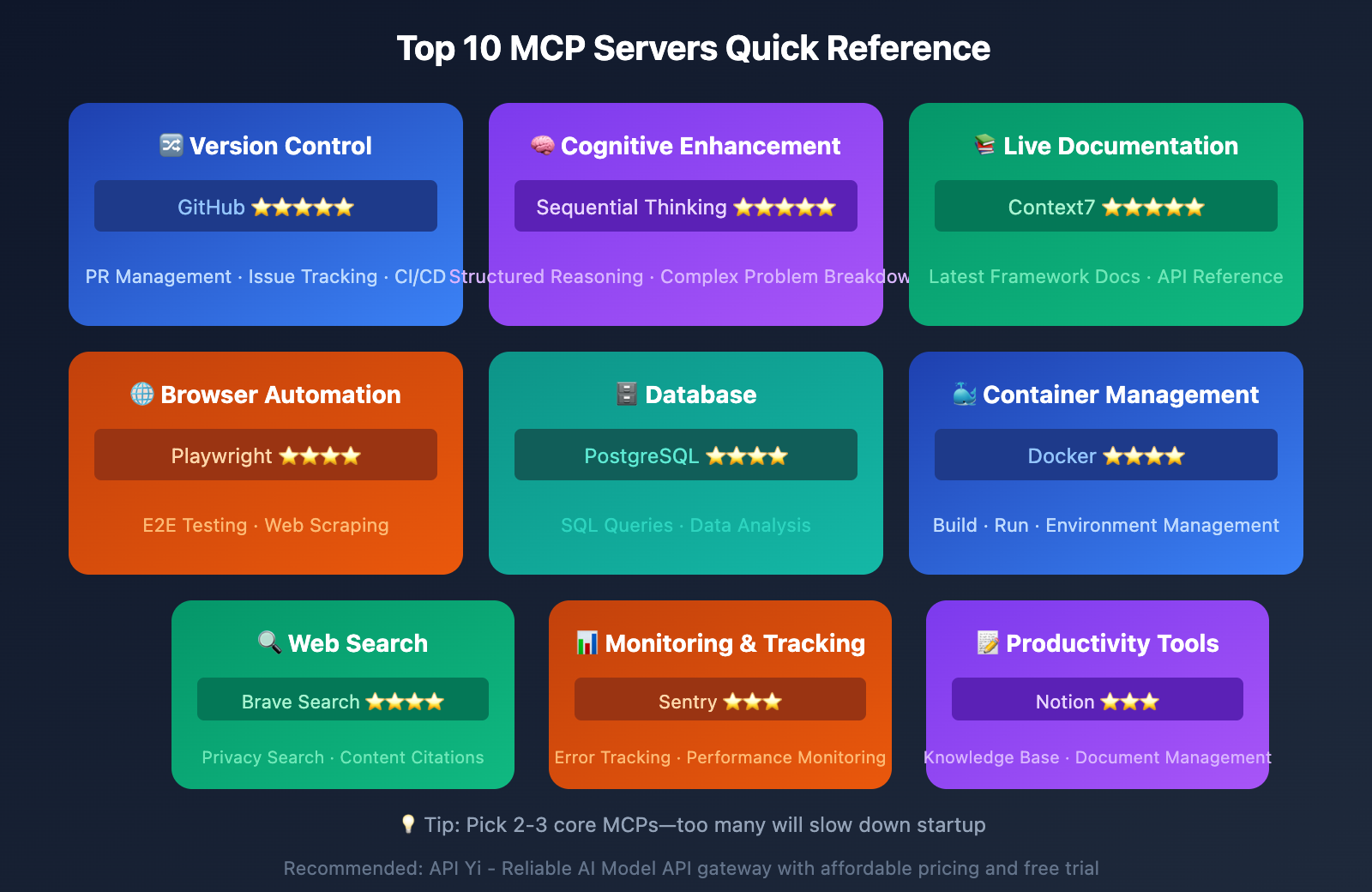
| Category | MCP Servers | Core Value |
|---|---|---|
| Version Control | GitHub, GitLab | PR management, automated code reviews |
| Cognitive Enhancement | Sequential Thinking | Structured reasoning for complex problems |
| File Operations | Filesystem | Safe local file operations |
| Documentation | Context7, Brave Search | Real-time docs and search capabilities |
| Browser Automation | Playwright, Puppeteer | E2E testing, web scraping |
| Database | PostgreSQL, Supabase | Data querying and analysis |
| Containerization | Docker | Container management, environment debugging |
| Monitoring | Sentry, PostHog | Error tracking, product analytics |
| Productivity | Notion, Linear, Figma | Knowledge base, task management, design |
MCP Basic Configuration Guide
Core Commands
# Add MCP server
claude mcp add [name] --scope user -- [command]

# View installed MCPs
claude mcp list

# Remove MCP server
claude mcp remove [name]

# Test MCP server
claude mcp get [name]
Configuration File Locations
| System | Configuration File Path |
|---|---|
| macOS | ~/Library/Application Support/Claude/claude_desktop_config.json |
| Windows | %APPDATA%\Claude\claude_desktop_config.json |
| Universal | ~/.claude.json (recommended) |
Configuration Example
{
  "mcpServers": {
    "github": {
      "command": "npx",
      "args": ["-y", "@modelcontextprotocol/server-github"],
      "env": {
        "GITHUB_PERSONAL_ACCESS_TOKEN": "your_token_here"
      }
    },
    "sequential-thinking": {
      "command": "npx",
      "args": ["-y", "@modelcontextprotocol/server-sequential-thinking"]
    }
  }
}
Scope Explanation
| Scope | Description | Use Case |
|---|---|---|
| local | Available only in current project | Project-specific tools |
| user | Available across all projects, private | Personal common tools |
| project | Project-level config, shareable | Team collaboration tools |
Configuration Tips
- Node.js prerequisite: Most MCPs use npx, so make sure you've got Node.js installed
- Restart to apply: You'll need to restart Claude Code after modifying the config
- Windows special handling: Local npx commands might need the
cmd /cprefix - Timeout adjustment: Use
MCP_TIMEOUT=10000to adjust startup timeout
Tip: Through APIYI apiyi.com, you can get API access to various AI models. When combined with MCP, it enables more flexible AI workflows.
MCP Installation Best Practices
Recommended Installation Combinations
Frontend Developers:
- Context7 (latest framework docs)
- Playwright (E2E testing)
- GitHub (version control)
Backend Developers:
- PostgreSQL (database operations)
- Docker (container management)
- GitHub (version control)
Full-Stack Developers:
- Sequential Thinking (complex problems)
- GitHub (version control)
- Context7 (real-time docs)
Things to Keep in Mind
- Don't go overboard: 2-3 core MCPs are enough – too many will slow down startup
- Check dependencies: Make sure Node.js, Docker, and other dependencies are properly installed
- Protect credentials: Don't commit API Keys and Tokens to your code repository
- Regular updates: The MCP ecosystem's evolving fast, so keep things updated to get new features
FAQ
Q1: What’s the difference between MCP and Claude Code’s built-in features?
Claude Code's built-in features focus on code editing and terminal operations. MCP extends Claude's ability to interact with external systems—databases, cloud services, third-party tools, and more. Think of it this way: built-in features are your "core capabilities," while MCP is your "extension plugins."
Q2: I installed MCP but Claude isn’t responding. What should I do?
Common solutions:
- Restart Claude Code to apply the configuration
- Use
claude mcp listto verify successful installation - Check if environment variables (like API tokens) are set correctly
- Look for missing dependencies (such as Node.js)
- Try increasing the startup timeout with
MCP_TIMEOUT=10000
Q3: What should users in China be aware of when using MCP?
Some MCP servers rely on overseas services (like GitHub API, Brave Search), which may have accessibility issues. Recommendations:
- Use intermediary services like APIYI apiyi.com for stable API access
- Prioritize locally-running MCPs (like Filesystem, Sequential Thinking)
- For network-dependent MCPs, ensure a stable network environment
Summary
The core value of Claude Code MCP:
- Capability Extension: Evolves Claude from a code editor into a full-featured development platform
- Workflow Integration: Operate GitHub, databases, cloud services, and multiple tools from a single interface
- Efficiency Multiplier: Automates repetitive tasks so you can focus on core development
Top 10 Must-Have MCPs at a Glance:
- Version Control: GitHub
- Enhanced Thinking: Sequential Thinking
- File Operations: Filesystem
- Live Documentation: Context7
- Web Search: Brave Search
- Browser Automation: Playwright
- Database: PostgreSQL
- Container Management: Docker
- Error Monitoring: Sentry
- Knowledge Base: Notion
We recommend starting with the 2-3 scenarios you use most frequently, then gradually expanding. Through APIYI apiyi.com, you can access various AI model APIs and combine them with MCP to build even more powerful development workflows.
Reference Materials
⚠️ Link Format Note: All external links use the
Resource Name: domain.comformat for easy copying but aren't clickable, which helps preserve SEO value.
-
MCP Official Documentation: Model Context Protocol Specification
- Link:
modelcontextprotocol.io - Description: Anthropic's official MCP protocol documentation and specifications
- Link:
-
Official MCP Server Repository: GitHub Reference Implementations
- Link:
github.com/modelcontextprotocol/servers - Description: Collection of officially maintained MCP server reference implementations
- Link:
-
Awesome MCP Servers: Community Curated List
- Link:
github.com/wong2/awesome-mcp-servers - Description: Community-maintained curated list of MCP servers
- Link:
-
Claude Code MCP Documentation: Official Configuration Guide
- Link:
code.claude.com/docs/en/mcp - Description: Claude Code's official MCP configuration and usage documentation
- Link:
Author: Technical Team
Tech Discussion: Feel free to discuss in the comments. For more resources, visit the APIYI apiyi.com tech community