Author's Note: A detailed breakdown of the core updates in Claude Code versions v2.1.92 through v2.1.90, including MCP tool result persistence (500K characters), plugin bin directories, the /powerup interactive tutorial, and 5 other major feature upgrades.
Claude Code has released a series of significant updates over the last three versions (v2.1.90 ~ v2.1.92). Features like MCP tool result persistence, plugin executable directories, and the /powerup interactive tutorial have sparked widespread interest in the developer community. This article provides a quick look at how these updates impact your AI-assisted programming workflow.
Core Value: Get up to speed on the latest 3 versions of Claude Code in just 3 minutes, and master the MCP persistence configuration and the /powerup learning path.
Claude Code v2.1.92 Quick Look
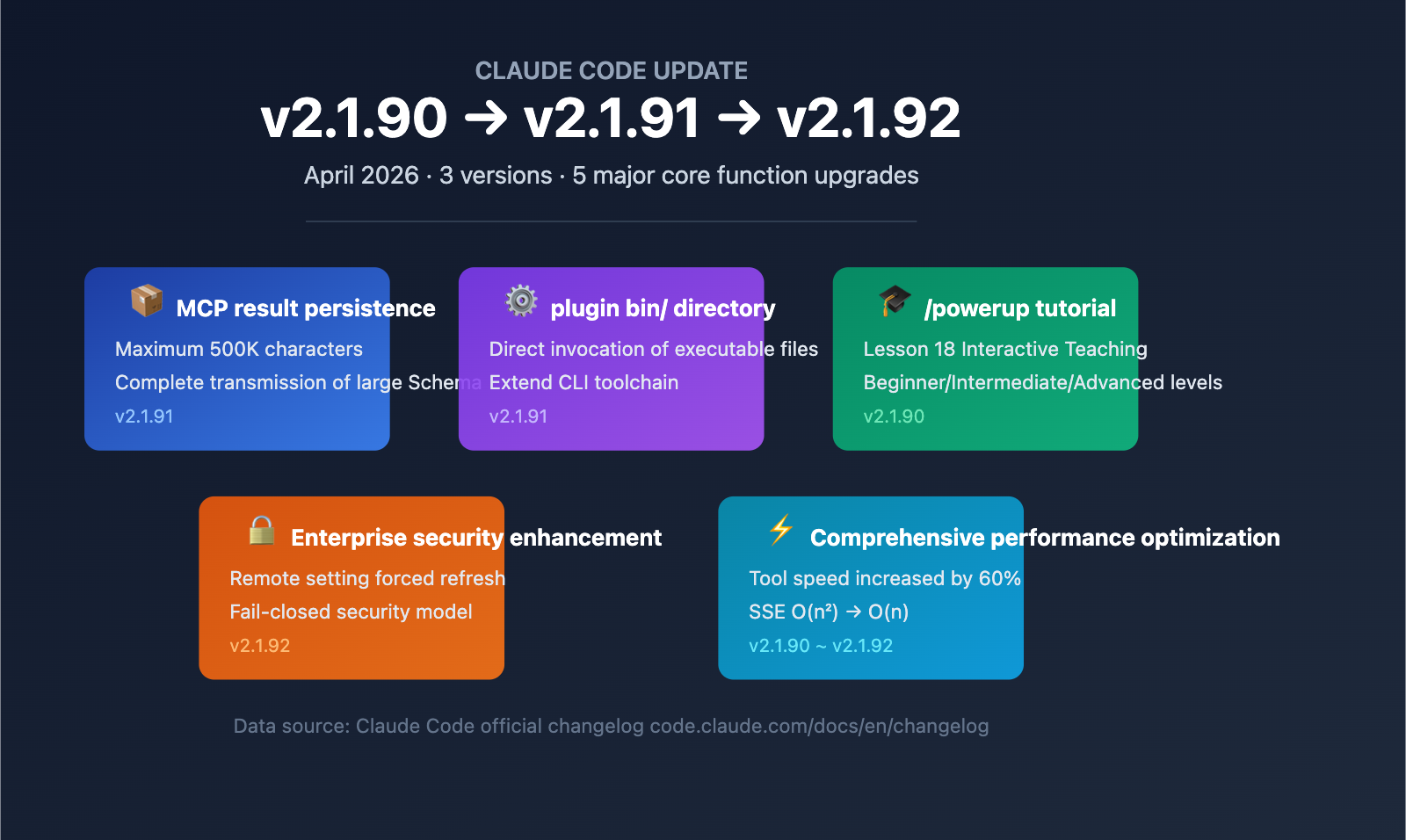
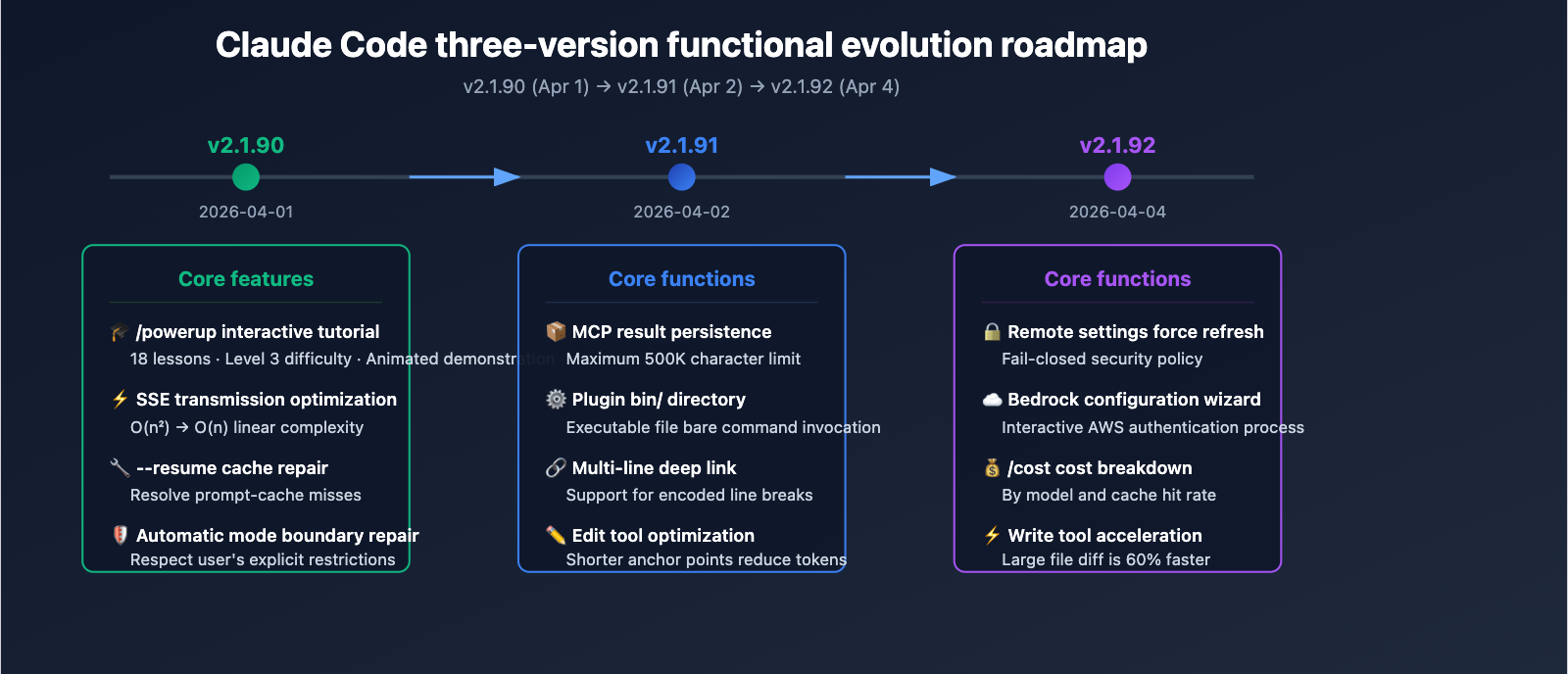
Claude Code released three versions in quick succession in early April 2026: v2.1.90, v2.1.91, and v2.1.92. Here is a complete breakdown of the core updates across these versions:
| Version | Release Date | Core Updates | Scope |
|---|---|---|---|
| v2.1.92 | 2026-04-04 | Forced remote settings refresh, Bedrock interactive config wizard | Enterprise security, AWS users |
| v2.1.91 | 2026-04-02 | MCP result persistence (500K), plugin bin/ directory | MCP developers, plugin ecosystem |
| v2.1.90 | 2026-04-01 | /powerup interactive tutorial, major performance optimizations | All users |
Claude Code v2.1.92 Key Highlights
The core changes in v2.1.92 focus on enterprise-grade security controls and developer experience improvements:
The forceRemoteSettingsRefresh policy is a major update for enterprise teams. When enabled, the CLI forces a pull of the latest remotely managed settings every time it starts. If the pull fails, it exits (a fail-closed security model). This ensures that enterprise IT teams can guarantee all developers are consistently running configurations that comply with company security policies, preventing drift caused by local caching.
The Bedrock interactive configuration wizard significantly improves the first-time setup experience for AWS users. After selecting "3rd-party platform" on the login screen, the wizard guides you through the entire process of AWS authentication, region configuration, credential verification, and model binding, eliminating the need to manually edit configuration files.
Deep Dive into Claude Code MCP Tool Result Persistence
Core Mechanism of MCP Result Persistence
The MCP tool result persistence introduced in v2.1.91 is arguably the most impactful feature for developers in this release. Previously, large results returned by MCP tools—such as database schemas or extensive codebase indexes—would be truncated due to default limits, leading to a loss of critical context.
Now, MCP servers can override these default limits by setting the _meta["anthropic/maxResultSizeChars"] field, supporting up to 500,000 characters (approx. 500K). This means:
- Complete Database Schema Transfer: The full structure of large-scale databases can be passed to Claude in one go.
- No More Truncated Codebase Indexes: Project-level file indexes and dependency graphs can be fully preserved.
- Full API Documentation Loading: Comprehensive documentation for complex APIs can be ingested as context.
| Scenario | Previous Limit | After Persistence | Improvement |
|---|---|---|---|
| Database Schema | Truncated to partial structure | Full 500K characters | Full understanding of data models |
| Project File Index | Only core files kept | Full directory tree | Precise code location |
| API Documentation | Summarized version | Full parameter descriptions | Accurate interface invocation advice |
| Log Analysis | Last few dozen lines | Extensive logs | More accurate diagnostics |
How to Configure MCP Result Persistence
Simply add the _meta field to your MCP server response to enable it:
{
  "content": [
    {
      "type": "text",
      "text": "... large result content ..."
    }
  ],
  "_meta": {
    "anthropic/maxResultSizeChars": 500000
  }
}
View full MCP server implementation example
import { Server } from "@modelcontextprotocol/sdk/server/index.js";

const server = new Server({
  name: "database-schema-server",
  version: "1.0.0"
});

server.setRequestHandler("tools/call", async (request) => {
  if (request.params.name === "get_database_schema") {
    const schema = await fetchFullDatabaseSchema();

    return {
      content: [
        {
          type: "text",
          text: JSON.stringify(schema, null, 2)
        }
      ],
      _meta: {
        "anthropic/maxResultSizeChars": 500000
      }
    };
  }
});
🎯 Development Tip: If you're building an MCP server, be sure to set a reasonable
maxResultSizeCharsvalue. You don't always need to hit the 500K limit; just choose an upper bound that fits your actual data needs. For scenarios where you need to test across various AI models, you can use the APIYI (apiyi.com) platform to centrally manage your API keys and quickly verify how your MCP server performs with different models.
Claude Code Plugin Executable Support
Plugin bin/ Directory Mechanism
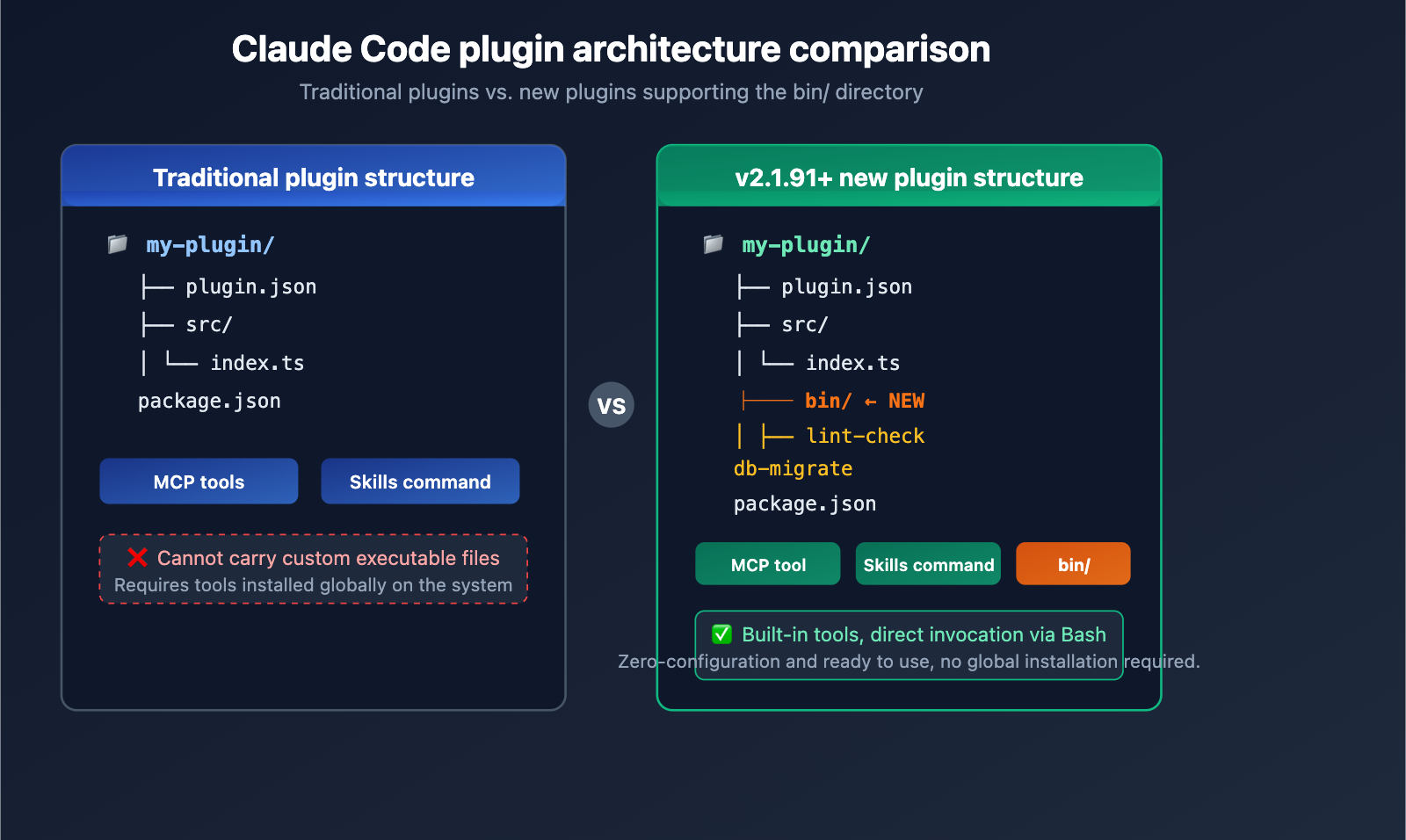
v2.1.91 adds support for a plugin bin/ directory, a major expansion for the Claude Code plugin ecosystem. Plugin developers can now include executable files in their packages and invoke them directly as bare commands within the Bash tool.
Typical use cases for this feature include:
- Custom CLI Tools: Plugin-bundled command-line tools that run directly in Claude's Bash environment.
- Build Scripts: Project-specific build, test, and deployment scripts.
- Data Processing Tools: Custom data transformation and formatting utilities.
Plugin bin/ Directory Structure
my-claude-plugin/
├── plugin.json
├── src/
│   └── index.ts
└── bin/
    ├── lint-check        # Custom linting tool
    ├── db-migrate        # Database migration script
    └── deploy-preview    # Preview deployment tool
Once configured, Claude Code can call these tools directly when executing Bash commands:
# Claude can call plugin executables directly in Bash
lint-check src/
db-migrate --status
deploy-preview --branch feature/new-api
Other Key Updates in Claude Code v2.1.91
| Feature | Description | Use Case |
|---|---|---|
| Multi-line Deep Links | claude-cli://open?q= now supports %0A encoded line breaks |
IDE integration, external tool calls |
| disableSkillShellExecution | Disables inline shell execution within skills | Enterprise security policies |
| Edit Tool Optimization | Uses shorter old_string anchors |
Reduces output token consumption |
| –resume Fix | Fixes session history loss caused by async write failures | Long-running development sessions |
💡 Pro Tip: The
--resumefix addresses a widespread issue where session history chains would break if asynchronous writes failed silently during a resume. This has been completely resolved, allowing you to safely interrupt and resume long-running development sessions.
Claude Code /powerup Interactive Tutorial System
/powerup Feature Overview
Introduced in v2.1.90, /powerup is Claude Code's first built-in interactive tutorial system. It provides terminal-based lessons with animated demonstrations, covering 18 key topics ranging from beginner to advanced levels.
| Difficulty Level | Number of Lessons | Content Covered | Target Audience |
|---|---|---|---|
| Beginner | 6 Lessons | CLAUDE.md, /clear, /compact, Plan Mode, Model Selection | New users |
| Intermediate | 6 Lessons | Skills, Hooks, Sub-agents, MCP configuration, /rewind | Daily users |
| Advanced | 6 Lessons | Worktrees, Auto Mode, /schedule, SDK Headless Mode | Power users |
How to use /powerup
Simply type the following in your Claude Code terminal:
/powerup
The system will display an interactive menu where you can select specific lesson modules. Each lesson includes:
- Conceptual Explanation: The core principles and design philosophy behind the feature.
- Animated Demo: Real-time operation demonstrations right in your terminal.
- Hands-on Practice: Guided exercises to help you try things out in your own projects.
Recommended Learning Path for /powerup
We recommend the following learning paths based on your experience level:
Getting Started — Master these 3 fundamentals first:
- How to write the CLAUDE.md project configuration file.
- Using the /compact command to manage your context window.
- Using Plan Mode to solve complex tasks step-by-step.
Leveling Up — Focus on automation capabilities:
- Configuring Hooks to automate your workflow.
- Using Sub-agents to handle tasks in parallel.
- Extending Claude's tool capabilities with MCP servers.
Advanced Mastery — Unlock full potential:
- Using Worktrees for parallel development in isolated environments.
- Using /schedule to run remote agents on a timer.
- Integrating SDK Headless Mode into your CI/CD pipelines.
🚀 Quick Start: If you need to test various Large Language Models while developing MCP servers, we recommend using the unified API from APIYI (apiyi.com). You can access mainstream models like Claude, GPT, and Gemini with just a single API key.
Claude Code v2.1.92 Performance Optimization Summary
Write Tool Performance Boost
v2.1.92 optimizes the diff calculation for the Write tool, resulting in a performance increase of approximately 60% when handling large files containing tabs, & symbols, and $ signs. This is a significant quality-of-life improvement for developers who frequently edit large configuration files, shell scripts, and templates.
v2.1.90 Performance Optimizations
Version v2.1.90 includes several underlying performance improvements:
| Optimization | Improvement | Real-world Impact |
|---|---|---|
| SSE Transfer | Optimized from quadratic to linear complexity | Significantly faster response times for long conversations |
| Session Writing | Optimized transcription file writing | Reduced I/O blocking |
| MCP Schema Cache | Optimized cache key lookups | Lower latency for MCP tool invocations |
| –resume Cache | Fixed regression where full prompt-cache was missed | Drastically reduced token consumption when resuming sessions |
Other Improvements in v2.1.92
- /cost command enhancement: Subscribers can now view cost breakdowns by model and cache hit rate.
- /release-notes upgrade: Now an interactive version selector, making it easier to view update logs for any version.
- Remote control session naming: Defaults to using a hostname prefix (e.g.,
myhost-graceful-unicorn), with support for customization via--remote-control-session-name-prefix. - Cache expiration notice: Pro users will see a footer prompt after the prompt cache expires, showing the approximate number of uncached tokens.
💰 Cost Tip: The Claude Code
/costcommand now provides cost analysis broken down by model. If you're using multiple AI models for development, you can use the billing features on the APIYI (apiyi.com) platform to centrally monitor usage and expenses for all models, making cost management much easier.
description: "A breakdown of the latest bug fixes and improvements in Claude Code v2.1.92, along with answers to common user questions."
Claude Code v2.1.92 Bug Fixes
We've addressed several issues over the last three releases that were impacting the user experience:
v2.1.92 Fixes
- Fixed an issue where sub-agent tmux sessions failed to create.
- Fixed an API 400 error caused by thinking blocks containing only whitespace.
- Fixed accidental survey submissions triggered by keypresses in autonomous mode.
- Fixed duplicate message displays during full-screen scroll playback.
- Fixed the plugin MCP server getting stuck in a "connecting" state.
- Removed the
/tagand/vimcommands. - Restored Unix Socket blocking in the Linux sandbox.
v2.1.91 Fixes
- Fixed session history loss caused by
--resumeasynchronous write failures. - Fixed
cmd+deleteshortcut issues in iTerm2, kitty, WezTerm, and Ghostty terminals. - Fixed the loss of plan mode state after container restarts.
v2.1.90 Fixes
- Fixed a regression where
--resumecaused a full prompt-cache miss (introduced in v2.1.69). - Fixed infinite rate-limit dialog loops.
- Fixed issues where autonomous mode ignored explicit user boundaries (e.g., "don't push").
- Fixed "File content has changed" errors from Edit/Write tools when the format-on-save hook is enabled.
FAQ
Q1: Is the 500K character limit for MCP tool result persistence a hard cap?
Yes, 500,000 characters is the current maximum allowed value for anthropic/maxResultSizeChars. We recommend setting this based on your actual data needs rather than defaulting to the maximum. Excessively large results consume more of your context window, which can impact the quality of subsequent interactions. If you need to handle massive datasets, we suggest performing pre-processing and summarization on the MCP server side.
Q2: Can I use the /powerup tutorial offline?
The /powerup tutorial content is built directly into the Claude Code installation package, so no extra downloads are required. As long as you have v2.1.90 or higher installed, you can run /powerup in your terminal to start learning without an internet connection. The course content will continue to expand with future version updates.
Q3: How do I upgrade to Claude Code v2.1.92?
You can upgrade via npm by installing the latest version globally:
npm install -g @anthropic-ai/claude-code@latest
After upgrading, run claude --version to verify the version number. If you need to perform model invocation across various AI models for testing and comparison during development, you can use the APIYI (apiyi.com) platform to access unified API interfaces and free testing credits.
Summary
Here are the core updates for Claude Code versions v2.1.90 through v2.1.92:
- MCP Result Persistence: Now supports tool results up to 500K characters, fixing issues where large schemas and indexes were previously truncated.
- Plugin
bin/Directory: Plugins can now include executable files, significantly expanding the toolchain capabilities of Claude Code. /powerupInteractive Tutorials: An 18-lesson course across three difficulty levels to help users of all skill levels master Claude Code systematically.- Enterprise Security Enhancements: The
forceRemoteSettingsRefreshpolicy ensures configuration consistency across environments. - Comprehensive Performance Optimization: The
Writetool is now 60% faster, and SSE transmission has been optimized from O(n²) to O(n).
These updates signal that Claude Code is evolving from a simple AI programming assistant into a full-fledged development platform. The continuous enhancement of the MCP ecosystem and the refinement of the plugin system provide developers with greater flexibility to build custom workflows.
We recommend using APIYI (apiyi.com) to quickly experience the API interfaces for Claude and other mainstream Large Language Models. The platform offers free credits and a unified interface for multiple models, making it easy to verify and compare performance.
📚 References
-
Claude Code Official Changelog: Complete version history.
- Link:
code.claude.com/docs/en/changelog - Description: The primary source for the latest version update details.
- Link:
-
Claude Code GitHub Repository: Open-source code and issue tracking.
- Link:
github.com/anthropics/claude-code - Description: View source code, submit bug reports, and suggest new features.
- Link:
-
MCP Protocol Specification: Official documentation for the Model Context Protocol.
- Link:
modelcontextprotocol.io - Description: The authoritative reference for MCP server development and tool result formatting.
- Link:
-
Claude Code Plugin Development Guide: Getting started with plugin development.
- Link:
code.claude.com/docs/en/plugins - Description: Learn about plugin structure,
bindirectory configuration, and the publishing process.
- Link:
Author: APIYI Technical Team
Technical Discussion: Feel free to share your experiences with Claude Code in the comments. For more AI development resources, visit the APIYI documentation center at docs.apiyi.com.