Author's Note: A detailed breakdown of the 3 ways to access the Nano Banana Pro API: Vertex AI (Enterprise), AI Studio (Developer), and APIYI API proxy service (the simplest and most affordable option). We also analyze network restrictions for users in regions like China and Russia and provide effective solutions.
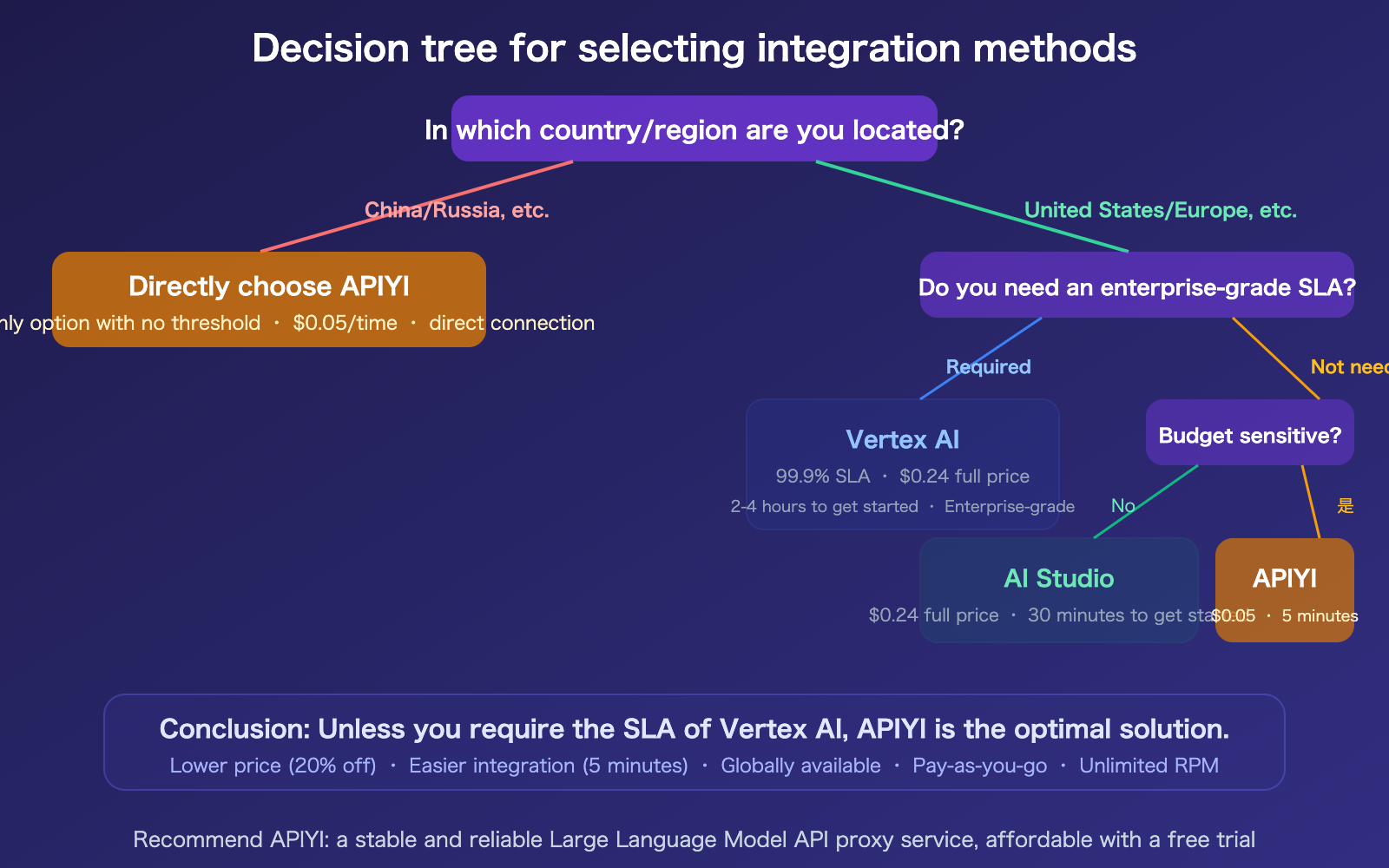
Looking to generate high-quality images with the Nano Banana Pro API but don't know where to start? Google provides two official entry points—Vertex AI and AI Studio—but both require payment methods, offer no discounts, and are completely inaccessible to users in countries like China and Russia. This article breaks down the barriers and costs of all three access methods (Vertex AI, AI Studio, and APIYI API proxy service) to help you choose the best solution for your needs.
Core Value: Understand the real-world cost and barrier differences between these three access methods, especially how users outside the U.S. can access the Nano Banana Pro API in the simplest and most cost-effective way.
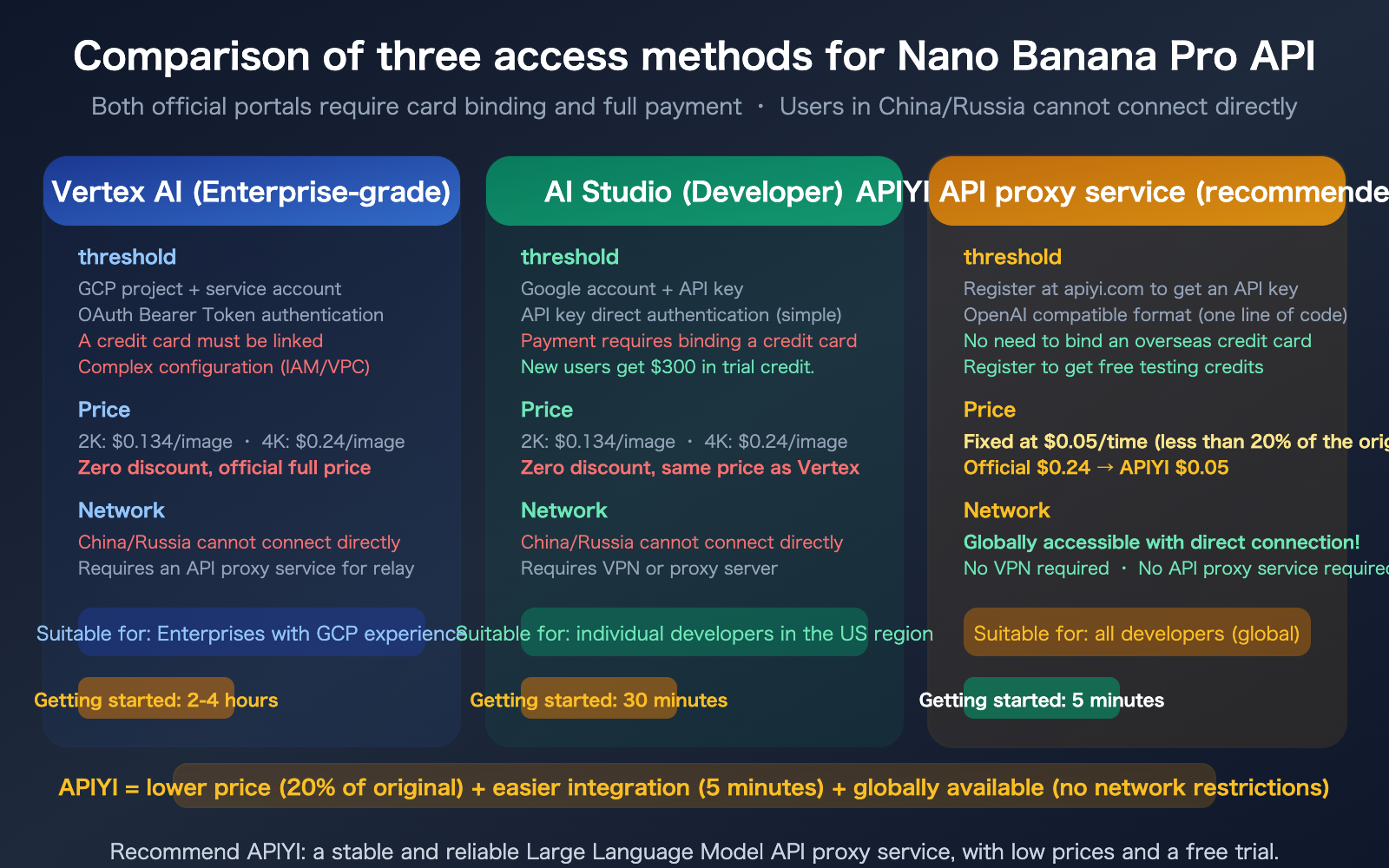
A Complete Comparison of Three Integration Methods
Let's start by laying out all the dimensions in a single table.
| Comparison Dimension | Vertex AI | AI Studio | APIYI Proxy |
|---|---|---|---|
| Authentication | OAuth + Service Account | API Key | API Key (OpenAI format) |
| Card Requirement | Overseas credit card required | Overseas credit card required | No overseas card needed |
| Configuration Complexity | High (GCP Project + IAM + VPC) | Medium (API Key) | Very Low (One-line base_url) |
| Onboarding Time | 2-4 hours | 30 minutes | 5 minutes |
| 2K Price | $0.134 | $0.134 | $0.05 Fixed price |
| 4K Price | $0.24 | $0.24 | $0.05 Fixed price |
| Discount | None | None | Over 80% off |
| Available in China | No direct access | No direct access | Direct access available |
| Available in Russia | No direct access | No direct access | Direct access available |
| SLA Guarantee | 99.9% | None | No charge for failures |
| RPM Limits | Customizable | Free: 2-5, Paid: 150 | Unlimited |
| Prompt Caching | Supported | Not supported | Supported |
| Batch API | Supported (50% off) | Supported | Supported |
| Free Tier | $300 trial credit | Free tier (very limited) | Free trial credit on sign-up |
Method 1: Integrating via Vertex AI (Enterprise-Grade)
Vertex AI is Google Cloud's enterprise-grade AI platform, offering comprehensive model deployment and management capabilities.
Vertex AI Integration Steps
| Step | Action | Time |
|---|---|---|
| 1 | Register a Google Cloud account (requires overseas credit card) | 10 mins |
| 2 | Create a GCP project | 5 mins |
| 3 | Enable Vertex AI API | 5 mins |
| 4 | Create a service account and download JSON credentials | 15 mins |
| 5 | Configure IAM permissions | 15 mins |
| 6 | Install gcloud CLI and authenticate | 30 mins |
| 7 | Write code for model invocation | 30 mins |
Total time is approximately 2-4 hours, and it requires some Google Cloud experience.
Vertex AI Pros and Cons
Pros: 99.9% SLA, supports Prompt Caching, customizable RPM quotas, and enterprise-grade security (IAM/VPC/CMEK).
Cons: Complex configuration, requires an overseas credit card, no direct access from China/Russia, and no price discounts.
Method 2: Access via AI Studio (For Developers)
AI Studio is Google's simplified API portal for developers, and it's much easier to configure than Vertex AI.
Steps to Access AI Studio
| Step | Action | Time Required |
|---|---|---|
| 1 | Log in to your Google account | 1 min |
| 2 | Visit aistudio.google.com | 1 min |
| 3 | Enable Gemini API | 2 mins |
| 4 | Generate an API key | 2 mins |
| 5 | Link a credit card (for paid usage) | 10 mins |
| 6 | Write code to call the API | 15 mins |
Total time is about 30 minutes, which is a much lower barrier to entry than Vertex AI.
Key Considerations for AI Studio
Extremely Limited Free Tier: The free quota for Nano Banana Pro is practically non-existent—every API invocation is billed from the very first image. New users get $300 in trial credits, but once those are gone, you'll be charged full price.
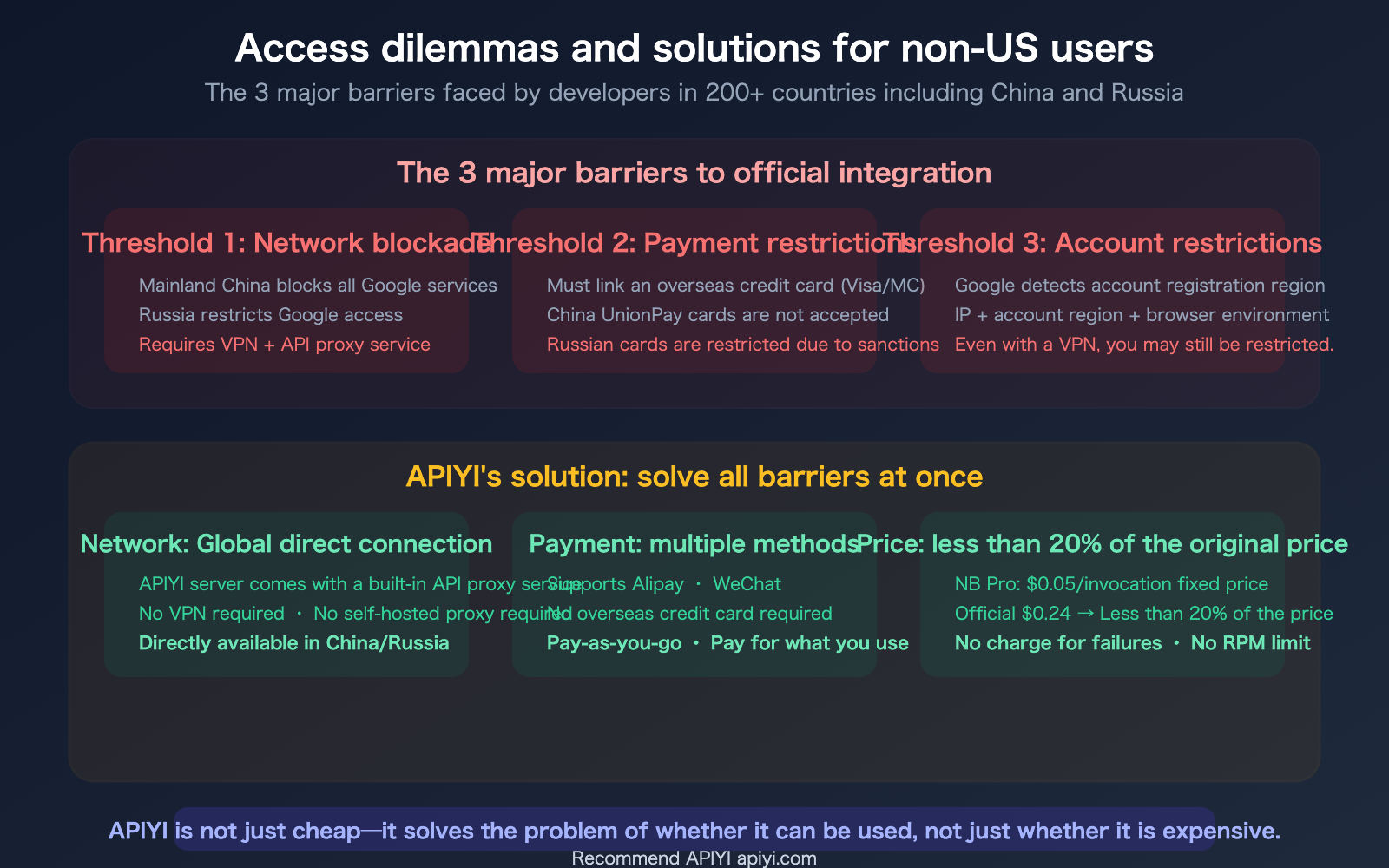
Network Restrictions: AI Studio is not directly accessible from mainland China or Russia. Even if you use a VPN to bypass network issues, Google may detect your account's registration region—Google accounts registered in China may face additional restrictions.
Stricter Safety Filters: AI Studio's safety filters are more aggressive than those in Vertex AI. Scenarios like e-commerce clothing swaps are more likely to trigger IMAGE_SAFETY and PROHIBITED_CONTENT flags.
Method 3: Access via APIYI API Proxy Service (Recommended)
APIYI removes all the hurdles mentioned above—no Google account, no overseas credit card, no network proxy, and no complex configuration required.
Steps to Access via APIYI
| Step | Action | Time Required |
|---|---|---|
| 1 | Visit apiyi.com to register | 2 mins |
| 2 | Get your API key | 1 min |
| 3 | Set the base_url in your code |
1 min |
| 4 | Start making calls | 1 min |
Total time is 5 minutes.
APIYI Integration Code
import openai

client = openai.OpenAI(
    api_key="YOUR_APIYI_KEY",          # Get this from apiyi.com
    base_url="https://vip.apiyi.com/v1" # Just change this line
)

response = client.chat.completions.create(
    model="gemini-3-pro-image-preview",  # Nano Banana Pro
    messages=[{
        "role": "user",
        "content": "Professional e-commerce product photo: white sneakers, pure white background, 45-degree angle"
    }]
)
It's that simple—if you've used the OpenAI SDK before, you just need to change the base_url to start using Nano Banana Pro.
Cost Comparison: Generating 1,000 4K Images
| Plan | Price per 4K Image | Total Cost for 1,000 Images | Savings vs. Official | Additional Costs |
|---|---|---|---|---|
| Vertex AI Official | $0.24 | $240 | — | VPN/Proxy server fees |
| AI Studio Official | $0.24 | $240 | — | VPN fees |
| AI Studio Batch | $0.12 | $120 | 50% | VPN + No latency guarantee |
| APIYI Fixed Price | $0.05 | $50 | 79% | No additional costs |
Generating 1,000 4K images with APIYI costs just $50—that's 79% cheaper than the $240 charged by Vertex AI/AI Studio, and you don't have to pay for extra VPNs or proxy servers.
APIYI Offers More Than Just Low Prices
Many people think APIYI is "just cheap"—but it actually solves a series of structural problems:
| Problems APIYI Solves | Details |
|---|---|
| Easy Integration | OpenAI-compatible format; change one base_url and you're up and running in 5 minutes |
| Pay-as-you-go | Pay only for what you use; no need to estimate usage or buy bundles |
| Global Access | Built-in API proxy service; direct connection for users in China/Russia without a VPN |
| No Card Required | No need for overseas credit cards; supports multiple payment methods |
| Prices as Low as 20% | NB Pro at a fixed $0.05/call vs. $0.24 official price |
| Stability Guarantee | Multi-channel load balancing; works even when official services return 503 errors |
| No Charge for Failures | Safety blocks like IMAGE_SAFETY do not incur costs |
| No RPM Limits | Multi-account pools bypass official single-account quotas |
| Multi-Model Coverage | Use NB Pro + NB2 + Claude + GPT all with a single Key |
FAQ
Q1: Is the Nano Banana Pro on APIYI the same model as the official Google version?
Yes, it's exactly the same. APIYI connects to Nano Banana Pro via Google Cloud, so all requests are routed directly to Google's own model infrastructure. The image quality, model version, and parameter support are identical to the official version. The only difference lies in the access method and pricing—APIYI passes cost savings on to developers through bulk channel discounts and operational efficiency.
Q2: I’m in China and used to call the API via VPN + AI Studio. Can I switch to APIYI?
Absolutely, and it's super easy. If you were using the Google genai SDK, switching to APIYI's OpenAI-compatible format only requires two changes: 1) update the base_url to https://vip.apiyi.com/v1; and 2) update the api_key to your APIYI key. After that, you won't need a VPN anymore—APIYI's servers include a built-in API proxy service, allowing for direct connections from mainland China. Plus, you'll save on those monthly VPN fees ($5–15/month).
Q3: Are Vertex AI and AI Studio prices exactly the same? Are there really no discounts?
The base prices are identical ($0.134 for 2K, $0.24 for 4K). The only "discount" is the Batch API (asynchronous processing) at 50% off, but it doesn't guarantee real-time performance. There are no volume discounts, no long-term contract savings, and no room for negotiation—it's a fixed, public price. APIYI's fixed price of $0.05 is less than 20% of the official 4K price, which is a massive difference.
Q4: How does APIYI’s pay-as-you-go billing work? How is it different from the official credit system?
APIYI's pay-as-you-go billing is straightforward: you top up your account, and each model invocation is deducted from your balance ($0.05 per NB Pro call). You only pay for what you use—there are no minimum spends, no monthly fees, and no confusing credit conversions. This stands in stark contrast to Google's Antigravity credit system (where you pay $25 for 2,500 credits, credit consumption rules are opaque, and quota refresh policies change constantly). APIYI's pricing is transparent and stable.
Summary
Here are the key takeaways for the three ways to access the Nano Banana Pro API:
- Both official entry points have barriers: Vertex AI requires 2–4 hours of configuration, an international credit card, and costs the full $0.24 per image. AI Studio is simpler but still requires a linked card, full pricing, and is inaccessible from regions like China or Russia without a VPN.
- APIYI removes all barriers: 5-minute setup, no international credit card required, direct global access, a fixed price of $0.05/call (less than 20% of the official price), pay-as-you-go billing, no RPM limits, and no charges for failed requests.
- It's not just about the price: The core problem APIYI solves is accessibility. For developers in restricted regions like China or Russia, APIYI is likely the only barrier-free way to access these models.
We recommend accessing the Nano Banana Pro API via APIYI at apiyi.com—enjoy a fixed price of $0.05/call, direct global access, and a 5-minute setup. Register now to get free testing credits.
📚 References
-
Google Gemini API Available Regions List: Officially supported countries and regions
- Link:
ai.google.dev/gemini-api/docs/available-regions - Note: Mainland China and Russia are not included in the supported list.
- Link:
-
Nano Banana Pro API Complete Guide: Official pricing and integration methods
- Link:
ai.google.dev/gemini-api/docs/image-generation - Note: Includes pricing and parameters for both AI Studio and Vertex AI.
- Link:
-
Nano Banana Pro Vertex AI vs AI Studio Comparison: Detailed differences between the two official integration methods
- Link:
help.apiyi.com/en/nano-banana-pro-vertex-ai-vs-aistudio-comparison-guide-en.html - Note: Covers configuration steps, authentication methods, and feature differences.
- Link:
-
APIYI Documentation Center: Nano Banana Pro $0.05/call integration guide
- Link:
docs.apiyi.com - Note: 5-minute integration + global direct connection + pay-as-you-go billing.
- Link:
Author: APIYI Technical Team
Technical Discussion: Feel free to join the discussion in the comments section. For more resources, visit the APIYI documentation center at docs.apiyi.com.