Author's Note: This guide provides a detailed breakdown of the 3 Base URL paths and 3 domain nodes on the APIYI platform. We'll show you how to configure them correctly so you can get it right the first time and avoid common pitfalls.
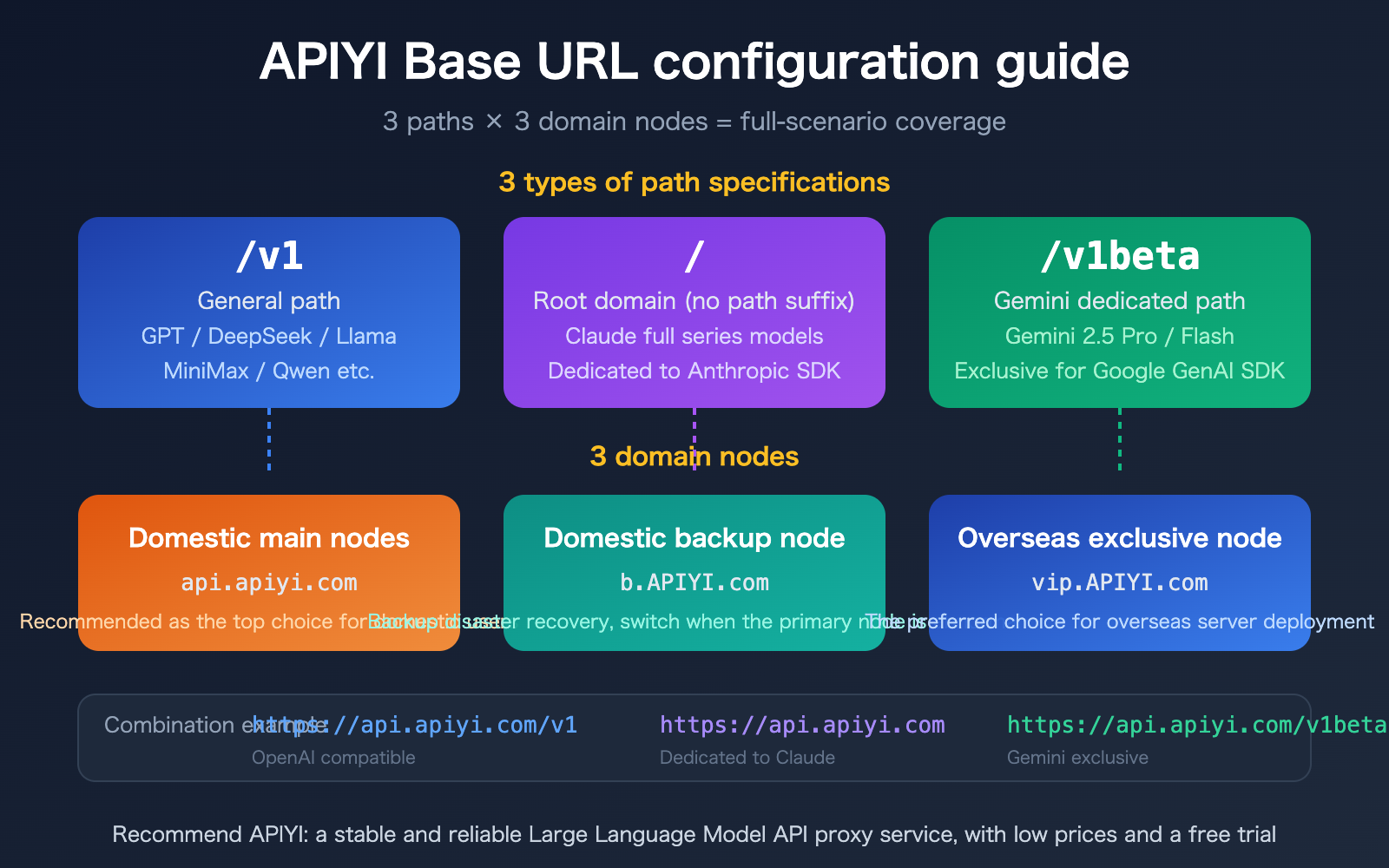
When configuring an AI model API, entering the wrong Base URL is one of the most common issues developers face. Different model providers use different path specifications—OpenAI uses /v1, Anthropic Claude uses the root domain, and Google Gemini uses /v1beta. If you aren't aware of these differences, your calls will inevitably fail.
The APIYI platform is fully compatible with these three path specifications and provides 3 domain nodes (Domestic Main, Domestic Backup, and Overseas Exclusive) to ensure stable access worldwide. This article uses clear tables and code examples to help you master every configuration scenario.
Core Value: By the end of this article, you'll have a complete grasp of how to configure APIYI Base URLs, saving you from wasting time on debugging path errors.
APIYI Base URL Key Points
| Point | Description | Value |
|---|---|---|
| 3 Path Standards | /v1 for general use, root domain for Claude, /v1beta for Gemini |
One platform compatible with all major SDKs |
| 3 Domain Nodes | Domestic primary, domestic backup, overseas exclusive | Global low latency + high availability disaster recovery |
| OpenAI Compatible Format | Use /v1 path to call GPT, DeepSeek, Llama, etc. |
Migrate by changing just one line of base_url |
| Native SDK Direct Connect | Claude and Gemini work with official SDKs, no conversion needed | Zero-cost integration |
APIYI Base URL Path Specifications Explained
Different AI providers chose different path styles when designing their APIs. This isn't arbitrary; it's a hard requirement defined by each provider's SDK:
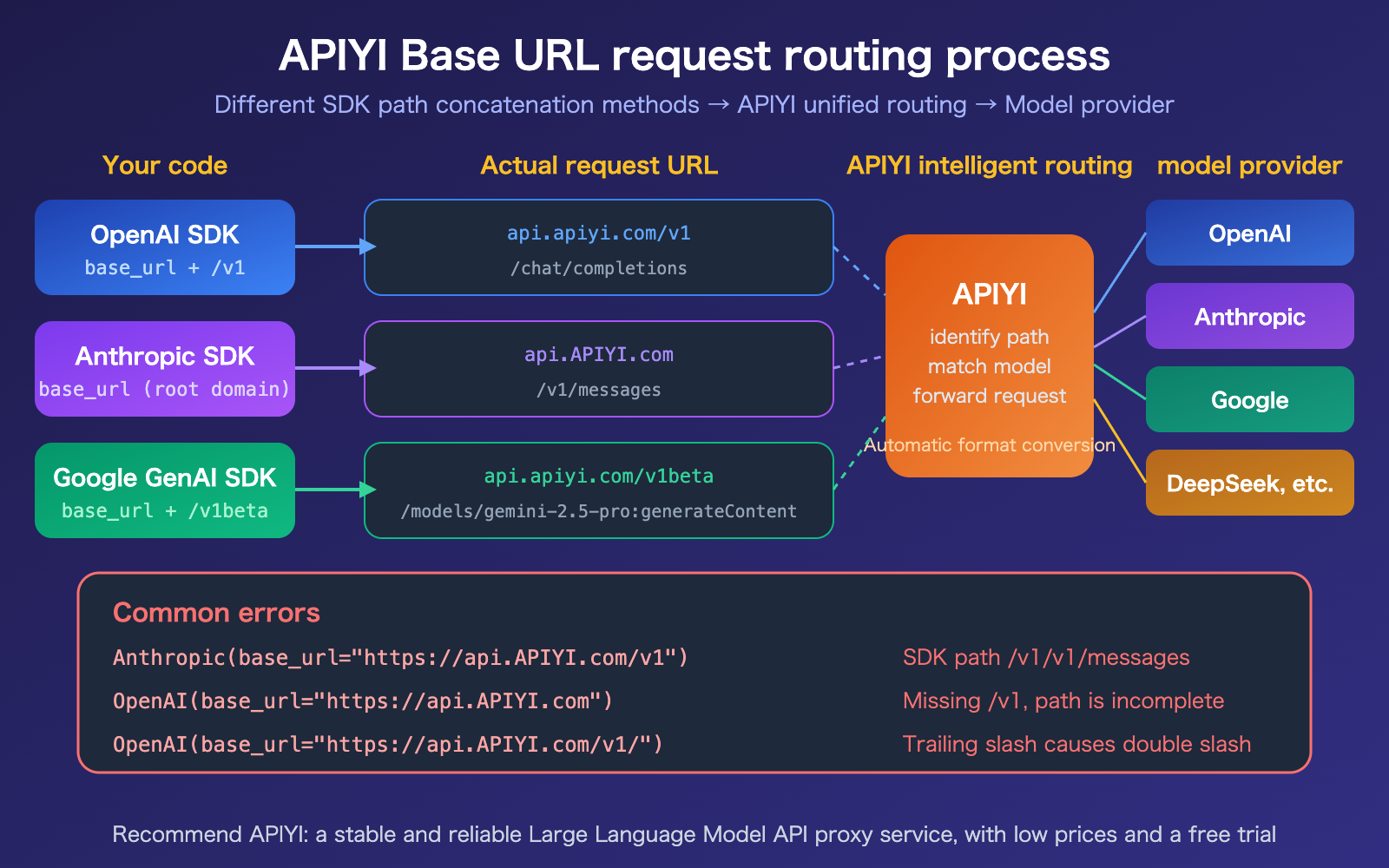
OpenAI Family (/v1): OpenAI has used the /v1 version prefix in their URLs from the start. Their Python SDK directly appends the resource path (like /chat/completions) to the base_url you provide (which includes /v1). All OpenAI-compatible models—GPT series, DeepSeek, Llama, Qwen, MiniMax, etc.—follow this convention.
Anthropic Family (Root Domain): Anthropic chose a different approach—the SDK internally appends the /v1/messages path itself, so the base_url should only contain the root domain, without /v1. If you mistakenly include /v1, the SDK will construct /v1/v1/messages, resulting in a 404 error.
Google Gemini Family (/v1beta): Google typically uses /v1beta to identify APIs that haven't reached GA (General Availability) status yet. The Gemini endpoint format is /v1beta/models/{model}:generateContent, and the SDK handles the path concatenation automatically.
APIYI Base URL Domain Node Selection
APIYI provides 3 domain nodes to cover different network environments:
| Node | Domain | Use Case | Note |
|---|---|---|---|
| Domestic Primary | api.apiyi.com |
Domestic servers, local development | Recommended first choice, lowest latency |
| Domestic Backup | b.apiyi.com |
Switch to this if the primary node fails | Disaster recovery, ensures business continuity |
| Overseas Exclusive | vip.apiyi.com |
Overseas server deployment | Optimized overseas routing, low-latency direct connection |
🎯 Selection Advice: Domestic users should prioritize
api.apiyi.comand consider configuringb.apiyi.comas a fallback in their code. Services deployed overseas should usevip.apiyi.comdirectly. All nodes offer identical functionality; they simply use different network routes.
APIYI Base URL Quick Configuration
Scenario 1: Calling OpenAI-Compatible Models (GPT / DeepSeek / Llama, etc.)
Path rule: Domain + /v1
import openai

client = openai.OpenAI(
    api_key="YOUR_API_KEY",
    base_url="https://api.apiyi.com/v1"  # Domestic primary + /v1
)

response = client.chat.completions.create(
    model="gpt-4o",
    messages=[{"role": "user", "content": "Hello!"}]
)
print(response.choices[0].message.content)
Scenario 2: Calling Claude Models (Anthropic SDK)
Path rule: Domain (root domain, do not add /v1)
import anthropic

client = anthropic.Anthropic(
    api_key="YOUR_API_KEY",
    base_url="https://api.apiyi.com"  # Root domain, no path suffix
)

message = client.messages.create(
    model="claude-sonnet-4-20250514",
    max_tokens=1024,
    messages=[{"role": "user", "content": "Hello!"}]
)
print(message.content[0].text)
Scenario 3: Calling Gemini Models (Google GenAI SDK)
Path rule: Domain + /v1beta
from google import genai

client = genai.Client(
    api_key="YOUR_API_KEY",
    http_options={"api_version": "v1beta", "base_url": "https://api.apiyi.com"}
)

response = client.models.generate_content(
    model="gemini-2.5-pro",
    contents="Hello!"
)
print(response.text)
Tip: Get free testing credits via APIYI (apiyi.com). You can configure and verify all three scenarios in under 5 minutes.
APIYI Base URL Quick Reference Guide
Here are the complete domain × path combinations. You can simply copy and paste them to get started:
APIYI Base URL Configuration: OpenAI-Compatible Models
| Domain Node | Base URL | Supported Models | Supported SDK |
|---|---|---|---|
| Domestic Primary | https://api.apiyi.com/v1 |
GPT, DeepSeek, Llama, Qwen, MiniMax, etc. | OpenAI Python/Node SDK |
| Domestic Backup | https://b.apiyi.com/v1 |
Same as above | Same as above |
| Overseas Exclusive | https://vip.apiyi.com/v1 |
Same as above | Same as above |
APIYI Base URL Configuration: Claude Models
| Domain Node | Base URL | Supported Models | Supported SDK |
|---|---|---|---|
| Domestic Primary | https://api.apiyi.com |
Claude Opus 4.6, Sonnet 4.6, Haiku, etc. | Anthropic Python/TS SDK |
| Domestic Backup | https://b.apiyi.com |
Same as above | Same as above |
| Overseas Exclusive | https://vip.apiyi.com |
Same as above | Same as above |
APIYI Base URL Configuration: Gemini Models
| Domain Node | Base URL | Supported Models | Supported SDK |
|---|---|---|---|
| Domestic Primary | https://api.apiyi.com/v1beta |
Gemini 2.5 Pro, 2.5 Flash, etc. | Google GenAI SDK |
| Domestic Backup | https://b.apiyi.com/v1beta |
Same as above | Same as above |
| Overseas Exclusive | https://vip.apiyi.com/v1beta |
Same as above | Same as above |
🎯 Configuration Tip: The differences in these paths are determined by the internal implementation of each SDK, not by any special requirements from APIYI. Just remember this rule of thumb—OpenAI needs
/v1, Claude doesn't, and Gemini needs/v1beta—and you'll never get it wrong.
APIYI Base URL Common Errors and Troubleshooting
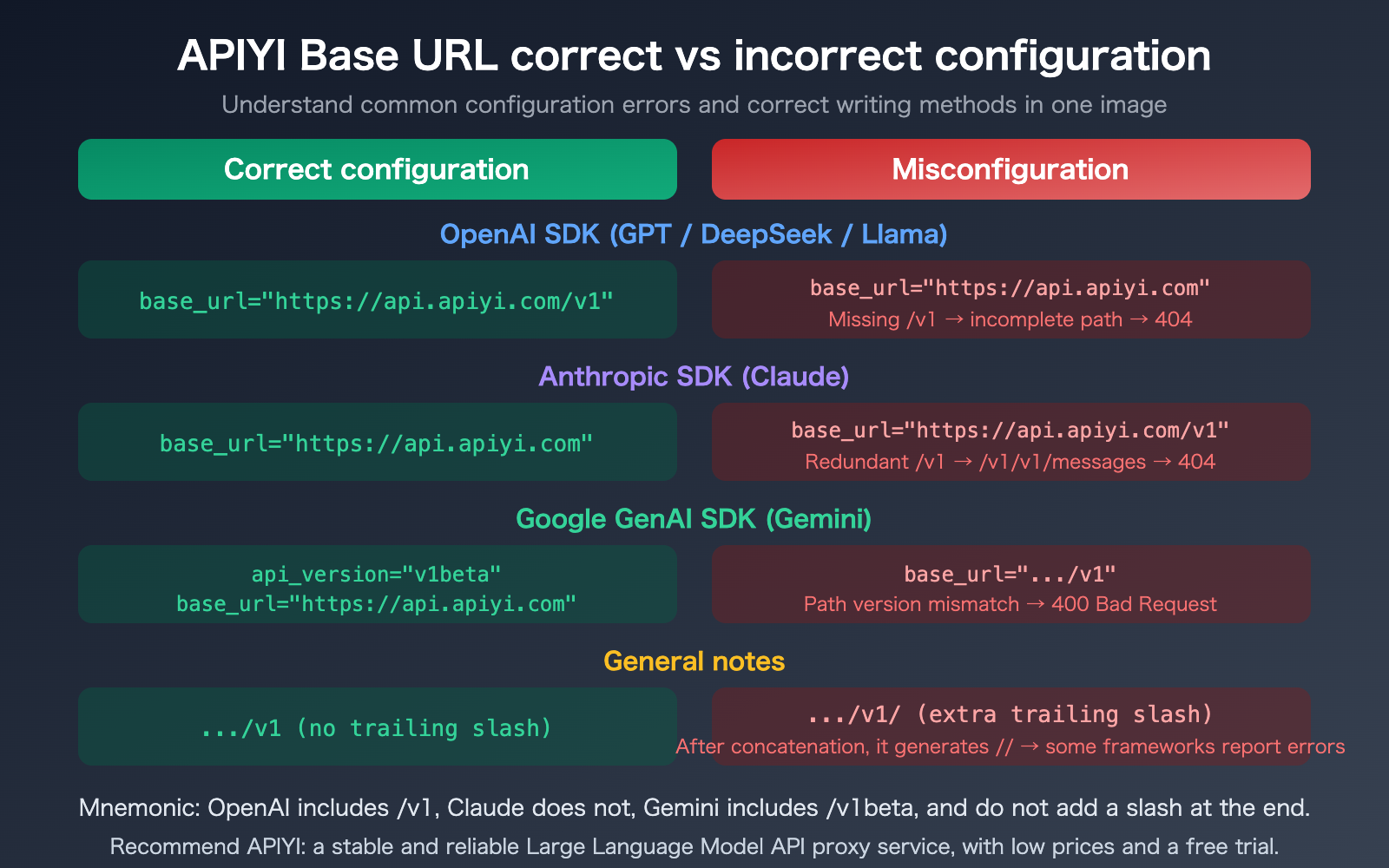
Quick Troubleshooting Table:
| Error Symptom | Possible Cause | Solution |
|---|---|---|
| 404 Not Found | OpenAI SDK missing /v1, or Anthropic SDK added an extra /v1 |
Check if the path matches the SDK specification |
| 400 Bad Request | Gemini SDK path version mismatch | Confirm you are using /v1beta |
| Connection Timeout | Incorrect domain node selection | Use api.apiyi.com for domestic, vip.apiyi.com for overseas |
| SSL Error | Missing https:// prefix |
All nodes must use HTTPS |
Double Slash // Error |
Trailing / in base_url |
Remove the trailing slash |
FAQ
Q1: What should I set as the Base URL when calling Claude models using the OpenAI SDK?
If you're using the OpenAI SDK to call Claude (via the OpenAI-compatible interface provided by APIYI), set the Base URL to https://api.apiyi.com/v1, just as you would for GPT. You only need to use the root domain when using the official Anthropic SDK. The key difference lies in which SDK you're using, not which model you're calling.
Q2: Is there any difference between the three domain nodes?
The features are identical; the only difference is the network route optimization. api.apiyi.com offers the lowest latency within China, vip.apiyi.com provides the lowest latency for overseas users, and b.apiyi.com serves as a backup disaster recovery node for China. We recommend configuring a fallback mechanism in your code so that it automatically switches to a backup node if the primary one times out.
Q3: How can I quickly verify if my Base URL configuration is correct?
We recommend using the APIYI platform for verification:
- Visit apiyi.com to register an account and obtain your API key.
- Use the code examples in this article, replace
YOUR_API_KEYwith your actual key, and run it. - If you receive a normal response, your configuration is correct. If you get a 404 or 400 error, check if the path matches the SDK specifications.
Summary
Key points for configuring the APIYI Base URL:
- Path Rules: Use
/v1for the OpenAI SDK, the root domain (without a path suffix) for the Anthropic SDK, and/v1betafor the Google GenAI SDK. - Domain Selection: Prioritize
api.apiyi.comfor domestic use,vip.apiyi.comfor overseas, andb.apiyi.comas a backup. - Common Pitfalls: Don't add
/v1to the Anthropic SDK, don't forget/v1for the OpenAI SDK, and avoid adding a trailing slash.
Just remember the mantra—OpenAI needs /v1, Claude doesn't, and Gemini needs /v1beta—and you'll never get it wrong.
We recommend visiting apiyi.com to get free credits and verify your setup quickly. The platform is fully compatible with all three path specifications and supports API invocation for all mainstream models.
📚 References
-
OpenAI API Documentation: Instructions for API integration and SDK usage
- Link:
platform.openai.com/docs/api-reference - Note: Official OpenAI API reference for understanding the /v1 path specification.
- Link:
-
Anthropic API Documentation: Integration guide for Claude models
- Link:
docs.anthropic.com/en/api/getting-started - Note: Understanding the base_url specification for the Anthropic SDK.
- Link:
-
Google AI for Developers: Gemini API integration instructions
- Link:
ai.google.dev/gemini-api/docs - Note: Understanding the /v1beta path and GenAI SDK configuration.
- Link:
-
APIYI Platform Documentation: Quick integration and configuration guide
- Link:
docs.apiyi.com - Note: Getting your API key, viewing the model list, and configuring multi-node setups.
- Link:
Author: APIYI Technical Team
Technical Discussion: Feel free to join the discussion in the comments section. For more resources, visit the APIYI documentation center at docs.apiyi.com.