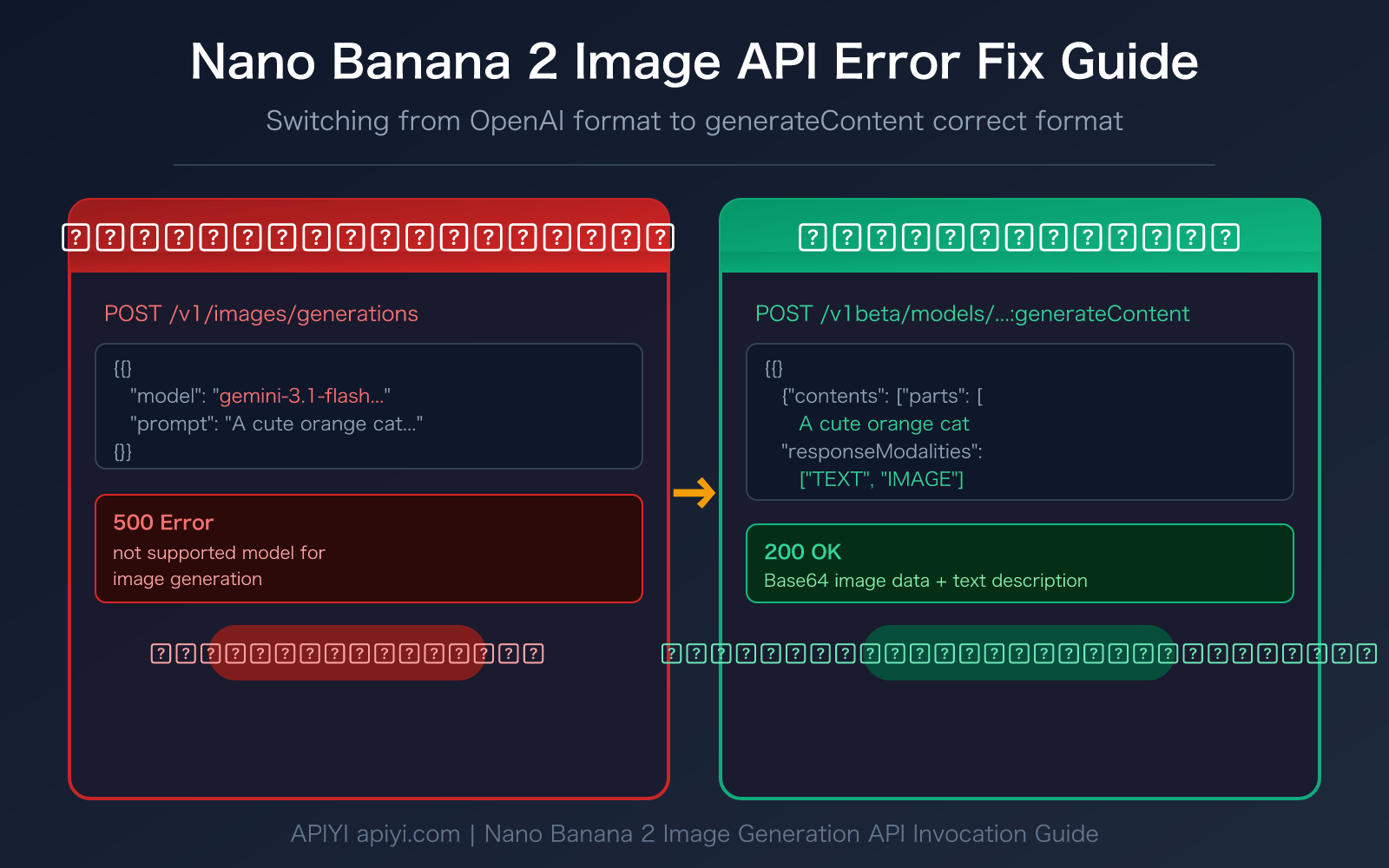
Author's Note: A detailed explanation of the root cause of the "not supported model for image generation" error when using the Nano Banana 2 image generation API, and how to correctly switch from the OpenAI format to the native Google generateContent format.
Getting a not supported model for image generation error when using Nano Banana 2 for image generation? This is one of the most common issues developers face when calling the Gemini image API. This article explains the root cause of the error and the correct way to call it, helping you quickly fix the Nano Banana 2 image API error.
Core Value: After reading this article, you'll understand the API call differences between Gemini image models and Imagen models, master the correct usage of the generateContent endpoint, and fix the error in 3 steps.
Core Cause of the Nano Banana 2 Image API Error
| Key Point | Explanation | Solution |
|---|---|---|
| Error Message | not supported model for image generation, only imagen models are supported | Switch to the generateContent endpoint |
| Root Cause | The OpenAI-format endpoint only supports Imagen models, not Gemini image models | Use the native Google API format |
| Correct Endpoint | /v1beta/models/{MODEL}:generateContent |
Replace /v1/images/generations |
| Required Parameter | responseModalities: ["TEXT", "IMAGE"] |
Set in generationConfig |
Detailed Explanation of the Nano Banana 2 Image API Error
When you use the OpenAI-compatible /v1/images/generations endpoint to call Nano Banana 2 (gemini-3.1-flash-image-preview) or Nano Banana Pro (gemini-3-pro-image-preview), the system returns the following error:
not supported model for image generation, only imagen models are supported
(request id: 20260315043447253411115cvUiXJMF)
new_api_error convert_request_failed, 500
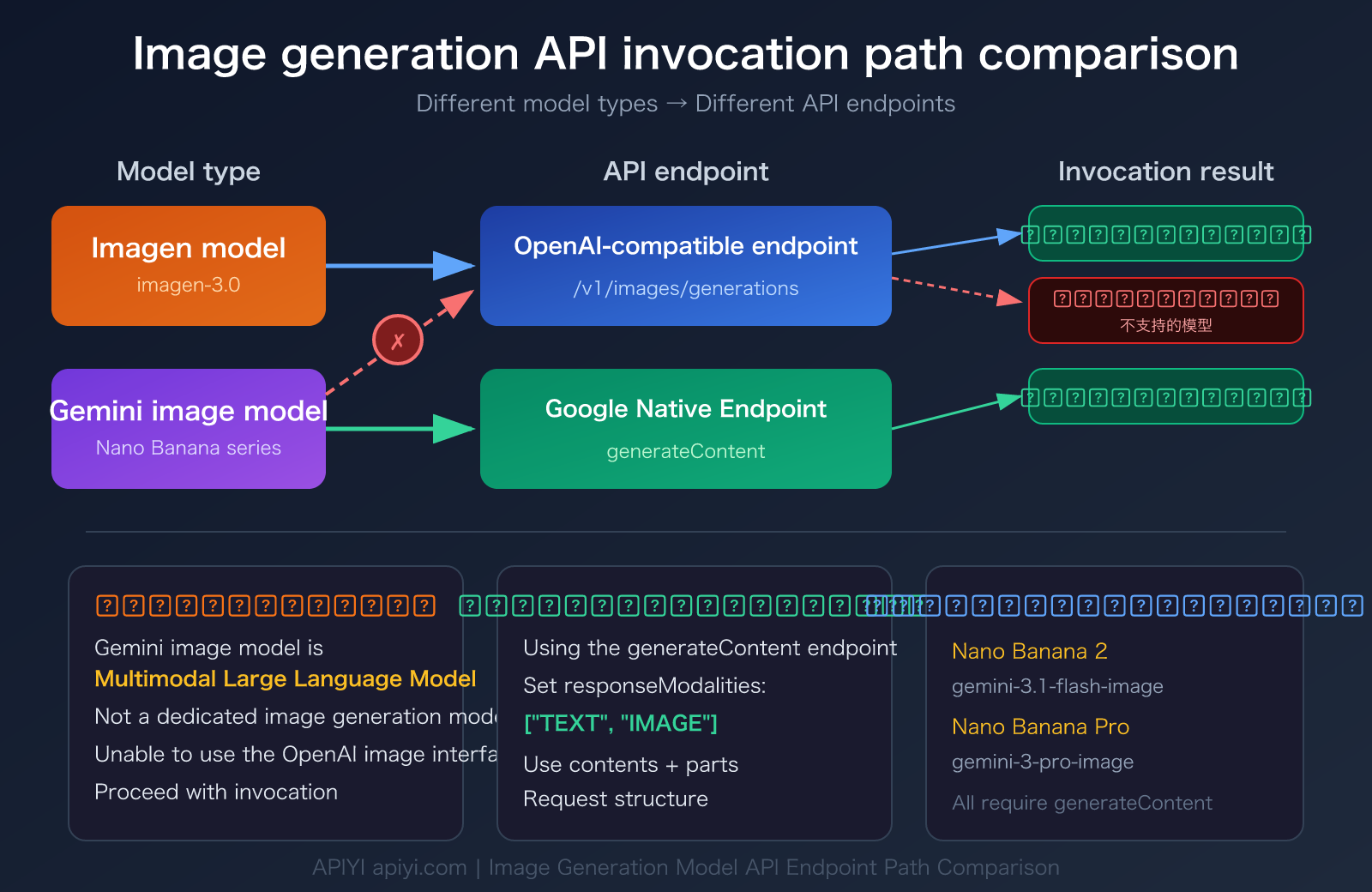
The core reason for this error is: Gemini image models and Imagen models are two completely different architectures.
- Imagen models (like
imagen-3.0-generate-001) are dedicated image generation models that use the/v1/images/generationsor:predictendpoint - Gemini image models (Nano Banana series) are multimodal language models that can output both text and images, and must use the
:generateContentendpoint
In simple terms, you're trying to use a "text-to-image dedicated channel" to call a "multimodal conversational model," and the format mismatch causes the error.
Nano Banana 2 Image API Correct Calling Format
Incorrect vs Correct Call Comparison
| Comparison Item | ❌ Incorrect Method (OpenAI Format) | ✅ Correct Method (generateContent Format) |
|---|---|---|
| API Endpoint | /v1/images/generations |
/v1beta/models/{MODEL}:generateContent |
| Request Structure | prompt + size + n parameters |
contents + generationConfig structure |
| Response Format | Image URL | Inline Base64 image data |
| Supported Models | DALL-E, Imagen series | Gemini image models (Nano Banana series) |
| Output Content | Image only | Text + Image (multimodal output) |
Nano Banana 2 Image API Incorrect Request Example
Here's an incorrect call that will cause an error:
# ❌ Incorrect: Using OpenAI format to call Nano Banana 2
curl -X POST https://api.apiyi.com/v1/images/generations \
  -H "Authorization: Bearer YOUR_API_KEY" \
  -H "Content-Type: application/json" \
  -d '{
    "model": "gemini-3.1-flash-image-preview",
    "prompt": "A cute orange cat napping in the sunlight",
    "size": "1024x1024",
    "n": 1
  }'
# Returns: not supported model for image generation
Nano Banana 2 Image API Correct Request Example
Here's the correct generateContent format call:
# ✅ Correct: Using Google's native generateContent format
curl -X POST https://api.apiyi.com/v1beta/models/gemini-3.1-flash-image-preview:generateContent \
  -H "Authorization: Bearer YOUR_API_KEY" \
  -H "Content-Type: application/json" \
  -d '{
    "contents": [{
      "parts": [
        {"text": "A cute orange cat napping in the sunlight"}
      ]
    }],
    "generationConfig": {
      "responseModalities": ["TEXT", "IMAGE"]
    }
  }'
🎯 Technical Tip: When calling Nano Banana 2 through the APIYI apiyi.com platform, you don't need a separate Google Cloud account. You can directly call the generateContent endpoint using a unified API key.
Nano Banana 2 Image API Quick Start
3 Steps to Fix Nano Banana 2 Image API Errors
Step 1: Change the API Endpoint
Switch the request URL from OpenAI format to generateContent format:
# Incorrect endpoint
https://api.apiyi.com/v1/images/generations

# Correct endpoint (Nano Banana 2)
https://api.apiyi.com/v1beta/models/gemini-3.1-flash-image-preview:generateContent

# Correct endpoint (Nano Banana Pro)
https://api.apiyi.com/v1beta/models/gemini-3-pro-image-preview:generateContent
Step 2: Modify the Request Body Structure
Change from OpenAI's prompt + size parameters to Google's native contents + generationConfig structure. Key parameters:
contents.parts.text: Image description textgenerationConfig.responseModalities: Must be set to["TEXT", "IMAGE"]
Step 3: Handle the Response Data
generateContent returns images as Base64-encoded inline data, not URLs. You'll need to extract and decode the image from the response.
Minimal Python Example
import requests
import base64

API_KEY = "YOUR_API_KEY"
BASE_URL = "https://api.apiyi.com"  # APIYI unified interface

response = requests.post(
    f"{BASE_URL}/v1beta/models/gemini-3.1-flash-image-preview:generateContent",
    headers={
        "Authorization": f"Bearer {API_KEY}",
        "Content-Type": "application/json"
    },
    json={
        "contents": [{"parts": [{"text": "A cute orange cat napping in the sunlight"}]}],
        "generationConfig": {"responseModalities": ["TEXT", "IMAGE"]}
    }
)

result = response.json()
for part in result["candidates"][0]["content"]["parts"]:
    if "inlineData" in part:
        img_data = base64.b64decode(part["inlineData"]["data"])
        with open("output.png", "wb") as f:
            f.write(img_data)
        print("Image saved as output.png")
    elif "text" in part:
        print("Model description:", part["text"])
View Complete Implementation Code (with error handling and aspect ratio settings)
import requests
import base64
import os
from typing import Optional

def generate_image(
    prompt: str,
    model: str = "gemini-3.1-flash-image-preview",
    aspect_ratio: str = "1:1",
    output_path: str = "output.png",
    api_key: Optional[str] = None
) -> dict:
    """
    Generate images using the Nano Banana 2 generateContent endpoint

    Args:
        prompt: Image description
        model: Model name
        aspect_ratio: Aspect ratio (1:1, 16:9, 9:16, 4:3, 3:4)
        output_path: Output file path
        api_key: API key

    Returns:
        Dictionary containing file path and model description
    """
    api_key = api_key or os.getenv("APIYI_API_KEY")
    base_url = "https://api.apiyi.com"  # APIYI unified interface

    response = requests.post(
        f"{base_url}/v1beta/models/{model}:generateContent",
        headers={
            "Authorization": f"Bearer {api_key}",
            "Content-Type": "application/json"
        },
        json={
            "contents": [{"parts": [{"text": prompt}]}],
            "generationConfig": {
                "responseModalities": ["TEXT", "IMAGE"],
                "imageConfig": {"aspectRatio": aspect_ratio}
            }
        },
        timeout=60
    )

    if response.status_code != 200:
        raise Exception(f"API request failed: {response.status_code} - {response.text}")

    result = response.json()
    candidates = result.get("candidates", [])
    if not candidates:
        raise Exception("No valid results returned")

    output = {"text": "", "image_path": ""}
    for part in candidates[0]["content"]["parts"]:
        if "inlineData" in part:
            img_data = base64.b64decode(part["inlineData"]["data"])
            with open(output_path, "wb") as f:
                f.write(img_data)
            output["image_path"] = output_path
        elif "text" in part:
            output["text"] = part["text"]

    return output

# Usage example
result = generate_image(
    prompt="An ink wash style landscape painting with mist-shrouded mountains in the distance",
    model="gemini-3.1-flash-image-preview",
    aspect_ratio="16:9",
    output_path="landscape.png"
)
print(f"Image saved: {result['image_path']}")
print(f"Model description: {result['text']}")
Recommendation: Get your API key from APIYI apiyi.com. The platform provides free testing credits and supports generateContent calls for both Nano Banana 2 and Nano Banana Pro Gemini image models.
Nano Banana 2 Image API Model Comparison
Understanding the differences in API invocation formats for various image generation models can help you avoid similar formatting errors:
| Model | Code Name | API Endpoint | Invocation Format | Available Platforms |
|---|---|---|---|---|
| Nano Banana 2 | gemini-3.1-flash-image-preview | :generateContent |
Google Native Format | APIYI and other platforms |
| Nano Banana Pro | gemini-3-pro-image-preview | :generateContent |
Google Native Format | APIYI and other platforms |
| Imagen 3 | imagen-3.0-generate-001 | /v1/images/generations or :predict |
OpenAI Compatible Format | APIYI and other platforms |
| DALL-E 3 | dall-e-3 | /v1/images/generations |
OpenAI Format | APIYI and other platforms |
Nano Banana 2 Image API Key Parameters Explained
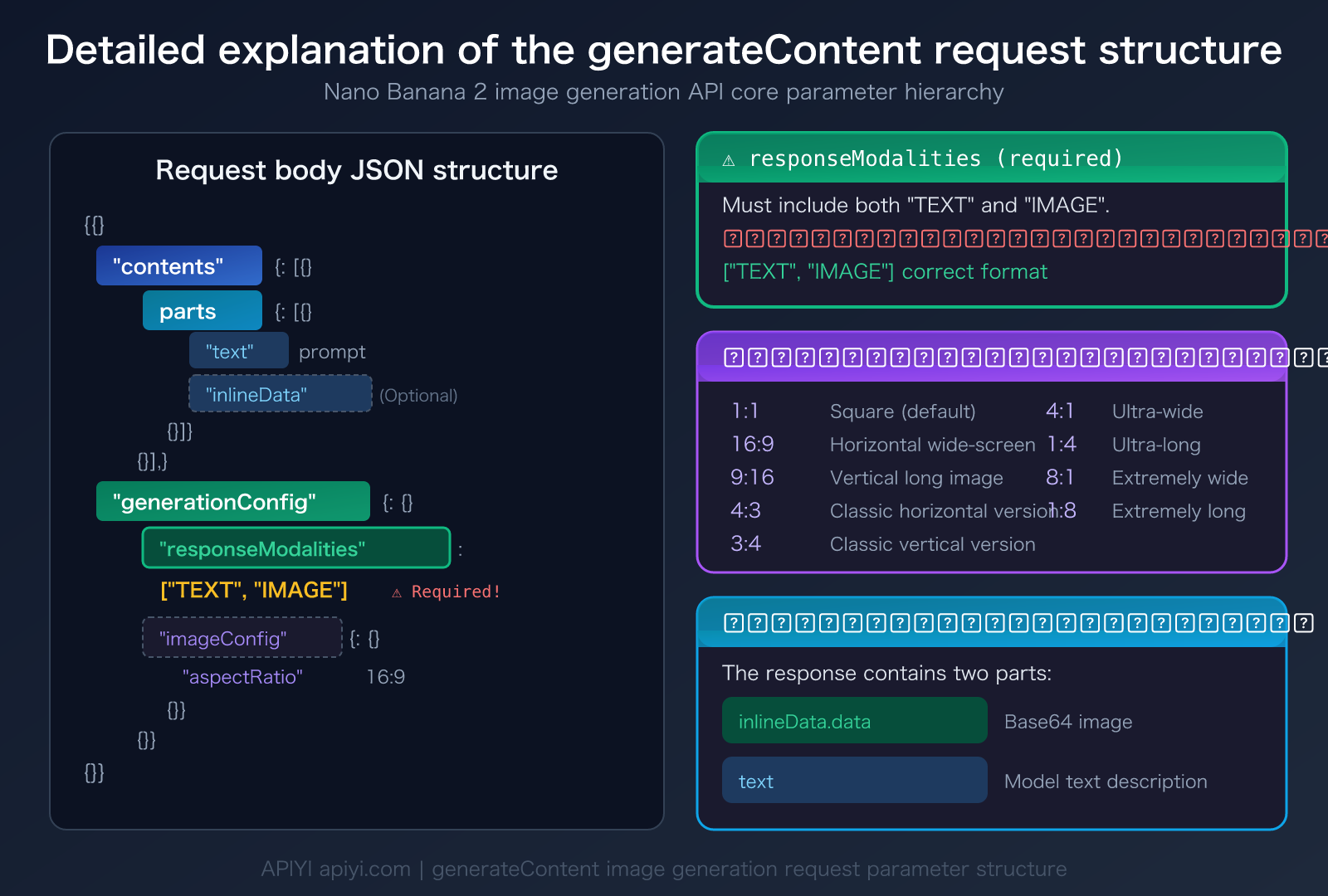
The generateContent endpoint supports a rich set of image generation parameters:
| Parameter | Description | Required? | Example Value |
|---|---|---|---|
contents.parts.text |
Image description prompt | ✅ Required | "An orange cat in the sunlight" |
responseModalities |
Response modality settings | ✅ Required | ["TEXT", "IMAGE"] |
imageConfig.aspectRatio |
Image aspect ratio | Optional | "1:1", "16:9", "9:16" |
contents.parts.inlineData |
Reference image (image-to-image) | Optional | Base64 image data |
💡 Important Note:
responseModalitiesmust include both"TEXT"and"IMAGE". Setting only["IMAGE"]will cause the request to fail. This is because Gemini image models are multimodal and always output both a text description and an image.
Frequently Asked Questions
Q1: Why can’t I call Nano Banana 2 using the OpenAI format?
Nano Banana 2 (gemini-3.1-flash-image-preview) is a multimodal language model based on Gemini. Its image generation capability is achieved through "conversational generation," not a dedicated "text-to-image interface." The OpenAI-format /v1/images/generations endpoint is specifically designed for dedicated image generation models like DALL-E and Imagen and cannot handle the multimodal request structure of the Gemini model. When calling through the APIYI apiyi.com platform, you need to select the corresponding endpoint format based on the model type.
Q2: What’s the difference between the Nano Banana 2 and Nano Banana Pro image APIs?
Both use the generateContent endpoint, and the calling format is exactly the same. The main differences are:
- Nano Banana 2 (Flash version): Faster generation speed, about 3-5 seconds, suitable for batch generation and rapid prototyping.
- Nano Banana Pro: Higher image quality, with text rendering accuracy up to 94%, suitable for detailed design and commercial use.
Both models are available on the APIYI apiyi.com platform; you just need to switch the model name in the endpoint URL.
Q3: How do I handle the image data returned by generateContent?
Unlike the OpenAI format which returns a URL, generateContent returns Base64-encoded inline image data. Here's how to process it:
- Find the part containing
inlineDatain thecandidates[0].content.partsof the response JSON. - Get the Base64 string from the
inlineData.datafield. - Decode it using
base64.b64decode()and save it as an image file. - The
inlineData.mimeTypefield will tell you the image format (usuallyimage/png).
Summary
The key points about Nano Banana 2 image API errors are:
- Clear Error Cause: Using
/v1/images/generations(OpenAI format) to call a Gemini image model triggers the "not supported model" error. - Switch to generateContent: The correct endpoint is
/v1beta/models/gemini-3.1-flash-image-preview:generateContent. - Set responseModalities: You must include
["TEXT", "IMAGE"]in thegenerationConfig, otherwise, images won't be generated.
When you encounter a Nano Banana 2 API error, the core solution is simple: replace the OpenAI image generation endpoint with Google's native generateContent endpoint.
We recommend testing Nano Banana 2 and Nano Banana Pro quickly through APIYI apiyi.com. The platform offers free credits, supports direct calls using the generateContent format, and doesn't require a Google Cloud account setup.
📚 Reference Materials
-
Google Gemini Image Generation Documentation: Official Gemini API image generation guide
- Link:
ai.google.dev/gemini-api/docs/image-generation - Description: Complete parameter specifications and examples for the generateContent endpoint
- Link:
-
Google generateContent API Reference: Gemini API content generation interface documentation
- Link:
ai.google.dev/api/generate-content - Description: Detailed request and response structures for the generateContent endpoint
- Link:
-
Google Gemini OpenAI Compatibility Documentation: Compatibility specifications between Gemini and OpenAI formats
- Link:
ai.google.dev/gemini-api/docs/openai - Description: Learn which features support OpenAI-compatible formats and which require native formats
- Link:
Author: APIYI Technical Team
Technical Discussion: Feel free to discuss Nano Banana 2 image API invocation issues in the comments. For more resources, visit the APIYI docs.apiyi.com documentation center