Author's Note: Deep Dive into GPT-5.4's 1M Context Window, the 272K Token Pricing Breakpoint That More Than Doubles Costs, the 127K-272K Optimal Performance Zone, Complete Price Comparison, and Cost-Saving Strategies
GPT-5.4 boasts a massive 1.05 million token context window, but here's something many developers miss: prices double after 272K tokens, and accuracy starts to drop. This isn't a simple "bigger is better" story.
Core Value: This article breaks down GPT-5.4's context performance curve, the 272K pricing threshold mechanism, and how to use GPT-5.4 most efficiently and cost-effectively via APIYI.
GPT-5.4 Context Pricing Key Points
| Key Point | Explanation | Practical Impact |
|---|---|---|
| Total Context | 1,050,000 tokens (1.05 million) | Theoretically handles ultra-long documents |
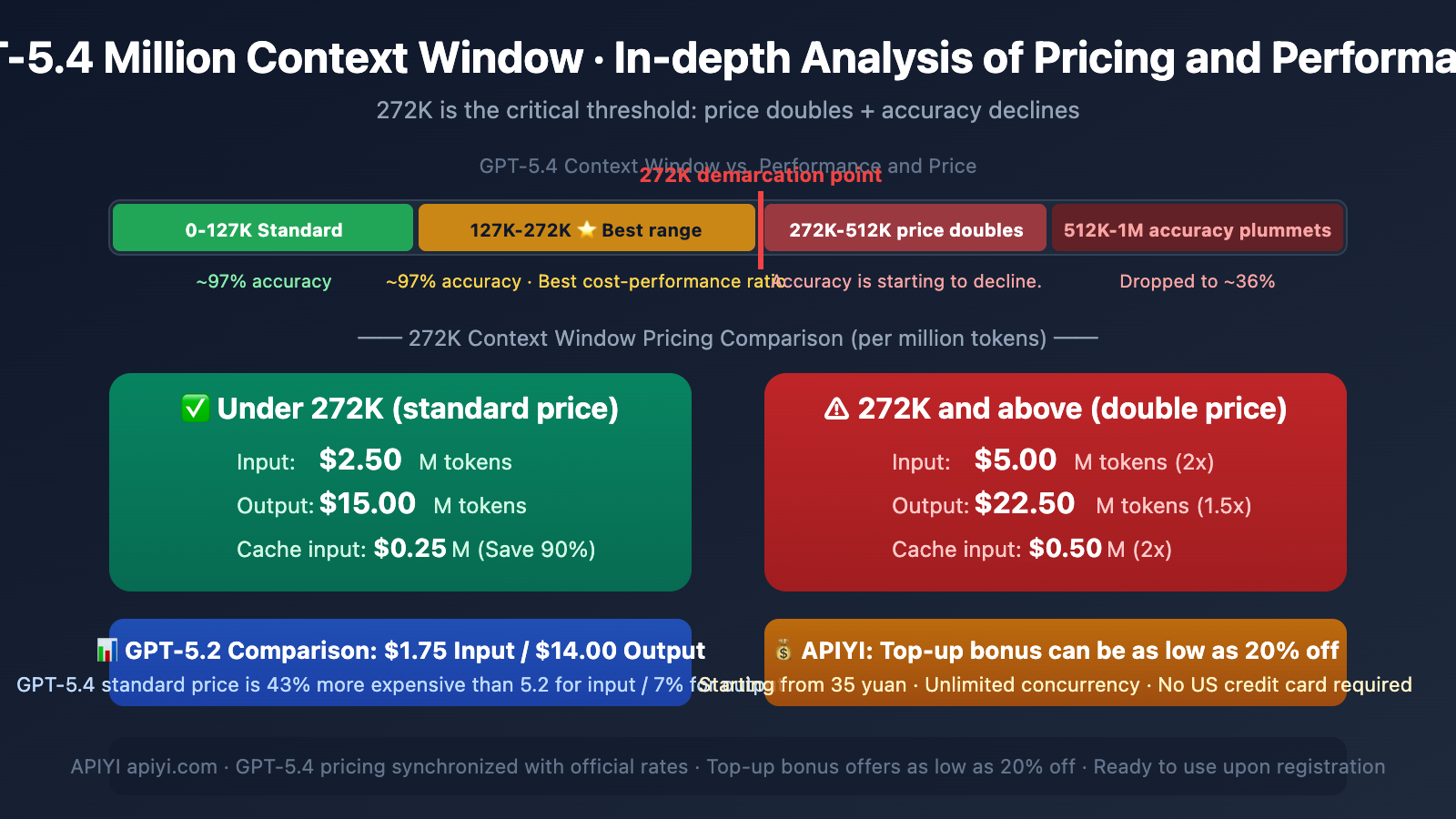
| 272K Breakpoint | Input price doubles after this point ($2.50→$5.00) | Keeping inputs under 272K can save half the input cost |
| Optimal Performance Zone | 127K-272K tokens | ~97% accuracy, best cost-performance ratio |
| Performance Drop Zone | Accuracy begins to decline after 256K | Accuracy may drop to ~36% in the 512K-1M range |
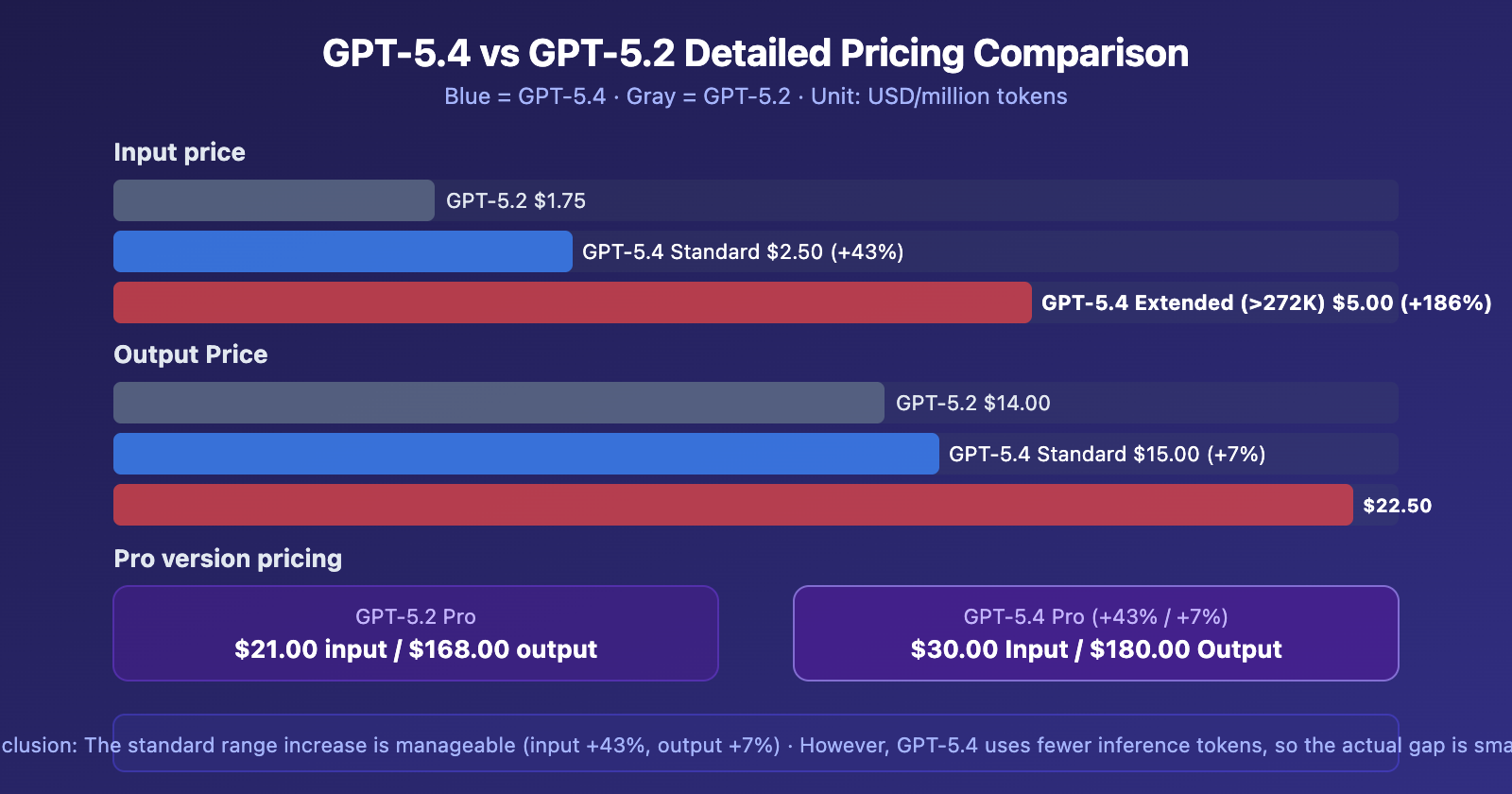
| vs GPT-5.2 | Input 43% more expensive, output 7% more expensive | But uses fewer reasoning tokens, narrowing the actual gap |
A Key Insight on GPT-5.4 Context: Usable Doesn't Mean Optimal
This is crucial: Just because GPT-5.4 supports a 1.05 million token context doesn't mean you should fill it up. Looking at OpenAI's published evaluation data:
- 16K-32K tokens: Needle-in-a-Haystack retrieval accuracy ~97%
- 127K-272K tokens: Accuracy remains stable at a high level, and it's the standard pricing tier
- Above 256K: Accuracy starts to drop
- 512K-1M tokens: Accuracy can plummet to around 36%
GPT-5.2 previously achieved near 100% accuracy in 4-needle MRCR tests within the 256K token range, further confirming that 256K is a critical threshold for performance reliability.
Practical Advice: For most applications, keeping your input under 272K tokens is the smartest strategy—it ensures accuracy and avoids the price doubling. Access GPT-5.4 via APIYI (apiyi.com), which offers official pricing and recharge bonuses that can bring costs down to as low as 80% off.
GPT-5.4 Context Pricing: A Complete Breakdown
GPT-5.4 Standard Pricing (Per Million Tokens)
Here is the complete tiered pricing structure for GPT-5.4:
| Processing Mode | Input (≤272K) | Input (>272K) | Cached Input (≤272K) | Cached Input (>272K) | Output (≤272K) | Output (>272K) |
|---|---|---|---|---|---|---|
| Standard | $2.50 | $5.00 | $0.25 | $0.50 | $15.00 | $22.50 |
| Batch | $1.25 | $2.50 | $0.13 | $0.26 | $7.50 | $11.25 |
| Flex | $1.25 | $2.50 | $0.13 | $0.26 | $7.50 | $11.25 |
| Priority | $5.00 | — | $0.50 | — | $30.00 | — |
Three Key Details of GPT-5.4 Context Pricing
First, pricing above 272K applies to the entire session. When your input exceeds 272K tokens, the higher rate applies to the entire conversation, not just the portion beyond the threshold. This means once you cross that line, all tokens are billed at the doubled rate.
Second, output prices also increase. It's not just the input that doubles. Once you exceed 272K, the output price jumps from $15.00 to $22.50—a 50% increase. This has a significant impact on output-intensive tasks like code generation or long-form writing.
Third, cached input is a major cost-saver. Cached input within the standard tier is only $0.25 per million tokens, one-tenth of the original price. If your tasks involve repeated system prompts or fixed context, leveraging caching can dramatically reduce costs.
GPT-5.4 vs. GPT-5.2 Pricing Comparison Analysis
A key question for many developers: How much more will it cost to migrate from GPT-5.2 to GPT-5.4?
Core Differences: GPT-5.4 vs. GPT-5.2 Pricing
| Pricing Item | GPT-5.2 | GPT-5.4 Standard | GPT-5.4 Extended | Standard Increase |
|---|---|---|---|---|
| Input | $1.75/M | $2.50/M | $5.00/M | +43% |
| Cached Input | $0.175/M | $0.25/M | $0.50/M | +43% |
| Output | $14.00/M | $15.00/M | $22.50/M | +7% |
| Pro Input | $21.00/M | $30.00/M | $60.00/M | +43% |
| Pro Output | $168.00/M | $180.00/M | $270.00/M | +7% |
GPT-5.4 is Pricier, But the Real Cost Gap Isn't Huge
OpenAI states that GPT-5.4 is their "most efficient reasoning model"—it can solve the same problems using fewer reasoning tokens. So, while the per-token price is higher, the total number of tokens consumed per call might be lower.
However, it's important to note: GPT-5.4's responses are, on average, about 24% longer than GPT-5.2's, which will offset some of the gains from its improved reasoning efficiency.
GPT-5.4 Context Window Best Practices
Three Golden Rules
Rule 1: Try to keep it under 272K. This is the sweet spot for cost-effectiveness—high accuracy, low price. For the vast majority of use cases, 272K tokens is enough to cover multi-turn conversations, long document analysis, and large codebase reviews.
Rule 2: 127K-272K is the optimal range. Within this range, the model's retrieval accuracy remains stable at around 97%, while fully leveraging GPT-5.4's long-context advantage. This is double the standard 128K window of GPT-5.2, already sufficient to handle most tasks that "used to not fit."
Rule 3: Think twice before exceeding 272K. Unless your task genuinely requires processing ultra-long documents in one go (like full codebase analysis or large legal text review), it's not recommended to go beyond 272K—because the price doubles while accuracy declines, drastically reducing cost-effectiveness.
GPT-5.4 Context Optimization Tips
| Tip | Description | Savings |
|---|---|---|
| Leverage Cached Inputs | Use caching for repeated system prompts, only $0.25/M | Saves 90% on input costs |
| Tool Search | Load tool definitions on-demand, don't dump them all at once | Saves 47% Tokens |
| Segmented Processing | Break ultra-long documents into segments, each under 272K | Avoids double pricing |
| Summary Compression | Use a cheaper model to extract summaries first, then use GPT-5.4 for deep analysis | Significantly reduces input volume |
APIYI GPT-5.4 Integration Advantages Explained
APIYI (apiyi.com) has simultaneously launched GPT-5.4, with pricing identical to the official rates. Here are the core advantages of APIYI compared to direct OpenAI connections:
APIYI vs. OpenAI Official Direct Connection Comparison
| Comparison Dimension | OpenAI Official | APIYI apiyi.com |
|---|---|---|
| Registration Barrier | Requires US credit card for binding | ❌ Not needed, use immediately after registration |
| Minimum Top-up | Requires overseas payment methods | ✅ Minimum 35 CNY (~5 USD) to start |
| Concurrency Limits | Rate-limited by Tier (RPM/TPM) | ✅ No concurrency limits |
| Batch API | ✅ Supported (half price) | ❌ Batch/Flex not supported |
| Standard Pricing | $2.50 Input / $15.00 Output | Pricing is identical |
| Actual Discount | No top-up bonuses | ✅ Top-up bonus events can reach up to 20% off |
| Ease of Onboarding | Requires VPN + Overseas Payment | ✅ Ready to use, integrate in 5 minutes |
Who is APIYI GPT-5.4 Best For?
Early Adopters: Start experiencing all of GPT-5.4's capabilities (including Computer Use) with a minimum of 35 CNY, no large prepayment required.
Long-term Users: Through top-up bonus events, large top-ups can receive extra credit, bringing the actual usage cost down to as low as 20% off. If your monthly consumption is stable at a certain level, this discount advantage accumulates significantly over time.
Chinese Developers: No need for a US credit card, VPN, or complex overseas payment setup. Register an APIYI apiyi.com account → Top up → Get your API Key → Change one line (base_url) to start calling.
High-Concurrency Scenarios: OpenAI officially limits RPM and TPM by Tier (Tier 1 is ~1000 RPM). APIYI has no concurrency limits, making it suitable for production environments requiring high-volume concurrent calls.
Note: APIYI currently does not support OpenAI's Batch API and Flex processing modes. If your workflow relies on half-price batch processing capabilities, you'll need to evaluate if this is suitable. For real-time interaction and standard API calls, APIYI is the more convenient choice.
GPT-5.4 Context Quick Start Guide
Minimal Example
from openai import OpenAI

client = OpenAI(
    api_key="YOUR_API_KEY",
    base_url="https://vip.apiyi.com/v1"
)

# Standard range call (≤272K, standard pricing)
response = client.chat.completions.create(
    model="gpt-5.4",
    messages=[
        {"role": "system", "content": "You are a code review expert"},
        {"role": "user", "content": "Please analyze the following code..."}
    ],
    max_tokens=4096
)
print(response.choices[0].message.content)
View Long Context Usage Example & Cost Estimation
from openai import OpenAI
import tiktoken

client = OpenAI(
    api_key="YOUR_API_KEY",
    base_url="https://vip.apiyi.com/v1"
)

def estimate_cost(input_tokens, output_tokens):
    """Estimate GPT-5.4 call cost"""
    if input_tokens <= 272000:
        input_cost = (input_tokens / 1_000_000) * 2.50
        output_cost = (output_tokens / 1_000_000) * 15.00
    else:
        input_cost = (input_tokens / 1_000_000) * 5.00  # Doubled
        output_cost = (output_tokens / 1_000_000) * 22.50  # 1.5x
    return input_cost + output_cost

# Example: Analyzing a large file
with open("large_codebase.txt", "r") as f:
    code_content = f.read()

# Estimate token count
enc = tiktoken.encoding_for_model("gpt-4o")
token_count = len(enc.encode(code_content))
print(f"Input Token Count: {token_count}")

if token_count > 272000:
    print(f"⚠️ Exceeds the 272K threshold, price will double!")
    print(f"Suggestion: Consider chunking or using summarization/compression")

estimated = estimate_cost(token_count, 4000)
print(f"Estimated Cost: ${estimated:.4f}")

# Actual call
response = client.chat.completions.create(
    model="gpt-5.4",
    messages=[
        {"role": "user", "content": f"Analyze the following code for security vulnerabilities:\n{code_content}"}
    ],
    max_tokens=8000
)
print(response.choices[0].message.content)
Recommendation: Access GPT-5.4 via APIYI at apiyi.com. Pricing is synchronized with the official rates, and top-up bonus promotions can achieve up to 20% off. Minimum top-up is 35 CNY, ready to use upon registration, no US credit card required.
GPT-5.4 Context Pricing: Scenario-Based Cost Estimation
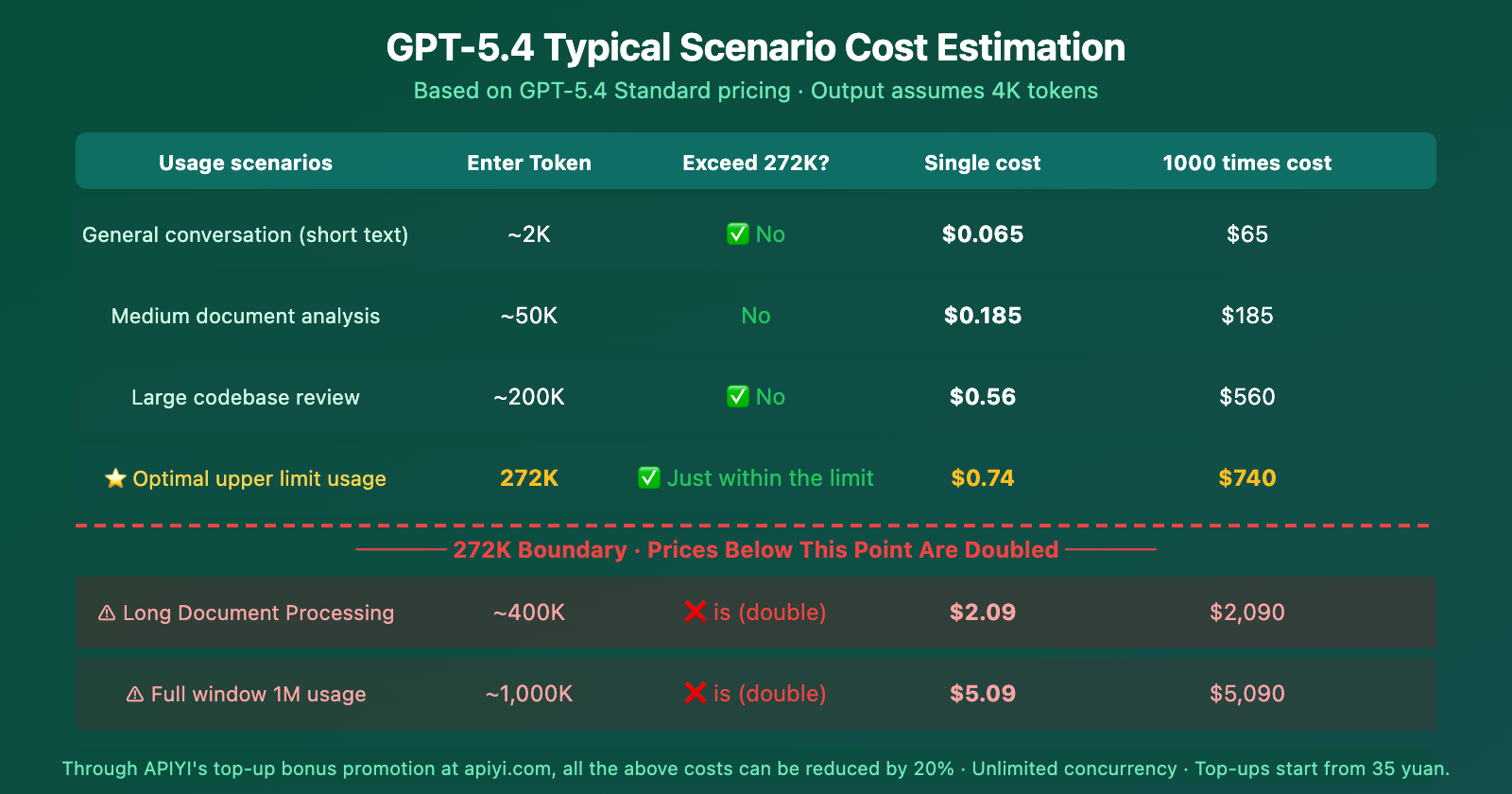
From the cost estimation, you can clearly see: 272K is a hard cost cliff. For the same extra 128K of input (from 272K to 400K), the single-call cost jumps from $0.74 to $2.09—nearly a 3x increase.
Frequently Asked Questions
Q1: For GPT-5.4, after exceeding 272K, is the higher price applied to the excess tokens or the entire session?
It's for the entire session. Once your input tokens exceed the 272K threshold, all tokens in the entire session are billed at the extended pricing (Input: $5.00/M, Output: $22.50/M), not just the portion that went over. Therefore, keeping your input under 272K is key to saving money.
Q2: APIYI doesn’t support Batch API. Isn’t that too expensive?
It's true that APIYI doesn't support OpenAI's Batch and Flex processing modes (which are priced at half the standard rate). However, APIYI's advantages are: no U.S. credit card required, minimum top-up of 35 CNY, unlimited concurrency, and ready-to-use out of the box. Furthermore, with top-up bonus promotions, you can achieve an effective 20% discount, which brings the cost close to Batch pricing for standard invocation scenarios. If your workflow involves real-time interaction rather than batch processing, APIYI is more convenient.
Q3: How can I quickly estimate if my task will exceed 272K tokens?
A simple rule of thumb: 1 English word ≈ 1.3 tokens, 1 Chinese character ≈ 2-3 tokens. 272K tokens is roughly equivalent to 200,000 English words or 90,000-130,000 Chinese characters. If your input, plus system prompts and conversation history, stays under this limit, you can safely enjoy the standard pricing. It's recommended to add token counting checks in your code for early warnings. This calculation logic also applies when invoking models through APIYI at apiyi.com.
Summary
The key points about GPT-5.4's context pricing are:
- 272K is the Critical Threshold: Exceeding 272K tokens doubles the input price ($2.50→$5.00) and increases the output price by 50% ($15.00→$22.50), and this applies to all tokens in the session.
- 127K-272K is the Optimal Range: Accuracy remains stable at around 97%, and it's within the standard pricing tier, offering the best value.
- Accuracy Declines Beyond 256K: In the 512K-1M range, accuracy can drop to about 36%—use with caution.
- More Expensive but More Efficient than GPT-5.2: Input is 43% more expensive and output 7% more expensive in the standard range, but it uses fewer reasoning tokens.
Cost-Saving Strategies: Keep input under 272K, make good use of Cached Input (saves 90%), and leverage Tool Search (saves 47%). By accessing GPT-5.4 through APIYI at apiyi.com, pricing is synchronized with the official rates, and top-up bonuses can achieve an effective 20% discount. With a minimum top-up of just 35 CNY, no U.S. credit card required, unlimited concurrency, and immediate usability upon registration—it's particularly well-suited for both initial experimentation and long-term use.
📚 References
-
OpenAI API Pricing Page: Complete pricing and context tier billing details for GPT-5.4
- Link:
developers.openai.com/api/docs/pricing - Description: Official authoritative pricing source, includes pricing for all modes: Standard/Batch/Flex/Priority
- Link:
-
OpenAI GPT-5.4 Model Documentation: Technical specifications for context window, output limits, etc.
- Link:
developers.openai.com/api/docs/models/gpt-5.4 - Description: Official model specification documentation
- Link:
-
OpenAI GPT-5.4 Announcement: Core capabilities and benchmark data
- Link:
openai.com/index/introducing-gpt-5-4/ - Description: Includes performance benchmarks, design philosophy, and pricing strategy explanations
- Link:
-
OpenAI Developer Community Discussion: Deep dive into GPT-5.4 pricing, context limits, and Tool Search
- Link:
community.openai.com/t/gpt-5-4-deep-dive-pricing-context-limits-and-tool-search-explained/ - Description: In-depth developer discussion on pricing structure and context performance
- Link:
Author: APIYI Technical Team
Technical Discussion: Feel free to discuss your GPT-5.4 context usage experience and cost optimization tips in the comments. For more resources, visit the APIYI docs at docs.apiyi.com.