title: Nano Banana 2 (Gemini 3.1 Flash) Speed Test & 4K Image Generation Guide
description: Real-world API data analysis of Nano Banana 2 (gemini-3.1-flash-image-preview) speed and a complete guide to generating 2K/4K high-definition images.
date: 2025-02-27
tags: [Gemini 3.1, Nano Banana 2, Image Generation, API Tutorial]
Author's Note: Real-world speed data for Nano Banana 2 (gemini-3.1-flash-image-preview), an analysis of why the Flash architecture isn't actually that fast in practice, and a complete guide to generating 2K/4K high-definition images.
Google released Nano Banana 2 (gemini-3.1-flash-image-preview) on February 26, 2025, claiming "Pro quality + Flash speed." However, actual test results have surprised many developers—this Flash-based model isn't nearly as fast as expected for image generation.
Core Value: This article uses real model invocation data from API calls to analyze the actual speed of Nano Banana 2, explains the real reasons why "Flash" isn't fast, and provides a complete practical guide for 2K/4K high-definition image generation.
Nano Banana 2 Real-World Speed Data
We conducted multiple rounds of actual model invocation tests for gemini-3.1-flash-image-preview via the APIYI platform. Here is the real-world Time to First Byte (TTFB) data:
| Test No. | Model | TTFB | Input Tokens | Output Tokens |
|---|---|---|---|---|
| 1 | gemini-3.1-flash-image-preview | 56s | 1,772 | 2,166 |
| 2 | gemini-3.1-flash-image-preview | 34s | 656 | 2,081 |
| 3 | gemini-3.1-flash-image-preview | 43s | 350 | 2,076 |
| 4 | gemini-3.1-flash-image-preview | 36s | 3,087 | 2,963 |
| 5 | gemini-3.1-flash-image-preview | 23s | 856 | — |
| 6 | gemini-3.1-flash-image-preview | 28s | 2,597 | 2,716 |
| 7 | gemini-3.1-flash-image-preview | 46s | 395 | 2,132 |
| 8 | gemini-3.1-flash-image-preview | 33s | 327 | 2,011 |
| 9 | gemini-3.1-flash-image-preview | 39s | 261 | 2,772 |
Nano Banana 2 Speed Analysis
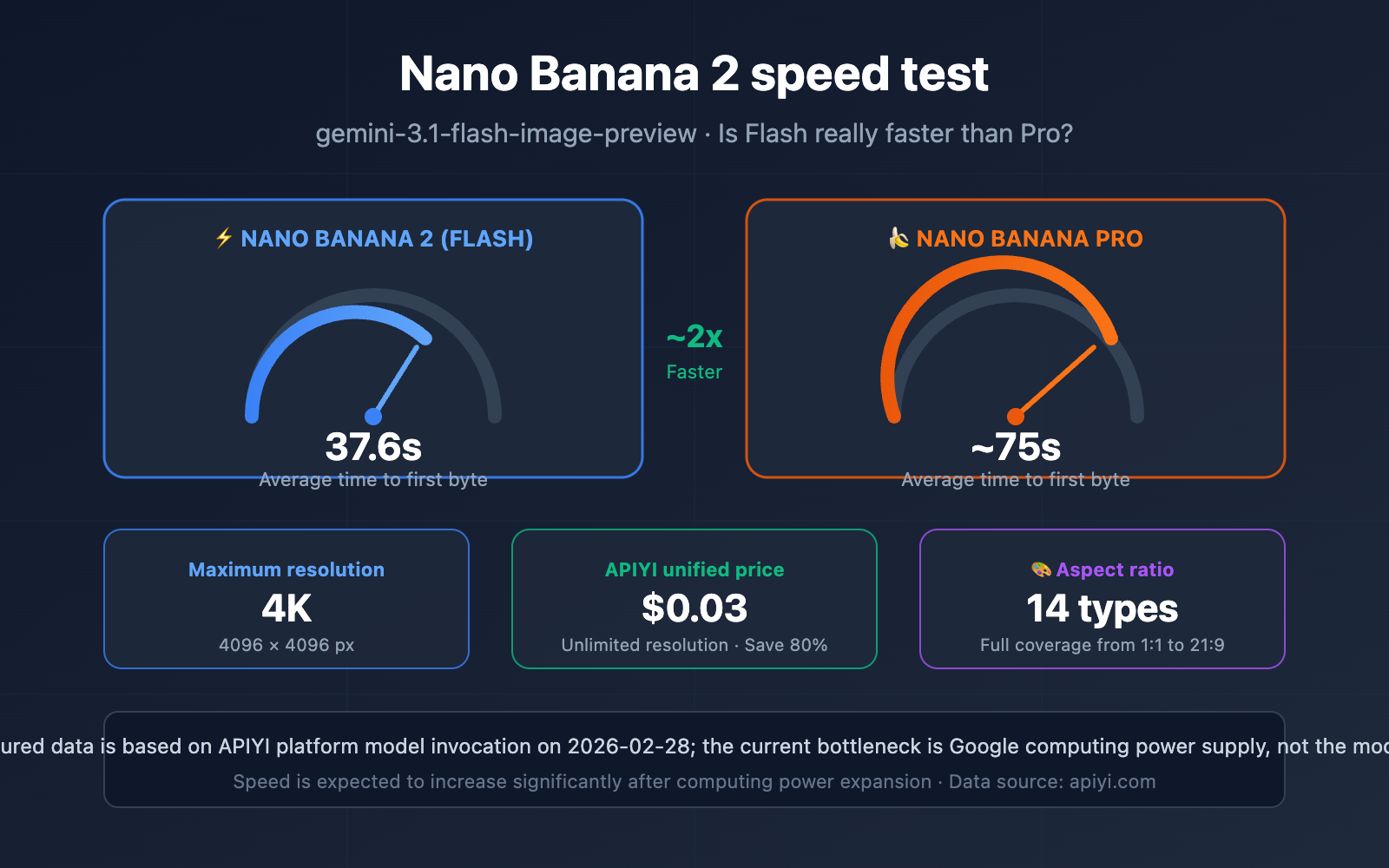
Based on these 9 test runs, the TTFB for gemini-3.1-flash-image-preview fluctuates between 23 and 56 seconds, with an average of about 37.6 seconds. This figure is significantly higher than Google's official "sub-20 second latency" claim and noticeably slower than the 4-6 second generation times reported in some community benchmarks.
Interestingly, there's no clear linear relationship between the number of input tokens and response time—a request with only 261 tokens took 39 seconds, while one with 856 tokens took only 23 seconds. This further suggests that the bottleneck isn't the model inference itself, but rather the infrastructure layer.
Additionally, the output tokens for Nano Banana 2 generally fall between 2,000 and 2,900, reflecting the inherent token consumption of image generation.
title: Why is Nano Banana 2 Not as Fast as Expected? A Deep Dive
description: Exploring the performance bottlenecks of Nano Banana 2, comparing Flash vs Pro architectures, and analyzing why real-world speeds lag behind theoretical benchmarks.
date: 2024-03-20
tags: [Nano Banana 2, Gemini, AI Performance, Image Generation]
Why is Nano Banana 2 Not Fast in Real-world Tests? A Deep Dive
3 Core Reasons for Nano Banana 2's Speed Bottlenecks
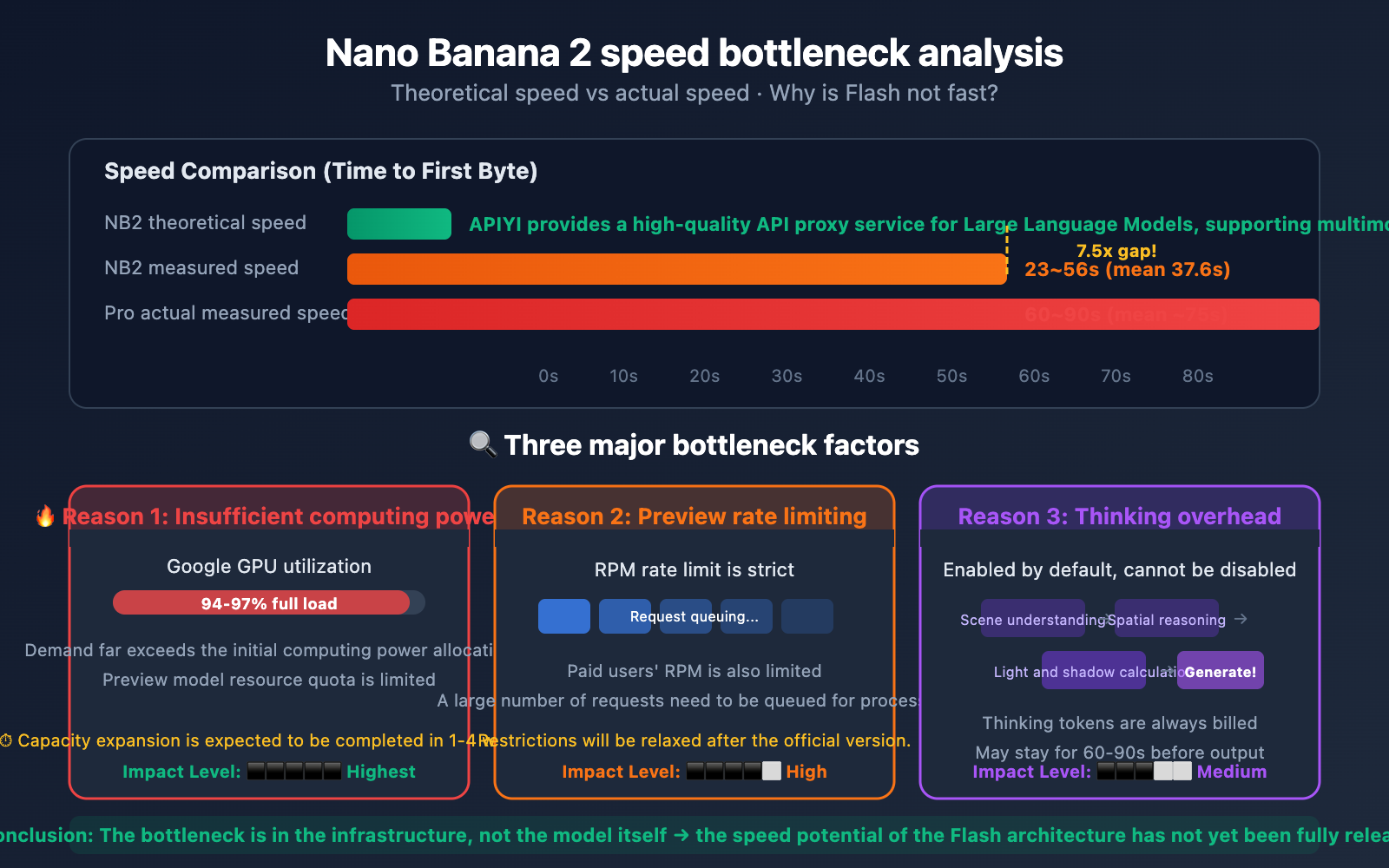
Many developers are puzzled: Nano Banana 2 is built on the Flash architecture, which should theoretically be 3-5x faster than Pro. So why are real-world tests often hitting 30-50 seconds?
Reason 1: Insufficient Compute Supply from Google
This is the primary culprit. As of February 2026, Google Gemini's infrastructure continues to face significant compute pressure, with demand far exceeding initial allocations. As a newly released Preview model, Nano Banana 2 has a limited quota of computational resources. Community feedback suggests GPU utilization peaks at 94-97% during high-traffic periods, meaning it's running at near-full capacity.
Reason 2: Rate Limiting During the Preview Phase
The gemini-3.1-flash-image-preview is still in its Preview stage, and Google applies stricter rate limits to these models. Even for paid users, the RPM (Requests Per Minute) is noticeably restricted, which means many requests end up sitting in a queue.
Reason 3: Hidden Overhead of the Thinking Mechanism
Nano Banana 2 has "Thinking" mode enabled by default, and it can't be turned off. Before generating an image, the model automatically performs scene understanding, spatial relationship reasoning, and lighting/physics calculations. Developer feedback indicates that the model sometimes stays in the "thinking" state for 60-90 seconds before outputting the result all at once, rather than streaming it back.
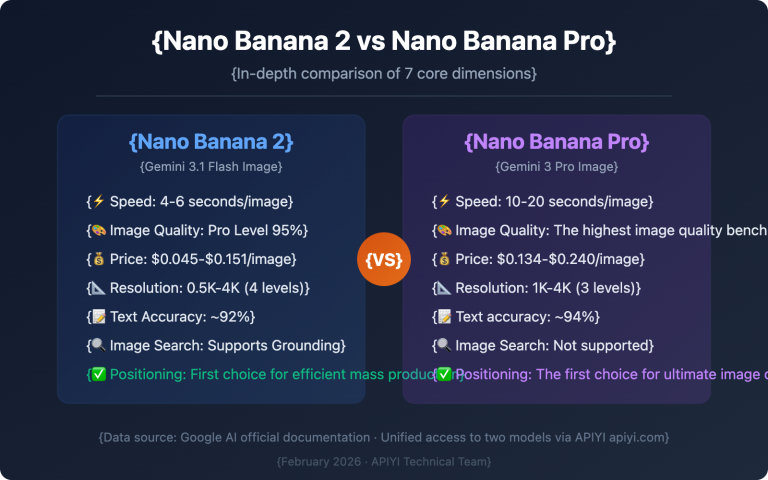
Nano Banana 2 vs Nano Banana Pro: Speed Comparison
| Comparison Item | Nano Banana 2 (Flash) | Nano Banana Pro |
|---|---|---|
| Architecture | Gemini 3.1 Flash | Gemini 3 Pro |
| Theoretical Speed | 3-5x Faster | Baseline |
| Real-world TTFB | 23-56 seconds | 60-90 seconds |
| Real-world Average | ~37.6 seconds | ~75 seconds |
| Actual Speedup | ~2x | Baseline |
| Expected Full-load Speed | <5 seconds (Official Target) | ~15 seconds |
| Max Resolution | 4K (4096px) | 2K (2048px) |
Based on real-world tests, Nano Banana 2 is faster than Pro—about 2x faster on average. However, it still falls short of Google's claimed 3-5x speedup and sub-20-second latency. Based on Google's track record, compute expansion for new models usually completes within 1-4 weeks of launch, at which point speed performance should improve significantly.
🎯 Testing Tip: Currently, the core advantages of Nano Banana 2 are its 4K resolution and lower cost, rather than raw speed. We recommend testing it via APIYI (apiyi.com). The platform offers a flat rate of $0.03 per image (regardless of resolution), saving you 80% compared to official 4K pricing.
Nano Banana 2: The Complete Guide to Generating 2K/4K High-Definition Images
One of the biggest upgrades in Nano Banana 2 is its support for 4K (4096×4096) ultra-high resolution, breaking through the 2K limit of Nano Banana Pro. Here's your complete guide to getting started.
Nano Banana 2 Resolution and Cost Comparison
| Resolution | Pixel Dimensions | Official Price | APIYI Price | Savings | Recommended Use Case |
|---|---|---|---|---|---|
| 0.5K | 512×512 | ~$0.045 | $0.03 | 33% | Thumbnails, quick previews |
| 1K | 1024×1024 | ~$0.067 | $0.03 | 55% | Social media, web graphics |
| 2K | 2048×2048 | ~$0.101 | $0.03 | 70% | Product displays, HD posters |
| 4K | 4096×4096 | ~$0.151 | $0.03 | 80% | Print materials, large screens |
The biggest advantage of the APIYI platform is the flat rate of $0.03 for all resolutions. This means generating a 4K image costs exactly the same as a 0.5K image. For scenarios requiring high-definition visuals, this pricing edge is a game-changer.
Nano Banana 2 Minimalist Code Example
Here's the simplest way to generate a 4K HD image via APIYI:
import requests, base64, json

response = requests.post(
    "https://api.apiyi.com/v1beta/models/gemini-3.1-flash-image-preview:generateContent",
    headers={"Content-Type": "application/json", "x-goog-api-key": "YOUR_APIYI_KEY"},
    json={
        "contents": [{"parts": [{"text": "A Shiba Inu wearing a spacesuit walking on the moon, 4K ultra-HD, cinematic lighting"}]}],
        "generationConfig": {
            "responseModalities": ["IMAGE"],
            "imageConfig": {"aspectRatio": "16:9", "imageSize": "4K"}
        }
    },
    timeout=120
)

image_data = response.json()["candidates"][0]["content"]["parts"][0]["inlineData"]["data"]
with open("output_4k.png", "wb") as f:
    f.write(base64.b64decode(image_data))
View full implementation (with error handling and multi-resolution support)
import requests
import base64
import json
import time

API_KEY = "YOUR_APIYI_KEY"
ENDPOINT = "https://api.apiyi.com/v1beta/models/gemini-3.1-flash-image-preview:generateContent"

def generate_image(
    prompt: str,
    size: str = "1K",
    aspect_ratio: str = "1:1",
    timeout: int = 120
) -> bytes:
    """
    Invoke Nano Banana 2 via APIYI to generate images

    Args:
        prompt: Text description of the image
        size: Resolution (512px / 1K / 2K / 4K)
        aspect_ratio: Width-to-height ratio
        timeout: Timeout in seconds

    Returns:
        Byte data of the PNG image
    """
    payload = {
        "contents": [{"parts": [{"text": prompt}]}],
        "generationConfig": {
            "responseModalities": ["IMAGE"],
            "imageConfig": {
                "aspectRatio": aspect_ratio,
                "imageSize": size
            }
        }
    }

    start = time.time()
    resp = requests.post(
        ENDPOINT,
        headers={"Content-Type": "application/json", "x-goog-api-key": API_KEY},
        json=payload,
        timeout=timeout
    )
    elapsed = time.time() - start
    print(f"Generation time: {elapsed:.1f}s | Resolution: {size}")

    resp.raise_for_status()
    data = resp.json()
    return base64.b64decode(data["candidates"][0]["content"]["parts"][0]["inlineData"]["data"])

# Example usage: Generate images at different resolutions
for size in ["1K", "2K", "4K"]:
    image = generate_image("Cyberpunk style futuristic city nightscape", size=size, aspect_ratio="16:9")
    with open(f"city_{size}.png", "wb") as f:
        f.write(image)
Tip: Generating 4K resolution usually takes 10-15 seconds longer than 1K. We recommend setting your timeout to at least 120 seconds. When using apiyi.com, all resolutions are billed at a flat $0.03 per image.
Nano Banana 2 Image Generation: 14 Aspect Ratios and Use Cases
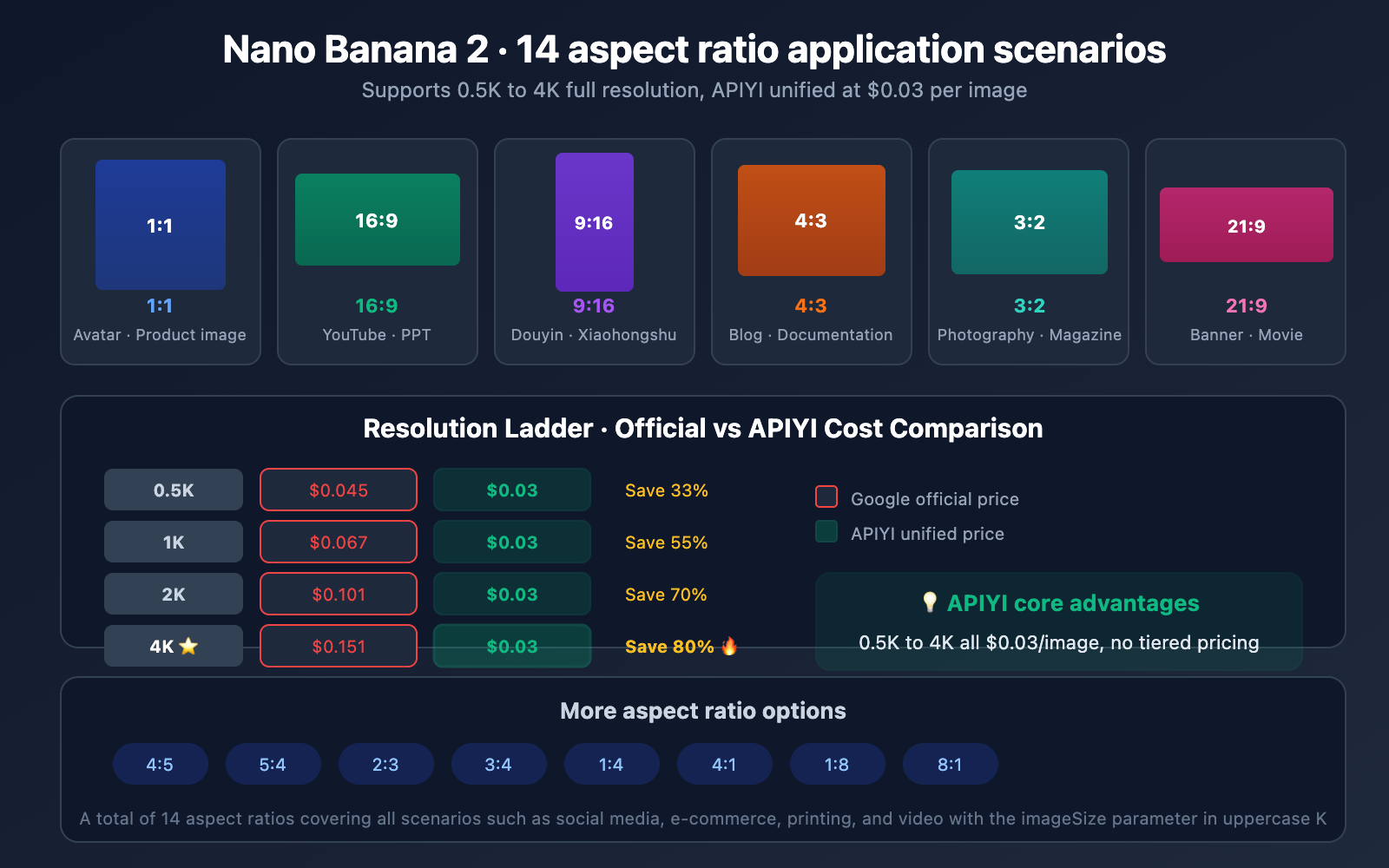
Nano Banana 2 supports 14 aspect ratios, covering almost all mainstream use cases:
| Aspect Ratio | Use Case | Typical Dimensions (4K) | Recommended Use |
|---|---|---|---|
| 1:1 | Social media avatars, product shots | 4096×4096 | Instagram, E-commerce |
| 16:9 | Landscape covers, desktop wallpapers | 4096×2304 | YouTube, PPTs |
| 9:16 | Vertical posters, phone wallpapers | 2304×4096 | TikTok, Instagram Stories |
| 4:3 | Traditional monitors, document graphics | 4096×3072 | Blogs, Documentation |
| 3:2 | Photography ratio, magazine layout | 4096×2731 | Print materials |
| 21:9 | Ultrawide, cinematic frame | 4096×1756 | Movie posters, Banners |
| 4:5 | Vertical social media | 3277×4096 | Instagram posts |
| Others | 1:4, 4:1, 1:8, 8:1, 2:3, 3:4, 5:4 | — | Special layout needs |
Usage Note: The
imageSizeparameter must use an uppercase K (e.g.,"2K", not"2k"). The aspect ratio is specified via theaspectRatioparameter in the format"Width:Height".
FAQ
Q1: Will Nano Banana 2 get faster in the future?
Most likely, yes. The current slow speeds are primarily due to insufficient computing power on Google's end, rather than performance issues with the model itself. Based on Google's track record, computing capacity expansion for new models is typically completed within 1-4 weeks of release. The Gemini 3 Flash text model went through a similar process at launch and eventually achieved extremely low latency.
Q2: What should I do if generating 4K images frequently times out?
We recommend setting your timeout to 120-180 seconds. If it still times out, try verifying your prompt's effect with 1K or 2K resolution first. Once you're satisfied with the result, switch to 4K. When using model invocation via APIYI (apiyi.com), all resolutions are priced at $0.03/image, so multiple attempts won't put a strain on your budget.
Q3: How can I quickly get started with Nano Banana 2?
The best way is to connect via the APIYI platform:
- Visit APIYI (apiyi.com) to register an account and get your API key.
- Use the code examples provided in this article and replace
YOUR_APIYI_KEYwith your actual key. - Start calling the API to generate images at $0.03/image regardless of resolution.
- Documentation reference: docs.apiyi.com/en/api-capabilities/nano-banana-2-image
Summary
Here are the core conclusions from our Nano Banana 2 speed tests:
- Real-world speeds of 23-56 seconds: While slower than the "sub-20 seconds" advertised officially, it's indeed about 2x faster than Nano Banana Pro.
- The bottleneck is computing power: There's nothing wrong with the Flash architecture itself; the bottleneck lies in Google's GPU capacity and Preview rate-limiting policies.
- 4K is the true highlight: It breaks through the 2K limit of the Pro version, supporting ultra-high-definition output up to 4096px.
- APIYI flat rate of $0.03/image: No resolution limits (0.5K-4K same price). Generating 4K images here saves you 80% compared to official pricing.
At this stage, the core reason to choose Nano Banana 2 isn't just speed—it's the 4K resolution + lower cost. As Google completes its capacity expansion, speed performance is expected to improve significantly in the coming weeks.
We recommend experiencing Nano Banana 2's 4K image generation capabilities through APIYI (apiyi.com). With a flat price of $0.03/image, it supports 14 aspect ratios and all resolution options.
📚 References
-
Google AI Image Generation Documentation: Nano Banana 2 Official API Docs
- Link:
ai.google.dev/gemini-api/docs/image-generation - Description: Official API interface specifications and parameter documentation.
- Link:
-
Google DeepMind Nano Banana 2 Announcement: Core Model Capabilities
- Link:
blog.google/innovation-and-ai/technology/ai/nano-banana-2/ - Description: Insights into the design philosophy and technical features of Nano Banana 2.
- Link:
-
Google Developers Guide: Building Applications with Nano Banana 2
- Link:
blog.google/innovation-and-ai/technology/developers-tools/build-with-nano-banana-2/ - Description: Practical developer guides and code examples.
- Link:
-
APIYI Nano Banana 2 Documentation: Complete Integration Guide via APIYI
- Link:
docs.apiyi.com/en/api-capabilities/nano-banana-2-image - Description: APIYI platform integration docs, pricing, and model invocation examples.
- Link:
-
Google AI Pricing Page: Gemini API Official Pricing
- Link:
ai.google.dev/gemini-api/docs/pricing - Description: Official token pricing and cost-per-request calculations.
- Link:
Author: APIYI Technical Team
Tech Talk: Feel free to discuss your experience with Nano Banana 2 in the comments. For more resources, visit the APIYI Documentation Center at docs.apiyi.com.