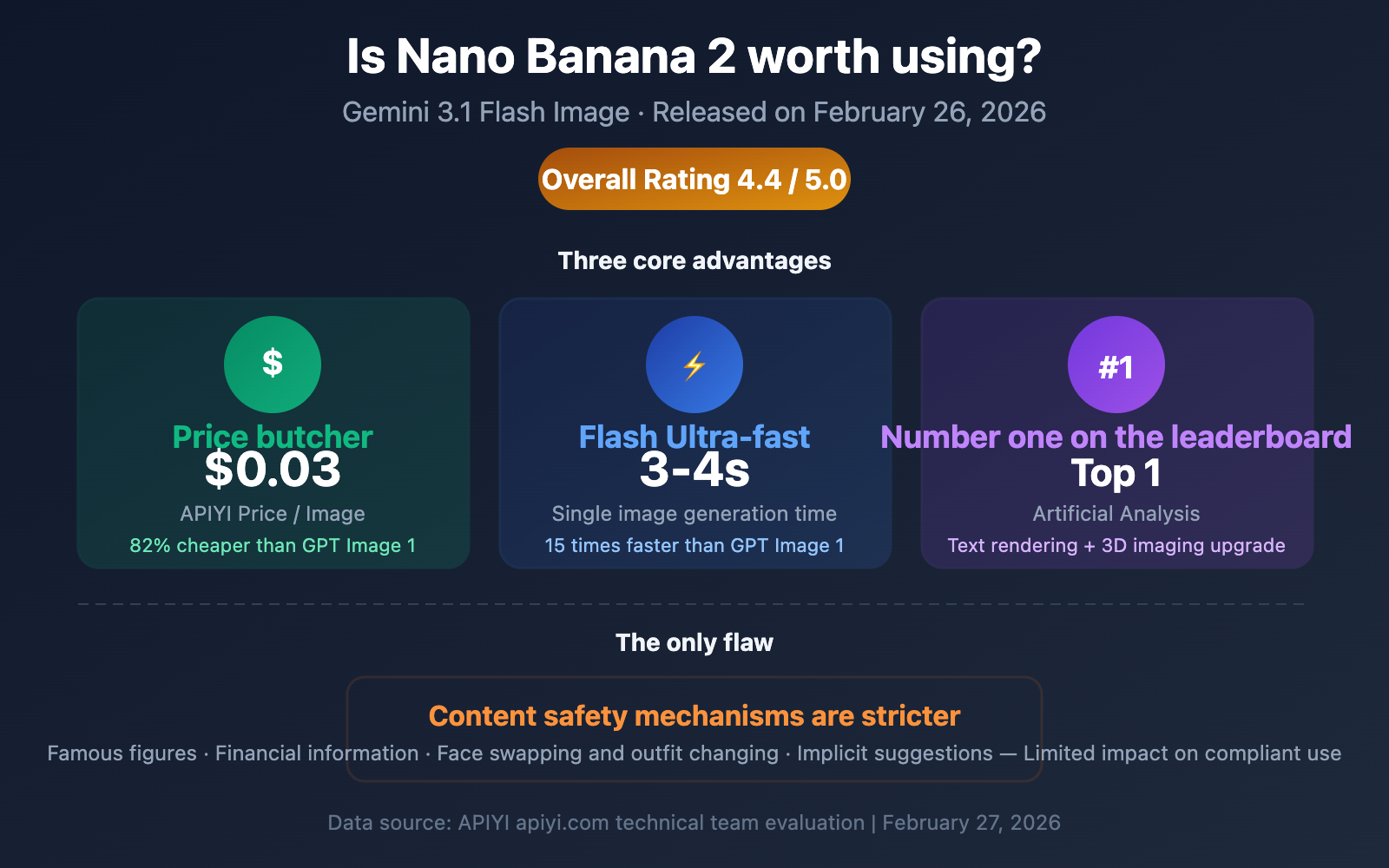
Is Nano Banana 2 worth it? This has been the hottest topic among developers since the release of Gemini 3.1 Flash Image on February 26, 2026. The answer is clear: Yes, absolutely—it's half the price of Nano Banana Pro, 2-3 times faster, and ranks #1 on the Artificial Analysis text-to-image leaderboard. The only trade-off? Stricter content safety filters.
Core Value: Through a real-world evaluation of 5 key metrics (price, speed, quality, resolution, and safety), we'll help you decide if Nano Banana 2 is the right fit for your project.
Nano Banana 2: Core Evaluation Data
Nano Banana 2 (Gemini 3.1 Flash Image) was officially released on February 26, 2026, positioned as "Pro Quality, Flash Speed." We've conducted a deep dive across five key dimensions.
| Evaluation Metric | Score | Key Data | Verdict |
|---|---|---|---|
| Price | ⭐⭐⭐⭐⭐ | Only $0.03/image via APIYI | Total price disruptor |
| Speed | ⭐⭐⭐⭐⭐ | 2-3x faster than Pro | Flash-level lightning speed |
| Quality | ⭐⭐⭐⭐ | Ranked #1 | Room for improvement in text rendering |
| Resolution | ⭐⭐⭐⭐⭐ | 512px to 4K | Full resolution support |
| Content Safety | ⭐⭐⭐ | Stricter than Pro | The only downside |
Nano Banana 2 Overall Verdict
Overall Rating: 4.4 / 5.0 — Highly recommended upgrade
The core value of Nano Banana 2 can be summed up in one sentence: Pro-level quality at Flash-level prices and speeds. For the vast majority of use cases, this is currently the most cost-effective AI image generation solution available.
🎯 Recommendation: If you're looking for a high-value AI image generation API, Nano Banana 2 is your best bet right now. By using the APIYI (apiyi.com) API proxy service, each model invocation costs only $0.03—about 45% of the official price. It's perfect for small-to-medium teams and indie developers looking for quick integration.
Nano Banana 2 Price Review — Absolute Price Butcher Level
Price is one of Nano Banana 2's biggest advantages and its most noteworthy change.
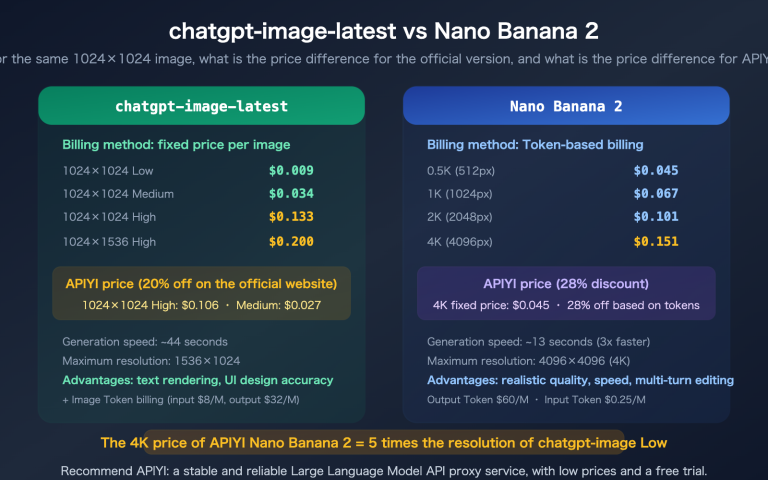
Nano Banana 2 Official Resolution Pricing
| Resolution | Token Consumption | Official Unit Price | Batch Price (50% off) | Use Case |
|---|---|---|---|---|
| 512px | 747 tokens | $0.045 | ~$0.023 | Thumbnails, Icons |
| 1K (1024×1024) | 1,120 tokens | $0.067 | ~$0.034 | Social Media, Web |
| 2K (2048×2048) | 1,680 tokens | $0.101 | ~$0.051 | HD Web, Print |
| 4K (4096×4096) | 2,520 tokens | $0.151 | ~$0.076 | Large Format, Pro Print |
Cross-Model Price Comparison (Generating 1,000 1K Images)
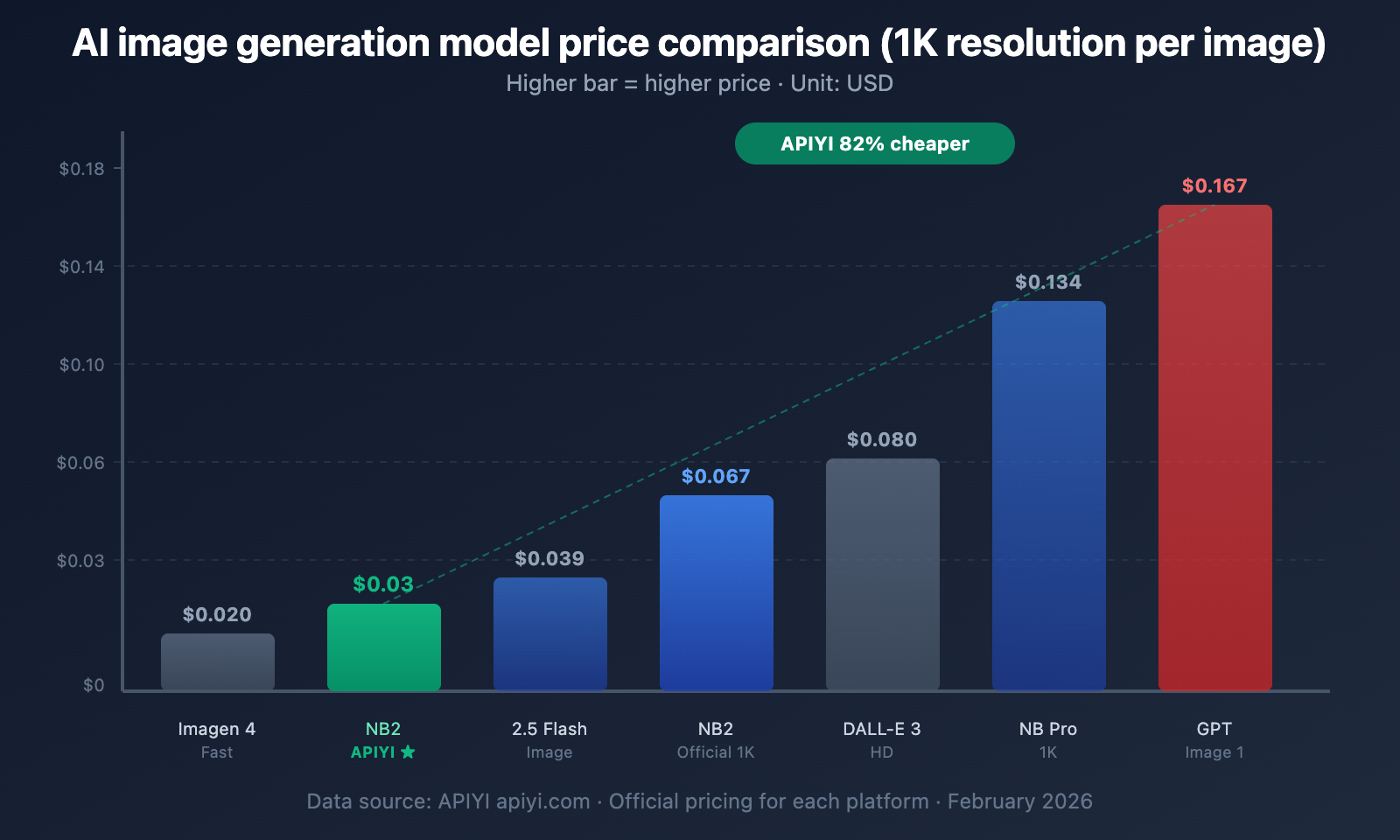
This comparison table clearly demonstrates Nano Banana 2's price competitiveness:
| Model | Unit Price | Cost for 1,000 Images | Relative to NB2 (APIYI) |
|---|---|---|---|
| Nano Banana 2 (APIYI) | $0.03 | $30 | Baseline ×1 |
| Imagen 4 Fast | $0.020 | $20 | ×0.67 (But lower quality) |
| Gemini 2.5 Flash Image | $0.039 | $39 | ×1.3 |
| Nano Banana 2 (Official 1K) | $0.067 | $67 | ×2.2 |
| DALL-E 3 HD | $0.080 | $80 | ×2.7 |
| Nano Banana Pro (1K) | $0.134 | $134 | ×4.5 |
| GPT Image 1 High | $0.167 | $167 | ×5.6 |
Key Findings:
- APIYI's $0.03/image pricing is an absolute price butcher — 55% cheaper than official rates and 82% cheaper than GPT Image 1.
- Even at the official price of $0.067/image, Nano Banana 2 is only 50% of the Pro version's price.
- The only cheaper option, Imagen 4 Fast ($0.02), is far inferior to Nano Banana 2 in terms of quality.
💰 Cost Optimization: For projects requiring large-scale image generation, using Nano Banana 2 via APIYI (apiyi.com) costs only $300 per 10,000 images, saving over 80% compared to GPT Image 1's $1,670. The platform provides a unified OpenAI-compatible interface, making migration costs extremely low.
Free Tier Explanation
It's important to note that Nano Banana 2 does not have a free tier for model invocation via API. Here is the current quota situation:
| Channel | Free Tier | Description |
|---|---|---|
| Google AI Studio (Web) | ~500-1000 images/day | For experimentation only, not production-grade |
| API Free Tier | 500 RPD / 15 RPM | Significant cuts coming in December 2025 |
| APIYI Platform | Pay-as-you-go | $0.03/image, no minimum spend |
Important Change: On December 7, 2025, Google significantly slashed free tier quotas, with some models seeing drops as high as 92%. If you previously relied on free credits, it's time to consider a paid plan.
Nano Banana 2 Speed Review — Flash-Level Velocity
Speed is the second biggest selling point of Nano Banana 2, and it's the core meaning behind the "Flash" designation.
Image Generation Speed Comparison
| Model | Generation Time (per image) | Speed Tier | Generation Method |
|---|---|---|---|
| Nano Banana 2 | ~3-4 seconds | ⚡ Flash Speed | Diffusion Model |
| Nano Banana Pro | ~8-12 seconds | 🔄 Reasoning Level | Decomposes prompt before generating |
| GPT-4o / GPT Image 1 | 60+ seconds | 🐌 Slow | Autoregressive |
| Imagen 4 Fast | ~2-3 seconds | ⚡ Ultra-fast | Specialized Diffusion Model |
| DALL-E 3 | ~10-15 seconds | 🔄 Medium | Diffusion Model |
Analyzing the Speed Gap: Nano Banana 2 vs Nano Banana Pro:
- Nano Banana Pro uses a "reasoning" workflow: it first breaks down the prompt and resolves ambiguities before generating the image.
- Nano Banana 2 generates directly: it skips the deep reasoning steps, making it 2-3 times faster.
- For most standard scenarios, the quality difference in direct generation is virtually indistinguishable to the naked eye.
Nano Banana 2 vs GPT Image 1 Speed Gap:
- GPT-4o takes over 60 seconds for image generation, which is 15-20 times slower than Nano Banana 2.
- In batch generation scenarios, this gap means that within a single hour, Nano Banana 2 can generate about 900 images, while GPT Image 1 can only manage about 60.
🚀 Pro Tip: Speed advantages are crucial for consumer-facing products. The user experience difference between waiting 3 seconds versus 60 seconds is night and day. We recommend testing Nano Banana 2's response times via the APIYI (apiyi.com) platform to verify latency performance in a real-world network environment.
Nano Banana 2 Quality Review — Ranking #1
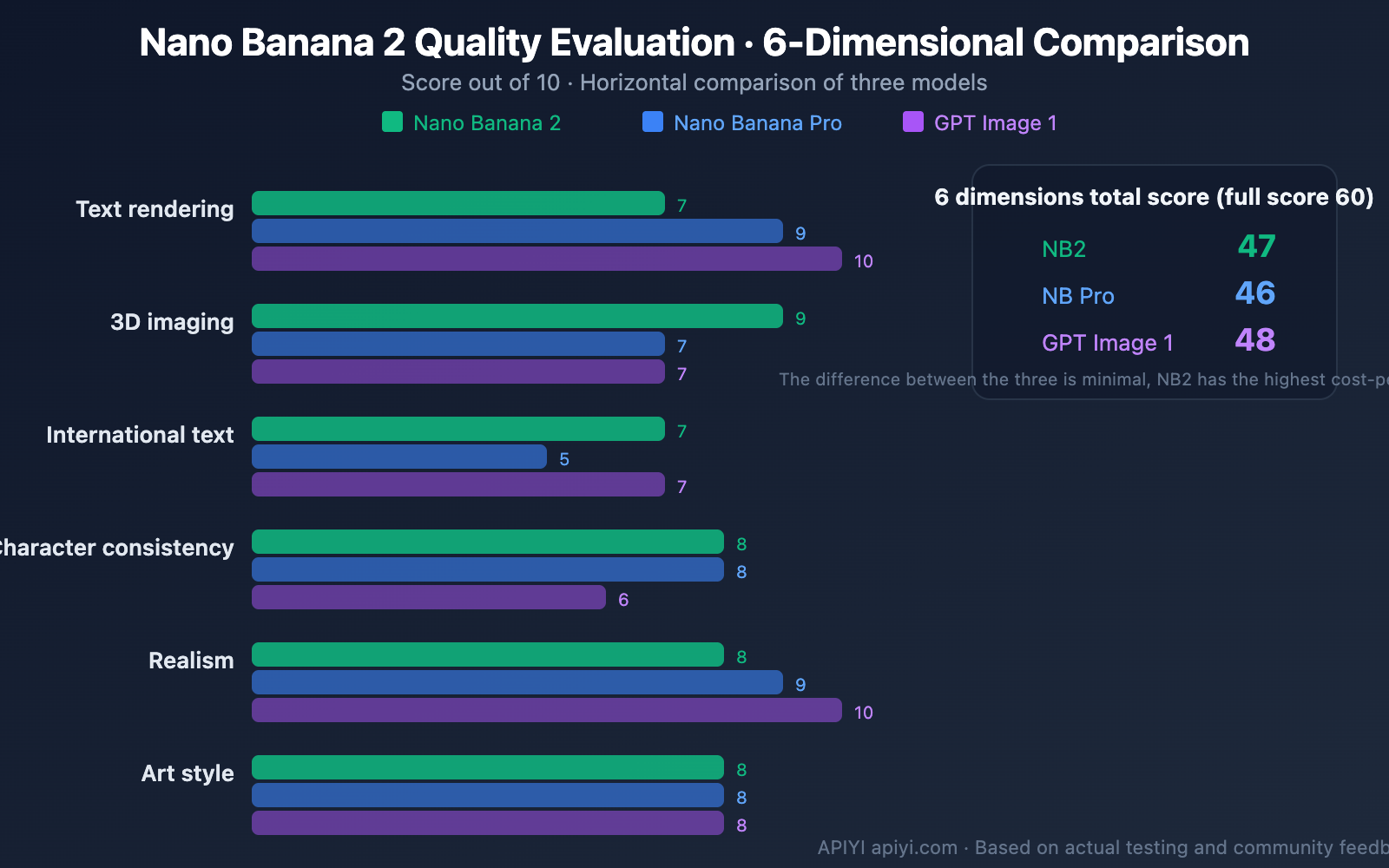
Core Quality Metrics
On its launch day, Nano Banana 2 topped the Artificial Analysis text-to-image leaderboard, which is a significant signal of its quality.
| Quality Dimension | Nano Banana 2 | Nano Banana Pro | GPT Image 1 | DALL-E 3 |
|---|---|---|---|---|
| Text Rendering | Good (Improving) | Excellent (~94% accuracy) | Best (Solved) | Average |
| 3D Imaging | Excellent (New) | Good | Good | Average |
| International Text | Good (New) | Average | Good | Poor |
| Character Consistency | 5 Characters / 14 Objects | 5 Characters / 14 Objects | Not Disclosed | Weak |
| Realism | Excellent | Excellent | Best | Good |
| Artistic Style | Rich | Rich | Rich | Good |
Leaderboard Data (Artificial Analysis, 120-point scale reference)
| Rank | Model | Overall Score | Key Strengths |
|---|---|---|---|
| #1 | Nano Banana 2 | — | Best overall, balance of speed and quality |
| #2 | GPT-4o Image | ~91% | Strongest text rendering |
| #3 | Imagen 4 Ultra | — | Google's flagship quality |
| — | DALL-E 3 | ~43% | Lagging behind |
Three Highlights of Nano Banana 2 Quality
Highlight 1: Massive Improvements in Text Rendering
Nano Banana 2 has made significant strides in text rendering. While it hasn't "completely solved" the text issue like GPT-4o, it has moved from "frequently incorrect" to "occasionally imperfect."
Highlight 2: 3D Imaging Capabilities
This is a new capability for Nano Banana 2. It performs exceptionally well in generating product renders and 3D concept art, opening up new possibilities for product showcases and conceptual design.
Highlight 3: Character Consistency
It supports maintaining consistency for up to 5 characters and 14 objects within a single workflow. This is incredibly valuable for comic creation, storyboarding, and sequential illustration.
Nano Banana 2 Resolution Support — From 512px to 4K
Nano Banana 2 supports full resolution output from 512px all the way up to 4K, with support for multiple aspect ratios.
Resolutions and Use Cases
| Resolution | Pixels | Price (APIYI) | Best For | Recommendation |
|---|---|---|---|---|
| 512px | 512×512 | ~$0.02 | Thumbnails, previews, rapid prototyping | ⭐⭐⭐ |
| 1K | 1024×1024 | $0.03 | Social media, web images, apps | ⭐⭐⭐⭐⭐ |
| 2K | 2048×2048 | ~$0.04 | HD posters, e-commerce detail pages | ⭐⭐⭐⭐ |
| 4K | 4096×4096 | ~$0.06 | Large format printing, professional design | ⭐⭐⭐ |
Pro Tip: 4K generation isn't just a simple upscale — it actually generates more realistic details. However, for web and screen displays, 1K or 2K is usually more than enough, so there's no need to pay extra for 4K unless you really need it.
Code Snippet: Model Invocation for Nano Banana 2
import openai

client = openai.OpenAI(
    api_key="YOUR_API_KEY",
    base_url="https://api.apiyi.com/v1"  # Unified interface via APIYI, $0.03/image
)

response = client.images.generate(
    model="nano-banana-2",
    prompt="A futuristic city skyline at sunset, cyberpunk style",
    n=1,
    size="1024x1024"
)

print(response.data[0].url)
View full code for batch generation and error handling
import openai
import time

client = openai.OpenAI(
    api_key="YOUR_API_KEY",
    base_url="https://api.apiyi.com/v1"  # APIYI unified interface
)

def generate_batch(prompts, size="1024x1024"):
    """Batch image generation with error handling and rate limiting"""
    results = []

    for i, prompt in enumerate(prompts):
        try:
            response = client.images.generate(
                model="nano-banana-2",
                prompt=prompt,
                n=1,
                size=size
            )
            results.append({
                "prompt": prompt,
                "url": response.data[0].url,
                "status": "success"
            })
        except Exception as e:
            error_msg = str(e)
            results.append({
                "prompt": prompt,
                "error": error_msg,
                "status": "blocked" if "SAFETY" in error_msg else "error"
            })

        # Rate control: Avoid hitting RPM limits
        if (i + 1) % 15 == 0:
            time.sleep(60)

    return results

# Example usage
prompts = [
    "A serene mountain landscape at dawn",
    "Abstract geometric art in blue and gold",
    "A cozy coffee shop interior, watercolor style",
]

results = generate_batch(prompts)
for r in results:
    print(f"[{r['status']}] {r['prompt'][:50]}...")
💡 Developer Tip: The code uses the OpenAI-compatible interface. This means if you've used DALL-E or GPT Image before, migrating to Nano Banana 2 only requires changing the
base_urlandmodelparameters. You can achieve a zero-cost switch through the APIYI (apiyi.com) platform.
The Only Catch — Stricter Content Safety
To be fair, Nano Banana 2 isn't perfect. Its only — and most obvious — drawback is that its content safety mechanism is much stricter than Nano Banana Pro.
Safety Policy Changes at a Glance
| Safety Dimension | Nano Banana Pro | Nano Banana 2 | Impact |
|---|---|---|---|
| NSFW / Adult | Strictly Blocked | Strictly Blocked | No Change |
| Famous Figures | Partially Blocked | Fully Blocked | ⬆️ Significantly Tightened |
| Character Outfit/Face Swap | Partially Available | Mostly Blocked | ⬆️ Significantly Tightened |
| Financial Info Modification | No Blocking | Newly Blocked | 🆕 New Restriction |
| Implicit Suggestions | Partial Detection | Enhanced Detection | ⬆️ Detection Upgraded |
| Copyrighted IP | Blocked | Blocked | No Change |
| Minors | Absolutely Blocked | Absolutely Blocked | No Change |
Real-World Impact on Developers
Scenarios with high impact:
- Portrait editing products — Face swapping or outfit changes for celebrities are restricted.
- Financial applications — Document editing features might get flagged.
- Adult-oriented platforms — Detection of implicit suggestions is much more sensitive.
Scenarios with low impact:
- Standard text-to-image — Landscapes, products, and conceptual art are unaffected.
- Original characters — Editing and changing outfits for original characters usually works fine.
- Commercial design — Posters, banners, and UI designs can be used normally.
Actual Failure Rate: According to community feedback, the success rate for compliant commercial use remains above 95%. The safety mechanism primarily targets high-risk content and has limited impact on standard business use.
🎯 Handling Tips: If you run into a content safety block, check the
finishReasonfield in the returned data. When calling through the APIYI (apiyi.com) platform, our API proxy service transparently forwards Google's original response without adding any extra restrictions. For a deep dive into safety mechanisms and strategies, check out our full guide on Nano Banana 2 Content Safety.
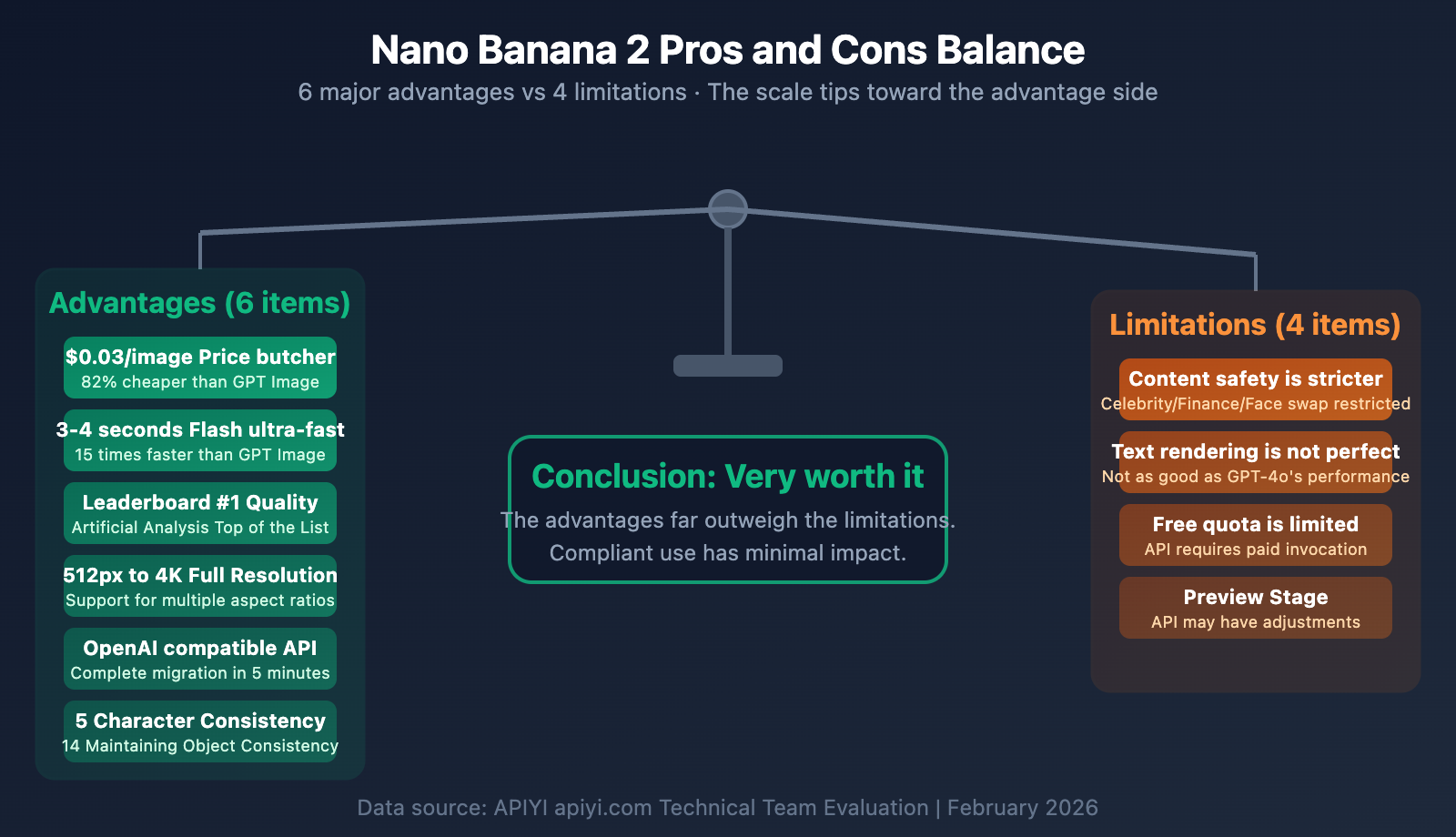
Is Nano Banana 2 Worth It? A Summary of Pros and Cons
Pros
- Ultra-Low Cost: Only $0.03 per image on the APIYI platform—that's about 1/5.6 the cost of GPT Image 1.
- Blazing Fast Speed: Generates images in just 3-4 seconds, making it 15-20 times faster than GPT Image 1.
- Top-Tier Quality: Ranked #1 on the Artificial Analysis leaderboard, with significant improvements in text rendering and 3D imaging.
- Full Resolution Support: From 512px to 4K, it covers everything from thumbnails to professional print requirements.
- Seamless API Compatibility: Uses an OpenAI-compatible interface, meaning migration costs are practically zero.
- Character Consistency: Supports maintaining consistency for up to 5 characters and 14 objects.
Limitations
- Stricter Content Safety: More restrictions on celebrities, financial themes, and face-swapping scenarios (though this has limited impact on compliant business use).
- Text Rendering Isn't Perfect: While improved, it still doesn't quite match the text precision of GPT-4o.
- Limited Free Tier: model invocation requires payment; there isn't a generous free tier available.
- Preview Status: It's currently in a Preview state, so the API might see some adjustments.
Frequently Asked Questions
Q1: Should I choose Nano Banana 2 or Nano Banana Pro?
For 90% of use cases, go with Nano Banana 2. It's half the price and 2-3 times faster, and the quality difference is barely noticeable to the naked eye in most scenarios. It's only worth choosing Nano Banana Pro if you specifically need the highest text rendering accuracy (~94%) or require the model to "think deeply" to understand complex prompts. Both are supported on the APIYI (apiyi.com) platform, so you can switch and compare them anytime.
Q2: How does APIYI manage to offer a price of $0.03 per image?
As an API proxy service, APIYI leverages large-scale bulk purchasing to secure better pricing and passes those savings directly to developers. At $0.03 per image, it's roughly 45% of the official 1K price, making it a very attractive option for small to medium teams and individual developers. Visit apiyi.com to learn more about the specific billing details.
Q3: Is it hard to migrate from DALL-E / GPT Image to Nano Banana 2?
It's incredibly simple. If you're using the OpenAI SDK, you just need to change the base_url to https://api.apiyi.com/v1 and update the model to nano-banana-2. No other code changes are necessary. With the OpenAI-compatible interface provided by APIYI (apiyi.com), you can finish the migration in under 5 minutes.
Q4: Will the stricter content safety affect normal commercial use?
For compliant commercial scenarios (product photos, marketing materials, UI design, concept art, etc.), the impact is negligible. The success rate for image generation remains above 95%. The safety mechanisms primarily target high-risk scenarios like celebrity likeness editing, financial document tampering, or adult content. If you run into a false positive, you can try optimizing your prompt or contact APIYI (apiyi.com) technical support for assistance.
Q5: Is the 4K quality of Nano Banana 2 worth the extra cost?
It depends on your application. 4K ($0.151 official / ~$0.06 via APIYI) produces genuine high-detail images rather than just simple upscaling. It's definitely worth the investment for scenarios that require printing or large-scale displays. However, for web content, social media, or in-app illustrations, the 1K quality ($0.03 via APIYI) is perfectly adequate. We recommend starting with 1K for testing and upgrading as needed.
Summary
Is Nano Banana 2 worth using? The answer is: Absolutely.
It achieves a rare "triple threat" in the AI image generation field—low cost, high speed, and top-tier quality, all at once. The only trade-off is a stricter content safety mechanism, but this has minimal impact on compliant commercial use.
For most developers, Nano Banana 2 should be the go-to AI image generation model:
- 82% cheaper than GPT Image 1 (APIYI $0.03 vs $0.167)
- 15x faster than GPT Image 1 (3-4 seconds vs 60+ seconds)
- Ranked #1 for overall quality
- OpenAI-compatible interface, allowing for a 5-minute migration
We recommend trying Nano Banana 2 via the APIYI (apiyi.com) platform right away. At just $0.03 per image, you can test the results and find the perfect image generation solution for your project.
📝 Author: APIYI Team
🔗 Technical Support: Visit apiyi.com for Nano Banana 2 integration guides and technical support
📅 Updated: February 27, 2026