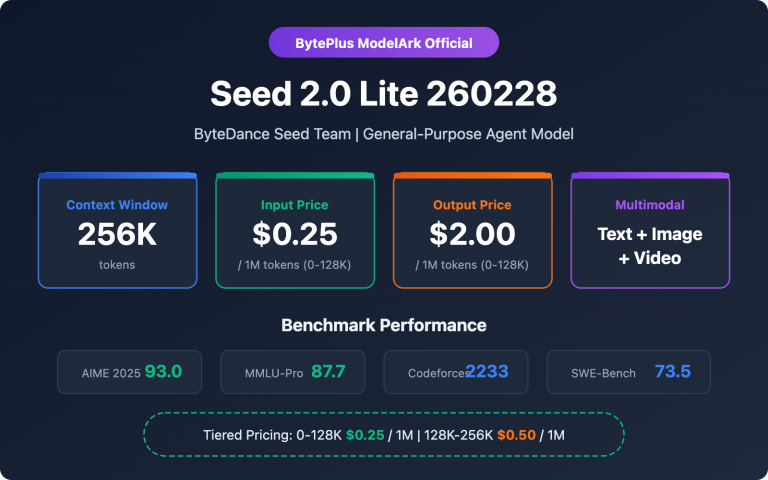
Author's Note: The seed-2-0-mini-260215 model is the latest release from the BytePlus platform and the vanguard of the Seed 2.0 series, with Seed 2.0 Pro and Seed 2.0 Lite yet to be released. Currently, Seed 2.0 Mini is live on APIYI with pricing identical to the official site. Plus, you can get a 10% bonus on deposits starting from $100—equivalent to a 20% discount!
Regarding the Seed series background: How do you deploy an AI model with both multimodal understanding and reasoning capabilities in a high-concurrency, low-latency production environment while keeping inference costs at rock bottom? This is a core challenge for many enterprise developers. This article provides a deep dive into the API invocation methods for Seed 2.0 Mini (seed-2-0-mini-260215), helping you quickly master this high-performance small model optimized for cost-sensitive scenarios.
Core Value: By the end of this post, you'll know how to configure Seed 2.0 Mini's 4-level reasoning modes, leverage its 256K long context window for complex tasks, and implement the most cost-effective solutions for your real-world projects.
Seed 2.0 Mini API Key Points
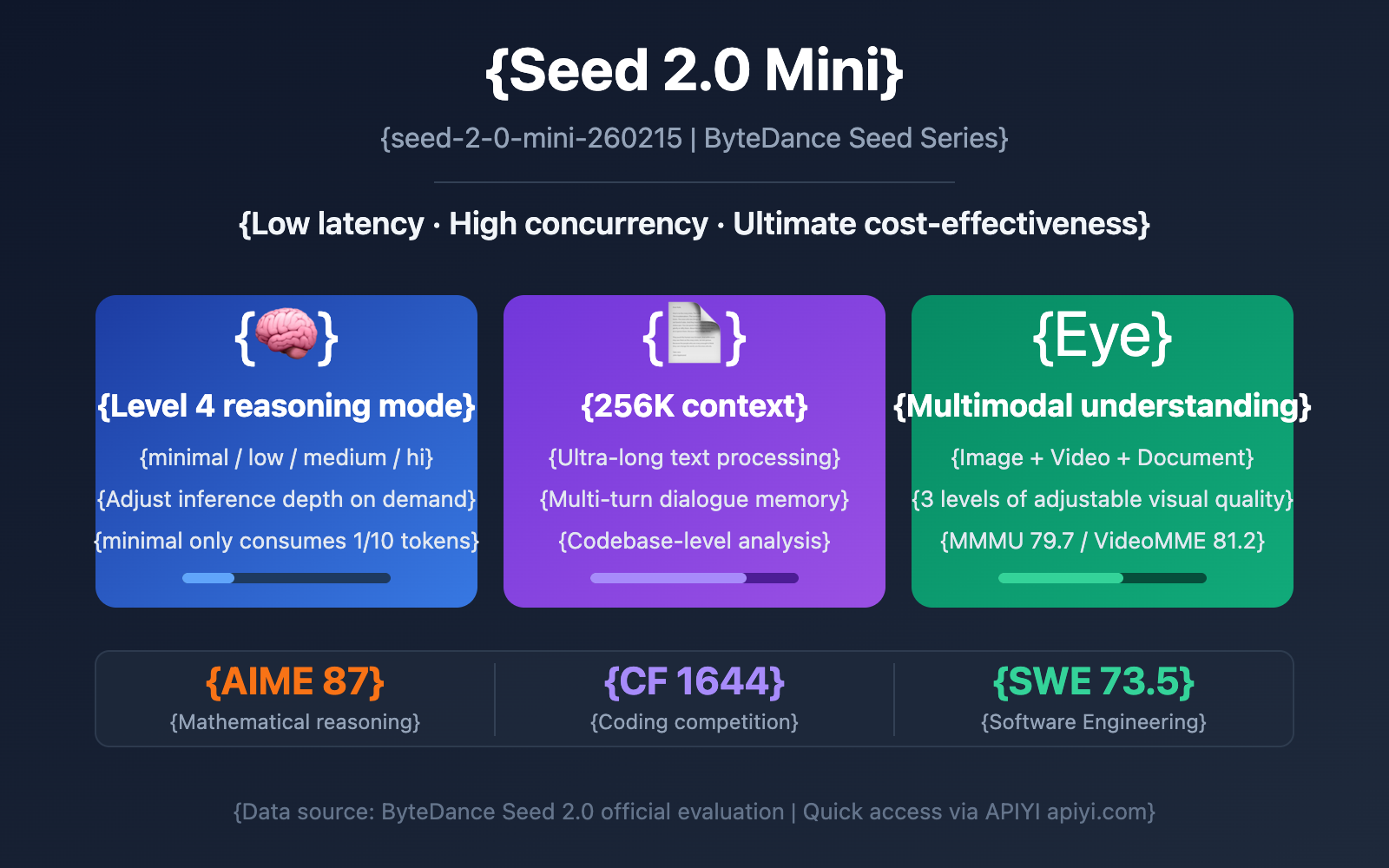
ByteDance officially released the Seed 2.0 series of Large Language Models on February 14, 2026, featuring four variants: Pro, Lite, Mini, and Code. Among them, Seed 2.0 Mini (Model ID: seed-2-0-mini-260215) is specifically designed for low-latency, high-concurrency, and cost-sensitive applications, making it the most inference-efficient member of the Seed 2.0 family.
| Key Feature | Description | Developer Benefit |
|---|---|---|
| 4 Reasoning Levels | Adjustable: minimal / low / medium / hi | Choose reasoning depth on-demand; precise cost control |
| 256K Context Window | Supports ultra-long text and multi-turn chat | Handles complex scenarios like long docs and codebase analysis |
| Multimodal Understanding | Analyzes images, videos, and documents | One model covers both text and visual dual-channel tasks |
| Extreme Cost-Efficiency | Non-reasoning mode uses ~1/10 tokens of reasoning mode | Massive cost reduction for high-frequency simple tasks |
| Enterprise-Grade Stability | Exception modes reduced by ~40% vs previous gen | Significantly improved reliability for B2B scenarios |
Seed 2.0 Mini Reasoning Modes Explained
The most distinctive feature of Seed 2.0 Mini is its reasoning_effort system with four adjustable levels. Developers can flexibly choose the reasoning depth based on task complexity:
- minimal (No Reasoning): Completely skips Chain of Thought (CoT) reasoning and outputs results directly. Ideal for standardized tasks like classification, format conversion, and template filling. Offers the fastest response and lowest token consumption.
- low (Light Reasoning): Performs simple logical deduction. Suitable for medium-complexity tasks like information extraction, basic Q&A, and content summarization.
- medium (Moderate Reasoning): Executes a more complete reasoning process. Best for tasks requiring logical depth, such as code generation, data analysis, and business reporting.
- hi (Deep Reasoning): Enables full Chain of Thought reasoning with near-peak performance. Perfect for high-difficulty tasks like mathematical proofs, complex programming, and multi-step reasoning.
In minimal mode, Seed 2.0 Mini maintains about 85% of its reasoning-mode performance while consuming only about 1/10th of the tokens. This means you get incredible cost efficiency for high-frequency, straightforward scenarios.
Seed 2.0 Mini API Performance Benchmarks
While Seed 2.0 Mini is the most lightweight variant in the Seed 2.0 series, it still performs impressively across multiple benchmarks, significantly outperforming the previous generation's Seed 1.6 Flash small model.
| Evaluation Dimension | Item | Seed 2.0 Mini | Seed 2.0 Pro | Description |
|---|---|---|---|---|
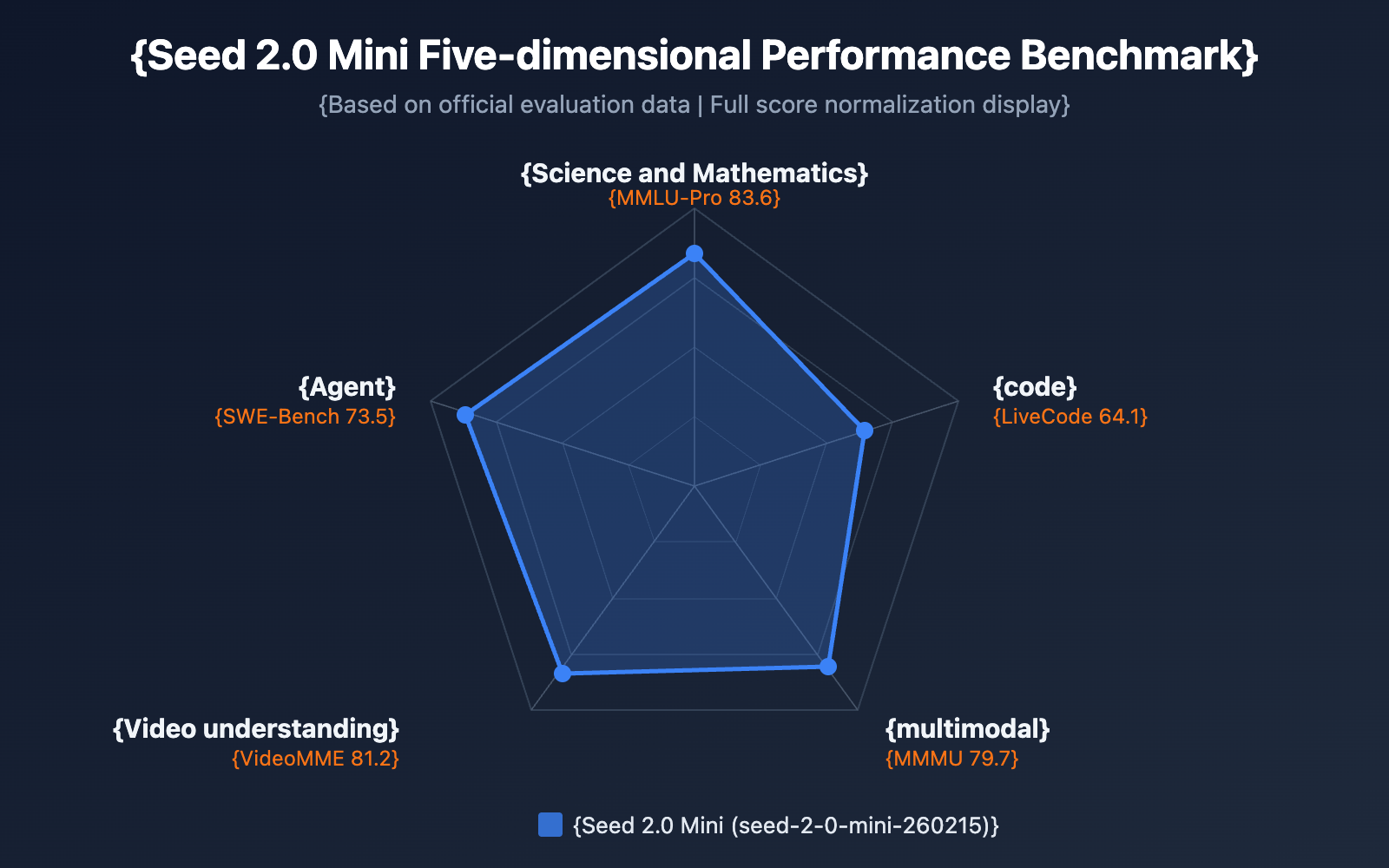
| Science & Math | MMLU-Pro | 83.6 | — | Knowledge understanding benchmark |
| Science & Math | AIME 2025 | 87 | 98.3 | Math competition reasoning |
| Science & Math | MathVision | 78.1 | — | Visual math reasoning |
| Coding Capability | Codeforces | 1644 | 3020 | Competitive programming rating |
| Coding Capability | LiveCodeBench | 64.1 | — | Real-time programming evaluation |
| Multimodal | MathVista | 85.5 | — | Mathematical visual reasoning |
| Multimodal | MMMU | 79.7 | — | Multimodal understanding |
| Video Understanding | VideoMME | 81.2 | 89.5 | Video content analysis |
| Agent | SWE Bench | 73.5 | — | Software engineering tasks |
| Agent | BrowseComp | 72.1 | — | Web browsing understanding |
As the benchmark data shows, Seed 2.0 Mini maintains the high inference efficiency of a small model while achieving core capability metrics very close to the Pro version. It's particularly strong in Agent tasks (SWE Bench 73.5, BrowseComp 72.1) and multimodal understanding (MMMU 79.7), making it fully capable of handling enterprise-grade applications.
🎯 Technical Tip: When choosing between Seed 2.0 model variants, Mini is the best choice for high-concurrency batch processing. We recommend running actual tests via the APIYI (apiyi.com) platform to compare latency and quality across different inference modes, helping you find the perfect configuration for your specific business scenario.
Getting Started with Seed 2.0 Mini API
Minimalist Call Example
Seed 2.0 Mini is compatible with the OpenAI SDK interface, making integration costs extremely low. Here's the most basic call code:
import openai

client = openai.OpenAI(
    api_key="YOUR_API_KEY",
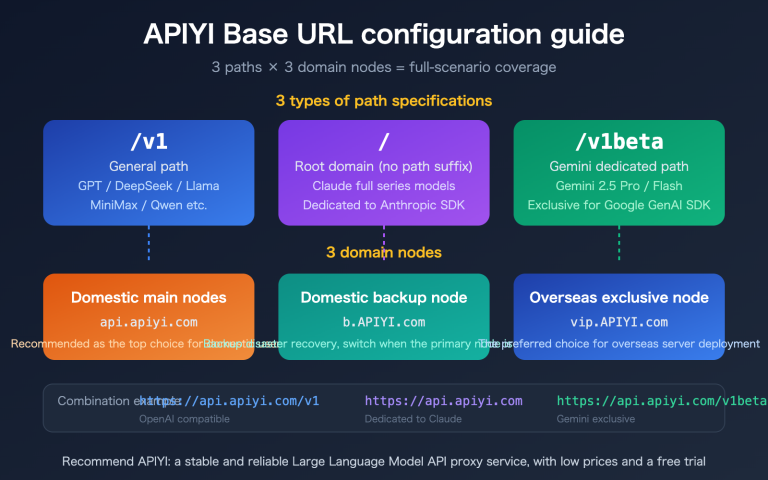
    base_url="https://api.apiyi.com/v1"  # Using APIYI unified interface
)

# Basic text dialogue - use minimal reasoning mode for lightning-fast response
response = client.chat.completions.create(
    model="seed-2-0-mini-260215",
    messages=[
        {"role": "user", "content": "Summarize the core principles of quantum computing in one sentence."}
    ],
    extra_body={
        "reasoning_effort": "minimal"  # Optional: minimal / low / medium / hi
    }
)

print(response.choices[0].message.content)
🚀 Quick Start: We recommend using the APIYI (apiyi.com) platform for quick access to the Seed 2.0 Mini API. The platform provides out-of-the-box compatible interfaces, requires no complex configuration, and allows you to complete integration in 5 minutes while supporting unified calls for multiple mainstream models.
Configuring the 4-Tier Reasoning Modes
Different business scenarios require different depths of reasoning. The following example shows how to flexibly switch reasoning modes based on the task type:
import openai

client = openai.OpenAI(
    api_key="YOUR_API_KEY",
    base_url="https://api.apiyi.com/v1"  # APIYI unified interface
)

def call_seed_mini(prompt, reasoning_effort="medium", system_prompt=None):
    """General call function for Seed 2.0 Mini, supporting 4-tier reasoning modes"""
    messages = []
    if system_prompt:
        messages.append({"role": "system", "content": system_prompt})
    messages.append({"role": "user", "content": prompt})

    response = client.chat.completions.create(
        model="seed-2-0-mini-260215",
        messages=messages,
        extra_body={"reasoning_effort": reasoning_effort}
    )
    return response.choices[0].message.content

# Scenario 1: Content Classification - use minimal mode for instant response
category = call_seed_mini(
    prompt="Classify the following text into: Tech/Finance/Sports/Entertainment\nText: The next-generation chip uses a 3nm process...",
    reasoning_effort="minimal"
)

# Scenario 2: Text Summarization - use low mode for light reasoning
summary = call_seed_mini(
    prompt="Please summarize the core points of the following article in 100 words...",
    reasoning_effort="low"
)

# Scenario 3: Code Generation - use medium mode to balance speed and quality
code = call_seed_mini(
    prompt="Implement an LRU cache in Python that supports expiration times.",
    reasoning_effort="medium",
    system_prompt="You are a senior Python engineer"
)

# Scenario 4: Complex Reasoning - use hi mode for maximum reasoning quality
analysis = call_seed_mini(
    prompt="Analyze the following business data and provide 3 feasible growth strategies...",
    reasoning_effort="hi"
)
View full multimodal call example
import openai
import base64

client = openai.OpenAI(
    api_key="YOUR_API_KEY",
    base_url="https://api.apiyi.com/v1"
)

# Image understanding example - Seed 2.0 Mini supports multimodal text and images
def analyze_image(image_url, question, reasoning_effort="medium"):
    """Use Seed 2.0 Mini for image understanding and analysis"""
    response = client.chat.completions.create(
        model="seed-2-0-mini-260215",
        messages=[
            {
                "role": "user",
                "content": [
                    {"type": "text", "text": question},
                    {"type": "image_url", "image_url": {"url": image_url}}
                ]
            }
        ],
        extra_body={"reasoning_effort": reasoning_effort}
    )
    return response.choices[0].message.content

# Document parsing example
result = analyze_image(
    image_url="https://example.com/chart.png",
    question="Please analyze the key data trends in this chart.",
    reasoning_effort="medium"
)
print(result)

# Visual quality tiered control
# Seed 2.0 Mini supports three visual quality levels: low, high, and xhigh
response = client.chat.completions.create(
    model="seed-2-0-mini-260215",
    messages=[
        {
            "role": "user",
            "content": [
                {"type": "text", "text": "Please describe all the information in this dense text image in detail."},
                {
                    "type": "image_url",
                    "image_url": {
                        "url": "https://example.com/dense-text.png",
                        "detail": "xhigh"  # Optional: low / high / xhigh
                    }
                }
            ]
        }
    ],
    extra_body={"reasoning_effort": "hi"}
)
Seed 2.0 Mini API: A Guide to Choosing the Right Inference Mode
Choosing the right inference mode is the secret sauce to getting the most out of Seed 2.0 Mini. Here's a detailed breakdown of how the different modes compare and where they shine:
| Inference Mode | Token Consumption | Response Speed | Inference Quality | Recommended Scenarios |
|---|---|---|---|---|
| minimal | Approx. 1/10 | Fastest | ~85% | Classification, labeling, format conversion, template filling, simple Q&A |
| low | Approx. 1/5 | Fast | ~90% | Information extraction, summarization, translation, data cleaning |
| medium | Approx. 1/2 | Medium | ~95% | Code generation, data analysis, business reports, technical documentation |
| hi | 1x (Baseline) | Slower | 100% | Math reasoning, complex programming, multi-step logic, creative writing |
Enterprise-Grade Selection Strategy for Seed 2.0 Mini
For enterprise applications, we recommend a tiered invocation strategy to maximize your cost efficiency:
Tier 1 — High-Frequency Standardized Tasks (60-70% of requests):
Use minimal mode for tasks like content moderation, text classification, sentiment analysis, and keyword extraction. These tasks don't require heavy lifting in terms of reasoning. The 85% accuracy of minimal mode is usually more than enough, and you'll only be using 1/10th of the tokens compared to hi mode.
Tier 2 — Medium Complexity Tasks (20-25% of requests):
Use low or medium mode for text generation, content summarization, and simple code completion. These tasks require a bit of logical deduction, and medium mode offers a fantastic sweet spot between quality and cost.
Tier 3 — High Complexity Tasks (5-10% of requests):
Use hi mode—or even upgrade to Seed 2.0 Pro—for complex reasoning, mathematical proofs, and large-scale code generation.
💰 Cost Optimization: By adopting this tiered strategy, businesses can slash their overall model invocation costs by 60-80% without sacrificing service quality. We recommend running A/B tests via the APIYI (apiyi.com) platform to see how different modes handle your specific business data and find your perfect balance.
Seed 2.0 Mini API vs. Previous Generation
Seed 2.0 Mini is a massive step up from Seed 1.6 Flash. Here's how it stacks up across key dimensions:
| Dimension | Seed 2.0 Mini | Seed 1.6 Flash | Improvement |
|---|---|---|---|
| Content Recognition | Significant boost | Baseline | Massive |
| Knowledge Reasoning | Surpasses Seed 1.6 Pro | Baseline | Beyond Pro-level |
| Coding Ability | Noticeable boost | Baseline | Meets enterprise needs |
| Agent Capabilities | Noticeable boost | Baseline | Supports complex tool calls |
| Anomaly Patterns | Reduced by ~40% | Baseline | Significantly fewer redundancy issues |
| Context Window | 256K | — | Ultra-long context support |
| Inference Modes | 4 adjustable levels | — | New capability |
| Visual Quality Tiers | low/high/xhigh | — | New capability |
| Multimodal | Image + Video + Document | Limited support | Comprehensive enhancement |
Core Advantages of Seed 2.0 Mini in ToB Scenarios
Seed 2.0 Mini has been specifically tuned for enterprise (ToB) applications:
- Image Moderation: Recognition capabilities for common ToB fields (image auditing, classification, video inspection) have seen a major jump, with anomaly patterns dropping by about 40%.
- Structured Output: It hits the mark for enterprise requirements in image-text understanding and high-fidelity structured output, including support for forced JSON Schema output.
- Visual Quality Control: You get three tiers—low, high, and xhigh—to balance image quality against your resource budget. The default "high" mode improves prediction consistency, while the higher tier can handle dense text, complex charts, and detail-heavy scenes.
- Batch Processing: It's built for high-concurrency batch generation, performing exceptionally well in tasks like batch classification, content moderation, and lightweight generation.
Seed 2.0 Mini API FAQ
Q1: How should I choose the reasoning_effort parameter for Seed 2.0 Mini?
The core principle for choosing reasoning_effort is "task matching." For standardized tasks like classification, tagging, and formatting, using minimal will get you about 85% accuracy while consuming only 1/10 of the tokens. For tasks requiring logical deduction, such as code generation or data analysis, we recommend using medium. Only high-difficulty scenarios like mathematical proofs or complex reasoning require the hi mode. You can quickly test the effects of different modes through the APIYI (apiyi.com) platform to find the optimal configuration.
Q2: What multimodal inputs does Seed 2.0 Mini support?
Seed 2.0 Mini supports three input modalities: text, image, and video. For images, it supports the understanding and analysis of common formats (PNG, JPEG, WebP, etc.) and provides three visual quality options: low, high, and xhigh. For video, it supports content understanding and analysis, achieving a VideoMME score of 81.2. On the APIYI (apiyi.com) platform, you can use a unified OpenAI-compatible interface for all multimodal model invocations without needing extra adaptation.
Q3: Should I choose Seed 2.0 Mini or Seed 2.0 Pro?
The two have different positionings: Mini focuses on high-concurrency, low-latency, and cost-sensitive batch processing scenarios. Pro, on the other hand, pursues ultimate reasoning capabilities (with an AIME 2025 score of 98.3 and a Codeforces rating of 3020). If your application mainly involves high-frequency simple tasks (such as content moderation, classification tagging, or data cleaning), choosing Mini can significantly reduce costs. If you need cutting-edge reasoning capabilities (like complex math or high-difficulty programming), then go with Pro.
Q4: How does Seed 2.0 Mini implement tiered visual quality control?
Seed 2.0 Mini's visual tiering system offers 3 levels: the low mode is suitable for quick previews and simple recognition, consuming the fewest resources; the high mode (default) provides higher prediction consistency and recognition accuracy; the xhigh mode is specifically designed for dense text, complex charts, and detail-rich scenarios, reliably handling high-difficulty visual content. You can specify the level in the image_url.detail parameter of your API request.
Q5: How do I migrate existing GPT/Claude applications to Seed 2.0 Mini?
Seed 2.0 Mini is fully compatible with the OpenAI SDK interface specification, so migration costs are extremely low. You only need to modify the base_url and model parameters. The additional reasoning_effort parameter is passed via extra_body, which doesn't affect your existing interface logic. For developers already using the APIYI (apiyi.com) platform, just change the model parameter to seed-2-0-mini-260215 for a seamless switch.
Seed 2.0 Mini API Summary and Recommendations
Seed 2.0 Mini (Model ID: seed-2-0-mini-260215) is the core model in ByteDance's Seed 2.0 series designed for high-concurrency, low-cost scenarios. Its 4-level reasoning modes allow developers to precisely control reasoning depth and cost, while the 256K context window and multimodal understanding capabilities make it perform exceptionally well in enterprise-level applications. Compared to the previous generation Seed 1.6 Flash, Seed 2.0 Mini has seen significant improvements in content recognition, knowledge reasoning, and Agent capabilities, with abnormal modes reduced by about 40%.
We recommend quickly accessing the Seed 2.0 Mini API through APIYI (apiyi.com). The platform provides an OpenAI-compatible interface and supports unified model invocation and flexible switching across various mainstream models, helping you efficiently complete technical validation and production environment deployment.
References
-
ByteDance Seed 2.0 Official Page: Model introduction and technical specs
- Link:
seed.bytedance.com/en/seed2 - Description: Contains complete Seed 2.0 series model info and benchmark data
- Link:
-
Seed 2.0 Model Card: Technical Whitepaper
- Link:
github.com/ByteDance-Seed/Seed2.0 - Description: Includes detailed model architecture, training methods, and evaluation data
- Link:
-
Seed Model List: All available models
- Link:
seed.bytedance.com/en/models - Description: Covers specs for the full Pro, Lite, Mini, and Code series
- Link:
Author: APIYI Team | For more tips on AI model invocation, visit the APIYI apiyi.com technical blog.