Want your Clawdbot private AI assistant to have real-time web search capabilities? Configuring Brave Search API is currently the most recommended solution. This article will walk you through the entire process, from applying for an API Key to configuring Clawdbot.
Core Value: By reading this article, you'll learn how to configure the Brave Search API for Clawdbot, enabling your AI assistant to search the internet in real-time for the latest information, breaking free from knowledge cutoff limits.
What is Brave Search API?
The Brave Search API is an enterprise-grade web search interface provided by Brave. It's built on an independently developed search index that covers over 35 billion web pages.
Key Features of Brave Search API
| Feature | Description | Value for Developers |
|---|---|---|
| Independent Index | Doesn't rely on Google or Bing | More diverse results |
| Real-time Updates | 100M+ pages updated daily | Access to the latest information |
| Ad-free | Pure API results without ads | Ready for direct use in AI apps |
| Privacy First | No tracking of user behavior | Complies with privacy requirements |
| Multi-endpoint Support | Web, News, Images, Video | Meets various search scenarios |
Why Brave Search API is Perfect for AI Applications
With Google effectively locking down its Search API and Bing significantly hiking prices before ultimately discontinuing its API services, Brave Search API has emerged as the only independent and commercially viable global search API option available today.
| Search Engine | API Status | Suitable for AI Apps |
|---|---|---|
| No general search API provided | No | |
| Bing | API service discontinued in 2024 | No |
| Brave Search | Actively providing API | Yes |
| DuckDuckGo | No official API | No |
🎯 Technical Note: Brave Search API has become the preferred search tool for AI applications like Claude MCP and RAG pipelines. Through the APIYI (apiyi.com) platform, you can quickly access various utility-based APIs, including Brave Search.
Brave Search API Pricing Plans Explained
Brave Search API offers several pricing tiers, ranging from a free plan to enterprise-level solutions, catering to needs of all sizes.
Brave Search API Free Tier
The free tier is perfect for individual users and small projects:
| Quota Item | Free Allowance |
|---|---|
| Monthly Requests | 2,000 |
| QPS Limit | 1 req/sec |
| Supported Endpoints | Web Search |
| Use Cases | Personal projects, testing, and development |
Brave Search API Paid Plans Comparison
| Plan | Price | QPS | Monthly Requests | Key Features |
|---|---|---|---|---|
| Free | $0 | 1 | 2,000 | Basic Web Search |
| Base | $3 / 1k reqs | 20 | 20M | Goggles, News, Video |
| Base AI | $5 / 1k reqs | 20 | 20M | AI App Licensing |
| Pro AI | $9 / 1k reqs | 50 | Unlimited | Full features, Priority Support |
| AI Grounding | $4 / 1k reqs + $5 / 1M Tokens | – | – | Multi-turn search, Reasoning & Planning |
💡 Cost Optimization Tip: For personal use with Clawdbot, the free tier's 2,000 requests/month is usually more than enough. If you have higher search requirements, you can find more flexible billing options through the APIYI platform at apiyi.com.
What is Clawdbot?
Clawdbot is an open-source personal AI assistant that runs right on your own device and interacts with you through the communication channels you already use every day.
Clawdbot Core Advantages
| Advantage | Description |
|---|---|
| Multi-channel Support | Works with WhatsApp, Telegram, Discord, Slack, Signal, iMessage, and more |
| Runs Locally | Your data never leaves your device, so your privacy is guaranteed |
| Highly Customizable | Supports custom Skills and tool integrations |
| Free & Open Source | Fully open source on GitHub with an active community |
Clawdbot Architecture & Brave Search Integration
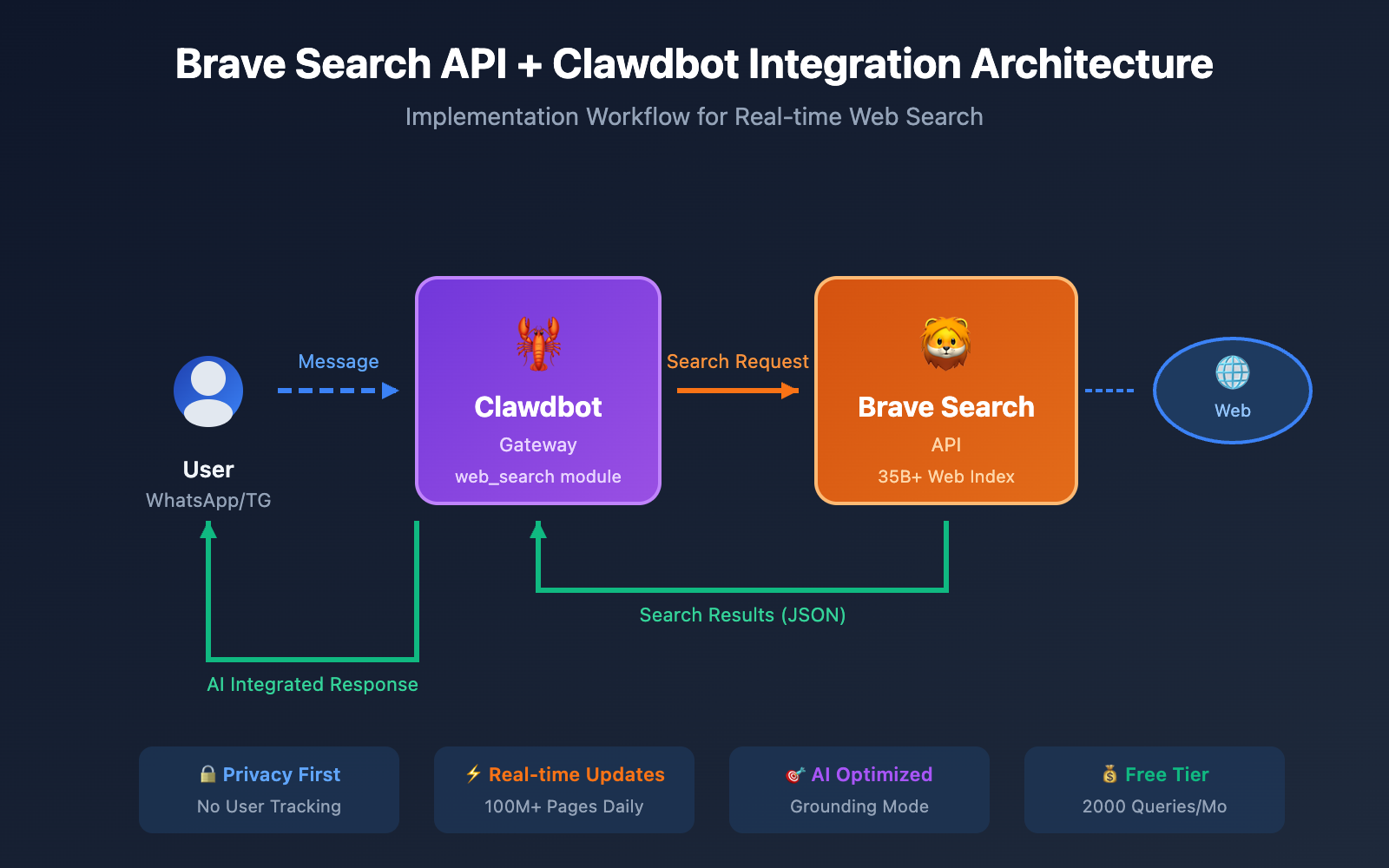
User Message → Clawdbot Gateway → AI Model Processing
                ↓
        Need web search?
                ↓
        Call Brave Search API
                ↓
        Search Results Returned → AI Model Integration → Reply to User
Clawdbot uses Brave Search as its default web_search provider. This means once you've finished the configuration, your AI assistant can automatically search the internet for information whenever it needs to.
Steps to Get Your Brave Search API Key
Step 1: Register for a Brave Search API Account
Head over to the Brave Search API official site: brave.com/search/api/
Click the "Get Started" or "Try for free" button and sign up with your email.
Step 2: Access the API Dashboard
Once you've registered, log in to the API Dashboard at: api-dashboard.search.brave.com
Step 3: Choose a Subscription Plan
Pick the plan that fits your needs on the Plans page:
| Use Case | Recommended Plan | Why? |
|---|---|---|
| Personal Clawdbot | Free | 2,000 calls/month is plenty for daily use |
| Team Collaboration | Base AI | Supports AI application authorization |
| Commercial Product | Pro AI | Unlimited requests and full feature set |
Pro Tip: For Clawdbot's web_search feature, you'll need to select the Data for Search plan, not the "Data for AI" plan.
Step 4: Generate Your API Key
- Find the "API Keys" section in the Dashboard.
- Click "Create API Key."
- Give your Key a name (like
clawdbot-search). - Copy the generated API Key and save it somewhere safe.
sk-brave-xxxxxxxxxxxxxxxxxxxxxxxxxxxxxxxx
⚠️ Security Reminder: Your API Key will only be displayed once. Copy and save it immediately—if you lose it, you'll have to generate a new one.
Detailed Steps for Configuring Brave Search API in Clawdbot
Method 1: Interactive Configuration (Recommended)
This is the easiest way to set things up, as Clawdbot will walk you through the entire process.
clawdbot configure --section web
Once executed, just follow the prompts:
- Select to enable the
web_searchfeature. - Paste your Brave Search API Key.
- Confirm the configuration is complete.
Method 2: Configuration File Method
If you're comfortable with the command line, you can edit the Clawdbot configuration file directly.
Configuration File Locations:
- macOS/Linux:
~/.config/clawdbot/config.yaml - Windows:
%APPDATA%\clawdbot\config.yaml
Adding Brave Search Configuration:
# Clawdbot Configuration File
web_search:
  enabled: true
  provider: brave
  api_key: "sk-brave-xxxxxxxxxxxxxxxxxxxxxxxxxxxxxxxx"

  # Optional: Search Parameters
  options:
    country: "US"        # Region for search results
    search_lang: "en"    # Search language
    count: 10            # Number of results to return
Method 3: Environment Variables Method
This method is ideal for Docker deployments or CI/CD environments.
# Set environment variables
export BRAVE_API_KEY="sk-brave-xxxxxxxxxxxxxxxxxxxxxxxxxxxxxxxx"

# Start Clawdbot
clawdbot start
Docker Compose Example:
version: '3.8'
services:
  clawdbot:
    image: clawdbot/clawdbot:latest
    environment:
      - BRAVE_API_KEY=sk-brave-xxxxxxxxxxxxxxxxxxxxxxxxxxxxxxxx
    volumes:
      - ./config:/app/config
🚀 Quick Start: Once configured, you can test it by sending any question requiring a web search to Clawdbot through any connected channel. If you also need to configure Large Language Model APIs, we recommend using the APIYI (apiyi.com) platform to get a unified interface.
Advanced Brave Search API Configuration in Clawdbot
Search Parameters Explained
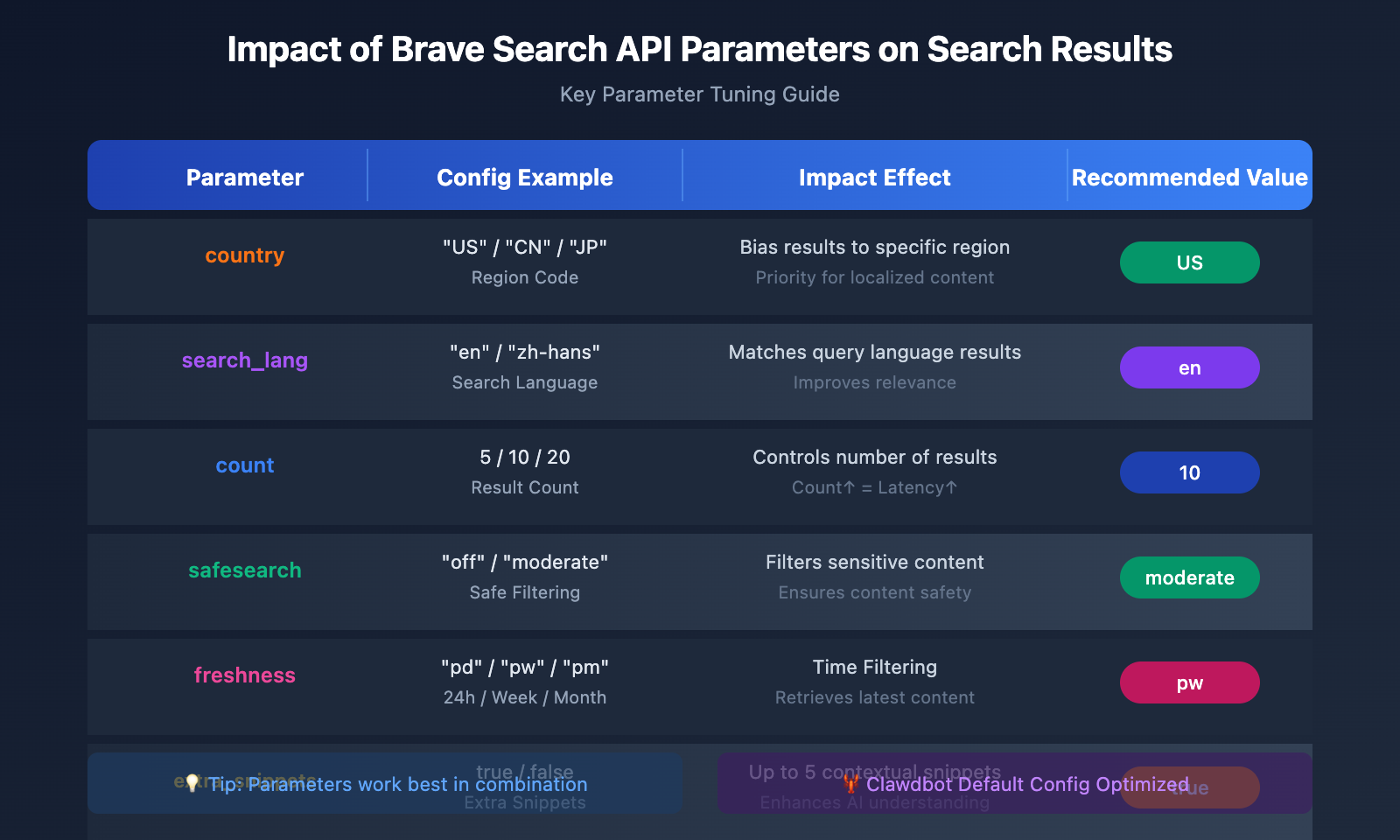
Clawdbot supports customizing several Brave Search parameters:
| Parameter | Type | Description | Example Value |
|---|---|---|---|
country |
string | Region preference for search results | US, CN, JP |
search_lang |
string | Search query language | en, zh-hans, ja |
ui_lang |
string | Interface language | en-US, zh-CN |
count |
int | Number of results returned | 1-20 |
offset |
int | Result offset | 0-9 |
safesearch |
string | Safe search level | off, moderate, strict |
freshness |
string | Time filter | pd (24h), pw (week), pm (month) |
Complete Configuration Example
web_search:
  enabled: true
  provider: brave
  api_key: "sk-brave-xxxxxxxxxxxxxxxxxxxxxxxxxxxxxxxx"

  options:
    # Basic Settings
    country: "US"
    search_lang: "en"
    count: 10

    # Content Filtering
    safesearch: "moderate"

    # Advanced Options
    text_decorations: true    # Enable text highlighting
    extra_snippets: true      # Retrieve extra snippets
Custom Search Rules with Goggles
Brave Search's unique "Goggles" feature allows you to customize the ranking and filtering of your search results.
web_search:
  provider: brave
  api_key: "your-api-key"
  options:
    goggles_id: "your-goggles-id"  # Apply a custom Goggles ID
Common Goggles Scenarios:
- Exclude specific domains.
- Prioritize technical documentation sites.
- Filter out low-quality content farms.
Clawdbot Brave Search Real-World Examples
Example 1: Finding the Latest Information
User Question:
What's new from OpenAI today?
Clawdbot Behavior:
- Identifies the need to search the web for the latest information.
- Calls the Brave Search API to look for relevant news.
- Consolidates the search results to generate an answer.
Example 2: Technical Inquiry
User Question:
What are the new features in Python 3.12?
Clawdbot Behavior:
- Searches Python 3.12 official documentation and technical articles.
- Extracts key feature information.
- Provides a structured response to the user.
Example 3: Multi-step Search Scenarios
Using AI Grounding mode, Clawdbot can perform multi-round searching and reasoning:
Compare the performance of Claude 3.5 Sonnet and GPT-4o in code generation.
Clawdbot will:
- Search for Claude 3.5 Sonnet's coding benchmarks.
- Search for GPT-4o's coding benchmarks.
- Search for articles comparing the two.
- Provide a conclusion after a comprehensive analysis.
🎯 Model Recommendation: Clawdbot supports various AI model backends. If you need to use multiple models like Claude and GPT-4o simultaneously, you can get a unified API interface through APIYI (apiyi.com) for flexible switching and cost control.
Brave Search API Quota Monitoring and Management
Checking API Usage
Log in to the Brave Search API Dashboard: api-dashboard.search.brave.com
On the Usage page, you can see:
- Number of requests used this month.
- Remaining quota.
- Historical usage trends.
Viewing Search Stats in Clawdbot
clawdbot stats --module web_search
Example output:
Web Search Statistics (Last 30 days)
------------------------------------
Total searches:     1,247
Successful:         1,235 (99.0%)
Failed:             12 (1.0%)
Avg response time:  342ms
Quota Alert Settings
In the Brave API Dashboard, you can set up:
- Email alerts when usage reaches 80%.
- Automatic stop when the quota is exhausted (to prevent overage charges).
Brave Search API Clawdbot Configuration FAQ
Q1: What should I do if the search function isn’t working after configuration?
Check these points:
- Make sure your API Key is correct: Re-copy and paste it to avoid any extra spaces.
- Check your plan type: It must be a "Data for Search" plan, not "Data for AI."
- Verify network connectivity: Ensure your server can access
api.search.brave.com. - View the logs: Run
clawdbot logs --module web_searchto check for error messages.
If the issue persists, you can get technical support and alternative solutions through APIYI (apiyi.com).
Q2: What happens if I run out of my free quota?
You've got a few options:
- Wait for the monthly reset: Free quotas reset on the 1st of every month.
- Upgrade to a paid plan: The Base AI plan starts at $5 per 1,000 requests.
- Optimize your search strategy: Configure Clawdbot to only trigger searches when absolutely necessary.
- Use caching: Reuse previous results for identical queries.
You can also use the APIYI (apiyi.com) platform for more flexible search API billing plans where you pay based on actual usage.
Q3: How can I improve the quality of search results?
Here are a few optimization tips:
- Specify region and language: Set
countryandsearch_langbased on your needs. - Enable extra_snippets: Get richer content summaries.
- Use Goggles: Apply custom ranking rules for your results.
- Set freshness: Use time filters for content that needs to be up-to-date.
Q4: What’s the difference between Brave Search API and other search APIs?
| Comparison | Brave Search | SerpAPI | Tavily |
|---|---|---|---|
| Index Source | Independent Index | Scrapes Google | Independent Index |
| Free Quota | 2,000 requests/mo | 100 requests/mo | 1,000 requests/mo |
| AI Optimization | AI Grounding Mode | None | Designed for AI |
| Price | $3-9 per 1k | From $50/mo | $5 per 1k |
Brave Search has the edge when it comes to cost-effectiveness and independence.
Best Practices for Integrating Brave Search API with Clawdbot
Performance Optimization Suggestions
| Optimization | Suggestion | Effect |
|---|---|---|
| Result Count | Set count: 5-10 |
Reduces response time |
| Request Caching | Enable local caching | Saves API quota |
| Concurrency Control | Follow QPS limits | Prevents request rejection |
| Error Retries | Implement exponential backoff | Improves stability |
Security Recommendations
- Don't hardcode your API Key: Use environment variables or configuration files.
- Rotate keys regularly: Change your keys every 3-6 months.
- Monitor for unusual usage: Set up usage alerts.
- Limit access scope: Only authorize the specific services that need it.
Cost Control Strategy
web_search:
  enabled: true
  provider: brave

  # Cost control
  rate_limit:
    max_per_minute: 10      # Max 10 searches per minute
    max_per_day: 100        # Max 100 searches per day

  cache:
    enabled: true
    ttl: 3600               # Cache for 1 hour
Brave Search API Clawdbot Configuration Summary
Through this article, you've learned:
- The core value of Brave Search API: Independent indexing, ad-free, and privacy-first.
- Pricing plan selection: The free tier for individual users is sufficient; upgrade as needed for commercial projects.
- Three configuration methods: Interactive, configuration files, and environment variables.
- Advanced parameter tuning: Region, language, and Goggles custom rules.
- Best practices: Performance optimization, security recommendations, and cost control.
Brave Search API empowers Clawdbot with real-time web search capabilities, breaking the limitations of Large Language Model knowledge cutoff dates. Paired with powerful models like Claude or GPT-4o, your personal AI assistant becomes much more practical.
We recommend using APIYI (apiyi.com) to quickly access the Large Language Model APIs and utility APIs you need, providing a one-stop solution for all your Clawdbot interface requirements.
References
-
Brave Search API Official Documentation: API interface specifications and parameter descriptions.
- Link:
brave.com/search/api/
- Link:
-
Clawdbot Official Documentation: Brave Search configuration guide.
- Link:
docs.clawd.bot/brave-search
- Link:
-
Clawdbot GitHub: Open-source code and issues.
- Link:
github.com/clawdbot/clawdbot
- Link:
-
Brave AI Grounding Introduction: Descriptions of advanced AI search features.
- Link:
brave.com/blog/ai-grounding/
- Link:
📝 Author: APIYI Team
📅 Last Updated: January 2026
🔗 Tech Community: Visit APIYI (apiyi.com) for more AI development resources.