"I want to fix the prompt for text-to-image so I can generate a consistent IP character. Will the fixed Seed parameter be available?"
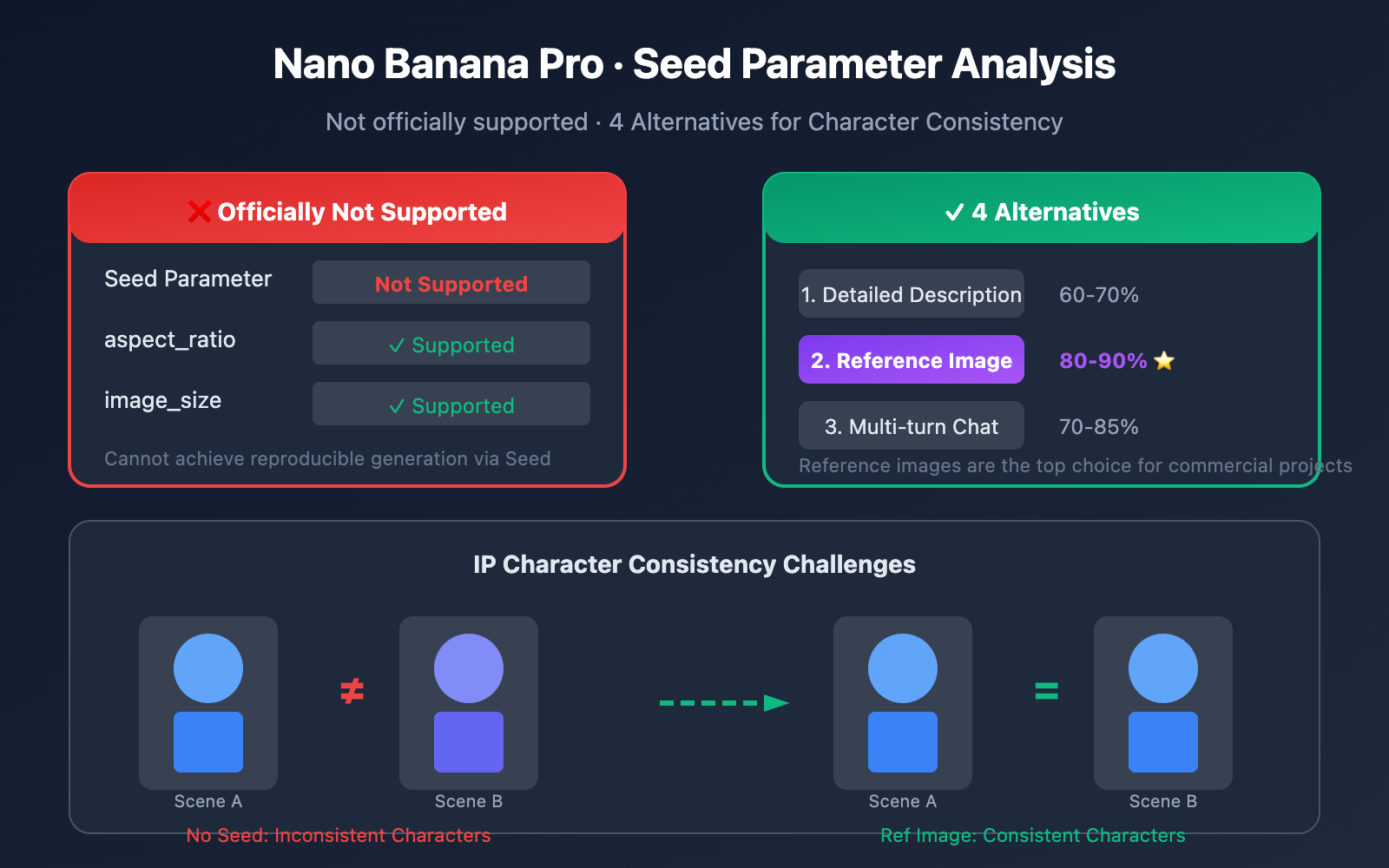
This is one of the most common questions from developers using Nano Banana Pro. Unfortunately, official documentation has confirmed: Nano Banana Pro does not currently support the Seed parameter.
If you check the official Google documentation (ai.google.dev/gemini-api/docs/image-generation), you'll see the only supported parameters are:
aspect_ratio: Aspect ratio (1:1, 16:9, 4:3, etc.)image_size: Resolution (1K, 2K, 4K)
There's no Seed parameter.
But that doesn't mean you're out of luck when it comes to character consistency. In this article, we'll dive into how the Seed parameter works and explore 4 alternative ways to keep your IP characters consistent in Nano Banana Pro.
What is a Seed Parameter?
How Seed Works
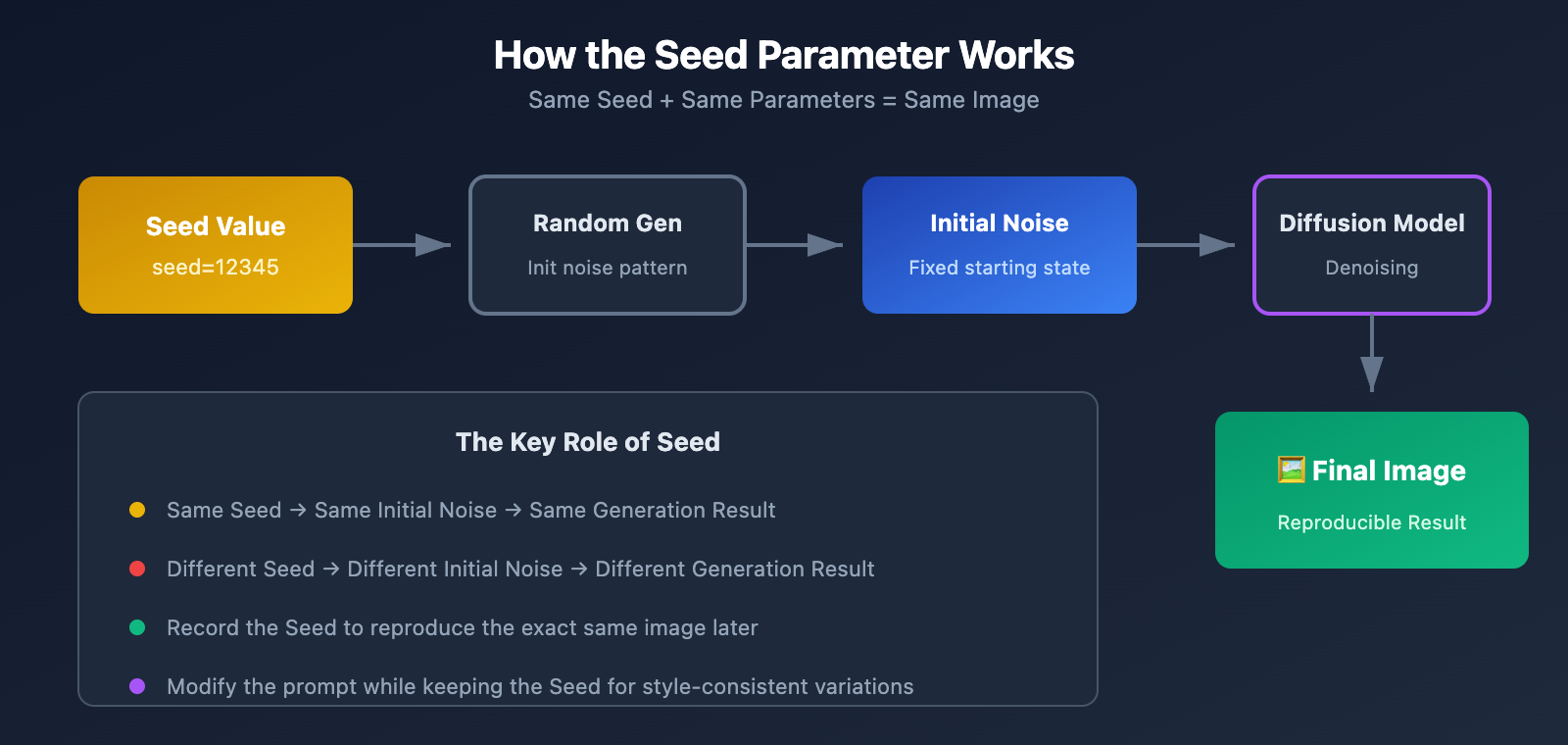
In AI image generation, a Seed is a numerical value used to initialize a random number generator. This value determines the starting noise pattern for the image generation process.
| Concept | Explanation |
|---|---|
| Seed Definition | A numerical value that controls the initial noise pattern |
| Function | Same Seed + Same Parameters = Same Image |
| Default Behavior | Generated randomly if not specified, leading to different results each time |
| Value Range | Usually an integer from 0 to 2^32 |
Why Seed Matters for Character Consistency
Imagine this scenario:
You design an IP character named "Little Blue" and need to generate:
- Little Blue in a cafe
- Little Blue in an office
- Little Blue at the beach
Without a Seed parameter, even if you use the exact same character description, "Little Blue" might look different every time—hair, facial features, and body type might vary.
With a Seed parameter, you can:
- Generate a character look you're happy with and record its Seed value.
- Use that same Seed for all future generations.
- Change only the scene description, while the character remains consistent.
Platform Comparison for Seed Support
| Platform | Seed Support | Consistency Effect |
|---|---|---|
| Stable Diffusion | ✅ Full Support | Highly Consistent |
| Midjourney | ✅ –seed Parameter | Good Consistency |
| DALL-E 3 | ⚠️ Limited Support | Partial Consistency |
| Leonardo AI | ✅ Fixed Seed | Highly Consistent |
| Nano Banana Pro | ❌ Not Supported | Cannot be guaranteed |
Officially Supported Parameters for Nano Banana Pro
Full Parameter List
According to the official documentation, Nano Banana Pro currently only supports the following parameters:
# Parameters supported by Nano Banana Pro
generation_config = {
    "aspect_ratio": "16:9",  # Aspect ratio
    "image_size": "2K"       # Resolution
}
Aspect Ratio Options
| Aspect Ratio | Use Cases |
|---|---|
1:1 |
Avatars, square social media posts |
2:3 / 3:2 |
Portrait photography |
3:4 / 4:3 |
Traditional photo ratios |
4:5 / 5:4 |
Recommended ratio for Instagram |
9:16 / 16:9 |
Video covers, banners |
21:9 |
Ultrawide, cinematic ratios |
Note: You must use an uppercase K (e.g., 1K, 2K, 4K); lowercase will be rejected.
Resolution Options
| Resolution | Pixels | Use Cases |
|---|---|---|
1K |
1024×1024 | Web display, quick previews |
2K |
2048×2048 | HD display, prints |
4K |
4096×4096 | Professional printing, large screen displays |
🎯 Tech Tip: If you need to test how different parameter combinations perform, we recommend calling the interface through the APIYI (apiyi.com) platform. It provides a unified API, making it easy to quickly verify your parameter configurations.
Why Nano Banana Pro Doesn't Support Seed
Potential Technical Reasons
1. Differences in Model Architecture
Nano Banana Pro is based on Gemini's multimodal architecture, which is different from traditional Diffusion Models. In a traditional diffusion model, the generation process looks like this:
Random Noise → Step-by-step Denoising → Final Image
The Seed controls that "Random Noise" step. Gemini's image generation likely uses a completely different generation paradigm.
2. Safety and Compliance Considerations
Fixed Seeds can be misused to:
- Precisely replicate copyrighted image styles.
- Bypass content safety filters.
- Mass-produce similar inappropriate content.
Google might have intentionally left this parameter out for safety reasons.
3. Product Positioning Strategy
Nano Banana Pro is positioned as "conversational image generation," emphasizing:
- Multi-turn dialogue editing.
- Natural language interaction.
- Contextual understanding.
It's not focused on the traditional "precise parameter control" mode.
Will They Ever Release the Seed Parameter?
There's no official statement yet. However, looking at technical trends:
- User demand is strong, and the community has been very vocal about it.
- Most competitors already support it.
- Business users have high requirements for consistency.
Prediction: Future versions will likely support it in some form, but the timeline remains uncertain.
Alternative 1: Detailed Character Description System
Core Idea
Since we can't lock in randomness with a seed, we'll use super-detailed text descriptions to maximize consistency.
Character Description Template
import openai

client = openai.OpenAI(
    api_key="YOUR_API_KEY",
    base_url="https://api.apiyi.com/v1"  # APIYI统一接口
)

# 定义角色基础描述 (尽可能详细)
character_base = """
角色名称: 小蓝
性别: 女性
年龄外观: 25岁左右
发型: 齐肩直发,深蓝色,有光泽
发色: #1E3A5F 深海蓝
眼睛: 大眼睛,双眼皮,瞳色为浅蓝色
脸型: 鹅蛋脸,下巴微尖
肤色: 白皙,略带粉色
身高体型: 165cm,纤细
穿着风格: 现代简约,偏好蓝白配色
特征标记: 右耳有一颗小痣
艺术风格: 日系插画风格,线条清晰,色彩明亮
"""

def generate_character_scene(scene_description):
    prompt = f"""
    {character_base}

    当前场景: {scene_description}

    请生成这个角色在该场景中的图像,保持角色特征完全一致。
    """

    response = client.images.generate(
        model="nano-banana-pro",
        prompt=prompt,
        size="1024x1024"
    )
    return response.data[0].url

# 生成不同场景
scene1 = generate_character_scene("在现代咖啡厅里喝咖啡,阳光从窗户照进来")
scene2 = generate_character_scene("在办公室电脑前工作,表情专注")
scene3 = generate_character_scene("在海边沙滩散步,微风吹动头发")
Description Elements Checklist
| Category | Required Elements | Optional Elements |
|---|---|---|
| Face | Face shape, eye shape, eyebrows | Moles, scars, facial habits |
| Hairstyle | Length, color, texture | Hair accessories, bangs style |
| Body Type | Height, weight range | Specific posture traits |
| Clothing | Overall style, primary colors | Specific items, accessories |
| Art Style | Overall style, line characteristics | Lighting style, color palette |
Effectiveness and Limitations
Pros:
- No extra tools needed
- Ready to use immediately
- Zero cost
Limitations:
- Consistency is around 60-70%
- Details still fluctuate
- Requires multiple attempts
Alternative 2: Reference Images
Nano Banana Pro's Reference Image Feature
Good news—Nano Banana Pro supports a reference image feature, which is currently the best way to achieve character consistency.
import openai
import base64

client = openai.OpenAI(
    api_key="YOUR_API_KEY",
    base_url="https://api.apiyi.com/v1"  # APIYI统一接口
)

def load_reference_image(image_path):
    with open(image_path, "rb") as f:
        return base64.b64encode(f.read()).decode()

# 加载角色参考图
reference_base64 = load_reference_image("character_reference.png")

response = client.chat.completions.create(
    model="nano-banana-pro",
    messages=[
        {
            "role": "user",
            "content": [
                {
                    "type": "image_url",
                    "image_url": {
                        "url": f"data:image/png;base64,{reference_base64}"
                    }
                },
                {
                    "type": "text",
                    "text": "参考这个角色的外观特征,生成她在海边散步的图像,保持角色完全一致"
                }
            ]
        }
    ]
)
Reference Image Best Practices
| Key Practice | Description |
|---|---|
| Choose clear reference images | Front-facing, well-lit, and with clear details |
| Provide multiple angles | Using both front and side views works better |
| Explicitly state elements to keep | "Keep the hairstyle, clothing, and facial features consistent" |
| Limit the scope of changes | "Only change the background and pose" |
Gemini 3 Pro Image Supports Up to 14 Reference Images
# 多参考图示例
reference_images = [
    load_reference_image("character_front.png"),
    load_reference_image("character_side.png"),
    load_reference_image("character_back.png"),
]

content = []
for ref in reference_images:
    content.append({
        "type": "image_url",
        "image_url": {"url": f"data:image/png;base64,{ref}"}
    })

content.append({
    "type": "text",
    "text": "基于以上参考图中的角色,生成她在图书馆阅读的场景"
})
💡 Quick Start: We recommend testing the reference image feature on the APIYI (apiyi.com) platform. It supports uploading various image formats, making it easy to quickly verify your results.
Alternative 3: Multi-turn Dialogue Editing
Leveraging Gemini's Dialogue Capabilities
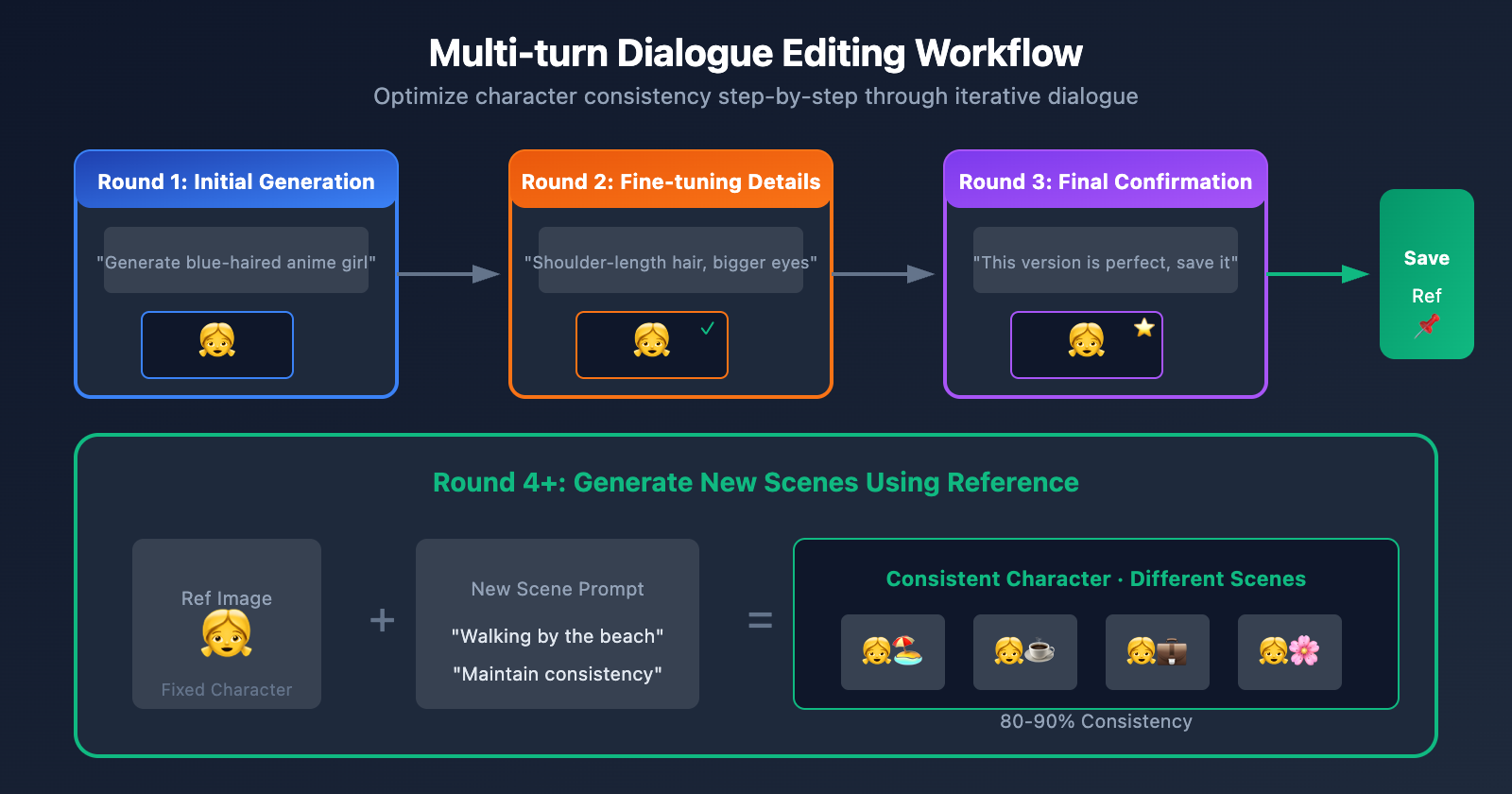
A unique advantage of Nano Banana Pro is multi-turn dialogue editing. You can:
- Generate an initial image
- Fine-tune details through conversation
- Iteratively approach your ideal result
- Save satisfactory versions as future references
Dialogue Editing Workflow
import openai

client = openai.OpenAI(
    api_key="YOUR_API_KEY",
    base_url="https://api.apiyi.com/v1"
)

conversation = []

# Round 1: Generate the base character
conversation.append({
    "role": "user",
    "content": "Generate an anime-style girl with short blue hair, wearing a white dress"
})

response1 = client.chat.completions.create(
    model="nano-banana-pro",
    messages=conversation
)

# Save the assistant's response
conversation.append({
    "role": "assistant",
    "content": response1.choices[0].message.content
})

# Round 2: Fine-tune details
conversation.append({
    "role": "user",
    "content": "Great, but please change the hair to shoulder-length and make the eyes larger and rounder"
})

response2 = client.chat.completions.create(
    model="nano-banana-pro",
    messages=conversation
)

# Round 3: Change the scene while keeping the character
conversation.append({
    "role": "assistant",
    "content": response2.choices[0].message.content
})

conversation.append({
    "role": "user",
    "content": "Keep all the features of this character unchanged, and place her in a scene under cherry blossom trees"
})

response3 = client.chat.completions.create(
    model="nano-banana-pro",
    messages=conversation
)
Dialogue Editing Tips
| Tip | Example |
|---|---|
| Clearly define what to keep | "Keep the character's appearance exactly the same, only change the background" |
| Progressive modifications | Change only one element at a time to adjust step-by-step |
| Confirm before proceeding | "I'm happy with this version; let's continue based on this" |
| Save checkpoints | Record the dialogue history of satisfactory versions |
Alternative 4: Combining External Tools
Workflow Design
If you have extremely high requirements for consistency, you can combine various external tools:
┌─────────────────────────────────────────────────────────┐
│  Step 1: Generate character prototypes using tools      │
│  that support Seeds                                     │
│  Tools: Stable Diffusion / Leonardo AI                  │
│  Output: Character reference images (multi-angle)       │
└─────────────────────────────────────────────────────────┘
                          ↓
┌─────────────────────────────────────────────────────────┐
│  Step 2: Generate scene images using Nano Banana Pro    │
│  Input: Reference images + Scene descriptions           │
│  Advantage: Leverage its powerful scene understanding   │
│  and generation capabilities                            │
└─────────────────────────────────────────────────────────┘
                          ↓
┌─────────────────────────────────────────────────────────┐
│  Step 3: Post-processing and Optimization              │
│  Tools: Photoshop / Online editors                      │
│  Tasks: Fine-tuning, unifying styles, fixing details    │
└─────────────────────────────────────────────────────────┘
Recommended Tool Combination
| Stage | Recommended Tools | Role |
|---|---|---|
| Character Design | Stable Diffusion + ControlNet | Precisely control character features |
| Scene Generation | Nano Banana Pro | Leverage powerful scene understanding |
| Style Consistency | IP-Adapter / LoRA | Maintain a consistent artistic style |
| Post-processing | Photoshop / Canva | Final adjustments |
Cost-Benefit Analysis
| Solution | Consistency | Complexity | Cost |
|---|---|---|---|
| Detailed Description | 60-70% | Low | Low |
| Reference Images | 80-90% | Medium | Medium |
| Multi-turn Conversation | 70-85% | Medium | Medium |
| External Tool Combination | 95%+ | High | High |
💰 Cost Optimization: For commercial projects, we recommend calling various model APIs via the APIYI (apiyi.com) platform. It supports multiple models like Nano Banana Pro and Stable Diffusion, allowing you to mix and match them flexibly to get the best price-performance ratio.
Practical Case: Creating a Consistent IP Character Series
Project Requirements
We need to create an IP character named "Little Orange" with the following:
- 5 images in different scenes
- Highly consistent character appearance
- Suitable for brand promotion
Implementation Steps
Step 1: Define Character Specs
character_spec = {
    "name": "Little Orange",
    "style": "Flat illustration style, simple and cute",
    "hair": "Orange pigtails, slightly curled at the ends",
    "eyes": "Large eyes, brown pupils, sparkling look",
    "face": "Round face, obvious blush, smiling expression",
    "outfit": "Orange hoodie + white skirt, sneakers",
    "accessories": "Orange fruit hair accessory on head",
    "color_palette": ["#FF8C00", "#FFA500", "#FFFFFF", "#FFE4B5"]
}
Step 2: Generate Initial Reference Image
initial_prompt = f"""
Create an IP character design:
- Name: {character_spec['name']}
- Style: {character_spec['style']}
- Hairstyle: {character_spec['hair']}
- Eyes: {character_spec['eyes']}
- Face shape: {character_spec['face']}
- Outfit: {character_spec['outfit']}
- Accessories: {character_spec['accessories']}

Generate a full-body front view of the character with a plain white background for easy future use.
"""

# Generate multiple times and choose the most satisfactory one as the reference.
Step 3: Generate the Series Using Reference Images
scenes = [
    "Picking oranges in a supermarket, looking happy",
    "Reading a book on a park bench, bright sunny day",
    "Baking an orange cake in the kitchen, wearing an apron",
    "Playing on a beach, sunset in the background",
    "Decorating a room for Christmas, wearing a Santa hat"
]

for scene in scenes:
    prompt = f"""
    Referencing the uploaded character image, keep all appearance features of the character exactly consistent:
    - Same orange pigtail hairstyle
    - Same large eyes and blush
    - Same orange hair accessory
    - Maintain the flat illustration style

    Scene: {scene}
    """
    # Generate image...
Evaluation of Results
By combining reference images with detailed descriptive prompts, the actual consistency can reach 85-90%.
FAQ
Q1: Will the Seed parameter be supported in the future?
There's currently no official timeline. Google's product strategy for Nano Banana Pro emphasizes "conversational interaction" over traditional parameter controls. However, as user demand grows, it's possible that future versions might support it in some form. We recommend keeping an eye on official documentation updates or checking the APIYI (apiyi.com) platform for the latest feature news.
Q2: How consistent is the reference image approach?
In our testing, it reaches about 80-90% consistency. The main differences usually appear in:
- Subtle facial details
- Lighting and shadow effects
- The direction of clothing folds
For most commercial uses, this level of consistency is already sufficient.
Q3: Is there a limit on the number of messages in multi-turn conversations?
The Gemini API has context length limits, but for image generation scenarios, 10-20 turns usually don't pose a problem. It's a good idea to "reset" the conversation periodically, using your favorite generated image as a new reference image to start a fresh session.
Q4: Which approach is best for commercial projects?
We recommend a combination of Reference Image + Detailed Description:
- Consistency is high enough for commercial use (85%+)
- Costs are manageable
- No complex toolchains required
You can easily test and deploy this workflow through the APIYI (apiyi.com) platform.
Q5: Is there any way to achieve 100% consistency?
Theoretically, it's impossible to reach 100% consistency without Seed support. If your requirements are extremely strict, we suggest:
- Using a tool that supports Seed (like Stable Diffusion) to generate the character.
- Using that generated character as a reference image input for Nano Banana Pro.
- Performing post-processing if necessary.
Summary
Nano Banana Pro officially does not support the Seed parameter, which means you can't achieve perfectly reproducible image generation through traditional methods.
However, we've identified 4 alternative strategies:
| Strategy | Consistency | Recommended Use Case |
|---|---|---|
| Detailed Character Description | 60-70% | Rapid prototyping, personal projects |
| Reference Images | 80-90% | Top choice for commercial projects |
| Multi-turn Dialogue Editing | 70-85% | Iterative optimization, fine-tuning single images |
| External Tool Combinations | 95%+ | Professional-grade, high-requirement projects |
Core Advice:
- Commercial Projects: Use the combination of reference images + detailed descriptions.
- Personal Creation: Multi-turn dialogue editing is usually enough.
- Professional Needs: Consider external tool combination strategies.
- Stay Tuned: Official Seed support might arrive in future versions.
We recommend using APIYI (apiyi.com) to quickly test these strategies. The platform supports Nano Banana Pro and various other image generation models, making it easy to find the solution that fits your needs.
Further Reading:
- Gemini Image Generation Official Documentation: ai.google.dev/gemini-api/docs/image-generation
- Stable Diffusion Seed Guide: getimg.ai/guides/guide-to-seed-parameter-in-stable-diffusion
- AI Image Consistency Techniques: venice.ai/blog/how-to-use-seed-numbers-to-create-consistent-ai-generated-images
📝 Author: APIYI Technical Team | Focusing on AI image generation API integration and optimization
🔗 Technical Support: Visit APIYI (apiyi.com) for Nano Banana Pro test credits and technical assistance.