Author’s note: Seedream 5.5, 5.0 Pro, and 5.0 Flash should be chosen based on the specific task and total cost. In 1.5K multi-reference-image tasks, there’s a price crossover point between 5.5 and 5.0 Pro.
One-line summary: Seedream 5.5, 5.0 Pro, and 5.0 Flash should be selected based on task capabilities and total cost—and in low-pixel multi-reference-image tasks, there’s a price crossover point between 5.5 and Pro.
to know: the 5 terms used in this article
- RGBA: Four channels—red, green, blue, plus alpha (transparency)—capable of representing transparent and semi-transparent images.
- Layer splitting: Breaking a complete image into a base image plus several individually usable element layers.
- OCR: Recognizing text content from images. Some APIs can also estimate the position and style of the text.
- Reference image: An image input alongside the prompt to constrain the subject or style.
- Pixel tier: A billing bracket defined by the total pixel count (width × height) of a single output image.
ByteDance Seed officially released Seedream 5.5 on November 9, 2026. Many developers and content teams immediately faced a practical question: should they still use the Seedream 5.0 Pro and Seedream 5.0 Flash they already have? Is the new version necessarily better and cheaper?
This isn’t a wishy-washy “each has its strengths” analysis. This article is based on the official Volcengine Ark documentation and price list updated on November 12, 2026, and clearly labels official capabilities, third-party testing, and editorial recommendations separately. At the end, you’ll get clear, task-based recommendations.
Core value: After reading this, you’ll know which Seedream version to use for tasks like product images, marketing posters, and content illustrations—and you’ll be able to calculate the real cost in multi-reference-image scenarios.
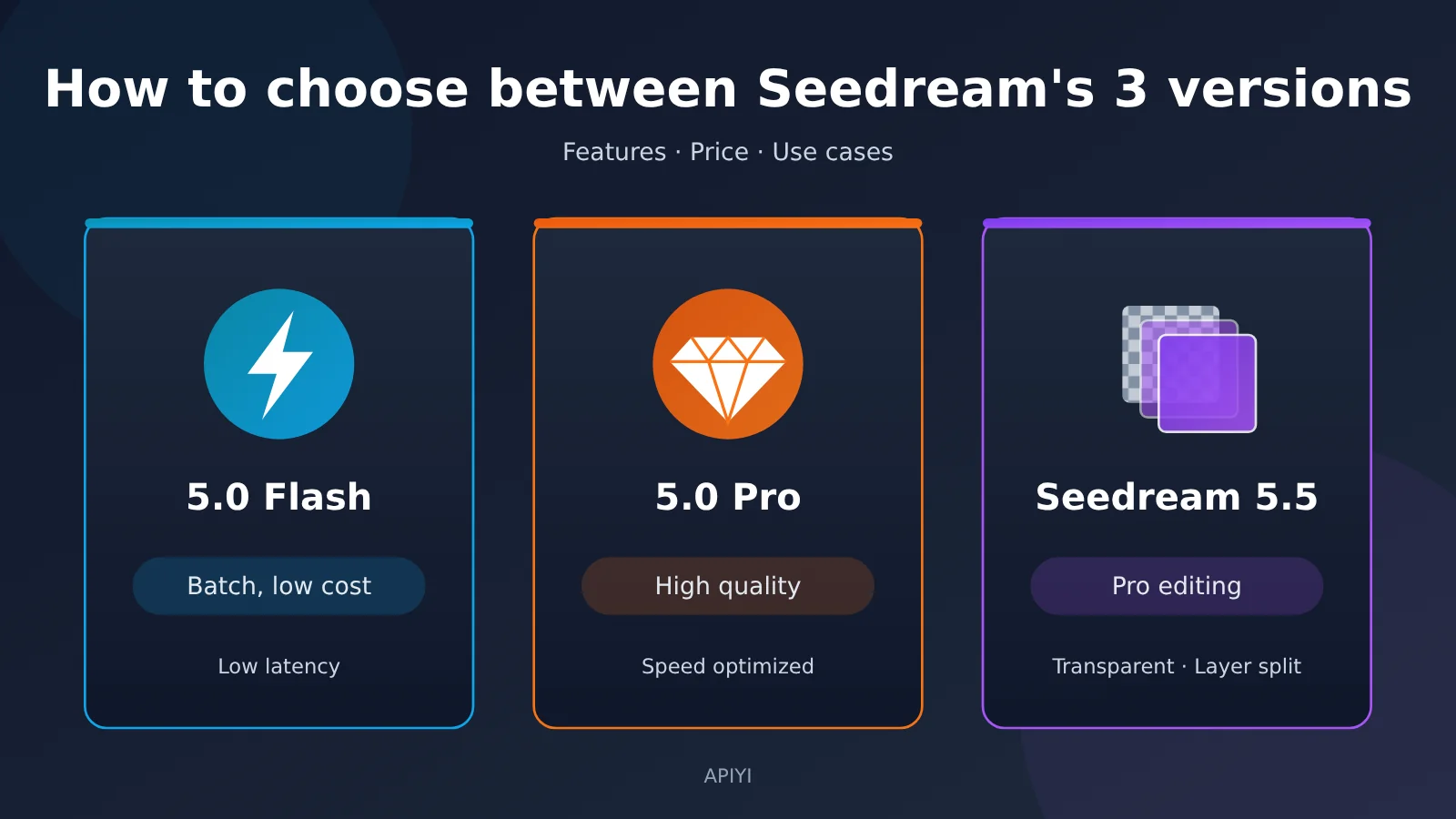
Let’s start with the conclusion: who is Seedream 5.5, 5.0 Pro, and 5.0 Flash each for?
According to Volcano Ark’s official product positioning, the roles of the three versions are clearly differentiated. Flash focuses on low cost and low latency, Pro is positioned for high-quality generation, and 5.5 is aimed at professional visual production and multi-turn editing. The table below pairs each positioning with its typical users so you can quickly find the right fit.
| Model | Official positioning | Typical users | One-line takeaway |
|---|---|---|---|
| Seedream 5.0 Flash | Low cost, low latency | Content teams producing images at high frequency and in batches; e-commerce teams making first drafts | If you just need “usable images” at volume, pick this first |
| Seedream 5.0 Pro | High-quality generation | Teams relying on the ultra-fast prompt optimization mode and 1.5K multi-reference image fusion | Keep it when you need its dedicated mode or a specific price advantage |
| Seedream 5.5 | Professional visual production, multi-turn editing | Designers, ad and e-commerce retouching teams, game asset creators | Choose it when you need repeated edits, transparent assets, or layer separation and reuse |
Three real-world business scenarios help explain this table. A WeChat public account team needs hundreds of article images every day and has no editing needs; Flash has the lowest per-image price. An e-commerce team wants to change the same jacket into multiple colorways while keeping the model and background unchanged; 5.5’s enhanced continuous editing capability fits this need exactly. A design team needs to break apart an old poster, replace the copy, and re-layout it; 5.5’s high-capacity layer separation and rich-text OCR are capabilities the other two versions don’t have.
One thing to make clear upfront: Seedream 5.5 isn’t the cheapest version in every scenario, and it doesn’t cover Seedream 5.0 Lite’s batch image generation, web search, or streaming output capabilities. So “switching all business to 5.5” isn’t a reasonable default move.
Seedream 5.5 Feature Comparison: What Are the Extra Capabilities Actually Good For?
Capability Comparison Table for the Three Seedream Versions
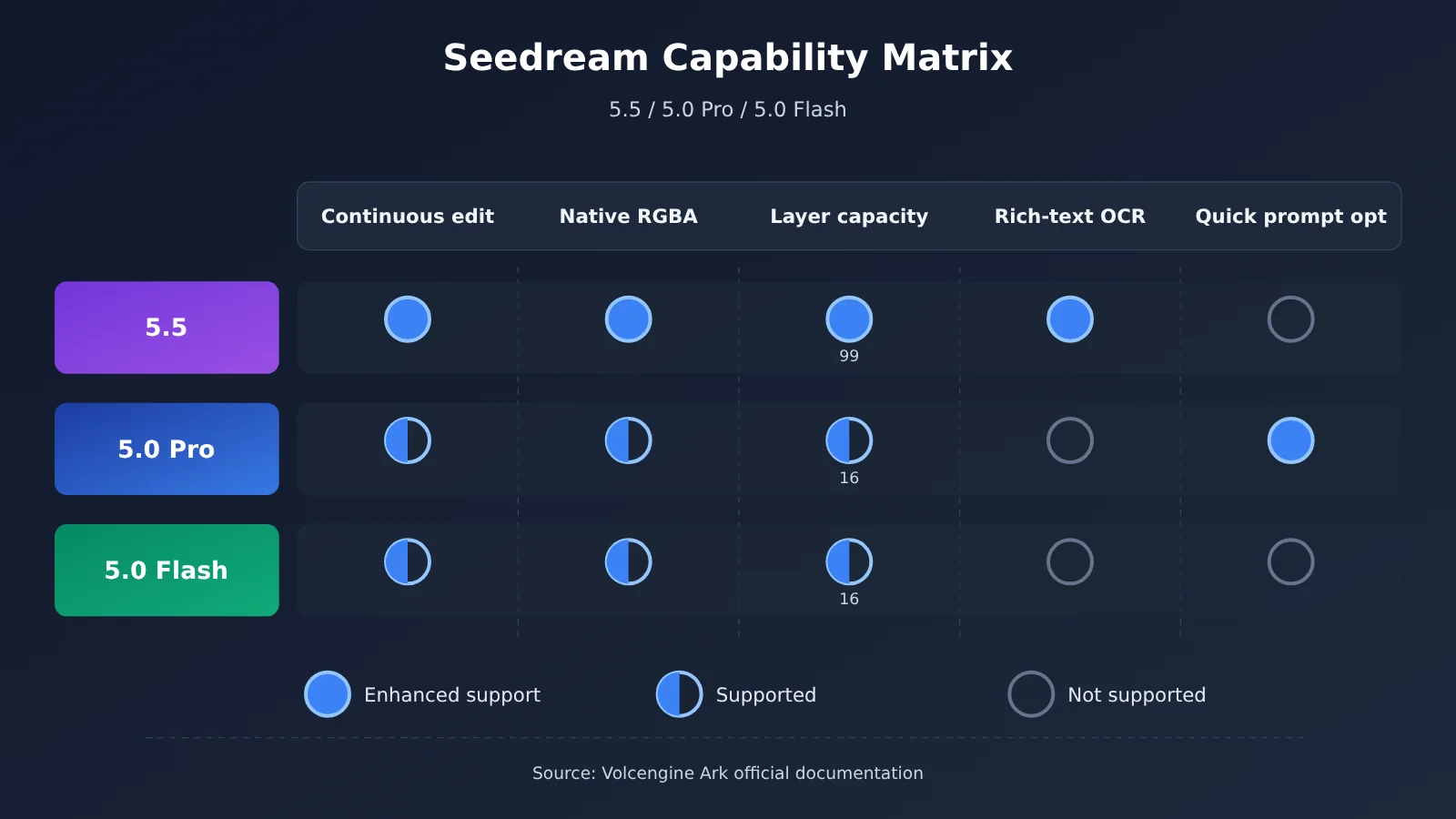
The table below combines the series capability comparison from the Volcano Ark image generation tutorial with the individual tutorials for 5.0 Pro, Flash, and 5.5. These are the capability boundaries stated in the official documentation; they don’t represent a ranking of actual results.
| Capability Dimension | Seedream 5.5 | Seedream 5.0 Pro | Seedream 5.0 Flash |
|---|---|---|---|
| Text-to-image, single-image editing | Supported | Supported | Supported |
| Multi-reference-image generation | Up to 10 | Up to 10 | Up to 10 |
| Continuous editing | Significantly enhanced | Supported | Supported |
| Native text-to-transparent-image (RGBA) | Supported | Not supported | Not supported |
| Image-to-transparent-image | Up to 10 regular reference images | Only 1 PNG with an existing alpha channel | Only 1 PNG with an existing alpha channel |
| Layer separation limit | Base image + up to 99 layers | Base image + up to 16 layers | Base image + up to 16 layers |
| Custom maximum output count | 2–100 | Not supported | Not supported |
| Rich-text OCR | Supported | Not supported | Not supported |
| Fast prompt optimization mode | Not supported | Supported | Not supported |
| Output tiers | 1K / 1.5K / 2K | 1K / 1.5K / 2K | 1K / 1.5K / 2K |
| Default output format | PNG | JPEG | JPEG |
| Default background mode | Auto | Opaque | Opaque |
| Per-model rate limit cap | 500 IPM | 500 IPM | 500 IPM |
Two points tend to get overlooked. First, all three share the same IPM (images-per-minute output limit) cap. The official docs describe it as a non-guaranteed limit, not a promise of inference speed or throughput. Second, fast prompt optimization is a Pro-only mode, but that doesn’t mean the entire image inference process will always be the fastest.
Seedream 5.5 Continuous Editing: Product Recoloring Scenario
The official demo showed a case of making 100 consecutive edits on the same image. The focus was on preserving pixels in unedited areas and reducing color shifts and cumulative quality degradation. The 100 rounds here are an official capability showcase; each round is a new generation call, not a single request performing 100 edits.
Third-party tests help gauge the real-world limits. Xinghai Intelligence Bureau tested recoloring a sports jacket in the Doubao web version. Across three edit rounds, the subject’s pose and clothing showed no obvious drift, and the author noted they didn’t test up to 100 rounds. Segmind ran 12 consecutive edits on a product image—the background didn’t show obvious pixel changes beyond its threshold, but the image gradually darkened overall. So when creating multiple color variants of a product, 5.5 can significantly reduce the “change one spot, alter the whole image” rework, but after long edit chains you still need to manually check colors.
Seedream 5.5 Native RGBA: Transparent Asset Creation
5.0 Pro and Flash can only extend from an existing transparent PNG, while 5.5 can generate transparent assets directly from text and can also use up to 10 regular reference images to create transparent images. For game props, stickers, icons, and white-background replacement assets for e-commerce, this means you can skip a background-removal step.
Real-world tests also point to the limits: in Segmind’s tests, transparent edges on hard goods like backpacks were fairly clean, but two attempts failed to generate transparent glass with a realistic see-through effect. Materials like glass and liquids still require manual review of the Alpha channel.
Seedream 5.5 Poster Layer Separation and OCR: Reusing Design Assets
Seedream 5.5 raises the layer limit from 16 to 99, and for cleanly structured text layers it can return the text content, line-by-line positions, similar fonts, colors, and approximate styles. In the official example, a poster is split into 1 base image plus 12 layers, and 9 of the text layers return OCR results.
The value of this capability is that it turns a flat poster into partially reusable assets. But don’t mistake it for “automatic generation of an editable PSD”: handwriting and stylized text may not have OCR results, similar fonts are only approximate matches, and final layout still has to be done in a design tool.
Seedream 5.5 API Pricing Comparison: Flash Is the Cheapest, but 5.5 Has Its Advantages Too
Official Unit Prices for the Three Versions
The prices below all come from Volcano Ark’s official Model Pricing, updated on November 12, 2026. The billing unit is RMB per image. They don’t include any additional fees from third-party platforms.
| Model | Input reference images | Output ≤2.61 million pixels (e.g. 1.5K) | Output >2.61 million pixels (e.g. 2048×2048) |
|---|---|---|---|
| Seedream 5.5 | ¥0.05/image, billed from the first image onward | ¥0.13/image | ¥0.23/image |
| Seedream 5.0 Pro | First image free, ¥0.02/image from the second image onward | ¥0.30/image | ¥0.60/image |
| Seedream 5.0 Flash | Free | ¥0.12/image | ¥0.12/image (no tier distinction) |
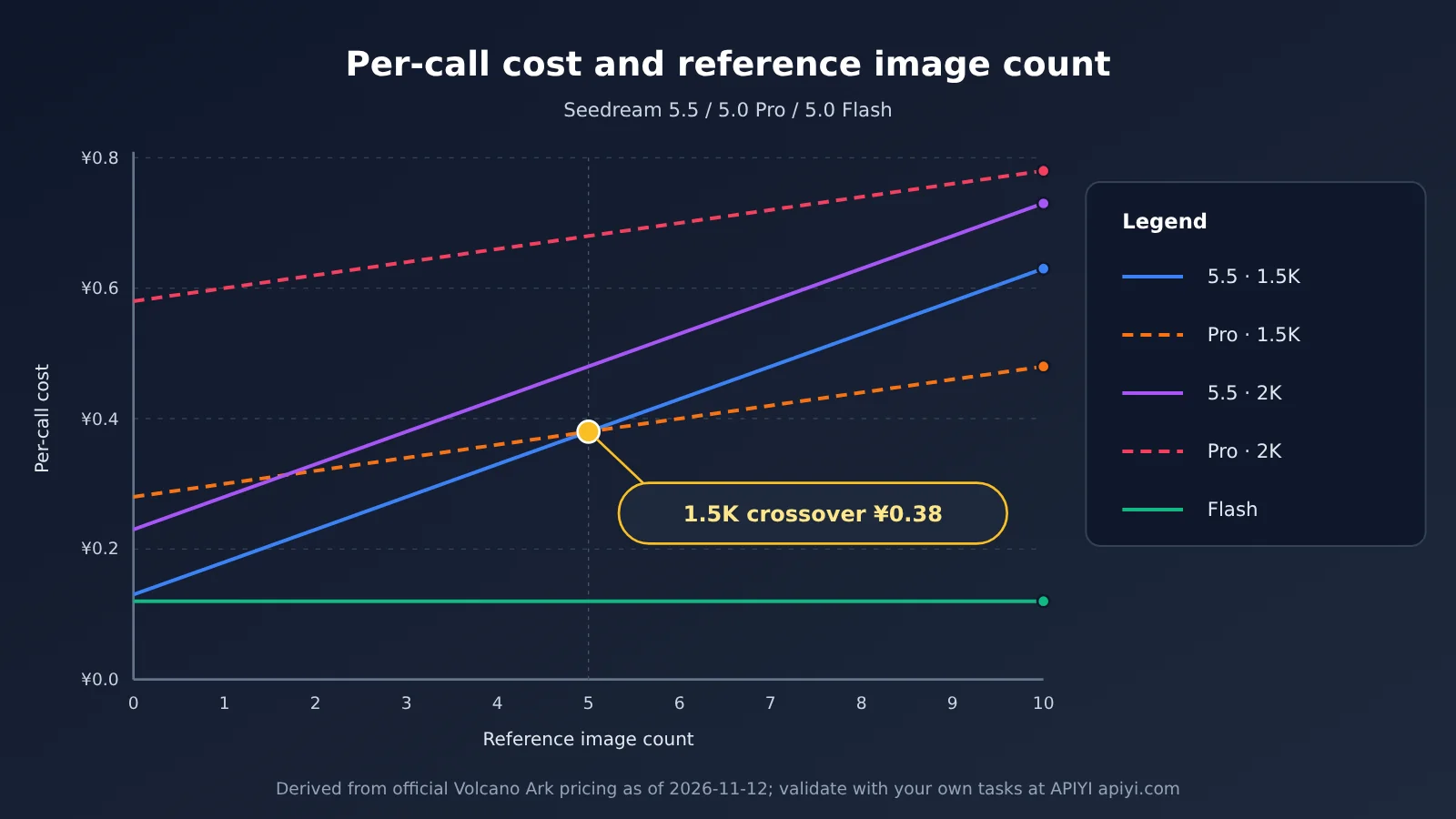
The input image billing rules for the three are completely different, and that’s exactly why the price crossover points appear. Let n be the number of input reference images (0–10). The cost of successfully generating one image in a single run is:
- 5.5 (1.5K): 0.13 + 0.05n; 5.5 (2K): 0.23 + 0.05n
- 5.0 Pro (1.5K): 0.30 + 0.02 × max(n−1, 0); 5.0 Pro (2K): 0.60 + 0.02 × max(n−1, 0)
- 5.0 Flash: 0.12
Cost Estimates for Multi-Reference-Image Scenarios
The table below shows what the editorial team derived from the official unit prices above. It assumes one successful image output per request and excludes retries and layer splitting.
| Scenario (single request, single image output) | Seedream 5.5 | Seedream 5.0 Pro | Seedream 5.0 Flash |
|---|---|---|---|
| 1.5K, no reference image | ¥0.13 | ¥0.30 | ¥0.12 |
| 1.5K, 1 reference image | ¥0.18 | ¥0.30 | ¥0.12 |
| 1.5K, 5 reference images | ¥0.38 | ¥0.38 | ¥0.12 |
| 1.5K, 10 reference images | ¥0.63 | ¥0.48 | ¥0.12 |
| 2K, 1 reference image | ¥0.28 | ¥0.60 | ¥0.12 |
| 2K, 5 reference images | ¥0.48 | ¥0.68 | ¥0.12 |
| 2K, 10 reference images | ¥0.73 | ¥0.78 | ¥0.12 |
There are three conclusions from this table worth adding to the model-selection doc:
- 1.5K price crossover: At the 1.5K tier and below, when you input 5 reference images, 5.5 and 5.0 Pro cost the same: ¥0.38. With 6–10 reference images, 5.0 Pro is actually cheaper. At 10 reference images, Pro is ¥0.15 lower than 5.5.
- 5.5 is cheaper for 2K editing: At high-pixel tiers such as 2K square images, 5.5 is always lower than Pro across 0–10 reference images. The most common single-reference-image 2K edit drops from ¥0.60 to ¥0.28, a reduction of about 53.3%.
- Flash pricing doesn’t change with reference images or tier: As long as its capabilities meet your needs, it’s the cheapest option in all ordinary single-image scenarios.
One important caveat: layer separation is billed separately for each base image and layer actually output. If a poster is split into 13 images, you’re charged for 13 images, and different layers may fall into different pixel tiers. “Up to 99 layers” doesn’t mean you can split everything for ¥0.23 in one go.
When Is It Worth Upgrading from Seedream 5.0 to Seedream 5.5?
The decision isn’t about version numbers; it’s about whether your workflow has any of these four needs. If even one applies, 5.5 usually reduces steps rather than just changing a single image.
- Continuous edits that keep the subject consistent: Clients repeatedly adjust colors, accessories, and backgrounds. In the past, every round might mean regenerating the whole image. 5.5 strengthens preservation of unedited areas; for continuous edits on RGB images, the official guidance is to set
backgroundtoopaque, which generally helps with consistency. - Producing transparent PNGs directly: Previously you had to generate an image on a white background, then cut it out manually or with a tool. Now you can set
"background": "transparent"and"output_format": "png"to output directly. Note that JPEG doesn’t support transparency. - Decomposing complex posters: Illustrations or posters with more than 16 elements couldn’t be fully decomposed in the 5.0 series. 5.5 lets you set an upper limit between 2 and 100 via
layer_decomposition_options.max_images, with a default of 30 images (including the base image). The maximum is just a cap; it doesn’t guarantee the actual number returned. - Reusing text and layer assets: When localizing ads into multiple languages or reusing templates, the position and style information returned by OCR can significantly reduce the work of re-measuring and re-laying out.
Conversely, for simple batch text-to-image, sticking with Flash makes sense. If you don’t need image editing, transparency, or layer decomposition, 5.5 costs ¥0.01 more per image than Flash in the 1.5K no-reference-image scenario, and ¥0.11 more per image in the 2K scenario—so the gap grows at volume. In addition, third-party tests show that 5.5 may also alter product structure to satisfy text requirements, or change the number of subjects when changing angles. After upgrading, manual review can’t be skipped.
🎯 Technical recommendation: Before upgrading, run a small-sample A/B test with your own real assets instead of just looking at official sample images. You can check the currently integrated image models and billing details on APIYI apiyi.com, and decide whether to switch after running a comparison with the same set of prompts.
How Should Developers Decide Between Seedream 5.5 and 5.0?
Choosing a Seedream Version by Task
Below is a recommendation strategy put together by our editorial team based on official positioning and billing rules. It isn’t a vendor-issued performance ranking.
| Task | Preferred Choice | Rationale |
|---|---|---|
| First drafts of product images in large batches | 5.0 Flash | Lowest per-image cost; officially positioned for fast generation |
| E-commerce hero visuals, multi-round color changes on products | 5.5 | Stronger continuous editing and consistency in unmodified regions |
| Creating new transparent PNG product assets | 5.5 | The only version with native text-to-RGBA |
| Simple extensions of existing transparent PNGs | 5.0 Flash | Most economical when the results meet requirements |
| Layer separation and copy replacement for marketing posters | 5.5 | Larger layer capacity, supports rich-text OCR |
| 1.5K, 6–10 reference image fusion | Include 5.0 Pro in the comparison | API cost in the same tier is lower than 5.5 |
| Workflows that rely on the ultra-fast prompt optimization mode | 5.0 Pro | The only one of the three that offers it |
| Illustrations for WeChat official accounts and content | 5.0 Flash | High frequency, low budget, rarely needs fine retouching |
Hybrid Route: Flash Drafts + 5.5 Refinement
For content production teams, a layered route tends to work best: Flash generates candidate drafts → human or programmatic review → 5.5 refines them and produces transparent assets → handoff to design tools. This is a suggested workflow, not something the platform offers as an automated cross-model orchestration service — you’ll need to implement the routing yourself at the business layer.
Below is a minimal invocation example using the OpenAI-compatible image endpoint. Check the platform’s actual model list for the model name to use:
import openai

client = openai.OpenAI(
    api_key="YOUR_API_KEY",
    base_url="https://api.apiyi.com/v1"  # APIYI unified interface
)

resp = client.images.generate(
    model="seedream-model-name",  # Check the model list in the APIYI console
    prompt="白色背景上的一双浅蓝色运动鞋,产品摄影风格",
    size="2048x2048"
)
print(resp.data[0].url)
See the full example with task-based routing and cost estimation
import openai

# Volcano Ark official CNY unit prices (2026-11-12), for estimation only, excluding third-party surcharges
def estimate_cost(model: str, n_ref: int, high_res: bool) -> float:
    if model == "flash":
        return 0.12
    if model == "pro":
        base = 0.60 if high_res else 0.30
        return round(base + 0.02 * max(n_ref - 1, 0), 2)
    if model == "5.5":
        base = 0.23 if high_res else 0.13
        return round(base + 0.05 * n_ref, 2)
    raise ValueError(model)

def pick_model(task: str, n_ref: int = 0, high_res: bool = True) -> str:
    """Routing rules suggested by the editorial team, not an official recommendation"""
    if task in ("transparent", "layer_split", "multi_round_edit"):
        return "5.5"
    if task == "prompt_fast_optimize":
        return "pro"
    if task == "multi_ref_fusion" and not high_res and n_ref >= 6:
        return "pro"   # Pro is cheaper at the 1.5K tier with 6–10 reference images
    if task == "draft":
        return "flash"
    return "5.5"

client = openai.OpenAI(
    api_key="YOUR_API_KEY",
    base_url="https://api.apiyi.com/v1"
)

m = pick_model("multi_ref_fusion", n_ref=8, high_res=False)
print(m, estimate_cost(m, 8, False), estimate_cost("5.5", 8, False))
# Output: pro 0.44 0.53
When you’re estimating total cost, unit price is only the starting point. The more meaningful metric is “cost per final deliverable image,” which equals the unit price multiplied by the average number of attempts, plus the time spent on manual retouching and review. In its cultural-creative fridge magnet test, Xinghai Intelligence Bureau needed around 4 rounds of conversation to get a specific text pun to land as intended. That kind of revision count belongs in your budget.
💡 Recommendation: Put generation success rate, average number of revision rounds, and delivery quality into the same evaluation sheet. With APIYI apiyi.com you can call multiple models through a single API key, so it’s easy to swap versions and compare per-image delivery costs within the same business code.
FAQ
Q1: What is Seedream 5.5?
Seedream 5.5 is an image generation and editing model officially released by ByteDance Seed on November 9, 2026. Its Volcano Ark Model ID is `doubao-seedream-5-5-261028`. It’s built around multi-turn editing consistency, native RGBA transparent assets, layer separation of up to 99 layers, and rich-text OCR.
Q2: How is Seedream 5.5 different from 5.0 Pro?
5.0 Pro still holds the high-image-quality position and the fast prompt optimization mode, and it’s cheaper for 1.5K tasks with 6–10 reference images. But it has no native text-to-transparent-image and no OCR, and its layer cap is only 16. By comparison, 5.5 wins on professional editing and on 2K single-reference-image editing cost. The official evaluation claims 5.5 beats 5.0 Pro on quality and usable rate across six categories of professional scenarios — that’s a vendor benchmark result.
Q3: Has Seedream 5.5 Pro been released yet?
As of November 13, 2026, the official word is only a teaser that a Pro version will come later in the Seedream 5.5 series; no release date, specs, or pricing have been announced. The current Seedream 5.5 shouldn’t be called 5.5 Pro.
Q4: What is Seedream 5.0 Flash best suited for?
WeChat Official Account illustrations, product image drafts, batch generation of social media assets, and simple extensions built on existing transparent PNGs. Input images are free, and output is a flat ¥0.12 per image (Volcano Ark’s official price) — the lowest per-image cost of the three.
Q5: How can I quickly compare the three Seedream versions via API?
Follow these steps:
1. Register an account at APIYI apiyi.com to get an API key and new-user trial credits.
2. Check the currently available image model names in the console.
3. Use the examples in this article, set base_url to `https://api.apiyi.com/v1`, and test each version with the same prompt and assets.
Q6: What are the known limitations of Seedream 5.5?
Based on the official docs and third-party testing, 5.5 doesn’t support streaming output, web-search-to-image, or a 4K tier. Long editing chains can still show gradual color drift, dense small text needs manual checking, and Alpha handling on transparent glass and liquids is unstable. Generated image URLs are valid for 24 hours, so save them promptly.
Q7: For multi-reference-image fusion, should I pick 5.5 or 5.0 Pro?
It depends on the output tier. At 1.5K and below with 6–10 reference images, Pro’s API cost is lower; at the 2K tier, 5.5 is cheaper for 0–10 reference images. If the quality difference is small, run a batch of real samples on each at APIYI apiyi.com, then decide by per-image delivery cost.
Q8: Is layer separation expensive?
Layer separation is billed per actual output base image plus each individual layer, and layers may land in different pixel tiers. The more layers you split, the higher the cost — use `max_images` to cap it and avoid unexpected bills.
Seedream 5.5, 5.0 Pro, and 5.0 Flash: Key Takeaways
- Tiered positioning: Flash is built for low-cost batch generation, Pro focuses on high image quality and dedicated modes, and 5.5 targets professional editing.
- What only 5.5 can do: native text-to-RGBA, 99-layer layer separation, and rich-text OCR are the core reasons to upgrade.
- Price crossover point: at the 1.5K tier, 5.5 and Pro cost the same with 5 reference images; with 6–10 images, Pro is cheaper.
- 2K editing costs less: single-reference-image 2K editing drops from ¥0.60 on Pro to ¥0.28 on 5.5.
- Flash saves the most: free input and ¥0.12 per output image — there’s no reason to upgrade for simple batch tasks.
- Hybrid route: Flash produces candidate drafts, 5.5 does the fine polishing — evaluate by cost per delivered image rather than unit price.
- Getting started: run small-sample comparisons through the unified APIYI apiyi.com interface, then lock in your production routing.
Summary: Choose a Seedream Model by Task, Not by Version Number
Picking between Seedream 5.5, 5.0 Pro, and 5.0 Flash comes down to three rules:
- For high-frequency, low-budget image output, choose 5.0 Flash: it has the lowest unit price and works well for first drafts and content illustrations.
- For professional visual editing, choose Seedream 5.5: it handles multi-round revisions, transparent assets, poster layer separation, and text reuse better, and 2K editing costs less than Pro.
- Keep 5.0 Pro for specific tasks: if you rely on lightning-fast prompt optimization, or you’re fusing 6–10 reference images at the 1.5K tier, Pro is still worth comparing.
A more reliable production approach is to move gradually from cheap first drafts to professional refinement: Flash handles volume, 5.5 handles quality and reusable assets, and Pro fills the gaps. We recommend validating results with real business materials through APIYI apiyi.com, then writing those routing rules into your production workflow.
📚 References
- ByteDance Seed: Official Seedream 5.5 Release Announcement — core upgrades, official examples, and evaluations
- Link:
seed.bytedance.com/zh/blog/more-realistic-images-more-stable-editing-across-100-rounds-introducing-seedream-5-5 -
Notes: the original source for the 100-round continuous editing demo, the text-collapse rate, and the GSB evaluation
-
Volcano Ark Seedream 5.5 Official Tutorial — parameters, transparent output, and layer decomposition
- Link:
console.volcengine.com/ark/region:cn-beijing/docs/seedream-5-5 -
Notes: field descriptions for Model ID, background, layer_decomposition, and more
-
Volcano Ark Image Generation Tutorial — capability comparison across the Seedream family
- Link:
console.volcengine.com/ark/region:cn-beijing/docs/image-generation-tutorial -
Notes: how 5.5, 5.0 Pro, 5.0 Flash, and 5.0 Lite differ in capability
-
Volcano Ark Model Pricing — official RMB billing
- Link:
console.volcengine.com/ark/region:cn-beijing/docs/model-pricing -
Notes: the basis for every price calculation in this article (updated 2026-11-12)
-
Xinghai Intelligence Bureau Hands-On Test — commercial design scenario testing
- Link:
eet-china.com/mp/a538489.html -
Notes: product recoloring, multi-image fusion, transparent PNGs, and text issues
-
Segmind Tech Blog — 36 billed generations and a 12-round editing test
- Link:
blog.segmind.com/seedream-5-5-is-here-edit-in-rounds-transparent-pngs-and-layers/ - Notes: third-party observations on color drift during continuous editing, transparent materials, and text testing
Author: APIYI Technical Team
Technical discussion: Feel free to reach out to us through the APIYI website homepage — more resources are available at the docs.apiyi.com documentation center