Author’s note: This article compares three GPT-Image channel types (official, -all, and -vip) on billing, image sizes, and partial editing. It also reviews historical incidents from April to October 2026 and proposes a fallback plan built on limited retries, a circuit breaker, and a backup channel.
If you’re integrating GPT-Image, you’ll quickly notice that the same image model shows up under several names on the platform. The official channel (such as gpt-image-2.5-flare), -all, and -vip differ in billing and parameter support, and they fail for different reasons. This article compares the three GPT-Image channel types across those dimensions and gives you a selection and fallback plan you can put into production right away.
This isn’t a “they all have their strengths” kind of compromise analysis. Our conclusions draw on the channel comparison page and model registry in the APIYI documentation center, plus the live status announcements from April to October 2026. We’ll separate what comes from official platform announcements, what comes from platform testing, and what is only historical record.
Key takeaway: By the end, you’ll know which GPT-Image channel to use as your primary and which as your backup, and how your code should handle 429, 408, and 5xx responses.
What Are GPT-Image Channels? Official Relay, Official Reverse, and Enterprise Groups
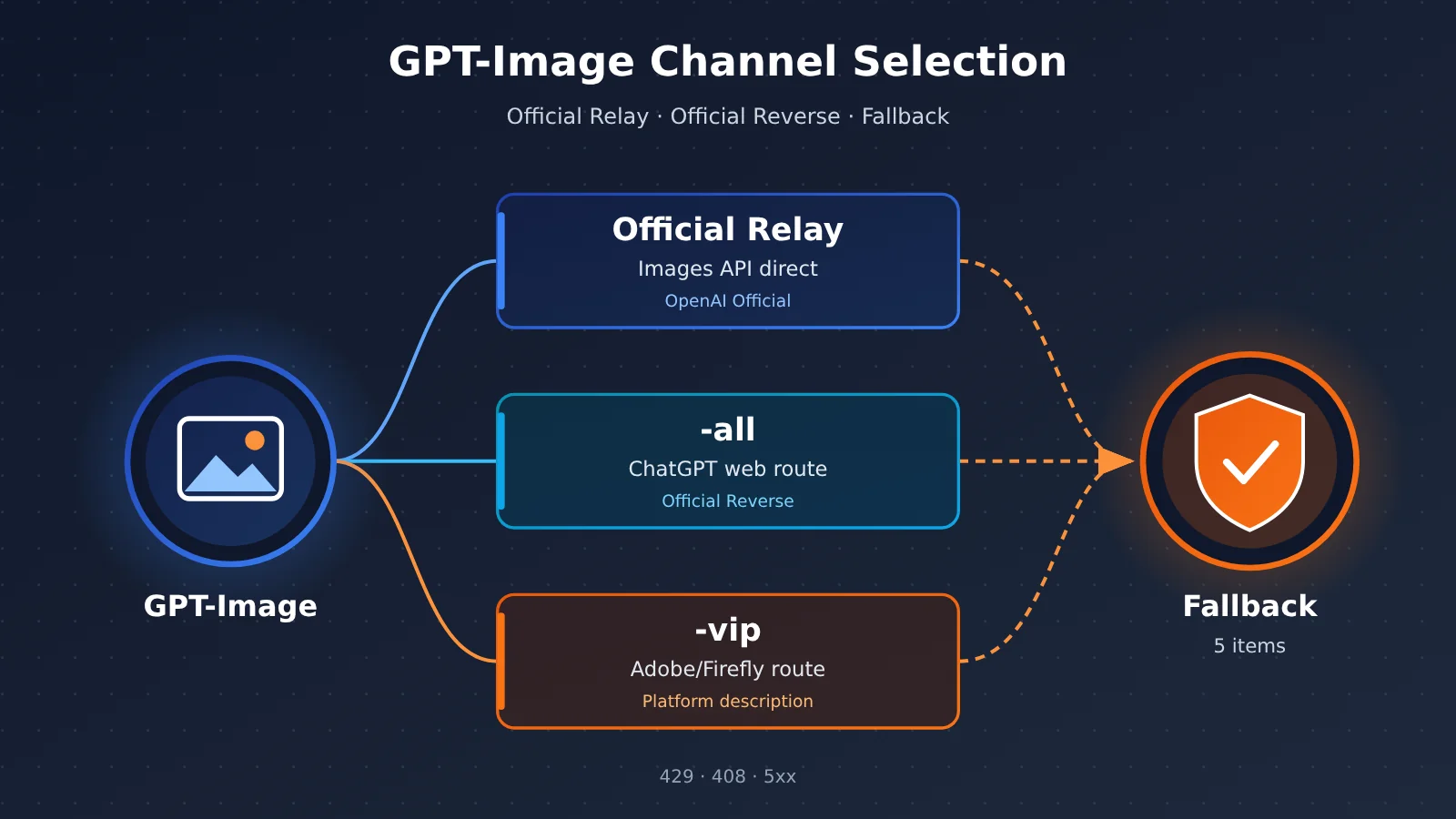
“官转” (official relay) and “官逆” (official reverse) are how the APIYI platform categorizes its channels. They aren’t OpenAI’s own terms. Official relay means a route that forwards requests directly through OpenAI’s official Images API. Official reverse means resources accessed through unofficial reverse-engineering methods. It doesn’t mean OpenAI provides those reverse-engineered APIs.
| Channel Type | Platform Documentation Definition | Representative Models | Main Upstream Dependency |
|---|---|---|---|
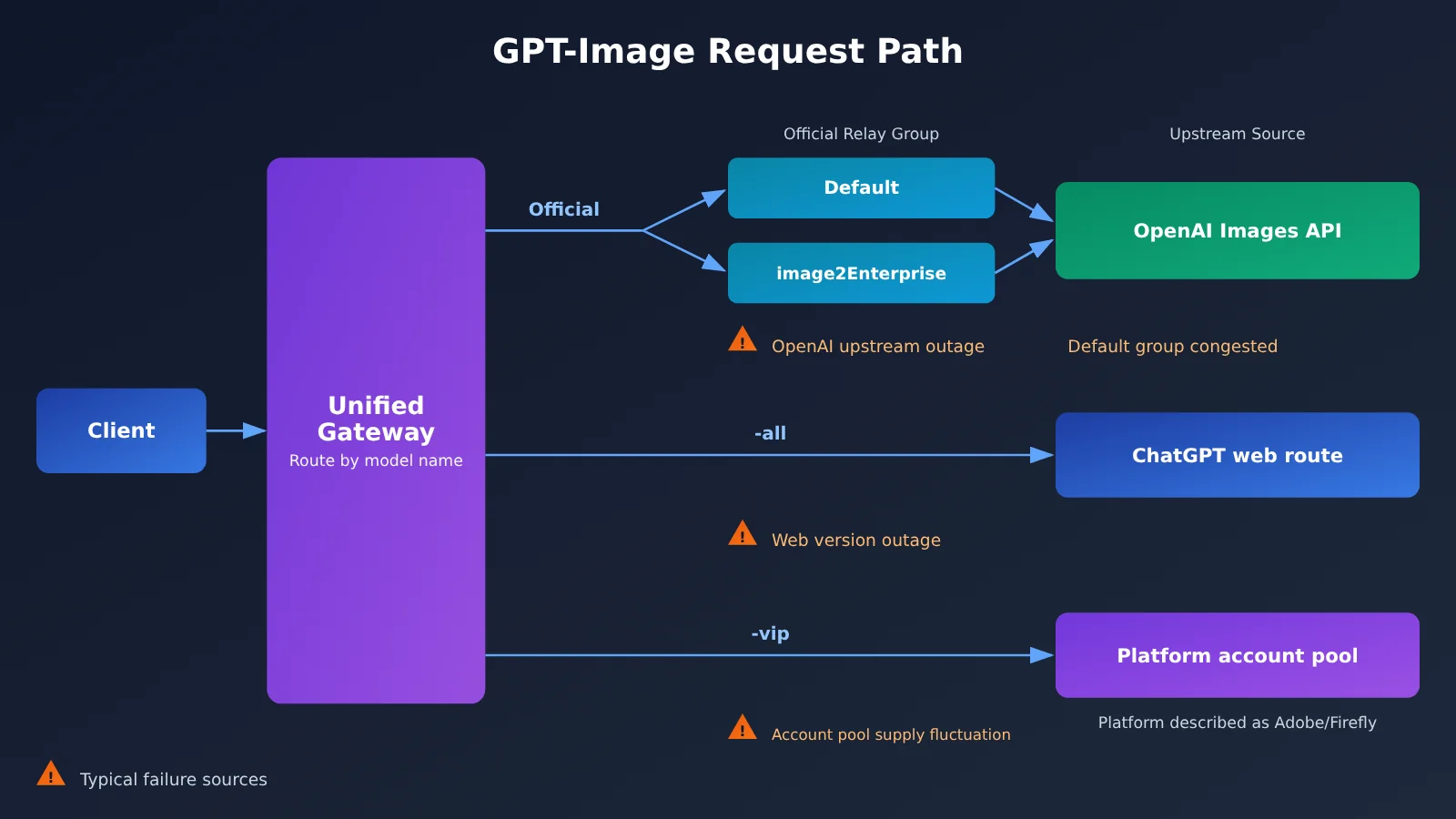
| Official relay | Direct forwarding through OpenAI’s official Images API | gpt-image-2.5-flare, gpt-image-2.5-sunburst | OpenAI API compute and quota |
| -all (official reverse) | Reverse-engineered access to the ChatGPT web route | gpt-image-2-all, gpt-image-2.5-all | ChatGPT web availability |
| -vip (official reverse) | Described in the platform docs as reverse-engineered resources on an Adobe / Firefly route | gpt-image-2-vip, gpt-image-2.5-flare-vip, gpt-image-2.5-sunburst-vip | Platform account-pool concurrency and upstream risk controls |
Where the GPT-Image Enterprise Group image2Enterprise Fits In
image2Enterprise is often mistaken for a standalone model, but it’s actually a token group. It was added on 2026-04-25 with a catalog rate multiplier of 1.2x, while the Default, image2_OSS, and SVIP groups run at 1.0x. On both 2026-04-27 and 2026-09-21, the default group ran short on resources while the enterprise group stayed stable, so it has served as a fallback path for official relay.
The enterprise group has its limits too. On 2026-05-07, official relay in the enterprise group was hit by the same OpenAI upstream outage, which shows it can ease congestion in the default group but can’t shield you from every upstream problem. Also, just because a group is listed in the model registry doesn’t mean every account is eligible to use it. Check the console for the exact activation requirements.
Where GPT-Image 2.6 Ends and the Older Channels Begin
As of 2026-11-11, the APIYI model registry lists two token-billed models, gpt-image-2.6-flare and gpt-image-2.6-sunburst, but no -all or -vip variants for 2.6. That means you can’t assume the size and quality capabilities of 2.5 VIP carry over to 2.6. Also note that the comparison page says direct official access for the older gpt-image-2 was shut down on 2026-09-30, even though the registry still keeps that ID. For new projects, I’d use 2.5 Flare or Sunburst in your official relay examples. According to the platform’s launch notes, flare generates images faster, while sunburst has stronger editing capabilities.
GPT-Image Official Relay vs -all vs -vip: Core Differences
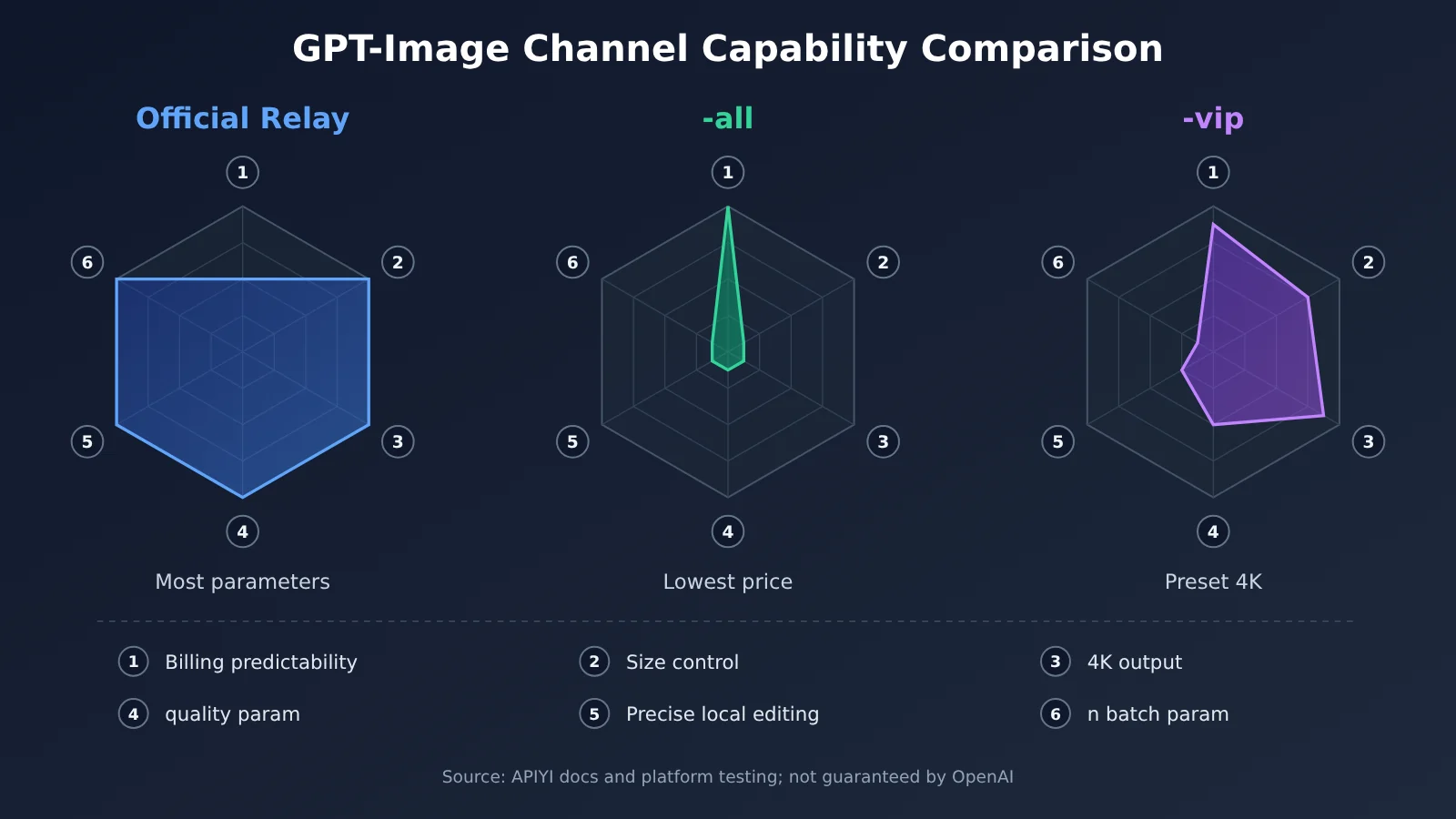
| Dimension | Official relay (2.5 flare / sunburst) | -all | -vip | Winner |
|---|---|---|---|---|
| Billing | Per token, varies with size and quality | $0.025/image (from 2026-10-10) | $0.03/image | Most predictable cost: -all |
| size parameter | Any valid size | Not supported | 30 common sizes | Official relay |
| 4K output | Supported | Not supported | Preset 4K supported | Official relay / -vip |
| quality parameter | Supported per the official API | Not supported | Channel-specific behavior, range varies by model | Official relay |
| n (multiple images) | Supported | Not supported | Not supported | Official relay |
| Precise mask-based inpainting | Supported | Not supported | Not guaranteed, whole-image regeneration only | Official relay |
| Typical use | Parameter control, precise editing | Fixed-price bulk image generation | Fixed price, preset sizes and 4K | — |
GPT-Image Channel Comparison Breakdown
Official relay: The official relay leads on parameter coverage. size, quality, n, and mask all work the way they do in the official Images API, which makes it a good fit for production environments that need fine-grained control. But it bills per token, so the cost of a single large, high-quality image goes up, and you can’t compare it directly with per-image pricing. Platform testing also found that the official relay’s prompt limit is around 8192 tokens. Go past that and you won’t get an error, but the output turns chaotic, so truncate long prompts on the client side. Also, OpenAI has officially shut down transparent backgrounds in gpt-image-2, so if you need a transparent background, the platform recommends the 2.5 official relay.
-all: The strengths of -all are its fixed price and its being the cheapest option. It suits bulk image generation where composition isn’t critical. It doesn’t support size, quality, n, or mask, so it’s best to pass only the prompt when calling it. -all depends on the ChatGPT web app, so whenever the web app has an outage, -all is affected too.
-vip: -vip sits between the two. It charges per image while offering preset sizes and 4K, which suits cases where you want a fixed cost but also high resolution. Its parameter behavior is channel-specific rather than an official guarantee. The xhigh and max quality tiers on 2.5 VIP were opened up based on platform testing, so don’t assume every reverse-engineered model has them.
Note: The prices in the table above follow the APIYI platform catalog (before top-up bonuses and group discounts). They aren’t OpenAI’s official per-image rates, and the final price is whatever the apiyi.com console shows.
A Look Back at GPT-Image Channel Outages: Why You Shouldn’t Bet on a Single Route
If you only look at a feature comparison table, you’ll miss one key factor: the three channel types fail for different reasons and recover at different speeds. Below are representative incidents from the platform’s status announcements between April and October 2026. These are all historical records and don’t reflect current status.
| Date (2026) | Channel | Symptoms | Platform Notes / Recommendations |
|---|---|---|---|
| Apr 23–27 | Official relay, default group | Concurrency alerts, temporary rate limits, 429 / 408 errors | Switch to image2Enterprise and raise the timeout to 360–600 seconds |
| May 7 | Official relay, enterprise group | Errors | Root cause was on the OpenAI upstream side |
| May 9 | Official relay, default group | Saturated again | Switch your token to the enterprise group |
| Jun 16–23 | -vip | The size parameter stopped working; resolution dropped to 1.5K, then 1K | Attributed to an upstream rule change; briefly recovered in between |
| Jul 7–13 | -all | Upstream failures, timeouts | Temporarily pointed to the vip channel; credits were reissued afterward for timed-out calls |
| Aug 24–25 | -vip | Upstream risk-control throttling, saturation | 429s can be retried; content-safety errors don’t need a retry |
| Sep 10–15 | 2.5 -vip | Hit by 429s, insufficient resources | Official relay and -all were both normal during the same period |
| Oct 15 | -all / -vip | -all affected by a ChatGPT web outage; -vip under heavy load | When the reverse-engineered official channel is unavailable, fall back to the official relay first |
| Oct 19 | 2.5 -vip | Concurrency saturation | Adding resources |
Summary of GPT-Image Channel Failure Patterns
Put these records side by side and four typical patterns emerge:
- Official relay default group runs out of resources: This shows up as 429 and 408 errors. The enterprise group eases some of the pressure, but it can’t avoid outages on OpenAI’s upstream side.
- -all follows ChatGPT web outages: As soon as the ChatGPT web version has problems, -all starts erroring or slowing down in sync. Response times recorded by the platform have ranged from about 40 seconds to about 80 seconds.
- -vip resource pool saturation and parameter drift: Besides 429s, there have been cases where size and quality suddenly stopped working and then came back. Even parameter availability isn’t stable.
- Multiple channels healthy at the same time: On Sep 10 and 15, while -vip was unavailable, the official relay and -all were both running normally. That’s exactly where connecting to two channels pays off.
A note on the time boundary: in the archive as of 2026-11-11, the last announcement that clearly concerned GPT-Image channel health was the one on Oct 19. The entries on Nov 5 and Nov 9 were about the 2.6 launch and a documentation update, not status notices. So this article doesn’t offer a stability ranking for any given day, and the historical response-time figures shouldn’t be treated as an SLA.
GPT-Image Channel Recommendations by Scenario
When to Choose the Official Relay
- E-commerce hero images and ad creatives: You need exact dimensions or 4K, plus
qualityto control output fidelity. - Inpainting and background swaps: These rely on precise mask-based editing. -vip can only regenerate the whole image, and -all doesn’t support masks.
- Existing OpenAI SDK code: You get the best parameter compatibility and the lowest migration cost.
When to Choose -all
- Bulk assets and rough concept sketches: There’s no hard requirement on size, and a fixed low price matters most.
- Content production on a tight budget: The flat $0.025 per image makes cost accounting simple.
When to Choose -vip
- You need 4K but want per-request billing: Just use the preset sizes the platform provides.
- Full-image generation is the main use case, with no need for precise local edits: You can live with some parameter variability caused by the channel’s behavior.
| Use Case | Recommended Primary Channel | Recommended Fallback | Fallback Caveats |
|---|---|---|---|
| Precise local editing | Official relay sunburst | Official relay enterprise group (if eligible) | Don’t fall back to -all / -vip; the mask will stop working |
| Commercial images at a specified size | Official relay flare | -vip preset sizes | Map fallback sizes to one of the 30 presets |
| 4K high-res at a fixed cost | -vip | Official relay | After switching, billing changes to per-token |
| High-volume batch generation | -all | -vip (also per-request billing) | Cost per image goes from $0.025 to $0.03 |
| Need n image variants | Official relay | Loop multiple calls to -all | Reverse-engineered channels don’t support the n parameter |
GPT-Image Channel Fallback Strategy: Retries, Circuit Breaking, and Degradation
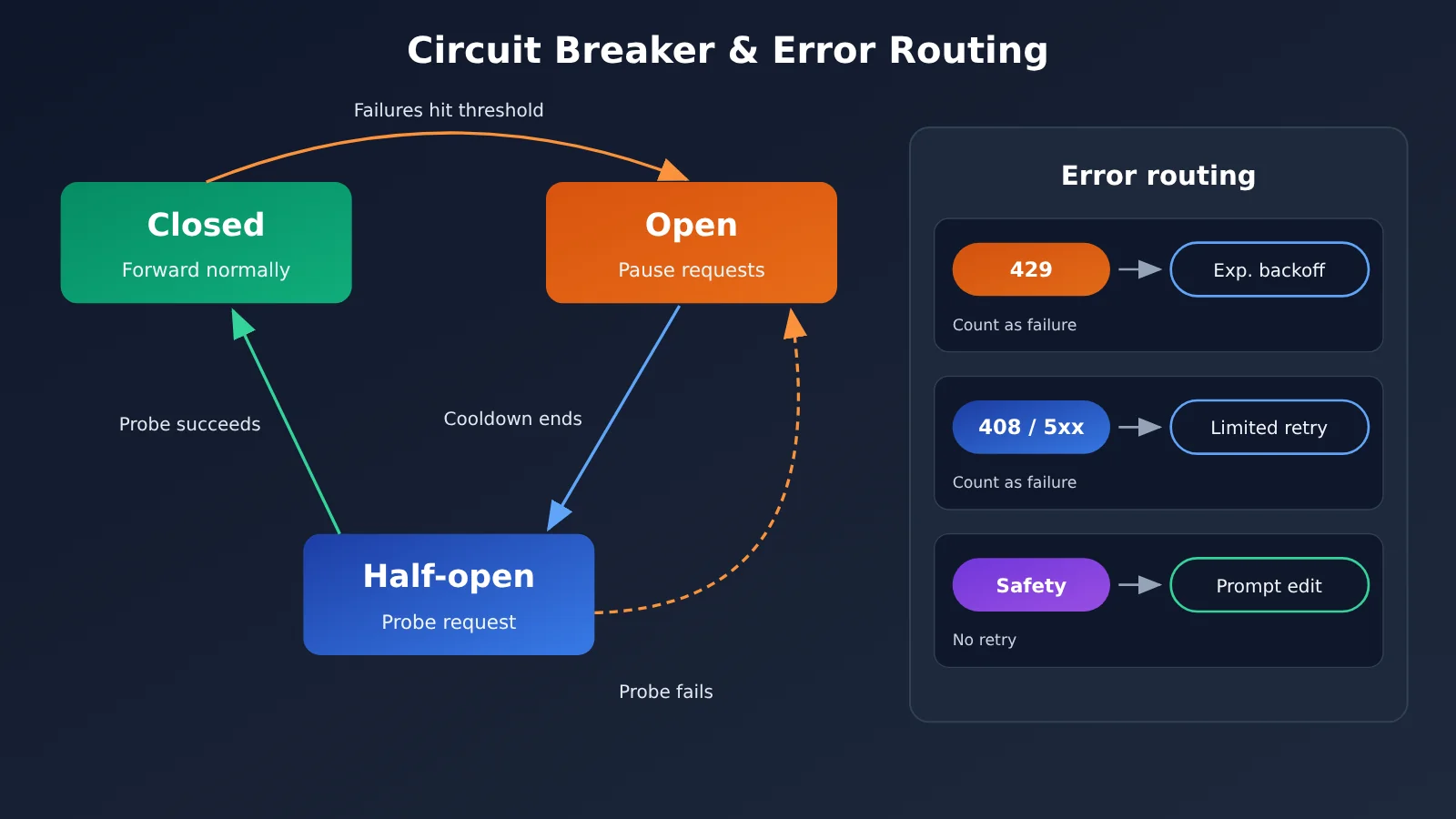
A reliable fallback isn’t “resend whenever there’s an error.” You first identify the error type, then pick the right action for it.
| Error Type | Common Causes | Retry? | Recommended Action |
|---|---|---|---|
| 429 | Concurrency or rate limits, saturated resource pool | Yes, backoff required | Use exponential backoff with random jitter; trip the circuit breaker and switch channels after consecutive failures |
| 408 / client timeout | Slow image generation upstream, timeout set too low | Limited retries | Raise the official-relay timeout to 360–600 seconds and retry at most 2 times |
| 5xx system errors | Platform or upstream failure | Limited retries | Up to 2 exponential-backoff retries; if it still fails, switch to a backup channel |
| Content safety errors | The prompt or input image triggered moderation | No | Modify the content before requesting again; retrying as-is just wastes quota |
| Prolonged outage | Widespread upstream failure | No | Trip the circuit breaker on the current channel and move to a backup channel that has passed a health check |
There are two pitfalls to watch out for. First, the platform has stated that a 500 returned by -all is usually a content violation (not billed). Also, since May, safety-related 500s on -all/-vip are now disclosed directly instead of being retried internally. So your client needs to read the error message rather than resending on every 5xx. Second, -vip has occasionally returned an Unknown error, and the platform’s experience is that compressing each input image to under 1.5MB helps.
Minimal Example
from openai import OpenAI

client = OpenAI(
    api_key="YOUR_API_KEY",
    base_url="https://api.apiyi.com/v1",
    timeout=600,  # Official-channel image generation is slow; the platform has suggested 360–600 seconds
)

resp = client.images.generate(
    model="gpt-image-2.5-flare",
    prompt="一只在咖啡馆窗边看书的橘猫,柔和晨光,写实摄影风格",
    size="1536x1024",
)
item = resp.data[0]
print(item.b64_json[:60] if item.b64_json else item.url)
View the full implementation: multi-channel retry + circuit breaker + fallback
import time
import random
import logging
import openai
from openai import OpenAI

logging.basicConfig(level=logging.INFO)
BASE_URL = "https://api.apiyi.com/v1"

# Channels are listed in priority order; different groups use different tokens
CHANNELS = [
    {"name": "official", "model": "gpt-image-2.5-flare",
     "key": "KEY_DEFAULT", "params": {"size": "1536x1024", "quality": "high"}},
    # Enable only if your account is eligible for the image2Enterprise group
    {"name": "official-enterprise", "model": "gpt-image-2.5-flare",
     "key": "KEY_ENTERPRISE", "params": {"size": "1536x1024", "quality": "high"}},
    # For -vip, replace size with one of the 30 presets in the docs
    {"name": "vip", "model": "gpt-image-2.5-flare-vip",
     "key": "KEY_DEFAULT", "params": {"size": "1536x1024"}},
    # -all doesn't support size / quality / n; pass only the prompt
    {"name": "all", "model": "gpt-image-2.5-all",
     "key": "KEY_DEFAULT", "params": {}},
]

FAIL_THRESHOLD = 3     # Number of consecutive failures before the breaker trips (example value)
COOLDOWN = 120         # Breaker cooldown in seconds (example value)
MAX_RETRY = 2          # Retry up to 2 times on 5xx / timeouts
breaker = {c["name"]: {"fails": 0, "open_until": 0} for c in CHANNELS}


def classify(err: Exception) -> str:
    msg = str(err).lower()
    if any(k in msg for k in ("safety", "content_policy", "moderation", "violat")):
        return "content"
    if isinstance(err, openai.RateLimitError):
        return "rate_limit"
    if isinstance(err, openai.APITimeoutError):
        return "timeout"
    if isinstance(err, openai.APIStatusError):
        if err.status_code == 408:
            return "timeout"
        if err.status_code >= 500:
            return "server"
        return "fatal"
    if isinstance(err, openai.APIConnectionError):
        return "network"
    return "fatal"


def generate(prompt: str, need_mask: bool = False):
    for ch in CHANNELS:
        if need_mask and ch["name"] in ("vip", "all"):
            continue  # Precise edits don't fall back to reverse-engineered channels
        state = breaker[ch["name"]]
        if time.time() < state["open_until"]:
            continue  # Channel breaker is open
        client = OpenAI(api_key=ch["key"], base_url=BASE_URL, timeout=600)
        for attempt in range(MAX_RETRY + 1):
            try:
                resp = client.images.generate(
                    model=ch["model"], prompt=prompt, **ch["params"])
                state["fails"] = 0
                logging.info("ok channel=%s model=%s", ch["name"], ch["model"])
                return ch["name"], resp.data[0]
            except Exception as e:
                kind = classify(e)
                logging.warning("fail channel=%s model=%s kind=%s req_id=%s",
                                ch["name"], ch["model"], kind,
                                getattr(e, "request_id", None))
                if kind in ("content", "fatal"):
                    raise  # Content or parameter issue: change the request, don't retry
                if attempt < MAX_RETRY:
                    time.sleep(2 ** (attempt + 1) + random.uniform(0, 1))
        state["fails"] += 1
        if state["fails"] >= FAIL_THRESHOLD:
            state["open_until"] = time.time() + COOLDOWN
    raise RuntimeError("所有 GPT-Image 通道均不可用")
🚀 Quick start: start by using the free trial quota for new users at APIYI apiyi.com to run a round of A/B channel validation across official relay (官转), -vip, and -all: same prompt, same size, then record latency, success rate, and image differences separately before settling on a primary/backup order.
GPT-Image Channel Decision Recommendations
If you only remember one principle, make it this: choose the primary channel by your business’s hard constraints, and choose the backup channel by how its failure sources differ. For workflows that need precise mask editing, redundancy has to live inside official relay itself — a default group plus an enterprise group, for example. For workflows that only need whole-image generation, you can pair “official relay + -vip” or “-all + -vip” so that two lines with different failure sources cover for each other. Beyond that, every request should log the model actually used, the channel, and the request_id, which makes reconciliation and troubleshooting much easier later.
💡 Selection tips: channel performance shifts as upstream resources change, and a stable history doesn’t guarantee a stable future. We recommend connecting two or more channels under the unified API at APIYI apiyi.com and running periodic low-volume health checks, rather than locking in a choice based on a single test result.
FAQ
Q1: What are the “official relay” and “official reverse” routes for GPT-Image?
The official relay is a route that forwards requests directly through OpenAI’s official Images API. The official reverse is the platform’s category for reverse-engineered access resources. It includes -all, which runs on the ChatGPT web route, and -vip, which the platform docs describe as an Adobe/Firefly route. The official reverse is not an API provided by OpenAI.
Q2: What’s the difference between GPT-Image -all and -vip?
Both are billed per request. -all costs $0.025 per image and doesn’t support size, quality, or 4K. -vip costs $0.03 per image and supports 30 preset sizes and a preset 4K. That said, parameter behavior is a channel-level matter, and there have been times when size stopped working and was later restored.
Q3: Does GPT-Image 2.6 also have -all and -vip variants?
In the model registry as of 2026-11-11, only two token-billed models are listed for 2.6: gpt-image-2.6-flare and gpt-image-2.6-sunburst. There are no -all or -vip variants for 2.6. Please don’t assume the 2.5 VIP capabilities carry over to 2.6.
Q4: Does the image2Enterprise group guarantee no outages?
No. It has run reliably many times when the default group was congested, but it was also hit by an OpenAI upstream outage on 2026-05-07. Its rate multiplier is 1.2x, and eligibility is determined in the console. It works well as redundancy within the official relay route, but don’t treat it as a catch-all safety net.
Q5: How can I quickly test multiple GPT-Image channels through the API?
1. Sign up for an account at APIYI (apiyi.com) to get an API key and free test credits.
2. Set `base_url` to `https://api.apiyi.com/v1` and switch the `model` parameter using the code in this article.
3. Call each channel with the same prompt, and record latency, success rate, and image quality.
With a unified interface, switching channels only requires changing the model name, so you don’t need to maintain a separate SDK for each upstream provider.
Q6: Should I keep retrying on a 5xx error?
No. The platform docs recommend at most 2 retries with exponential backoff for 5xx errors and timeouts. A 500 from -all is usually caused by a content policy violation, so retrying won’t help. Once you’ve used up your retries, trip the circuit breaker on the current channel and switch to a backup channel.
Q7: What are the known limitations of the GPT-Image channels?
– If an official relay prompt exceeds roughly 8192 tokens, it won’t throw an error, but the generated image will come out messy.
– Transparent backgrounds have been shut down officially for gpt-image-2. If you need a transparent background, use the 2.5 official relay instead.
– The reverse channels don’t support the `n` parameter or precise masks.
– For -vip, we recommend compressing input images to under 1.5MB.
GPT-Image Channel Selection: Key Takeaways
- Three channel types: the official relay hits the official Images API,
-alldepends on the ChatGPT web version, and-vipdepends on the platform’s account pool; - Parameter differences: only the official relay fully supports arbitrary
size,n, and precisemaskediting; - Billing differences: the official relay bills per token,
-allcosts $0.025 per image, and-vipcosts $0.03 per image; - Enterprise grouping:
image2Enterpriseis a token group at a 1.2x multiplier, not a standalone model; - Failure patterns: each channel fails for different reasons, and historically one channel has often been down while another stayed healthy;
- Retry principles: back off and retry on 429, retry 5xx and timeouts at most twice, and never retry content-safety errors;
- Getting started: connect both channels behind the unified APIYI interface, then use A/B testing to decide which one leads and which one backs it up.
Summary
The core of GPT-Image channel selection:
- Pick the primary channel by hard constraints: choose the official relay when you need precise editing and arbitrary dimensions,
-allwhen you want a fixed low price, and-vipwhen you need per-call billing at 4K; - Pick the fallback channel by failure source: keep the upstream dependencies of your primary and backup lines from overlapping — any single channel will eventually hit resource saturation or an upstream outage;
- Handle failures by error type: bounded retries, exponential backoff, circuit-breaker cooldowns, and logging. All four matter.
Historical reports make one thing clear: no GPT-Image channel stays failure-free over the long run. Reliability comes from your architecture, not from betting on the right line. A recommended approach is to connect multiple channels under one key through APIYI (apiyi.com), run a small-traffic comparison first, and then lock in your primary/backup setup.
📚 References
- APIYI Live Status Archive: Historical status updates, price changes, and documentation updates for each GPT-Image channel
- Link:
docs.apiyi.com/live/archive -
Note: This is the source of the incident timeline in this article. For current status, refer to the latest updates.
-
APIYI Model Registry: Model IDs, billing types, visible groups, and group multipliers
- Link:
docs.apiyi.com/model-registry.json -
Note: The data cited in this article was generated on 2026-11-11, and prices are list prices before discounts.
-
OpenAI Status Page: Official OpenAI service status
- Link:
status.openai.com - Note: The platform has previously recommended checking this page to tell whether an official-channel failure originates upstream.
Author: APIYI Technical Team
Technical Discussion: Feel free to reach out to us on the APIYI homepage. For more GPT-Image integration resources, visit the docs.apiyi.com documentation center.