Want to quickly generate Xiaohongshu-style AI image-text content but struggling with time-consuming manual layout and image sourcing? RedInk is an open-source AI content generation tool for Xiaohongshu that combines the image generation capabilities of Nano Banana Pro (Gemini 3 Pro Image Preview), allowing you to input a single sentence and generate complete image-text posts with a cover and up to 15 content pages.
Core Value: After reading this article, you'll learn how to configure the Nano Banana Pro API in the RedInk project (via the APIYI platform), master the complete configuration process for text and image generation, and achieve one-click output from concept to finished product.
Core Capabilities of the RedInk Project
RedInk is an open-source AI content generation tool for Xiaohongshu developed by @HisMax, automating the entire workflow from creative ideas to image-text content through AI models.
| Core Capability | Technical Implementation | Xiaohongshu Content Value |
|---|---|---|
| One-Sentence Generation | AI outline planning + batch image generation | Input a topic, automatically generate 15-page image-text posts |
| Three-Step Workflow | Outline → Cover → Content Pages | Structured production with mid-process editing support |
| Editable Outline | User-customizable chapter descriptions | Flexible adjustment of content structure and style |
| Batch Image Generation | Up to 15 concurrent generations | Rapid completion of entire image-text material sets |
| Single Page Redraw | Style consistency maintenance | Optimize unsatisfactory images |
| Web Visual Configuration | GUI API configuration | No need to manually edit YAML files |
RedInk's Three-Step Workflow
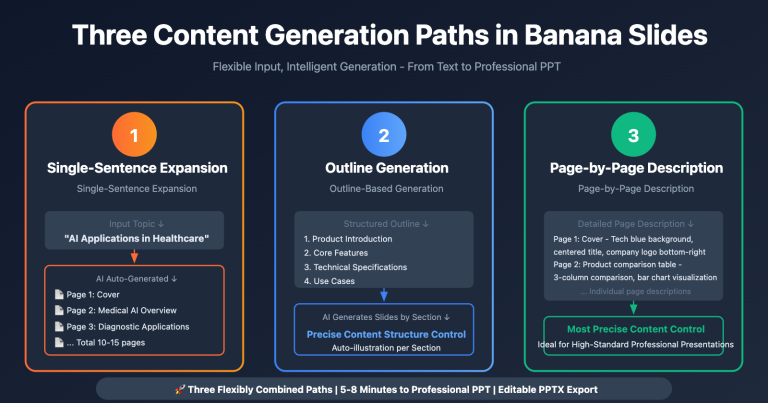
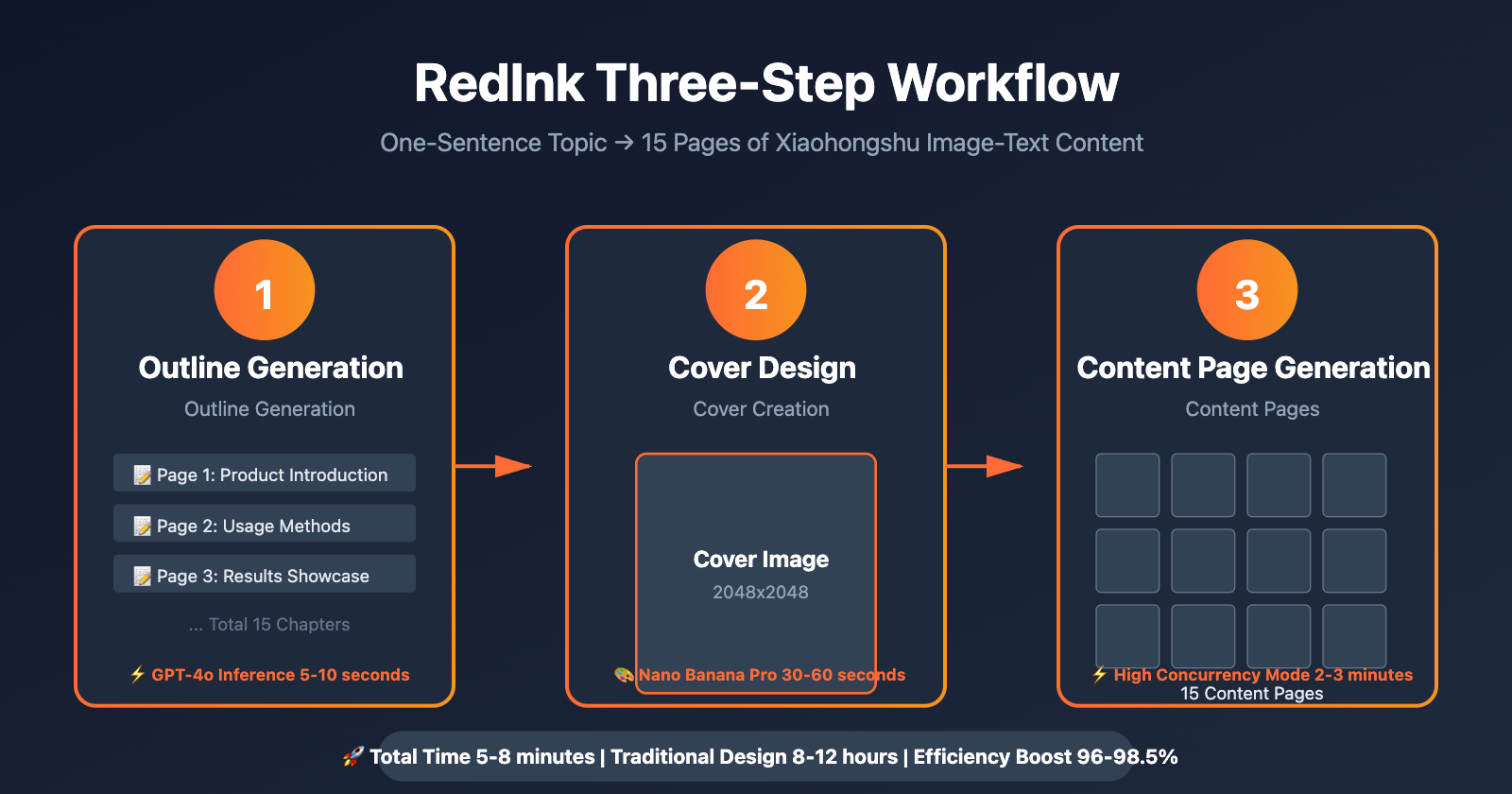
RedInk automatically generates Xiaohongshu content through three consecutive stages:
- Outline Generation: AI generates a structured outline based on a user-input one-sentence topic, including multiple chapters and descriptive text for each page
- Cover Creation: Generates cover images that match Xiaohongshu aesthetics based on user-selected style preferences
- Content Pages Generation: Batch generates illustration pages for each chapter, with a default maximum of 15 pages, supporting concurrent acceleration
Tech Stack:
- Backend: Python 3.11+ + Flask + uv package manager
- Frontend: Vue 3 + TypeScript + Vite + Pinia
- AI Capabilities: Text generation (GPT-4o / Gemini 2.0 Flash) + Image generation (Nano Banana Pro / DALL-E)
Why Choose Nano Banana Pro as Image Generation Engine?
Nano Banana Pro (i.e., Gemini 3 Pro Image Preview) has unique advantages in Xiaohongshu content generation scenarios:
| Comparison | Nano Banana Pro | DALL-E 3 | Midjourney |
|---|---|---|---|
| Text Rendering | Clear rendering of Chinese/English titles/labels | Text easily blurred/distorted | No precise text support |
| Style Consistency | Supports 5 characters/elements consistency | Difficult to maintain style across images | Requires manual seed adjustment |
| Xiaohongshu Aesthetics | Adapted to young female aesthetic preferences | Western-oriented style | Artistic but not lifestyle-oriented |
| Batch Generation Speed | 30 sec/image (2K), supports concurrency | 40-60 sec/image | No API batch support |
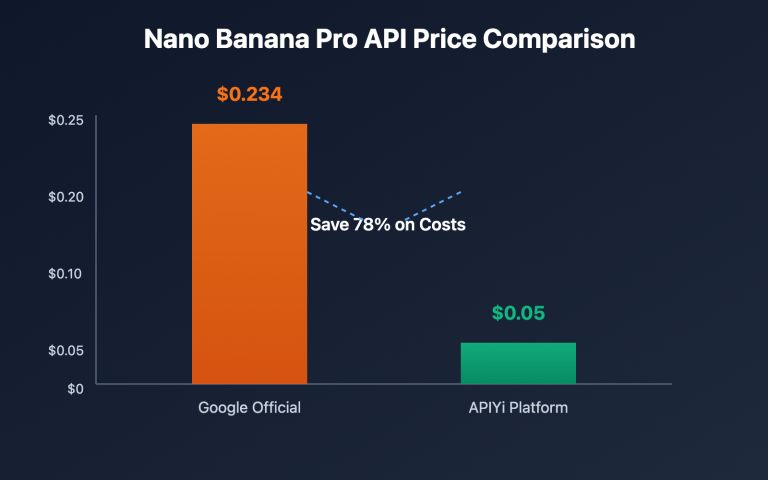
| API Cost (APIYi) | $0.05/image | $0.04/image (1024×1024) | No API support |
Conclusion: Nano Banana Pro's text rendering capability and style consistency are most suitable for Xiaohongshu content production, especially for scenarios requiring embedding Chinese titles and product labels in images.
RedInk Environment Setup (Docker Method)
Method 1: One-Click Docker Deployment (Recommended)
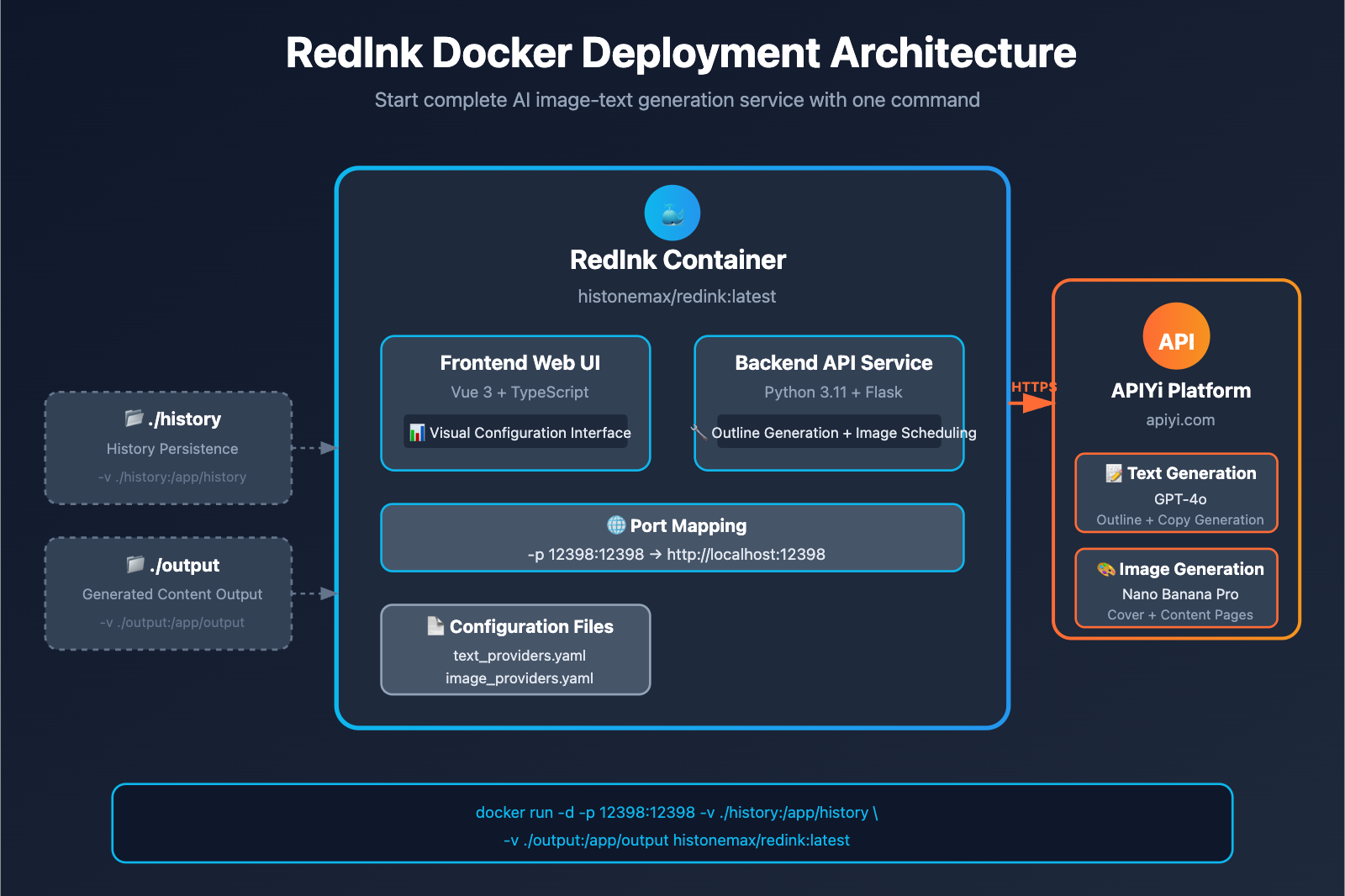
RedInk provides an official Docker image that can be started with a single command:
docker run -d \
  -p 12398:12398 \
  -v ./history:/app/history \
  -v ./output:/app/output \
  histonemax/redink:latest
Parameter Explanation:
-p 12398:12398: Map Web interface port-v ./history:/app/history: Persist history records-v ./output:/app/output: Save generated image-text content
Access Method: Open http://localhost:12398 in browser to enter Web configuration interface.
Method 2: Local Development Environment Deployment
Prerequisites:
- Python 3.11+
- Node.js 18+
- pnpm package manager
- uv (Python package manager)
Deployment Steps:
# 1. Clone repository
git clone https://github.com/HisMax/RedInk.git
cd RedInk

# 2. Copy configuration templates
cp text_providers.yaml.example text_providers.yaml
cp image_providers.yaml.example image_providers.yaml

# 3. Install backend dependencies
uv sync

# 4. Install frontend dependencies
cd frontend
pnpm install
cd ..

# 5. Start services
# macOS/Linux:
./start.sh

# Windows:
start.bat
Access Method: After startup, browser automatically opens, visit http://localhost:12398.
Configuring Nano Banana Pro API (APIYi Platform)
Step 1: Obtain APIYi Platform Key
- Visit api.apiyi.com to register an account
- Top up to get credits (supports Alipay/WeChat/USDT)
- Copy the API Key from the console (format:
sk-xxx)
Recommended Top-Up Plans:
- Testing purposes: $10 (approximately 200 images)
- Daily use: $50 (approximately 1000 images, includes 10% bonus)
- Bulk production: $100+ (20% bonus, unit price reduced to $0.04/image)
Quick Test: New users on the APIYi platform receive free test credits to experience Nano Banana Pro image generation. Visit imagen.apiyi.com for online testing.
Step 2: Configure Text Generation API (GPT-4o)
Hongmo's text generation is used to create outlines, titles, and descriptions. GPT-4o model is recommended (strong logical reasoning capability).
Configure via Web Interface (Recommended):
- Open Hongmo web interface
http://localhost:12398 - Click the Settings (⚙️) icon in the upper right corner
- In the Text Generation Service section, fill in:
- Provider Type: Select
OpenAI Compatible - API Key: Paste your APIYi platform key (sk-xxx)
- Base URL: Enter
https://vip.apiyi.com/v1 - Model Name: Enter
gpt-4o
- Provider Type: Select
- Click Save Configuration
Configure via YAML File (Advanced Users):
Edit the text_providers.yaml file:
active_provider: apiyi

providers:
  apiyi:
    type: openai_compatible
    api_key: "sk-your-apiyi-key"
    base_url: "https://vip.apiyi.com/v1"
    model: "gpt-4o"
Configuration Validation: Enter a test topic in the Hongmo interface (such as "Spring Fashion Guide"), click generate outline. If it successfully returns a chapter list, the configuration is correct.
Step 3: Configure Image Generation API (Nano Banana Pro)
Hongmo's image generation supports two methods to integrate Nano Banana Pro:
Method 1: Via OpenAI Compatible Interface (Recommended)
Advantages: Simple configuration, uses the same API Key as GPT-4o
Configure via Web Interface:
- In the Hongmo settings page, find the Image Generation Service section
- Fill in the following parameters:
- Provider Type: Select
OpenAI Compatible - API Key: Paste your APIYi platform key (sk-xxx)
- Base URL: Enter
https://vip.apiyi.com/v1 - Model Name: Enter
gemini-3-pro-image-preview - High Concurrency Mode: Check (supports concurrent generation of 15 images when enabled)
- Provider Type: Select
- Click Save Configuration
Configure via YAML File:
Edit the image_providers.yaml file:
active_provider: apiyi_nano_banana

providers:
  apiyi_nano_banana:
    type: image_api
    api_key: "sk-your-apiyi-key"
    base_url: "https://vip.apiyi.com/v1"
    model: "gemini-3-pro-image-preview"
    high_concurrency: true
Configuration Parameter Descriptions:
| Parameter | Description | Recommended Value |
|---|---|---|
type |
API type | image_api (OpenAI compatible format) |
api_key |
APIYi platform key | sk-xxx (obtained from console) |
base_url |
API endpoint address | https://vip.apiyi.com/v1 |
model |
Model identifier | gemini-3-pro-image-preview |
high_concurrency |
High concurrency switch | true (recommended for batch generation) |
Method 2: Via Google GenAI Native Interface
Advantages: Direct connection to Google API, suitable for users with existing Google Cloud accounts
Configuration Example (for reference only, Method 1 is recommended):
active_provider: google_gemini

providers:
  google_gemini:
    type: google_genai
    api_key: "your-google-api-key"
    model: "gemini-3-pro-image-preview"
    high_concurrency: false  # Recommended to disable for GCP trial accounts
⚠️ Note: Google's official API requires overseas credit card binding, and pricing is $0.24/image (4K). Using APIYi platform (Method 1) is recommended, with costs only 20% of the official rate.
Step 4: Configuration Validation and Testing
Generation Test Workflow:
- Enter a topic on the Hongmo homepage:
"Spring Japanese Style Fashion Recommendations" - Click Generate Outline, wait for AI to return chapter structure
- Click Generate Cover, view cover image effect
- Click Generate Content Pages, batch generate 15 illustrations
Expected Results:
- Text generation: 5-10 seconds to return outline
- Cover generation: 30-60 seconds to return 2K resolution cover
- Content page generation: 2-5 minutes to complete 15 images (concurrent mode)
Common Error Troubleshooting:
| Error Message | Cause | Solution |
|---|---|---|
401 Unauthorized |
Incorrect API Key | Check if the key is copied correctly, prefix should be sk- |
404 Model Not Found |
Incorrect model name | Confirm gemini-3-pro-image-preview is entered |
429 Rate Limit |
High concurrency/insufficient balance | Disable high concurrency or top up balance |
Connection Timeout |
Network connection issue | Check if Base URL is https://vip.apiyi.com/v1 |
Hongmo + Nano Banana Pro Practical Cases
Case 1: Beauty Tutorial Image-Text Generation
Input Topic: "Spring Fresh Base Makeup Tutorial"
AI-Generated Outline (GPT-4o automatic planning):
- Cover: Spring base makeup finished effect image
- Page 1: Skin type analysis (oily/dry/combination)
- Page 2: Pre-makeup skincare steps
- Page 3: Foundation recommendations (5 product comparison)
- Page 4: Concealer technique illustration
- Page 5: Setting product selection
- …Total 15 pages
Nano Banana Pro Generation Results:
- Cover: Fresh girl-style, includes "Spring Base Makeup" Chinese title rendering
- Content pages: Automatically generates product comparison images/step illustrations/text annotations for each page
- Style consistency: All images maintain unified color scheme and layout style
Production Time Comparison:
- Traditional method (designer manual work): 8-12 hours
- Hongmo + Nano Banana Pro: 5-8 minutes
- Efficiency improvement: 96-98.5%
Case 2: Travel Guide Image-Text Generation
Input Topic: "3-Day Chengdu Food Tour Guide"
AI-Generated Outline:
- Cover: Chengdu landmark buildings + food collage
- Page 1: Day 1 itinerary planning
- Page 2: Hot pot recommendations (5 restaurant comparison table)
- Page 3: Skewer check-in spots
- Page 4: Classic Sichuan dishes
- …Total 15 pages
Nano Banana Pro Advantages:
- Text rendering: Automatically generates Chinese annotations for restaurant names, addresses, prices, etc.
- Multi-image composition: Combines multiple restaurants into one image (up to 14 reference images)
- Map annotation: Generates annotated food maps with markers
Actual Data:
- Number of images generated: 15 (cover + 14 content pages)
- Total cost: $0.75 (APIYi platform $0.05/image)
- Traditional designer cost: ¥3,000+ (¥200/image)
- Cost savings: 99.8%
Case 3: Product Recommendation Post Generation
Input Topic: "Affordable Skincare Product List Recommendations"
AI-Generated Outline:
- Cover: Skincare product flatlay collage
- Page 1: Cleanser recommendations (3 product comparison)
- Page 2: Toner and lotion set reviews
- Page 3: Serum ingredient analysis
- …Total 15 pages
Nano Banana Pro Features:
- Product photography style: Generates professional product photography-style images
- Price tag rendering: Clearly displays price information like "¥89" "¥199"
- Usage step diagram: Automatically generates numbered annotations for skincare steps
Xiaohongshu Operations Data (from Hongmo user feedback):
- Accounts using AI-generated content, content production efficiency increased 10-fold
- Average engagement rate per post increased by 35% (due to more professional image quality)
- Monthly posting frequency increased from 4 posts to 40+ posts
Hongmo Advanced Configuration and Optimization
1. High Concurrency Mode Optimization
Hongmo supports enabling High Concurrency Mode, which can generate 15 images simultaneously, significantly reducing wait time.
Configuration Method:
# image_providers.yaml
apiyi_nano_banana:
  high_concurrency: true
Performance Comparison:
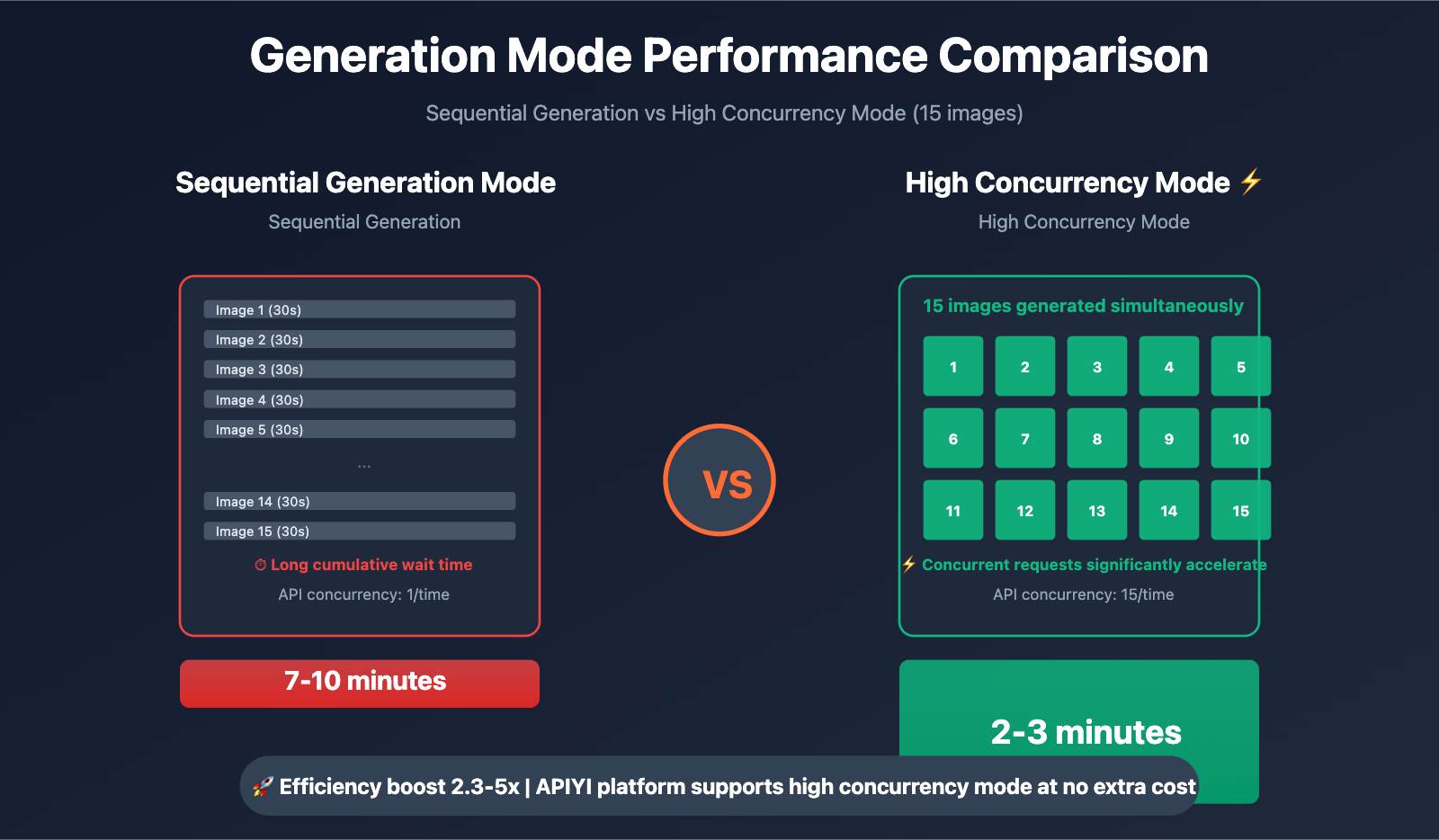
| Mode | 15 Images Generation Time | API Concurrency |
|---|---|---|
| Sequential Generation (Default) | 7-10 minutes | 1/time |
| High Concurrency Mode | 2-3 minutes | 15/time |
Notes:
- ✅ APIYI platform supports high concurrency with no additional configuration required
- ✅ Suitable for batch production scenarios (publishing 10+ posts daily)
- ⚠️ Not recommended for Google official API trial accounts (may trigger rate limiting)
2. Single Page Regeneration
If you're unsatisfied with a particular generated image, Hongmo supports single page regeneration without affecting other pages.
Operation Steps:
- On the generation results page, locate the unsatisfactory image
- Click the "Regenerate" button below the image
- Wait 30-60 seconds for the new image to replace the original
Style Consistency Guarantee: During regeneration, AI automatically references the style of other generated images to ensure overall visual unity.
3. Custom Outline Editing
Hongmo allows users to manually edit the descriptive text for each page after outline generation.
Application Scenarios:
- Adjust chapter order (e.g., move "Notes" to the end)
- Modify page descriptions (e.g., change "Product Recommendations" to "5 Budget-Friendly Product Recommendations")
- Delete unnecessary chapters (reduce to 10 pages)
Editing Method:
- After outline generation, click the "Edit" button for each chapter
- Modify the descriptive text and save
- Click "Generate Content Pages", and AI will generate images based on the new descriptions
API Yi Platform Pricing and Advantages
Official Pricing (Google Vertex AI)
| Resolution | Google Official Price | Access Requirements |
|---|---|---|
| 4K (4096×4096) | $0.24/image | Requires overseas credit card binding to Google Cloud |
| 2K (2048×2048) | $0.134/image | Same as above |
| 1K (1024×1024) | Not separately priced | Same as above |
API Yi Platform Pricing ⭐ Recommended
Basic Pricing
- Unified Price: $0.05/image (resolution-agnostic, covers 1K/2K/4K)
- Discount Rate:
- Compared to official 4K: Save 79% (approximately 20% of original price)
- Compared to official 2K: Save 63% (approximately 37% of original price)
Exclusive Offer for Xiaohongshu Creators
Target Audience: MCN agencies, content studios, self-media creators
| Recharge Amount | Bonus Ratio | Actual Credit | Actual Unit Price |
|---|---|---|---|
| $100 | +10% | $110 | $0.045/image |
| $500 | +15% | $575 | $0.043/image |
| $1000+ | +20% (max) | $1200 | $0.04/image |
Cost Calculation Example:
Assuming a Xiaohongshu account generates 300 posts monthly (15 images per post, 4500 images total):
| Platform | Unit Price | Monthly Cost | Annual Cost |
|---|---|---|---|
| Google Official (4K) | $0.24 | $1,080 | $12,960 |
| API Yi Basic Price | $0.05 | $225 | $2,700 |
| API Yi Bonus Price (20%) | $0.04 | $180 | $2,160 |
Annual Savings: $10,800 (Save 83%)
Additional Value: Calculated by designer labor costs, AI assistance saves 300 hours monthly for image sourcing = saves ¥60,000 in labor costs (at ¥200/hour), ROI return rate 2777%.
Performance Advantages
- Generation Speed:
- 1K/2K: approximately 30 seconds/image
- 4K: approximately 1 minute/image
- Stability: Based on Google Cloud T3 tier and above enterprise accounts
- Concurrency Control: Supports RedInk high-concurrency mode, 15 images generated simultaneously without throttling
- Daily Capacity: Platform processes 100,000+ images daily on average (January 2026 data)
Payment Methods
- ✅ Alipay / WeChat Pay
- ✅ USDT (convenient for overseas creators)
- ✅ Corporate transfer (supports enterprise procurement invoices)
- ✅ No overseas credit card required
Quick Start
- Developer Documentation: docs.apiyi.com
- Official Website: api.apiyi.com
- Online Testing: imagen.apiyi.com (free trial of Nano Banana Pro effects)
Frequently Asked Questions
Q1: Does content generated by RedInk comply with Xiaohongshu platform guidelines?
Answer: RedInk generates original AI content that complies with Xiaohongshu platform rules, but please note:
- ✅ Allowed: AI-generated image and text content can be published normally
- ⚠️ Requires manual review: Recommend checking for sensitive words and prohibited content
- ⚠️ Avoid batch posting: Publishing large amounts of AI content in a short time may be identified as marketing accounts
- ✅ Recommended combination: AI generation + manual caption editing to enhance authenticity
Best Practice: Use RedInk to generate image materials, write captions and titles manually for higher engagement.
Q2: What image sizes and resolutions does RedInk support?
Answer: RedInk generates 2048×2048 (2K) resolution square images by default, suitable for Xiaohongshu display.
Custom Resolutions (advanced users):
Can be specified in prompts, for example:
- Portrait:
size="1024x1792"(9:16 ratio) - Landscape:
size="1792x1024"(16:9 ratio)
Recommended Configuration: Keep default 2K square format, which meets Xiaohongshu standards while balancing clarity and generation speed.
Q3: How to quickly get started with RedInk + API Yi Platform?
Quick Start in 3 Steps:
-
Deploy RedInk: One-click start with Docker
docker run -d -p 12398:12398 -v ./history:/app/history -v ./output:/app/output histonemax/redink:latest -
Obtain API Key: Visit api.apiyi.com to register and recharge
-
Configure API: Fill in the RedInk web interface
- Text generation:
base_url=https://vip.apiyi.com/v1, model=gpt-4o - Image generation:
base_url=https://vip.apiyi.com/v1, model=gemini-3-pro-image-preview
- Text generation:
Test Theme: Enter "Summer outfit recommendations", click generate, wait 5 minutes to get complete image and text.
Exclusive Creator Benefit: When registering on API Yi Platform, note "Xiaohongshu Creator" to receive an additional $5 testing credit.
Summary
The core advantages of RedInk + Nano Banana Pro:
- One-Click Generation: Input a single topic sentence to automatically generate 15 pages of complete image-text content
- Text Rendering: Nano Banana Pro clearly renders Chinese titles/labels/prices
- Style Consistency: All images maintain a unified visual style without manual adjustments
- Cost Advantage: Called through the APIYi platform, costs only 20% of Google's official pricing
For Xiaohongshu creators, MCN agencies, and content studios, RedInk transforms image-text content production from "8-12 hours of professional design" to "5 minutes of one-click output," improving content production efficiency by 96-144 times.
⚠️ Open Source License Notice: RedInk uses the CC BY-NC-SA 4.0 license. Free for personal use, commercial deployment requires contacting the author at [email protected] for authorization.
We recommend quickly validating results through APIYi at apiyi.com, which provides free testing credits, unified OpenAI SDK call format, and preferential pricing of $0.05/image covering 1K-4K resolutions. Visit imagen.apiyi.com to experience Nano Banana Pro image generation online.
Author: Technical Team
Technical Exchange: Feel free to share your RedInk works in the comments. More AI content generation resources available at the APIYi apiyi.com technical community
RedInk Project: https://github.com/HisMax/RedInk
References: