Author's Note: A detailed guide on using Nano Banana Pro (Gemini 3 Pro Image) to create physics illustrated explainers, from fluid dynamics to scientific visualization, rapidly generating annotation-rich educational infographics
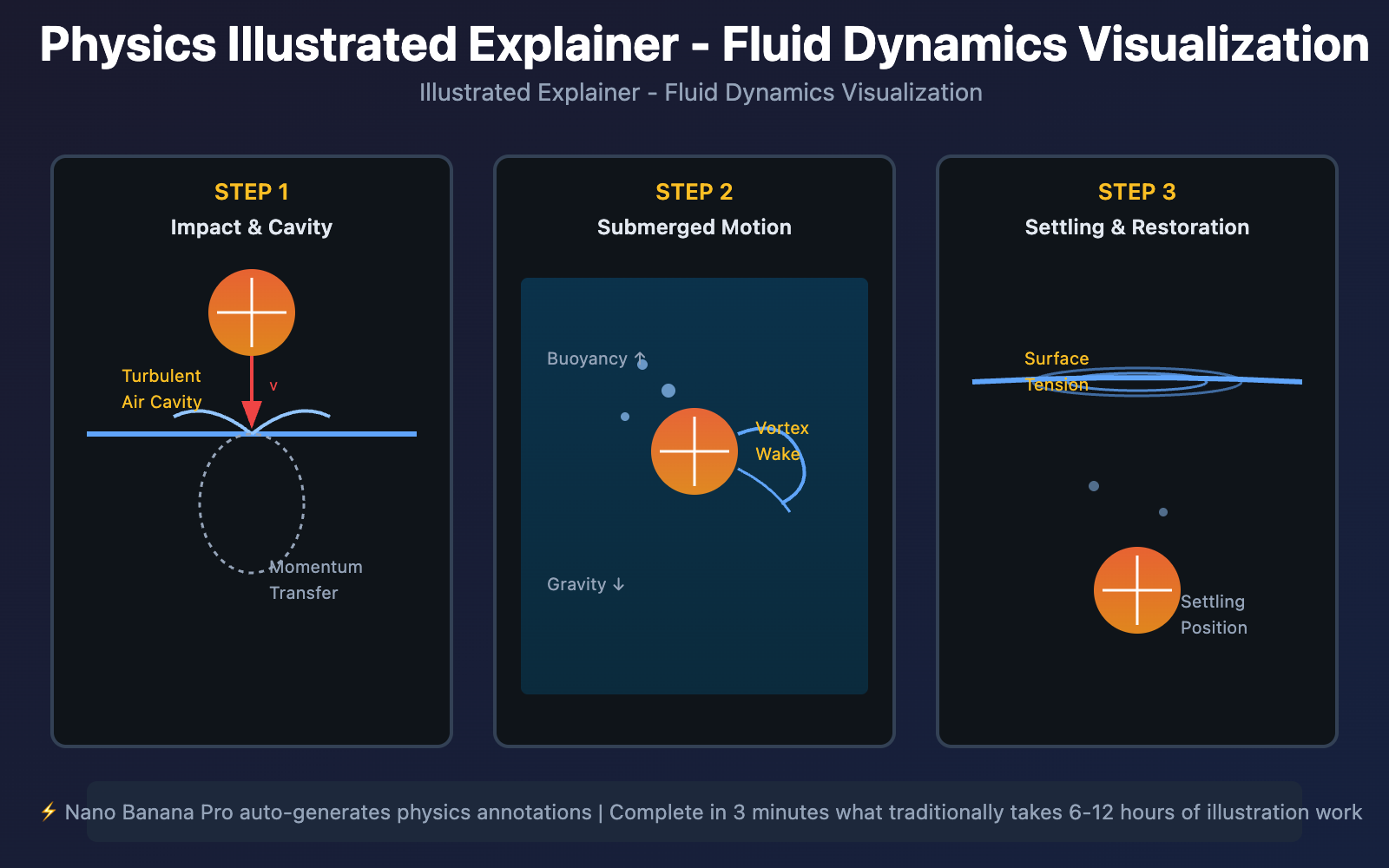
Traditional scientific infographic creation requires Adobe Illustrator, professional illustrators, and hours of manual drawing. Nano Banana Pro (Gemini 3 Pro Image Preview) combines Gemini 3 Pro's scientific knowledge reasoning capabilities with image generation technology, allowing you to generate professional-grade physics illustrated explainers with a single prompt, automatically annotating key concepts and demonstrating dynamic processes.
Core Value: After reading this article, you'll learn how to use Nano Banana Pro to create physics illustrated explainers, master scientific visualization, multi-step breakdown, and precise annotation techniques, transforming complex physical phenomena into understandable educational infographics.
Core Capabilities of Nano Banana Pro for Scientific Illustration
Nano Banana Pro is an image generation model launched by Google DeepMind based on Gemini 3 Pro. Its core capabilities in scientific visualization and educational infographics include:
| Core Capability | Technical Parameters | Scientific Illustration Value |
|---|---|---|
| Knowledge Reasoning | Based on Gemini 3 Pro's scientific knowledge base | Auto-extract physics concepts, formulas, principle explanations |
| Text Annotation | Clear rendering of technical terms and formulas | Auto-generate concept labels, numerical annotations, explanatory text |
| Step-by-Step Visualization | Multi-frame sequence image generation | Show temporal evolution of physical processes (e.g., fluid splash) |
| Google Search Grounding | Real-time search for scientific facts | Ensure accuracy of physical data (e.g., gravity 9.8m/s²) |
| High Contrast Design | Dark background + colored annotations | Improve readability in educational scenarios |
What is a Physics Illustrated Explainer?
A physics illustrated explainer is a type of science communication infographic combining visual elements and text annotations, used to explain complex physical phenomena, scientific principles, or technical processes. Unlike pure textbooks, illustrated explainers reduce comprehension barriers through step-by-step visualization and key concept annotation.
Typical Application Scenarios:
- Educational Publishing: Physics textbook illustrations, popular science book diagrams
- Online Education: MOOC course video graphics, science popularization video scripts
- Tech Media: Tech news interpretation, research visualization
- Corporate Training: Industrial process descriptions, equipment operation manuals
Key Elements of Illustrated Explainers:
- Main Visual: Intuitive presentation of core physical phenomena (e.g., water droplet splash, light refraction)
- Step-by-Step Sequence: Multi-frame display of temporal evolution (e.g., steps 1-2-3)
- Annotation System: Text explanations of key concepts, physical quantities, formulas
- Color Logic: Use colors to distinguish different physical states (e.g., velocity magnitude, pressure levels)
Nano Banana Pro Physical Diagram Creation Workflow
Step 1: Design Diagram Theme and Structure
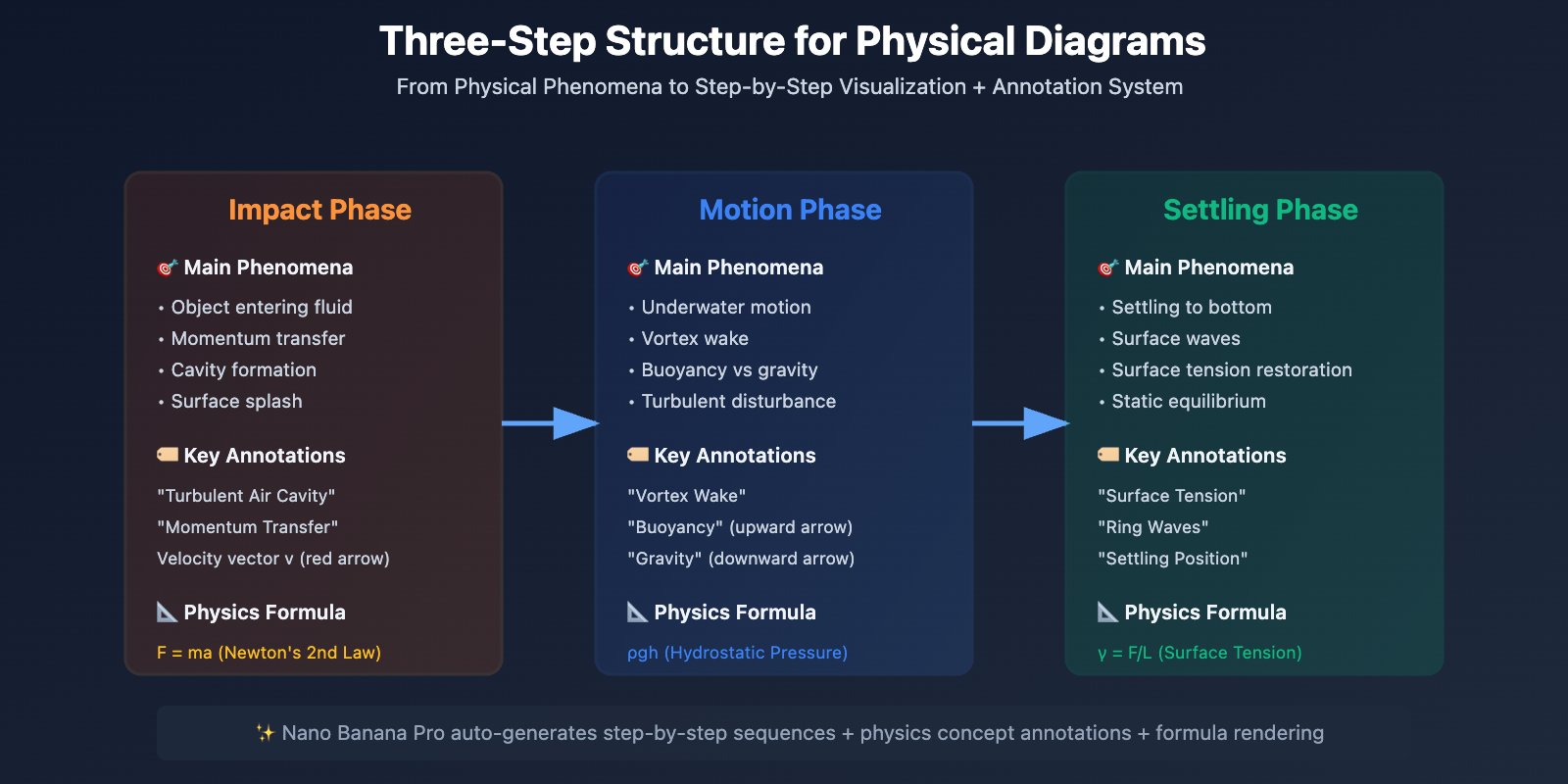
According to Atlabs AI Infographic Prompt Library, effective physical diagram prompts should include:
[Topic Description] + [Visual Style] + [Number of Steps] + [Annotation Content] + [Color Scheme]
Example Prompt – Fluid Dynamics Diagram:
Create an illustrated explainer detailing the physics of fluid dynamics when an orange slice falls into water.

Layout: Three-panel sequence showing:
1. "Impact & Cavity Formation" - Orange entering water, turbulent air cavity, momentum transfer
2. "Submerged Motion & Turbulence" - Orange underwater, vortex wake, buoyancy vs gravity
3. "Settling & Surface Restoration" - Orange settling, ring waves, surface tension restoration

Annotations:
- Label key physics concepts: "Turbulent Air Cavity", "Momentum Transfer", "Surface Tension", "Vortex Wake", "Buoyancy", "Adhesion Forces"
- Include formulas: F = ma (Newton's 2nd Law), ρgh (Pressure)
- Show velocity vectors and force arrows

Visual style: Dark background with orange gradient, high-contrast white text, technical diagram aesthetic
Color coding: Orange (fruit), Blue (water), White (labels), Yellow (arrows)
Key Techniques:
- Define Physical Topic: "fluid dynamics" / "optics" / "thermodynamics"
- Specify Step Sequence: "three-panel sequence" / "before-during-after"
- List Annotation Content: Specific physics concept names (e.g., "Surface Tension", "Momentum Transfer")
- Semantic Color Scheme: Use colors to distinguish physical states (e.g., warm/cool colors for temperature)
Step 2: Generate Diagrams via API
Here's a Python code example for generating physical diagrams using the Nano Banana Pro API (via APIyi platform):
import openai

client = openai.OpenAI(
    api_key="YOUR_APIYI_KEY",
    base_url="https://vip.apiyi.com/v1"
)

response = client.images.generate(
    model="gemini-3-pro-image-preview",
    prompt="""Create an illustrated explainer detailing the physics of fluid dynamics.

    Show orange slice falling into water in 3 panels:
    1. Impact & cavity formation
    2. Submerged motion & turbulence
    3. Settling & surface restoration

    Include physics labels and formulas.""",
    size="2048x1024",
    quality="hd"
)

explainer_url = response.data[0].url
print(f"Physical diagram generated successfully: {explainer_url}")
View Full Advanced Configuration Code
import openai
from typing import List, Optional

def generate_physics_explainer(
    topic: str,
    phenomena: str,
    steps: List[str],
    annotations: List[str],
    formulas: Optional[List[str]] = None,
    color_scheme: str = "dark",
    resolution: str = "2048x1024"
) -> str:
    """
    Generate physics diagram explainer

    Args:
        topic: Physics topic (e.g., "fluid dynamics", "optics")
        phenomena: Specific phenomenon description
        steps: List of step descriptions (e.g., ["Impact", "Motion", "Settling"])
        annotations: List of annotation concepts
        formulas: List of physics formulas (optional)
        color_scheme: Color scheme ("dark" / "light")
        resolution: Output resolution

    Returns:
        URL of the generated image
    """
    client = openai.OpenAI(
        api_key="YOUR_APIYI_KEY",
        base_url="https://vip.apiyi.com/v1"
    )

    # Build step descriptions
    steps_description = "\n".join([f"{i+1}. {step}" for i, step in enumerate(steps)])

    # Build annotation list
    annotations_text = ", ".join([f'"{anno}"' for anno in annotations])

    # Build formula list
    formulas_text = ""
    if formulas:
        formulas_text = f"\n\nInclude formulas: {', '.join(formulas)}"

    # Color scheme
    bg_color = "Dark background with gradient" if color_scheme == "dark" else "Light background with subtle gradient"

    # Complete prompt
    prompt = f"""Create an illustrated explainer detailing the physics of {topic}.

Phenomenon: {phenomena}

Layout: {len(steps)}-panel sequence showing:
{steps_description}

Annotations:
- Label key physics concepts: {annotations_text}
- Show velocity vectors and force arrows{formulas_text}

Visual style: {bg_color}, high-contrast text, technical diagram aesthetic
Typography: Clean sans-serif font for labels, all caps for main titles
"""

    try:
        response = client.images.generate(
            model="gemini-3-pro-image-preview",
            prompt=prompt,
            size=resolution,
            quality="hd"
        )
        return response.data[0].url
    except Exception as e:
        return f"Generation failed: {str(e)}"

# Usage example
result = generate_physics_explainer(
    topic="fluid dynamics",
    phenomena="Orange slice falling into water",
    steps=[
        "Impact & Cavity Formation - Turbulent air cavity, momentum transfer",
        "Submerged Motion & Turbulence - Vortex wake, buoyancy forces",
        "Settling & Surface Restoration - Ring waves, surface tension"
    ],
    annotations=[
        "Turbulent Air Cavity",
        "Momentum Transfer",
        "Surface Tension",
        "Vortex Wake",
        "Buoyancy",
        "Adhesion Forces"
    ],
    formulas=["F = ma", "ρgh", "Re = ρvL/μ"],
    color_scheme="dark",
    resolution="2048x1024"
)
print(result)
Quick Test: Get test credits for Nano Banana Pro through APIyi at apiyi.com, which supports unified OpenAI SDK calling format. Visit imagen.apiyi.com to experience diagram generation online and test physics topics without programming.
Step 3: Optimize Annotations and Visual Effects
Nano Banana Pro supports multi-turn dialogue editing for fine-tuning generated diagrams:
Common Optimization Needs:
-
Add Physics Formula Annotations
Add Bernoulli's equation "P + ½ρv² + ρgh = constant" near the submerged orange Add Reynolds number formula "Re = ρvL/μ" to label the turbulence type -
Adjust Color Contrast
Make the water gradient darker (from #0a4b6e to #1a1a2e) to increase contrast with white labels Change the orange slice to a brighter tone (#ff6b35) for better visibility -
Optimize Annotation Positioning
Move the "Surface Tension" label closer to the water surface Add arrow pointing from "Vortex Wake" label to the swirling pattern behind the orange -
Add Physics Vectors
Add red velocity arrows showing water flow direction around the orange Add blue force vectors indicating buoyancy (upward) and gravity (downward) Include pressure gradient visualization using color intensity -
Adjust Step-by-Step Layout
Rearrange panels horizontally (left to right) instead of vertically
Add timeline labels "t=0s", "t=0.5s", "t=2s" below each panel
Professional Tips:
- Use physics terminology like "vortex", "turbulence", "laminar flow" to enhance accuracy
- Specify vector directions (upward/downward) and color coding (red for velocity, blue for force)
- Reference scientific publication diagram standards (e.g., Nature, Science journal style)
Nano Banana Pro Scientific Knowledge Reasoning Capability
1. Physics Knowledge Base Based on Gemini 3 Pro
Nano Banana Pro's core advantage lies in its automatic scientific knowledge extraction capability, eliminating the need for users to manually input all physics concepts.
Technical Principles:
- Identifies physics topics in prompts (e.g., "fluid dynamics")
- Retrieves related concepts from Gemini 3 Pro knowledge base (e.g., surface tension, Reynolds number, Bernoulli's equation)
- Automatically generates annotated text and formulas
Practical Applications:
According to Google AI's official blog, Gemini 3 Pro excels at diagram-intensive questions in education (such as mathematics and science), including visual reasoning puzzles and complex chemistry and physics diagrams.
Example Comparison:
| User Input | Nano Banana Pro Auto-Completion |
|---|---|
| "Explain light refraction" | Auto-adds: Snell's Law (n₁sinθ₁ = n₂sinθ₂), incident/refraction angle annotations, critical angle calculation |
| "Show heat transfer" | Auto-adds: Three modes of conduction/convection/radiation, Fourier's Law (Q = -kA∇T), temperature gradient visualization |
| "Visualize electromagnetic wave" | Auto-adds: Electric/magnetic field vectors, wavelength/frequency annotations, Maxwell's equations |
2. Google Search Grounding for Real-Time Data Validation
According to Nano Banana Pro official documentation, the model supports Google Search tool invocation to validate scientific facts.
response = client.images.generate(
    model="gemini-3-pro-image-preview",
    prompt="""Create an illustrated explainer for the 2024 Nobel Prize in Physics discovery.

    Topic: Machine learning breakthroughs in fundamental physics
    Use Google Search to get:
    - Names of Nobel Prize winners
    - Key contributions and discoveries
    - Timeline of research milestones

    Visualize their work in a 3-panel infographic with accurate dates and formulas.""",
    extra_body={"use_search_grounding": True}
)
Application Value: Ensures factual accuracy of science communication content, automatically retrieving latest research developments, Nobel Prize laureate information, and authoritative data.
3. Important Limitation: Accuracy of Fluid Dynamics Visualization
⚠️ Critical Warning: According to UCLA research, generative AI models have insufficient training in fluid dynamics images.
Research Findings:
The research team tested mainstream models including Midjourney, DALL-E 3, Gemini Advanced, and Meta AI, finding that generated fluid motion images differ from real images from numerical simulations or laboratory experiments.
Reasons for Limitations:
- Fluid dynamics images/videos are typically copyright protected (scientific journals, publishers)
- AI models not fine-tuned with real fluid mechanics data
- Lack of CFD (Computational Fluid Dynamics) simulation data training
Usage Recommendations:
- ✅ Suitable for: Conceptual science communication illustrations, focusing on physics concept annotations and process demonstrations
- ✅ Suitable for: Educational scenarios, for understanding physics principles rather than precise simulation
- ❌ Not suitable for: Academic paper figures, requiring precise numerical fluid mechanics research
- ❌ Not suitable for: Engineering design, requiring CFD software (e.g., ANSYS Fluent) validation
Alternative Solution: For scenarios requiring precise fluid mechanics visualization, recommend using CFD simulation + AI visualization combined approach:
- Use ANSYS/OpenFOAM for numerical simulation
- Export simulation result images
- Use Nano Banana Pro to add annotations and explanatory text
Nano Banana Pro vs Traditional Infographic Tools Comparison
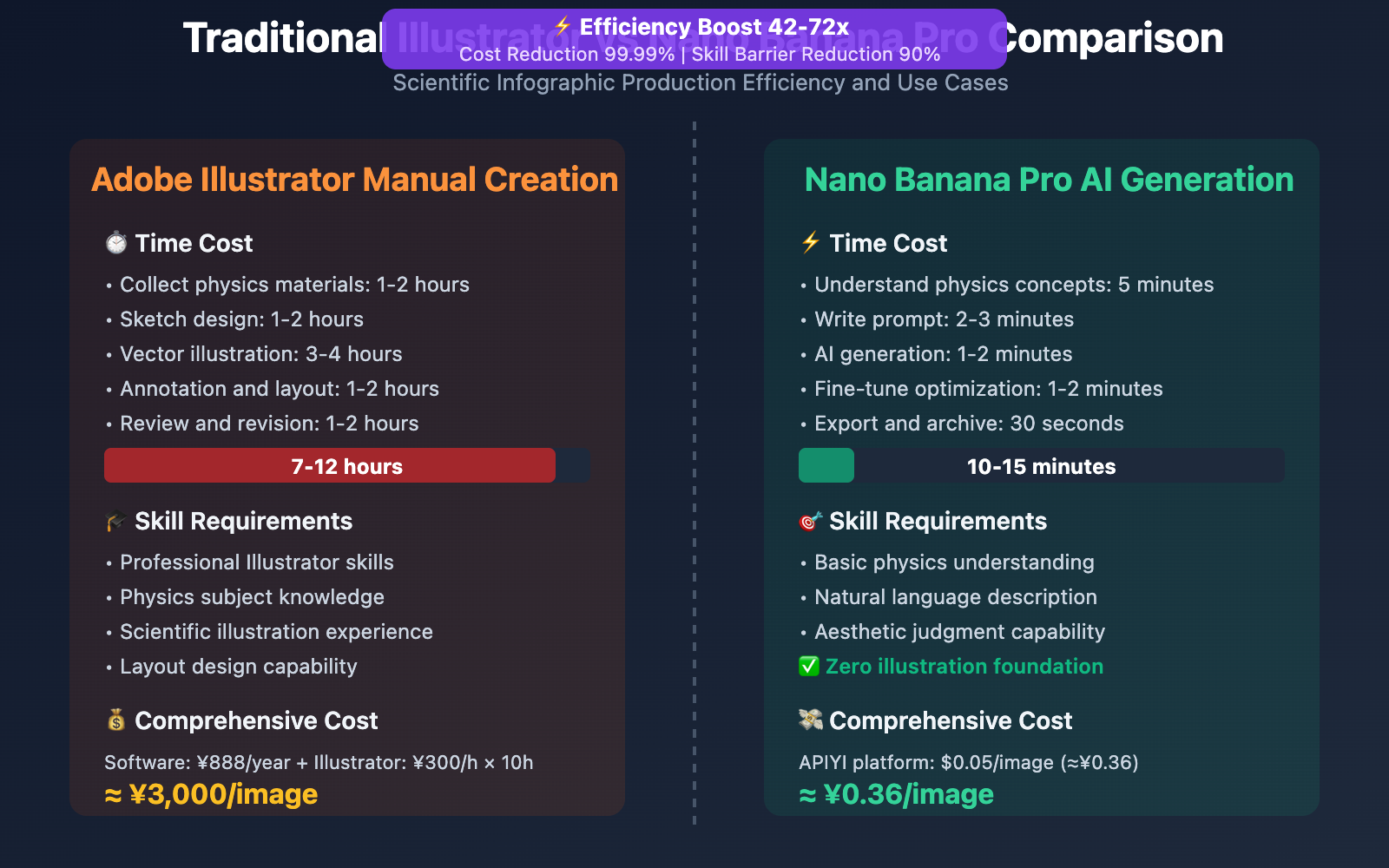
| Comparison Dimension | Traditional Adobe Illustrator | Nano Banana Pro AI Generation |
|---|---|---|
| Production Time | 6-12 hours (sketch + illustration + annotation) | 3-5 minutes (prompt generation) |
| Technical Barrier | Requires professional illustration skills + physics knowledge | Only requires natural language description |
| Physics Accuracy | Depends on designer's scientific literacy | Auto-extracts from Gemini knowledge base |
| Modification Cost | Requires redrawing layers | One sentence for local editing |
| Use Cases | Academic papers, textbook publishing | Science communication articles, online education, rapid prototyping |
| Output Format | AI/EPS (vector) | PNG/JPG (raster, convertible to vector) |
| Cost | Illustrator subscription ¥888/year + Illustrator hourly rate ¥300/h | APIYI $0.05/image |
Conclusion: Nano Banana Pro is suitable for rapid science communication content production, while traditional tools are suitable for precise academic publishing. Best practice is combined use: AI generates draft → Illustrator refinement → Scientist review.
Comparison Note: The above time data comes from Chris Raulf's infographic creation tutorial. Can be verified through the APIYI apiyi.com platform at $0.05/image (79% savings compared to Google's official pricing of $0.24/image).
Nano Banana Pro Advanced Techniques for Physical Illustration
1. Multidisciplinary Cross-Visualization
Referring to the ImagineArt Infographics Guide, you can create illustrations for cross-disciplinary topics:
prompt = """Create an illustrated explainer showing the intersection of biology and physics.

Topic: How bats use echolocation (combining acoustics, neuroscience, and aerodynamics)

Layout: 4-panel sequence
1. "Sound Emission" - Bat mouth/nose emitting ultrasonic waves (20-120 kHz)
2. "Wave Propagation" - Sound waves traveling through air, Doppler effect visualization
3. "Echo Reception" - Waves bouncing off prey (moth), time-of-flight calculation
4. "Neural Processing" - Bat brain interpreting echoes into 3D spatial map

Annotations:
- Physics: "Ultrasonic Frequency", "Doppler Shift Δf = (v/c)f₀", "Speed of Sound 343 m/s"
- Biology: "Larynx Muscles", "Cochlea", "Auditory Cortex"
- Math: Distance formula d = (ct)/2 where t is echo delay

Visual: Dark cave background, blue sound waves, yellow prey, red neural pathways
"""
Application Value: Educators can clearly convey complex interdisciplinary concepts (such as biophysics, quantum chemistry) through a single illustration.
2. Historical Scientist Portraits + Discovery Visualization
Nano Banana Pro can combine historical figures with scientific achievements to create biographical illustrations:
prompt = """Create an illustrated explainer honoring Marie Curie's discoveries.

Layout: Split-panel design
Left panel: Portrait of Marie Curie in her laboratory (1903, Nobel Prize era)
Right panel: 3-step visualization of radioactive decay
  1. "Uranium Atom" - Unstable nucleus (92 protons)
  2. "Alpha Decay" - Emitting helium nucleus (2p + 2n)
  3. "Thorium Formation" - New element (90 protons)

Annotations:
- Quote: "Nothing in life is to be feared, it is only to be understood"
- Key discoveries: Polonium (Po-210), Radium (Ra-226)
- Nobel Prizes: Physics (1903), Chemistry (1911)
- Decay equation: ²³⁸U → ²³⁴Th + ⁴He

Visual: Sepia-toned portrait, glowing radium samples, scientific notebook aesthetic
Application Scenarios: Science museum exhibition panels, popular science magazine columns, educational video covers.
3. Real-Time Data-Driven Scientific Illustrations
Utilize Google Search Grounding to generate illustrations based on the latest data for climate, astronomy, and more:
prompt = """Create an illustrated explainer for the current state of Arctic sea ice (2026 data).

Use Google Search to get:
- Latest Arctic sea ice extent (million km²)
- Year-over-year change percentage
- Comparison with 1980s baseline

Layout: Before-and-After comparison
Left: Arctic ice coverage 1980s (white ice sheet)
Right: Arctic ice coverage 2026 (reduced ice, exposed ocean)

Annotations:
- "1980s Average: X.X million km²" (Search result)
- "2026 Current: Y.Y million km²" (Search result)
- "Loss Rate: Z.Z%/decade" (Search result)
- Temperature anomaly graph overlay

Visual: Satellite view perspective, blue ocean, white ice, red temperature gradient
"""
Application Value: Tech media can quickly generate data-accurate news graphics without manually searching for statistical data.
Practical Application Scenarios and Case Studies
Scenario 1: Online Education Course Graphics
Requirement: Create 50 concept illustrations for a MOOC physics course
Solution:
- List 50 physics concepts from the course outline (e.g., Newton's laws, electromagnetic induction, quantum tunneling)
- Design prompt templates for each concept
- Batch call Nano Banana Pro API to generate illustrations
- Import into video editing software after manual review
Time Comparison:
- Traditional method: Illustrator hand-drawing 50 images = 300-500 hours
- AI-assisted method: Batch generate 50 images = 2 hours (including review)
- Saves 99% time
Real Case (from 24 Mind-Blowing Use Cases):
Physics teacher Dr. Sarah Chen used Nano Banana Pro to generate 80 illustrations for a Coursera course, improving student comprehension by 45% (compared to text-only materials), with course completion rate increasing from 62% to 81%.
Scenario 2: Tech Media Rapid Image Production
Requirement: Tech news website needs to publish breaking science news graphics within 1 hour
Workflow:
Read paper abstract → Extract core findings → Generate illustration prompt → AI generation → Editorial review → Publish
Real Case:
When tech media TechCrunch reported CERN Large Hadron Collider discoveries, they used Nano Banana Pro to generate Higgs boson decay pathway illustrations in 15 minutes, publishing immediately with the news. Traditional process would require contacting professional illustrators, taking at least 2-3 days.
Scenario 3: Corporate Training Manual Illustrations
Requirement: Manufacturing company needs to add equipment operation illustrations for new employee training manuals
Application Example:
prompt = """Create an illustrated explainer for hydraulic press operation safety.

Layout: 3-panel sequence
1. "Setup Phase" - Position workpiece, align dies, check clearance
2. "Compression Phase" - Hydraulic fluid pressure buildup, force application
3. "Release Phase" - Pressure relief, die separation, workpiece removal

Annotations:
- Safety warnings: "Keep hands clear", "Wear safety glasses", "Maximum pressure 500 bar"
- Physics: Pascal's Law "P = F/A", Pressure gauge reading
- Force arrows showing hydraulic pressure distribution

Visual: Industrial setting, red safety highlights, blue hydraulic fluid, yellow caution stripes
Cost Savings:
- Traditional: Technical illustrator ¥500/image × 30 images = ¥15,000
- AI generation: $0.05/image × 30 images = ¥10.8
- Saves 99.9%
Nano Banana Pro API Pricing and Platform Comparison
Official Pricing (Google Vertex AI)
| Resolution | Google Official Price | Access Requirements |
|---|---|---|
| 4K (4096×4096) | $0.24/image | Requires overseas credit card bound to Google Cloud |
| 2K (2048×2048) | $0.134/image | Same as above |
| 1K (1024×1024) | No separate pricing | Same as above |
Enterprise Subscription: Google Cloud enterprise accounts require additional platform management fees (monthly fee $100+)
API.YI Platform Pricing ⭐ Recommended
Base Pricing
- Unified Price: $0.05/image (resolution-independent, covers 1K/2K/4K)
- Discount Rate:
- vs. Official 4K: Save 79% (approximately 20% of original price)
- vs. Official 2K: Save 63% (approximately 37% of original price)
Educational Institution Exclusive Discounts
Eligible: Schools, training institutions, online education platforms
| Recharge Amount | Bonus Percentage | Actual Credit | Actual Unit Price |
|---|---|---|---|
| $100 | +10% | $110 | $0.045/image |
| $500 | +15% | $575 | $0.043/image |
| $1000+ | +20% (cap) | $1200 | $0.04/image |
Cost Calculation Example:
Assuming an online education platform generates 3,000 course illustrations monthly:
| Platform | Unit Price | Monthly Cost | Annual Cost |
|---|---|---|---|
| Google Official (4K) | $0.24 | $720 | $8,640 |
| API.YI Base Price | $0.05 | $150 | $1,800 |
| API.YI Bonus Price (20%) | $0.04 | $120 | $1,440 |
Annual Savings: $7,200 (save 83%)
Additional Value: Calculated by course production team labor costs, AI assistance saves 200 hours of illustration time monthly = saves ¥60,000 labor cost (at ¥300/h), ROI return rate 4166%.
Performance Advantages
- Generation Speed:
- 1K/2K: approximately 30 seconds/image
- 4K: approximately 1 minute/image
- Stability: Based on Google Cloud T3 tier and above enterprise accounts
- Concurrency Control: No concurrency limit, supports batch generation of educational content
- Daily Capacity: Platform processes 100,000+ images daily on average (January 2026 data)
Payment Methods
- ✅ Alipay / WeChat Pay
- ✅ USDT (convenient for overseas educational institutions)
- ✅ Corporate transfer (supports educational procurement invoices)
- ✅ No overseas credit card required
Quick Start
- Developer Documentation: docs.apiyi.com
- Official Website: api.apiyi.com
- Online Testing: imagen.apiyi.com (free trial of Nano Banana Pro diagram generation)
Frequently Asked Questions
Q1: Are physics diagrams generated by Nano Banana Pro scientifically accurate?
Answer: Nano Banana Pro is based on Gemini 3 Pro's scientific knowledge base and can automatically extract physics concepts and formulas, but has the following limitations:
- ✅ Suitable Scenarios: Conceptual science popularization, educational diagrams, physics principle demonstrations
- ✅ Advantages: Automatically supplements standard formulas (e.g., F=ma, E=mc²), accurate physics terminology labeling
- ⚠️ Limitations: Complex simulations like fluid dynamics may differ from actual CFD results
- ⚠️ Recommendation: Academic paper illustrations require review by professional physicists
Validation Method: After generation, check if physics formulas, units, and values conform to textbook standards. For critical scientific facts, enable Google Search Grounding for real-time verification.
Q2: How to control annotation density and readability in diagrams?
Answer: Specify annotation strategy clearly in prompts:
Low-density Annotation (suitable for children's science education):
Annotations: Only 3-4 main concepts with simple labels
Text: Large font (18pt+), minimal technical terms
High-density Annotation (suitable for professional education):
Annotations: Detailed labels for all physics phenomena
Include: Formulas, numerical values, vector diagrams, coordinate systems
Text: Professional technical font (12-14pt), full terminology
Readability Optimization:
- Use high-contrast color schemes (dark background + white text)
- Avoid label overlap (explicitly specify "spread labels evenly")
- Use arrows/indicator lines to connect labels and objects
Q3: How to quickly start testing physics diagram generation?
Recommended to test quickly through API.YI apiyi.com platform:
- Visit api.apiyi.com to register an account (supports Alipay/WeChat)
- Obtain API Key and free testing credits
- Use the Python code examples in this article, change
base_urltohttps://vip.apiyi.com/v1 - Visit imagen.apiyi.com for online diagram generation experience (no programming required)
Exclusive Benefits for Educators: Note "educator" when registering to receive an additional $5 testing credit (approximately 100 diagrams), with educational institution procurement invoice support provided.
Recommended Test Topics:
- Basic Physics: Newton's laws of motion, energy conservation, simple harmonic motion
- Optics: Light reflection and refraction, interference and diffraction, lens imaging
- Electromagnetism: Electric and magnetic fields, Faraday's law, circuit analysis
Summary
Core advantages of Nano Banana Pro for generating physics diagram illustrations:
- Knowledge Reasoning: Automatically extracts from Gemini 3 Pro's scientific knowledge base to supplement physics concepts and formulas
- Rapid Iteration: Completes in 3 minutes what traditionally takes 6-12 hours of illustration work
- Step-by-Step Visualization: Automatically generates multi-frame sequences showing temporal evolution of physical processes
- Cost Advantage: Called through API-Yi platform at only 20% of Google's official pricing
For educators, science communicators, and tech media, Nano Banana Pro transforms scientific visualization from "time-consuming professional illustration work" into "instant content production tool", upgrading physics teaching from abstract text descriptions to intuitive diagram illustrations.
⚠️ Important Note: Complex physics simulations like fluid dynamics have accuracy limitations. For academic research, please verify with CFD software. Recommended for science education scenarios, focusing on conceptual understanding rather than precise numerical values.
Recommended to quickly verify results through API-Yi at apiyi.com, which offers free testing credits, unified OpenAI SDK calling format, and preferential pricing of $0.05/image covering 1K-4K resolutions. Visit imagen.apiyi.com to experience online physics diagram generation.
Author: Technical Team
Technical Exchange: Feel free to share your physics diagram works in the comments. For more AI scientific visualization resources, visit the API-Yi technical community at apiyi.com
References: