OpenCode is one of the most talked-about open-source AI coding agents in 2026. Its design philosophy centers on being "model-agnostic and terminal-first," allowing developers to run Claude, invoke GPT, Gemini, local models, or even mix and match them as they please. Much like Claude Code, it runs directly in your terminal, but it takes a different path—abstracting the provider into a pluggable configuration, leaving the choice of the underlying model entirely up to you.
Many readers have asked me a very specific question: Since OpenCode appears to use OpenAI-compatible mode in its configuration, does it support Anthropic's native format? And when connecting to an API proxy service like APIYI, how should one choose the right setup?
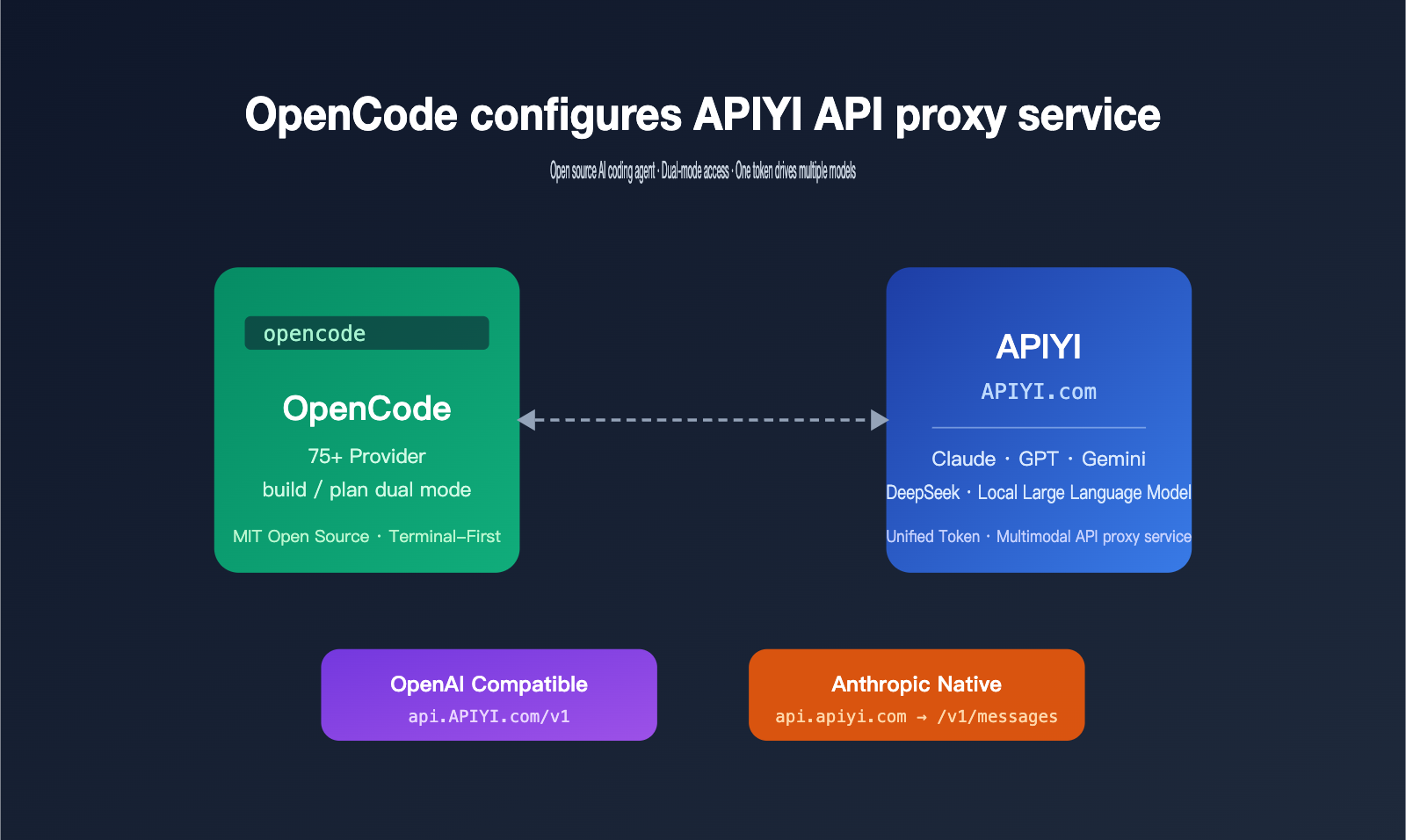
In this article, I've conducted a thorough investigation based on the official English documentation and source code. I'll first clarify what OpenCode is and its key differences from Claude Code, then walk you through how to connect it to the APIYI (apiyi.com) API proxy service, covering both OpenAI-compatible and Anthropic native invocation methods. You'll be ready to configure it as soon as you finish reading.
Introduction to OpenCode: The Core Positioning of an Open-Source AI Coding Agent
OpenCode is maintained by the SST team (the creators of the SST/Serverless Stack framework), hosted at github.com/sst/opencode, and released under the MIT license. As of this writing, it has accumulated over 150,000 GitHub stars with more than 850 contributors, making it one of the most active open-source coding agent projects today. Its target audience is clear: intermediate to advanced developers who want to handle most coding tasks in the terminal without being locked into a single model provider.
OpenCode's Architectural Design and Operational Mode
OpenCode uses a client/server architecture, running the core agent logic in a local service process, while the TUI (Terminal UI) is just one of many potential frontends. This means the same agent instance can be accessed simultaneously by a terminal, a desktop app, an IDE plugin, or even a mobile device, leaving plenty of room for multi-device collaboration in the future.
It features two built-in agent modes, which you can toggle instantly using the Tab key:
buildmode: Grants full tool permissions by default, including read, write, and command execution, making it suitable for actual development tasks.planmode: A read-only mode used solely for code analysis, solution design, and suggestions, without modifying any files.
| Dimension | OpenCode Design Highlights | Value to Developers |
|---|---|---|
| Architecture | Client/Server separation | Multi-device collaboration, remote control |
| Model Layer | Abstracted as pluggable provider | Switch between 75+ models freely |
| Interaction | TUI / Desktop App / IDE Plugin | Not bound to a single interface |
| Permissions | build / plan dual modes | Balances security and efficiency |
| Deployment | Local-first, supports remote connection | Data stays local |
🎯 Configuration Tip: If you want to use Claude, GPT, Gemini, DeepSeek, and other models in OpenCode without opening accounts and managing multiple API keys for each, you can connect directly to the APIYI (apiyi.com) API proxy service to cover mainstream models with a single token.
Core Capabilities of OpenCode
Its capabilities go far beyond traditional IDE plugins. By entering natural language in the terminal, OpenCode can interpret your entire codebase, add features, modify existing logic, run tests, and even perform cross-file refactoring. The plan mode is used for preliminary reviews: let the agent output its implementation strategy first, and once you've confirmed, switch to build mode to execute it.
It also supports a non-interactive mode, opencode run "your prompt", which can be piped directly into shell scripts for CI/CD, batch refactoring, scheduled tasks, and other automation scenarios. This capability was not available in early versions of Claude Code, which is why OpenCode is frequently chosen for engineering workflows.
It's worth noting that OpenCode pulls and matches the model list from a public database called models.dev by default. This means that even if an upstream provider releases a new model, OpenCode can recognize it quickly. When you connect via an API proxy service, your local model mapping stays consistent with the APIYI backend's list, avoiding the awkward situation where you've specified a model ID in your config, but the actual request is rejected.
Core Differences Between OpenCode and Claude Code
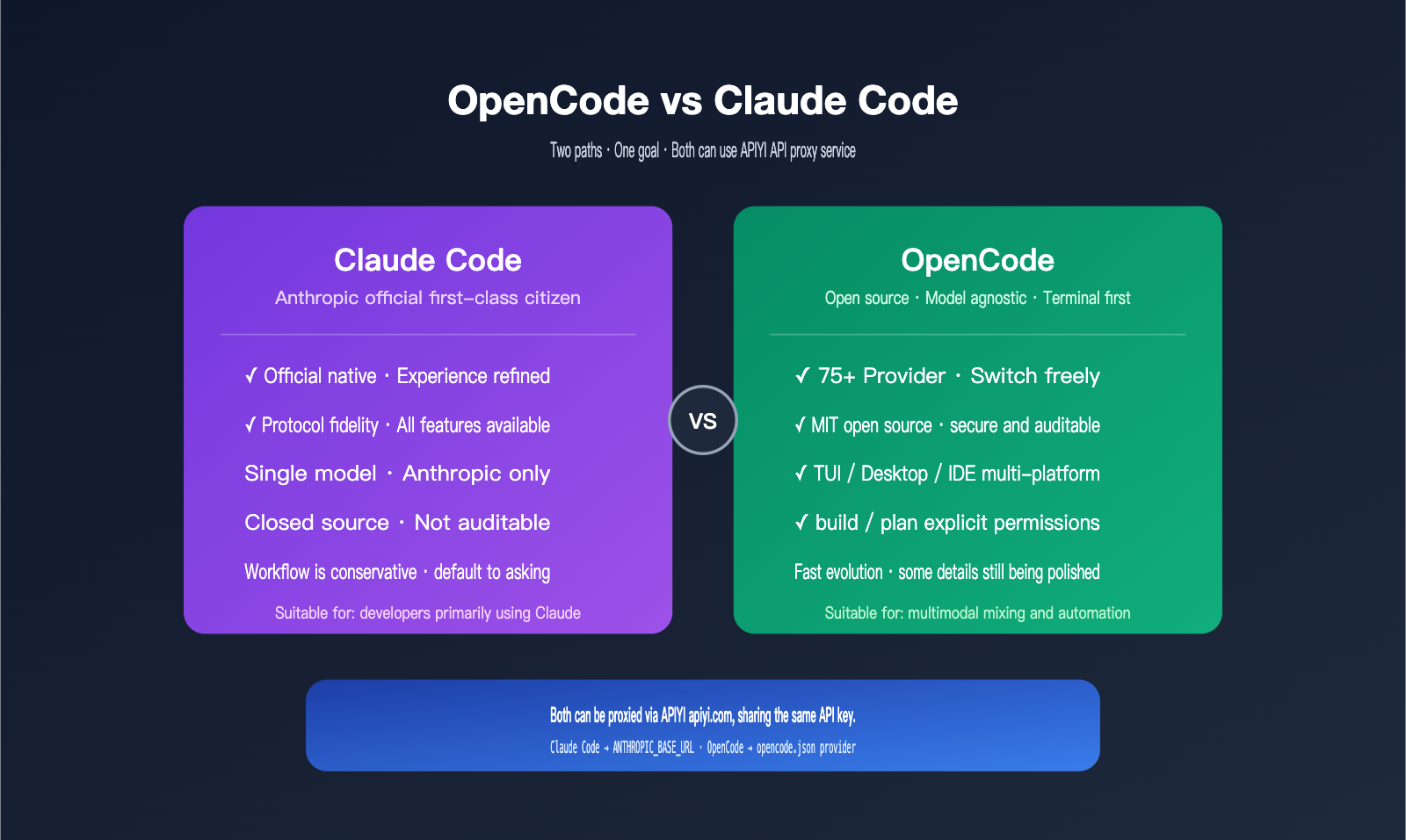
Many people mistake OpenCode for an "open-source version of Claude Code," but their core positioning is actually quite different. Claude Code is a first-class tool built by Anthropic specifically for their own models, while OpenCode is a neutral framework designed for a multi-model ecosystem.
Model Support and Cost Control
Claude Code can only invoke Anthropic's own models (Sonnet, Opus, and Haiku series), meaning all tasks are billed according to Anthropic's pricing. OpenCode supports over 75 providers, including OpenAI, Anthropic, Google Vertex, Bedrock, Groq, Azure, OpenRouter, and even local inference backends like Ollama and LM Studio.
This flexibility is incredibly useful in real-world workflows. You can offload lightweight tasks—like documentation generation, commit messages, or variable renaming—to cheaper, smaller models, and then switch back to Claude Sonnet or Opus for complex refactoring and architectural thinking. This can typically lower your overall costs by 40–60%.
Workflow and Permission Model Differences
Claude Code takes a conservative approach by default, proactively asking for confirmation before writing files or running commands. It’s beginner-friendly but can occasionally disrupt your flow. OpenCode takes a more transparent approach: the code is fully open-source and can be audited by security teams, and permissions are explicitly managed via build/plan toggles, which is much friendlier for automation and scripting.
| Comparison Dimension | OpenCode | Claude Code |
|---|---|---|
| Open Source Status | MIT licensed, source code auditable | Closed source, binary distribution only |
| Model Range | 75+ providers, including local models | Anthropic models only |
| Custom Endpoint | Any provider can change baseURL | Via ANTHROPIC_BASE_URL |
| Interface | TUI / Desktop App / IDE Plugin | Terminal-focused |
| Permission Policy | Explicit build / plan switching |
Default confirmation prompts |
| Maturity | Rapid evolution, some details still being polished | Highly polished experience |
| Best For | Multi-model mixing, local deployment, customization | All-in-one Claude experience |
🎯 Recommendation: If your workflow is primarily Claude-based but you occasionally want GPT or Gemini as a backup, I recommend configuring multiple models in OpenCode using your APIYI (apiyi.com) API key, allowing you to switch models with a single token. Use native Claude Code for your main development tasks, and switch to OpenCode when you need to cross-verify with complex tasks.
Who Should Use OpenCode?
OpenCode is best suited for developers who don't mind spending 20 minutes reading configuration documentation, are cost-sensitive, want a single toolchain that spans multiple models, or work in companies where models must be auditable. If you just want an "out-of-the-box Claude" experience, Claude Code remains the more convenient choice.
Two Invocation Modes for Connecting OpenCode to the APIYI Proxy
Back to the question readers care about most: Does OpenCode use the OpenAI-compatible mode or the native Anthropic format? The answer is it supports both, depending on how you configure the provider in your opencode.json.
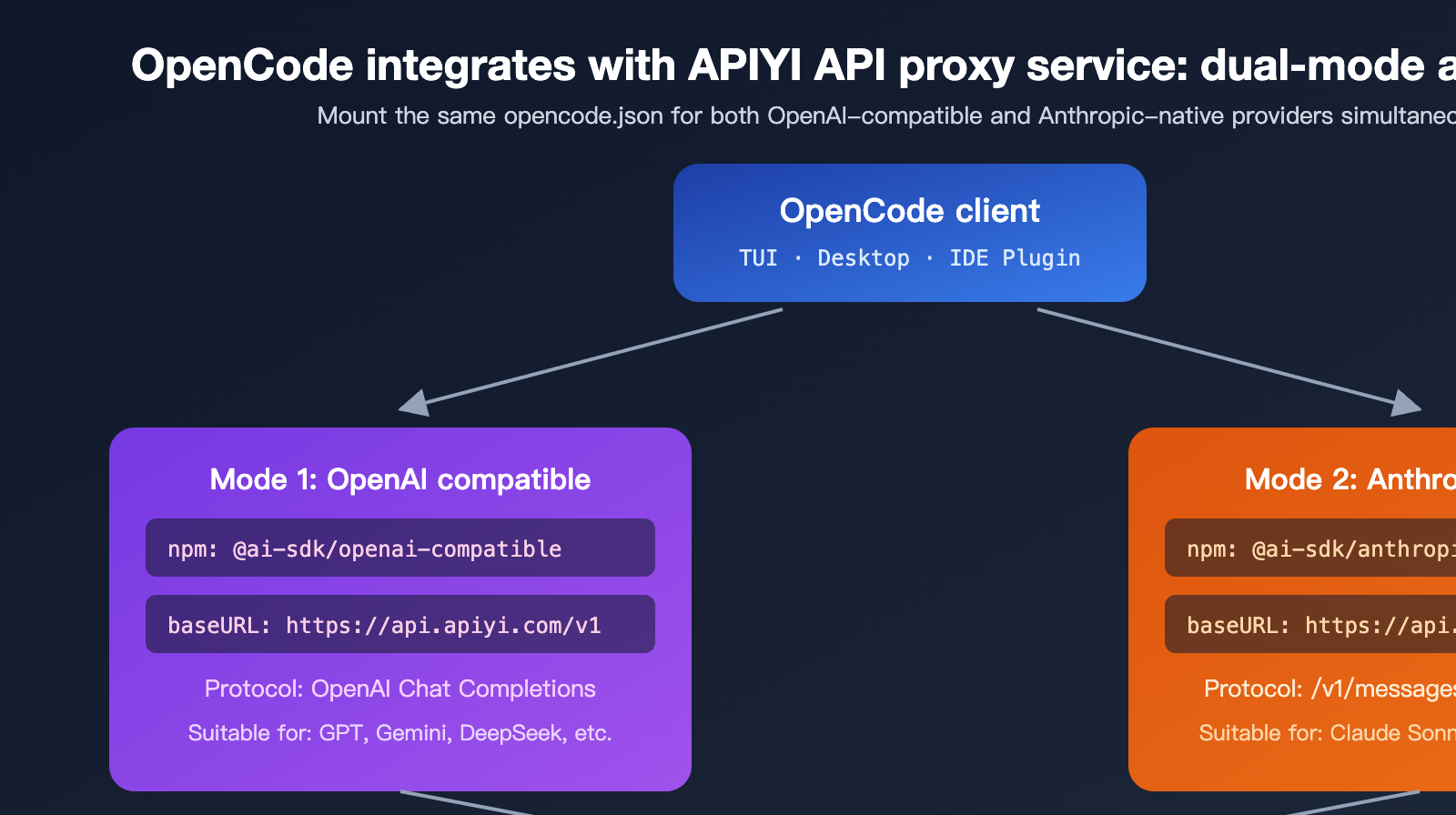
Mode 1: OpenAI Compatible Mode (Most Versatile)
This is the primary method recommended in the OpenCode documentation and the safest path for connecting to third-party API proxy services. It uses the Vercel AI SDK's @ai-sdk/openai-compatible package under the hood to wrap any endpoint that adheres to the OpenAI Chat Completions protocol as an OpenCode provider. APIYI’s OpenAI-compatible entry point is api.apiyi.com/v1, which allows you to invoke dozens of models—including GPT, Claude, Gemini, and DeepSeek—all unified under the OpenAI format.
The advantage here is its versatility; almost any model can be hosted under the same provider. The trade-off is that some Anthropic-specific capabilities (like extended thinking or native tool use blocks) undergo protocol conversion, so minor edge-case behaviors might differ slightly from the official Anthropic endpoint.
Mode 2: Anthropic Native Mode (Recommended for Claude)
OpenCode’s built-in anthropic provider uses the @ai-sdk/anthropic package. The request path is /v1/messages, and the request body format follows the Messages API defined in the official Anthropic documentation. This format supports Claude-specific features like content blocks, tool_use blocks, and extended thinking, using the exact same protocol as Claude Code.
By simply pointing provider.anthropic.options.baseURL to APIYI’s https://api.apiyi.com, OpenCode will send requests using the native Anthropic format, which the APIYI proxy then forwards to the upstream Claude service. This means you get a Claude invocation experience in OpenCode that is virtually identical to Claude Code.
| Mode | Underlying Package | APIYI Base URL | Best For | Protocol Fidelity |
|---|---|---|---|---|
| OpenAI Compatible | @ai-sdk/openai-compatible |
https://api.apiyi.com/v1 |
Mixing multiple models | Standard OpenAI |
| Anthropic Native | @ai-sdk/anthropic |
https://api.apiyi.com |
Full Claude series | Official parity |
🎯 Configuration Tip: For daily use, we recommend a dual-mode setup—configure both an
anthropicprovider and anopenai-compatibleprovider in the sameopencode.json. Use the former for Claude and the latter for GPT/Gemini/DeepSeek. Both providers can share the same APIYI (apiyi.com) token, so there's no need to manage multiple keys.
3 Steps to Configure OpenCode with the APIYI API Proxy Service
Below is the minimal setup process to get you up and running. You should be able to complete these steps in under 5 minutes.
Step 1: Install the OpenCode Client
There are two main ways to install it; choose the one that fits your environment.
# Option A: Global install via npm (Recommended for Node.js users)
npm install -g opencode-ai@latest

# Option B: One-click script (Recommended for macOS / Linux)
curl -fsSL https://opencode.ai/install | bash
Once installed, run opencode --version to verify. Windows users can use Scoop or WSL. If the npm installation fails, it's likely due to an outdated Node version—upgrading to 18+ or 20+ is recommended.
Step 2: Get Your API Key from the APIYI Dashboard
Log in to the APIYI dashboard, go to the token management page at api.apiyi.com/token, and create a new token. We recommend naming it OpenCode and selecting the appropriate group (if you need to call Claude, ensure the group includes the Claude model series). Copy the sk-xxx string; you'll need it for the next step.
🎯 Token Tip: After registering at apiyi.com, it's best practice to create separate tokens for each client—one for ClaudeCode, one for OpenCode, one for Cursor, etc. This way, if one client experiences an issue, you can revoke its specific token without affecting your other tools.
Step 3: Edit the opencode.json Configuration File
OpenCode looks for opencode.json in your project root first, then falls back to the user-level config at ~/.config/opencode/opencode.json. Here is a complete example that supports both Anthropic native mode and OpenAI-compatible mode:
{
  "$schema": "https://opencode.ai/config.json",
  "provider": {
    "anthropic": {
      "options": {
        "baseURL": "https://api.apiyi.com",
        "apiKey": "{env:APIYI_KEY}"
      }
    },
    "apiyi-openai": {
      "npm": "@ai-sdk/openai-compatible",
      "name": "APIYI OpenAI Compatible",
      "options": {
        "baseURL": "https://api.apiyi.com/v1",
        "apiKey": "{env:APIYI_KEY}"
      },
      "models": {
        "gpt-4o": { "name": "GPT-4o" },
        "claude-sonnet-4-6": { "name": "Claude Sonnet 4.6" },
        "gemini-2.5-pro": { "name": "Gemini 2.5 Pro" }
      }
    }
  }
}
Next, add your API key to your environment variables:
# macOS / Linux
echo 'export APIYI_KEY="sk-your-token-from-apiyi"' >> ~/.zshrc
source ~/.zshrc

# Windows PowerShell
$env:APIYI_KEY = "sk-your-token-from-apiyi"
After launching OpenCode, use the /models slash command to select your model. We recommend using the anthropic provider for the Claude series and the apiyi-openai provider for other models.
🎯 Base URL Rule: Do not add
/v1for Anthropic native mode, as the SDK automatically appends/v1/messages. For OpenAI-compatible mode, you must include/v1. This rule is consistent with the guidelines provided in the Claude Code documentation on apiyi.com—just remember: "Native = no suffix, Compatible = add suffix."
Troubleshooting Common Configuration Errors
| Error Message | Likely Cause | Solution |
|---|---|---|
Route /api/messages not found |
baseURL included /v1 incorrectly |
Remove the /v1 suffix |
Required provider.anthropic.models |
Missing models field after custom baseURL | Explicitly list available model IDs |
401 Unauthorized |
Token expired or group lacks model access | Regenerate your APIYI token |
model not found |
Model ID mismatch with APIYI dashboard | Check the actual ID in the APIYI Model Plaza |
| Request timeout | Network jitter or upstream rate limiting | Switch APIYI nodes or retry |
🎯 Debugging Tip: If you run into any of the errors above, test your token and network connectivity first by running
curl https://api.apiyi.com/v1/models -H "Authorization: Bearer $APIYI_KEY". This step identifies 90% of issues in under 30 seconds and is much faster than tweakingopencode.jsonrepeatedly. If the list returns normally, the issue is almost certainly in your OpenCode configuration.
Practical Use Cases for OpenCode and the APIYI API Proxy Service
Once your configuration is working, your workflow will define your experience. Here are a few common real-world scenarios.
Scenario 1: Side-Effect-Free Code Review with "Plan" Mode
Switch to plan mode (press Tab), and enter /explain the authentication flow in this repository. OpenCode will scan the code and output an analysis report without modifying any files. This is perfect for onboarding new team members, performing security reviews, or mapping out legacy architecture.
Scenario 2: End-to-End Development with "Build" Mode
Once you've confirmed your plan, switch to build mode and issue a task like Refactor the auth middleware to use JWT and add unit tests. OpenCode will automatically read the relevant files, make changes, run tests, and iterate based on any failures. It's best to run this on a clean git branch for easy rollbacks.
Scenario 3: Multi-Model Collaboration and Cost Control
Leverage OpenCode's provider abstraction to assign different tasks to different models:
- Documentation and commit messages: Use
gpt-4o-miniviaapiyi-openaifor extremely low costs. - Complex refactoring and code reviews: Use
claude-sonnet-4-6or the Opus series via theanthropicprovider. - Multilingual or visual content: Use
gemini-2.5-proviaapiyi-openai.
🎯 Cost Tip: When calling via apiyi.com, all models are billed based on actual token usage with no minimum spending threshold. We recommend starting with lower-cost models to verify your workflow before switching to higher-end models to get the most value for your budget.
Scenario 4: Non-Interactive CI/CD Integration
You can use the opencode run command to pipe prompts directly into your shell, with output returned via stdout. This makes it easy to integrate into GitHub Actions, GitLab CI, or scheduled tasks—for example, automatically running a repository structure audit every week or generating a changelog draft before a PR is merged.
FAQ
Q1: Does OpenCode really support the native Anthropic /v1/messages protocol?
Yes, it does. The built-in anthropic provider in OpenCode uses the @ai-sdk/anthropic package. The request path is the official Anthropic /v1/messages endpoint, and the request body follows the official Messages API format, using the same protocol as Claude Code. Simply point your baseURL to APIYI (apiyi.com), and you'll get an experience in OpenCode that's nearly identical to Claude Code.
Q2: If I only use the OpenAI compatibility mode, what Claude features might I lose?
In OpenAI compatibility mode, Anthropic-specific features like tool_use blocks, extended thinking, and cache control headers are adapted at the protocol layer. While they remain functional, the response format is converted, so some fine-grained behaviors (such as thinking token billing or specific stop reasons) might differ slightly from the native mode. For primary Claude development, we recommend using the native mode.
Q3: Does the OpenCode configuration file support ${env:VAR} or {env:VAR}?
The latest version uses the {env:VAR} syntax exclusively; older versions previously used ${env:VAR}. If OpenCode reports apiKey is undefined, check if you've accidentally written it as ${env:APIYI_KEY} and update it to {env:APIYI_KEY} to match the current standard.
Q4: Can OpenCode's built-in /connect command connect directly to APIYI?
Yes. Run /connect, select "Other", enter your provider ID (e.g., apiyi-openai), and paste your APIYI token; OpenCode will automatically write it to opencode.json. However, /connect defaults to the OpenAI compatibility path. If you want to use the Anthropic native mode, we recommend manually editing provider.anthropic.options.baseURL.
Q5: Can I use the same APIYI token for both Claude Code and OpenCode?
Absolutely, and it's highly recommended. APIYI (apiyi.com) tokens aren't tied to a specific client. The same sk-xxx token can be used simultaneously across multiple clients like Claude Code (via ANTHROPIC_BASE_URL), OpenCode (via opencode.json), Cursor, and Continue. You can view your usage billing centrally by source in your dashboard.
Q6: Are OpenCode's plan / build modes the same as Claude Code's permission confirmation?
The design goals are similar, but the implementation paths differ. Claude Code asks for confirmation step-by-step, prompting you before every file write or command execution. OpenCode uses mode switching: the plan mode fundamentally disables write permissions, while the build mode enables them by default. OpenCode's approach is better suited for automated scenarios, whereas Claude Code is better for workflows that require granular control.
Q7: Is the latency when calling Claude via the APIYI proxy service higher than connecting directly to the official endpoint?
APIYI (apiyi.com) has deployed entry points across multiple core nodes in China and has optimized the connection paths for major upstream providers like Claude, GPT, and Gemini. For users in China, the perceived time-to-first-byte (TTFB) is typically significantly lower than connecting directly to official endpoints. You can verify the specific numbers in your own network environment using curl -w "%{time_starttransfer}" for a side-by-side comparison.
Summary: Best Practices for OpenCode + APIYI
The real value of OpenCode lies in returning "model choice" to the developer, and proxy services like APIYI provide the infrastructure to make that flexibility practical. By combining the two, developers can enjoy a Claude experience in the terminal that rivals Claude Code, while easily switching to GPT, Gemini, or DeepSeek for cross-validation—all while managing just one OpenCode configuration file and one APIYI token.
To answer the question from the beginning of this article: OpenCode supports both OpenAI compatibility mode and the native Anthropic format, and they are not mutually exclusive. We recommend that long-term users keep both providers in opencode.json: use the native path for Claude to retain full functionality, and use the compatibility path for other models to maximize versatility.
🎯 Final Recommendation: If you're planning to try OpenCode, the easiest way to start is to register at APIYI (apiyi.com), generate a token, and enable both modes as described in this article. Within a week, you'll find that you can't live without the "one token to rule all models" workflow, and you'll never want to maintain separate accounts and balances for every model provider again.
— APIYI Technical Team | Continuously tracking the AI coding agent ecosystem. For more tutorials, visit the APIYI (apiyi.com) Help Center.