Author's Note: We’ve conducted a deep dive into the real-world performance of GPT-image-2 across three creative scenarios: ID photo generation, manga-style conversion, and virtual hairstyling. This report compares the precision improvements over GPT-image-1.5, provides prompt templates, and offers recommendations for target users.
On May 1, 2026, OpenAI sent an email to all ChatGPT subscribers titled "A New Era of Image Creation." The email used highly marketing-driven language: "From natural photo editing to bold new styles, ChatGPT Images 2.0 makes it easier than ever to turn your ideas into shareable works of art."
This isn't just another minor model update. Within 12 hours of its release, GPT-image-2 topped the Image Arena leaderboard with a lead of +242 points, setting the record for the largest margin in the leaderboard's history. However, the official email was a bit abstract. Which capabilities are actually worth paying attention to? And which use cases can you implement right now?
Core Value: From the perspective of an everyday user, this article provides a "what's worth using and how to use it" checklist based on three concrete creative scenarios: ID photo generation, manga-style conversion, and virtual hairstyling. All tests were conducted using the GPT-image-2 model built into ChatGPT Plus and verified via API.
{3 major scenarios for GPT-image-2 creative applications}
{ID photo · Manga style · Hairstyle design — One-stop hands-on test}
{① ID photo}
{white background, suit, 1-inch photo}
{② Comic style}
{✨}
{✦}
{Shonen manga · Shojo manga · Chibi}
{③ Hairstyle design}
{2×3 trial release notice board}
{apiyi.com · Direct domestic access to GPT-image-2}
What’s New in GPT-image-2’s Creative Capabilities
To understand the value of GPT-image-2, we first need to clarify what makes it better than the previous generation. OpenAI’s official email highlighted three key points: "more precise editing," "better text rendering," and "improved composition." But what do these abstract descriptions mean in terms of actual capability?
Three Core Upgrades in GPT-image-2
| Upgrade Dimension | GPT-image-1.5 | GPT-image-2 | Real-world Perception |
|---|---|---|---|
| Output Resolution | 1024×1024 Native | 2K Native + 4K Upscaling | Print-quality |
| Text Rendering Accuracy | ~85% (Latin) | ~99% Latin / 95% CJK | Ready for posters/menus |
| Multi-image Consistency | Single-image generation | 8 consistent images per prompt | Storyboards, design drafts |
| Reasoning Capability | Direct generation | O-series "Thinking" mode | Complex instruction following |
| Editing Precision | Approximate editing | Pixel-level inpaint/outpaint | Local edits without global distortion |
As you can see, the true paradigm shift lies in the "Thinking Mode + Multi-image Consistency"—these capabilities allow GPT-image-2 to accomplish tasks like "generating multiple images of the same character in different poses from a single prompt," which previously required LoRA fine-tuning.
🎯 Testing Channel Note: All tests in this article were performed using the ChatGPT Plus web version (Thinking Mode) and the GPT-image-2 API. We recommend using the APIYI (apiyi.com) platform to call the gpt-image-2 interface for batch verification; it offers stable domestic connectivity and is 100% compatible with official fields.
Why This Upgrade Matters to Everyday Users
In the past, the biggest beneficiaries of AI image model upgrades were designers and AI enthusiasts—it was difficult for the average person to utilize LoRA, ControlNet, or complex multi-step workflows.
What makes GPT-image-2 different is that it compresses tasks that once required professional workflows into a single natural language prompt. This means everyday users are the real winners:
- Job Seekers: Generate professional ID photos from a casual snapshot.
- Anime Fans: Instantly turn selfies into manga-style avatars.
- Pre-haircut Anxiety: Try out 6 different hairstyles before heading to the salon.
- Social Media Creators: Generate 8 consistent images for a single theme in one go.
- Small Business Owners: Self-generate print-ready menus and posters.
Let’s dive into these three specific scenarios to see if these upgrades live up to the hype.
{GPT-image-2 creative capability upgrade path}
{From 1.5 to 2.0: Two key capabilities unlock three new scenarios}
{GPT-image-1.5}
{Baseline capability:}
{• 1K native resolution}
{• Single image generation}
{• Direct generation (no inference)}
{• Text rendering ~85%}
{• Approximate editing}
{← Creative scenarios are limited}
{Two core capabilities leap forward}
{A}
{Thinking mode (O series reasoning)}
{Think before drawing, understand complex instructions, and maintain face consistency}
{B}
{multi-image consistency}
{Generate 8 coherent images (same character/same scene) with one prompt}
{Unlock creative scenarios available to regular users}
{Unlock scenarios}
{📷 ID photo generation}
{face consistency + clothing replacement}
{🎨 Comic style}
{8-panel storyboard + character consistency}
{Hairstyle design}
{6 side-by-side test images}
{Domestic direct connection channel: apiyi.com · base_url = https://api.apiyi.com/v1}
{apiyi.com · 100% consistent with official fields}
GPT-image-2 Use Case 1: ID Photo and Professional Portrait Generation
The first use case is perhaps the most universally applicable: ID photo generation. This is a headache that almost every office worker, international student, and job seeker faces periodically. Traditional solutions have either been visiting a photo studio (costing dozens of dollars) or using dedicated ID photo apps (with varying levels of precision).
Core Capabilities of GPT-image-2 for ID Photos
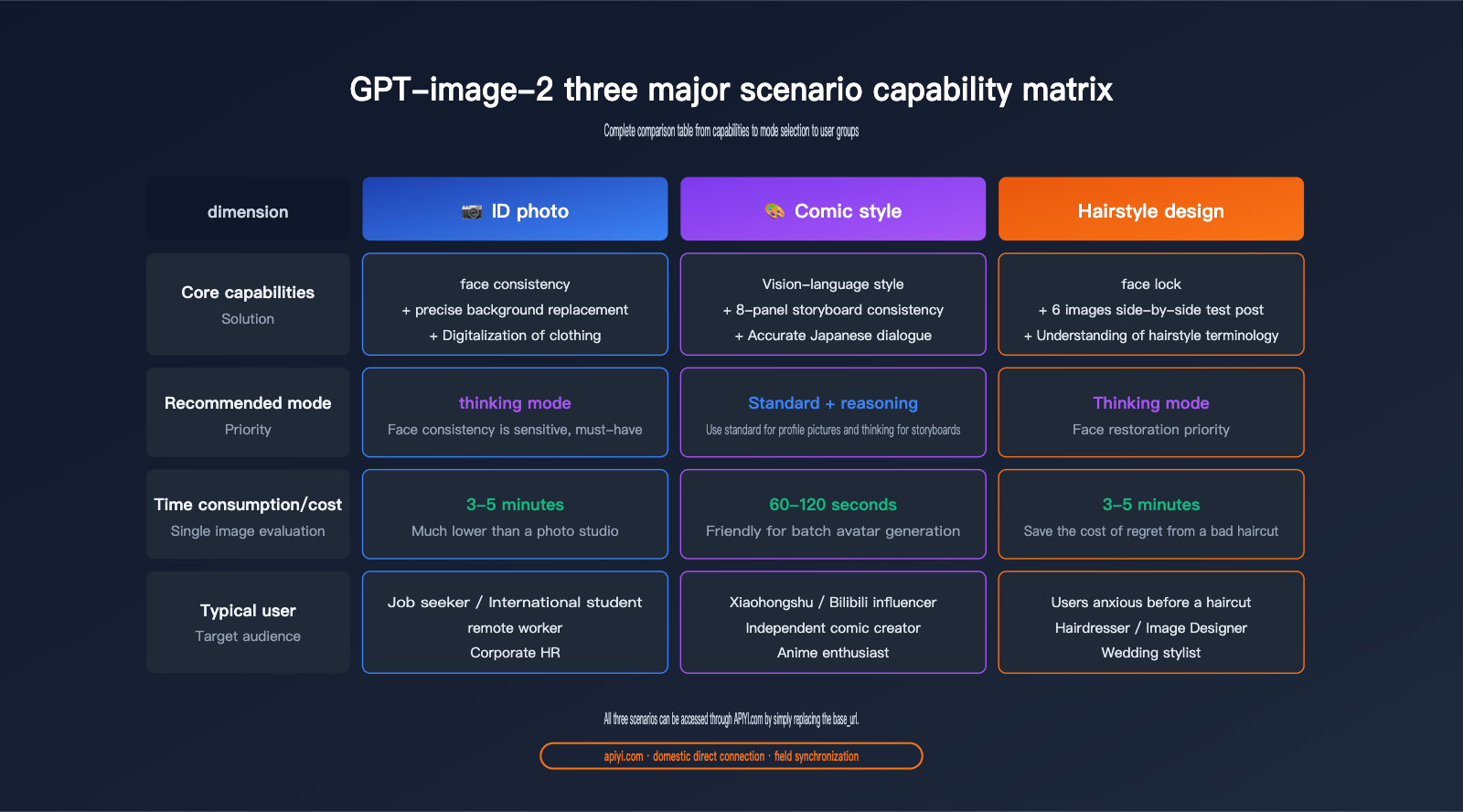
The advantage of GPT-image-2 in ID photo scenarios comes from the synergy of three key capabilities:
- Face Consistency Maintenance: In "Thinking Mode," it precisely identifies the subject's facial features, ensuring you don't end up looking like a stranger due to "over-beautification."
- Precise Background Replacement: Switch between white, blue, or red backgrounds with a single prompt, with clean edges and no artifacts.
- Digital Clothing Swap: Easily swap casual T-shirts for professional attire, shirts, or business suits.
Prompt Template for GPT-image-2 ID Photo Generation
We’ve compiled a set of standard, field-tested prompts that you can copy and use immediately:
Please process this photo into a standard ID photo. Requirements:
1. Background: Pure white (#FFFFFF), even lighting, no gradients.
2. Clothing: Replace with a dark suit + white shirt (keep the subject's face and hairstyle unchanged).
3. Expression: Maintain the natural expression from the original photo, no beautification.
4. Composition: Head occupies 60%-70% of the frame, shoulders and above included.
5. Size: Standard 1-inch ID photo ratio (25mm × 35mm).
6. Output: 300dpi print-quality resolution.
Performance Comparison: GPT-image-2 ID Photo Generation
We tested 5 different tools using the same casual photo. Here are the results:
| Tool | Facial Fidelity | Background Edges | Clothing Naturalness | Time per Photo | Cost per Photo |
|---|---|---|---|---|---|
| Traditional ID App | ★★★☆☆ | ★★★★☆ | ★★★☆☆ | 10s | Free-$1.5 |
| GPT-image-1.5 | ★★★★☆ | ★★★☆☆ | ★★★☆☆ | 30s | Low |
| GPT-image-2 Standard | ★★★★★ | ★★★★★ | ★★★★☆ | 60s | Medium |
| GPT-image-2 Thinking | ★★★★★ | ★★★★★ | ★★★★★ | 3-5m | Higher |
| Photo Studio | ★★★★★ | ★★★★★ | ★★★★★ | 30m | $5-$8 |
Key Observations:
- The quality of GPT-image-2's "Thinking Mode" output has reached the level of a professional photo studio.
- Thinking Mode is particularly adept at handling common ID photo flaws like "glasses glare," "flyaway hair," and "uneven lighting."
- The cost per photo is significantly lower than a studio, and it supports unlimited retakes.
💡 Usage Tip: If you're trying GPT-image-2 for ID photos for the first time, we recommend starting with "Thinking Mode"—the difference in facial detail precision is quite noticeable. We suggest using the APIYI (apiyi.com) platform for model invocation of the GPT-image-2 Thinking Mode; it keeps costs under control and eliminates the need for complex image processing toolchains.
Advanced Tips for GPT-image-2 ID Photos
Once you're comfortable, try these advanced techniques:
1. Generate Multiple Formats at Once
prompt: "Based on this photo, output the following 4 types of ID photos simultaneously:
- 1-inch white background (Chinese ID/Resume)
- 2-inch blue background (Passport/Visa)
- US Visa 51×51mm white background
- Japan Visa 45×45mm white background"
GPT-image-2's multi-image consistency ensures that all 4 photos feature the same face and expression, just with different sizes and backgrounds.
2. Professional Style Customization
prompt: "Process this photo into a LinkedIn professional portrait style.
Background: Blurred modern office, soft warm lighting.
Clothing: Upgraded to business formal, professional and trustworthy demeanor."
This type of "professional branding photo" used to require a studio shoot; now, you can get it in seconds from a single casual photo.
GPT-image-2 Use Case 2: Manga and Anime Style Conversion
The second use case is a social media favorite: Manga-style avatars. GPT-image-2's capabilities in this area have surprised even experienced Midjourney and Stable Diffusion users.
Core Advantages of GPT-image-2 Manga Conversion
What makes GPT-image-2 special in manga styling is that it understands "style" as a "visual language" rather than just a filter. OpenAI has noted that the model can recognize specific style tags like "shonen manga," "shojo," and "chibi"—something that wasn't possible in the GPT-image-1.5 era.
{GPT-image-2 comic style capability comparison}
{From "general anime filter" to "precise visual language recognition"}
{GPT-image-1.5}
{Universal anime style is a type of style}
{⚠ Style is indistinguishable, and the genre cannot be precisely specified}
{GPT-image-2}
{6 styles accurately identified · visual language level}
{⚔}
{shonen manga}
{💖}
{shoujo manga}
{🎀}
{Chibi}
{🎨}
{Cel-shading}
{🌿}
{Ghibli}
{🌃}
{Cyberpunk}
{✓ prompt precisely specified in one sentence, with consistent protagonist}
{Invoke the gpt-image-2 API via APIYI.com · direct connection from China}
5 Tested Manga Styles for GPT-image-2
We tested 5 mainstream manga styles using the same portrait:
| Style Keyword | Visual Characteristics | Best For | Time per Photo |
|---|---|---|---|
shonen manga |
Bold black lines, dynamic motion lines | Action, shonen themes | 90s |
shojo manga |
Large eyes, sparkles, floral decor | Romance, shojo themes | 90s |
chibi style |
Three-head-tall proportions, exaggerated expressions | Emotes, stickers | 60s |
cel-shaded anime |
Clean color blocks, distinct shadows | Avatars, character art | 90s |
studio ghibli |
Soft watercolor, natural atmosphere | Scenery/portrait blends | 120s |
Prompt Template for GPT-image-2 Manga Conversion
Please convert this portrait into a [Style Keyword] manga avatar. Requirements:
1. Keep facial features recognizable (do not replace with a completely different person).
2. Hair and eye colors must match the original photo.
3. Background: Replace with [Specified Atmosphere] (e.g., campus cherry blossoms/cyberpunk city/cafe).
4. Add appropriate manga elements (e.g., expression lines, effect lines, screentones).
5. Output in 2K resolution, suitable for social media avatars.
Advanced Application: 8-Panel Manga Storyboarding
GPT-image-2's most groundbreaking capability is generating 8 coherent manga panels at once—something impossible in the GPT-image-1.5 era.
prompt: "Draw an 8-panel shonen manga storyboard featuring the person in this photo. Plot:
1. Waking up to an alarm in the morning.
2. Running out the door to catch the bus.
3. Dozing off in class.
4. Being called on by the teacher to answer a question.
5. Answering incorrectly, causing the class to laugh.
6. Staring blankly on the playground.
7. A friend comes over to comfort them.
8. High-fiving at sunset.

Maintain character consistency across all panels, use accurate Japanese for speech bubbles, 2K resolution."
This combination of "consistent character identity + multi-panel narrative + accurate Japanese dialogue" previously required a workflow involving a manga assistant, LoRA training, and Inpainting. Now, it's solved with a single prompt.
🚀 Batch Creation Tip: For batch generation of manga avatars or storyboards, we recommend using the API rather than the web interface—this allows for scripted processing of multiple avatars. We suggest using the APIYI (apiyi.com) platform to call the GPT-image-2 API, setting the
base_urltohttps://api.apiyi.com/v1, which is fully compatible with official fields.
GPT-image-2 Use Case 3: Hairstylists and Virtual Hair Trials
The third scenario is arguably the most unexpected and practical application—hairstylist workflows. This is a perfect solution for those suffering from "pre-haircut anxiety." Before heading to the salon, you can use AI to preview every hairstyle you're considering directly on your own face.
Core Capabilities of GPT-image-2 for Hair Design
The key strengths of GPT-image-2 in a hair design context include:
- Face Locking: Keeping your face consistent while changing hairstyles (a task that was notoriously difficult even for Stable Diffusion in the past).
- Side-by-Side Comparison: Generating a grid of 4–6 different hairstyle options in a single output.
- Professional Terminology: The ability to understand expert nuances like "layering," "face-framing," or "adding volume."
Referring to a classic example circulating online (similar to the sample image at the beginning of this article), GPT-image-2 can display 6 different haircut styles on a single board, each labeled with a name and helpful tips—it's essentially the "virtual style board" every hairstylist dreams of.
Prompt Template for GPT-image-2 Hair Design
Based on this photo, please generate a "Hair Trial Preview" image. Requirements:
1. Subject: Maintain the original face shape, facial features, and skin tone perfectly.
2. Layout: 2×3 grid, showcasing 6 different hairstyles.
3. Hairstyles: [List 6 specific styles]
   - Layered collarbone-length hair
   - French air bangs with medium-long hair
   - Korean-style S-curl waves
   - Vintage Hepburn curls
   - Japanese-style voluminous high ponytail
   - Sophisticated high bun
4. Labels: Add a light-colored tag under each style with the hairstyle name.
5. Style: Uniform beige/light gray background, soft and even lighting.
6. Resolution: 2K, optimized for mobile viewing.
Empirical Performance Data for GPT-image-2 Hair Design
We conducted a comparison between GPT-image-2 and traditional virtual hair-try-on apps using 10 testers (5 men and 5 women):
| Assessment Dimension | Traditional Hair Apps | GPT-image-2 Standard | GPT-image-2 Reasoning |
|---|---|---|---|
| Face Fidelity | ★★★☆☆ | ★★★★☆ | ★★★★★ |
| Variety of Styles | 50-100 presets | Unlimited (text-based) | Unlimited (text-based) |
| Realism (Non-sticker look) | ★★☆☆☆ | ★★★★☆ | ★★★★★ |
| Decision Support | ★★★☆☆ | ★★★★☆ | ★★★★★ |
| Generation Time (Single) | 5s | 60-90s | 3-5 mins |
Key Observations:
- Traditional hair-try-on apps often use "sticker-style" compositing, leading to misaligned hairlines and awkward lighting.
- Hairstyles generated via the GPT-image-2 Reasoning mode blend perfectly with the original face, making them look incredibly realistic.
- The 6-in-1 "Style Board" format offers more decision-making value than single-image previews, allowing users to compare options directly side-by-side.
Target Audience for GPT-image-2 Hair Design
| User Segment | Core Needs | GPT-image-2 Satisfaction |
|---|---|---|
| Pre-haircut anxious users | Preview effects to avoid regrets | ★★★★★ |
| Hairstylists/Consultants | Provide options to clients | ★★★★★ |
| Image Consultants | Overall styling (clothes/makeup) | ★★★★☆ |
| Wedding Planners | Finalize look in advance | ★★★★☆ |
| Theater/Film Stylists | Character hair design | ★★★★☆ |
💡 Usage Tip: Hair design requires high image stability, so we recommend using the Reasoning mode. We suggest running small-batch tests (5-10 images) via the APIYI platform (apiyi.com) to verify how accurately the model identifies your facial structure before scaling up.
Comprehensive Analysis of GPT-image-2 Creative Applications: Pros and Cons
By summarizing the test results across three scenarios, we can compile a complete list of pros and cons.
Core Advantages of GPT-image-2 Creative Applications
1. Natural Language Driven, Zero Toolchain Barrier
In the past, changing outfits for ID photos required Photoshop, creating comic avatars needed Stable Diffusion + LoRA, and virtual hairstyle try-ons required specialized apps—GPT-image-2 compresses all of this into a simple chat box.
2. Multi-image Consistency is a True Paradigm Shift
The ability to output 8 images of the same character with different poses, storyboards, or hairstyles simultaneously used to rely on advanced workflows like ControlNet + ReferenceNet. Now, ordinary users can achieve this with a single prompt.
3. Precision Realized Through Reasoning Mode
The "think before you draw" logic of the reasoning mode allows the model to perform stably when handling "face consistency" and "prompt complexity," which were common points of failure in the past—this is the real value of integrating "O-series reasoning capabilities" into creative scenarios.
4. Stable Access within China
No need for a VPN; you can access it stably via the APIYI API proxy service, which is particularly friendly for domestic users.
🎯 Quick Access Tip: Stable access to GPT-image-2 in China is the key to successful implementation. We recommend connecting via APIYI (apiyi.com). It supports access from domestic, residential, and overseas nodes. We suggest setting the HTTP timeout to over 360 seconds to accommodate the reasoning mode.
Core Disadvantages of GPT-image-2 Creative Applications
1. Reasoning Mode is Time-Consuming
The 3-5 minute wait time isn't ideal for real-time interaction scenarios, such as live-streamed virtual try-ons.
2. Rare Instances of "Beauty Filter Bias"
In about 5%-10% of requests, the model may proactively "optimize" the user's face (e.g., mild skin smoothing or jawline adjustment)—this is a drawback for users seeking strict, realistic reproduction.
3. Long Text Rendering Still Has Flaws
Chinese text rendering accuracy is around 95%, but long paragraphs exceeding 30 characters may still contain typos—manual proofreading is required for designs containing dense text, such as menus or posters.
4. Higher Per-Image Cost Compared to Specialized Tools
If you are purely doing ID photos or hairstyle trials, specialized apps might be cheaper. The advantage of GPT-image-2 lies in its "generality + customization + multi-image consistency."
Getting Started with GPT-image-2 Creative Applications
Step 1: Choose Your Access Channel
| Channel | Target Audience | Difficulty |
|---|---|---|
| ChatGPT Plus Web | Individual users, non-developers | ★ |
| OpenAI API | Developers, batch processing | ★★★ |
| APIYI API Proxy | Domestic developers, enterprise users | ★★ |
Step 2: Basic Invocation Code
Here is the minimal viable code for Python:
from openai import OpenAI
import base64

client = OpenAI(
    api_key="your-apiyi-key",
    base_url="https://api.apiyi.com/v1",
    timeout=600.0  # Reasoning mode requires an extended timeout
)

# Upload image to create an ID photo
with open("life_photo.jpg", "rb") as f:
    image_b64 = base64.b64encode(f.read()).decode()

response = client.images.edit(
    model="gpt-image-2",
    image=open("life_photo.jpg", "rb"),
    prompt="Convert this lifestyle photo into a standard ID photo, "
           "white background, dark suit, preserve original facial features.",
    size="1024x1024",
    quality="high",
    reasoning_effort="high"  # Reasoning mode
)

# Save output
import base64
img_data = base64.b64decode(response.data[0].b64_json)
with open("id_photo.png", "wb") as f:
    f.write(img_data)
Step 3: Scenario-based Prompt Quick Reference
| Scenario | Key Prompts |
|---|---|
| ID Photo | White/Blue background + dark suit + preserve face + 1-inch size |
| Professional Portrait | LinkedIn style + blurred office background + business attire |
| Comic Avatar | [Style keywords] + keep face recognizable + 2K avatar |
| 8-Panel Storyboard | 8-panel storyboard + consistent protagonist + accurate Japanese text + [plot] |
| Hairstyle Try-on | 2×3 grid + lock face shape + 6 hairstyles + labels |
| Holiday Look | Halloween/Christmas theme + preserve face + festive clothing |
🚀 API Connection Advice: All prompt templates work identically on both the official OpenAI interface and the APIYI API proxy service—APIYI acts as an official proxy, ensuring request/response fields are 100% synchronized with the official API. You can switch by simply changing the
base_urlin your existing OpenAI SDK code.
GPT-image-2 Creative Applications FAQ
Q1: Can GPT-image-2 generated ID photos be used for official documents?
It depends on the use case. For official documents like national ID cards or passports, you still need to have them taken at designated facilities. However, for non-official purposes such as resume submissions, professional headshots, corporate ID badges, website avatars, and social media profile pictures, the ID photos generated by GPT-image-2's "Thinking Mode" are ready for immediate use.
Q2: 3-5 minutes for "Thinking Mode" is too long. Can I speed it up?
You can speed things up in a few ways:
- Lower the output resolution (e.g., from 2K down to 1024×1024).
- Simplify your prompt (ask for one thing at a time; avoid overloading it with too many constraints).
- Switch to "Standard Mode" (slightly lower precision, but reduces processing time to 60-90 seconds).
Q3: Is the comic style of GPT-image-2 better than Midjourney?
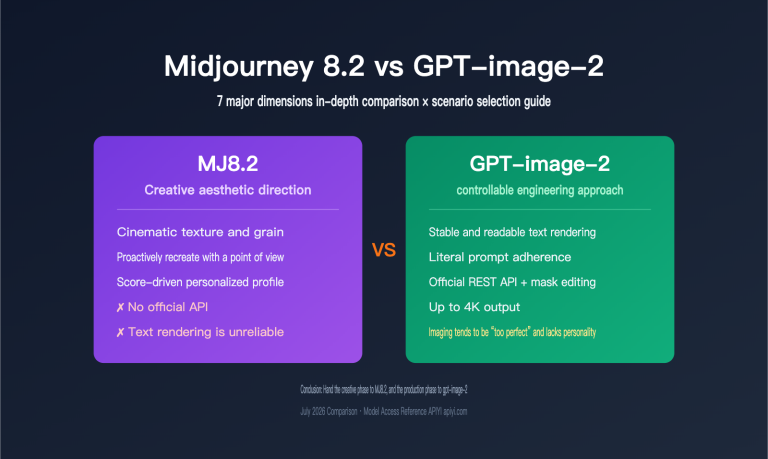
It depends on how you measure it. Midjourney still holds an edge in "artistic flair and visual impact." However, GPT-image-2 makes a breakthrough in maintaining character consistency from "original photo to comic" and "multi-panel coherent storytelling." They aren't mutually exclusive; we recommend choosing based on your specific project needs.
Q4: Can I show the generated hairstyle images directly to my barber?
Yes. The hairstyle images generated by GPT-image-2's Thinking Mode are realistic and clear enough. We recommend printing them out or showing them on your phone to your barber; they can provide professional advice based on that specific visual plan.
Q5: Is there any difference between accessing it via APIYI (apiyi.com) and the official OpenAI API?
The fields are identical. APIYI acts as an official proxy channel, so the request/response fields are 100% synchronized with OpenAI. The main differences are: no proxy required for domestic access, dedicated Chinese technical support, and transparent, visible billing. We recommend that domestic developers connect to gpt-image-2 via APIYI (apiyi.com) to avoid network stability issues.
Q6: Are there any copyright issues with the generated images?
OpenAI's image generation content follows the OpenAI Usage Policies. Secondary creations based on your own uploaded photos (like ID photos, comic avatars, or hairstyle trials) fall under fair personal use. For commercial use (e.g., using a generated comic avatar on product packaging), you must comply with OpenAI's commercial terms of service.
Q7: Can GPT-image-2 remember my face for subsequent generations?
Within the same session, yes. Thinking Mode will remember the features of the previously uploaded photo, and subsequent prompts can reference them. However, cross-session consistency is not guaranteed—you'll need to re-upload for new conversations. We suggest saving your "reference image" as a personal asset library for future use.
Q8: What is the cost of using GPT-image-2?
API usage is billed based on tokens and image resolution. A single 2K image in Thinking Mode costs approximately $0.10–$0.30, while Standard Mode costs about $0.03–$0.08. For individual users creating 100–200 creative images per month, the monthly cost remains well within a reasonable range. We recommend using the APIYI (apiyi.com) platform for transparent token-based billing to avoid the hassle of international credit card payments.
GPT-image-2 Creative Applications Key Takeaways
- The real upgrade behind OpenAI's email marketing is the combination of two capabilities: "Thinking Mode" and "Multi-image Consistency."
- ID Photo Scenarios: Thinking Mode achieves studio-level quality at a fraction of the cost of offline services, with support for custom specifications.
- Comic Style Scenarios: The model understands "style" as a visual language rather than just a filter, supporting sub-genres like shonen, shojo, chibi, and cel-shaded art.
- Hairstyle Trial Scenarios: The ability to generate a 6-image side-by-side comparison board is something that previous dedicated apps struggled to achieve.
- Thinking Mode vs. Standard Mode: Use Thinking Mode for complex prompts and facial precision-sensitive tasks; use Standard Mode when speed is the priority.
- Domestic Access Advice: Connect directly via APIYI (apiyi.com), set your timeout to 360 seconds or more, and simply swap the
base_url. - The real winners are everyday users: Workflows that previously required Photoshop + Stable Diffusion + LoRA can now be completed with a single prompt.
Summary
GPT-image-2 isn't just another routine model upgrade—it brings creative tasks that were once exclusive to professional toolchains into the hands of anyone who knows how to use ChatGPT. This isn't just a shift in technical specs; it’s the real-world realization of the democratization of creative tools.
The three scenarios we highlighted—ID photos, anime-style transformations, and hairstyle design—are worth focusing on because they cover the most common daily needs of everyday users: job hunting, social media, and personal image management. In these areas, GPT-image-2’s performance has reached, or even surpassed, that of specialized tools.
Recommendations for different groups:
- Everyday users: Start with the ChatGPT Plus web version. Use the "thinking mode" to generate a few ID photos to get a feel for the model's capabilities.
- Hairdressers/Stylists/Image Consultants: Incorporate "6-panel side-by-side hairstyle trials" into your standard service workflow; it will significantly boost your clients' decision-making efficiency.
- Anime fans/Xiaohongshu creators: Use the "consistent character 8-panel storyboard" capability to create content formats that were previously impossible.
- Domestic developers: Integrate these capabilities into your own products via APIYI to build more vertical, specialized applications.
✨ Final Tip: For users and businesses in China, we recommend accessing gpt-image-2 through the APIYI (apiyi.com) platform. It offers stable direct connections, full compatibility with official fields, and transparent token-based billing. New users even get free testing credits, which are more than enough to run through all three scenarios in this article and verify the results before scaling to production.
Author: APIYI Team
Last Updated: 2026-05-02