Author’s note: A model that seems to have “gotten dumber” hasn’t necessarily been replaced. Starting with Anthropic’s recent FlashProve research on proving inference, this article lays out a troubleshooting sequence for the factors that affect API results, from the caller’s setup to the server.
“The model solves the same problem on the official website, but gets stuck when I call it through the API.” “The model has obviously gotten dumber this month.” Nearly every developer who accesses a Large Language Model through an API has heard complaints like these. A common first reaction is: Did someone swap the model behind the scenes?
Anthropic recently released FlashProve, an open-source research prototype that uses cryptographic proofs to verify whether an output really came from a specified set of model weights. It offers a path toward mathematically verifying whether a model has been swapped.
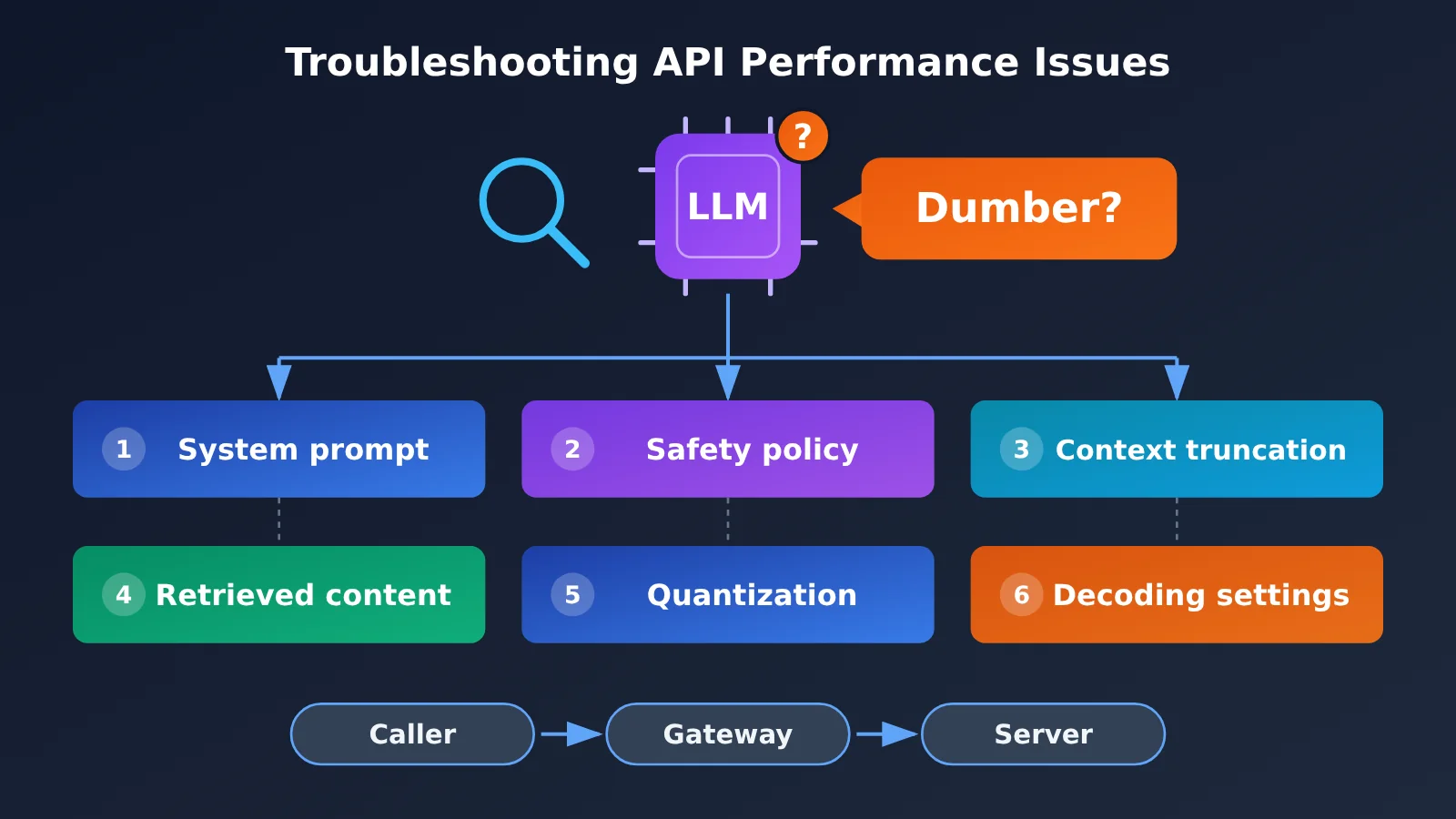
But that’s not the whole story when a model seems to get dumber. The research makes clear that even when the identity of the weights has been confirmed, system prompts, safety policies, context truncation, retrieved content, quantization methods, and decoding parameters can all affect the final result. The Kimi team’s troubleshooting experience also shows that a substantial share of benchmark anomalies come from misused decoding parameters.
What you’ll get: A checklist for investigating a model that seems to have gotten dumber, including what you can check yourself, what requires your provider’s help, and why “asking a few questions to identify the model” isn’t reliable.
Troubleshooting a “Dumber” Model: Key Facts at a Glance
First, let’s establish the context. The discussion started with Anthropic’s research on “provable inference” and led to a central question in the community: who’s responsible when a model seems to get dumber?
| Item | Details |
|---|---|
| Published by | Anthropic’s research team, which also released code, a technical report, and Lean formal proofs |
| Core technology | FlashProve: uses zkSNARK zero-knowledge succinct proofs to generate cryptographic proofs of model inference |
| What it solves | Verifies whether an output came from specified weights without revealing the weights or requiring users to rerun the model |
| What it doesn’t solve | Product-level changes to system prompts, safety policies, context, decoding parameters, and more |
| Takeaway for developers | Investigate unusual model performance layer by layer, rather than focusing solely on whether the model was swapped out |
How FlashProve Proves “You Are Who You Say You Are”
FlashProve works in two steps. First, the provider generates a “commitment” to the model weights—a cryptographic fingerprint that uniquely identifies the weights without exposing them. Then, for a given input and output, the provider generates a proof. With the commitment, prompt, response, and proof file, users can verify on their own computers whether the output was actually computed using the committed weights.
The zero-knowledge design ensures that verifiers don’t gain access to the weights or intermediate computation values, and can’t see which experts were invoked at each layer of an MoE model. That’s much more reliable than asking a model to identify itself: the model name in its response no longer serves as proof of identity. Instead, what’s checked is the computational relationship between the output and the weights.
Anthropic tested FlashProve using Llama 4 Maverick, whose 4-bit weights are publicly available. It’s a mixture-of-experts model with roughly 400 billion parameters, about 17 billion of which are activated per token. The published results include:
| Metric | Experimental Result | Notes |
|---|---|---|
| Proof generation throughput | About 110 tokens/second on a single H100 | This is proof generation speed, not chat output speed |
| Proof file size | About 19 MB per 1,024-token request | Must be delivered with the response |
| Verification time | About 17 seconds on a 24-thread CPU | No GPU required; verification can be done on a laptop |
| Weight commitment generation | About 39 minutes | Only needs to be generated once |
| Additional cost | GPU time is about 70–95 times that of ordinary vLLM inference | Widespread adoption is still some way off |
Why a Model Can Still Seem Dumber Even When the Weights Are Verified
FlashProve has one important prerequisite: users must know the commitment for the “authentic model” in advance. If a provider can only prove that a response came from a model it chose, but users can’t confirm that it’s the model they purchased, the proof still doesn’t solve the identity problem. Ideally, the model vendor or a trusted organization would publish the commitment, and users would verify against that established fingerprint.
More importantly, unchanged weights don’t mean an unchanged service. A proof tied to the weights can’t automatically tell you whether the system prompt was adjusted, the context was truncated, or the decoding parameters stayed consistent. That’s why complaints about models getting dumber persist: the problem is often the result of several factors combined.
6 Common Reasons a Model Seems to Get Dumber
If we break down the factors listed in the research and group them by where the problem might occur, it becomes clear that quite a few are within the caller’s control.
| Factor | Typical symptoms | Where it might occur | Can users check it themselves? |
|---|---|---|---|
| Decoding parameters | Rambling or repetitive output, low scores in reasoning mode | Mainly on the caller’s side, though the server may also set defaults | Yes, check the request parameters |
| Context truncation | “Forgets” earlier messages, gives incomplete answers, ignores instructions | Either the caller or the server | Partly; check token usage |
| System prompt | Changes in style, more refusals, incorrect formatting | Injected by the caller or the server | Users can check their own, but not the server’s |
| Safety policies | Suddenly refuses certain questions or gives more cautious answers | Mainly on the server side | Difficult; requires an explanation from the provider |
| Retrieved content | Fluctuating answer quality in RAG scenarios | The caller’s retrieval pipeline | Yes, inspect the retrieved content |
| Quantization | Slight decline in overall capability, higher error rate on long reasoning tasks | Server-side deployment | No; requires the provider’s cooperation |
Misused Decoding Parameters: An Easily Overlooked Reason a Model Seems to Get Dumber
When introducing Kimi Vendor Verifier, the Kimi team shared a telling finding: after K2 Thinking launched, they received a number of community reports about unusual benchmark scores. Their investigation confirmed that many of these came from misused decoding parameters. The team then constrained the relevant parameters in Thinking mode and checked whether thinking content was being passed back correctly.
The takeaway for developers is straightforward: if parameters such as temperature, top_p, max_tokens, or the reasoning mode switch don’t match the official recommendations, model performance can differ significantly from what you expect. This is especially true for reasoning models. Different providers have their own requirements for sampling parameters, thinking budgets, and how thinking content should be passed back in multi-turn conversations. Check each model’s official documentation for the right values instead of reusing your usual settings for a standard chat model.
Incomplete Context: When a Model Seems to “Forget”
Another common issue is context. If you only send the latest message in a multi-turn conversation, the model naturally can’t “remember” what came before. In a workflow, if message history exceeds the model’s context window, the earliest system instructions are often truncated. As a result, the model may suddenly stop following the required output format. Setting max_tokens too low can also cut an answer short, making it look like the model “stopped halfway through.”
All of these can feel like the model has gotten dumber, but in most cases, checking the request body and the finish reason in the response will help you pinpoint the problem on the spot.
How to Troubleshoot a Model That Seems Less Capable: 3 Steps
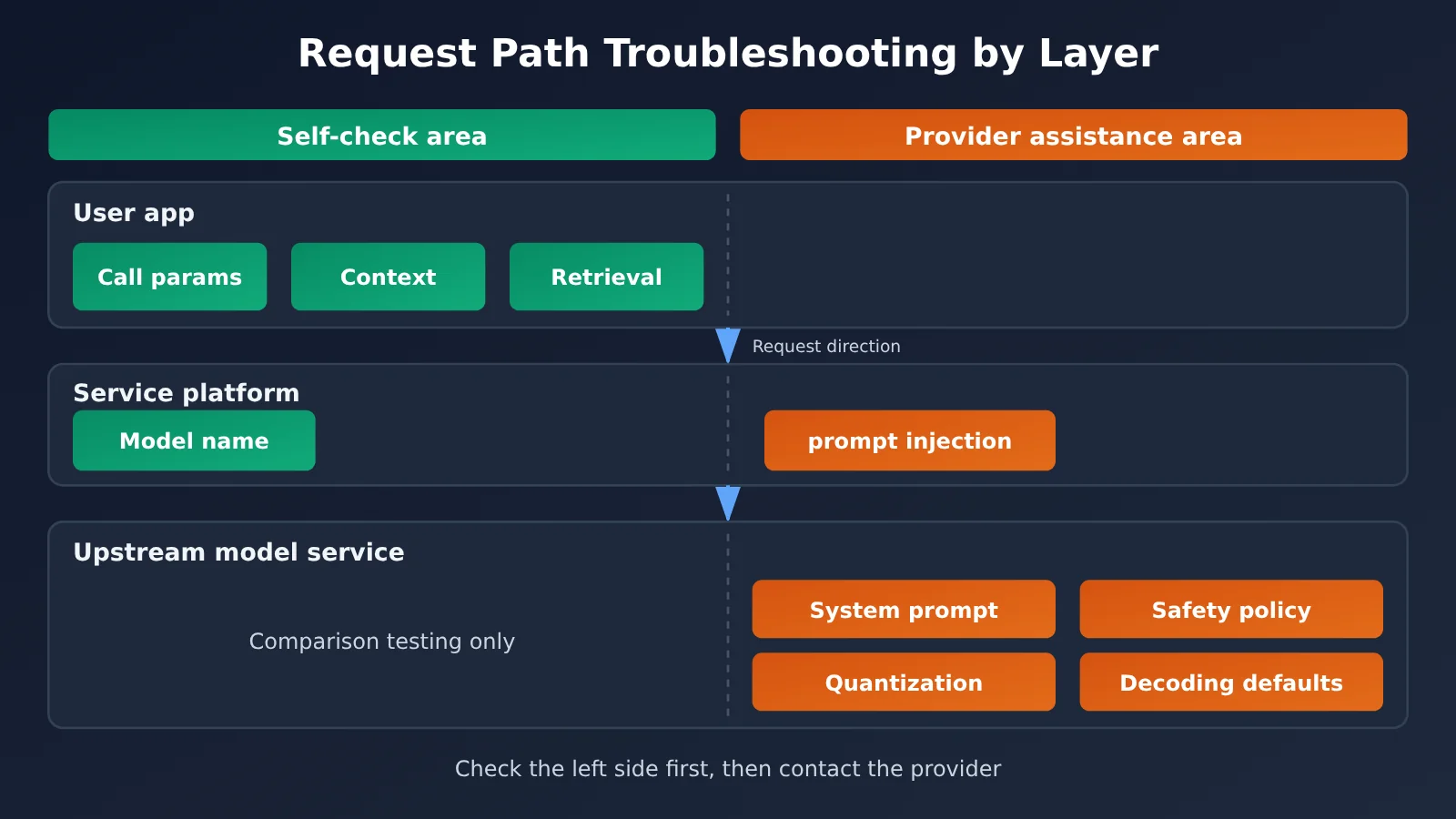
The cause could lie anywhere in the request chain, so start with the cheapest and most controllable checks. Work through them in this order:
- Check the client first: Verify the model name, decoding parameters, max_tokens, system prompt, complete message list, and the content retrieved by RAG.
- Run a comparison test: Keep the parameters and prompts fixed, then compare results with the official channel or the behavior described in the official documentation. Run the test multiple times to observe the distribution, rather than relying on a single result.
- Investigate the server last: If the client configuration is correct and the difference is consistent and reproducible, contact the service provider with your request logs and test results.
Minimal Example: Make a Reproducible Call with Fixed Parameters
A practical first step is to set every parameter explicitly rather than rely on defaults, and print the finish reason and token usage:
import openai

client = openai.OpenAI(api_key="YOUR_API_KEY", base_url="https://api.apiyi.com/v1")

resp = client.chat.completions.create(
    model="gpt-4o-mini",  # Replace with the model you're troubleshooting
    messages=[{"role": "user", "content": "用三句话解释什么是零知识证明"}],
    temperature=0, max_tokens=800,
)
print(resp.choices[0].finish_reason, resp.usage)
print(resp.choices[0].message.content)
If finish_reason is length, the response was cut off by max_tokens. In that case, an incomplete answer isn’t a sign that the model has gotten worse—it’s a parameter issue. The input token count in usage can also help you check whether the full context was actually sent.
View the full comparison test script
import json
import openai
from collections import Counter

client = openai.OpenAI(
    api_key="YOUR_API_KEY",
    base_url="https://api.apiyi.com/v1"  # Change the model parameter to switch models
)

# Set all parameters explicitly to avoid relying on defaults
PARAMS = {
    "temperature": 0.2,   # For reasoning models, use the value recommended in the official documentation
    "top_p": 1.0,
    "max_tokens": 2000,
}

TEST_CASES = [
    {"id": "math", "prompt": "一个数加上它的一半等于 45,这个数是多少?只给出数字。", "expect": "30"},
    {"id": "format", "prompt": "用 JSON 输出三种水果名称,键名为 fruits。", "expect": "fruits"},
]

def run_case(model: str, case: dict, rounds: int = 5) -> dict:
    """Run the same test case multiple times and track the hit rate, truncation count, and token usage."""
    hits, finish = 0, Counter()
    prompt_tokens = []
    for _ in range(rounds):
        resp = client.chat.completions.create(
            model=model,
            messages=[
                {"role": "system", "content": "你是严谨的助手,按要求作答。"},
                {"role": "user", "content": case["prompt"]},
            ],
            **PARAMS,
        )
        content = resp.choices[0].message.content or ""
        finish[resp.choices[0].finish_reason] += 1
        prompt_tokens.append(resp.usage.prompt_tokens)
        if case["expect"] in content:
            hits += 1
    return {
        "case": case["id"],
        "hit_rate": hits / rounds,
        "finish_reasons": dict(finish),
        "prompt_tokens": sorted(set(prompt_tokens)),
    }

if __name__ == "__main__":
    model = "gpt-4o-mini"  # Replace with the model you're troubleshooting
    report = [run_case(model, c) for c in TEST_CASES]
    print(json.dumps({"model": model, "params": PARAMS, "report": report},
                     ensure_ascii=False, indent=2))
The key to this script isn’t the test questions themselves, but three things: fixing all parameters and including them in the report, running each case multiple times to check the hit rate, and recording finish_reason and prompt_tokens to rule out truncation and context issues. Only after ruling out all three is it worth investigating whether something has changed on the server side.
🚀 Troubleshooting tip: APIYI apiyi.com uses an OpenAI-compatible interface, so you only need to change the model parameter to switch models. That makes it easy to compare multiple models using the same test script. The platform also provides call logs and usage statistics, which can help you review request consumption and token usage to assess whether the full context was sent. Check the platform console for the exact fields shown in the logs.
What Users Can Check vs. What Requires the Provider’s Help
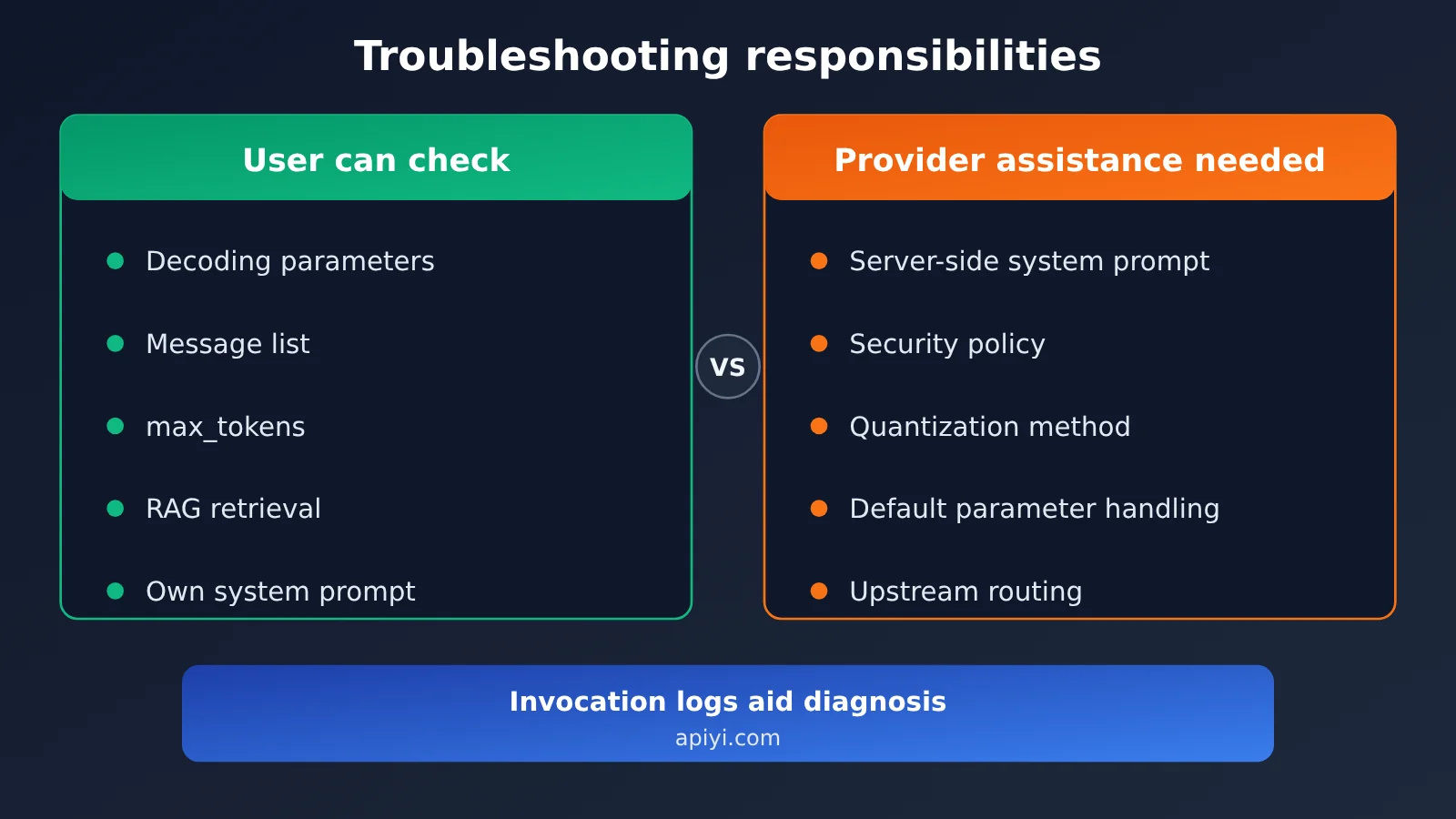
| Item | What users can check | Information needed from the provider |
|---|---|---|
| Decoding parameters | Print the complete request body and compare it with the official documentation | Whether the platform modifies parameters or supplies defaults |
| Context completeness | Check the message list and prompt_tokens | Whether server-side truncation or context window limits are in effect |
| Reasoning mode | Check the thinking toggle and how thinking content is returned | Whether the upstream service supports the relevant parameters |
| Quantization and deployment | Cannot be checked independently | Deployment precision and upstream channel details |
| Safety policies | Compare the same request’s behavior through the official channel | Whether additional moderation rules have been applied |
When you contact your provider, bring request samples with fixed parameters, statistics from multiple runs, and comparison data. That’ll make the conversation much more productive. If you just say “the model got dumber,” it’s hard for them to pinpoint the issue.
Why Asking a Few Questions Isn’t a Reliable Way to Tell Whether a Model Has Gotten Dumber
One popular method in the community is to ask the model about something only a newer version should know. If it can’t answer, the conclusion is that the model has been swapped. The problem is that a single response has an element of randomness. A chance mistake, different parameters, missing context, or differences in a vendor’s internal routing can all lead to the same conclusion: “This isn’t the model I wanted.”
Stanford University’s Model Equality Testing research project offers a more rigorous perspective. Researchers tested 31 commercial API endpoints serving four Llama models in 2024 and found that the output distributions of 11 endpoints differed statistically from reference distributions based on Meta’s released weights. The key point is that they compared output distributions, not whether the models got one or two questions right.
For developers, the statistical approach is worth borrowing: use fixed parameters, multiple test cases, and repeated runs to look for consistent differences. That’s also why the comparison script above uses a “hit rate” rather than a “single result.”
Impact Analysis: When Models Seem to Get Worse
Impact on Developers
- Start troubleshooting earlier: When results are off, check your request body first. Misused parameters and missing context are inexpensive to investigate and often explain the problem.
- Set parameters explicitly: Don’t rely on defaults in production. Configure reasoning models according to the official documentation, and keep parameters under version control.
- Build a regression test suite: Run a fixed set of test cases regularly so you have data—not just a gut feeling—when a model seems to get worse.
- Keep invocation records: Request parameters, token usage, and finish reasons are key evidence when talking to a service provider.
Impact on the Industry
- Verification is moving beyond gut feelings to proof: FlashProve demonstrates a way to verify model weight identity. Model providers, evaluators, and regulators may eventually use it to confirm which model is actually serving requests.
- Expect broader demands for transparency: Beyond weights, the next discussion will focus on whether system prompts, decoding strategies, and deployment configurations are consistent.
- Widespread adoption will take time: Generating proofs costs roughly tens of times more than ordinary inference. Longer context support and a trusted commitment-publishing mechanism are also needed, so it’s unlikely to cover everyday invocations in the near term.
Frequently Asked Questions
Q1: What should I check first if a model seems to have gotten worse?
Start with your request: Is the model name correct? Do decoding parameters such as temperature match the official recommendations? Is max_tokens too low? Are you passing the complete message history in multi-turn conversations? The Kimi team’s experience suggests that a significant share of unusual benchmark results come from misconfigured decoding parameters, so this is often the quickest place to start.
Q2: Can FlashProve settle the debate over whether a model has gotten worse?
No. It can verify whether an output came from specified weights, but only if there’s a trusted model commitment to compare against. A weight proof doesn’t automatically cover factors like system prompts, safety policies, context truncation, quantization methods, or decoding parameters.
Q3: How can I run a reliable comparison test?
Keep all parameters and prompts fixed, prepare multiple test cases with clear answers, and run each case several times to calculate the success rate. Also record finish_reason and token usage. With APIYI apiyi.com, you can compare multiple models using the same OpenAI-compatible code. New users get free testing credits for this kind of verification.
Q4: Why might a reasoning model perform worse through the API than on the web app?
Common reasons include reasoning mode being disabled or set to a different budget, sampling parameters that don’t match official recommendations, an incorrect method for passing reasoning content back in multi-turn conversations, and system prompts or tools included in the web app but absent from the API. Check each item against the model’s official API documentation.
Q5: How should I contact the provider after checking everything on my end?
Prepare request samples with fixed parameters, statistics from multiple runs, comparison data from official channels, and the time period when the issue occurred. You can view invocation logs and usage statistics in the APIYI apiyi.com console. Providing the relevant records can significantly shorten the time it takes to identify the issue.
Key Takeaways for Troubleshooting Model Performance
- A model seeming less capable doesn’t necessarily mean it’s been swapped: System prompts, context, decoding parameters, and other factors can all affect results.
- Parameter misuse is common: The Kimi team confirmed that incorrect decoding parameters caused a significant share of abnormal benchmark results.
- Troubleshoot in stages: Check the client side first, run comparison tests next, and investigate server-side issues last.
- A single question isn’t a reliable test: Compare output distributions across multiple runs instead of judging one or two answers.
- Weight verification has limits: FlashProve verifies weight identity, but it can’t account for product-level configuration changes.
- Use consistent testing tools: APIYI apiyi.com’s compatible interface and logs can help you compare models side by side.
Summary
In the past, debates about whether a model had become less capable mostly relied on screenshots and subjective impressions. Anthropic’s FlashProve offers a way to verify whether a model has been swapped, but it also reminds us that an entire layer of configuration beyond the weights can affect performance.
- Check your setup first: Decoding parameters, max_tokens, the message list, and content retrieved by RAG are the lowest-cost places to start.
- Run comparisons: Compare results with the official service using fixed parameters, multiple test cases, and multiple runs. Let data replace gut feeling.
- Contact the provider: Once you’ve ruled out client-side issues, share request logs and statistical results with the provider to investigate server-side problems.
Consider adding the comparison script in this article to your regular regression tests. With APIYI apiyi.com, you can quickly test multiple models using the same code. The platform offers free testing credits and a unified OpenAI-compatible interface.
📚 References
- 36Kr / APPSO – Analysis of Anthropic’s Provable Inference Research: FlashProve’s principles, experimental data, and discussion of why models may appear less capable
- Link:
36kr.com/p/4056019887510401 -
Details: The primary source for the facts and data in this article, including information on Kimi Vendor Verifier and Model Equality Testing
-
Anthropic Research – Provable Inference: The official FlashProve research page
- Link:
anthropic.com/research/provable-inference - Details: Includes the technical report, open-source code, and formal proofs
Author: APIYI Technical Team
Technical support: If you’re having trouble investigating unexpected model invocation results, contact us through the APIYI homepage at apiyi.com. For integration guides, visit the documentation center at docs.apiyi.com.