On October 29, 2026, from 17:27 Beijing time until 04:35 the next day (about 11 hours), the official Claude Code extension in the Cursor marketplace was replaced with a malicious build containing an SSH backdoor. The affected versions were 2.1.312 and 2.1.313 on macOS arm64 and Windows x64. Cursor says up to 5,000 users may have downloaded it or received it through an automatic update.
This wasn’t a fake plugin that snuck into the marketplace. The package users installed had the official name, Anthropic.claude-code, and its interface and features looked normal. Many people didn’t realize they’d installed it. That’s also why uninstalling the extension or upgrading isn’t enough. The malicious code had already added an SSH public key, set up a persistence script to run at startup, and sent host information to the attacker. There are three things you need to do to finish the cleanup: remove the key, remove the persistence mechanism, and rotate your credentials.
What you’ll get: This article breaks the process into five steps, each covering what you’ll see, what to do, and how to tell if it worked. Even if you’re not a security specialist, you can check and clean up your system in about half an hour, including rotating your APIYI key.
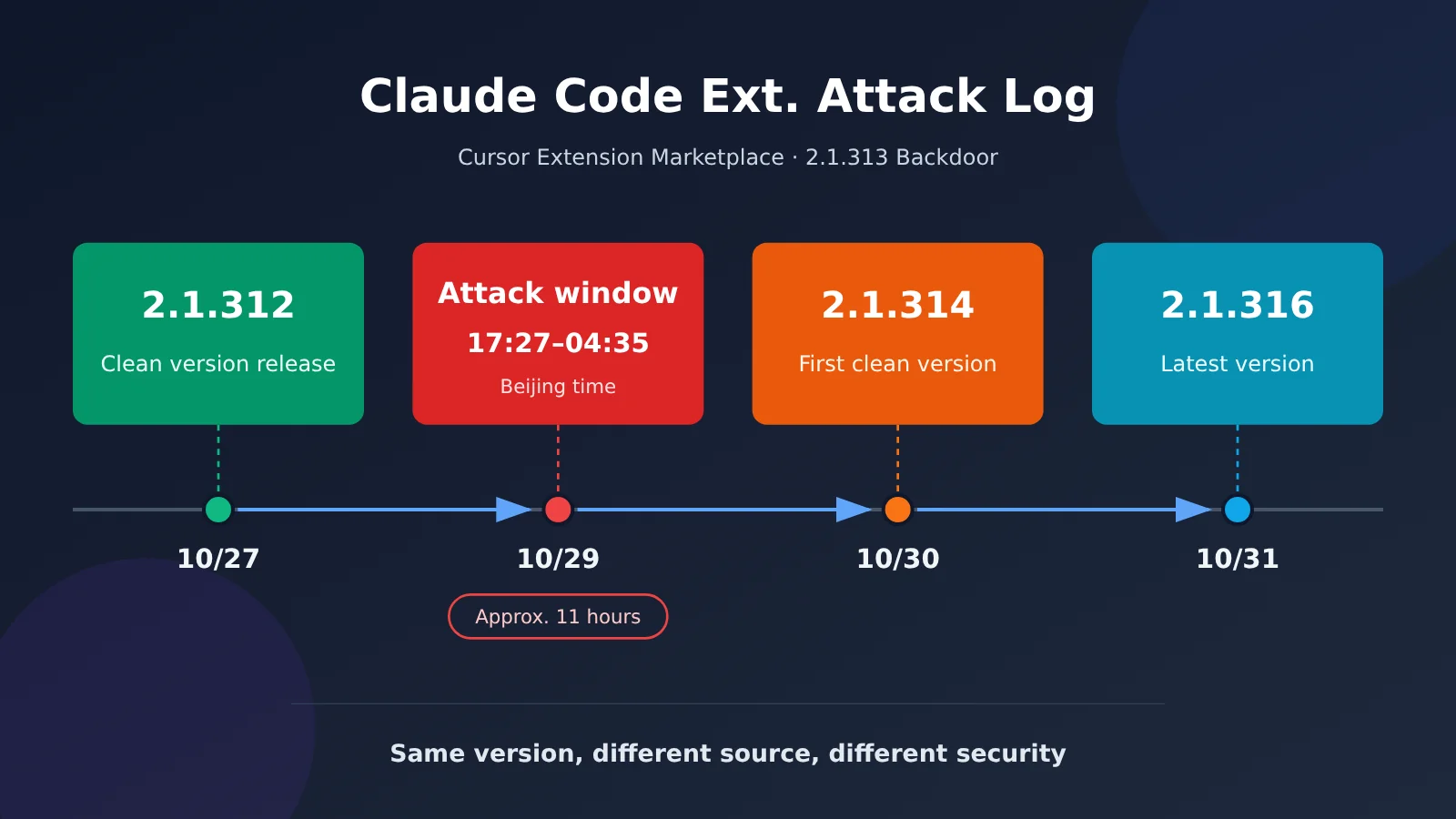
Caption: The malicious window lasted about 11 hours. Version 2.1.314 was the first clean release after the incident.
Don’t Panic: What Happened to the Claude Code Extension?
Let’s start with the facts. Everything in the table below comes from Cursor’s security advisory and public responses from Anthropic employees.
| Item | Facts |
|---|---|
| Incident | Anthropic.claude-code in the Cursor extension marketplace was tampered with to plant a persistent SSH backdoor |
| Affected versions | 2.1.312 and 2.1.313 (Cursor added 2.1.312 when it updated its advisory on October 30) |
| Platforms | macOS (darwin-arm64) and Windows (win32-x64); the code also contained a Linux branch |
| Exposure window | October 29, 02:27–13:35 Pacific Time; October 29, 17:27 – October 30, 04:35 Beijing time |
| Scope | Cursor said up to 5,000 users were exposed; this is an exposure estimate, not a confirmed infection count |
| Current status | The malicious versions have been removed; the marketplace was shut down, rebuilt, audited, and restored; Cursor said the attacker’s server was taken offline by its hosting provider |
| Clean versions | 2.1.314 was the first clean version; as of October 31, the latest was 2.1.316 |
Caption: Screenshot of Cursor’s security advisory (to be added during editing).
Some early reports about the incident got a few things wrong. Here are three corrections:
- 2.1.312 is also affected. Cursor initially listed only 2.1.313, then added 2.1.312. If you installed 2.1.312 from the Cursor marketplace during the exposure window, you should investigate too.
- Only the Cursor Marketplace was compromised. Early reports claimed Open VSX, the Microsoft marketplace, and npm were also affected. Those claims have since been corrected. Socket audited the registry’s change logs and found no record of 2.1.313 being published or deleted.
- 2.1.313 was never released through Anthropic’s official channels. Anthropic security engineer David Dworken said the version never appeared on Open VSX, the official VS Code marketplace, or any host operated by Anthropic. To avoid version-number confusion, the next official release skipped straight to 2.1.314.
As for who did it and how they obtained publishing access, there are no answers yet. Anthropic’s Felix Rieseberg said this wasn’t a breach of Anthropic’s systems or employees’ computers; someone used access to the Cursor marketplace to publish the tampered version. Cursor’s advisory didn’t explain how the attacker obtained publishing access. Cursor had opened the Marketplace to public submissions earlier in October, but officials haven’t said whether that was connected to the attack, and we won’t speculate here. For developers, checking your machine is a better first step than guessing at the root cause.
Why the Official Claude Code Extension Could Be Poisoned
Many people’s first reaction is: How can a package with an official name be malicious? To answer that, it helps to understand how IDE extensions run. An extension runs with the IDE’s permissions, giving it access to your code, environment variables, and files in your user directory. It also executes code as soon as it loads—you don’t need to open a dialog or actively use it.
Phorion’s analysis found that the malicious code was a 66-line immediately invoked function expression (IIFE) inserted at the very beginning of extension.js, ahead of the legitimate extension code. It ran as soon as Node loaded the extension module, before the normal activate callback. The tampered extension.js was 3,692,922 bytes, roughly 7 KB larger than the previous clean version. It didn’t rely on npm’s postinstall hook, so this wasn’t npm package poisoning. The code inside the VSIX installation package had been modified directly.
Think of it this way: Someone didn’t slip counterfeit medicine into a pharmacy. They swapped a box of a legitimate brand on the official shelf for a tampered one. The name, packaging, and barcode were all real—only the medicine inside was different. That’s why the usual advice to “check for the official publisher” didn’t work in this case.
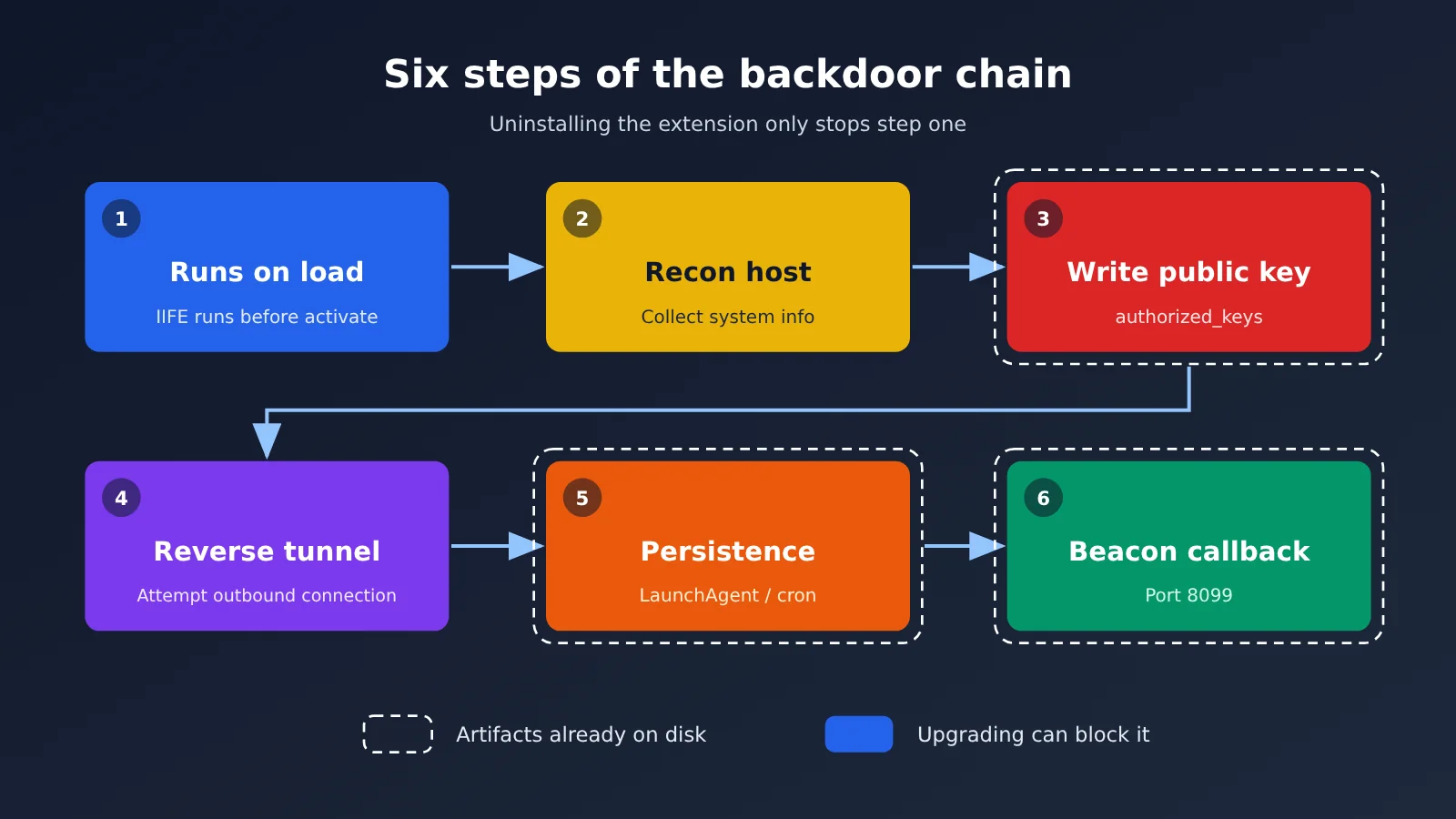
Caption: The backdoor chain has six steps. Uninstalling the extension only stops the first one.
There are three common misconceptions about this incident:
- “An official package name means an official build.” In this case, the package name and publisher identity were official, but Anthropic didn’t create the build. Open VSX also has a version 2.1.312, published on October 27, that’s clean. The same version number can have a different security status depending on its source.
- “Only 2.1.313 is affected.” Version 2.1.312 in the Cursor marketplace was malicious too.
- “Uninstalling or upgrading fixes everything.” Cursor’s announcement said that simply uninstalling the extension may not be enough because the payload leaves behind persistence scripts that run independently.
Check for and Remove the Claude Code Extension Backdoor in 5 Steps
Follow these five steps in order. The first three are checks, the fourth is cleanup, and the fifth is the final wrap-up. Each step explains what to do and how to tell when it’s complete.
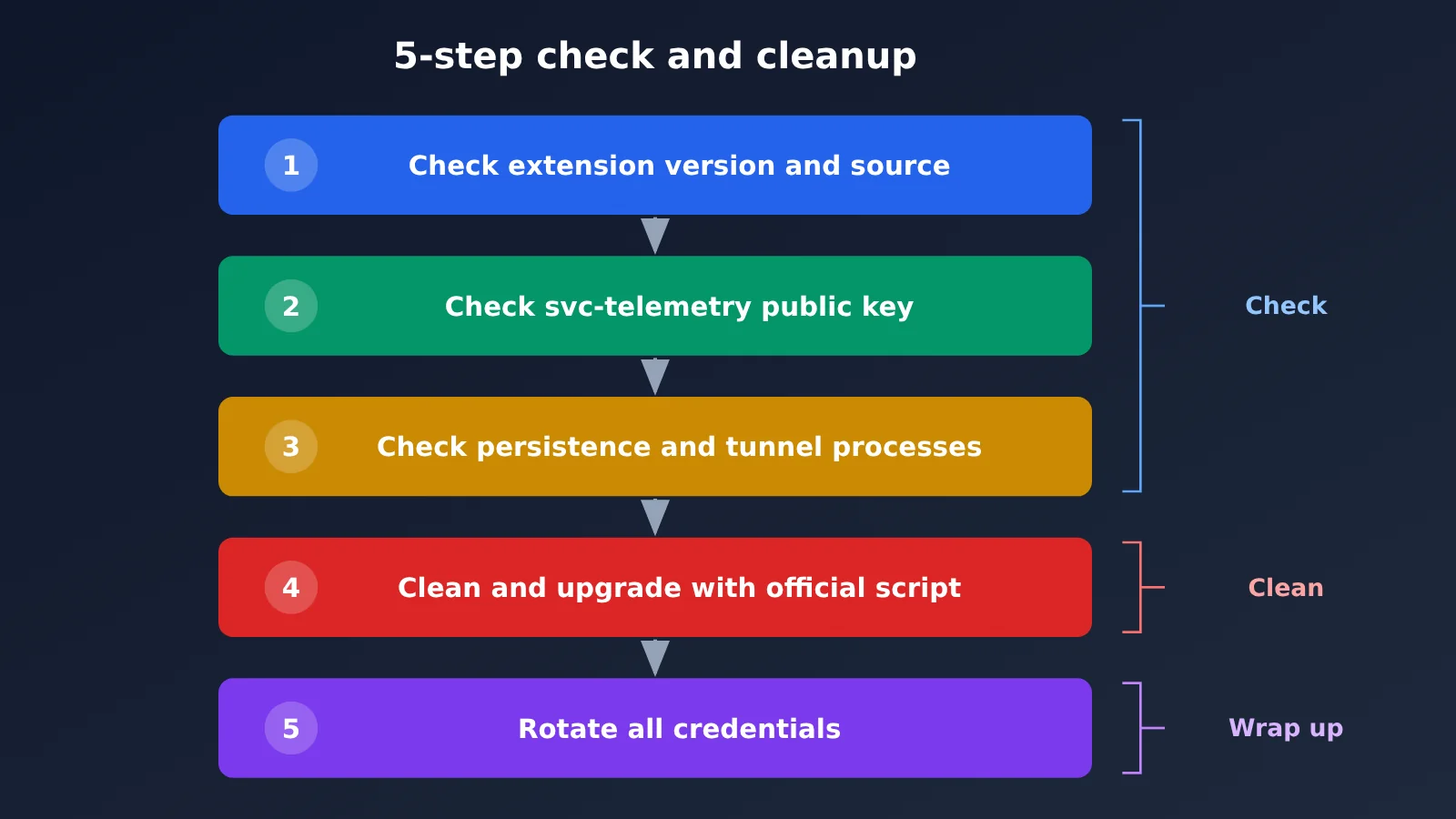
Caption: The five-step process. Don’t skip credential rotation in step five.
① Check the extension version and source. Open Cursor’s Extensions panel, search for Claude Code, and check the version number and publisher. Then inspect the ~/.cursor/extensions/ directory in a terminal (%USERPROFILE%\.cursor\extensions\ on Windows) for folders whose names contain anthropic.claude-code-2.1.312 or 2.1.313. Even if you’re now running a newer version, a leftover directory from an older version indicates you may have installed it during the affected period.
② Check for the svc-telemetry public key. On macOS and Linux, run grep -n svc-telemetry ~/.ssh/authorized_keys. On Windows, check both %USERPROFILE%\.ssh\authorized_keys and C:\ProgramData\ssh\administrators_authorized_keys. The malicious code checks whether the string svc-telemetry appears anywhere in the file, so checking only the comments isn’t enough. You should also run ssh-keygen -lf ~/.ssh/authorized_keys to list all public key fingerprints and compare each one against the attacker’s fingerprint, SHA256:0Z6R+DF64Do2nwQic8a7kkfDLNNk4IiK+2U2Rci4htk.
③ Check persistence and tunnel processes. Where you look depends on your operating system:
- macOS: Check
~/Library/LaunchAgents/com.apple.sysmond.plist,~/.config/.smt,~/.config/.smtk, and.stk_*files in the temporary directory. This LaunchAgent name impersonates an Apple system component, but it’s actually a user-level startup item. - Windows: Run
schtasks /query /tn SysMonto check for a scheduled task; check forsysmon.cmdin the startup folder, as well as%USERPROFILE%\.config\smt.cmdand%TEMP%\.stk_*. - Linux: Run
crontab -land look for an entry with@rebootthat points to~/.config/.smt. - All platforms: Check for
sshorautosshprocesses with-R '*:0:localhost:22'in their arguments.
| Step | What to do | Completion criteria |
|---|---|---|
| ① Extension source | Check the Extensions panel and ~/.cursor/extensions/ |
No 2.1.312 / 2.1.313 directories; current version is ≥ 2.1.314 |
| ② Public key | Search for svc-telemetry and compare fingerprints |
No matches in either type of authorized_keys file |
| ③ Persistence | Check plist / SysMon / cron / tunnel processes | Files are absent; no ssh processes have the -R argument |
| ④ Removal | Run Cursor’s official script and upgrade | Script exits with status 0; repeat checks ①②③ and find no matches |
| ⑤ Credentials | Rotate Git, CI, cloud, SSH, and API credentials | Old credentials are disabled; invocation logs show no anomalies |
④ If you’re affected, run the official remediation script. If either check ② or ③ flags an issue, follow Cursor’s advisory. On macOS, download cursor.com/static/security/claude-code-extension/remediate-macos.sh and run bash remediate-macos.sh as the affected user (not root). On Windows, download remediate-windows.ps1, open PowerShell using “Run as administrator,” and execute powershell -ExecutionPolicy Bypass -File .\remediate-windows.ps1. Download the scripts only from Cursor’s official website—don’t use untrusted “one-click cleanup” tools. The scripts remove the malicious extension, persistence mechanisms, tunnel process, and attacker’s public key; they’ll exit with a nonzero status if anything remains. After cleanup, upgrade the extension to a version later than 2.1.314. As of October 31, you can install 2.1.316 directly.
⑤ Rotate your credentials. These include GitHub / GitLab tokens, CI/CD tokens, cloud provider Access Keys, SSH private keys, npm / PyPI tokens, and any APIYI apiyi.com API keys configured on the machine. Rotate them from a trusted machine. If SSH logs show that the tunnel was actually used, Phorion recommends rebuilding the host, which is safer than cleaning up each item individually.
Why Most Hosts Weren’t Accessed—but You Still Need to Check for the Claude Code Backdoor
First, the relatively good news: According to Phorion’s analysis, bugs in the malicious code prevented it from successfully enabling SSH on most hosts.
On macOS, the script ran systemsetup -getremotelogin without administrator privileges. The command returned a message saying administrator privileges were required, but still exited with code 0. The script only checked whether the output contained Off. Since the message didn’t contain that word, the script mistakenly assumed Remote Login was already enabled and skipped the step to turn on SSH.
On Windows, the PowerShell command to install OpenSSH Server was passed to a helper function with /bin/sh hardcoded into it. Standard Windows installations don’t have /bin/sh, so this step most likely failed. Cursor also said that enabling SSH and establishing the tunnel would fail unless Cursor was launched with administrator privileges, which is rare.
But that doesn’t mean you’re in the clear. The public key, persistence script, and reconnaissance beacon were still planted. Think of it this way: The attacker’s lock-picking tool was broken, so many doors never opened. But the key is still in the lock, and the script tries again every 60 seconds.
| Category | Indicator (IOC, defanged) | Description |
|---|---|---|
| Network | 134[.]209[.]82[.]225:22, username tunnel |
Reverse SSH tunnel destination |
| Network | 134[.]209[.]82[.]225:8099/beacon |
Plaintext HTTP beacon that sends host information |
| Public key | Comment svc-telemetry |
Added to authorized_keys |
| Fingerprint | SHA256:0Z6R+DF64Do2nwQic8a7kkfDLNNk4IiK+2U2Rci4htk |
Attacker’s public key fingerprint |
| Tunnel private key | SHA256:KOAU57+ZG6u3MG4WwzPzPX2O5YEe9qdOC1Bl+6MVyDQ |
Written to a .stk_* file in the temporary directory |
| File | extension.js SHA-256 begins with ecb58cb2 |
Main malicious extension file; see Cursor’s advisory for the full hash |
Caption: Screenshot of the malicious VSIX hash table (to be added during editing).
Pay particular attention to these situations:
- Remote Login was already enabled. If you enabled Remote Login on your Mac under “System Settings → General → Sharing,” or
Get-Service sshdshows that the service is running on Windows, the backdoor has the conditions it needs to work. - A server going offline doesn’t mean your machine is clean. The attacker’s server is currently unavailable, but the persistence script keeps retrying the connection. Until it’s removed, the machine remains in an unsafe state.
- Check SSH login logs. On macOS, run
log show --predicate 'process == "sshd"' --last 7d. On Linux, check/var/log/auth.log. On Windows, check the OpenSSH/Operational log in Event Viewer. Look for successful public-key authentication using the svc-telemetry key from127.0.0.1or::1. If you find even one such entry, treat the host as having been accessed and consider rebuilding it.
The malicious code also collected the hostname, username, system information, working directory, global Git email address, public IP address, and the names of up to 40 environment variables. Phorion’s conclusion is clear: The bugs reduced the likelihood of unauthorized access, but you can’t rely on them as a defense.
Should You Rotate Your APIYI Key After the Claude Code Extension Compromise?
Yes. The malicious code collected the names of environment variables matching KEY, TOKEN, SECRET, PASS, AWS, or GCP. Although it didn’t directly read their values, the attacker already knows what credentials are present on your machine. Once the tunnel is available, the attacker can interactively read environment variable values, configuration files, and shell history. So if the machine had version 2.1.312 or 2.1.313 installed during the exposure window, treat any APIYI apiyi.com key configured on it as potentially exposed.
To be clear: APIYI wasn’t compromised. The risk is that keys on your local machine may have been read. Rotate the keys, but there’s no need to panic. Here’s how:
| Step | Action | Verification |
|---|---|---|
| 1 | Open the token page in the console at api.apiyi.com/token |
You can see your existing keys |
| 2 | Click “Add” in the upper-right corner and select the ClaudeCode group for the key used by Claude Code |
A new key beginning with sk- is generated |
| 3 | Change ANTHROPIC_AUTH_TOKEN to the new key and keep ANTHROPIC_BASE_URL set to https://api.apiyi.com |
The env settings in ~/.claude/settings.json are also updated |
| 4 | Reopen your terminal and restart Claude Code | You can chat and make calls normally |
| 5 | Return to the token page and disable or delete the old key | The old key is disabled |
| 6 | Check the usage logs | There’s no usage involving unexpected models or during unusual time periods |
If your scripts use the OpenAI-compatible interface, remember to rotate the key associated with base_url="https://api.apiyi.com/v1" in your code too. Afterward, send a test request with the new key to confirm it works. If the old key is still used on other machines or in other projects, replace it everywhere—don’t just update one machine.
🎯 Best practice: The APIYI apiyi.com token page lets you set a balance limit and expiration date for each key. Use one key per machine and separate keys for development and production. That way, if something like this happens again, you only need to disable the affected key.
One more thing: APIYI keys aren’t the only credentials you need to rotate. GitHub / GitLab tokens, CI secrets, cloud provider Access Keys, SSH private keys, and npm / PyPI tokens should all be rotated too. Do this from a trusted machine.
Claude Code Extension Compromise FAQ
Q1: Am I affected if I only use the official VS Code Marketplace?
There’s currently no evidence that you are. The only verified distribution source was the Cursor Marketplace. The malicious version 2.1.313 wasn’t available on the Microsoft Marketplace or Open VSX.
Q2: Am I affected if I only use the Claude Code CLI and not the IDE extension?
You aren’t affected by this incident. The CLI package on npm wasn’t compromised; only the extension VSIX in the Cursor Marketplace was affected.
Q3: Am I affected if I use Cursor but haven’t installed the Claude Code extension?
No. The malicious code only runs when the extension is loaded. If you’re unsure, search for `svc-telemetry` as described in step ②. It only takes a few seconds to check.
Q4: Am I safe once I upgrade to 2.1.314?
Upgrading only prevents future exposure. Any public keys and persistence scripts already written to your system, as well as any information that has leaked, won’t disappear when you upgrade. You still need to follow steps ②③④⑤.
Q5: Should I install 2.1.316 now?
Yes. As of October 31, 2.1.316 is the latest version on GitHub Releases, and both 2.1.314 and 2.1.316 are clean. There was no 2.1.315 release in between, which is normal.
Q6: Do I need to reinstall my operating system?
If only the public key or persistence mechanism was found, running the official script and completing a follow-up check is usually enough. If SSH logs show that the tunnel was actually used, Phorion recommends rebuilding the host, because the sample can’t tell you what an attacker did after logging in.
Q7: Is 5,000 the number of confirmed infections?
No. Cursor said “up to 5,000 users.” That’s an estimate of exposure through downloads and automatic updates, not a confirmed infection count. Cursor says it will contact affected users directly.
Q8: Could someone remotely control my computer?
Because of the bug mentioned earlier, SSH services weren’t enabled on most macOS and Windows hosts, and the attacker’s server is now offline. But if you already had remote login enabled, the risk is real. Check your SSH logs to see whether anyone logged in.
Q9: Could my APIYI API key be leaked?
The APIYI platform itself wasn’t breached. The risk is that environment variables on your computer may have been read. We recommend creating a new API key at api.apiyi.com/token, updating your configuration, and then disabling the old key.
Claude Code Extension Compromise: Key Takeaways
- Affected versions: Versions 2.1.312 and 2.1.313 in the Cursor marketplace. Other official distribution channels weren’t affected.
- Execution on load: You don’t need to use the extension; loading it is enough to install the backdoor.
- Three traces to check: A public key in
authorized_keys, a persistence script, and information sent back by the beacon. - Most users weren’t logged into: A bug in the malicious code prevented this in most cases, but that’s no reason to skip an investigation.
- Remediation: Run the official script, upgrade to a version later than 2.1.314, and rebuild the host if necessary.
- Credential cleanup: Rotate Git, CI, cloud, SSH, and APIYI credentials.
References
- Cursor security notice: Affected versions, IOCs, and removal script
- Link:
cursor.com/blog/claude-code-extension-security-notice - Phorion technical analysis: Analysis of the malicious code and its bug
- Link:
phorion.io/blog/offical-claude-code-vsx-compromise - StepSecurity analysis: Registry and version verification
- Link:
stepsecurity.io/blog/claude-code-extension-trojanized - Claude Code GitHub Releases: Official version history
- Link:
github.com/anthropics/claude-code/releases
Summary
What makes this incident unusual is that the malicious version used the official package name, so relying on the official publisher alone isn’t enough. Here’s the recommended order of response: first check the extension’s version and source, then check for public keys and persistence mechanisms. If you find indicators of compromise, run the official script, and finally rotate all credentials from a trusted machine.
APIYI users can also take this opportunity to reorganize their key groups, quotas, and expiration dates using one key per machine. For configuration details, see the token management documentation at APIYI apiyi.com.
Author: APIYI Technical Team
Technical discussions: Contact us through the APIYI homepage. For Claude Code integration and configuration, visit the documentation center at docs.apiyi.com.
This isn’t something you can fix just by changing versions. The real cleanup involves keys, persistence mechanisms, and credentials.