
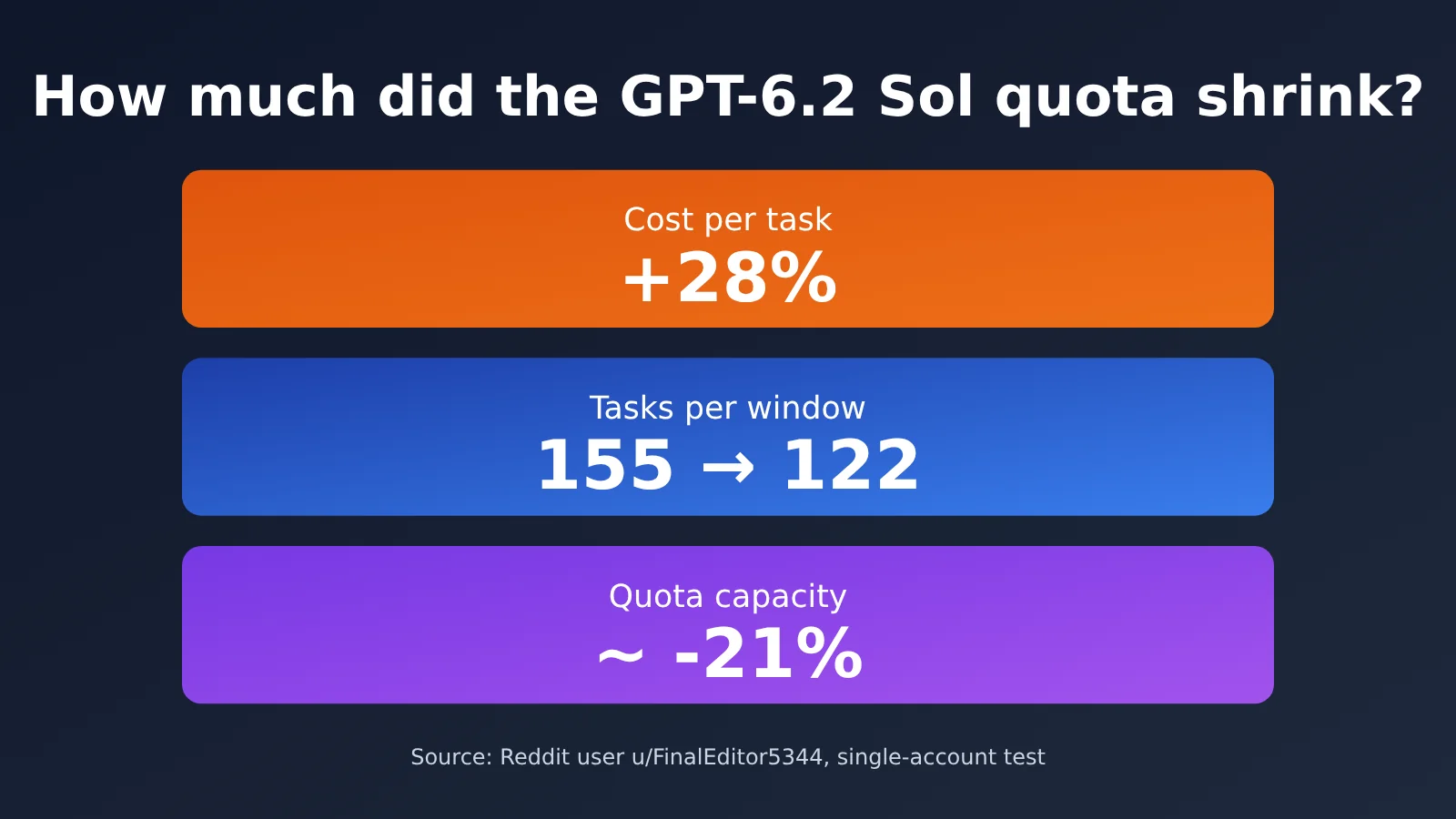
Based on a same-task benchmark run by a Codex Plus user, after the fix GPT-6.2 Sol burns about 28% more of the 5-hour quota per task than it did before the fix. Converted into how many tasks fit in one window, that’s roughly 155 down to 122 — about 21% fewer. Both 28% and 21% are correct; the denominators are just different. After the fix, 6.2 Sol also fits fewer tasks per window than the ~134 in the 6.1 Sol control, which means the usage edge 6.2 previously had over 6.1 vanished in this test set.
What you’ll learn from this article
- How this benchmark was run, how reliable the numbers are, and where they can’t be extrapolated.
- Why the same change produces two numbers, 28% and 21%, and which one you should use.
- What the GPT-6.1 Sol control group tells us.
- In OpenAI’s staff explanation, what 40% and 25% actually refer to — and what they don’t.
- How to recalculate your quota change from your own usage table readings, and how to switch to a fallback when your quota runs out.
Index: Start with “To Know” and “Impact at a Glance” to get up to speed on the concepts and how badly you’re affected. The “Objective Facts” section walks through the benchmark method and data, the 6.1 control group, and the limits of the test, then closes with OpenAI’s explanation. The “Analysis and Judgment” section covers the two-denominator conversion, where 6.2 sits relative to 6.1, plus a self-test script you can run as-is and an example API fallback call. The FAQ at the end answers a few common questions.
Things to Know: GPT-6.2 Sol Quota Reduction Concepts
| Concept | Brief explanation |
|---|---|
| Codex | OpenAI’s coding agent product; Plus and other subscribers can use it within their subscription quota |
| 5-hour quota window | Codex subscription usage is measured on a rolling 5-hour window, and the usage meter shows the percentage used in the current window |
| GPT-6.2 Sol / Astra | The two models discussed in this article. Our testing only covered Sol; Astra was not retested |
| Medium thinking | Reasoning effort set to the medium level; both rounds of testing used this setting |
| Integer meter readings | The usage meter only shows whole-number percentages, which introduces rounding error, so the test results are a range |
| Backup reset | A one-time quota reset opportunity mentioned by OpenAI staff; you can save it for when you need it |
You can find the official definition of the metering rules on the Codex pricing page: developers.openai.com/codex/pricing
GPT-6.2 Sol Quota Reduction Impact at a Glance
- Heavy Codex Plus users: You’re affected most directly. If you often came close to the limit within a 5-hour window, you may hit the cap sooner after the fix, so you’ll need to leave roughly 20% extra headroom for the same workload.
- Occasional Plus users: If you rarely max out a single window, the change may not feel obvious, but the same task will take up a larger share of your quota.
- Users choosing between 6.1 and 6.2: If you picked 6.2 Sol because it “used less quota,” that reason no longer holds in this round of testing, so you’ll need to weigh the options again.
- Developers running batch tasks with Codex: Lower window capacity directly affects scheduling, so consider using a pay-as-you-go API as an overflow channel.
GPT-6.2 Sol’s Shrinking Quota: The Hard Numbers
How It Was Tested: The Same 135 Tasks, Before and After
The data comes from Reddit user u/FinalEditor5344. Running on a ChatGPT Plus account with medium thinking, they ran the same set of 135 coding tasks twice before the fix and twice after it, with the post-fix runs taking place on November 26–27. Every task passed in all runs, so the change in consumption wasn’t caused by failures or retries.
Original experiment post: www.reddit.com/r/codex/comments/1y753sp/gpt62_sols_usage_advantage_over_61_was_the/
The author converted readings from the 5-hour quota meter into an average cost per task. Since the meter only shows whole percentages, the results carry rounding error.
| Metric | Before Fix | After Fix | Change |
|---|---|---|---|
| Consumption per task (before fix = 1) | 1 | ~1.28 | ~+28% (roughly +22% to +33% given whole-number readings) |
| Tasks runnable per 5-hour window (estimate) | ~155 | ~122 | ~−21.3% |
| Task pass rate | 135/135 | 135/135 | No change |
Table note: The tasks-per-window figure is an estimate derived from the readings — the author didn’t actually run 122 tasks back-to-back until hitting the cap.
GPT-6.1 Sol Control Group: Baseline Is Basically Stable
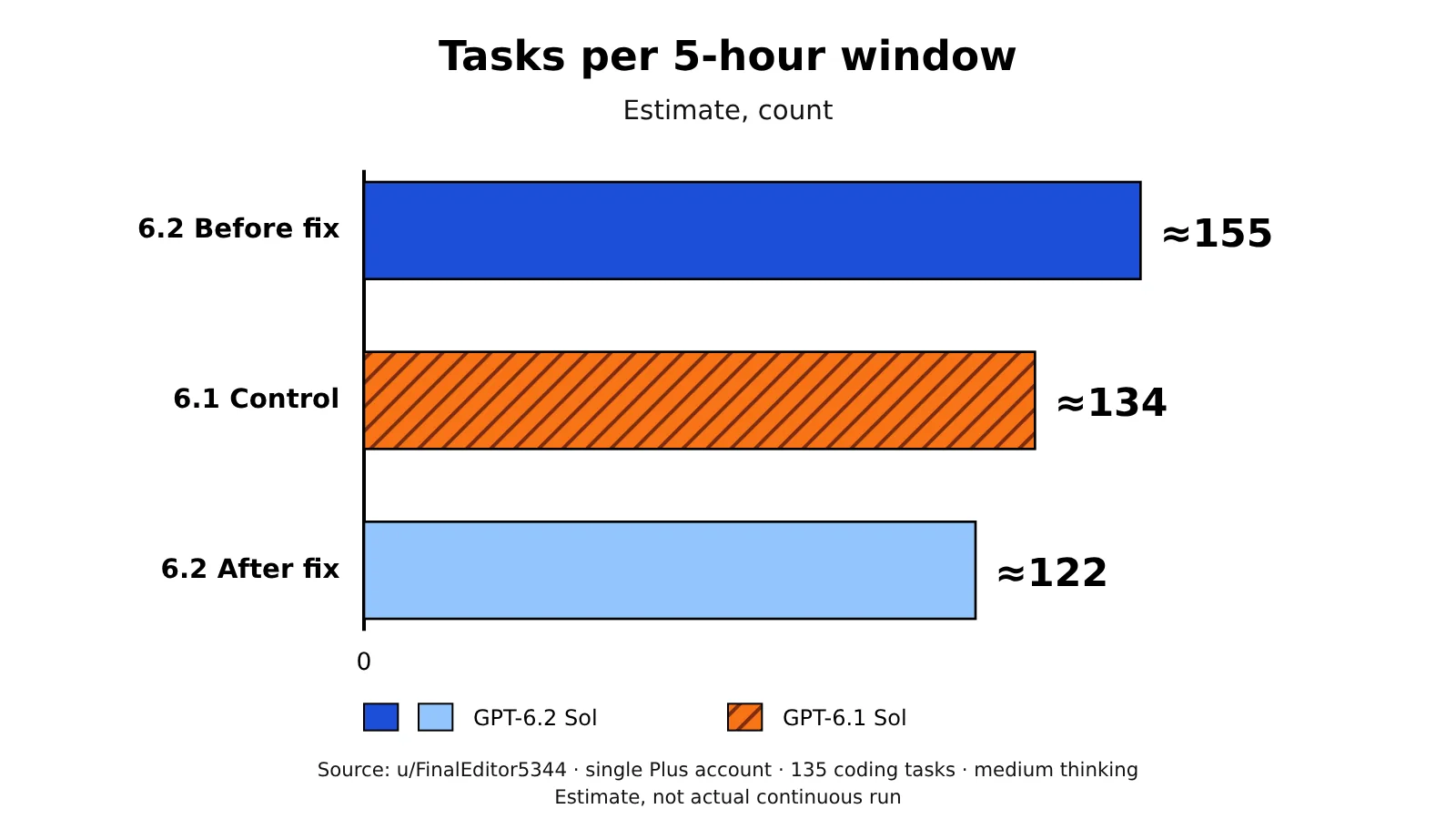
The author also kept GPT-6.1 Sol as a control, at about 134 tasks per window. On November 2, November 10, and the retest day, the usage meter readings for 6.1 Sol were 69%, 66%, and 66%, respectively—only a few percentage points apart.
| Control item | GPT-6.2 Sol before fix | GPT-6.2 Sol after fix | GPT-6.1 Sol |
|---|---|---|---|
| Tasks per window (estimated) | About 155 | About 122 | About 134 |
| Relative to 6.1 | About 21 more | About 12 fewer | Baseline |
| Usage meter reading records | Not disclosed | Not disclosed | 11/2: 69%; 11/10: 66%; retest day: 66% |
| Was Astra retested? | Not tested | Not tested | Not applicable |
Limitations of the Testing
The author lists a few limitations themselves, and you should keep them in mind when reading the data:
- There’s only one Plus account and one type of workload (135 coding tasks). Results might differ with other task types.
- Astra wasn’t re-tested, so this dataset doesn’t answer how much Astra’s numbers changed.
- The speed data from another round of testing on the same day doesn’t belong to this set of conclusions and shouldn’t be mixed in with it.
A Note from OpenAI
An OpenAI employee posted that, compared with the previous week, users hit the usage cap 40% and 25% faster with Astra and Sol, respectively. He also said that usage that was under-charged in the past won’t be clawed back, and users still have one backup credit reset available.
Employee’s original post: x.com/cantworkitout/status/2125784147889393806
Verifiable public screenshot post: www.reddit.com/r/codex/comments/1y5q43m/tibos_update_on_the_gpt_62_usage/
Note that the employee is talking about “the speed at which the cap is reached,” which measures a change along the time dimension—it’s not the same thing as “the quota was cut by 40% or 25%.”
Analyzing the GPT-6.2 Sol quota shrinkage
28% vs. 21%: converting with two different denominators
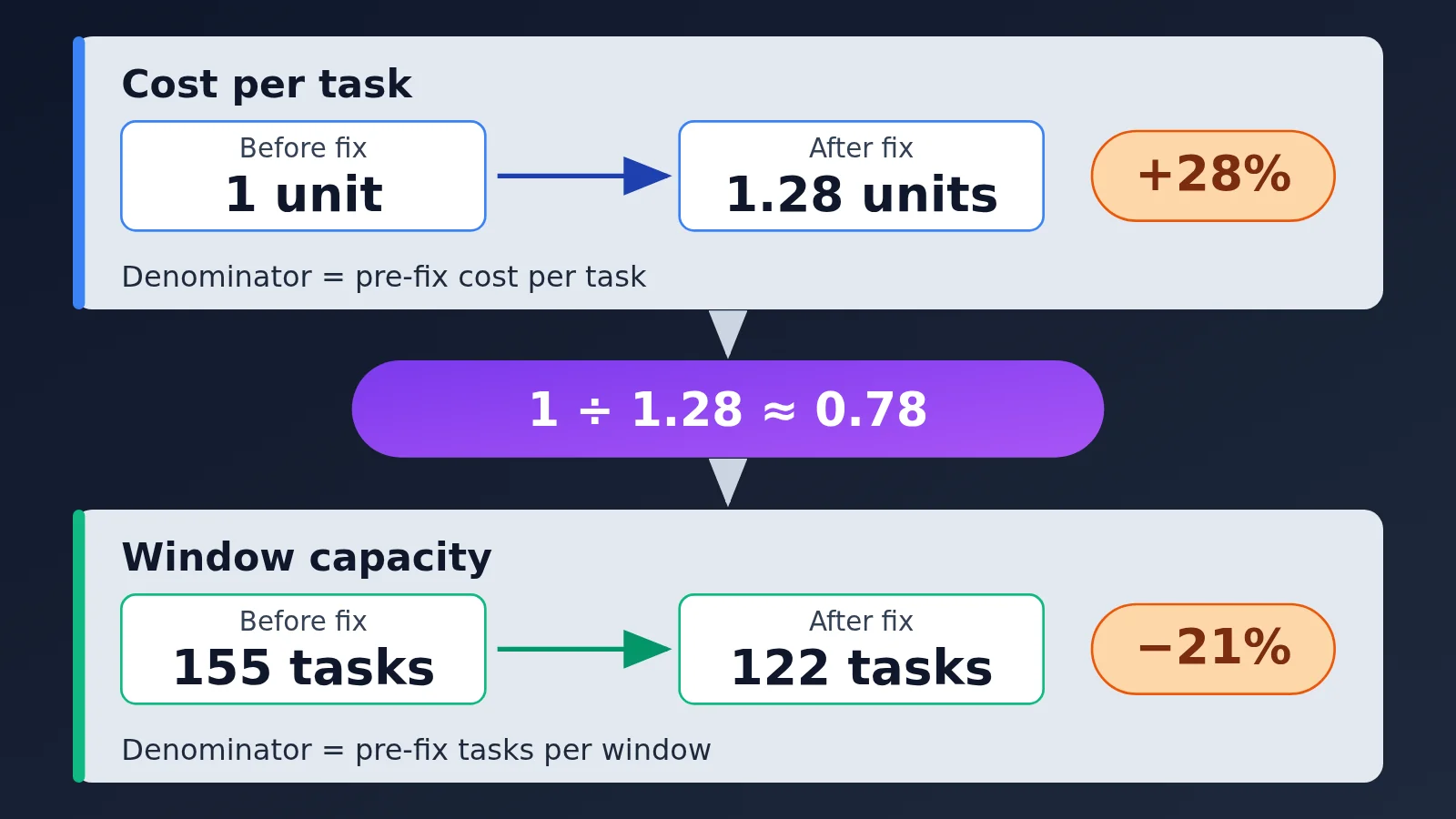
One change produces two numbers because the denominators differ. “28% more consumption per task” uses the pre-fix per-task consumption as its denominator; “21% fewer tasks per window” uses the pre-fix tasks-per-window count as its denominator. The two relate like this: window capacity becomes 1/1.28 of what it was — about 0.78, meaning roughly 22% less — which lines up with the 21.3% you get from 155→122. The small gap comes from rounding in the estimates.
| What you care about | Number to look at | Denominator |
|---|---|---|
| How much more one task costs now | about +28% (range roughly +22% to +33%) | pre-fix per-task consumption |
| How much work one window still holds | about −21% | pre-fix tasks per window |
| Window drop converted from the integer reading range | about −18% to −25% (converted in this article) | pre-fix tasks per window |
The last row is derived here from 1−1/1.22 and 1−1/1.33 — it’s not a figure the original author provided. For Plus users, “about two-tenths fewer per window” is the more intuitive way to think when planning; when comparing model costs, “about 28% more per task” is the more accurate framing.
GPT-6.2 Sol’s Usage Advantage Over 6.1 Is Gone
Before the fix, 6.2 Sol was handling about 155 tasks per window — a good deal more than 6.1 Sol’s roughly 134. That was one of the reasons many people switched over to 6.2. After the fix, 6.2 Sol fell to about 122, putting it below 6.1. The 6.1 readings stayed basically flat over this stretch, which tells us the change is concentrated on the 6.2 side and isn’t some drift in how we measure.
From this data, 6.2 Sol’s earlier reputation for being “more quota-friendly” most likely came down to a bug that was under-deducting, not the model itself being more efficient. That conclusion rests on a single account and one coding workload — other task types would need fresh validation.
Why You Can’t Treat 40% or 25% as a Straight Quota Cut
“Hitting the cap 40% faster” is a statement about the time dimension — it depends on usage intensity, task type, reasoning intensity, and so on, which is a different basis from “how much each task consumes.” So you can’t just translate it into “Astra’s quota is 40% lower” or “Sol’s quota is 25% lower.”
Looking at the 25% figure for Sol from the employee alongside the measured 28%, the two point in the same direction and are close in magnitude, but they’re measured on different bases, so a head-to-head comparison isn’t really valid. The 40% figure for Astra so far exists only as an official claim, with no same-basis measurement to back it up.
Quick Start: Recalculate GPT-6.2 Quota Shrinkage with Your Own Readings
Other people’s data is only a reference—the most reliable approach is to run the test with your own tasks. The method is simple: in a fresh window, record how many tasks you ran and how much the usage meter increased; calculate once before the fix and once after, and you’ll get your own per-task consumption and per-window capacity.
The script below only does local calculations and doesn’t call any API:
def window_capacity(tasks_run: int, meter_start: int, meter_end: int):
    """Estimate how many tasks can run per 5-hour window based on the integer usage meter reading (including rounding interval)."""
    used = meter_end - meter_start
    per_task = used / tasks_run
    low = tasks_run / (used + 0.5) * 100   # conservative estimate when the reading is on the high side
    high = tasks_run / max(used - 0.5, 0.1) * 100
    return per_task, tasks_run / used * 100, (low, high)

before = window_capacity(tasks_run=40, meter_start=0, meter_end=26)
after = window_capacity(tasks_run=40, meter_start=0, meter_end=33)
print("修复前每窗约 %.0f 个,区间 %.0f-%.0f" % (before[1], *before[2]))
print("修复后每窗约 %.0f 个,区间 %.0f-%.0f" % (after[1], *after[2]))
print("单任务消耗变化 %+.0f%%" % ((after[0] / before[0] - 1) * 100))
print("窗口容量变化 %+.0f%%" % ((after[1] / before[1] - 1) * 100))
The 40, 26, and 33 in the example are just demo numbers—replace them with your own records. The more tasks you run and the more the usage meter increases, the smaller the error from integer rounding; that’s also why the original author used 135 tasks.
When You’re Running Low on Quota: Use a Pay-As-You-Go API as an Overflow Channel
Window capacity is down by roughly 20%, so the most practical move for heavy users is to shift work that can be handled offline onto a pay-as-you-go API, and save the subscription quota for interactive coding. APIYI offers an OpenAI-compatible interface, so a single key gives you access to multiple models — all your existing OpenAI SDK code needs is a different base_url.
import openai

client = openai.OpenAI(
    api_key="YOUR_API_KEY",
    base_url="https://api.apiyi.com/v1"  # APIYI unified endpoint
)

response = client.chat.completions.create(
    model="YOUR_MODEL_NAME",  # Refer to the model list in the APIYI console
    messages=[{"role": "user", "content": "为这个函数补充单元测试:..."}]
)
print(response.choices[0].message.content)
See the full example of routing batch tasks
import openai
from typing import List

client = openai.OpenAI(
    api_key="YOUR_API_KEY",
    base_url="https://api.apiyi.com/v1"  # Pay-as-you-go calls through APIYI
)

def run_batch(tasks: List[str], model: str, max_tokens: int = 2000) -> List[str]:
    """Hand off offline-friendly coding tasks to the API in batches to save Codex subscription windows"""
    results = []
    for i, task in enumerate(tasks, 1):
        try:
            resp = client.chat.completions.create(
                model=model,
                messages=[
                    {"role": "system", "content": "你是资深工程师,只输出可直接使用的代码和简短说明。"},
                    {"role": "user", "content": task},
                ],
                max_tokens=max_tokens,
            )
            results.append(resp.choices[0].message.content)
            usage = resp.usage
            print(f"[{i}/{len(tasks)}] tokens: {usage.total_tokens}")
        except Exception as e:
            results.append(f"Error: {e}")
    return results

if __name__ == "__main__":
    batch = [
        "为 utils/date.py 中的 parse_range 函数编写 pytest 测试",
        "把下面的回调风格代码改写为 async/await:...",
    ]
    outputs = run_batch(batch, model="YOUR_MODEL_NAME")
    for out in outputs:
        print(out[:200], "\n---")
Unlike a subscription window, the API bills by token, and every response returns usage, so costs can be calculated precisely — no need to guess from a percentage-based usage meter.
Tip: If you want to gauge the effect of offloading work first, sign up at APIYI apiyi.com and use the free trial credit for new users to run a few typical tasks, then compare token consumption and output quality before deciding how much to route through the API.
| Approach | Metering | Best for | Where to use it |
|---|---|---|---|
| Codex Plus subscription | 5-hour window, usage meter percentage | Interactive coding, tasks that need an agent to operate on a repo | ChatGPT Plus |
| Pay-as-you-go API | Billed per token, usage returned in responses |
Batch test generation, code refactoring, documentation cleanup, and other offline tasks | APIYI apiyi.com, official API |
GPT-6.2 Sol Quota Reduction FAQ
Q1: How much did the GPT-6.2 Sol quota actually shrink?
According to u/FinalEditor5344’s single-account measurement, consumption per task increased by roughly 28% (range about 22% to 33%), and the number of tasks runnable per 5-hour window dropped from about 155 to 122 — roughly 21% fewer. This is the result from one account on one coding workload.
Q2: Why do some people say 28% and others say 21%?
Different denominators. The 28% is based on per-task consumption before the fix, while the 21% is based on the number of tasks per window before the fix. Both describe the same change.
Q3: Are the 40% and 25% figures OpenAI mentioned the size of the quota cut?
No. The employee said that compared with the previous week, Astra and Sol hit their limits 40% and 25% faster respectively. That’s a speed metric, and it can’t be directly rewritten as “the quota dropped by 40% or 25%.”
Q4: Will the previously under-charged quota be clawed back?
Per the OpenAI employee’s statement, past usage won’t be retroactively charged, and users have one backup quota reset available.
Q5: Should I still use GPT-6.2 Sol instead of 6.1?
Looking at quota alone, the post-fix 6.2 Sol in this group’s tests (about 122 per window) is already lower than 6.1 Sol (about 134 per window). If 6.2 delivers better quality on your tasks, the extra quota spend may be worth it; I’d suggest running the script from the earlier article on your own tasks before deciding.
Q6: How much did Astra shrink?
There’s no apples-to-apples measurement yet — the original author didn’t re-test Astra. All we have is the official-side mention of “hitting the ceiling 40% faster,” which shouldn’t be converted into a specific quota reduction.
Q7: The subscription quota isn’t enough — is there a low-barrier way to supplement it?
You can hand batch, offline coding tasks to a pay-as-you-go API. APIYI apiyi.com offers OpenAI-compatible endpoints — just change one line of `base_url` and you’re connected. New users get free trial quota, which makes it a good way to validate at small scale first.
Q8: How can I make my own measurements more accurate?
Fix your task set and reasoning effort, start measuring in a fresh window, and run as many tasks as you can so the usage meter climbs high enough to reduce integer rounding error. If you need a cost comparison accurate down to the token, call the model with the same tasks on APIYI apiyi.com and read the `usage` field directly.
If your workflow already consistently exceeds the Plus window, a subscription plus pay-as-you-go API combo is usually more flexible than stubbornly waiting for the window to refresh; you can first run a round of typical tasks on APIYI apiyi.com using the free quota, then adjust your split ratio based on actual consumption.
Author: APIYI Technical Team
Technical discussion: Feel free to contact us on the APIYI apiyi.com homepage; more integration resources are available at the docs.apiyi.com documentation center.