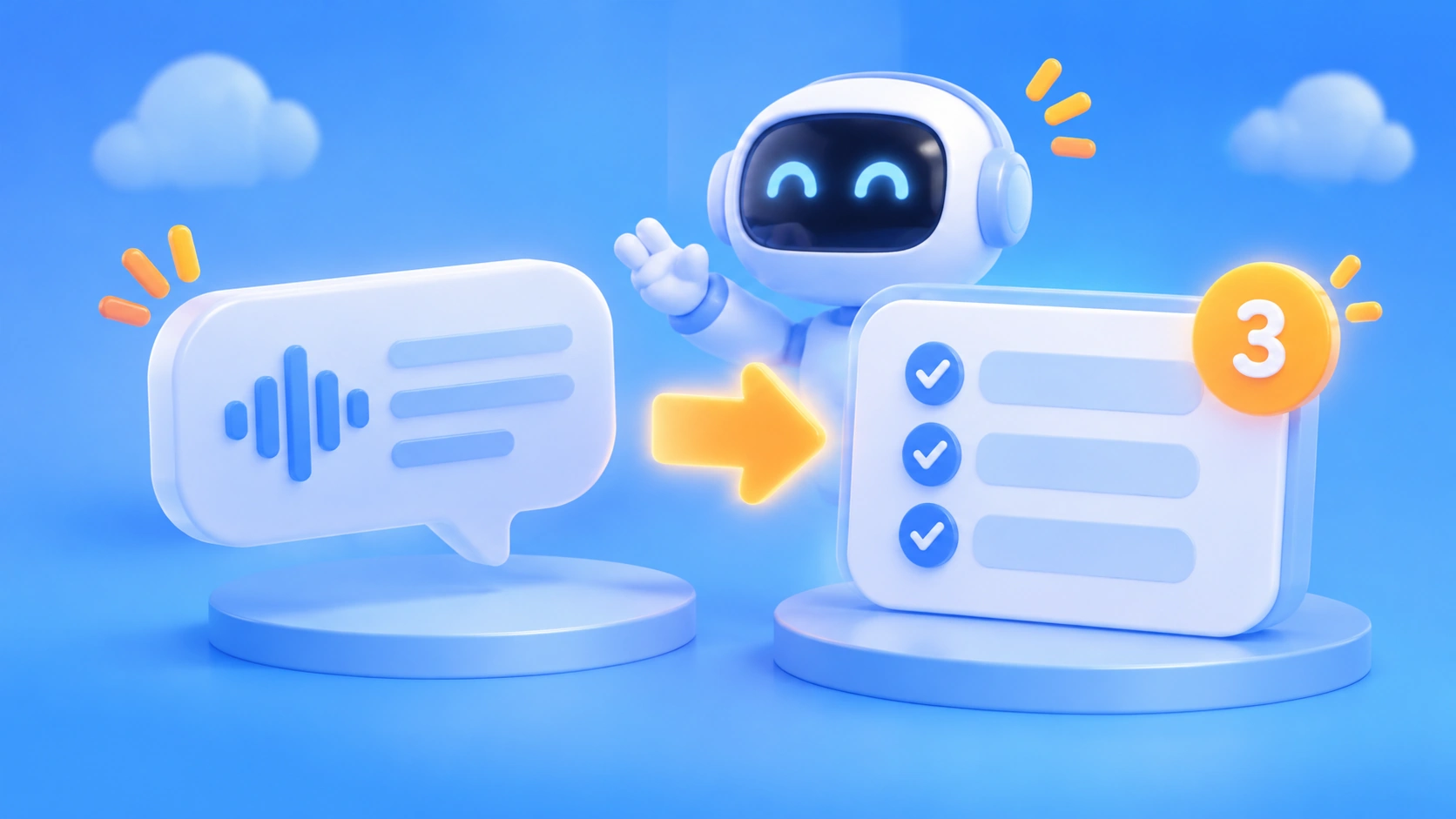
Author’s note: VibeHub Skill turns spoken language into requirements an Agent can execute directly, adding at most 3 related terms each time. This article explains how to install it, how to use its two features, where Tokens actually get spent, and how to route model requests to APIYI.
Short version first: VibeHub is responsible for getting your colloquial language right—Tokens are spent on the models your Agent calls, not on VibeHub’s own lookups.
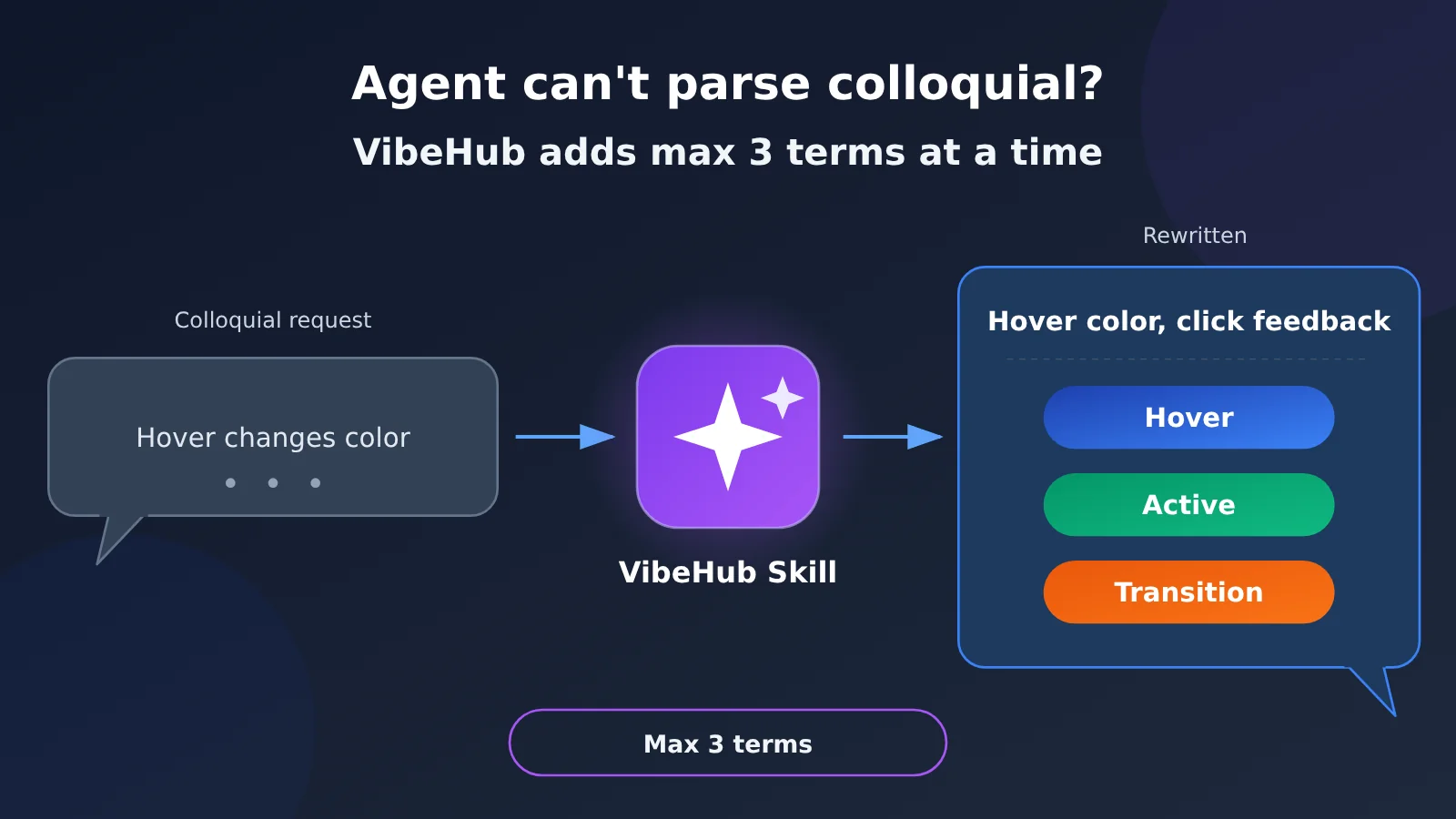
When you’re doing Vibe Coding with an Agent, two things tend to happen. The first: you say “make this button change color when I hover over it, and give some feedback when I click it,” but the Agent misreads it and builds something that doesn’t match. The second: words like Tooltip, Hover, and optimistic updates start showing up in the Agent’s replies, you don’t understand them, and you don’t know what to say next. VibeHub Skill handles both of these problems, and it draws a clear line: at most 3 genuinely relevant terms each time.
It won’t give you a frontend course. The repo’s README makes it clear that it doesn’t offer a learning path, a course plan, or local exercises, and it won’t blow up a simple requirement into a tutorial.
What you’ll get from this article: a one-liner you can send straight to your Agent to install it; how each of the two features works and where its boundaries are; the difference between “this Skill doesn’t take an API key itself” and “the Agent that installs it is still burning model Tokens”; and which endpoint to use—OpenAI-compatible or Anthropic-native—when you route your Agent’s Tokens through APIYI.
What Is VibeHub? A Vibe Coding Glossary That Helps Agents Understand Conversational Language
VibeHub’s site is vibe-hub.org. On its Chinese homepage, it describes itself as “a Vibe Coding glossary that helps you pin down frontend, backend, and AI terms in plain language.” The nav bar has entries for Terms, Practice, Courses, Avoiding AI-Sounding Writing, Updates, Skill, and Community Group. The author is Oil; his personal site and GitHub profile are linked in the references at the end.
The site also has an entry for Vibe Coding itself: expressing requirements in natural language, letting AI write the code, and then iterating based on the results. In Chinese, it’s also often called “vibe programming” or “gut-feel programming.” One line in the entry is worth remembering: just because it runs doesn’t mean it’s reliable—before shipping, you still need to check the code, tests, and permissions. That applies to every Agent workflow mentioned below.
| Key point | Description | Value to you |
|---|---|---|
| Website | vibe-hub.org, a visual glossary (original wording on the Skill intro page: 360 visual terms) | Look up unfamiliar concepts in plain language |
| Skill repository | GitHub oil-oil/vibe-hub-skill, MIT license |
Lets Agents automatically apply terminology rules in conversation |
| Feature 1 | Structured phrasing: rewrites colloquial input into a request you can send as-is | Reduces misunderstandings by the Agent |
| Feature 2 | Proactive hints: calls out up to 3 relevant terms at a time | Helps you understand the reply and know what to say next |
| Cost boundary | The Skill itself doesn’t configure an account or API key | Tokens are only spent on the model that the Agent calls |
How the VibeHub Skill and the VibeHub Website Split the Work
The division of labor is spelled out clearly in the repo README: the glossary content is maintained by vibe-hub.org, while the repo only keeps expression rules and the term parser. In other words, the website handles “what this word means and which image goes with it,” while the Skill handles “when to bring up this word, how to rewrite what you say, and where the links come from.”
Under the skills/vibehub/ directory, there are four files: SKILL.md defines the expression rules, agents/openai.yaml is the configuration for the Agent host, scripts/vibehub.mjs is the term parsing script, and vibehub.config.json is the parser configuration. The entire Skill contains no model invocation logic—that’s what determines who pays for tokens, as discussed below.
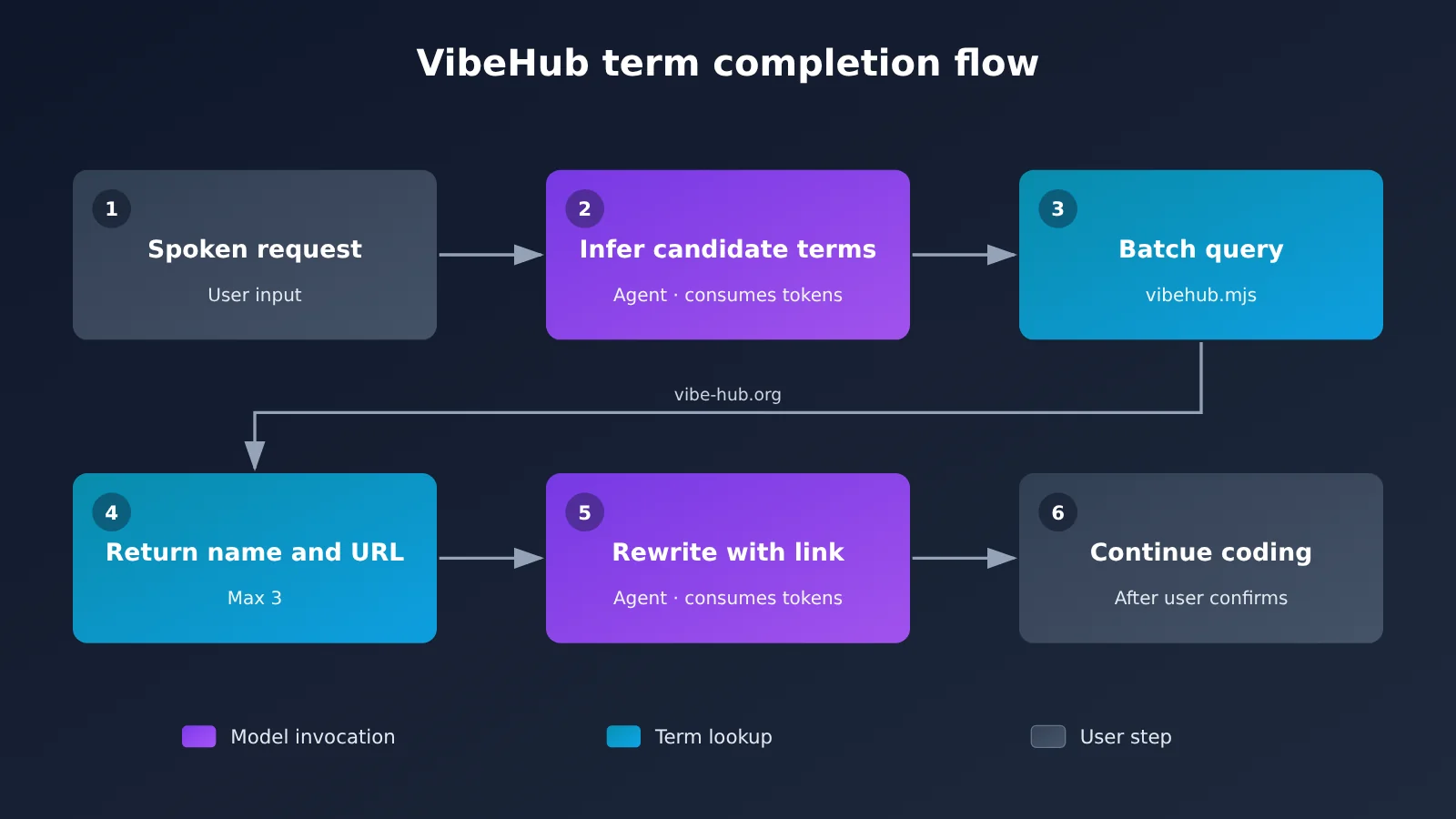
How to Install the VibeHub Skill in One Minute
Installing doesn’t require creating an account or filling in any Key. Based on the configuration boundaries in the README, you only need two things: Node.js 20 or higher on your machine, and an internet connection.
Two Ways to Install the VibeHub Skill
- Option 1: Just send your Agent a single sentence (verbatim from the Skill intro page):
https://github.com/oil-oil/vibe-hub-skill Help me install the skills/vibehub Skill from this repository. - Option 2: Install with the skills command (verbatim from the repository README):
npx skills add oil-oil/vibe-hub-skill - After installation: have the Agent host reload the Skill, and it’ll take effect in a new conversation.
The first option is for people who’d rather not touch a terminal — just paste the whole sentence into the Agent’s chat box, and the Agent handles the fetching and placement itself. The second option suits users who are comfortable with the command line; the result is the same. Neither approach asks you for an API key, because this Skill only runs its own built-in terminology lookup script.
| Configuration Item | Requirement for VibeHub Skill | Source |
|---|---|---|
| Runtime | Node.js 20 or higher | Repository README (verbatim) |
| Network | Internet access required (to look up vibe-hub.org terms) | Repository README (verbatim) |
| Account / API Key | No account or API key configuration | Repository README (verbatim) |
| License | MIT | Repository README (verbatim) |
| Resolve command form | node skills/vibehub/scripts/vibehub.mjs resolve, plus one or more --query, optionally --compact |
Repository README (verbatim) |
How VibeHub Terminology Queries Are Sent Out
The resolver doesn’t just throw the whole request sentence at a search API. Its process is: the Agent first infers candidate terms from the current context, then verifies the names and links with a single batch query. When confidence is high, it queries just one; when there’s ambiguity, it compares up to three.
The link rules are strict: only use the url returned by the resolver — never assemble your own, never fabricate one. If there’s no match, say so directly, and don’t make up terms or links. So every VibeHub link you see in a reply is something the query API actually returned.
🚀 Quick-start tip: Once VibeHub is installed, every rewrite and explanation the Agent does calls a Large Language Model once. If you want to share one Key across different Agents and see all your billing in one place, you can first register an account at APIYI apiyi.com, then use the small trial credit you get on signup to run through the whole workflow.
Two VibeHub Capabilities: Sharpening Plain Speech and Adding at Most 3 Terms
The Skill introduction page boils the capability down to 2 core functions. Each is illustrated below with the single example from that page — nothing extra added.
Function One: VibeHub Turns Plain Speech into a Requirement an Agent Can Execute Directly
The original wording: “When you hover the mouse over this button it should change color, and clicking it should give some feedback too.”
The rewrite: “Add a Hover state and an Active state to the button, and use a Transition so the state change feels more natural.” Each of the three terms links out to the /hover, /active, and /transition entries on vibe-hub.org.
The point of this step is preserving the original intent. The Skill won’t quietly slip in a framework, parameters, or an implementation plan — it won’t pick a color value or an animation duration for you, and it won’t swap in a different UI library. What you get back is a requirement you can send straight to an Agent, meaning exactly what you meant, just worded in a way the Agent is less likely to misread.
Function Two: VibeHub Proactively Points Out Terms You Need to Know
The original wording: “I want this setting to take effect as soon as I change it — I don’t want to click save again.”
The Skill will flag Switch: it fits scenarios with only on and off states where changes apply immediately; if you need to change several things and then confirm them all at once, this isn’t the right design. That explanation sits right next to your current task, telling you when to use it and when not to — instead of handing you an encyclopedia definition.
There are three rules for these proactive hints (as stated on the Skill introduction page):
- Link a term to VibeHub the first time it appears;
- Keep the explanation tied to the current task — no encyclopedia definitions;
- Suggest at most 3 genuinely relevant terms each time.
| Dimension | Function One: Standardizing Expression | Function Two: Proactive Hints |
|---|---|---|
| When it triggers | Your requirement is vaguely expressed | There’s a design concept behind your requirement that you haven’t named |
| What it outputs | One rewritten requirement you can send as-is | 1 to 3 terms plus explanations anchored to the task |
| Example terms | Hover, Active, Transition | Switch |
| What it won’t do | Add frameworks, parameters, or an implementation plan on its own | Give encyclopedia definitions, or walk through the entire glossary term by term |
| Your next step | Confirm it, then send it to the Agent | Judge whether the approach fits, then decide how to phrase things |
When You Don’t Understand an Agent’s Reply, Use VibeHub to Explain Just the Key Concepts
When an Agent’s reply suddenly throws out words like Tooltip or optimistic update, you can paste the original text in. According to the README, it only explains the concepts that most affect your next decision — it doesn’t translate the whole paragraph word by word, and it doesn’t launch a course on its own.
The working principles in the README come down to four: give a result you can use directly first, then explain the terms; preserve the user’s original intent; at most 1 to 3 terms each time; and if the phrasing is already accurate, don’t force teaching into it. That last one is genuinely practical — if you already said it clearly, it won’t butt in.
Where VibeHub Skill’s Tokens Actually Get Spent
This is the easiest thing to get wrong. VibeHub Skill doesn’t take an API key itself, and looking up terms isn’t a model invocation. The resolver script just fires one batch query at vibe-hub.org and gets back the term names and links.
What actually burns tokens is the Agent that has this Skill installed. Rewriting your casual phrasing, explaining terms in plain language, and then building the page — all three of those are model invocations. The Skill makes the input and output of those calls more accurate, but it doesn’t pay the bill for you, and the calls themselves don’t go away.
| Step | Who runs it | Calls the LLM? | Consumes model tokens? |
|---|---|---|---|
| Inferring candidate terms | Agent | Yes | Yes |
| Batch-looking up terms and links | VibeHub resolver script → vibe-hub.org | No | No |
| Rewriting the casual request | Agent | Yes | Yes |
| Explaining terms in plain language | Agent | Yes | Yes |
| Writing code and editing the page per the request | Agent | Yes | Yes |
So when you top up your balance or pick a model, the thing you’re doing that for is the model service behind the Agent — you’re not opening an account on the VibeHub website. help-apiyi already has a post called “Where the Token Bill for Long Agent Tasks Comes From,” which breaks down how prefix caching affects your bill on long tasks, so I won’t rehash it here.
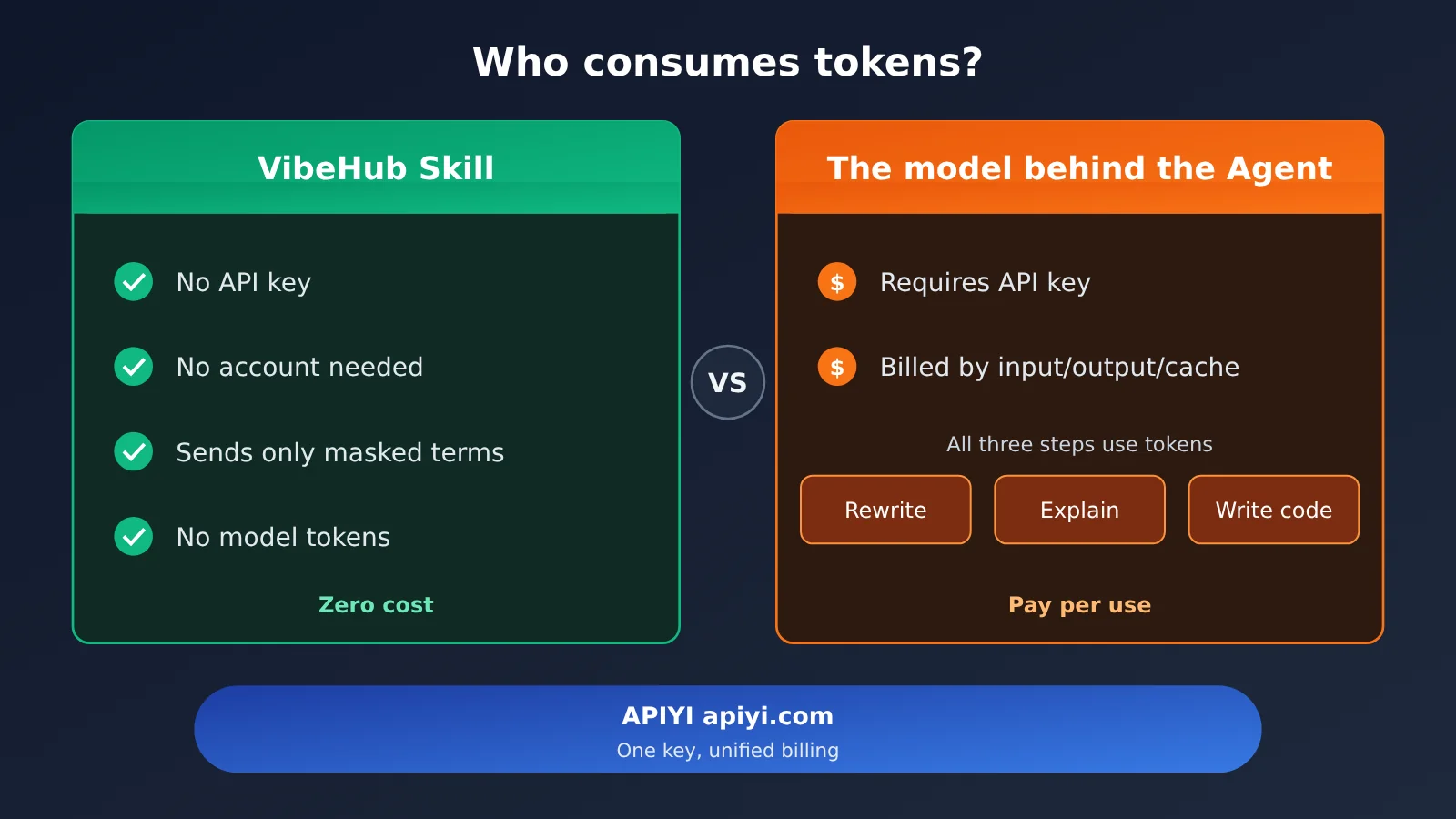
The takeaway from the figure above: the Agent’s model requests can point at APIYI apiyi.com — one key and one shared balance covering both Claude-family and GPT-family models — and nothing on the VibeHub side needs to change.
Check Models and Prices on APIYI, Then Point Your Agent’s Requests There
APIYI is an API gateway, not a model host. With one key and a single balance, you can call models from multiple vendors. Accounts require manual sign-up, and you get a small trial quota after registering—the platform doesn’t offer free model routing. The full model list and pricing are in the model catalog at docs.apiyi.com/models, sourced from the system’s real-time pricing API.
Choose endpoints by SDK, not by model
When pointing your Agent’s requests to APIYI, first check which SDK your Agent uses, then set the corresponding URL:
- OpenAI-compatible: set
base_urltohttps://api.apiyi.com/v1. Chat Completions uses/v1/chat/completions, and Responses uses/v1/responses. - Anthropic native: set
base_urlto the root domainhttps://api.apiyi.com—don’t add/v1again, or it’ll be concatenated into/v1/v1/messagesand return a 404. The Messages endpoint is/v1/messages. - Node selection:
api.apiyi.comis the default node;b.apiyi.comis for backup and enterprise use cases;api-cf.apiyi.comsupports text only, has a timeout limit of around 100 seconds, and isn’t suitable for long-running tasks.
The docs also recommend that OpenAI GPT-5 and later models prefer the Responses API. If you’re using multiple Agents such as Claude Code and Codex at the same time, help-apiyi’s Step-by-Step Tutorial: Connect All Agents with One Key and Use Open-Source magpie to Unify Access to the API Gateway explains how to do unified access.
Common Model Pricing for Vibe Coding (Original Master Table)
The table below was updated on 2026-11-13 12:57 (UTC+8). Prices are in USD per 1 million tokens and come from the original APIYI apiyi.com master model table. Top-ups use a fixed exchange rate of 1:7. The actual discounted price for each group is shown in the console after you log in. For this batch of models, the “As low as” column is “—”.
| Model ID | Input | Output | Cache Read | Endpoint | Groups |
|---|---|---|---|---|---|
claude-opus-5-5 |
$4 | $20 | $0.2 | chat, messages | ClaudeCode, Claude_Reverse, Claude_Enterprise, Default, SVIP |
claude-sonnet-5-5 |
$2 | $10 | $0.1 | chat, messages | ClaudeCode, Claude_Reverse, Claude_Enterprise, Default, SVIP |
claude-fable-5-2 |
$8 | $40 | $0.2 | chat, messages | ClaudeCode, Claude_Enterprise, Default, SVIP |
gpt-6.1-sol † |
$2 | $10 | $0.1 | responses (recommended), chat | CodexResponses, Codex_Reverse, Default, SVIP |
gpt-6.1-terra |
$1 | $5 | $0.05 | responses (recommended), chat | CodexResponses, Codex_Reverse, Default, SVIP |
A few additional notes, broken down by ID:
claude-opus-5-5,claude-sonnet-5-5, andclaude-fable-5-2each have a same-priced-thinkingversion.claude-fable-5-2‘s group list in the master table does not include Claude_Reverse. Pay attention when selecting groups, and don’t copy the groups used for the first two Claude models.gpt-6.1-solhas a † and uses tiered pricing. The original master table states: input is $2/1M for 0 to 272,000 tokens; input is $4/1M above 272,000 tokens.gpt-6.1-solandgpt-6.1-terraare recommended to go through/v1/responses; tool calls also go through Responses.
💡 Recommendation: VibeHub’s rewrites and terminology explanations are short conversations and don’t demand much model capability; what really eats up tokens is the long coding tasks later on. You can use the same API key on APIYI apiyi.com to try several models separately, compare results and bills for the same request, and then decide which one to use day to day.
If you want the Agent to figure out the integration method on its own, you can install APIYI’s integration skill pack into the Agent: npx skills add https://docs.apiyi.com. The skill pack documentation is at docs.apiyi.com/skill.md.
Privacy and risk boundaries when using VibeHub
There are two layers to the risk here: one is VibeHub’s term lookup, and the other is the Agent’s own model invocation.
The VibeHub term lookup layer: According to the repo’s README, term lookup only sends a short description that’s been sanitized programmatically. Common keys, URLs, emails, local paths, and code blocks get stripped before sending — no source code, customer info, or full requirement write-ups are sent. What actually goes to vibe-hub.org is just a short term like “button hover state.”
The Agent and model layer: The project context the Agent has already read is still governed by the privacy settings of whatever product and model provider you’re using. VibeHub’s sanitization only covers the term queries it sends out itself — it has no control over what the Agent sends to the model.
- Don’t paste your API key into the conversation. The key belongs in the Agent’s config or environment variables, not in chat content sent to the model.
- APIYI is an API gateway. It’s not an account pool, and it’s not a tool for bypassing login — invocations go through the normal API billing path.
- Check things yourself before going live. As the Vibe Coding entry puts it, running doesn’t mean reliable — you still need to go over the code, tests, and permissions yourself.
Frequently Asked Questions (FAQ)
Q1: What is VibeHub?
VibeHub (vibe-hub.org) is a Vibe Coding glossary maintained by its author, Oil — it explains frontend, backend, and AI terms in plain language. Once you install the companion VibeHub Skill into your Agent, it rewrites your casual phrasing into precise requirements and points out at most 3 relevant terms each time.
Q2: Does the VibeHub Skill require an API Key?
No. The repo README explicitly states “no account or API Key configuration required” — you only need Node.js 20 or later and an internet connection. The API Key is needed for the Large Language Model your Agent calls, and that key can be a token from APIYI apiyi.com; it has nothing to do with VibeHub.
Q3: How is VibeHub different from just asking the Agent to explain terms?
If you ask directly, it might dump a wall of text, or it might make up links. VibeHub caps itself at 1 to 3 terms per response, keeps explanations tied to the current task, and only uses URLs returned by the parser — if it can’t find one, it says so instead of fabricating. And when your wording is already accurate, it won’t force in an explanation.
Q4: What scenarios is VibeHub good for?
– You want to describe an interaction effect but can’t name things like Hover or Active;
– You’re not sure whether a setting should be an instant-apply Switch or batched on save;
– The Agent’s reply contains a concept you don’t understand, which affects how you respond next.
It doesn’t offer learning paths or courses — if you want structured study, head to the course and exercise sections on the site.
Q5: After installing VibeHub, how do I route the Agent’s model requests to APIYI?
1. Register a manual account at APIYI apiyi.com to get an API Key and a small trial quota;
2. For OpenAI-compatible SDKs, set base_url to `https://api.apiyi.com/v1`;
3. For the native Anthropic SDK, use the root domain `https://api.apiyi.com` — don’t add `/v1`.
Nothing needs to change on the VibeHub side.
Q6: Will VibeHub send my code out?
According to the README, term lookups only send a short sanitized description — keys, URLs, emails, local paths, and code blocks are stripped before sending, and source code or full requirement text is never transmitted. That said, the project context your Agent sees is still handled under your chosen model provider’s rules, so evaluate that part separately.
Q7: What are VibeHub’s limitations?
It needs internet access and Node.js 20 or later; its term coverage is limited to what vibe-hub.org has on record, and it won’t invent a term when nothing matches; it only handles wording and terminology — it won’t decide your implementation approach for you, and it can’t guarantee the code your Agent writes is reliable.
VibeHub Skill Key Takeaways
- In one sentence: VibeHub tightens up your casual phrasing so the tokens go to the model your Agent actually calls.
- Two ways to install: send an install message to your Agent, or run
npx skills add oil-oil/vibe-hub-skill. - Feature 1: It standardizes your wording while preserving the original intent — it won’t add frameworks or parameters on its own.
- Feature 2: It proactively suggests terms — no more than 3 genuinely relevant ones each time.
- Where the costs stop: The Skill needs no API key, and term lookups don’t call a Large Language Model.
- Connecting to APIYI: use
/v1for OpenAI-compatible endpoints, and the root domain for Anthropic native. - Layered privacy: term lookups are redacted, while the Agent’s context still goes through the model provider you pick.
Summary
VibeHub handles two pain points in Vibe Coding: “I can’t say it precisely” and “I don’t understand it”.
- Making casual language precise: something like “it changes color when I hover the mouse over it, and gives feedback when I click” gets rewritten into a requirement built from three terms — Hover, Active, and Transition.
- Stopping at the right point: at most 3 terms each time, with explanations tied to the task at hand — no lecturing.
- Keeping the costs straight: the Skill itself takes no key and calls no model; the tokens are all spent on the Agent’s three steps of rewriting, explaining, and writing code.
Installation takes one sentence. What you actually need to decide is which model the Agent connects to and which endpoint it uses. You can use APIYI apiyi.com with a single Key to compare the models in the table above, then point the Agent’s requests there. For model names and pricing, refer to the platform’s model list.
📚 References
- VibeHub Official Site: A Vibe Coding Glossary
- Link:
vibe-hub.org -
Description: Entry point for terms, exercises, and courses; the Vibe Coding entry is at
vibe-hub.org/vibe-coding -
VibeHub Skill Page: The two core features and the original install pitch
- Link:
vibe-hub.org/vibehub-skill -
Description: Source of the examples for standardized phrasing and proactive suggestions
-
GitHub – vibe-hub-skill: The Skill repository
- Link:
github.com/oil-oil/vibe-hub-skill -
Description: README and SKILL.md, covering how to query it, privacy, and configuration boundaries
-
Author Oil: Personal site and GitHub
- Link:
oiloil.org,github.com/oil-oil -
Description: VibeHub author homepage
-
APIYI Model List: Models, endpoints, groups, and pricing
- Link:
docs.apiyi.com/models -
Description: Data updated 2026-11-13 12:57 (UTC+8), in USD per 1 million tokens
-
APIYI Documentation Portal and Agent Integration Skill Kit
- Link:
docs.apiyi.com/llms.txt,docs.apiyi.com/skill.md - Description: Endpoint selection, node descriptions, and Agent integration methods
Author: APIYI Technical Team
Technical discussion: Feel free to reach us through the homepage of the APIYI apiyi.com website. For more integration materials, visit the docs.apiyi.com documentation center.