Author’s note: Decide what you’re actually delivering first, then choose between Claude Artifacts and Claude Code. This article starts from two delivery goals — no-code prototypes and maintainable engineering — and lays out a practical way to make the call.
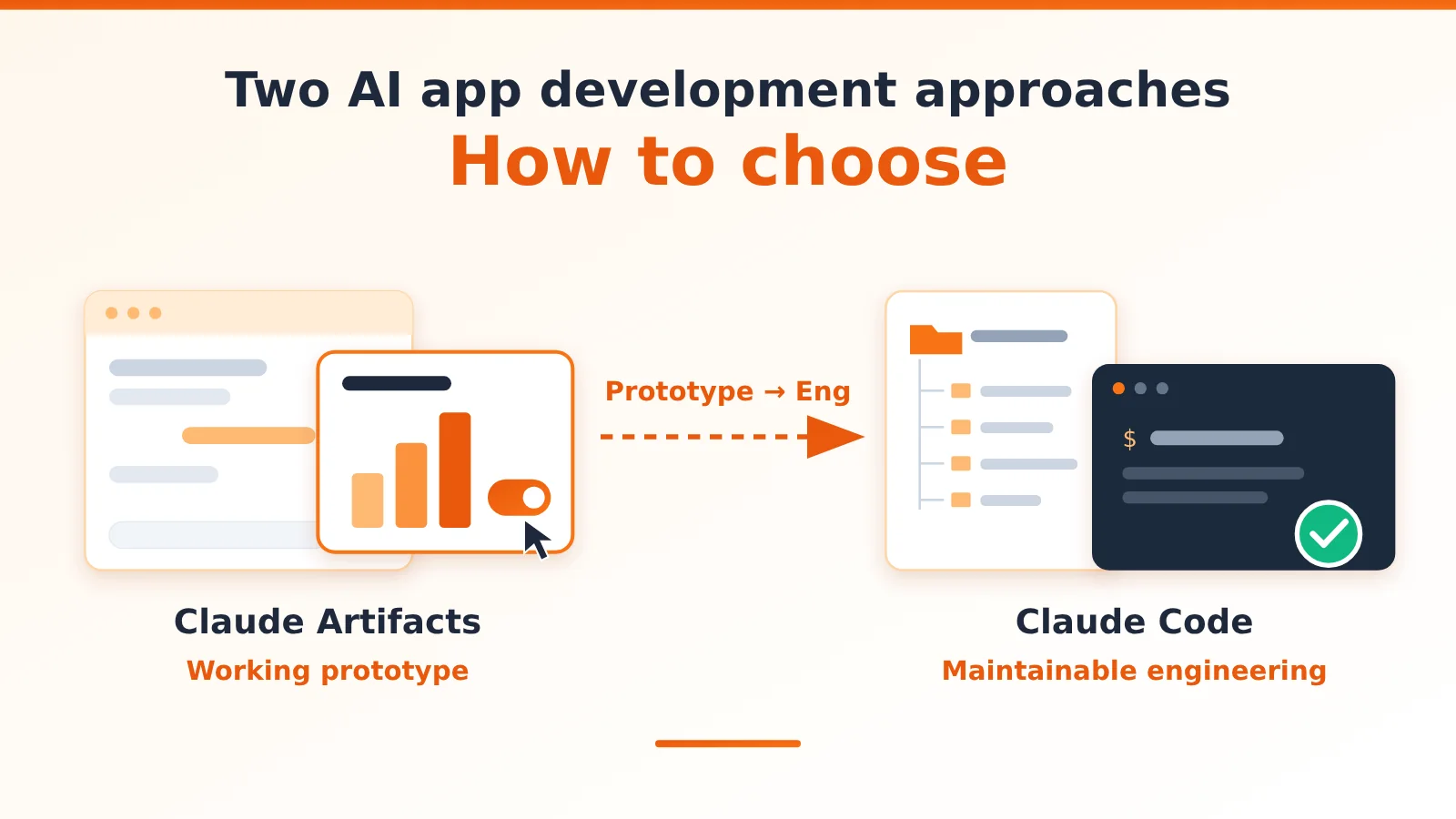
Bottom line up front: If what you’re delivering is a tool people can open, click through, demo, or use again and again — and you don’t need a separate distribution channel — go with Claude Artifacts. If you’re delivering a codebase that an individual or a team owns and controls — source code, dependencies, tests, commit history, and a release pipeline — go with Claude Code. You can also chain the two: use an Artifact to validate requirements and interactions first, then have Claude Code turn it into a real project; or have Claude Code publish the session output as an Artifact for business colleagues to review.
Four key conditions can flip this decision: whether a code repository already exists, whether you need single sign-on and access auditing, whether you need to ship a standalone installer or a service on your own domain, and whether you meet the eligibility requirements for the publishing entry point.
A note on sourcing: the capability descriptions in this article come from Anthropic’s official documentation and announcements, verified on November 27, 2026. The desktop installation capability corresponds to the Mac and Windows beta announced on November 24. The pricing scenarios and acceptance criteria are the author’s own examples and calculations — this article includes no hands-on testing and cites no community reviews.
Claude Artifacts vs Claude Code Knowledge Map
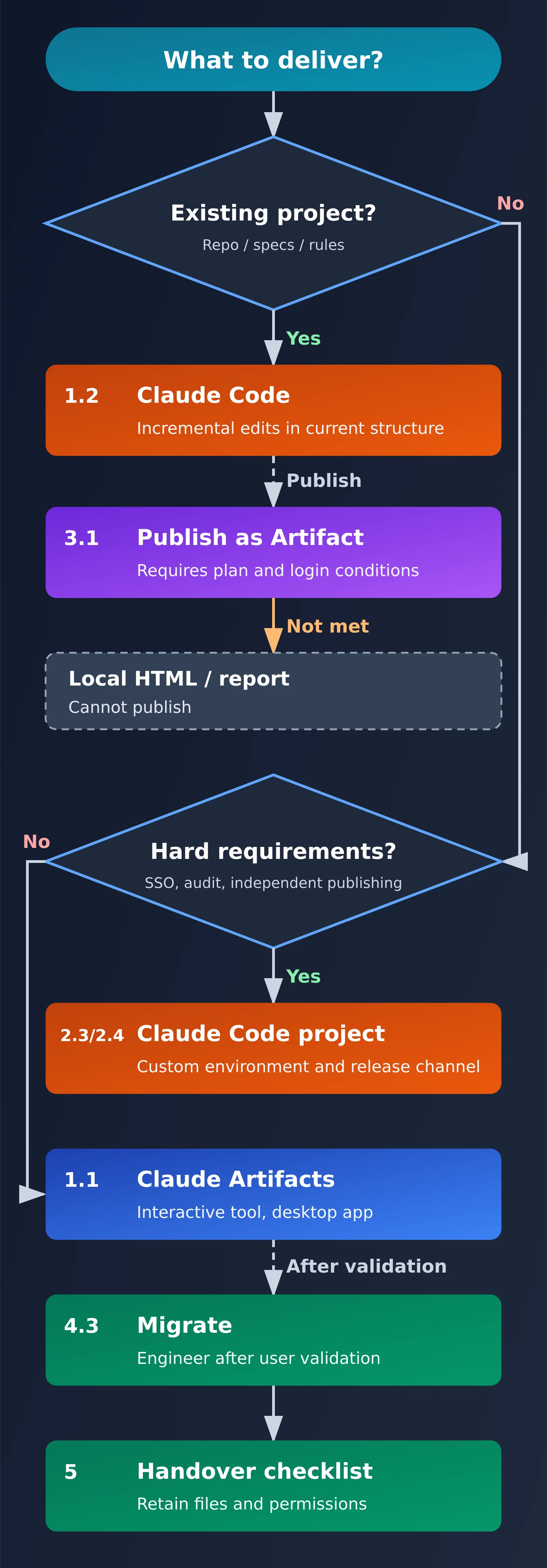
Figure note: The map starts from the “delivery goal”: first, does engineering already exist; then, are there hard requirements around identity, data, and deployment scope. When none of those requirements apply, an Artifact is the fastest way to ship a usable tool. Once a team needs to own the code and the release process, you move onto the Claude Code path. The two paths connect through the combined workflow in Section 3 and the migration scenario in Section 4.3, while Section 5 lists the materials you must preserve at handoff.
Reading guide
- Section 1 — Delivery goals: defines what each option actually delivers; this is the baseline for every comparison that follows.
- Section 2 — Development and maintenance: contrasts the two across four dimensions: where the requirement starts, version review, identity and data, and deployment scope.
- Section 3 — Combined workflow: explains how the two convert into each other, plus the eligibility conditions for the publish entry point.
- Section 4 — Three scenarios: uses the author’s examples to ground the judgment from the first three sections in concrete tasks.
- Section 5 — Handoff checklist: the files and permissions to keep when migrating or handing work over.
Sections 1 and 2 are best read in order. Sections 3, 4, and 5 can be consulted as needed — if you’ve already settled on a path, jump straight to Section 4.
To Know: Claude Artifacts and Claude Code Terminology
| Term | Brief explanation |
|---|---|
| Artifact | Actionable content Claude generates alongside the conversation—such as a single-page tool or panel—that you can edit and share |
| Install as app | Installing an eligible web-based Artifact through Claude Desktop as an app with its own window and icon; currently in Beta |
| Connectors | The channel through which an Artifact connects to the user’s own external services; typically each user uses their own connection |
| Claude Code | A coding agent that can read codebases, make cross-file changes, and run build or test commands; accessible from the terminal, editor, desktop, or browser |
| Content Security Policy | Browser rules that restrict what a webpage can load and execute; Artifact pages published by Claude Code are subject to these rules |
1 Differences in Delivery Goals Between Claude Artifacts and Claude Code
1.1 Claude Artifacts: Deliver an Actionable Tool
With Artifacts, you describe the interface, data, and behavior, and Claude generates clickable content directly alongside the conversation. Both the web version and Claude Desktop let you create, edit, and share. According to the official announcement, eligible web-based artifacts can even be installed through Claude Desktop as standalone apps, each with its own window and icon.
There are a few boundaries to this delivery model you should know upfront. First, users still access it through Claude’s hosting, and launching the desktop app requires an internet connection and a Claude login. Second, the installed app corresponds to the original Artifact, and it updates automatically when the author makes changes—the official wording is “updates automatically.” That makes it a good fit for single-page calculators, internal prototypes, demos, lightweight panels, and personal tools that don’t need their own distribution channel.
1.2 Claude Code: Deliver a Maintainable Codebase
Claude Code is built for work on codebases. The official overview sums up its capabilities as “edits files, runs commands”: reading a project, making cross-file changes, running build or test commands, and fitting into existing development workflows. The official getting-started guide covers the whole path—from understanding a project, to making changes, to testing, to using Git.
Here, the deliverables are the source code in the repository, dependency versions, tests, reviewable commits, and the release pipeline. The team chooses the runtime environment, database, authentication, and distribution channel themselves. One thing to keep in mind: just because Claude Code can execute commands doesn’t mean it will handle deployment for you. Whether to build and ship depends on the project scripts, credentials, permissions, and who’s in charge.
| Aspect | Claude Artifacts | Claude Code | Source |
|---|---|---|---|
| Primary deliverable | A tool or page you can open, click, and demo | Source code, dependencies, tests, commits, release pipeline | Official |
| User access method | A Claude-hosted link or a desktop-installed app | The runtime environment and distribution channel chosen by the team | Official |
| Update method | The installed app updates automatically after the author makes changes | Pushed by the release system after branching, review, and merging | Official |
| Runtime dependency | Internet connection and a Claude login | The project’s own runtime, database, and credentials | Official |
| Typical uses | Single-page calculators, internal prototypes, demos, lightweight panels | Iterating on existing projects, multi-user services, production systems | Official + author’s summary |
2 Claude Artifacts vs Claude Code: Development and Maintenance Comparison
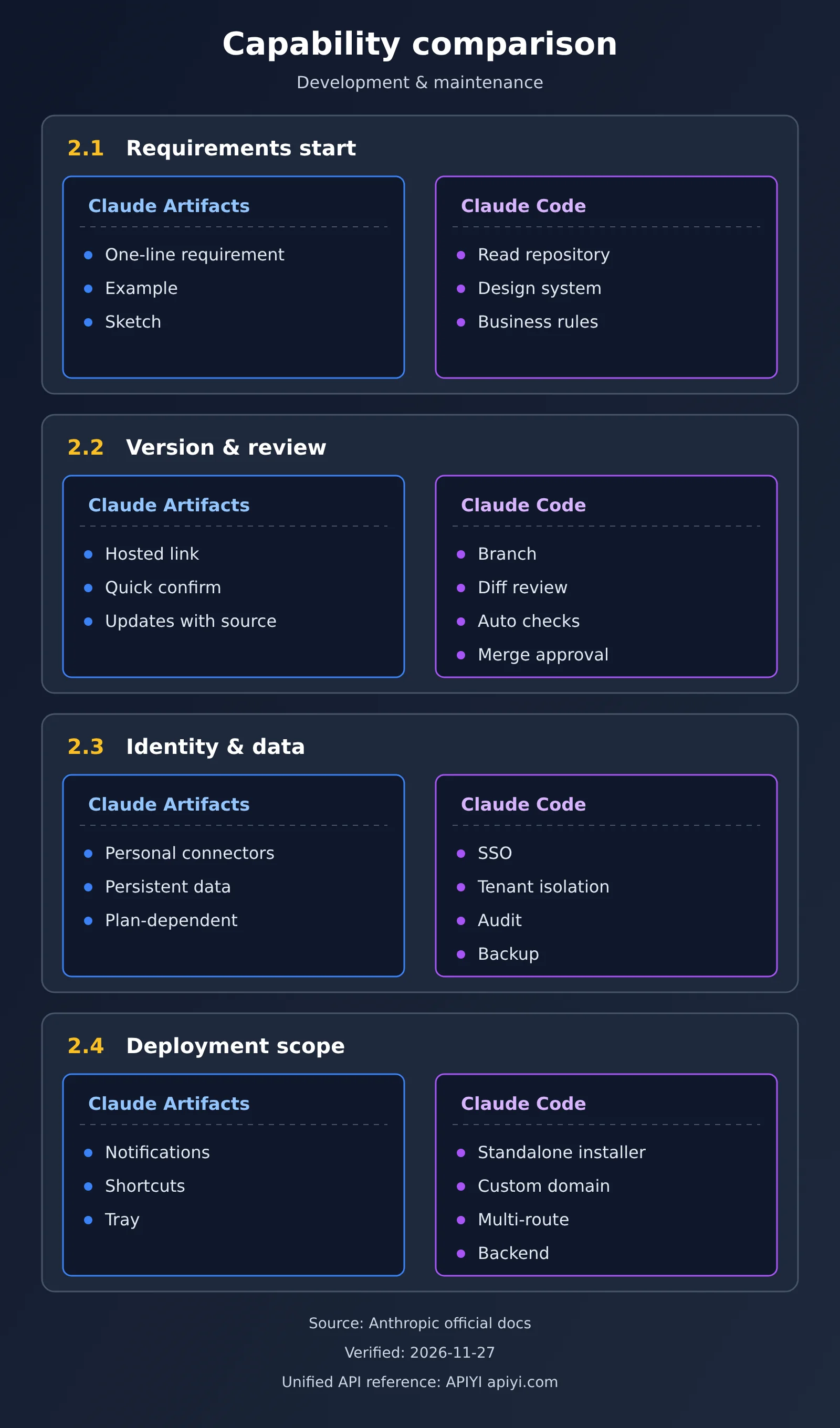
Figure note: Of the four dimensions, 2.3 identity and data and 2.4 deployment scope are the ones most likely to decide the route outright; 2.1 and 2.2 mostly affect development efficiency and how you collaborate. Let’s walk through each one.
2.1 Starting point: Claude Artifacts begins with a sketch, Claude Code begins with engineering constraints
If all you have is a one-sentence requirement, three sample cases, and a UI sketch, Artifacts can build the interaction first and then invite the user to try it on the same page. When a repository, legacy modules, a design system, or business rules already exist, Claude Code can read those constraints first and then make incremental changes within the existing structure.
Both entry points understand natural language, but project-level constraints have to land on real files and runnable acceptance commands. In Claude Code, a sound approach is to have it describe the scope of impact first, list the paths it will modify along with a test plan, and then execute in small batches.
2.2 Versions and review: Claude Artifacts shows changes instantly, Claude Code stays traceable
The hosted link for an Artifact is handy for quickly confirming layout and rules, and installed apps update along with the underlying artifact. The official help notes specifically that a desktop system authorization covers only the current version; after a change, it’ll ask again for permissions you’ve already granted.
The repository route, on the other hand, lets every change go through a branch, diff review, automated checks, and merge approval, with the release system deciding when users get the new version. The Claude Code desktop documentation also provides app previews and visual diff inspection, so the demo UI and the review trail for code changes can be kept side by side.
2.3 Identity and Data: Claude Artifacts Uses Personal Connections, Claude Code Enforces Organizational Rules
Artifacts can call Claude, connect through the user’s own connectors, and persist personal or shared data on eligible plans. Each user typically works through their own connection, and real-time sharing inside an organization follows its own dedicated rules. Sharing permissions, connector tool permissions, and desktop permissions are three separate, independent settings.
If you already have requirements around single sign-on, tenant isolation, access auditing, retention policies, or scheduled backups, the repository route lets you encode those rules directly into application code and the deployment environment. Whichever route you pick, acceptance testing should use accounts with different roles to check what authors, editors, and read-only users each see.
2.4 Deployment Scope: Claude Artifacts Has Controlled Capabilities, Claude Code Is Fully Customizable
Once installed, an Artifact can request controlled capabilities such as notifications, global shortcuts, a menu bar entry, or a system tray icon. Full access permissions let eligible programs run commands and read and write files — the exact scope needs to be checked separately against the permission documentation and organizational policy.
If the project needs to ship a standalone executable installer, support other operating systems, or serve multi-route pages and backend services from your own domain, you should take the engineering route. Packaging, signing, deployment, upgrades, and failure recovery each have their own configuration and verification steps, and all of them need to leave repeatable, executable records in the repository.
| Dimension | Signals to choose Claude Artifacts | Signals to choose Claude Code |
|---|---|---|
| Starting point | Only verbal requirements, samples, and sketches | An existing repository, legacy modules, a design system |
| Versioning and review | Quick layout confirmation, fine with instant updates | Need branches, reviews, and approval records |
| Identity and data | Personal connectors are enough | Need SSO, tenant isolation, auditing, and backups |
| Deployment scope | Controlled capabilities like notifications and shortcuts suffice | Need a standalone installer, your own domain, or a backend |
3 The Combined Workflow of Claude Artifacts and Claude Code
3.1 Publishing Session Results as an Artifact from Claude Code
Claude Code’s official docs have a dedicated page on turning session results into Artifacts, with examples like annotated pull request walkthroughs, investigation timelines, and interactive data dashboards. In eligible sessions, the agent generates a hosted web page, and the initial link is private — the official wording is “a private URL on claude.ai.” Subsequent iterations can update the same URL.
The page itself comes with clear constraints: publish inputs support HTML, HTM, or Markdown; the page is restricted by a content security policy; and it’s a static page that can’t authenticate visitors on its own. So using an Artifact to introduce a backend project and deploying that backend to production are two separate deliveries.
| Publishing condition | Requirement | Source |
|---|---|---|
| Claude Code version | v2.1.281 or newer | Official docs |
| Plan and sign-in | Must meet plan and account sign-in requirements | Official docs |
| Credential type | Sessions using API keys or cloud provider credentials can’t publish to Claude-hosted links | Official docs |
| Organization and interface | Organization settings and session interface must be eligible | Official docs |
| When requirements aren’t met | Generates local HTML or prompts that publishing isn’t possible | Official docs |
One more thing that’s easy to mix up: the Claude Desktop version threshold for installing Artifacts is a separate capability — check the desktop installation help page for the exact version. When troubleshooting, treat “publishing an Artifact from Claude Code” and “installing an Artifact in Claude Desktop” as two operations with their own separate version checks.
3.2 Pulling an Existing Artifact Back into Your Local Project
The reverse direction works too. Hand Claude Code the link to an existing Artifact, and when permissions allow, it can save the page’s complete source as local files. After that it’s just an ordinary file in your repo — ready for version control and testing. This is also the starting point for the migration scenario in section 4.3.
4 Claude Artifacts vs Claude Code: Three Selection Scenarios (Author Examples)
The scenarios and acceptance criteria below are author examples, used to illustrate the decision process; they do not represent actual test results.
| Scenario | Recommended path | Main deliverables | Acceptance method |
|---|---|---|---|
| 4.1 Personal quote estimation | Claude Artifacts | Operable rules interface, desktop installation as a common entry point | Correct messages for zero, negative numbers, and empty values |
| 4.2 Adding quote functionality to an existing project | Claude Code, with Artifact review | Candidate changes, tests, prototype link | Normal and failure cases pass; price-change records can be queried |
| 4.3 Migrating a personal tool to a multi-user service | Artifacts first, then Claude Code | Acceptance tests, identity, migration, rollback, monitoring | Same set of sample results on both sides; correct permissions |
4.1 Personal quote estimation: Claude Artifacts only
Input quantity, tax-inclusive unit price, and discount; output the amount and rule explanation. First use an Artifact to let users try three sets of values and confirm whether the messages for zero, negative numbers, and empty values are reasonable, then install it on the desktop as a common entry point.
What this stage delivers is an operable rules interface. It’s recommended to also save the calculation logic and examples as text, for example, “quantity 10, tax-inclusive unit price 99, discount 0.9, should get 891” (a worked example), so it can be reproduced later in the development environment.
4.2 Adding Quoting to an Existing Project: Claude Code Takes the Lead
The finance service already has a database, login, and a pricing table, and the new feature needs to record who changed a price and when. This is where you use Claude Code to locate the relevant interfaces and permission layer in the repository, propose candidate changes, and run both the happy-path and failure cases.
You can also attach an Artifact built on fictional data only, so business colleagues can check the fields, terminology, and order of operations. Production release still goes through the project pipeline, and the UI prototype link stays on file as a decision record.
4.3 Migrating from a Personal Tool to a Multi-User Service: Chaining the Two Together
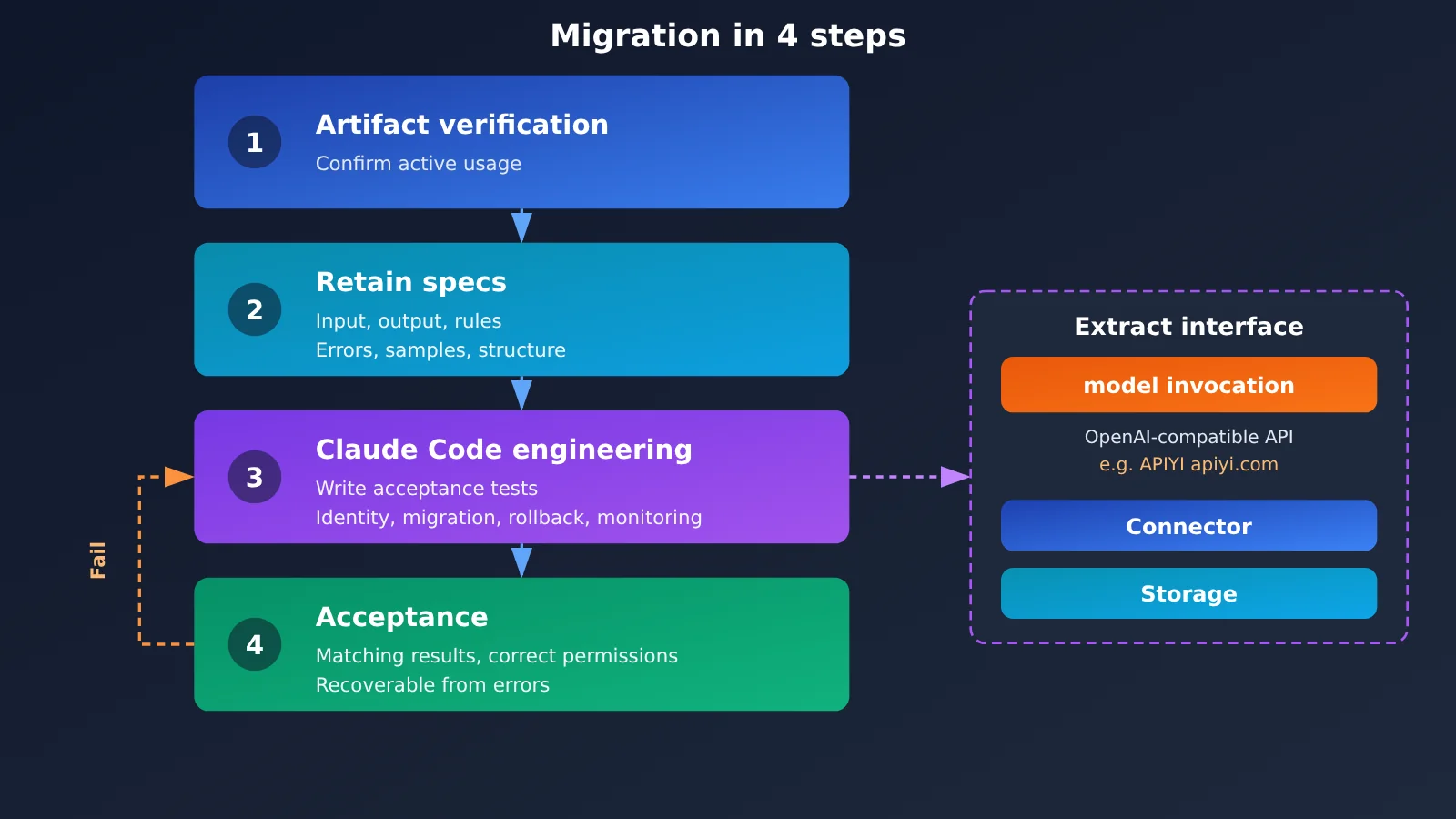
Start with the Artifact to confirm people will actually use the feature, and preserve the inputs, outputs, calculation rules, error messages, non-sensitive samples, and data structures. Then write the feature as acceptance tests in the repository, adding identity, data migration, rollback, monitoring, and ownership. You can tell whether the migration succeeded by three criteria: both sides produce the same results on the same sample set, organizational permissions are correct, and exceptions can be recovered.
If the prototype depends on Claude-specific interfaces or connectors, it’s worth abstracting separate interfaces for model invocation, connectors, and storage during migration, so you can implement each one in the new runtime environment. Below, using model invocation as an example, is one OpenAI-compatible approach.
4.3.1 Migration Example: Extracting Model Invocation into a Standalone Interface
import os
import openai

client = openai.OpenAI(
    api_key=os.environ["APIYI_API_KEY"],
    base_url="https://api.apiyi.com/v1"  # APIYI OpenAI-compatible interface
)

resp = client.chat.completions.create(
    model=os.environ.get("MODEL_NAME", "your-claude-model"),  # refer to the model list in the console
    messages=[{"role": "user", "content": "用一句话解释:数量10,单价99,九折,合计891"}]
)
print(resp.choices[0].message.content)
View the full code: calculation logic + model invocation interface separation
import os
from typing import Protocol
import openai


# 1. Pure computation logic: uses the same sample set as the Artifact prototype
def compute_quote(quantity: float, unit_price: float, discount: float) -> float:
    if quantity is None or unit_price is None or discount is None:
        raise ValueError("输入不能为空")
    if quantity < 0 or unit_price < 0:
        raise ValueError("数量和单价不能为负数")
    if not (0 < discount <= 1):
        raise ValueError("折扣应在 0 到 1 之间")
    return round(quantity * unit_price * discount, 2)


# 2. Model invocation interface: the implementation can be swapped during migration
class Explainer(Protocol):
    def explain(self, text: str) -> str: ...


class OpenAICompatibleExplainer:
    def __init__(self) -> None:
        self.client = openai.OpenAI(
            api_key=os.environ["APIYI_API_KEY"],
            base_url="https://api.apiyi.com/v1"  # unified invocation through APIYI
        )
        self.model = os.environ.get("MODEL_NAME", "your-claude-model")

    def explain(self, text: str) -> str:
        resp = self.client.chat.completions.create(
            model=self.model,
            messages=[
                {"role": "system", "content": "你是报价规则助手,用简洁中文说明计算过程。"},
                {"role": "user", "content": text},
            ],
            max_tokens=300,
        )
        return resp.choices[0].message.content


# 3. Acceptance tests: matches the samples saved with the prototype
def test_samples() -> None:
    assert compute_quote(10, 99, 0.9) == 891.0
    assert compute_quote(0, 99, 0.9) == 0.0
    for bad in [(-1, 99, 0.9), (10, 99, 0)]:
        try:
            compute_quote(*bad)
            raise AssertionError("应当报错")
        except ValueError:
            pass


if __name__ == "__main__":
    test_samples()
    total = compute_quote(10, 99, 0.9)
    print(total)
    print(OpenAICompatibleExplainer().explain(f"数量10,单价99,九折,合计{total}"))
Tip: If you need to compare how well different models explain the rules during migration, you can start by claiming free test credits at APIYI apiyi.com. One API key works across Claude, OpenAI, Gemini, and other models — just switch
MODEL_NAMEto compare them.
5. Handoff Checklist: Claude Artifacts to Claude Code
Before handing off, confirm exactly which files and access permissions the incoming owner will receive. This checklist also helps you distinguish between a UI demo link, an app installation entry point, and an engineering deployment address—so the person taking over doesn’t end up with just a single link while being asked to maintain the entire service.
- Interaction review: A read-only link plus a one-page description of expected behavior. Spell out whether external visitors can browse it, whether login is required, and which data comes from a personal account.
- Code review: The change branch and the necessary test commands. Record input samples, dependency versions, required environment variable names, and test results.
- Regularly updated tools: State the publisher, the approver, and the criteria for confirming a successful release—for example, only opening it up after a test account has walked through the critical path.
- Cloud repository tasks: Claude Code documentation provides a cloud entry point for connecting to GitHub from a browser and reviewing pull requests. Whether to adopt it depends on whether the team is willing to grant repository access, whether the project can be rebuilt in a cloud environment, and whether dependencies and secret variables can be configured to team requirements.
If you only need to validate the interaction, keeping a small Artifact can lower the review cost, while deployment arrangements still follow the engineering release process.
Claude Artifacts vs Claude Code FAQ
Q1: What’s the most fundamental difference between Claude Artifacts and Claude Code?
The difference is in the deliverable. Artifacts delivers a tool hosted by Claude that’s ready to use; Claude Code delivers a code project controlled by your team, with the runtime environment and release channel decided by the team.
Q2: Once an Artifact is installed as a desktop app, can it run independently of Claude?
No. According to the official announcement, the desktop launch depends on an internet connection and a Claude login, and users still access it through Claude’s managed hosting. If you need a standalone installer, you should take the Claude Code engineering route.
Q3: What’s the current status of the desktop installation feature and Claude Code’s publishing feature?
Desktop installation is the Mac and Windows Beta announced on November 24, 2026. Publishing an Artifact with Claude Code requires v2.1.281 or newer, verified on November 27, 2026. The version thresholds for the two need to be checked separately.
Q4: Can Claude Code running with an API key publish an Artifact?
According to the official documentation, sessions using an API key or cloud provider credentials can’t publish to a Claude-hosted link; when the conditions aren’t met, it generates a local HTML file or shows that publishing isn’t possible. Model invocation in your own application code isn’t subject to this restriction—you can unify access through OpenAI-compatible interfaces like APIYI apiyi.com.
Q5: During the prototype phase, how can I test different models’ results at low cost?
Abstract model invocation into an interface, then switch model names via environment variables. APIYI apiyi.com offers free trial credits for new users—a single key lets you compare multiple models, which is great for confirming results before moving to engineering.
Q6: What are the known limitations of each approach?
Artifacts depends on a Claude login; sharing, connector, and desktop permissions must be managed separately, and changes require re-authorization. Pages published by Claude Code are static and can’t authenticate visitors; meanwhile, the engineering route’s packaging, signing, deployment, and recovery all need to be configured by the team. This article hasn’t been tested in practice—please verify performance in your own environment.
Claude Artifacts vs Claude Code: Key Takeaways
- Pick your route by deliverable: Artifacts for a tool people can actually use, Claude Code for engineering work you’ll need to maintain.
- Hard requirements settle the direction: SSO, auditing, a standalone installer, or your own domain all point to the engineering route.
- Desktop apps are still hosted: once installed, an Artifact still needs an internet connection and a Claude login.
- Publishing has eligibility rules: you need v2.1.281 or later, and API key sessions can’t publish to a hosted link.
- The two can be chained together: validate the requirements with an Artifact first, then build it in Claude Code and sign off against the same set of samples.
- Extract the interface first when migrating: model invocation can plug straight into the OpenAI-compatible endpoint at APIYI apiyi.com.