GPT-6.2’s improvements over GPT-6 are comprehensive. In OpenAI’s published Chat benchmarks run on the same methodology, image understanding climbed from 47.4% to 71.7%, a gain of 24.3 percentage points; complex instruction following rose from 62.5% to 78.1%, a gain of 15.6 percentage points. Web search leads across all four reasoning tiers, with the biggest improvements at the lower tiers. That said, these numbers can only be read within their respective task sets — you can’t average them across tests, and you certainly can’t treat them as everyday accuracy.
What will you learn from this article?
- The exact scores, percentage-point gaps, and relative gains GPT-6.2 shows over GPT-6 in the four official charts.
- Why the “biggest improvement” in web search can legitimately be described three different ways at once.
- How reasoning tiers affect different benchmarks differently, and what cross-tier comparisons can actually tell you.
- Why the 78.1% that also shows up in the system card isn’t the same metric.
- How to run your own local comparison on your own images and instructions using an OpenAI-compatible API.
Index: “To Know” starts by explaining terms like BrowseComp and reasoning tiers, while “Impact at a Glance” summarizes the changes by audience. The “Objective Facts” section lays out the release framing, the four benchmark results, and the system card data in order. “Analysis and Judgment” discusses how to read these numbers, which conclusions you can’t draw, and provides code for a local comparison. The FAQ at the end answers a few common questions.
Background: Key Concepts in GPT-6.2 vs GPT-6
| Concept | Quick explanation |
|---|---|
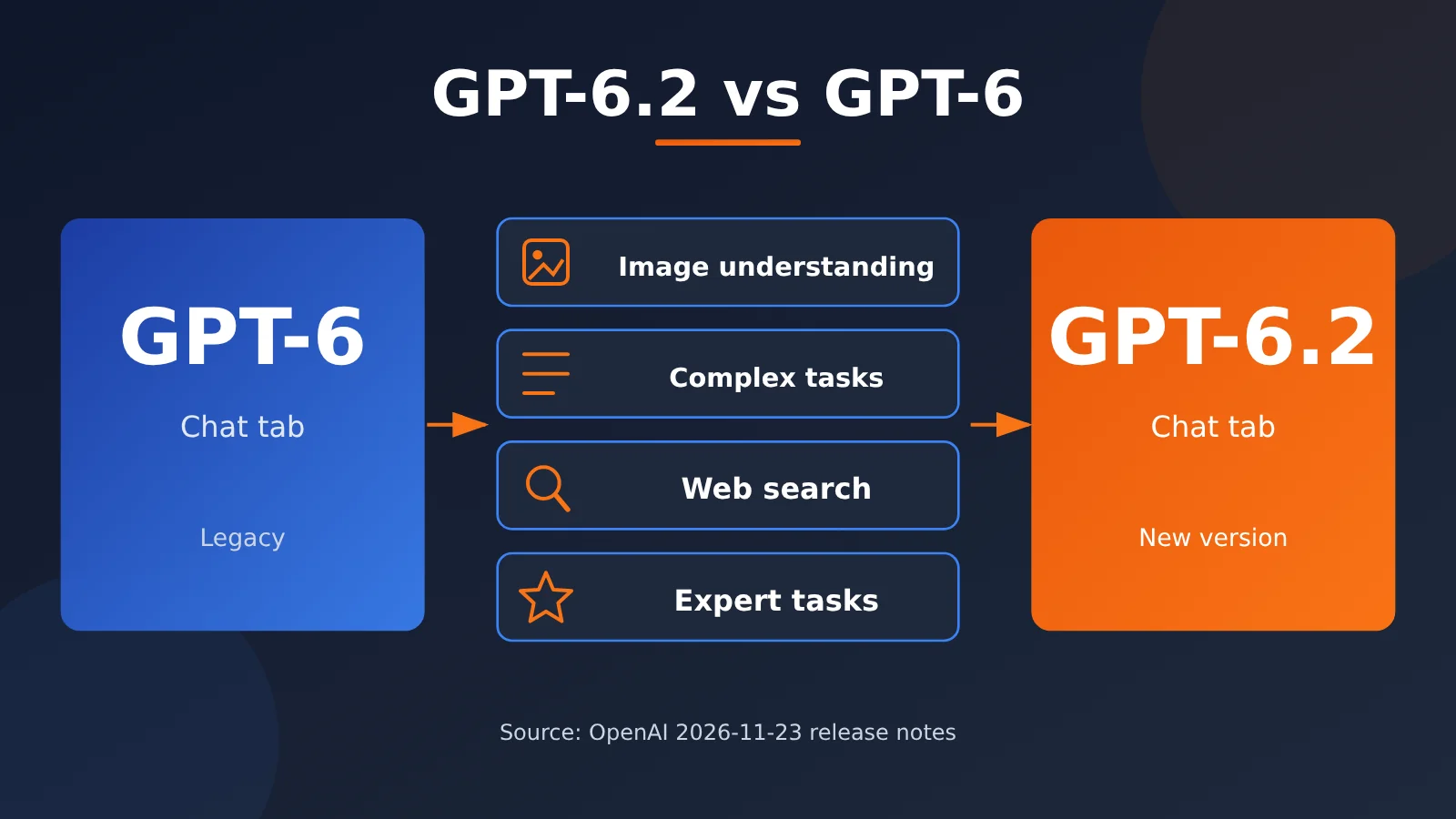
| GPT‑6.2 (Chat tab) | A version released on November 23, 2026, exclusive to the ChatGPT conversation tab, built on GPT‑6.2 Sol tuned for everyday chat |
| GPT‑6 Sol (October 7) | The system card’s name for the chat model before the update; the release-notes legend labels it GPT‑6 (Chat tab) |
| Reasoning tiers | The four reasoning settings officially tested: Instant, Medium, High, Extra High |
| BrowseComp | A browsing-agent benchmark OpenAI released publicly in 2025, with questions that are hard to look up but whose answers can be verified; this Chat announcement uses an internal version |
| Percentage points | The raw difference between two percentages — for example, 71.7% minus 47.4% equals 24.3 percentage points |
| Relative growth | The percentage-point gap divided by the old percentage; the lower the baseline, the bigger this number tends to look |
| Point estimate | A single number shown on the chart, with no error range attached |
| System card | The safety and behavior evaluation document OpenAI publishes alongside a model release, containing tests that differ from those in the release notes |
GPT-6.2 vs GPT-6: Impact at a Glance
- Everyday ChatGPT users: When you share a screenshot or an image of a table and ask the model a specific question, the success rate in official tests rises noticeably. Complex prompts with several constraints also get fully carried out more often.
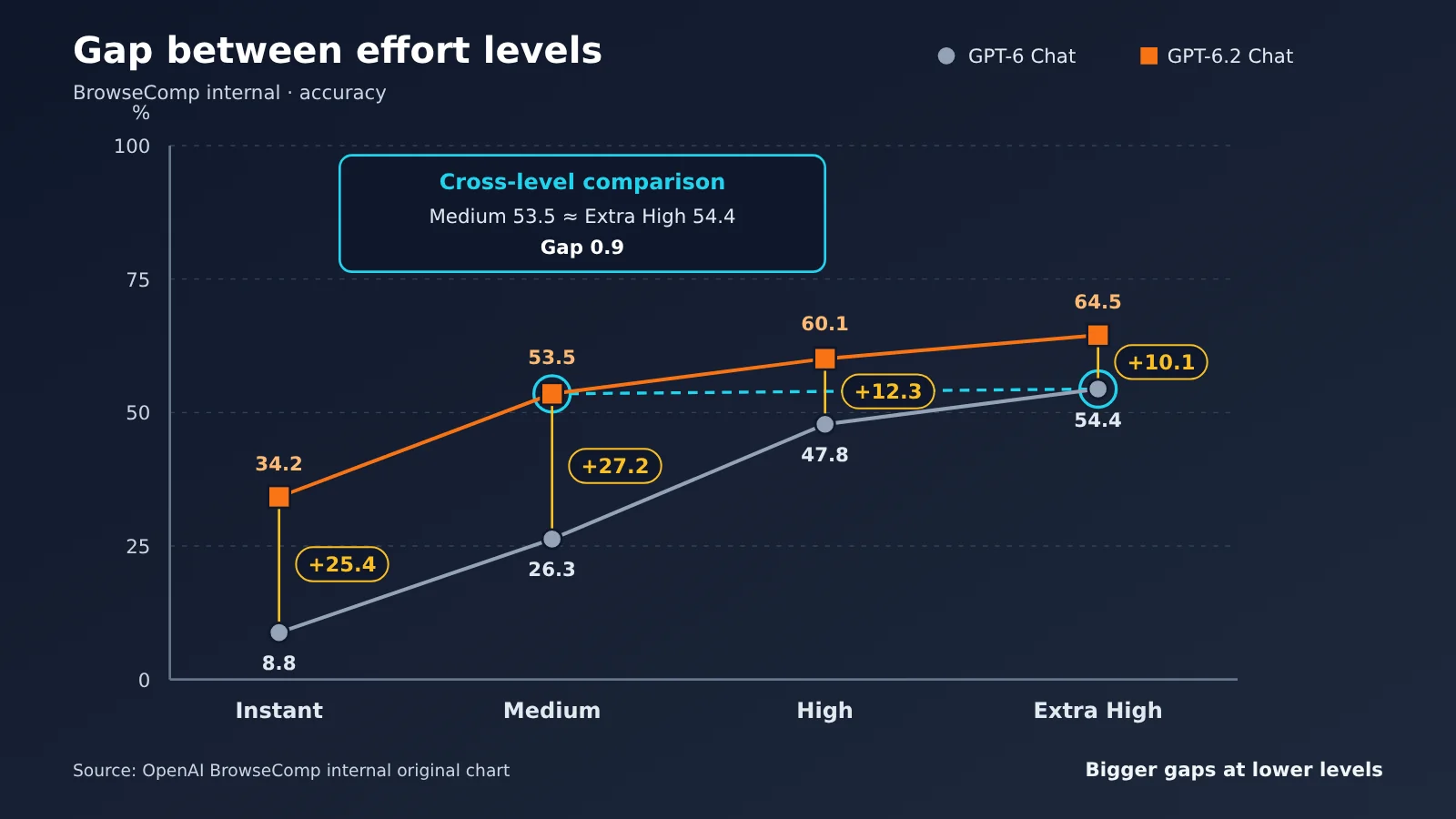
- Users who lean on web search: On fast tiers like Instant, the rate of correct search answers jumps from 8.8% to 34.2% — even the low tiers return more usable results, though the highest scores still come from Extra High.
- Developers and evaluators: These numbers cover only the Chat tab version, so don’t mix them with the API, coding, or agent-task scores from the November 17 Astra and Sol announcement. If you want a comparison against your own business data, you can run your own tests on the same sample through an OpenAI-compatible endpoint like APIYI (apiyi.com).
- Content creators and reporters: When citing these figures, state both the baseline and the final value and name the task, so you don’t conflate the internal BrowseComp version with public leaderboards.
Objective Facts: GPT-6.2 vs GPT-6 Official Results
GPT-6.2 Release Information and Comparable Basis
On November 23, 2026, OpenAI announced GPT‑6.2 in the ChatGPT release notes and included four original evaluation charts. The legends are uniformly labeled GPT‑6 (Chat tab) and GPT‑6.2 (Chat tab), so the two data points in the same chart can be compared directly, item by item. The system card released the same day calls the new version GPT‑6.2 (November 23) and the older version GPT‑6 Sol (October 7).
It’s important to distinguish this from the Astra and Sol announcement on November 17. That announcement evaluated professional work, agentic tasks, and coding tasks, and its model versions, metrics, and inference settings each had their own basis; for example, FrontierCode compares maintainer acceptance results for two specialized models at maximum inference settings. This article uses only the like-for-like data from the November 23 Chat release notes.
GPT‑6.2 Image Understanding and Complex Instruction-Following Results
| Metric | GPT‑6 Chat | GPT‑6.2 Chat | Improvement (percentage points) | Relative growth |
|---|---|---|---|---|
| Image Understanding score | 47.4% | 71.7% | 24.3 | About 51.3% |
| Complex instruction-following rate | 62.5% | 78.1% | 15.6 | About 25.0% |
Table note: Data comes from the original chart in OpenAI’s release notes; percentage points are the new value minus the old value, and relative growth is the difference divided by the old value. The denominators and scoring methods for the two metrics belong to separate evaluations and can’t be combined.
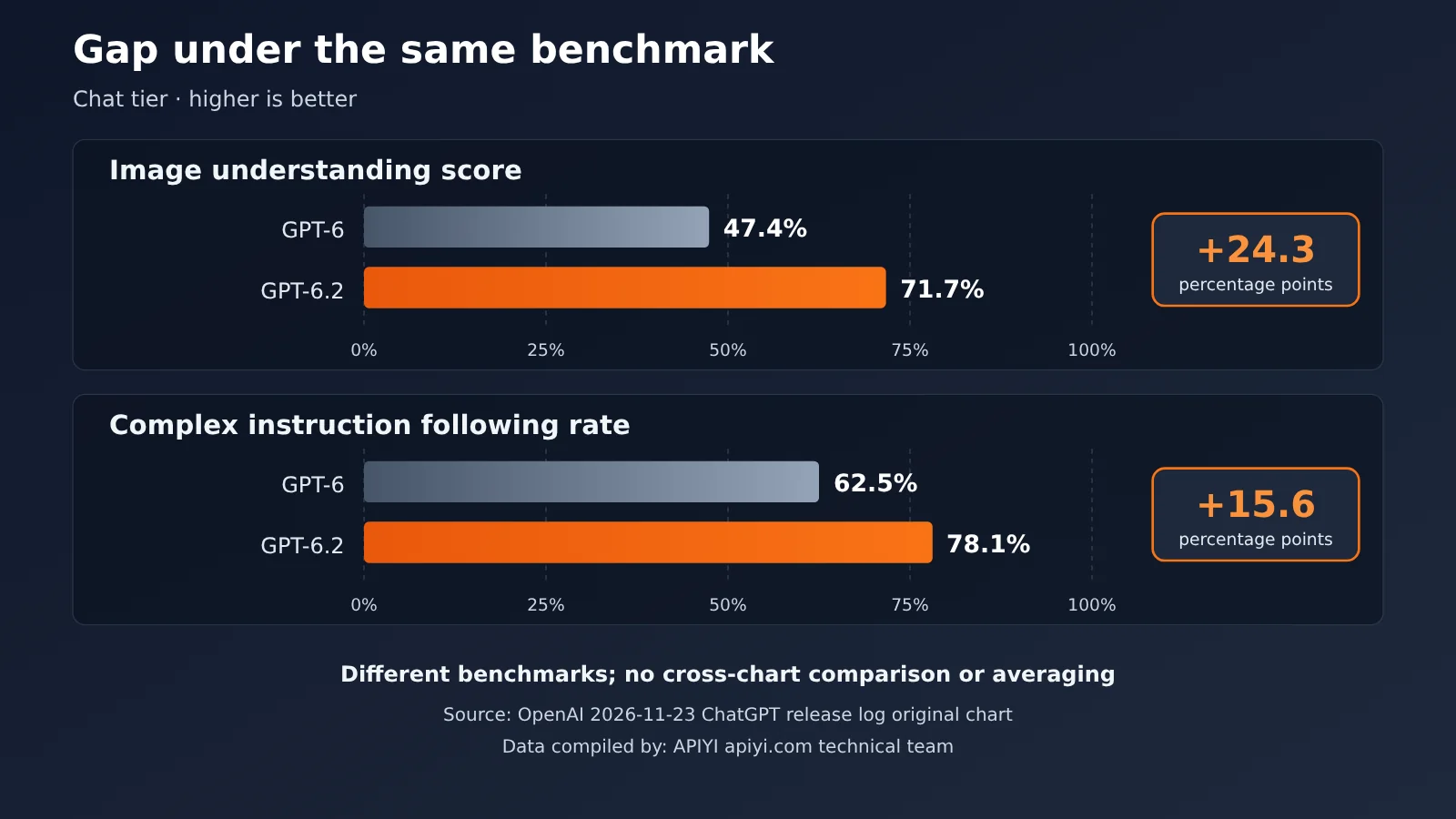
The vertical axis of the original image understanding chart is labeled “Image Understanding score”; it measures the ability to answer questions about images users share. A typical task is to give the model a screenshot of a timetable and ask it to read out the time slot for a specific route and date, and point to where that information appears. This score has nothing to do with image generation or editing—ChatGPT Images has its own announcement and model name—and it isn’t the same as accuracy at extracting text from scans.
The vertical axis of the original complex-instruction chart is “share of responses that follow the requirements”; OpenAI says these prompts are especially challenging. 78.1% means that share of the new model’s replies met all requirements. A self-devised example can help illustrate the task shape: pick two time slots from an event description, arrange them in the specified order, use the specified unit for cost, and list missing items separately. OpenAI didn’t use this example to produce the score.
GPT‑6.2 Web Search: BrowseComp Internal Version Scores Across Four Tiers
| Tested reasoning setting | GPT‑6 Chat | GPT‑6.2 Chat | Improvement (percentage points) | Relative growth |
|---|---|---|---|---|
| Instant | 8.8% | 34.2% | 25.4 | about 288.6% |
| Medium | 26.3% | 53.5% | 27.2 | about 103.4% |
| High | 47.8% | 60.1% | 12.3 | about 25.7% |
| Extra High | 54.4% | 64.5% | 10.1 | about 18.6% |
Table note: The metric is the share of questions answered correctly, taken from the original BrowseComp internal version chart. The announcement text summarizes the Extra High improvement as about ten percentage points; this table records 10.1 at the precision shown in the chart.
GPT‑6.2 is higher than GPT‑6 at the same tier across all four tiers. The paper for the public BrowseComp version explains that these questions rely on finding clues across sites, and the answers are usually short and gradeable; however, this comparison uses an internal version, so the public version’s question count, configuration, and leaderboard scores don’t apply to this comparison.
GPT-6.2 Expert Task Scores Across Four Tiers
| Tested reasoning setting | GPT-6 Chat | GPT-6.2 Chat | Improvement (percentage points) |
|---|---|---|---|
| Instant | 52.3% | 65.2% | 12.9 |
| Medium | 60.8% | 68.0% | 7.2 |
| High | 65.5% | 71.5% | 6.0 |
| Extra High | 65.9% | 71.1% | 5.2 |
Table note: The figures are average scores taken from the original expert task chart. The announcement text states that the lowest tier went from 52% to 65%; the original chart adds precision and identifies that tier as Instant.
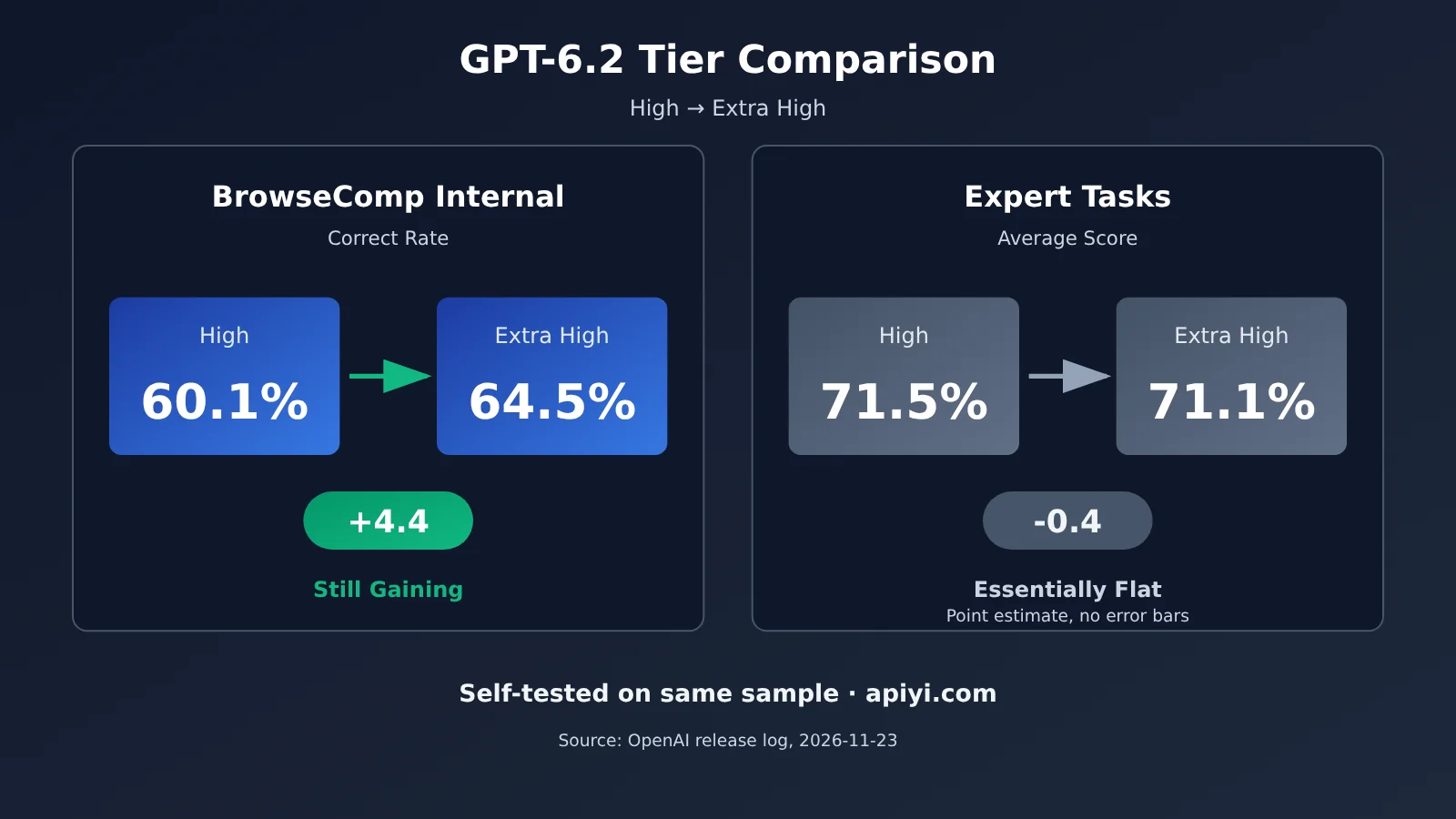
The same-tier gains on the expert task are also largest at Instant. It’s worth noting that GPT-6.2’s point estimate dipped slightly by 0.4 percentage points from High to Extra High, while the same tier change on the internal BrowseComp version added 4.4 percentage points.
The 78.1% in the System Card: Same Number, Different Metric
| System card test | GPT-6 Sol (October 7) | GPT-6.2 (November 23) | Test condition |
|---|---|---|---|
| Targeted compliance with model behavior specifications | 76.6% | 78.1% | ChatGPT instruction configuration, no production tool access |
| Steerability (following valid override instructions) | 60.6% | 48.6% | Same as above |
Section 5 of the system card also shows 78.1%, but it measures targeted compliance with model behavior specifications—not the same thing as the complex instruction following in the release log. In the steerability test in the same section, the new version’s score dropped from 60.6% to 48.6%. Section 4 of the system card also includes a set of factuality tests: the new model improved significantly on a question set that users had previously flagged as failures, and its error rates on high-fact-density and high-risk question sets were roughly comparable. The system card notes that these question sets are skewed toward harder items and can’t represent the overall error rate of everyday Chat.
Analysis: What GPT-6.2’s Gains Over GPT-6 Actually Mean
There Are Three Ways to Describe the “Biggest Improvement” in Web Search
On the internal version of BrowseComp, “which tier of GPT‑6.2 improved the most” depends on which quantity you’re measuring. The highest absolute score belongs to Extra High at 64.5%; the largest gap in percentage points belongs to Medium at 27.2; and the largest relative growth belongs to Instant, which started from the lowest baseline and ended at roughly 3.89× that baseline. All three are true at the same time — there’s no contradiction.
Our take: for a general audience, lead with percentage points, and spell out both the baseline and the final value. Saying “a 288.6% improvement” makes it easy to assume the model has become virtually infallible, whereas what 8.8% to 34.2% really means is that on this class of hard problems, the fast tier still gets about two-thirds of the questions wrong. If you restate the percentage as “per hundred questions,” treat it purely as a proportional conversion — don’t mistake one hundred for the actual sample size.
The value of GPT-6.2’s reasoning tiers depends on the task
Reading the two four-tier charts side by side shows that reasoning tiers play a different role depending on the task. On web search, going from High to Extra High still delivers a 4.4 percentage point gain, while expert tasks essentially plateau after High. So “higher is always better” isn’t a universal rule — lookup-style tasks are the ones more likely to benefit from more reasoning and retrieval.
Cross-tier comparisons are informative too: GPT-6.2 Medium scores 53.5% on web search, close to GPT-6 Extra High’s 54.4%, and GPT-6.2 Instant scores 65.2% on expert tasks, close to GPT-6 High’s 65.5%. But the announcement doesn’t disclose the compute budget, number of searches, or latency behind these tiers, so all we can say is that the scores are “close” — we can’t conclude that the new version’s lower tier can replace the old version’s higher tier at a lower cost. And a gap like 0.4 is just a difference between point estimates; the charts show no error ranges, so it isn’t enough to say which tier is reliably better.
Evidence Boundaries: What These Conclusions Can’t Support
The four charts support two kinds of conclusions: one is the size of the upgrade measured the same way, for example a 24.3 percentage point gain in image understanding; the other is the difference that shifts by tier, for example the generational gap in web search is 15.3 percentage points larger on Instant than on Extra High. Any claim beyond that range needs additional evidence.
Specifically, sample details, error margins, real-user distribution, response latency, and request cost are not part of the scoring information in these four charts. Rolling the four tests into an average or composite score throws away each test’s own denominator and task definition, so we don’t recommend it. A higher accuracy rate on web search also doesn’t mean factual errors in long replies drop at the same pace — the factual testing results in the system card show these two things need to be measured separately.
How to Compare GPT-6.2 and GPT-6 Yourself via the API
Beyond the official benchmarks, a more reliable approach is to run your own comparison on business samples: keep the same image, the same question, and the same reasoning settings, then check the answers item by item. Note that this release targets the Chat tab in ChatGPT; for the API side, the model names and available versions should follow the platform’s model list, and the model names in the code below are placeholders.
import openai

client = openai.OpenAI(
    api_key="YOUR_API_KEY",
    base_url="https://api.apiyi.com/v1"  # APIYI OpenAI-compatible endpoint
)

resp = client.chat.completions.create(
    model="YOUR_MODEL_NAME",  # Use the actual name from the platform's model list
    messages=[{
        "role": "user",
        "content": [
            {"type": "text", "text": "读出图中 3 号线周六的首末班时间,并指出依据位置。"},
            {"type": "image_url", "image_url": {"url": "https://example.com/timetable.png"}}
        ]
    }]
)
print(resp.choices[0].message.content)
View the full comparison code: check the same image and instructions item by item
import openai

client = openai.OpenAI(
    api_key="YOUR_API_KEY",
    base_url="https://api.apiyi.com/v1"  # One key to switch between multiple models
)

# The two model names to compare; replace with the actual names from the platform's model list
MODELS = ["OLD_MODEL_NAME", "NEW_MODEL_NAME"]

IMAGE_URL = "https://example.com/timetable.png"
PROMPT = (
    "根据图片完成:1. 筛出周六的两个时段;"
    "2. 按发车时间升序排列;3. 票价统一用元表示;"
    "4. 图中缺失的信息单独列出,不要猜测。"
)

# Judge each requirement separately; closer to instruction-following metrics than an overall impression
CHECKLIST = ["只含周六时段", "按升序排列", "票价单位为元", "缺失项单列"]

def ask(model: str) -> str:
    resp = client.chat.completions.create(
        model=model,
        messages=[{
            "role": "user",
            "content": [
                {"type": "text", "text": PROMPT},
                {"type": "image_url", "image_url": {"url": IMAGE_URL}}
            ]
        }],
        temperature=0
    )
    return resp.choices[0].message.content

results = {}
for m in MODELS:
    try:
        results[m] = ask(m)
    except Exception as e:
        results[m] = f"Error: {e}"

for m, text in results.items():
    print("=" * 40)
    print(f"模型: {m}\n{text}\n")
    print("人工核对清单:")
    for item in CHECKLIST:
        print(f"  [ ] {item}")
Suggestion: Results from your local comparison come from your own sample, so label them separately from OpenAI’s published benchmarks. You can get free test credits through APIYI apiyi.com and use a single key to switch between multiple models, so you can finish a small-sample comparison quickly.
GPT-6.2 vs GPT-6: Common Questions
Q1: How much better is GPT-6.2 than GPT-6 overall?
There’s no official composite score, and we don’t recommend averaging the numbers yourself. Looking at individual metrics: image understanding is up 24.3 percentage points, complex instruction following up 15.6 points, web search up 10.1 to 27.2 points across its four levels, and expert tasks up 5.2 to 12.9 points across four levels.
Q2: When was GPT-6.2 released?
OpenAI announced it in the ChatGPT release notes on November 23, 2026, for the Chat tab, powered by GPT‑6.2 Sol. The Astra and Sol announcement from November 17 is a separate set of benchmarks for professional tasks.
Q3: Does the image understanding gain mean image generation got better too?
No. This test measures how well the model reads images users share and answers questions about them. Image generation and editing are a separate product capability under ChatGPT Images. It also can’t be directly converted into accuracy for pulling text out of scanned documents.
Q4: Which reasoning level should I pick for web search?
In the official chart, Extra High has the highest absolute score, and gains flatten out after Medium. But the official data doesn’t disclose latency or cost for each level, so the real choice depends on how long you’re willing to wait and what your budget looks like — run a test on your own question set.
Q5: How do I compare GPT-6.2 and GPT-6 in practice through the API?
Sign up at APIYI apiyi.com to get an API key and free quota, set the code’s base_url to `https://api.apiyi.com/v1`, confirm which versions are available in the model list, then check the outputs item by item using the same images and instructions.
Q6: What known weaknesses does GPT-6.2 have?
The system card shows steerability dropped from 60.6% to 48.6% — meaning the share of cases where it follows valid coverage instructions fell. On high-fact-density and high-risk question sets, error rates are roughly on par with the previous version. The four official charts also don’t publish error ranges or sample details.
Q7: What’s the easiest mistake to make when citing this data?
There are three common ones: treating the system card’s 78.1% as the complex-instruction score, treating the internal BrowseComp version as a public leaderboard, and reporting only relative gains without baselines. For teams that need to validate repeatedly across multiple models, running fixed-sample regression through APIYI apiyi.com’s unified interface is more reliable than leaning on a single announcement.
If you only remember one thing, make it this: GPT‑6.2’s gains are real and widespread in the official same-methodology tests, but every number is tied to a specific task set and reasoning level. The upgrades in image reading and complex instructions are the easiest to feel in daily use, while web search gains are most obvious at the lower levels. To confirm how big these changes are for your own business, the most direct approach is still to run a comparison on a fixed sample — and APIYI apiyi.com’s unified multi-model interface saves you a lot of setup work along the way.
References
-
ChatGPT release notes (GPT-6.2 entry, November 23, 2026): Four original evaluation charts and release notes
- Link:
help.openai.com/en/articles/6825453-chatgpt-release-notes - Note: Source of all scores reported on the same basis in this article
- Link:
-
GPT-6.2 ChatGPT system card: Behavior policy, steerability, and factuality evaluations
- Link:
deploymentsafety.openai.com/gpt-6-2-chatgpt - Note: Used for the factuality discussion in Section 4 and the targeted compliance and steerability discussion in Section 5
- Link:
-
GPT-6.2 Astra and Sol model announcement (November 17): Professional work, agentic, and coding task evaluations
- Link:
openai.com/index/introducing-gpt-6-2-astra-sol/ - Note: Different evaluation basis; included only to distinguish between the models
- Link:
-
BrowseComp public version overview: Design rationale for browsing-agent evaluation
- Link:
openai.com/index/browsecomp/ - Note: Only for understanding the evaluation principles; not applicable to internal-version scoring
- Link:
-
ChatGPT image input help: Instructions for using image attachments
- Link:
help.openai.com/en/articles/8400551-chatgpt-image-inputs-faq - Note: Distinguishes image understanding from image generation
- Link:
Author: APIYI Technical Team
Technical contact: Feel free to reach us through the homepage at APIYI apiyi.com. For more integration resources, visit the documentation center at docs.apiyi.com