很多开发者看到 gemini-3.1-pro-preview-customtools 这个模型名时会困惑: customtools 是什么意思? 它和标准的 gemini-3.1-pro-preview 有什么不同? 本文用 5 分钟帮你彻底搞清楚。
核心价值: 读完本文,你将明白什么时候该用标准版、什么时候该用 customtools 版,以及如何在 Agent 开发中正确选择。
什么是 Gemini 3.1 Pro Customtools
一句话解释
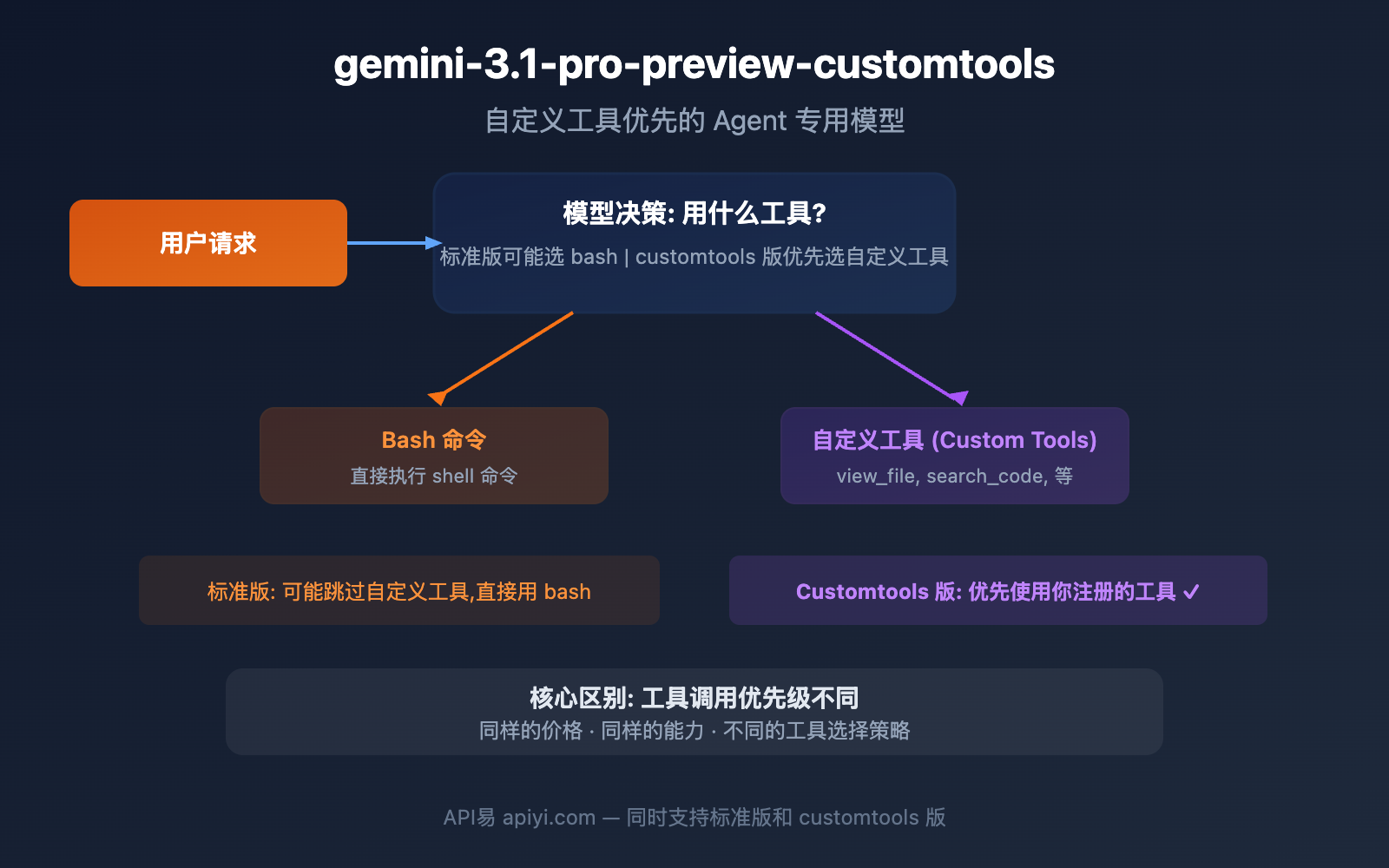
gemini-3.1-pro-preview-customtools 是谷歌在 2026 年 2 月 19 日与标准版 Gemini 3.1 Pro 同步发布的专用变体模型。它和标准版的核心区别只有一个: 优先使用你注册的自定义工具,而不是默认跑 bash 命令。
谷歌官方 Changelog 的原话是:
Launched a separate endpoint
gemini-3.1-pro-preview-customtools, which is better at prioritizing custom tools, for users building with a mix of bash and tools.
为什么需要这个变体
在 Agent 开发中,开发者通常会同时给模型注册两类能力:
- Bash/代码执行: 让模型直接运行 shell 命令
- 自定义工具 (Custom Tools): 开发者定义的结构化函数,如
view_file、search_code、create_pr等
问题出在哪里? 标准版 Gemini 3.1 Pro 有时会「偷懒」,跳过你精心设计的自定义工具,直接用 bash 命令完成任务。比如你注册了 view_file 工具,但模型可能直接执行 cat filename.py,绕过了你的工具。
这在某些场景下是有问题的:
- 自定义工具可能有权限控制和日志记录
- 自定义工具的返回格式是结构化的,便于后续处理
- 自定义工具可能连接了外部系统 (数据库、API 等)
customtools 变体就是为了解决这个问题: 让模型优先选择你注册的工具。
Gemini 3.1 Pro 标准版 vs Customtools 版核心区别
| 对比维度 | 标准版 | Customtools 版 |
|---|---|---|
| 模型 ID | gemini-3.1-pro-preview |
gemini-3.1-pro-preview-customtools |
| 发布日期 | 2026.2.19 | 2026.2.19 (同步发布) |
| 推理能力 | ARC-AGI-2 77.1% | 相同 |
| 编码能力 | SWE-Bench 80.6% | 相同 |
| 上下文窗口 | 1,048,576 tokens | 相同 |
| 最大输出 | 65,536 tokens | 相同 |
| 输入价格 | $2.00 / 1M tokens | 相同 |
| 输出价格 | $12.00 / 1M tokens | 相同 |
| 工具调用行为 | 可能优先使用 bash | 优先使用自定义工具 |
| 适用场景 | 通用推理、编码、分析 | Agent 开发、工具编排 |
| 质量说明 | 所有场景均衡 | 不涉及工具的场景可能有微小质量波动 |
🎯 关键理解: 两个模型的「智力水平」完全相同。区别只在于面对「该用 bash 还是该用你注册的工具」这个选择时,customtools 版会更倾向于选择你的自定义工具。
什么场景需要用 Gemini 3.1 Pro Customtools
需要用 customtools 的场景
| 场景 | 为什么需要 | 具体例子 |
|---|---|---|
| AI 编码助手 | 需要用结构化的 view_file、edit_file 等工具 | Claude Code、Cursor 类产品 |
| DevOps Agent | 需要通过工具调用 CI/CD 系统而非直接 bash | 自动化部署、代码审查机器人 |
| MCP 工作流 | 注册了 MCP 工具协议的 Agent | 多步骤工作流编排 |
| 有权限控制的 Agent | 自定义工具内置了权限检查 | 企业级 Agent 应用 |
| 需要结构化日志的 Agent | 工具调用便于记录和审计 | 合规要求高的场景 |
不需要用 customtools 的场景
| 场景 | 用标准版即可 | 原因 |
|---|---|---|
| 普通对话/问答 | gemini-3.1-pro-preview |
不涉及工具调用 |
| 文本分析/翻译 | gemini-3.1-pro-preview |
纯文本输入输出 |
| 代码生成 (无工具) | gemini-3.1-pro-preview |
只需要模型直接写代码 |
| 简单 bash 脚本执行 | gemini-3.1-pro-preview |
就是想用 bash |
谷歌的官方建议
谷歌在 Gemini 3 开发者指南的 FAQ 中明确说:
If you are using
gemini-3.1-pro-previewand the model ignores your custom tools in favor of bash commands, try thegemini-3.1-pro-preview-customtoolsmodel instead.
翻译: 如果你发现标准版忽略了你的自定义工具而直接用 bash,换成 customtools 版试试。
Gemini 3.1 Pro Customtools API 调用方法
基本调用: 和标准版完全一样
import openai

client = openai.OpenAI(
    api_key="YOUR_API_KEY",
    base_url="https://api.apiyi.com/v1"  # API易 统一接口
)

# 只需要换 model 名称,其他代码完全不变
response = client.chat.completions.create(
    model="gemini-3.1-pro-preview-customtools",
    messages=[
        {"role": "user", "content": "帮我查看项目中的 main.py 文件内容"}
    ]
)
print(response.choices[0].message.content)
带自定义工具的 Agent 调用
customtools 版的真正威力在于搭配 function calling:
import openai
import json

client = openai.OpenAI(
    api_key="YOUR_API_KEY",
    base_url="https://api.apiyi.com/v1"  # API易 统一接口
)

# 定义自定义工具
tools = [
    {
        "type": "function",
        "function": {
            "name": "view_file",
            "description": "查看指定文件的内容",
            "parameters": {
                "type": "object",
                "properties": {
                    "file_path": {
                        "type": "string",
                        "description": "文件路径"
                    }
                },
                "required": ["file_path"]
            }
        }
    },
    {
        "type": "function",
        "function": {
            "name": "search_code",
            "description": "在代码库中搜索关键词",
            "parameters": {
                "type": "object",
                "properties": {
                    "query": {
                        "type": "string",
                        "description": "搜索关键词"
                    },
                    "file_pattern": {
                        "type": "string",
                        "description": "文件匹配模式,如 *.py"
                    }
                },
                "required": ["query"]
            }
        }
    }
]

# customtools 版会优先使用上面定义的工具
response = client.chat.completions.create(
    model="gemini-3.1-pro-preview-customtools",
    messages=[
        {"role": "user", "content": "帮我在项目中找到所有包含 TODO 的 Python 文件"}
    ],
    tools=tools
)

# 模型会调用 search_code 工具而不是直接 grep
tool_call = response.choices[0].message.tool_calls[0]
print(f"工具: {tool_call.function.name}")
print(f"参数: {tool_call.function.arguments}")
查看完整的 Agent 循环代码
import openai
import json

client = openai.OpenAI(
    api_key="YOUR_API_KEY",
    base_url="https://api.apiyi.com/v1"
)

tools = [
    {
        "type": "function",
        "function": {
            "name": "view_file",
            "description": "查看指定文件的内容",
            "parameters": {
                "type": "object",
                "properties": {
                    "file_path": {"type": "string", "description": "文件路径"}
                },
                "required": ["file_path"]
            }
        }
    },
    {
        "type": "function",
        "function": {
            "name": "search_code",
            "description": "在代码库中搜索关键词",
            "parameters": {
                "type": "object",
                "properties": {
                    "query": {"type": "string", "description": "搜索关键词"},
                    "file_pattern": {"type": "string", "description": "文件匹配模式"}
                },
                "required": ["query"]
            }
        }
    },
    {
        "type": "function",
        "function": {
            "name": "edit_file",
            "description": "编辑文件中的指定内容",
            "parameters": {
                "type": "object",
                "properties": {
                    "file_path": {"type": "string", "description": "文件路径"},
                    "old_content": {"type": "string", "description": "要替换的旧内容"},
                    "new_content": {"type": "string", "description": "新内容"}
                },
                "required": ["file_path", "old_content", "new_content"]
            }
        }
    }
]

# 模拟工具执行
def execute_tool(name, args):
    """实际项目中替换为真实的工具实现"""
    if name == "view_file":
        return f"文件内容: {args['file_path']} (模拟)"
    elif name == "search_code":
        return f"搜索 '{args['query']}' 的结果: 找到 3 处匹配 (模拟)"
    elif name == "edit_file":
        return f"已将 {args['file_path']} 中的内容替换 (模拟)"
    return "未知工具"

# Agent 主循环
messages = [{"role": "user", "content": "找到项目中所有 TODO 注释并修复它们"}]
max_turns = 5

for turn in range(max_turns):
    response = client.chat.completions.create(
        model="gemini-3.1-pro-preview-customtools",
        messages=messages,
        tools=tools
    )

    msg = response.choices[0].message
    messages.append(msg)

    if msg.tool_calls:
        for tc in msg.tool_calls:
            args = json.loads(tc.function.arguments)
            result = execute_tool(tc.function.name, args)
            messages.append({
                "role": "tool",
                "tool_call_id": tc.id,
                "content": result
            })
            print(f"[Turn {turn+1}] 调用: {tc.function.name}({args})")
    else:
        print(f"[完成] {msg.content[:200]}")
        break
🚀 快速开始: 通过 API易 apiyi.com 平台,标准版和 customtools 版使用同一个 API Key。只需修改 model 参数即可切换,非常适合 A/B 测试哪个版本更适合你的 Agent。
Gemini 3.1 Pro Customtools 和 Agent 框架的关系
主流 Agent 框架的适配情况
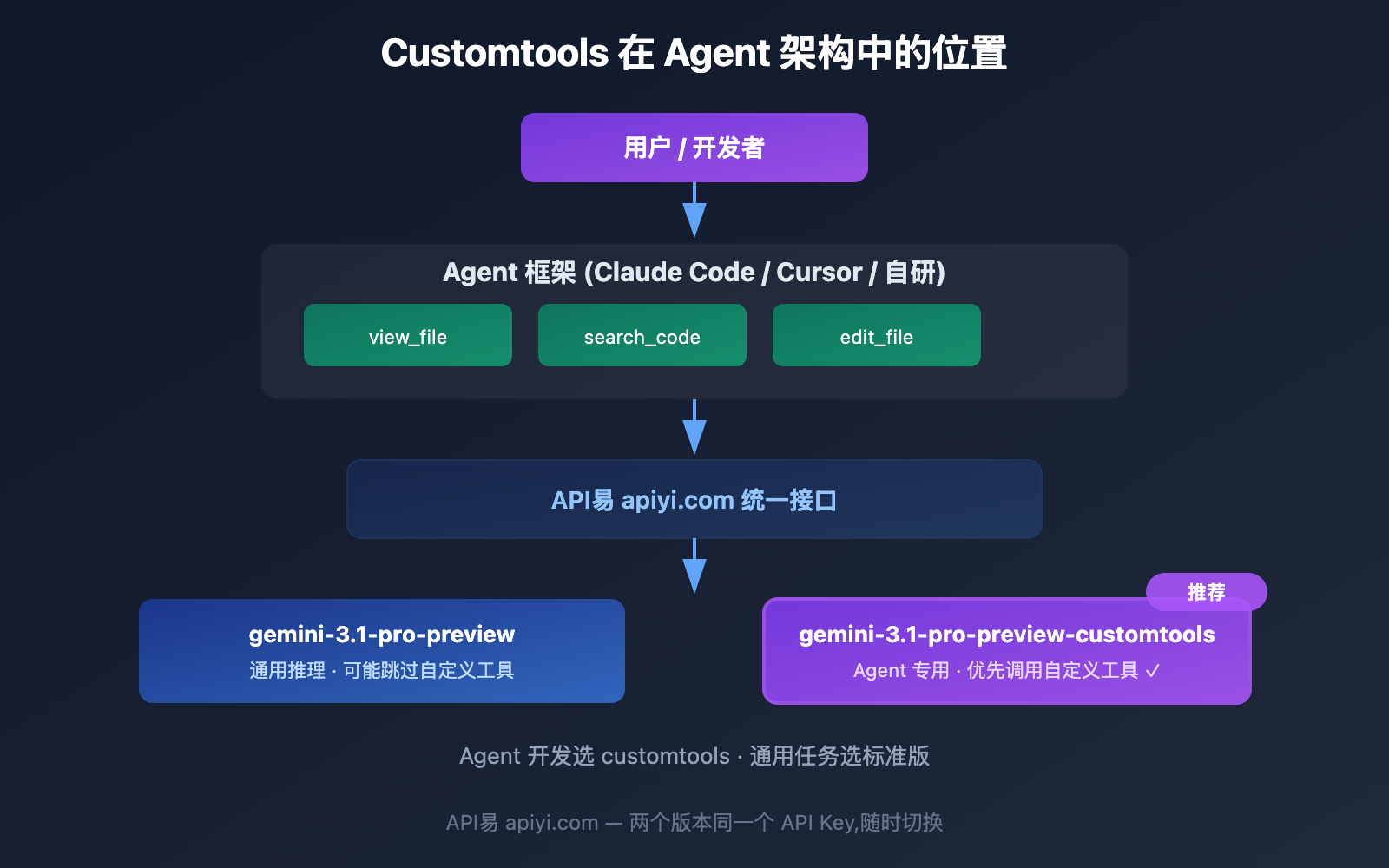
customtools 版对以下 Agent 开发场景特别有价值:
| Agent 框架/场景 | 适配建议 | 理由 |
|---|---|---|
| Claude Code 类编码助手 | 推荐 customtools | 需要 view_file、edit_file 等结构化工具 |
| Cursor / GitHub Copilot | 推荐 customtools | IDE 工具集需要被优先调用 |
| MCP 协议 Agent | 推荐 customtools | MCP 注册的工具需要优先级保障 |
| LangChain / LlamaIndex | 推荐 customtools | 框架注册的 tools 需要被正确调用 |
| 纯 Chat 应用 | 用标准版 | 不涉及工具调用 |
| RAG 检索增强 | 视情况而定 | 如果检索是通过 function calling 实现的,用 customtools |
Gemini 3.1 Pro Customtools 与标准版的行为对比
为了更直观地理解区别,看一个具体的例子:
同一个请求,两个模型的不同反应
用户请求: 「帮我查看 src/main.py 文件的内容」
已注册工具: view_file(file_path: string)
| 模型版本 | 模型行为 | 说明 |
|---|---|---|
| 标准版 | 可能直接执行 cat src/main.py |
用 bash 完成任务,跳过了你的工具 |
| Customtools 版 | 调用 view_file("src/main.py") |
优先使用你注册的自定义工具 |
两种方式都能获取文件内容,但通过自定义工具调用有以下优势:
- 权限控制: 你的
view_file工具可以检查路径是否在白名单内 - 格式化输出: 工具可以返回结构化的 JSON 而非原始文本
- 日志审计: 工具调用会被框架自动记录
- 错误处理: 工具可以提供友好的错误信息而非 bash 报错
谷歌 Gemini 工具调用模型的演进
customtools 是谷歌首次为工具调用提供专用模型变体。以下是谷歌 Gemini 工具相关模型的完整图谱:
| 模型 | 发布时间 | 工具类型 | 说明 |
|---|---|---|---|
| Gemini 2.5 Flash | 2025 | 基础 function calling | 通用工具调用 |
| Gemini 3 Pro Preview | 2025 末 | function calling | 改进的工具调用 |
| Gemini 3.1 Pro Preview | 2026.2.19 | function calling + 并行工具 | 标准版,可能倾向 bash |
| Gemini 3.1 Pro Customtools | 2026.2.19 | function calling 优先 | Agent 专用,优先自定义工具 |
| Computer Use Preview | 2025 | GUI 操作 | 计算机使用 (实验性) |
| Deep Research Preview | 2025 末 | 搜索 + 分析 | 深度研究 Agent |
这表明谷歌正在将模型按使用场景细分,而不是用一个通用模型覆盖所有场景。未来可能会出现更多专用变体。
常见问题
Q1: customtools 版会更贵吗?
不会。customtools 版和标准版的价格完全相同: 输入 $2.00 / 1M tokens,输出 $12.00 / 1M tokens。通过 API易 apiyi.com 平台调用,两个版本使用同一个 API Key,没有额外费用。
Q2: customtools 版的推理能力会变弱吗?
几乎不会。谷歌提到在「不涉及工具的场景中可能有微小质量波动」,但核心推理能力 (ARC-AGI-2 77.1%、SWE-Bench 80.6%) 保持不变。如果你的 Agent 主要使用工具,customtools 版的整体表现会更好。
Q3: 什么时候应该从标准版切换到 customtools 版?
当你发现模型在有自定义工具可用的情况下,仍然频繁使用 bash 命令来完成任务时,就应该切换。比如你注册了 view_file 但模型总是用 cat,注册了 search_code 但模型总是用 grep。通过 API易 apiyi.com 可以快速 A/B 测试两个版本。
Q4: 如果我没有注册任何自定义工具,用 customtools 版有意义吗?
没有意义。如果不注册自定义工具,两个版本的行为完全相同。customtools 版的优化只在「模型需要在 bash 和自定义工具之间做选择」时才会体现。
总结: Gemini 3.1 Pro Customtools 速查
| 问题 | 答案 |
|---|---|
| customtools 是什么? | 优先使用自定义工具的 Gemini 3.1 Pro 变体 |
| 和标准版有什么区别? | 仅工具调用优先级不同,推理能力和价格相同 |
| 什么时候用? | 开发 Agent、使用 MCP、注册了 function calling 工具时 |
| 什么时候不用? | 纯对话、纯推理、不涉及工具调用时 |
| 两个版本能切换吗? | 能,改一个 model 参数就行 |
| 价格一样吗? | 完全相同: 输入 $2 / 输出 $12 per MTok |
一句话总结: gemini-3.1-pro-preview-customtools 就是 Gemini 3.1 Pro 的「Agent 专用模式」— 让模型更听话地使用你注册的工具而非直接跑 bash。价格不变、智力不变,只是工具选择策略更适合 Agent 开发。
推荐通过 API易 apiyi.com 平台同时接入两个版本,在实际项目中 A/B 测试后选择最适合的。对于 Agent 开发者来说,customtools 版几乎总是更好的选择。
参考资料
-
Google AI 文档: Gemini 3.1 Pro Preview 模型页
- 链接:
ai.google.dev/gemini-api/docs/models/gemini-3.1-pro-preview - 说明: 包含标准版和 customtools 版的对比说明
- 链接:
-
Gemini API Changelog: 2026 年 2 月 19 日更新
- 链接:
ai.google.dev/gemini-api/docs/changelog - 说明: customtools 变体的首次发布记录
- 链接:
-
Gemini 3 开发者指南: FAQ 中的工具选择建议
- 链接:
ai.google.dev/gemini-api/docs/gemini-3 - 说明: 何时从标准版切换到 customtools 版
- 链接:
-
Google AI 文档: Function Calling 指南
- 链接:
ai.google.dev/gemini-api/docs/function-calling - 说明: Gemini 模型的函数调用 API 详解
- 链接:
📝 作者: APIYI Team | 技术交流请访问 API易 apiyi.com
📅 更新时间: 2026 年 2 月 20 日
🏷️ 关键词: gemini-3.1-pro-preview-customtools, 自定义工具, Agent 开发, function calling, 工具调用, API 调用