Over the past year, we've seen an explosion of AI creative products. One of the hottest topics among designers is Figma Weave. It’s not your traditional Figma canvas, nor is it just another text-to-image tool. Instead, it’s a node-based AI creative canvas launched for professional creators after Figma integrated Weavy—a company they acquired in 2025—into their ecosystem. Many people’s first reaction upon seeing the interface is, "Isn't this just ComfyUI meets Figma?" While that’s the general idea, the subtle differences in the details define a completely different positioning.
For developers and third-party API users, the burning question is: What exactly is Figma Weave, and can it be connected to third-party API proxy services like APIYI's Nano Banana Pro or Veo 3.1? In this article, I’ll break down the product in plain language and provide an honest, definitive answer based on the latest official Figma documentation—no guesswork involved.
What is Figma Weave? A 5-Minute Primer for Newcomers
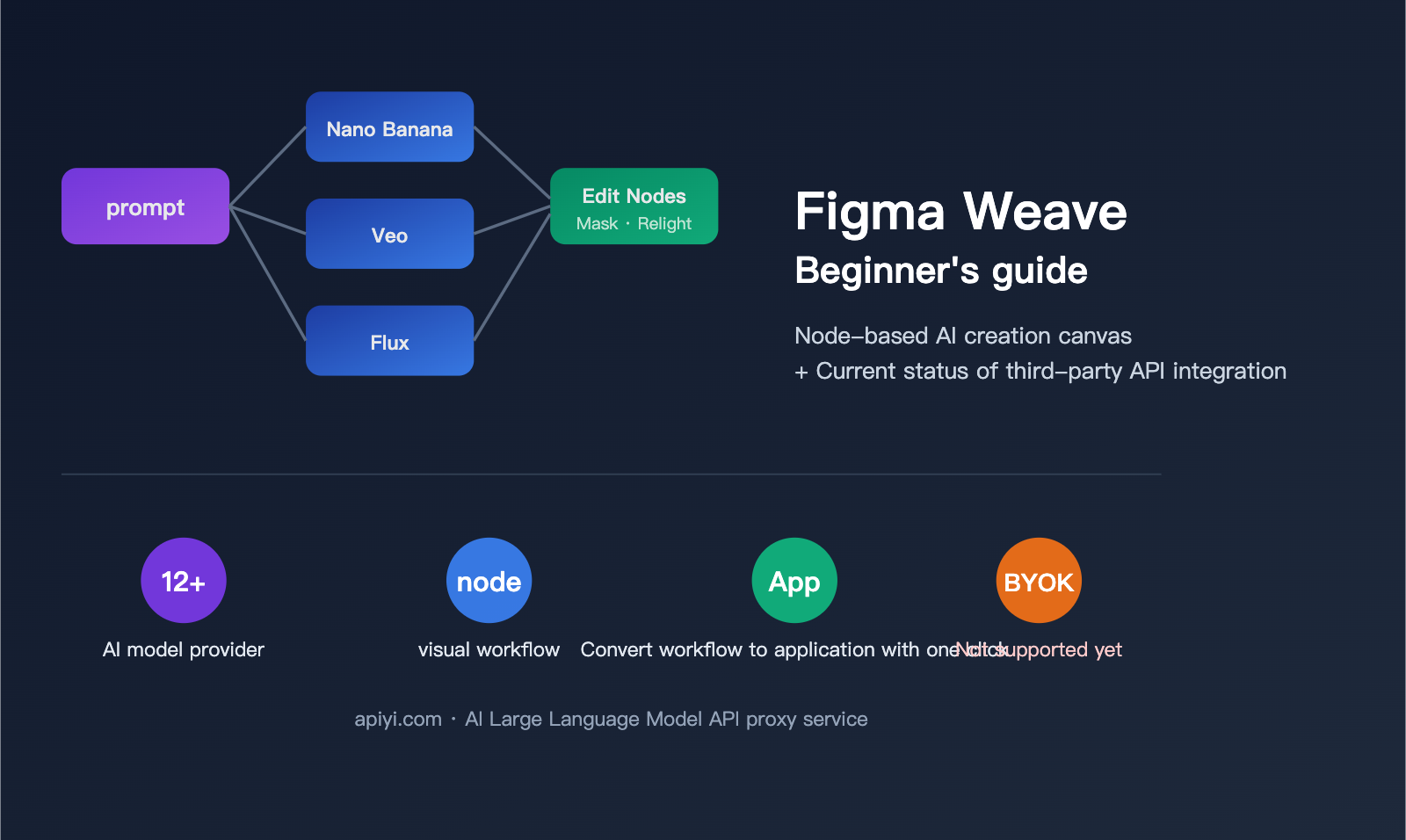
To understand Figma Weave, you first need to understand its origins. In 2025, Figma officially acquired a startup called Weavy, which originally offered a node-based generative AI canvas for professional creators. After the acquisition, Weavy was rebranded as Figma Weave and positioned as an "AI-native creative tool" within the Figma ecosystem. It exists as a separate, though gradually converging, product line from traditional Figma (vector design).
In a nutshell: Figma Weave is an AI creative platform that integrates multiple AI models, professional editing tools, and node-based workflows onto a single canvas. Designers can do the following on one canvas:
- Feed a single prompt to multiple models simultaneously to compare outputs from Nano Banana, Flux, and Ideogram side-by-side.
- Connect generative results to professional editing nodes like masking, color grading, Inpaint, and Relight.
- Package an entire workflow into a reusable mini UI app to share with teammates who aren't familiar with node editing.
📌 Key difference from ComfyUI: ComfyUI is open-source, geared toward engineers, and emphasizes local deployment and custom nodes. Figma Weave is a commercial SaaS, geared toward professional designers, and emphasizes out-of-the-box usability, team collaboration, and built-in professional-grade editing nodes. They aren't replacements for each other; they serve different audiences.
Product Positioning at a Glance
| Dimension | Traditional Figma | Figma Weave |
|---|---|---|
| Core Object | Vector interface design | AI generation + professional editing |
| Interaction Model | Layers / Components | Nodes / Workflows |
| AI Models | Limited built-in AI assistants | 12+ mainstream generative models |
| Output Format | Design drafts / Prototypes | Images / Video / Motion / VFX |
| Core Users | UI/UX Designers | Visual / Motion / VFX Designers |
| Collaboration | Real-time multi-user editing | Workflow sharing + mini-app packaging |
Why Figma is Doing This
From a strategic perspective, Figma's biggest anxiety over the past few years has been: AI generation tools are disrupting the value chain of traditional "pixel-perfect manual design." By acquiring Weavy, Figma not only fills the gap in generative creation but also builds a moat using "professional editing nodes + workflow packaging"—ensuring that AI output isn't just "an image," but an asset that can be refined and reused by the entire team.
For users, the core pain point Figma Weave solves is: consolidating the capabilities scattered across various AI tools into a single, reusable workflow. Previously, you might have generated in Midjourney, masked in Photoshop, created video in Runway, and color-graded in another tool. Now, these steps can be connected as a node graph on the same canvas—build it once, save it, and the whole team can reuse it.
Breaking Down Figma Weave’s Core Capabilities
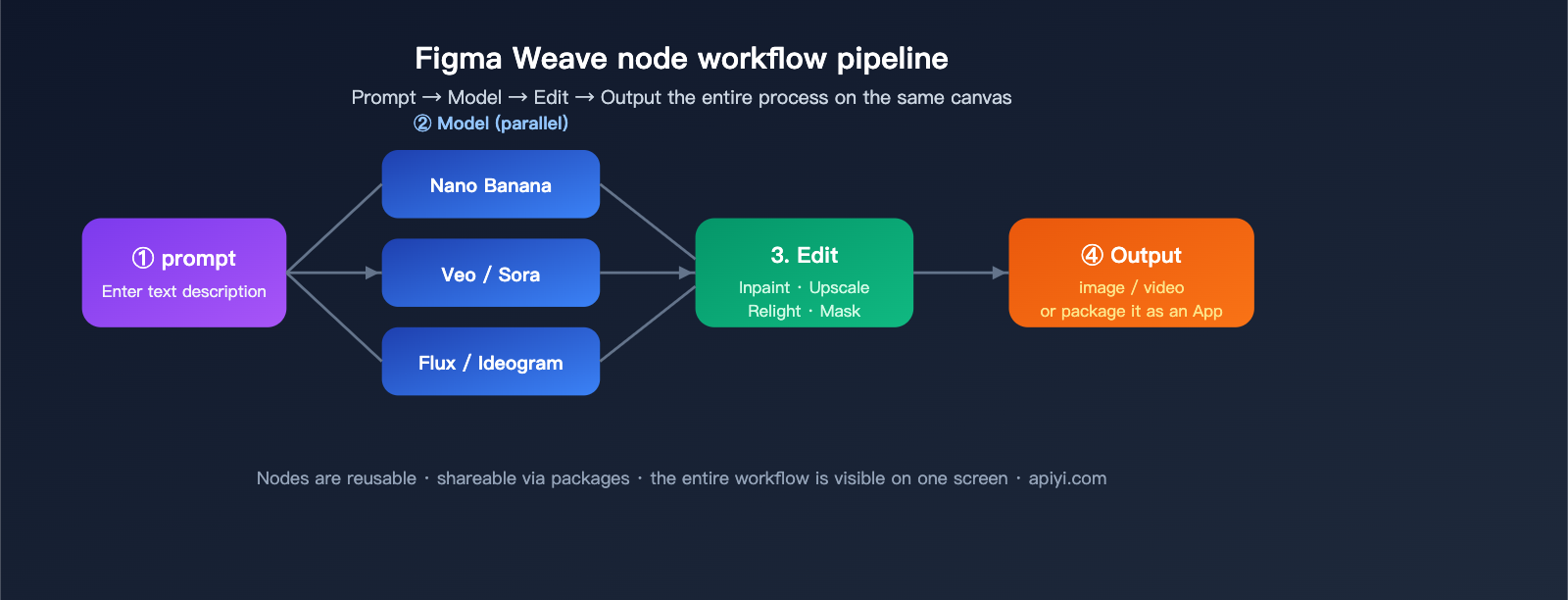
You can break down Figma Weave's capabilities into four main areas. Understanding these will help you speak the same language as your product manager.
Capability 1: Multi-Model Orchestration
This is Figma Weave’s signature feature. You can enter a single prompt and dispatch it to multiple models simultaneously, allowing you to compare results side-by-side on the same canvas. In real-world scenarios, designers pick different models based on the specific task:
- Realistic Imagery / Product Shots: Flux, Ideogram
- Fine Control / In-painting: Nano Banana, Seedream
- Cinematic Video: Veo, Sora, Seedance
- Illustration Styles: Recraft, Bria
In traditional workflows, switching models meant jumping between platforms, accounts, and payment systems. Figma Weave condenses this into a single "node."
Capability 2: Professional Editing Nodes
This is what sets Figma Weave apart from most AI generation tools. It features a built-in suite of professional editing nodes covering:
- Masking & Cutouts: Mask, Inpaint, Outpaint
- Color & Lighting: Relight, Color Grading, Channels
- Geometry & Space: Z Depth, Crop, Invert
- Quality & Upscaling: Upscale, Blur
- Understanding & Description: Image Describer, Painter
These aren't just basic "filters"; they are workflow units that can be seamlessly chained with generation nodes. You can generate an image, use Inpaint to tweak a specific part, use Relight to adjust the lighting, and finally use Upscale to reach 4K—all on the same canvas.
Capability 3: Workflow-to-App
This capability is massive for team collaboration. Figma Weave lets you package a complex node workflow into a simplified "mini-app" with a streamlined UI. Your colleagues don't need to understand the node graph; they just upload a reference image, fill in a prompt, and reuse the workflow you designed.
For example, an operations team might need to batch-generate "brand-consistent product scenario shots." A designer can chain the parameters, masking, lighting, and upscaling nodes into an app. The ops team then just enters the "product name + scenario description" to generate the assets.
Capability 4: Layer Composition and Type Rendering
Traditional AI tools often output "flat images," but Figma Weave supports full layer composition + text typography + blending modes. The output can be editable, multi-layered assets, meaning the AI output isn't the final destination, but rather the starting point for further refinement.
🎯 A quick tip for understanding Weave: If you're familiar with ComfyUI, think of Figma Weave as a "SaaS-ified, designer-friendly, professional-grade" version of ComfyUI—albeit without the ability to customize node code or model weights. For developers, if you need programmatic access to underlying models like Nano Banana Pro or Veo 3.1, a better path is still to integrate via a unified API platform like APIYI (apiyi.com).
Which AI models does Figma Weave support?
As of April 2026, Figma Weave officially lists support for 12+ AI model providers. At a granular level, these can be split into "Verified" and "Unverified" categories.
Verified vs. Unverified Mechanism
This is a key data compliance design feature in Figma Weave:
- Verified Models: Figma has formal contracts with these providers, ensuring your content is only used to provide the service and is never used for model training, backed by contractual legal indemnity.
- Unverified Models: These follow the individual provider's default policies. Figma clarifies: "Unverified does not mean your data will necessarily be used for training," but the protection is not as robust as it is for Verified models.
- Enterprise Restrictions: Under the Enterprise plan, Unverified models require admin approval via the Model Management Dashboard before they can be used.
Mainstream Model List
The following table summarizes the mainstream model providers officially mentioned in Figma Weave documentation (please note: refer to official documentation as model status changes with contract updates):
| Category | Model / Provider | Typical Use Case |
|---|---|---|
| Image Generation | Google Nano Banana Series | Fine control / Consistent editing |
| Image Generation | Black Forest Labs Flux | Photorealistic imagery |
| Image Generation | Recraft / Bria / Ideogram | Illustration / Typography / Brand style |
| Video Generation | Google Veo | Cinematic video generation |
| Video Generation | Runway / Luma | Video generation and editing |
| Video Generation | Kling / Wan / Lightricks | Diverse video styles |
| Multimodal | OpenAI Series | General creative tasks |
| Other | Grok, etc. | Specific scenarios |
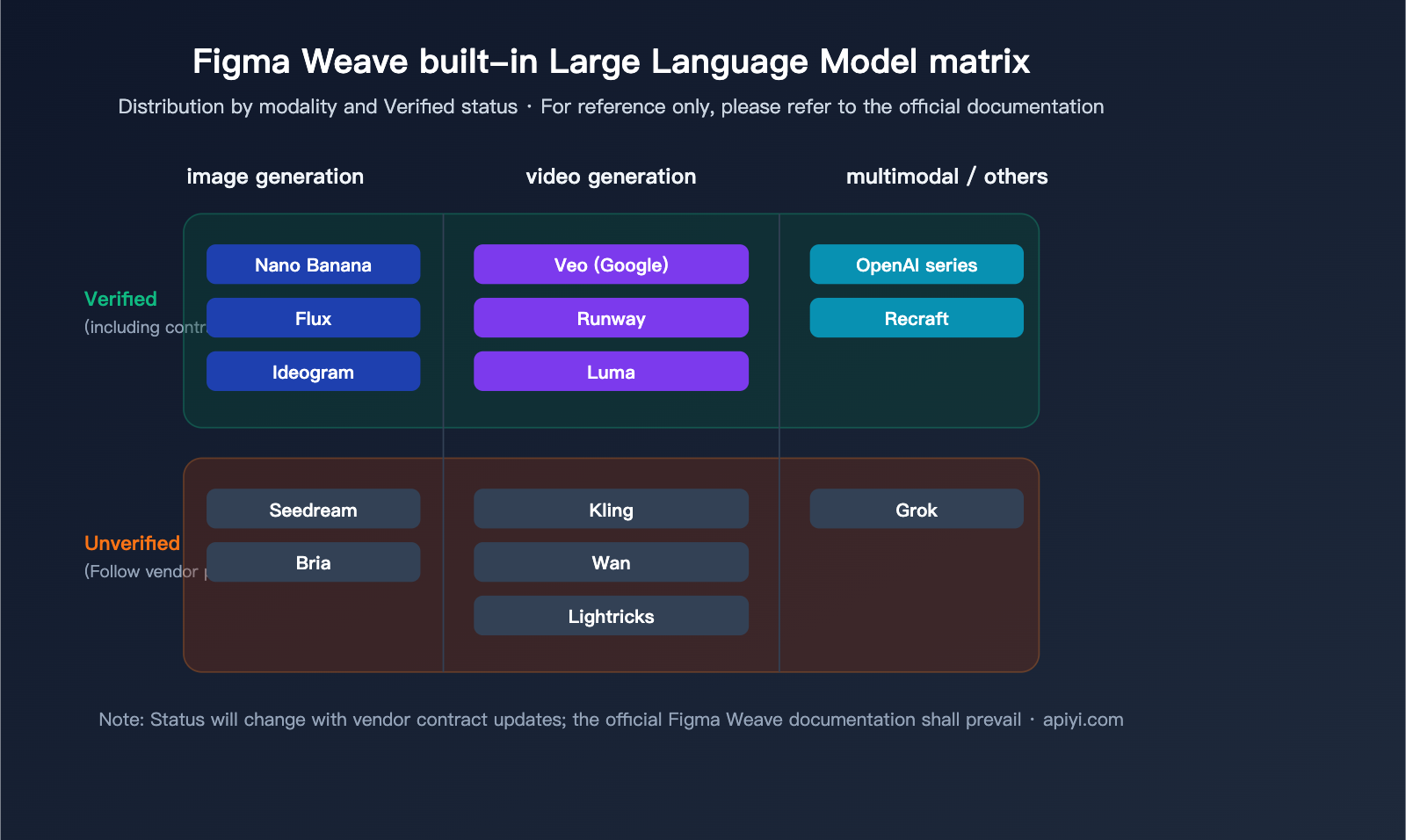
⚠️ Important Note: The model list above is based on official Figma Weave public documentation. Availability, pricing, and Verified status are subject to change. Using these models via Figma Weave is not the same as using the official APIs of these providers; you are using the service bundled by Figma and its partners.
Can Figma Weave connect to APIYI's Nano Banana Pro and Veo 3.1?
This is the most critical question in this article and the one most readers are concerned about. We’ll give you a straight, no-fluff answer based on official documentation:
🚨 Current Answer: No
As of this writing (April 2026), Figma Weave does not support any form of third-party API integration. This isn't just a technical detail; it's a hard product limitation:
According to the official Figma Weave Help Center documentation on API Integration:
"At the moment, Figma Weave doesn't offer API integration for any of its plans."
In other words, Figma Weave doesn’t provide API integration across any of its plans. This means:
- ❌ No support for BYOK (Bring Your Own Key)
- ❌ No support for custom API endpoints (Custom Base URL)
- ❌ No support for third-party API proxy services (such as APIYI, apiyi.com)
- ❌ No support for Webhooks or external workflow triggers
In short, you cannot connect APIYI's Nano Banana Pro, Veo 3.1, or similar APIs to Figma Weave. You are restricted to using the built-in, official channels that Figma has bundled with model providers.
Official Roadmap: Coming Soon, but No Timeline
The Figma Weave official documentation explicitly states that this is a feature "actively in development," with hopes to launch in the "coming months." However, as of now, there is no public timeline, no Beta test announcement, and no confirmed specifications for BYOK.
Current Status Quick Check
| Requirement | Figma Weave Support |
|---|---|
| Use Figma Weave's built-in Nano Banana series | ✅ Supported (via official Figma channels, not your own Key) |
| Use Figma Weave's built-in Veo video generation | ✅ Supported (via official Figma channels) |
| Connect APIYI Nano Banana Pro (Own Key) | ❌ Not supported |
| Connect APIYI Veo 3.1 (Own Key) | ❌ Not supported |
| Connect any third-party API proxy service | ❌ Not supported |
| Custom Base URL | ❌ Not supported |
| API Integration (Future) | 🕒 Planned by Figma, no timeline |
Why doesn't Figma Weave open up API integration right now?
Based on product logic, there are three likely reasons (for reference only):
- Billing and Settlement: Figma Weave model usage is bundled into subscription plans; introducing BYOK would disrupt their billing structure.
- Data Compliance: The legal protections of the Verified/Unverified mechanism depend on direct contracts between Figma and the model providers; opening third-party APIs would weaken these safeguards.
- Product Experience: Parameters, stability, and rate limits vary wildly between API providers. Unifying this experience within a single canvas requires massive engineering effort.
💡 Advice for readers: If you’re a designer with a strong need to use APIYI’s Nano Banana Pro or Veo 3.1, you’ll have to wait for official Figma Weave integration. In the meantime, if you're a developer or looking to build automated workflows, you can bypass Figma Weave and call these models programmatically via the unified interface at APIYI (apiyi.com). You can use tools like n8n, Coze, ComfyUI, or custom scripts to build your own workflows.
Developer Alternative: Direct Calls to Nano Banana Pro and Veo 3.1 via APIYI
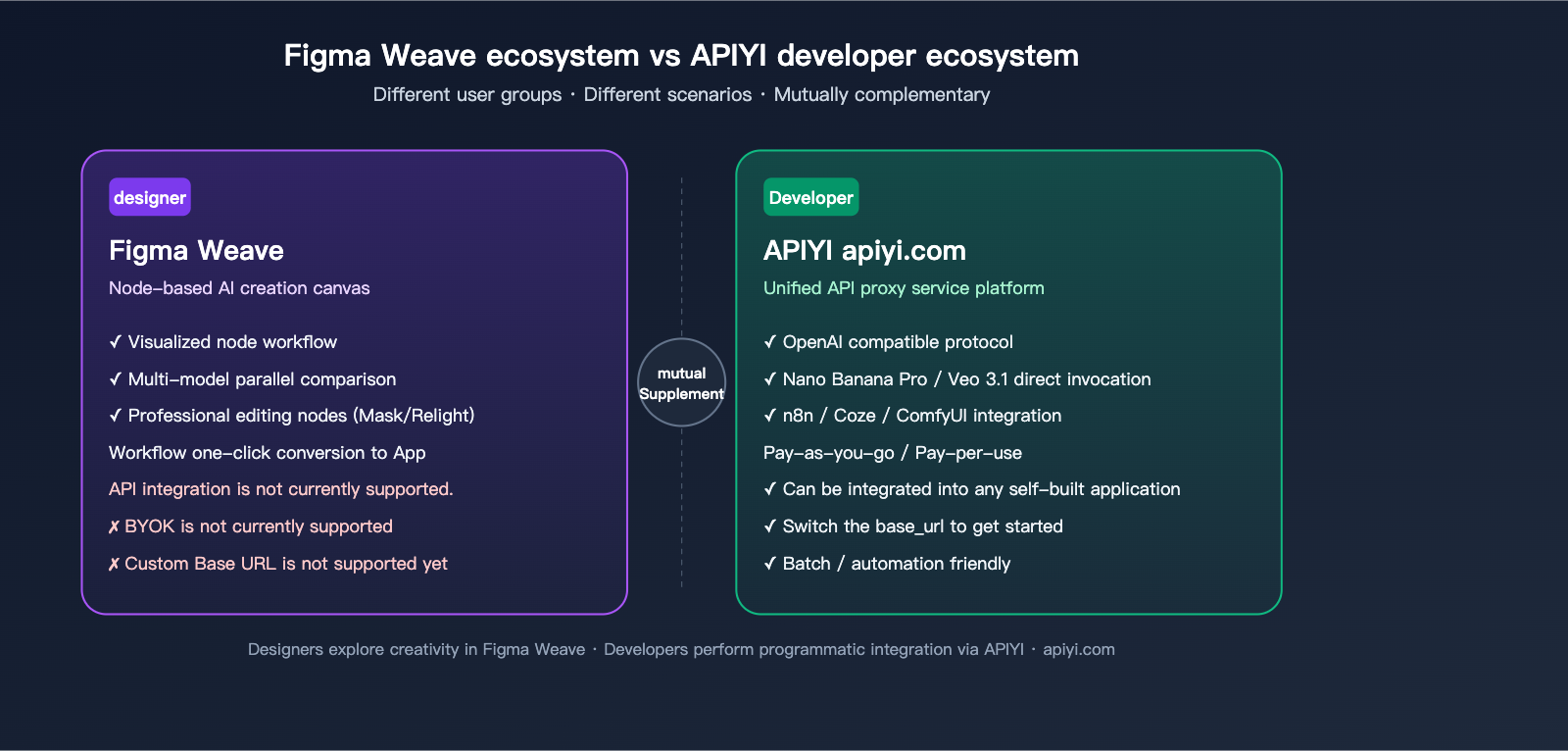
Since Figma Weave can't connect to third-party APIs in the short term, calling the API platform directly is the most practical option for teams and developers needing to programmatically use Nano Banana Pro and Veo 3.1. Below is a reusable minimal code example.
Scenario Comparison: Designers vs. Developers
| User Role | Core Needs | Recommended Solution |
|---|---|---|
| Designer (Individual) | Visual creation, model comparison, image generation | Figma Weave (Built-in models) |
| Design Team | Workflow bundling + team reuse | Figma Weave (Workflows) |
| Independent Developer | API calls, integrate into own apps | APIYI (apiyi.com) Unified API |
| Automation Engineer | n8n / Coze / ComfyUI automation | APIYI (apiyi.com) Unified API |
| Enterprise Application | Large-scale batching, custom prompts | APIYI (apiyi.com) Unified API |
Minimal Code Example: Calling Nano Banana Pro
import openai

# Initialize client pointing to APIYI
client = openai.OpenAI(
    api_key="YOUR-APIYI-KEY",
    base_url="https://api.apiyi.com/v1"
)

# Call the Nano Banana Pro model
response = client.images.generate(
    model="nano-banana-pro",
    prompt="A minimalist product scene, light background, soft shadows",
    size="1024x1024"
)

print(response.data[0].url)
The code above uses the official OpenAI SDK—just change the base_url to APIYI’s unified entry point. This is why many developers choose APIYI: the integration process is identical to OpenAI’s, so you don't need to write custom code for every single model.
Minimal Code Example: Calling Veo 3.1 Video Generation
import requests

# Direct API request to APIYI
resp = requests.post(
    "https://api.apiyi.com/v1/video/generations",
    headers={"Authorization": "Bearer YOUR-APIYI-KEY"},
    json={
        "model": "veo-3.1",
        "prompt": "An orange cat slowly stretching on a windowsill, cinematic soft lighting",
        "duration": 8,
        "aspect_ratio": "16:9"
    }
)
print(resp.json())
Note: Please check the official APIYI documentation for specific field requirements. Veo 3.1 is a high-end video model; generation can take anywhere from tens of seconds to several minutes, so it is recommended to use an asynchronous task + polling approach.
🧰 Automation Friendly: APIYI’s unified interface is highly compatible with mainstream automation platforms like n8n, Coze, and ComfyUI. If you want to build a workflow like "Form Trigger → Nano Banana Pro Generation → Auto Upload to OSS → Push to Feishu," using the APIYI API as the model invocation node is a standard practice.
Complementary Relationship with Figma Weave
It’s important to emphasize: APIYI and Figma Weave are not competitors; they are complementary.
- Figma Weave solves the problem of "designers visualizing ideas within a canvas."
- APIYI solves the problem of "developers integrating model capabilities into their own product backends via code."
An ideal team setup would be: designers explore creative concepts and define visual styles in Figma Weave; developers use APIYI's API to build production-grade, stable generation capabilities into the backend. Once Figma Weave eventually supports BYOK, your team can use the same APIYI key to bridge both workflows seamlessly.
FAQ: Frequently Asked Questions
Q1: Is Figma Weave free?
Figma Weave offers a trial credit, but you'll need a subscription for full access. Pricing is set by the official Figma website. Model usage is bundled into subscription tiers and cannot be converted into credits. If you're looking for "pay-as-you-go" flexibility with access to any model, you should consider a developer-focused API platform like APIYI (apiyi.com), which charges based on tokens or per-invocation.
Q2: Can I use Figma Weave to call APIYI's Nano Banana Pro directly?
No. Figma Weave currently does not support any form of API integration or Bring Your Own Key (BYOK). You are restricted to their built-in model channels. If you need to call Nano Banana Pro using your own API key, you'll need to do so through the APIYI interface within your code or automation tools.
Q3: What's the difference between Figma Weave's Nano Banana and APIYI's Nano Banana Pro?
The former is a bundled service version from the Figma-Google partnership, billed via subscription; the latter is a developer API accessed via APIYI (apiyi.com) on a per-use or pay-as-you-go basis. While the underlying model capabilities are the same, the usage methods, billing, and licensing agreements differ.
Q4: If Figma Weave opens up API integration in the future, can I connect it to APIYI?
That depends on how Figma Weave implements its API integration. If they support custom base URLs and OpenAI-compatible protocols, it would theoretically be possible to connect to APIYI (apiyi.com). However, this is purely speculative, and you should rely on official announcements.
Q5: For batch automation, should I use Figma Weave or APIYI?
I recommend using the APIYI API directly for batch automation. Figma Weave's "Workflow-to-App" is more focused on "visual collaboration and reuse" for teams. For high-volume, purely programmatic tasks, a direct API is a much more natural choice.
Q6: Does Figma Weave support Veo 3.1?
Figma Weave has publicly stated support for the Google Veo series. For specific details regarding version 3.1 or its features, please refer to the official Figma Weave documentation—vendors update these versions frequently, so this can change.
Q7: Should I choose ComfyUI or Figma Weave?
If you're an engineer or a technical creator who values local deployment, custom nodes, and an open-source ecosystem, go with ComfyUI. If you're a professional designer or design team looking for out-of-the-box functionality, professional editing nodes, and team collaboration, choose Figma Weave. They serve different target audiences.
Q8: Is content generated on Figma Weave used to train their models?
It depends on whether you're using "Verified" or "Unverified" models. Verified models have contracts explicitly stating they won't be used for training, while Unverified models follow the individual model provider's policies. Enterprise plans also include an additional layer of administrator approval.
Conclusion: Figma Weave is Worth Watching, But API Integration is Still Pending
Returning to the two core questions from the beginning of this article:
1. What is Figma Weave?
It is a node-based AI creative canvas created by Figma after acquiring Weavy. It bundles 12+ mainstream generative AI models, professional-grade editing nodes, and workflow capabilities into a single canvas. It is positioned for professional designers and visual teams, not for developers.
2. Can Figma Weave connect to APIYI's Nano Banana Pro and Veo 3.1?
Not currently. Official Figma Weave documentation explicitly states that none of their tiers support API integration, meaning no BYOK, no custom base URLs, and no third-party API connectivity. They have indicated it will be released in the "coming months," but no specific timeline exists.
For developers, the more realistic path in the short term is to bypass Figma Weave and call models like Nano Banana Pro and Veo 3.1 directly through APIYI's (apiyi.com) unified API. You can pair this approach with automation platforms like n8n, Coze, or ComfyUI, or integrate it into your own backend application. Once Figma Weave eventually opens up its API, you can simply plug in your APIYI key to achieve "dual-link coverage."
📢 Pro-tip: Designers can start exploring their creative workflows with Figma Weave today. For developers who need "direct API access to Nano Banana Pro / Veo 3.1," the most convenient solution remains the unified interface provided by APIYI (apiyi.com)—it's isomorphic with the OpenAI SDK, so you can start by simply switching your
base_url.
Author: APIYI Team · Specializing in AI Large Language Model API integration and developer tool reviews · apiyi.com