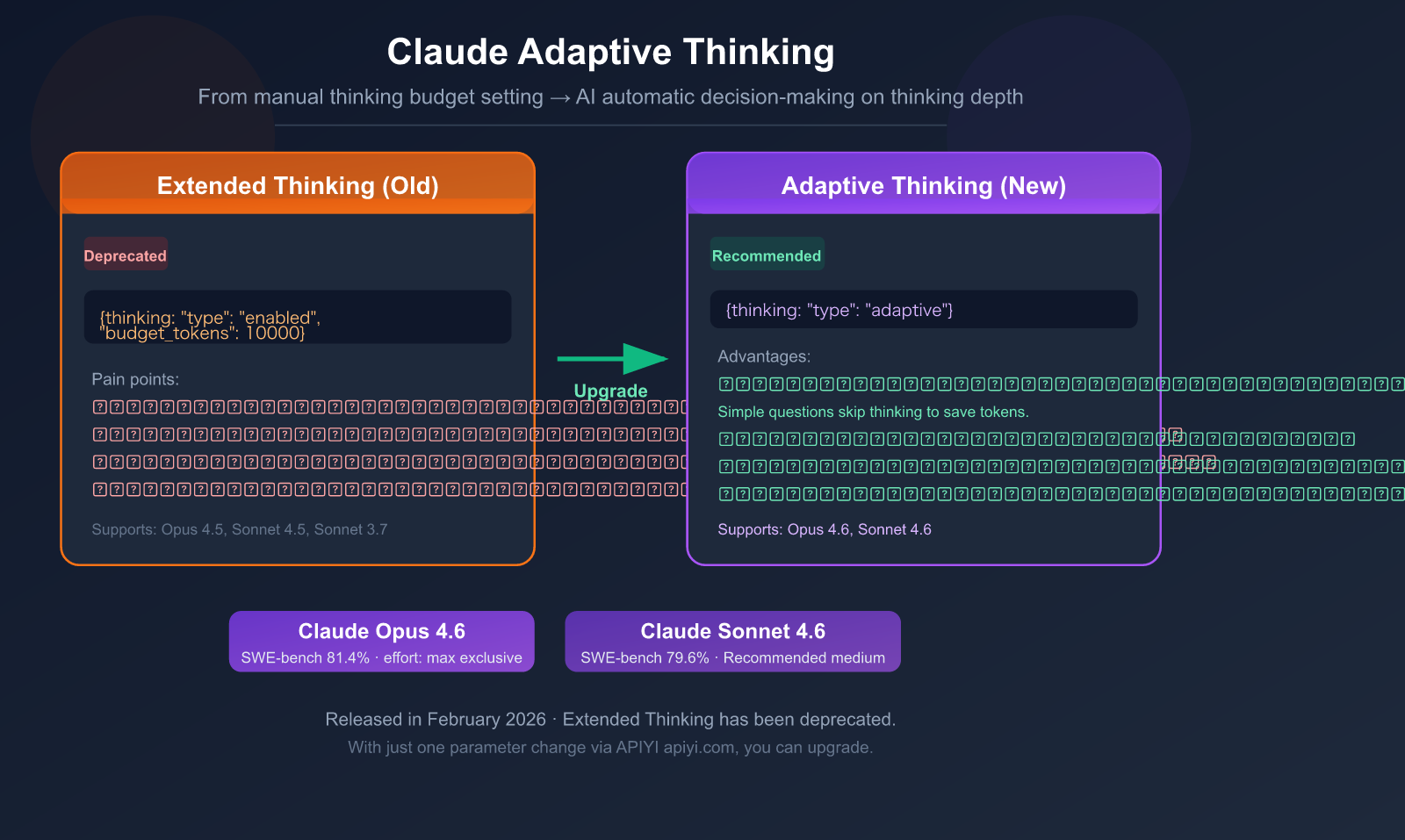
If you've been using Claude's Extended Thinking mode, heads up—it's been marked as Deprecated (to be discontinued) in Claude 4.6. It's being replaced by a smarter mode: Adaptive Thinking.
The core change: Instead of you manually setting a thinking token budget (budget_tokens), Claude now decides for itself whether to think and how deeply. Simple questions get instant answers, complex problems get deep reasoning—all handled by a single parameter.
Core Value: By reading this article, you'll master the API call method for Adaptive Thinking, its 4 major upgrades, how to configure the effort parameter, and get a complete migration guide from Extended Thinking.
What is Adaptive Thinking: The One-Sentence Explanation
Extended Thinking (Old Mode): The developer tells Claude, "You have a budget of 10,000 tokens to think," and Claude will use up that budget.
Adaptive Thinking (New Mode): Claude evaluates the problem's complexity itself and decides "whether it needs to think" and "how deeply to think."
# ❌ Old Mode (Extended Thinking) - To be discontinued
thinking={"type": "enabled", "budget_tokens": 10000}

# ✅ New Mode (Adaptive Thinking) - Recommended
thinking={"type": "adaptive"}
Key Information at a Glance
| Information Item | Details |
|---|---|
| Feature Name | Adaptive Thinking |
| Release Date | February 5, 2026 (Released with Claude Opus 4.6) |
| Supported Models | Claude Opus 4.6, Claude Sonnet 4.6 |
| API Parameter | thinking: {"type": "adaptive"} |
| Control Method | effort parameter (replaces budget_tokens) |
| Status | Officially recommended method (Extended Thinking is Deprecated) |
| Interleaved Thinking | Automatically enabled (no beta header needed) |
| Claude Code | Natively supported, can adjust with /effort command |
🎯 Migration Advice: If your project is currently using Extended Thinking (
type: "enabled"), it's recommended to migrate to Adaptive Thinking as soon as possible. When calling the API for Claude Opus 4.6 or Sonnet 4.6 through the APIYI apiyi.com platform, you can complete the migration by changing just one parameter.
Adaptive vs Extended Thinking: 4 Core Upgrades
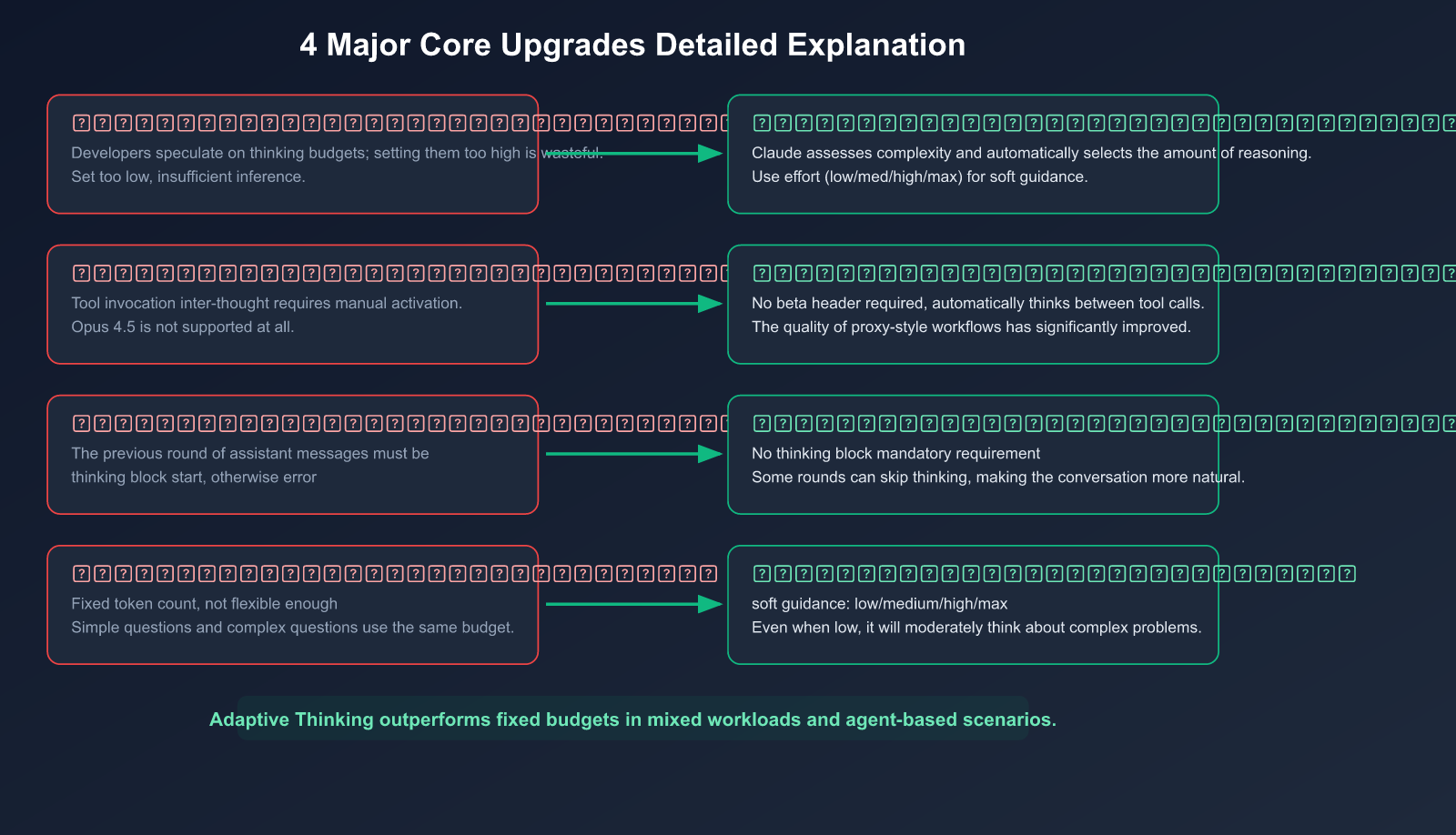
Upgrade 1: From "Fixed Budget" to "Dynamic Decision-Making"
This is the most fundamental change.
Pain point of the old model: You had to guess a budget_tokens value. Set it too low, and complex problems wouldn't get enough reasoning; set it too high, and you'd waste tokens (and money) on simple problems.
# Old model: You guess how many thinking tokens this problem needs?
thinking={"type": "enabled", "budget_tokens": 10000}
# Problem: Simple problems also consume a lot of thinking tokens
New model: Claude automatically decides based on the complexity of each request.
# New model: Claude judges for itself
thinking={"type": "adaptive"}
# Simple problem: No thinking or light thinking
# Complex problem: Deep reasoning
Practical impact: For mixed workloads that are "sometimes simple, sometimes complex" (like code review scenarios—some PRs just change text, others involve concurrency refactoring), Adaptive Thinking outperforms fixed budgets in both overall performance and cost efficiency.
Upgrade 2: Automatic Interleaved Thinking
In agentic workflows, Claude needs to think between multiple tool calls.
Old model: Interleaved thinking required manually adding a beta header and wasn't available on Opus 4.5.
New model: When using Adaptive Thinking, interleaved thinking is automatically enabled without any extra configuration.
User request → Claude thinks → Calls Tool A → Claude thinks again → Calls Tool B → Final answer
This is especially important for Claude Code and other agentic applications—the AI can "rethink" after each tool call, significantly reducing errors.
Upgrade 3: More Flexible Multi-Turn Conversations
Old model: In multi-turn conversations, the assistant message from the previous round had to start with a thinking block, otherwise it would error. This made conversation management complicated.
New model: That restriction is gone. Adaptive Thinking is more flexible in multi-turn conversations because Claude might choose not to think in some rounds.
Upgrade 4: The effort Parameter Replaces budget_tokens
effort is a behavioral signal, not a hard limit, making it more practical than budget_tokens.
| Effort Level | Behavior | Use Case | Supported Models |
|---|---|---|---|
max |
Always deep thinking, no constraints | Highest difficulty reasoning | Opus 4.6 only |
high (default) |
Almost always thinks, deep reasoning for complex problems | Code review, architecture design | Opus 4.6, Sonnet 4.6 |
medium |
Moderate thinking, may skip for simple problems | Daily development, general tasks | Opus 4.6, Sonnet 4.6 |
low |
Minimizes thinking, prioritizes speed | Simple Q&A, style checks | Opus 4.6, Sonnet 4.6 |
Important: Even at low effort, if a problem is complex enough, Claude will still choose to think. Effort is a suggestion, not a command.
💡 Sonnet 4.6 Recommendation: Anthropic officially recommends using
mediumeffort as the default for Sonnet 4.6 to strike the best balance between speed, cost, and quality. When calling via APIYI apiyi.com, just include theoutput_configparameter in your request.
Complete Guide to API Invocation
Basic Invocation: Simplest Adaptive Thinking
import openai

client = openai.OpenAI(
    api_key="YOUR_API_KEY",
    base_url="https://api.apiyi.com/v1"  # APIYI unified interface
)

response = client.chat.completions.create(
    model="claude-opus-4-6",
    messages=[
        {"role": "user", "content": "Explain the impact of Python's GIL on multithreading"}
    ],
    max_tokens=16000,
    extra_body={
        "thinking": {"type": "adaptive"}
    }
)
print(response.choices[0].message.content)
Using the Native Anthropic SDK
import anthropic

client = anthropic.Anthropic(
    api_key="YOUR_API_KEY",
    base_url="https://api.apiyi.com"  # APIYI unified interface
)

response = client.messages.create(
    model="claude-opus-4-6",
    max_tokens=16000,
    thinking={"type": "adaptive"},
    messages=[
        {"role": "user", "content": "Review this code for race conditions..."}
    ]
)

# Parse the response: may contain thinking block and text block
for block in response.content:
    if block.type == "thinking":
        print(f"[Thinking Process] {block.thinking}")
    elif block.type == "text":
        print(f"[Answer] {block.text}")
Fine-Grained Control with the Effort Parameter
# Anthropic SDK example
response = client.messages.create(
    model="claude-sonnet-4-6",
    max_tokens=16000,
    thinking={"type": "adaptive"},
    output_config={"effort": "medium"},  # Medium thinking depth
    messages=[
        {"role": "user", "content": "What's wrong with this code?"}
    ]
)
Omitting Thinking Content to Reduce Latency
If you don't need to see the thinking process, you can use display: "omitted" to reduce transmission latency:
response = client.messages.create(
    model="claude-opus-4-6",
    max_tokens=16000,
    thinking={
        "type": "adaptive",
        "display": "omitted"  # Don't return thinking text
    },
    messages=[...]
)
# Note: Thinking tokens will still be billed
View the complete code review workflow example
import anthropic

client = anthropic.Anthropic(
    api_key="YOUR_API_KEY",
    base_url="https://api.apiyi.com"
)

def review_pr(diff_content, risk_level="medium"):
    """Adaptively review code based on risk level"""

    # High risk: Opus + high effort
    # Low risk: Sonnet + medium effort
    if risk_level == "high":
        model = "claude-opus-4-6"
        effort = "high"
    else:
        model = "claude-sonnet-4-6"
        effort = "medium"

    response = client.messages.create(
        model=model,
        max_tokens=16000,
        thinking={"type": "adaptive"},
        output_config={"effort": effort},
        system="""You are a senior code review expert.
Analyze code changes and categorize by severity level:
🔴 Must fix (security/logic)
🟡 Should fix (quality)
💡 Improvement suggestions""",
        messages=[
            {"role": "user", "content": f"Review:\n\n{diff_content}"}
        ]
    )

    thinking_text = ""
    review_text = ""
    for block in response.content:
        if block.type == "thinking":
            thinking_text = block.thinking
        elif block.type == "text":
            review_text = block.text

    return {
        "thinking": thinking_text,
        "review": review_text,
        "model": model,
        "effort": effort,
        "input_tokens": response.usage.input_tokens,
        "output_tokens": response.usage.output_tokens
    }
🚀 Quick Start: To call the Claude 4.6 API through APIYI apiyi.com, just add
thinking: {"type": "adaptive"}to your request to enable adaptive thinking. No extra configuration needed—upgrade your AI reasoning with one line of code.
Effort Parameter in Practice: Optimal Configurations for Different Scenarios
Scenario-Based Configuration Guide
| Scenario | Recommended Model | Effort | Reason |
|---|---|---|---|
| Simple Q&A/Translation | Sonnet 4.6 | low |
No deep reasoning needed, prioritize speed |
| Code Completion/Formatting | Sonnet 4.6 | low |
Pattern matching task, no thinking required |
| Daily PR Review | Sonnet 4.6 | medium |
Balance speed and review depth |
| Complex Bug Debugging | Opus 4.6 | high |
Requires cross-file reasoning |
| Security Vulnerability Audit | Opus 4.6 | high |
Can't miss high-risk issues |
| Math/Logic Proof | Opus 4.6 | max |
Requires extreme reasoning depth |
| Architecture Design | Opus 4.6 | max |
Requires comprehensive trade-off consideration |
Using Effort in Claude Code
After the March 2026 update, Claude Code added the /effort command:
# Set directly in the Claude Code terminal
/effort medium    # Daily coding
/effort high      # Code review
/effort max       # Architecture design (Opus 4.6 only)
This lets developers flexibly adjust Claude's thinking depth based on the current task, without modifying code.
💰 Cost Optimization: The effort parameter directly affects token consumption. For daily coding tasks, setting Sonnet 4.6 to
mediumorlowcan significantly reduce costs. Calling through the APIYI apiyi.com platform is more affordable than the official price, giving you double savings when combined with the effort parameter.
Migrating from Extended Thinking to Adaptive Thinking
Migration Reference Table
| Old Format (Extended Thinking) | New Format (Adaptive Thinking) |
|---|---|
thinking: {"type": "enabled", "budget_tokens": 5000} |
thinking: {"type": "adaptive"}, output_config: {"effort": "low"} |
thinking: {"type": "enabled", "budget_tokens": 10000} |
thinking: {"type": "adaptive"}, output_config: {"effort": "medium"} |
thinking: {"type": "enabled", "budget_tokens": 30000} |
thinking: {"type": "adaptive"}, output_config: {"effort": "high"} |
thinking: {"type": "enabled", "budget_tokens": 100000} |
thinking: {"type": "adaptive"}, output_config: {"effort": "max"} |
| Manually add interleaved thinking beta header | Automatically enabled, no header needed |
Migration Considerations
1. Prompt Cache Will Break
When switching from enabled to adaptive mode, the message-level prompt cache breakpoints will become invalid. System prompt and tool definition caches remain unaffected.
Recommendation: Migrate all requests to adaptive mode at once, rather than mixing modes.
2. Thinking Content is Summarized by Default
The Claude 4.6 model returns summarized thinking content by default, not the full thinking text. This means the thinking block you see is a simplified version.
- Summarized (
display: "summarized"): Default behavior - Omitted (
display: "omitted"): No thinking text returned - Full version: Requires contacting the Anthropic sales team to enable
3. Billing Uses Full Thinking Tokens
Regardless of whether you see summarized or omitted thinking, billing is based on the full internal thinking token count. Don't assume lower costs just because you see less text.
4. Prefill No Longer Supported
Claude Opus 4.6 no longer supports prefilling assistant messages—sending a prefill will return a 400 error. To control output format, use system prompts or structured output.
🎯 Migration Tip: We recommend testing the migration in a staging environment first, especially to compare output quality differences between adaptive mode and your previous fixed
budget_tokenssettings. You can easily run A/B tests through APIYI at apiyi.com—using the same API key to call different configurations.
Billing Mechanism Explained
How Thinking Tokens Are Billed
Understanding the billing mechanism is crucial for cost control.
| Billing Item | Description |
|---|---|
| Input tokens | Standard billing ($5/MTok Opus, $3/MTok Sonnet) |
| Thinking tokens | Billed at output token price ($25/MTok Opus, $15/MTok Sonnet) |
| Response text tokens | Billed at output token price |
| Summary generation tokens | No additional charge |
| display: "omitted" | Thinking tokens are still billed, just not transmitted |
Cost Optimization Strategies
Use low effort for simple problems → May skip thinking → Save many output tokens
                                                ↓
                                           Costs can drop 50-80%
Real-world comparison example: The same code style check task
| Configuration | Thinking Tokens | Response Tokens | Total Cost (Sonnet) |
|---|---|---|---|
| effort: high | ~3000 | ~500 | ~$0.053 |
| effort: medium | ~800 | ~500 | ~$0.020 |
| effort: low | 0 (skipped thinking) | ~500 | ~$0.009 |
For simple tasks, low effort is about 83% cheaper than high effort.
💰 Money-saving tip: For batch processing scenarios (e.g., style checking 100 files), setting effort to
lowcan save significant costs. When calling the Claude 4.6 API via APIYI at apiyi.com, you get discounted pricing plus effort parameter optimization for double the savings.
Frequently Asked Questions
Q1: Can Adaptive Thinking and Extended Thinking be used together?
Yes, but it's not recommended. On the Claude 4.6 model, Extended Thinking (type: "enabled") is still available but marked as Deprecated and will be removed in future versions. Mixing both modes also breaks prompt cache checkpoints. It's recommended to migrate to Adaptive Thinking as soon as possible. The parameter format is fully compatible when calling via APIYI at apiyi.com.
Q2: Does Opus 4.5 support Adaptive Thinking?
No. Adaptive Thinking only supports Claude Opus 4.6 and Sonnet 4.6. Opus 4.5 still requires using type: "enabled" mode and manually setting budget_tokens. If you need Adaptive Thinking, it's recommended to upgrade to the 4.6 series models. APIYI at apiyi.com provides API access for both 4.5 and 4.6 full model series.
Q3: Does display: “omitted” actually save money?
No, it doesn't save money. display: "omitted" only makes the API not return the thinking text, reducing network transmission latency. But the internal thinking tokens are still generated and billed. The real way to save money is by lowering the effort level—low or medium will make Claude skip or reduce thinking on simple problems.
Q4: How can I tell if Claude performed thinking in a specific request?
Check if the response contains a thinking type content block. If Claude determines thinking isn't needed, the response will only have a text block, no thinking block. In Adaptive mode, the token counts in the usage field can help you determine how many tokens were consumed by thinking.
Q5: How to use Adaptive Thinking in Claude Code?
Claude Code enables Adaptive Thinking by default when using Opus 4.6 or Sonnet 4.6. You can adjust thinking depth with the /effort command: /effort low (fast mode), /effort medium (balanced mode), /effort high (deep mode). The March 2026 update also fixed the "adaptive thinking is not supported" error caused by non-standard model strings.
Summary: Adaptive Thinking is the Core Upgrade in Claude 4.6
Adaptive Thinking represents a significant evolution in AI reasoning patterns—shifting from "developers guessing how much the AI needs to think" to "the AI deciding for itself how much thinking it needs."
Four Core Upgrades:
- Dynamic Decision-Making: Simple questions get instant replies, complex problems get deep reasoning
- Automatic Interleaved Thinking: Automatic reasoning between tool calls in agent workflows
- Flexible Multi-Turn Conversations: No need to force a thinking block at the start
- Effort Parameter: A more intuitive control method than
budget_tokens
Migration Recommendation: Change from thinking: {"type": "enabled", "budget_tokens": N} to thinking: {"type": "adaptive"}, and use output_config: {"effort": "..."} to control depth.
We recommend using APIYI at apiyi.com to quickly access the APIs for Claude Opus 4.6 and Sonnet 4.6. A single parameter change lets you enjoy the intelligent reasoning and cost optimization brought by Adaptive Thinking.
References
-
Claude API Documentation – Adaptive Thinking: Official technical guide
- Link:
platform.claude.com/docs/en/build-with-claude/adaptive-thinking
- Link:
-
Claude API Documentation – Effort Parameter: Detailed explanation of effort configuration
- Link:
platform.claude.com/docs/en/build-with-claude/effort
- Link:
-
Anthropic Official – Claude Opus 4.6: Release announcement
- Link:
anthropic.com/news/claude-opus-4-6
- Link:
-
Claude API Documentation – Extended Thinking: Guide for the original extended thinking
- Link:
platform.claude.com/docs/en/build-with-claude/extended-thinking
- Link:
Author: APIYI Team | To master the latest Claude API capabilities, visit APIYI at apiyi.com for API access and technical support for the full Claude 4.6 model series.