Author’s note: You call gpt-6.1-sol successfully but get an empty body? The docs record completion_tokens as 300, all of it reasoning_tokens, with not a single word of actual text. This article explains why, and gives you two fixes.
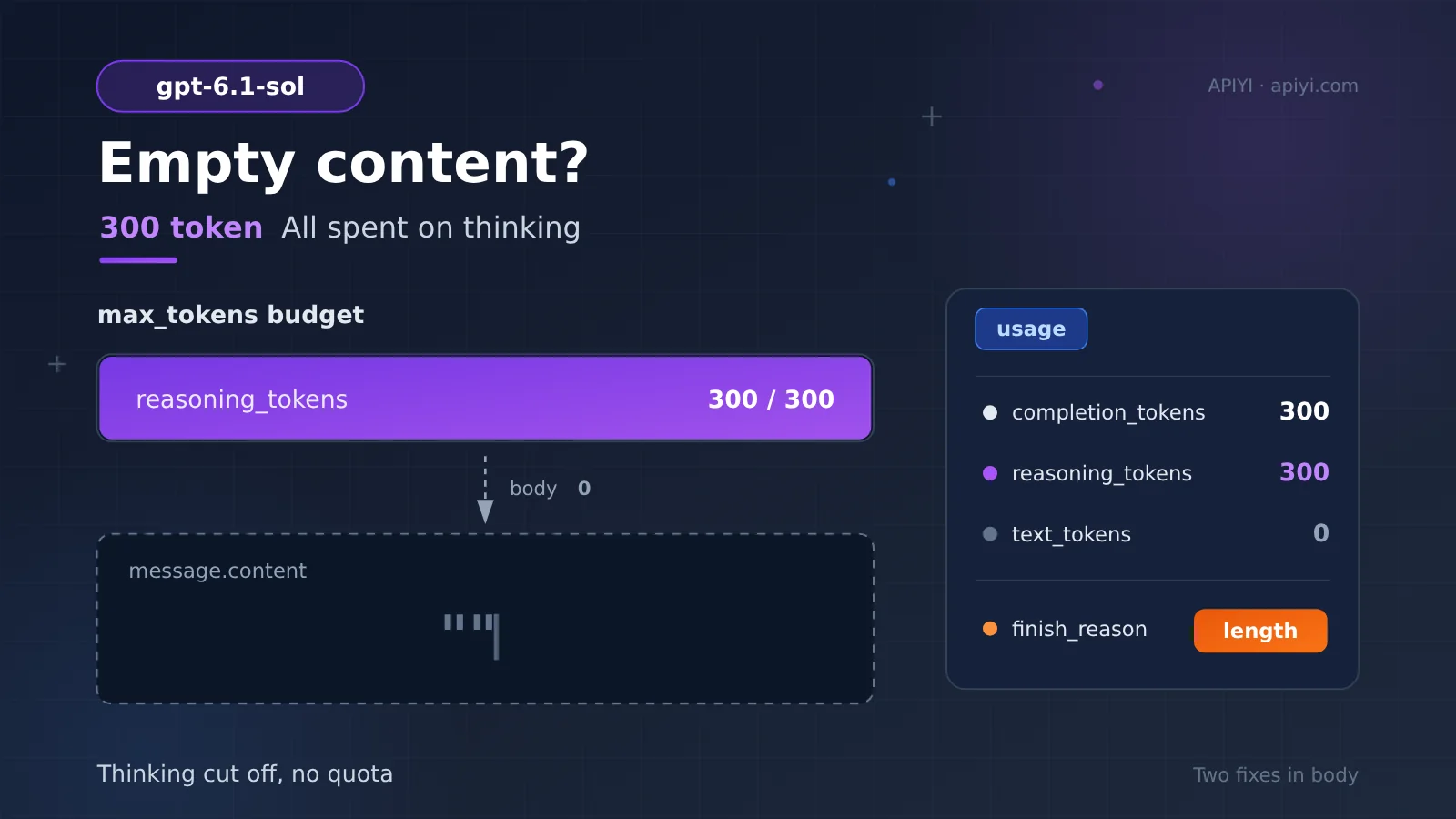
If you just finished calling gpt-6.1-sol, the request didn’t throw an error, but the message.content you got back is an empty string, don’t immediately start suspecting your network or a broken model. Take a look at the usage in the response: completion_tokens is 300, reasoning_tokens is also 300, and text_tokens is 0. In other words, all 300 tokens went into thinking, and not a single character of the body was written.
This isn’t some flaky, one-off mystery, and the model isn’t being lazy. According to the docs, the reasoning process and the final body of gpt-6.1-sol share the same max_tokens budget — so if the thinking hasn’t finished but the budget is already exhausted, the body gets cut off entirely. Plenty of developers calling gpt-6.1-sol through APIYI (apiyi.com) assumed the platform was having an outage the first time they ran into this.
This isn’t yet another generic primer on reasoning models — it’s a troubleshooting guide aimed squarely at the specific symptom of “the body is empty.” By the time you finish reading, you’ll understand what those numbers in usage are telling you, and you’ll have two parameter-level changes that get the body to come out normally.
The Core Issues Behind gpt-6.1-sol’s Empty Body Text
Let me give you the conclusion first, then work through the details. A few key facts recorded in the docs determine how you should go about troubleshooting this:
| Key point | What the docs say | Why it matters to you |
|---|---|---|
| Thinking and body text share the same budget | For gpt-6.1-sol, both the reasoning process and the final answer come out of max_tokens |
Understanding the root cause of the empty body |
| All 300 tokens went to thinking | completion_tokens 300 equals reasoning_tokens 300, while text_tokens is 0 |
Spotting the problem type at a glance |
| Two outward symptoms | Throws an empty_response error code, or returns HTTP 200 with an empty body string |
Not being fooled by a “fake success” |
| Retrying is basically useless | Same prompt, same max_tokens—send it again and you’ll get pretty much the same result |
Saving yourself a detour |
Where did all those 300 tokens go?
To understand the empty body, you first need to understand how gpt-6.1-sol answers. It’s a reasoning model: before it actually starts writing, it drafts internally—breaking down the problem, trying out paths, checking itself. That draft is what gets counted as reasoning_tokens.
The key point is that, according to the docs, the draft and the body text aren’t two separate budgets—they share the same max_tokens. When max_tokens is set somewhere in the 200 to 500 range and the task genuinely requires reasoning, the budget can easily get used up during the thinking phase: the thinking isn’t even finished, the body hasn’t started, and the budget has already run dry. What comes back to you is naturally an empty body.
The numbers in the docs lay it out pretty plainly:
completion_tokens: 300—the total amount generated this timereasoning_tokens: 300—the portion spent on thinkingtext_tokens: 0—the portion actually written as body textfinish_reason:length—it stopped because it hit the length cap, not because it wrapped up normally
completion_tokens exactly equal to reasoning_tokens with text_tokens at zero—that’s pretty much the standard signature of “the whole budget got eaten by thinking.” Combined with finish_reason being length, you can confirm the model isn’t “unwilling to answer” but “has no budget to answer.” The cap it hit here also lands right within the 200 to 500 easily-exhausted range mentioned in the docs.
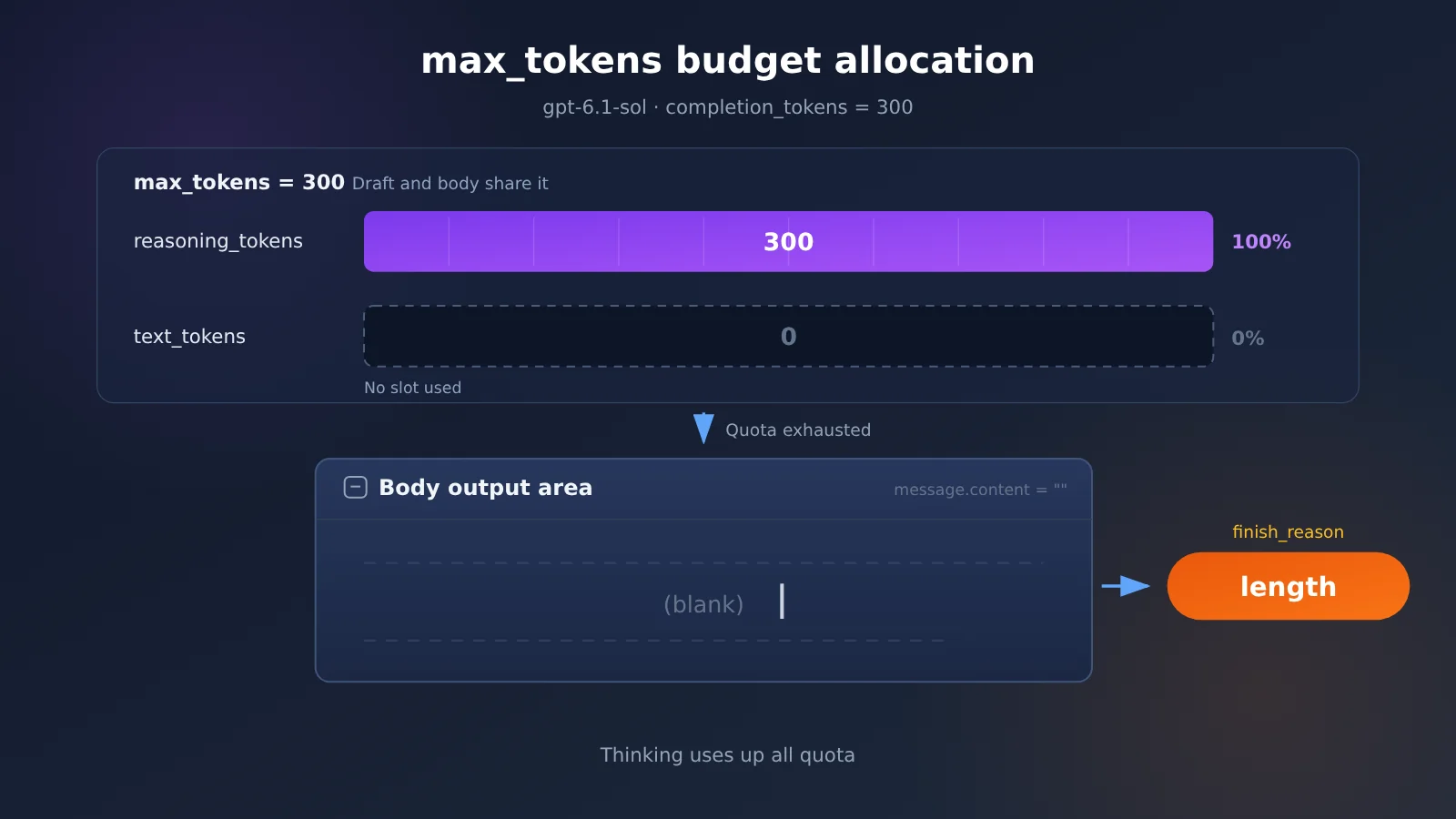
The diagram above illustrates how the budget was allocated for this call. The full original wording of the field meanings is collected in the APIYI documentation center—it’s worth cross-checking against the original to confirm the details, so you don’t change parameters based on memory.
The two outward symptoms of an empty body
The same cause shows up in two ways at the API level, and the docs record both. One is a direct error: it returns the error code empty_response, and the request is explicitly flagged as anomalous. The other is a “fake success”: HTTP 200, everything looks normal, but message.content is an empty string.
The second kind is more misleading. The status code is successful, the latency looks normal, and you won’t catch that the body is empty unless you dig into usage. So when you run into “the API call succeeded but the content is empty,” your first instinct should be to check usage, not to check the network.
| Outward symptom | What’s returned | How to tell |
|---|---|---|
| Direct error | Error code empty_response |
Plainly visible |
| Fake success | HTTP 200, message.content is an empty string |
Need to check usage and finish_reason |
How to confirm the cause of an empty body in gpt-6.1-sol
Troubleshooting isn’t complicated—four steps are enough. I’d suggest starting with usage:
- Check whether
completion_tokensequalsreasoning_tokens. If they’re equal, it means all generated tokens went into reasoning, and the body got zero budget. - Check whether
text_tokensis 0. A value of zero means not a single word was written into the body—this is the most direct evidence. - Check whether
finish_reasonislength. If it’slengthrather than a normal completion, the model was cut off by the limit. - Recall your
max_tokenssetting. If it falls in the 200–500 range and the task requires reasoning, you’ve basically found your answer.
Once confirmed, there’s one thing you can skip right away: retrying with the exact same parameters. The docs record that with the same prompt and the same max_tokens, retrying is basically useless. This isn’t network flakiness—it’s the inevitable result of budget allocation. Send it again, and the budget stays the same, so reasoning will still spend it all first.
If you’re calling gpt-6.1-sol through an aggregation platform, the troubleshooting entry point typically looks like this:
- Platform address: APIYI apiyi.com
- API endpoint:
https://api.apiyi.com/v1 - Model name:
gpt-6.1-sol - API spec: OpenAI-compatible, with parameter semantics matching the official API
Suggestion: Get free test credits through APIYI apiyi.com, then compare responses to the same prompt under different
max_tokensvalues. Within a few minutes you’ll confirm the issue is budget allocation, not the model itself.
gpt-6.1-sol Empty Response Body Quick Fix: Increase max_tokens or Lower reasoning_effort
Once the cause is clear, the fix follows naturally, and there are only two directions: give the response body more room, or make reasoning spend less. Each fix suits a different kind of task, so don’t mix and match.
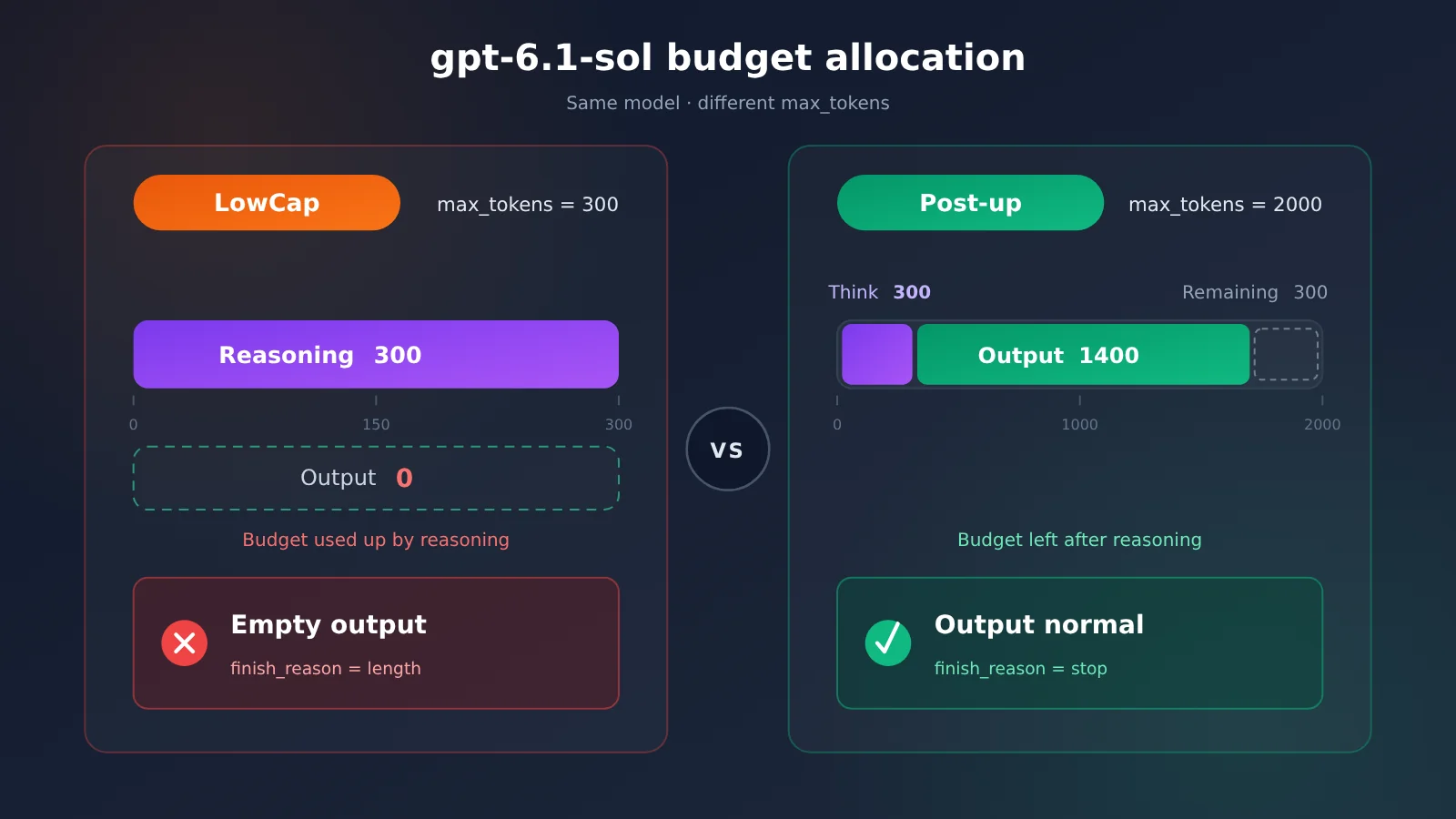
Fix 1: Increase max_tokens. The docs give reference values: start at 2000 for ordinary conversation, and go above 16000 for complex reasoning or long-form tasks. These numbers aren’t arbitrary—the reasoning draft itself can already be substantial, and the response body needs extra room on top of that. 2000 is just the starting line for ordinary conversation.
Fix 2: Lower reasoning_effort. If the task doesn’t need deep reasoning—simple rewriting, format conversion, one-line Q&A—you can let the model “think less.” Once the thinking stage consumes less, the same budget goes further.
| Option | What to Do | When It Fits | Expected Result |
|---|---|---|---|
Increase max_tokens |
Start at 2000 for ordinary conversation; above 16000 for complex reasoning and long-form tasks | Tasks that need full reasoning quality | Fixes the root cause |
Lower reasoning_effort |
Reduce reasoning intensity | Light tasks that don’t demand deep reasoning | Less thinking overhead |
| Retry with the same parameters | Change nothing and send again | Basically useless | Not recommended |
Comparing the Fixes
Increasing max_tokens is the preferred fix. It doesn’t change how the model thinks—it just swaps in a bigger “scratch pad,” so reasoning quality is unaffected. With a higher ceiling, reasoning proceeds as usual and the response body gets its own share of the budget, so text_tokens is naturally no longer 0.
Lowering reasoning_effort fits a different scenario: the task itself doesn’t need deep thinking, but the model runs full reasoning by default. Lower it and thinking costs less and responses come faster—but don’t do this for complex tasks, since compressing reasoning depth can hurt answer quality.
Retrying with the same parameters gets its own callout because it’s the most common knee-jerk reaction. The docs note that with the same prompt and the same max_tokens, retrying basically doesn’t help—it’s not a luck problem, it’s an arithmetic problem. You can also reproduce the difference between the two scenarios above on the APIYI apiyi.com platform with the same prompt and see the comparison in about two minutes.
Does Increasing max_tokens Cost More?
Many people are afraid to increase max_tokens because they worry the bill will explode. The docs make one key point here: max_tokens is a ceiling, not actual consumption—billing is based on the tokens actually generated.
In other words, moving max_tokens from 300 to 2000 doesn’t mean every call is billed at 2000. You’re charged for how much reasoning was used and how much body text was written—the unused portion of the ceiling costs nothing. Raising the ceiling is essentially giving the response body room to survive, not prepaying a bigger bill. APIYI apiyi.com uses pay-as-you-go billing; for exact unit prices, refer to the platform’s pricing page—this article doesn’t quote specific numbers.
gpt-6.1-sol Empty Response FAQ
Q1: What exactly is an “empty response” from gpt-6.1-sol?
When you call `gpt-6.1-sol`, the reasoning process and the response body draw from the same `max_tokens` budget. The reasoning burns through it first, so the actual content gets cut off entirely — and you end up with nothing. In the documented example numbers, `completion_tokens` is 300, all of it consumed by `reasoning_tokens`, while `text_tokens` is 0.
Q2: Does an HTTP 200 still count as an error?
Yes. As documented, an empty response shows up in one of two ways: either an `empty_response` error code, or an HTTP 200 where `message.content` is an empty string. A successful status code doesn’t guarantee the content is fine — you have to look at `text_tokens` and `finish_reason` in the usage data together.
Q3: Why doesn’t retrying help?
The docs are clear on this: same prompt, same `max_tokens`, retrying basically gets you nowhere. The budget allocation is deterministic — if the budget doesn’t change, the reasoning will still spend it all first. To change the outcome, change the parameters, not your luck.
Q4: So the model just refused to answer?
It’s not refusing — it ran out of budget to answer with. When `finish_reason` is `length`, the model was cut off by the cap, not stopping of its own accord. Raise `max_tokens` and the exact same question will get you an actual response.
Q5: Which settings are most likely to trip people up?
Per the docs, setting `max_tokens` to roughly 200–500 on a task that requires reasoning will exhaust the budget during the thinking phase. That range might be plenty for an ordinary chat model, but for a reasoning model like `gpt-6.1-sol`, it’s often not even enough to finish a draft.
Q6: How do I quickly verify the fix works?
We recommend running a side-by-side comparison on APIYI (apiyi.com): sign up to get free trial credit, set the endpoint to `https://api.apiyi.com/v1`, pick `gpt-6.1-sol` as the model, then:
1. Send the same prompt again with `max_tokens` raised to 2000
2. Check whether `text_tokens` is greater than 0
3. Check whether `message.content` contains actual text
Same platform, same prompt, only one variable changed — the cleanest possible conclusion.
Q7: Does raising max_tokens increase the cost?
You aren’t billed for the ceiling. As documented, `max_tokens` is an upper limit, not actual consumption — billing is based on the tokens actually generated. Whatever the reasoning plus the response actually produced is what you pay for. For exact per-token pricing, check the APIYI pricing page.
Q8: Do non-reasoning models behave this way too?
Per the docs, non-reasoning models don’t produce this kind of empty response. With no thinking phase, the entire `max_tokens` budget goes to the response, so a small budget just truncates the answer rather than wiping it out completely. That’s one of the signals to help you decide whether switching models is the right move.
Key Takeaways: The gpt-6.1-sol Empty Response Body
- Root cause of the empty body: reasoning and the actual response share
max_tokens, and reasoning burns through the budget first - How to spot it:
completion_tokensequalsreasoning_tokens, andtext_tokensis 0 - Two symptoms: the
empty_responseerror code, or an HTTP 200 with an empty string - First fix to try: start at 2000 for regular chat, and 16000+ for complex reasoning and long-form output
- Lighter alternative: lower
reasoning_effortto cut down on reasoning consumption - Don’t waste effort: retrying with the same parameters is basically useless
- Billing logic:
max_tokensis a ceiling, not a charge — you’re billed for what’s actually generated
Summary
Looking back, the key points about the gpt-6.1-sol empty response body are actually pretty clear:
- The cause: reasoning and the actual response share
max_tokens. That set of 300 numbers is allreasoning_tokens,text_tokensis 0, andfinish_reasonislength. - The fix: raise
max_tokens(start at 2000 for regular chat, 16000+ for complex reasoning and long-form output), or lowerreasoning_effort. Retrying with the original parameters is basically useless. - Billing:
max_tokensis a ceiling, not consumption — you’re billed for the tokens actually generated, so there’s no need to be stingy about raising it.
Next time you hit “the request succeeded but the body is empty”, check usage first, then finish_reason — you’ll usually pin it down within ten seconds. To quickly verify the fix, try APIYI at apiyi.com: the platform offers free test credits and a unified interface across multiple models, so you can change one parameter and compare immediately.
References
- APIYI Documentation Center: Explaining Empty Bodies in Reasoning Models
- Link:
docs.apiyi.com/faq/reasoning-model-empty-response.md -
Description: the original write-up on why empty bodies happen, the two ways they show up, and how to fix them
-
APIYI Docs Brief: gpt-6.1-sol Empty Body Case (2026-11)
- Link:
docs.apiyi.com/live/2026-11/reasoning-model-empty-response.md - Description: the source for the numbers around
completion_tokens300 and the recommendedmax_tokensvalue
Author: APIYI Technical Team
Technical discussion: Feel free to reach us through the APIYI website homepage. More materials are available at the docs.apiyi.com documentation center.