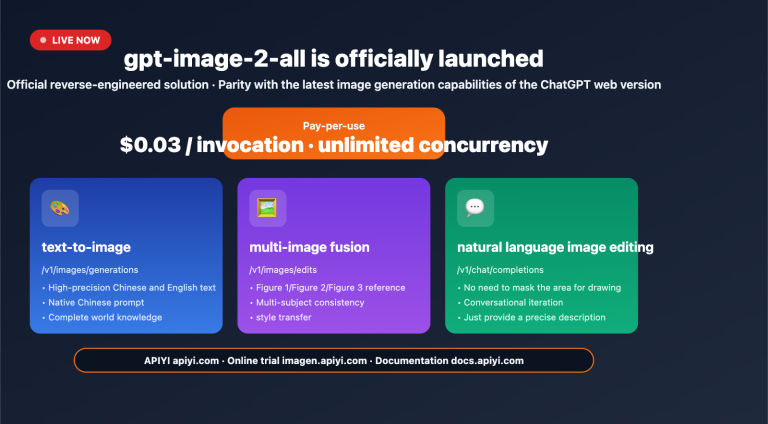
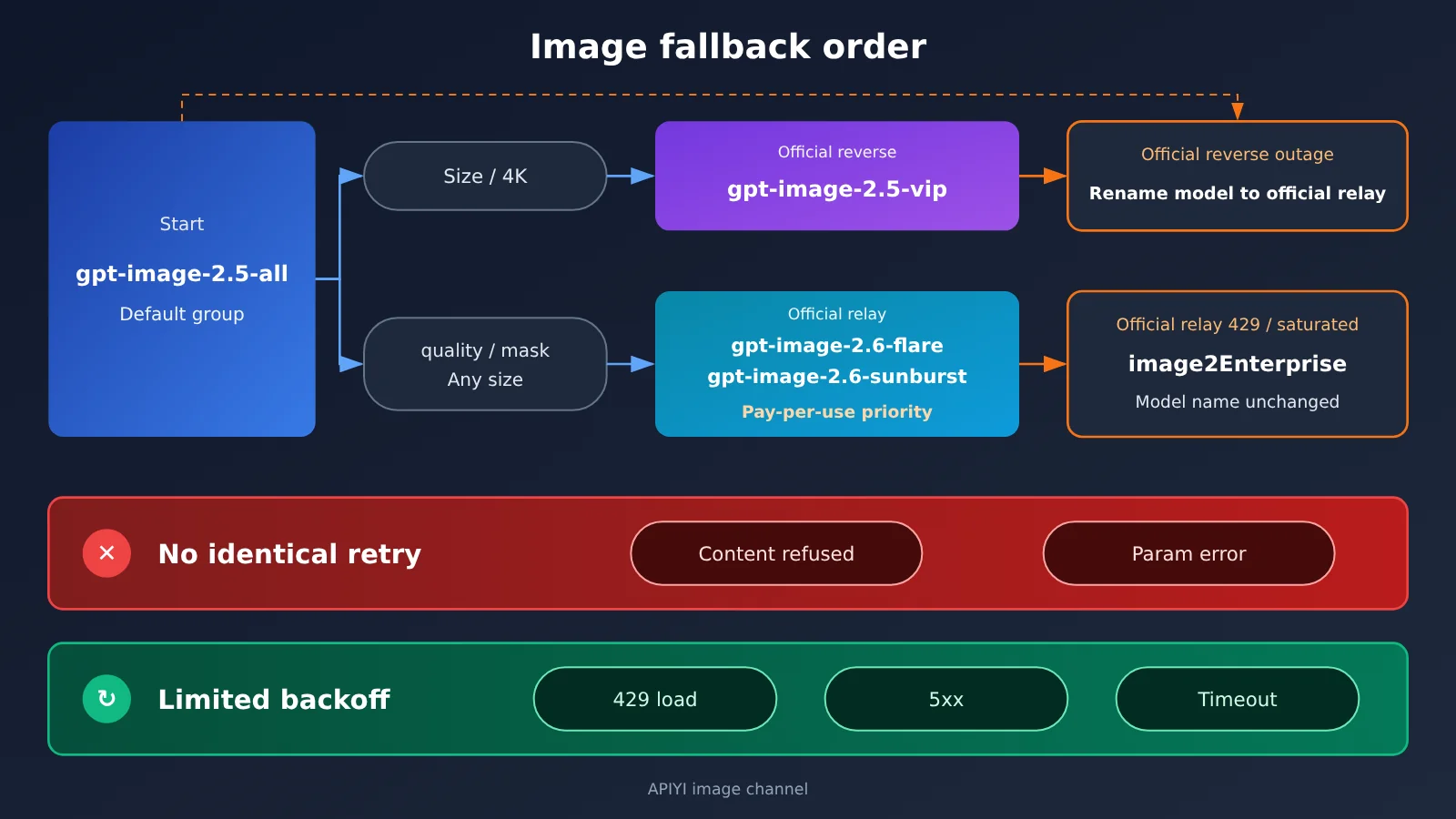
Bottom line first. For bulk image generation on APIYI, use gpt-image-2.5-all by default for regular tasks. It runs under the Default group, works with either request-based or usage-based tokens, and is listed at $0.025 per image. When you need to lock to a fixed size or 4K, switch the model name to a -vip variant such as gpt-image-2.5-vip, listed at $0.03 per image. That said, the -all page itself notes that 4K on -vip can be less stable, so it isn’t the first choice for 4K. When you need the official quality tier, masked inpainting, or any valid size, use the official proxy route. For new projects, prioritize gpt-image-2.6-flare (speed-first) and gpt-image-2.6-sunburst (editing and precision first).
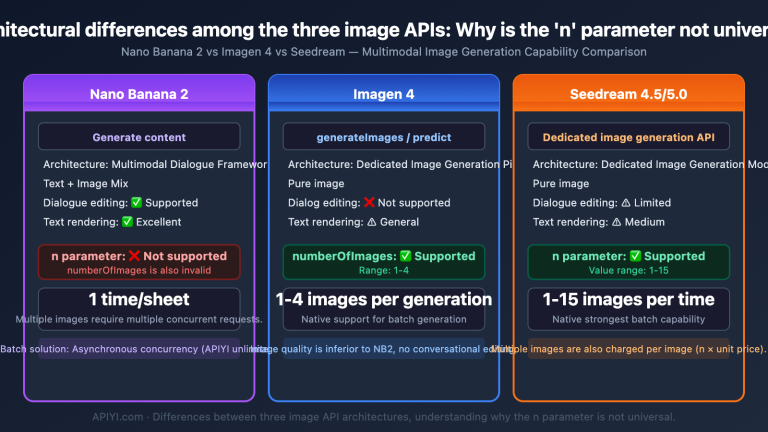
There are two fallback cases. If the official proxy route keeps returning 429 or is saturated under the Default group, switch the token group to image2Enterprise; the model name stays the same. If the official reverse-engineered route hits a ChatGPT web or Adobe upstream outage, don’t keep backing off on the same reverse route—change the model name to an official-proxy model and confirm the token is set to “usage-first.” There are also two kinds of errors you shouldn’t retry as-is: content-safety refusals and parameter errors. Also watch the n parameter: on -all it bills n times but still returns only 1 image.
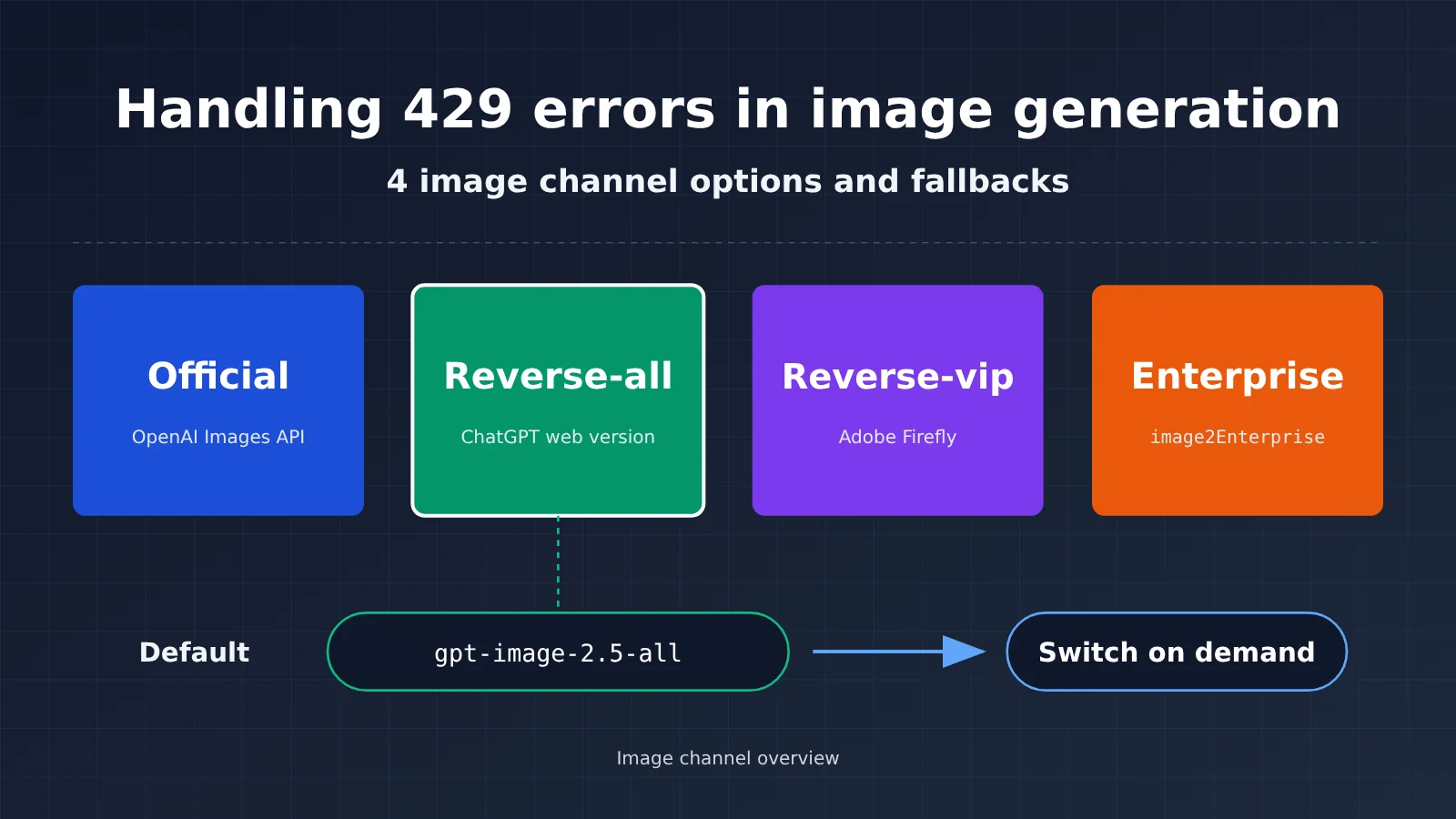
What Are the Four GPT Image Channel Names?
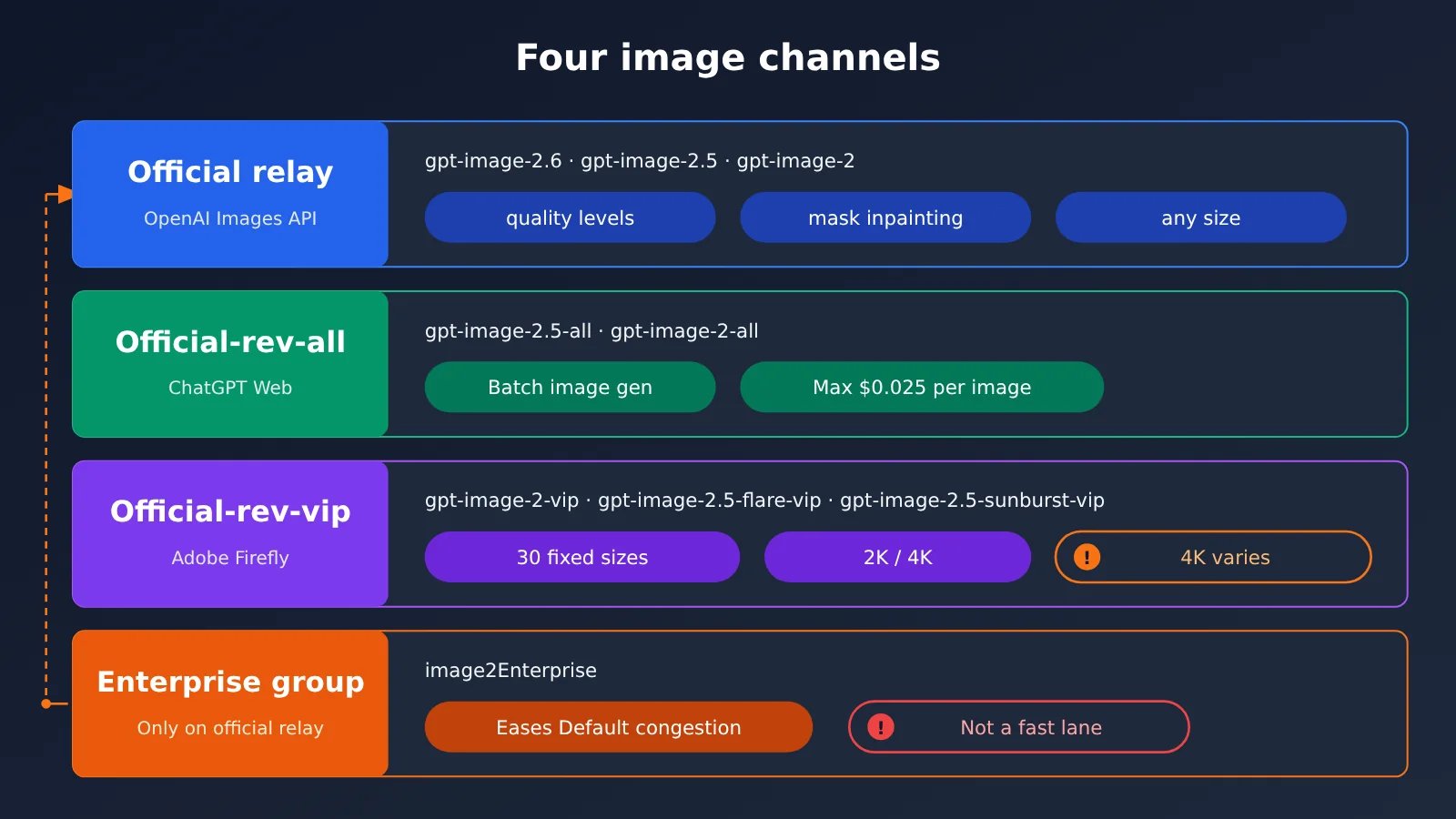
The same GPT image model can appear with several suffixes in the model list. They indicate the upstream source and billing method. The “Enterprise group” isn’t a model—it’s a routing option on the token. Here’s the breakdown, using the docs’ terminology:
-
Official relay: A direct official connection to the OpenAI Images API. The docs state that requests and responses are identical to the official OpenAI API. In the master price table, the official relay image models include
gpt-image-2.6-flare,gpt-image-2.6-sunburst,gpt-image-2.5-flare,gpt-image-2.5-sunburst, their date snapshotsgpt-image-2.5-flare-2026-09-08andgpt-image-2.5-sunburst-2026-09-08, and the previous generationgpt-image-2. The docs recommend flare for text-to-image and sunburst for editing and multi-image fusion. In production, you can pin a date snapshot so an alias doesn’t start pointing somewhere else. -
Official reverse -all: This is the reverse-engineered ChatGPT web version.
gpt-image-2-allandgpt-image-2.5-allcost the same, behave identically, and are interchangeable. The reason is that the ChatGPT web version has been upgraded to Images 2.5 across the board, sogpt-image-2-allalso outputs 2.5 images. The docs recommend usinggpt-image-2.5-alldirectly for new projects. -
Official reverse -vip: The Adobe reverse-engineered line (Firefly). Models include
gpt-image-2-vip,gpt-image-2.5-flare-vip, andgpt-image-2.5-sunburst-vip. The aliasgpt-image-2.5-vippoints togpt-image-2.5-sunburst-vip. -
Enterprise group
image2Enterprise: The enterprise fallback group for official relay traffic to the OpenAI upstream. The FAQ explicitly says it isn’t Google Vertex, nor is it an acceleration line meant to shorten image generation time. Its job is to provide another resource pool when the default group is congested, but it can’t guarantee the upstream will always be available.
One more group that’s often mistaken for a fallback is image2_OSS. It’s a 1x, no-surcharge group with a single purpose: make sure a URL is returned and the result isn’t downgraded to base64. It doesn’t improve stability, and it’s available for -all and -vip.
2.6 currently only has an official relay version. In the 2026-11-10 price table and the pricing API, there are no models named gpt-image-2.6-all, gpt-image-2.6-vip, or anything similar. Refer to the platform’s model list for model names and prices.
Choosing a Default Image Channel by Scenario: Price and Capability Comparison
When picking a channel, start with three questions: do you need official quality tiers, how strict are your size requirements, and should costs be capped per image? Work through them in this order:
- Batch image generation, cost capped per image, long edge between 512 and 1536: use
gpt-image-2.5-all. Acceptance criteria: the returned image’s actual width and height match expectations, and each charge in the console equals the unit price multiplied by the number of invocations. - You need one of the 30 fixed sizes, or you need 2K/4K: switch to the -vip model and pass
sizeexplicitly. Acceptance criteria: judge by the returned image’s actual dimensions, not just the request parameters. - You need the official
quality,maskinpainting, transparent backgrounds, any valid size, or fields aligned with OpenAI: go with the official-channel relay. Use 2.6 for new projects, and a dated 2.5 snapshot when you need to lock behavior. Acceptance criteria: request fields match the target model’s official parameter table with no 400 errors.
Image Channel Price Comparison
The billing and list prices below come from the master price table (updated 2026-11-09) and are all pre-discount list prices. After the 10% to 20% top-up bonus, actual charges will be lower; the console is the final authority. For the full model list and pricing, see docs.apiyi.com/models.
| Model | Channel type | Billing | List price (pre-discount) | Available groups |
|---|---|---|---|---|
gpt-image-2.6-flare / gpt-image-2.6-sunburst |
Official relay (launched 2026-11-05) | Usage-based | Per million tokens: $5 text input, $8 image input, $30 output | Default, image2Enterprise, image2_OSS, SVIP |
gpt-image-2.5-flare / gpt-image-2.5-sunburst and the 2026-09-08 snapshots |
Official relay | Usage-based | Same as above; cached-read text $1.25, image $2 | Default, image2Enterprise, image2_OSS, SVIP |
gpt-image-2 |
Official relay (previous generation) | Usage-based | Same as above | Default, image2Enterprise, image2_OSS, SVIP |
gpt-image-2.5-all / gpt-image-2-all |
Official reverse-engineered ChatGPT web | Per request | $0.025/request | Default, image2_OSS, SVIP |
gpt-image-2.5-vip and 3 other -vip names |
Official reverse-engineered Adobe Firefly | Per request | $0.03/request | Default, image2_OSS, SVIP |
There’s one inconsistency between the pricing API and the master price table, so you need to look at them separately. In the pricing API, gpt-image-2, gpt-image-2.5-flare, and gpt-image-2.5-sunburst have quota_type 1 and model_price 0.2. Meanwhile, gpt-image-2.6-flare, gpt-image-2.6-sunburst, and the two 2026-09-08 snapshots have quota_type 0 and model_price 0. The master price table, however, lists all of these official-relay models as usage-based. The list prices in this article follow the usage-based basis in the master price table; we don’t treat 0.2 as a per-request price. Before you order, check the actual discounted price for that group in the console. The 0.025 for -all and 0.03 for -vip match in both sources, so you can use them as per-request list prices.
The cost per image on the official relay depends on output tokens. The comparison page (as described in the docs) gives a typical range of about $0.03 to $0.2 per image; the longer the prompt and the higher the size and quality, the higher the cost. The docs include a rough calculation from 2026-09-09: a 1024 square image with 2.5 at xhigh costs about $0.094 (3122 output tokens), and at max about $0.211 (7024 output tokens), excluding input, which is usually under $0.001. The docs conclude that for 1K low drafts, the official relay isn’t necessarily more expensive; medium-to-high image quality is where the official reverse-engineered option at $0.025 to $0.03 is the better deal.
One more old price to flag: an old help center article from 2026-04-25 listed gpt-image-2-all at $0.03/request; that was data from before the price cut. -all dropped to $0.025 on 2026-10-10, and both -all names were adjusted at the same time. The docs give this reason for the cut: -all is more stable than -vip; -vip is more affected by upstream risk controls and fluctuates more, but it’s still maintained and works as usual.
Image Channel Capability Comparison
| Capability | Official Reverse -all | Official Reverse -vip | Official Relay |
|---|---|---|---|
size |
Dedicated page: common dimensions with a long side of 512–1536, including values that aren’t multiples of 16; 2K isn’t listed as exactly supported | 30 options (10 aspect ratios × 1K/2K/4K); only applies to the images endpoint | Any valid size, with dimensions in multiples of 16 and an aspect ratio no wider than 3:1; presets include 3840×2160 |
quality |
Not accepted | Channel-dependent, not guaranteed; in a 2026-09-10 retest, the two 2.5 models hit max, while gpt-image-2-vip only hit high |
Officially promised levels; xhigh/max are limited to the two 2.5 models (comparison page) |
n |
Not accepted, but passing it still charges n times | Not supported; one image per request | Supported |
| Mask | Full-image redraw only | Full-image redraw only | Supports mask for localized inpainting |
| Transparent background | No background parameter; can only be written into the prompt |
Can output alpha PNG, but not promised in the docs | Supported in 2.5; gpt-image-2 has been shut down |
| Speed (as stated in docs) | Dedicated page: about 30–60 seconds; comparison page: about 90 seconds | gpt-image-2-vip: 90–150 seconds; flare-vip: 22–138 seconds; sunburst-vip: 37–120 seconds |
As of 2026-09-09, 2.5-flare at 1K low was about 10 seconds, sunburst about 14 seconds; gpt-image-2 was 100–120 seconds |
The two docs disagree about the speed of -all: the dedicated page says about 30–60 seconds, while the comparison page says about 90 seconds. This article lists both numbers and doesn’t average them. There’s also a docs mismatch for -all’s size: the dedicated page says “size is now supported,” while the comparison page still says it isn’t accepted. This article goes with the dedicated page. The dedicated page also notes that 1536 square images may be interpolated, so they don’t represent native detail. The 2.6 claims — “50% faster generation” and “Flare at low quality in as fast as 6 seconds” — come from an official announcement quoted in the November 5, 2026 live update, not from the platform’s own retest data. For 2.6’s new parameters (complexity, SVG, GIF, etc.), go by OpenAI’s official docs; you can’t just apply the 2.5 parameter table.
If you need 4K a lot, the -all dedicated page also mentions another route: Nano Banana on APIYI. In the master price table, the nano-banana-pro and gemini-3-pro-image series are $0.09 per request, while nano-banana-2 and gemini-3.1-flash-image are $0.055 per request. The enterprise groups for this route are NanoBananaEnterprise and NanoBananaReverse; they can’t be mixed with image2Enterprise.
How to Configure Token Types and Group Priority for Image Channels
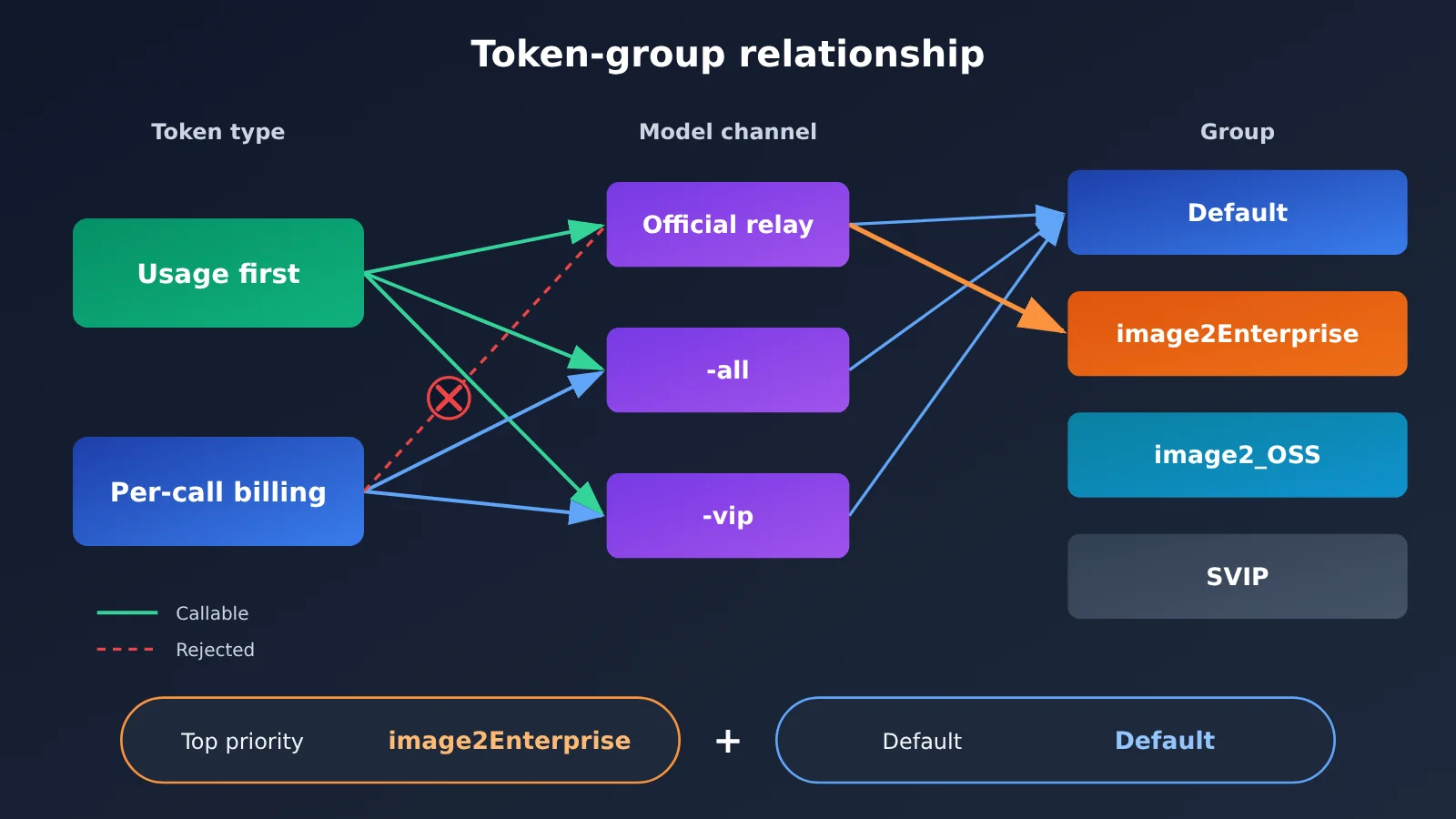
A lot of errors aren’t actually caused by the channel itself — they come from a token type or group being configured incorrectly. Every channel uses the same Base URL: https://api.apiyi.com/v1. The recommended endpoints are /v1/images/generations and /v1/images/edits. There’s only one token-type rule you really need to remember: official relay must use “Usage-Based Priority.” If you call official relay with a per-call token, it’ll be rejected because the billing method doesn’t match. For -all and -vip, either “Per-Call Billing” or “Usage-Based Priority” works.
| Group | Multiplier (Pricing API, 2026-11-10) | Applicable channels | Purpose | Notes |
|---|---|---|---|---|
Default |
1 | Official relay, -all, -vip | Default first choice | Official relay may have tight concurrency at peak and return 429s |
image2Enterprise |
1.2 | Official relay only | OpenAI upstream enterprise fallback | Not an accelerated route, and not Vertex; -all and -vip are not in this group |
image2_OSS |
1 | Official relay, -all, -vip | Guarantees URL output | Doesn’t improve stability; the URL expires after about 24 hours |
SVIP |
The API reports 1; refer to the console token page | Official relay, -all, -vip | Follow the console instructions | The limited-time multiplier promotion ended on 2026-10-29 |
The docs explain the enterprise group’s 1.2x multiplier this way: it’s set on the basis that a large customer who makes a one-time $3,000 top-up and gets a 20% bonus ends up paying roughly the official website price; the platform does not factor in tax costs. As for which models are visible in this group, the FAQ body table lists gpt-image-2.5-flare, gpt-image-2.5-sunburst, and gpt-image-2. The master price table and the pricing API’s enable_groups show that the two 2.6 models are also included, but the FAQ table hasn’t been updated to match yet. The docs don’t say this group requires a separate application — if you can’t select it, go by what the console shows.
The recommended setup is “one token covers both model types.” A token can have one default group and up to two fallback groups. According to the docs, set the first priority to image2Enterprise and the default group to Default. That way, official relay requests go through the enterprise group first, while -all and -vip stay in Default and generate images normally because they aren’t in the enterprise group. Steps: open api.apiyi.com/token, edit the token, select the groups, and save. No code changes needed. Acceptance criteria: use the same request to call an official-relay model once and an -all model once; both should return images, and the official relay run should be billed at 1.2x in the console.
Workloads that depend heavily on URLs need separate handling. Under the default group, the docs note that as of 2026-07, omitting response_format returns b64_json; explicitly passing response_format as url gets you a link, but the default group doesn’t guarantee the output format. For these workloads, switch the token to image2_OSS and explicitly pass url; download and save the file to your own storage as soon as you get the link. Acceptance criteria: the response contains a url field, and the saved file opens.
How to Handle 429s, Saturation, and Provider Outages During Image Generation
The same error code doesn’t always mean the same thing — the root cause can be completely different. So the first step is to read error.message in the response body, then decide how to handle it. The -vip page splits 429s into two categories: rejected parameters and group saturation. The -all page gives a broad explanation of 429 as “rate limiting or insufficient quota.” The live status feed has also logged two kinds of first-party outages, one from the ChatGPT web version and one from OpenAI upstream. The table below turns all of this into “what you see → what to do first”:
| What you see | Diagnosis | First action | Acceptance criteria |
|---|---|---|---|
| 官转 keeps returning 429 or saturation warnings on Default | Default group is congested | Go to api.apiyi.com/token, switch the group to image2Enterprise, or raise its priority — the model name stays the same |
The same request produces an image, and billing becomes 1.2× |
-vip returns 429 with a message like quality must be one of… |
Parameter rejected | Change the parameter; don’t retry as-is | The first request after the fix succeeds |
| -vip returns 429 with the message “current group’s upstream load is saturated” | Occasional saturation | Retry with exponential backoff and check the live status feed | Recovers within a limited number of attempts; otherwise switch to 官转 |
| -all/-vip throws a cluster of errors on the same day, and the live feed reports a first-party outage | ChatGPT web or Adobe first-party outage | Stop backing off; change the model name to switch to 官转 | The 官转 request succeeds, and the token is pay-per-use priority |
官转 enterprise group returns The server had an error while processing your request. |
OpenAI upstream failure | Retry once or twice; if it still fails, switch to 官逆 | After switching to -all, images can be generated |
| 401 | Token issue | Check the token; don’t retry | Recovers after switching to the correct token |
gpt-image-2 with background set to transparent returns 400 |
The official API has discontinued this capability | For transparent backgrounds, use 2.5 官转 with png or webp | The returned image has an alpha channel |
If you suspect a first-party outage, check docs.apiyi.com/live first to see whether there’s a matching announcement for the day, then decide whether to back off or switch channels. Switching from 官逆 to 官转 is easy: on APIYI, you use the same token and only change the model name. As the comparison page puts it, “you only need to change the model name to switch to 官转.” But there are two prerequisites you need to verify one by one:
- Token type: Make sure the token is “pay-per-use priority.” If it’s a per-call token, the request will be rejected.
- Trim fields for the target model: When switching to
gpt-image-2, remove the xhigh and max tiers and the transparent background; sizes carried over from -all that aren’t multiples of 16 need to be changed to multiples of 16, with an aspect ratio no greater than 3:1. Going the other way, from 官转 back to -all, you need to removequality,n,aspect_ratio, andmask. - Timeouts: For 官转, set 240 seconds for low and medium quality, 300 seconds for high and xhigh, and use 600 seconds as the fallback for max and for
gpt-image-2‘s high. For -all and -vip, set a conservative 300 seconds. Compress input images to under 1.5MB first.
Historical Announcement Assessment Table, April–November 2026
These events are only meant to show what kinds of failures have occurred and how they were handled at the time. They do not represent the current status as of 2026-11-10. Whether a group is currently saturated should be judged from the error body and real-time status at that moment.
| Date | Event (historical announcement) | Handling at the time | How to use it today |
|---|---|---|---|
| 2026-04-29 | Official relay default group still returned 429; only image2Enterprise was stable; -all and -vip were both stable | Route official relay through the enterprise group | A typical case of “official relay default group congestion” |
| 2026-05-07 | Official relay enterprise group also returned a server error; root cause was the OpenAI upstream | Wait for upstream recovery or switch channels | Even the enterprise group can’t guarantee the upstream is always available |
| 2026-05-13 | Default group was saturated; image2Enterprise could still generate images | Switch to the enterprise group | Supports the priority-based configuration |
| 2026-05-23 | Default group added resources; the docs said there was no need to specifically switch to the enterprise group | Back to Default | Congestion is temporary |
| 2026-09-21 | 2.5 official relay default group had tight concurrency; the enterprise group was stable | Switch to the enterprise group | Same as above |
| 2026-10-15 | gpt-image-2-vip was overloaded; -all errored due to a ChatGPT web upstream vendor failure; gpt-image-2 transparent background was shut down (the comparison page records 2026-09-30) |
For official reverse, use official relay as fallback first; for transparent backgrounds, switch to 2.5 official relay | When the upstream vendor fails, switch channels instead of stubbornly retrying |
| 2026-11-05 | 2.6 official relay launched; the Default group is available | New projects can use it | This is a launch announcement, not an incident announcement |
Which image generation errors to retry, and which not to
There’s only one criterion for deciding whether to retry: will the cause of the error go away on its own over time? Load-related 429s, 5xxs, and timeouts may recover by themselves, so you can do a limited number of backoff retries. Parameter errors, token errors, and content refusals won’t disappear on their own—retrying them as-is just wastes time and can sometimes cost you extra. The ops stance recorded in the 2026-08-25 topic archive is “429 can be retried; content safety doesn’t need a retry,” which matches this rule.
- OK to retry with backoff: Use exponential backoff for load-related 429s; retry 5xxs once or twice; for timeouts, first raise the client timeout to the recommended value. Log the
request-idfrom the response headers to make troubleshooting easier. The -vip docs say you don’t need to worry about concurrency first when RPM is under 500. - Fix first, then resend: If a parameter is rejected, fix the parameter first; on a 401, check the token first; on a 400, check the target model’s field table first. Authentication failures and parameter validation failures aren’t billed.
- Don’t retry automatically: There are two kinds of content refusals. One returns an explicit error, such as “The image wasn’t generated as expected. Please adjust your prompt and try again.” This isn’t billed, and you should revise the prompt. The other returns 200, but the body is a soft refusal like “I can’t fulfill this request.” By protocol, it counts as a normal response and is billed—and the official API can’t identify it in advance at the protocol layer. Don’t automatically resubmit the same prompt.
Q: I passed n=4 to -all — why did I get only 1 image but get charged 4 times?
-all doesn’t accept n, but if you pass it anyway, you’ll still be charged n times. The example on the dedicated page is n=3 charging $0.075, and it still returns only 1 image. When you need N images, you should call it N times in parallel. Acceptance criterion: the number of charges in the console equals the number of images you actually receive.
Q: The comparison page says -all doesn’t accept size — can I pass it or not?
Go by the -all dedicated page — yes, you can. An explicitly passed size takes priority over the size description in the prompt; if you don’t pass it, or pass auto, it keeps the native behavior. The comparison page just hasn’t been updated yet.
Q: Can enterprise groups speed up image generation?
No. The FAQ states plainly that it isn’t a fast lane — it just gives you another resource pool when the Default group is congested. Official-reverse models can stay in the Default group.
Q: In the pricing API, is the 0.2 for official relay a per-call price?
That’s not how you should read it. The price master table lists usage-based pricing, and this article follows the same usage-based basis. For some aliases without a date, the API returns model_price 0.2, so the two sources don’t line up. Before you place an order, check the actual discounted price in the console.
Q: Does 2.6 have -all or -vip versions?
As of the 2026-11-10 price summary table and pricing API, neither exists, and this article doesn’t speculate about any release date.
The default config to follow
- Model name:
gpt-image-2.5-all; switch togpt-image-2.5-vipwhen you need a specific size or 4K; switch togpt-image-2.6-flareorgpt-image-2.6-sunburstwhen you need the official parameters - Group: first priority
image2Enterprise, withDefaultas the default group; for businesses that depend heavily on URLs, create a separate token and useimage2_OSS - Token type: pay-as-you-go preferred (both official-relay and official-reverse channels can call it)
- Timeout (seconds): set 300 for
-all/-vip; for official-relay, 240 for low/medium quality, 300 for high/xhigh, and 600 for max - Base URL:
https://api.apiyi.com/v1
Once you’ve got things running with this setup, day to day you only need to watch two things: what error.message in the error body says, and whether that day’s real-time updates have any relevant announcements. With the two tables above as a reference, you can decide whether to back off and retry, modify the request, or switch channels.
Author: APIYI Tech Team
Technical discussion: If you hit an error that isn’t covered here, feel free to reach out to us through the APIYI official website homepage, and include therequest-idalong with the full error body.