Author’s note: This article breaks down Gemini Omni 1.2 Flash’s 15-second duration, reference following, multi-turn editing, voice and camera controls, 30% price cut, and officially acknowledged limitations to help developers decide whether to evaluate it for video generation.
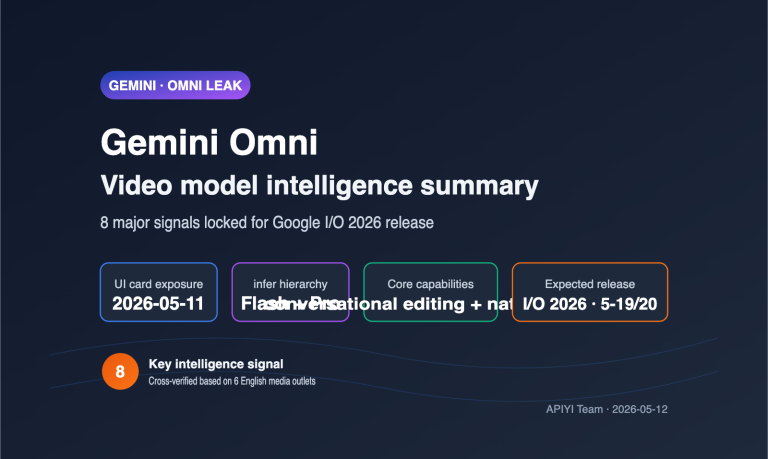
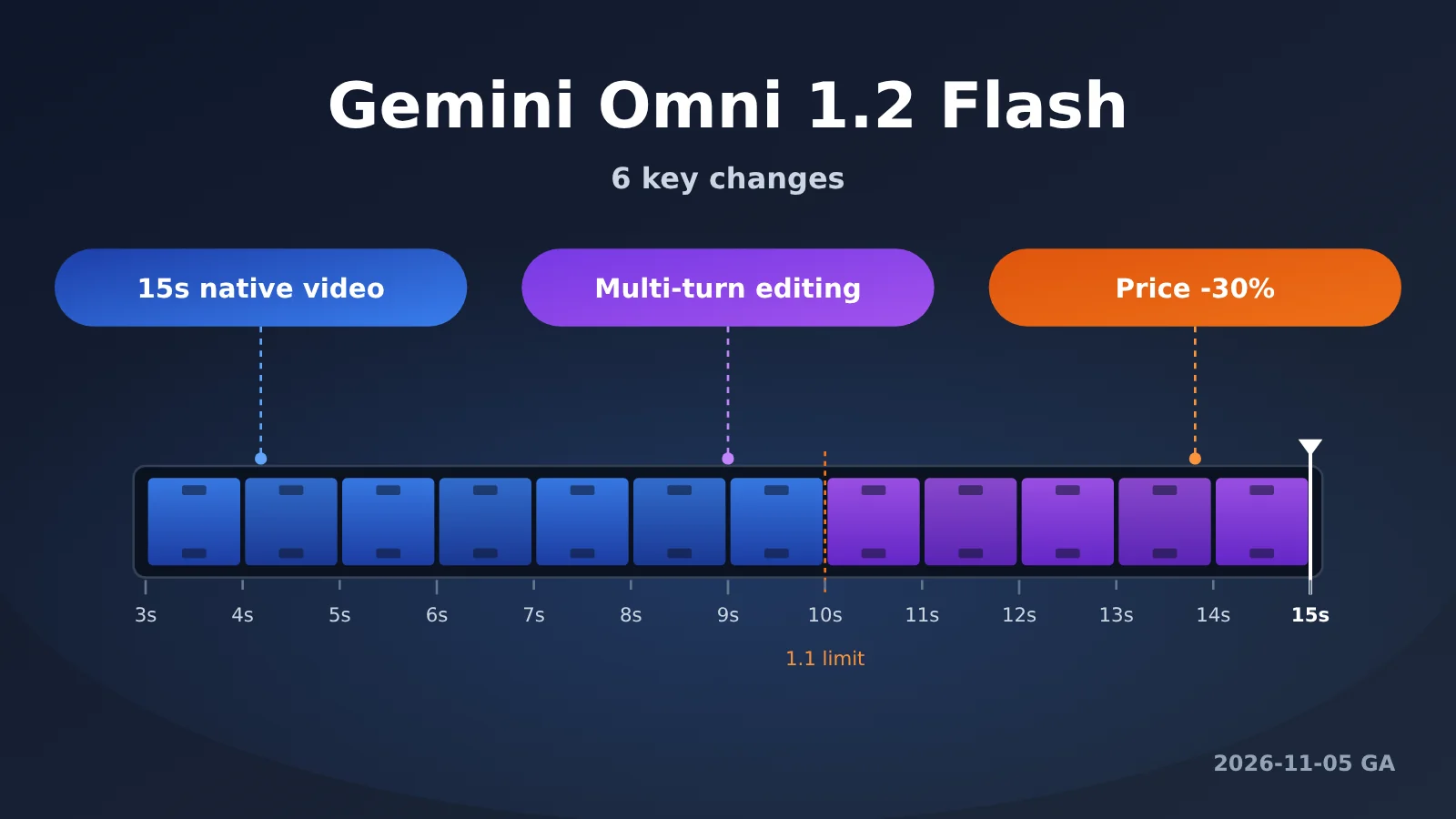
Google released Gemini Omni 1.2 Flash on November 5, 2026, with general availability (GA) on both the Gemini API and Gemini for business. The release brings three major updates: native 15-second videos, multi-turn conversational editing, and 720p video at $0.07 per second (30% less than 1.1). It also improves reference following, consistency, voice, and camera controls.
This isn’t just a rumor. All of the information above comes from Google’s official launch post, authored by a Google DeepMind product manager. But the post focuses on showcasing results and says little about the parameters, model IDs, and rate limits developers care about. This article translates the marketing claims into specifications and boundaries, and flags what you’ll still need to validate with your own assets.
The takeaway: In a few minutes, you’ll understand what’s changed in Gemini Omni 1.2 Flash compared with 1.1, which features are available through the API, which are limited to Google apps, and whether it’s worth evaluating now.
Gemini Omni 1.2 Flash at a Glance
Here’s a summary of the key launch details. Everything in the table comes from the official announcement. Parameters it doesn’t mention—such as the model ID, API format, and rate limits—are left out and covered later in the “To Be Verified” section.
| Item | Gemini Omni 1.2 Flash Details |
|---|---|
| Release date | 2026-11-05, generally available (GA) the same day |
| Released by | Google / Google DeepMind |
| Video duration | 3–15 seconds, configurable in 1-second increments (up from a 10-second limit in version 1.1) |
| Pricing | $0.07 per second at 720p ($12 per 1 million video output tokens, calculated at 5,792 tokens per second at 720p), 30% less than Omni 1.1 |
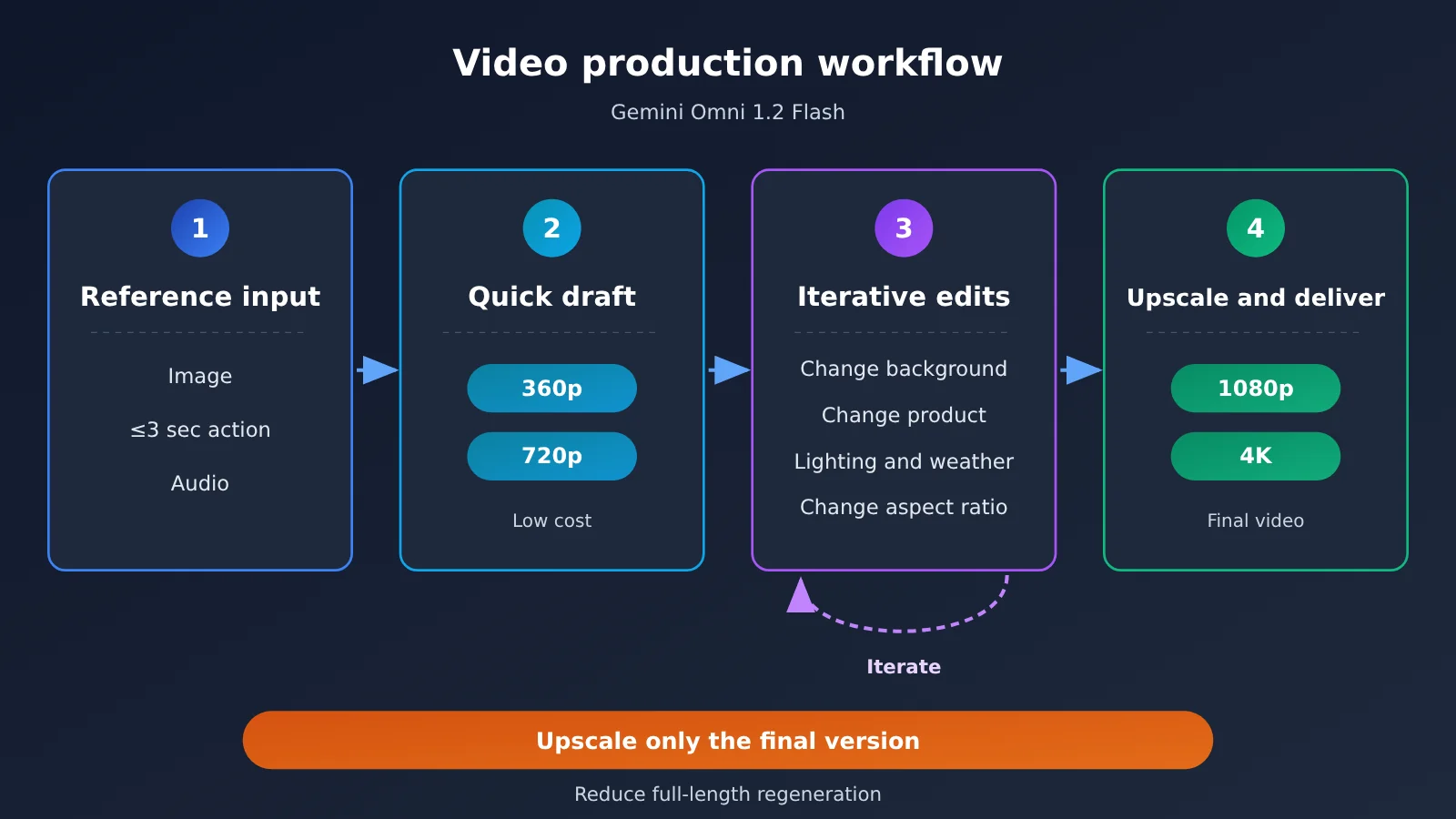
| Resolution workflow | Draft quickly at 360p / 720p, then upscale results you’re happy with to 1080p or 4K |
| Reference inputs | Character, product, and style images; motion clips up to 3 seconds; audio prompts |
| Editing | Multi-turn conversational editing across the full 15-second clip |
| Enterprise capabilities | Built on Google Cloud infrastructure, with Provisioned Throughput available |
| Content identification | Outputs include an imperceptible SynthID watermark |
| Officially acknowledged limitations | Fast-paced sports action, rapid changes in scripts, and complex physics are still being improved |
What GA and Provisioned Throughput Mean for Gemini Omni 1.2 Flash
Google specifically emphasized that this is the first time Gemini Omni has reached GA. For developers, GA means the model has moved beyond the preview or experimental stage and is ready for production use. It also typically means the API and model behavior will be more stable than in a preview release.
Provisioned Throughput is Google Cloud’s reserved throughput offering: enterprises purchase a set amount of processing capacity in advance in exchange for more predictable availability and latency during peak periods. If your business needs to generate ad creative in bulk or has an SLA for delivery times, this may matter more than the unit price. The announcement didn’t specify how it’s billed, so you’ll need to check the Google Cloud pricing page.
6 Key Changes in Gemini Omni 1.2 Flash Compared with 1.1
The official article uses plenty of example videos to show what’s improved. We’ve turned those descriptions into a developer-focused list, separating measurable specification changes from quality improvements. You can use the former directly in a technical plan; you’ll need to test the latter yourself.
| Dimension | Gemini Omni 1.1 Flash | Gemini Omni 1.2 Flash | Type of change |
|---|---|---|---|
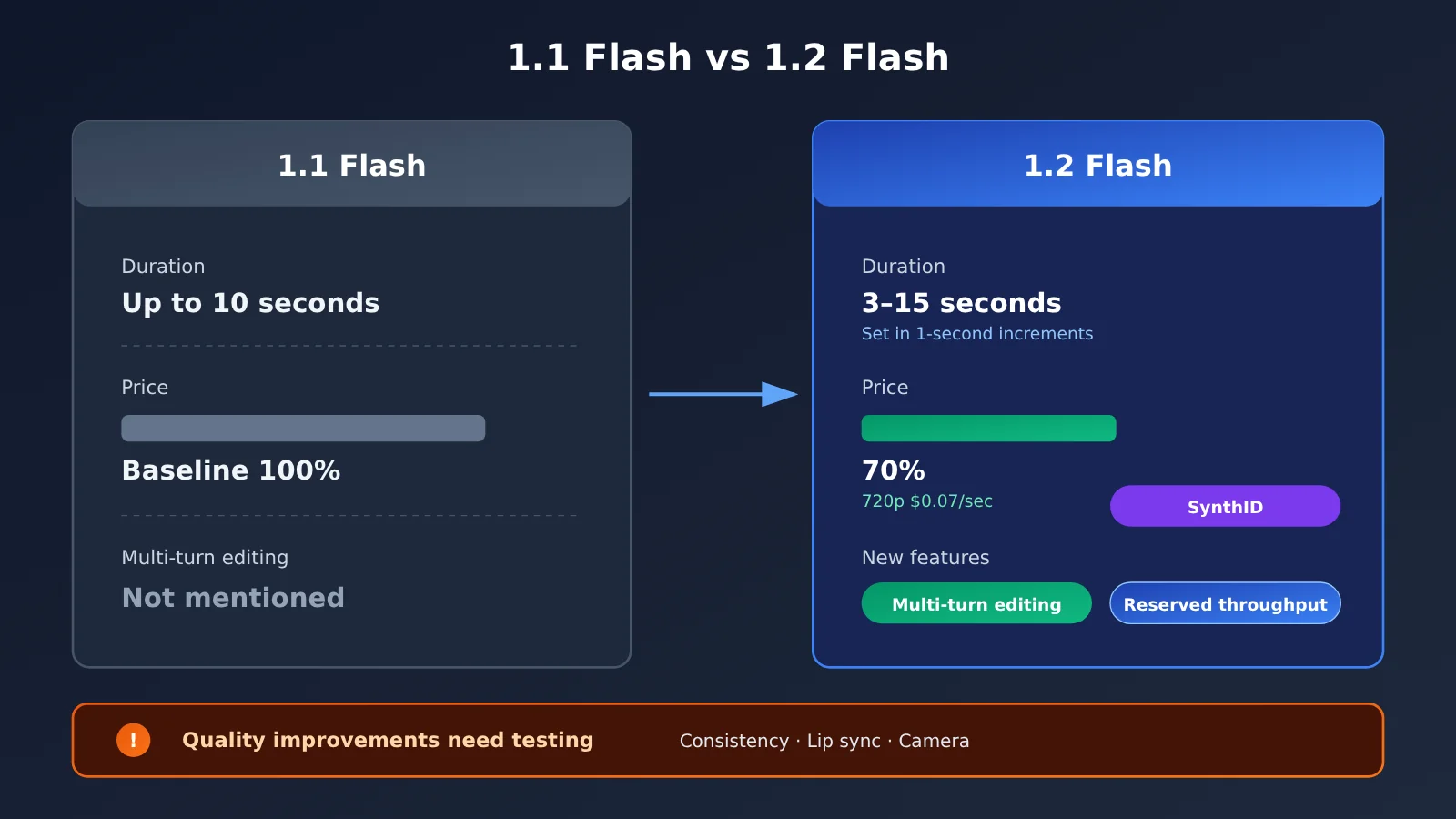
| Maximum duration | 10 seconds | 15 seconds; configurable from 3–15 seconds in 1-second increments | Specification change |
| 720p price | $0.10/second ($17.50 per million video output tokens) | $0.07/second ($12 per million video output tokens) | Price change |
| Reference adherence | Official examples show weaker adherence to reference images | Faces, clothing, packaging fonts, and brand colors remain consistent across camera angles | Quality improvement |
| First- and last-frame consistency | Examples show detail discrepancies, such as a cat on a roof and a soup spoon turning into chopsticks | Less detail drift and deformation | Quality improvement |
| Multi-turn editing | Not mentioned in the release article | Replace products or backgrounds, change lighting or weather, and adjust aspect ratios over successive turns | New capability |
| GA status | Not GA | First GA release, with Provisioned Throughput support | Specification change |
💡 Pricing note: Google charges for video output by token, not by the second, so the per-second prices in this article are estimates. Both rates come from the Gemini API pricing page: video output costs $17.50 per million tokens for 1.1 and $12 for 1.2. At 5,792 output tokens per second for 720p, that works out to approximately $0.10/second and $0.07/second, respectively—a decrease of about 30%. The pricing page also states that, starting December 3, 2026, requests sent to gemini-omni-1.1-flash will be automatically routed to 1.2 and billed at 1.2 rates.
Change 1: Gemini Omni 1.2 Flash Supports Flexible Durations of 3–15 Seconds
Increasing the maximum duration from 10 to 15 seconds may sound like a small change, but it makes a big difference for many use cases. A complete social media ad, a product feature demo, or a short story with a beginning, middle, and end often needs 12–15 seconds. Previously, you had to stitch two clips together; now, you can generate one in a single pass.
Another easy-to-miss detail is that you can set the duration in 1-second increments. With a model billed by the second, specifying exactly 7 seconds means you don’t have to pay for 10. That can make a real difference when you’re generating videos in bulk.
Change 2: Reference Following Covers Images, Motion Clips, and Audio
1.2 Flash lets you combine multiple references: character, product, or style images; motion clips up to 3 seconds long; and audio prompts. In an official example, a photo of a model and front-and-back product images of three outfits were used to generate a 15-second virtual try-on video. The model’s identity and each garment’s cut, drape, and back details stayed consistent through a 360-degree turn.
E-commerce is the most obvious application: you can turn existing product photography or character design images into try-on clips, 360-degree product showcases, and brand ads. Keep in mind that the 3-second maximum for motion clips is a hard limit. If your motion reference footage is longer, you’ll need to trim it first.
Change 3: Better Consistency Across First and Last Frames and Extended Clips
According to the official announcement, characters, objects, and scenes now stay more stable from the first frame to the last, with less visual drift and distortion during motion and camera changes. This applies to both interpolating between a first and last frame and extending an existing clip to build a longer sequence.
Interestingly, the official comparison between versions 1.1 and 1.2 acknowledges subtle differences, such as a cat appearing on a rooftop and a spoon turning into chopsticks. That suggests consistency has “improved significantly” rather than been “completely solved,” so detail-sensitive scenes still need a human review.
Change 4: Multi-Turn Conversational Editing with Gemini Omni 1.2 Flash
This is the update with the biggest impact on workflows. You can make changes to the same video over multiple turns—for example, replacing a product or background, changing the lighting or weather, or switching aspect ratios—without regenerating it from scratch. In one official example, the background of a generated video is changed five times in succession, while the two characters’ performances, armor reflections, and camera composition remain unchanged.
Multi-turn editing covers the full 15-second clip. One typical use case cited by the official announcement is producing ad variants at scale for different audiences and placements. Another example demonstrates “motion transfer”: the first turn generates a swaying octopus, and the second replaces it with a dancer whose dress mimics the octopus’s fluid motion.
Change 5: More Natural Speech and Multi-Speaker Dialogue
Dialogue in 1.2 Flash flows more naturally, lip-syncing is clearer, and the model can distinguish between multiple speakers. In an official example, a scene image is paired with four sets of character, lip-sync, and one-second voice references, assigning each voice sample to the correct character.
One distinction matters: Most of the implementations mentioned in this section are Google applications—multi-character dialogue in Flow, explainer videos in Gemini for business, and finished videos with avatars and narration in Google Vids. The announcement doesn’t explain how to invoke the speech capabilities through the API or pass the parameters.
Change 6: More Controllable Continuous Camera Movement
Google says complex continuous camera movements—FPV fly-throughs, dramatic pullbacks, and orbits—have significantly fewer unintended jump cuts and more consistent proportions. Examples include an uncut FPV flight based on two architectural photos, moving from a plaza through bronze doors and up to the Pantheon’s dome, and a continuous 10-second shot that pulls back from a coastal close-up to a panoramic view of an island.
How the Gemini Omni 1.2 Flash Cost-Saving Workflow Works
The 30% price cut is only part of the story. Google puts more emphasis on a workflow for controlling total cost: generate quick drafts at low resolution → refine the details through multi-turn editing → upscale only the final version you’re happy with. Compared with regenerating the entire clip whenever something isn’t right, this can significantly reduce wasted spending.
In Google AI Studio, the model card shows token-based prices: $1.50 per million input tokens, $9 per million text output tokens, and $12 per million video output tokens. This is the same pricing as the “$0.07 per second” mentioned above, just expressed in different units. The official pricing page converts the 720p rate of 5,792 output tokens per second into a per-second price and also lists the other resolutions:
- 360p: 1,931 output tokens per second, approximately $0.023/second
- 720p: 5,792 output tokens per second, approximately $0.07/second
- 1080p (upscaled): 8,688 output tokens per second, approximately $0.104/second
- 4K (upscaled): 17,376 output tokens per second, approximately $0.209/second
At the 720p rate, a single clip costs roughly:
| Duration | Cost per 720p clip ($0.07/second) | Typical use |
|---|---|---|
| 3 seconds | Approximately $0.21 | Shot tests, animated covers |
| 6 seconds | Approximately $0.42 | Short in-feed ads |
| 10 seconds | Approximately $0.70 | Product highlight showcases |
| 15 seconds | Approximately $1.05 | Complete ads, product explainers |
The announcement doesn’t say whether each round of multi-turn editing is billed for the full clip duration. That directly affects how much editing saves compared with regeneration. When testing on a small scale, it’s worth recording the actual charge for each round.
Another major cost of video generation is prompt trial and error. Many teams first use a text Large Language Model to break a creative brief into a storyboard and instructions for each editing round, then hand those instructions to the video model. This helps reduce unproductive generations. The simplest version calls a text model through an OpenAI-compatible interface to produce prompts for multiple editing rounds in one go:
- Install the SDK: In Python, run
import openai, then create a client withopenai.OpenAI(api_key="YOUR_API_KEY", base_url="https://api.apiyi.com/v1"). Pointbase_urlto APIYI’s OpenAI-compatible endpoint and use the API key from your console. - Choose a model to write the prompts: Replace
YOUR_TEXT_MODELwith an available Gemini, GPT, or Claude text model from the platform’s model list. This model only writes the prompts; you’ll call the video model separately. - Send the brief as a user message: Pass
messages=[{"role": "user", "content": "为一段 15 秒运动鞋广告写 4 轮编辑指令:换背景、换天气、换灯光、切 9:16"}]along with the model ID toclient.chat.completions.create(...). - Read the result: Use
print(resp.choices[0].message.content)to get the editing instructions. Feed them to the video model one round at a time, in order, so each round edits the previous result instead of regenerating the entire video.
To use the same script for different briefs, try the following approach with a fixed output structure.
- Write a system prompt: Define it as a Python string. Have the model act as a video ad storyboard artist and output JSON only, with three keys:
duration_sec(an integer from 3 to 15),base_prompt(the initial generation prompt), andedit_turns(editing instructions for the second round onward). Add a rule that each round changes only one variable—background, product, lighting, weather, or aspect ratio—while keeping the characters and camera shots unchanged. - Define the function
build_video_plan(brief, variants, model="YOUR_TEXT_MODEL"), which takes a creative brief and a list of desired variants. - Build the user message: Use an f-string to append the brief after
创意简报:and the comma-separated variants after需要的变体:. - Send two messages at once to the text model: Put the system prompt in
systemand the assembled string inuser. Addresponse_format={"type": "json_object"}so the response can be parsed directly as JSON. - Parse the result and clamp the duration: First run
plan = json.loads(resp.choices[0].message.content), thenplan["duration_sec"] = max(3, min(15, int(plan.get("duration_sec", 15)))). The model supports durations from 3 to 15 seconds in one-second increments. - Run it with a real brief: For example, use “New running shoes, a morning run through the city, emphasizing lightweight design and bounce” as the brief, with variants for “rainy street,” “beach at dusk,” and “switch to 9:16 portrait.” Print the result with
json.dumps(plan, ensure_ascii=False, indent=2). - Hand it off to the video model: Pass
base_promptandedit_turnsto your video API and execute each round in order. Before running many rounds in batches, record the actual charge for each round.
🚀 Quick-start tip: Text models are well suited to generating storyboards and editing instructions in batches. With APIYI at apiyi.com, you can use the same API key to compare how well different text models write prompts. New users get free testing credits. For the Gemini Omni video model itself, refer to Google’s official channels; check the platform’s model list to see whether APIYI supports it.
How Gemini Omni 1.2 Flash Affects Developers
Distinguishing Gemini Omni 1.2 Flash API Capabilities from Google App Features
The official announcement covers the API, cloud platform, and several Google apps together, making it easy to mistake an app feature for something available through the API. The table below breaks them down by channel.
| Channel | Audience | Capabilities described by Google | What to consider |
|---|---|---|---|
| Gemini API / Google AI Studio | Developers | GA; prototype in AI Studio, with interactive starter apps and developer documentation | Check the official documentation for specific parameters, model IDs, and rate limits |
| Google Cloud console | Enterprises | GA; enterprise-grade infrastructure and security, Provisioned Throughput | Suited to teams with SLA and high-volume needs |
| Flow | Creators | Scene direction, multi-turn editing, multi-character dialogue | An in-app feature, not necessarily an API capability |
| Google Vids | Google account / Workspace users | 15-second clips at no additional cost | An in-app feature suited to non-technical teams testing the results |
| Gemini app | Google AI Ultra subscribers | 15-second videos, rolling out gradually | Rollout timing may vary by region and account |
| Google Ads | Advertising teams | Expanded video marketing campaigns | Designed for advertising use cases |
| Text assistance (storyboards/prompts) | Developers | Not an official Omni channel; uses text models to generate scripts and editing instructions | You can access various text models through platforms such as APIYI at apiyi.com |
Impact on Application Developers
- Workflow design will change: Multi-turn editing makes it practical to generate once and edit multiple times. Products can offer a chat-like interface for video revisions instead of making users rewrite the full prompt every time.
- Cost models need a rethink: Per-second billing, duration settings in one-second increments, and low-resolution drafts could reduce unit costs, but you’ll need to understand how editing rounds are billed first.
- Compliance is simpler: SynthID watermarks are embedded by default, a plus for platforms that need to identify AI-generated content.
Impact on Content Creators and Product Owners
- E-commerce and brand assets stand to benefit most: Better adherence to reference images and improved consistency address common needs like virtual try-ons, 360-degree product showcases, and multiple ad variants.
- Hold off on heavy investment in weaker use cases: Google says fast sports action, rapid script changes, and complex physics are still being improved. For now, the model isn’t a strong primary choice for sports or action content and shots involving complex physical interactions.
Gemini Omni 1.2 Flash Evaluation Checklist
Official examples are carefully selected showcases, and independent testing is still limited. Before deciding whether to include the model in your workflow, verify each of the following with your own assets.
| What to test | Why it matters | Suggested approach |
|---|---|---|
| Reference consistency | Official examples may not reflect your product images and character designs | Generate 10–20 results using your own product images and packaging with text, then track the distortion rate |
| Fast motion and complex physics | These are acknowledged weaknesses | Test scenes with running, jumping, collisions, and liquids |
| Multi-round editing stability | Drift can accumulate over successive rounds | Edit for at least 5 rounds and check whether characters and composition remain consistent |
| Editing charges | These determine your actual savings | Run a small trial and record the charge for each round |
| API parameters and rate limits | The announcement didn’t specify them | Check the Gemini API developer documentation and run load tests |
| Speech and lip sync | Performance with non-English dialogue, including Chinese, is unknown | Test multi-person dialogue in your target language |
Frequently Asked Questions
Q1: What is Gemini Omni 1.2 Flash?
Gemini Omni 1.2 Flash is a video generation model released by Google on 2026-11-05, when it also became generally available (GA). Designed for speed and low cost, it supports native video generation from 3 to 15 seconds, multiple types of reference inputs, and multi-turn conversational editing. Pricing for 720p video is $0.07 per second.
Q2: What’s the difference between Gemini Omni 1.2 Flash and 1.1?
Version 1.1 supported videos up to 10 seconds. Version 1.2 extends that to 15 seconds, with duration adjustable in one-second increments, and costs 30% less. It also adds multi-turn conversational editing and improves reference adherence, first- and last-frame consistency, speech-to-lip synchronization, and continuous camera movement. It’s also the first version to reach GA and offer Provisioned Throughput.
Q3: Is Gemini Omni 1.2 Flash available now?
Yes. It’s generally available through the Gemini API and Google Cloud, and developers can prototype with it in Google AI Studio. It’s also available in Google Vids, Flow, and Google Ads, and is gradually rolling out to Google AI Ultra subscribers in the Gemini app.
Q4: What is Gemini Omni 1.2 Flash best suited for?
– **E-commerce virtual try-ons and product showcases**: Generate try-on clips and 360-degree product views using model photos and product images
– **Batch production of ad variants**: Edit one piece of footage across multiple rounds to create versions with different backgrounds, weather, and aspect ratios
– **Product explainers and educational shorts**: Create multi-shot explainers in 15 seconds; text labels are spelled correctly in the official examples
– **Spatial showcases with continuous camera movement**: Create FPV fly-throughs and pull-back shots of buildings and tourist attractions
Q5: Can I access Gemini Omni 1.2 Flash through APIYI?
APIYI already provides access to Gemini text models, but please check the platform’s model list for current availability of Gemini Omni video models. This article doesn’t guarantee access. In the meantime, you can use APIYI at apiyi.com to generate storyboards and multi-turn editing instructions with text models, then use Google’s official channels for video generation.
Q6: What are the known limitations of Gemini Omni 1.2 Flash?
Google acknowledges that fast sports action, rapid script changes, and complex physics are still being improved. You can also see subtle detail discrepancies in the first- and last-frame examples. The release article doesn’t specify API parameters, model IDs, or rate limits, so you’ll need to check the official documentation. Upscaling to 1080p costs about $0.104 per second, while 4K costs about $0.209 per second; both are listed on the pricing page.
Q7: How can I reduce the cost of trial and error when writing video generation prompts?
Start by using a text model to break your brief into a structured storyboard and editing instructions that change just one variable per round. Then hand them off to the video model. This can significantly reduce the number of unusable clips. With APIYI’s unified interface at apiyi.com, you can quickly compare prompts written by different text models and choose the one that works best for your business.
Gemini Omni 1.2 Flash: Key Takeaways
- Longer videos: Generate up to 15 seconds, with durations from 3–15 seconds set in 1-second increments—enough for a complete ad in one generation
- Lower pricing: 720p costs $0.07 per second, 30% less than 1.1
- Cost-saving workflow: Draft at low resolution, edit over multiple rounds, and upscale only the final version
- More reliable references: Images, motion clips of up to 3 seconds, and audio work together to maintain consistency across camera angles
- First GA release: Supports Provisioned Throughput and embeds a SynthID watermark in outputs
- Clear limitations: Fast motion and complex physics still need care—test with your own assets
- Supporting workflow: Use APIYI at apiyi.com to call text models and generate storyboards and editing instructions in batches
Summary: Is Gemini Omni 1.2 Flash Worth Evaluating Now?
The key points about Gemini Omni 1.2 Flash:
- Concrete specification upgrades: 15-second duration, 1-second increments, a 30% price cut, and the first GA release can all go straight into a technical proposal
- Multi-round editing changes the workflow: Instead of regenerating an entire clip, you can make changes round by round—a major benefit for ad variants and e-commerce assets
- Quality improvements need testing: The gains in consistency, lip sync, and camera movement come from official examples. You’ll need to verify how they perform with your own assets
If you’re making e-commerce, brand advertising, or product explainer videos, it’s worth running a comparison with your own assets in Google AI Studio now. If you mainly work with sports, high-speed action, or complex physical interactions, you may want to wait for future versions.
During your evaluation, you can use APIYI at apiyi.com to call multiple text models with the same API key and generate storyboards and editing instructions, helping reduce the cost of prompt experimentation. The platform offers free testing credits for new users.
📚 References
- Google Official Blog – Gemini Omni 1.2 Flash Launch Post: The source for all factual claims in this article
- Link:
blog.google/innovation-and-ai/technology/developers-tools/introducing-gemini-omni-1-2-flash/ -
Details: Official information on duration, pricing, reference inputs, multi-turn editing, availability, and known limitations
-
Google AI Studio: A starting point for prototyping with the Gemini API
- Link:
aistudio.google.com - Details: Google’s recommended channel for developers to try the API, with access to starter apps and developer documentation
Author: APIYI Technical Team
Technical discussions: Contact us through the APIYI homepage at apiyi.com. For more integration resources, visit the documentation center at docs.apiyi.com.