Author’s note: When you hit a 429, you don’t have to switch models right away. This article walks through a 3-step triage to figure out whether the rate limit comes from the upstream provider, the gateway, or the free tier — and then shows how to configure exponential backoff, Retry-After, and failover.
It’s the middle of the night, your batch job is running, and the logs suddenly fill with a wall of 429 Too Many Requests. Most people’s first instinct is “this model is no good, let’s switch to another one.” That conclusion usually comes way too early. A 429 only tells you that someone is limiting you — not who, and not on what dimension. The core argument of this article is simple: locate the source of the rate limit first, then decide whether to back off or switch.
This isn’t a generic retry primer. We’ll follow the actual order you’d debug in: break down the error message, the response headers, and the rate-limit dimensions, then give concrete configuration advice for backoff parameters and failover chains.
The payoff: after reading this, you’ll be able to tell within a few minutes whether a given 429 came from the upstream provider, an intermediate gateway, or your free-tier quota — and you’ll have a fault-tolerance strategy in place that knows when to wait and when to switch.
Key Points for Diagnosing 429 Rate Limits
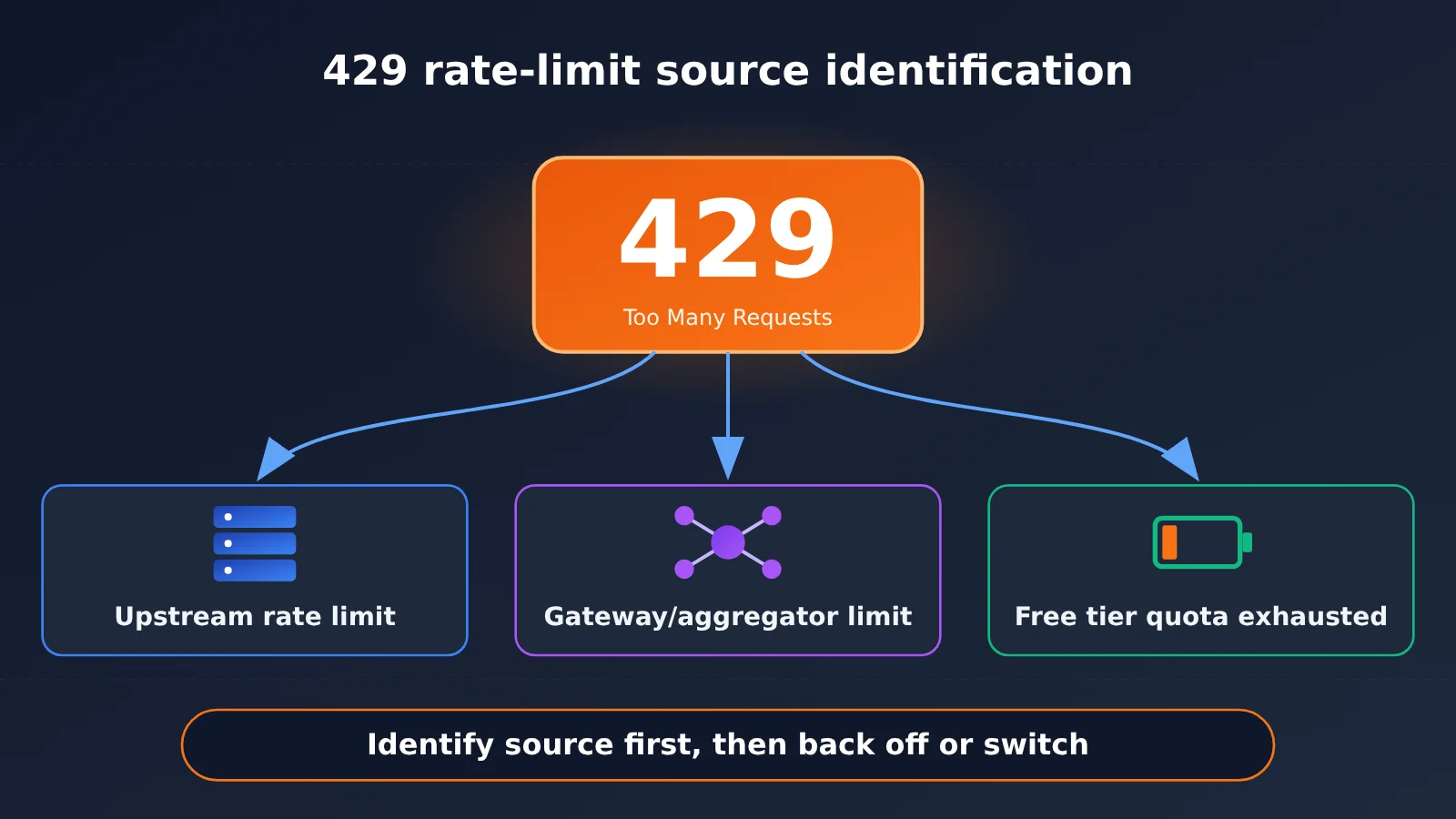
429 is the standard HTTP status code for “too many requests.” In the Large Language Model API world, it can come back from any layer in the call chain. The table below sums up the three most common sources and how to handle each one properly.
| Rate limit source | Typical signs | Should you switch models? | Recommended action |
|---|---|---|---|
| Upstream model provider | The error body carries the provider’s own error type and wording, and the response headers include the provider’s rate-limit fields | Usually not needed | Back off according to Retry-After, and lower concurrency or request a quota increase if necessary |
| Intermediate gateway/aggregation platform | The error wording comes from the gateway and mentions account-level or group-level rates | Not needed | Check the quota and concurrency settings on the gateway side, or switch to a different gateway group |
| Free tier/trial quota | Mentions free quota, daily request limits, or insufficient capacity | Depends | Upgrade to a paid tier, or switch to a similar model that has capacity |
Why a 429 Doesn’t Mean the Model Is Down
When the model itself is unavailable, the more common signal is a 5xx error. For example, Anthropic’s overload returns 529 overloaded_error, and 502 and 503 usually point to a gateway or load balancer problem. These status codes mean the server temporarily can’t keep up — a completely different thing from “your account went over quota.”
A 429 carries a clear sense of ownership: the rate limit rule is aimed at you — your API key, your organization, the free tier you’re on, or the rate the gateway assigned to you. Switching models can sometimes get you around it, but if the limit comes from an account-level quota on the gateway, a different model will hit the same wall. And if the limit comes from an upstream provider’s tokens-per-minute cap, waiting a few seconds is all it takes to recover, whereas switching models just adds uncertainty about output quality.
Third-party troubleshooting write-ups on Claude Code back this up too: when Claude Code hits a 429, it shows Request rejected (429) followed by the server’s exact wording — and that wording is what tells you whether the limit came from Anthropic, from the gateway, or from the free tier. So the first step in troubleshooting is always to read the full error message, not just glance at the status code.
How 429 Differs from Nearby Status Codes
To avoid lumping different errors together, the table below lists a few status codes that are easy to confuse with 429 during Large Language Model invocation.
| Status code | Meaning | Responsible party | Suitable for retry | Suitable for failover |
|---|---|---|---|---|
| 429 | Too many requests, hit the rate or quota limit | Caller’s quota | Yes, with backoff | Switch only after backoff fails |
| 529 | Upstream overloaded (Anthropic-specific) | Server capacity | Yes, brief backoff | Yes |
| 503 | Service temporarily unavailable | Server or gateway | Yes | Yes |
| 500/502 | Internal error or gateway error | Server or gateway | Limited retries | Yes |
| 400/401/403 | Parameter, authentication, or permission problem | Caller configuration | No | No, fix the config first |
There’s a detail in this table that’s easy to overlook: according to third-party testing, Claude Code’s fallbackModel mechanism only triggers on 529 overload — trying up to 3 backup models — and not on 429. That tells us the tool’s designers themselves believe the first reaction to a 429 should be backoff, not swapping models.
How to Tell Who’s Behind a 429 Rate Limit: A 3-Step Triage
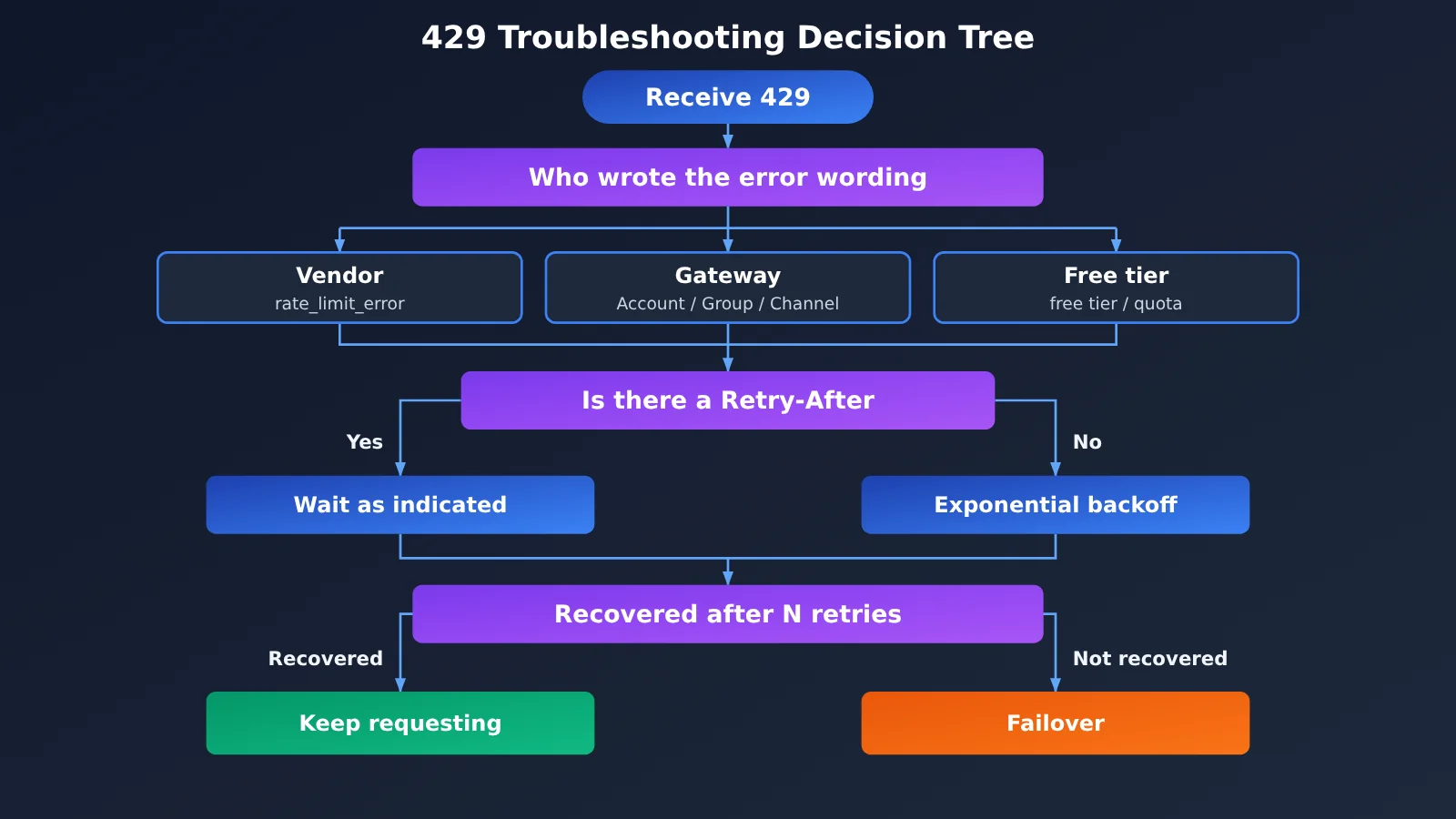
Here’s a 429 troubleshooting process you can follow as-is. The three steps are ordered from lowest to highest cost, and in most cases you’ll pinpoint the culprit on step one.
Step 1: Read the full 429 error body
Don’t just log the status code—record the response body verbatim. A 429 from different layers differs noticeably in wording, and that’s your most direct clue.
- Returned by the upstream provider: The error body usually includes the vendor’s error type field. Anthropic, for example, returns a
rate_limit_errortype, while OpenAI-style APIs return an error code likerate_limit_exceededand specify whether you exceeded the request count or the token count. - Returned by the gateway: The wording often references the gateway’s own concepts—”account,” “group,” “token,” “channel”—or explicitly names the gateway.
- Returned by the free tier: You’ll see terms like “free tier,” “quota,” “daily limit,” or “capacity.” In third-party tests of free trials for certain models, this capacity-type 429 comes up frequently.
If you’re calling through a proxy or aggregation platform, pay special attention to whether the gateway passes through the upstream’s original error. Passthrough means the upstream is limiting you; custom wording that isn’t passed through means the gateway is the one limiting you.
Step 2: Check the 429 response headers
Response headers are the second link in the evidence chain. Major providers return remaining quota and reset time in response headers, and gateways may include their own fields as well.
| Response header | Common source | Meaning | Use in troubleshooting |
|---|---|---|---|
Retry-After |
HTTP standard, widely used | Number of seconds to wait | Prefer this when backing off |
x-ratelimit-remaining-requests |
OpenAI-style API | Requests remaining in the current window | Determine whether it’s RPM rate limiting |
x-ratelimit-remaining-tokens |
OpenAI-style API | Tokens remaining in the current window | Determine whether it’s TPM rate limiting |
anthropic-ratelimit-requests-remaining |
Anthropic | Requests remaining | Confirm the rate limiting comes from Anthropic |
anthropic-ratelimit-input-tokens-remaining |
Anthropic | Input tokens remaining | Determine whether it’s input token rate limiting |
The rule is simple: if a provider-prefixed rate limit header appears and the remaining value is 0, it’s basically safe to say the upstream provider is limiting you; if there are no provider rate limit headers and only gateway-specific fields—or nothing at all—then the gateway layer is more likely. Note that some providers have moved specific limits to dashboard-only display in recent years, so the information in response headers may be incomplete. In that case, go back to the error wording from Step 1 and the dimension comparison from Step 3.
Step 3: Match the rate-limiting dimension
Once you know who’s throttling you, you also need to figure out what exactly is being limited. Rate-limiting rules vary from vendor to vendor. A third-party side-by-side comparison of five providers shows: Anthropic mainly limits by tokens per minute, and cache hits don’t count toward the quota; DeepSeek mainly limits concurrency; OpenAI and Google’s specific quotas are mostly something you check in their consoles.
This has a direct impact on your configuration strategy. Here’s the common mapping:
- RPM (requests per minute) exceeded: Merge multiple small requests into batch requests, or add a token bucket on the client to pace sending evenly.
- TPM (tokens per minute) exceeded: Shorten the context, enable prompt caching, and split long-document tasks across different time windows.
- Concurrency exceeded: Reduce the number of workers and use a queue to cap in-flight requests. Plain backoff has limited effect here.
- Daily quota or free tier exhausted: Backoff is pointless. You can only wait for the reset, upgrade your tier, or switch to another channel.
Case 4 is the only kind of 429 where backoff is guaranteed to be useless—and it’s the one you should identify as early as possible and jump straight to failover for.
How to Configure a 429 Backoff Strategy
Once you’ve confirmed that a 429 is a recoverable rate limit, it’s time for the backoff phase. The goal of backoff isn’t “retry as fast as possible” — it’s “recover as fast as possible without making the congestion worse.”
Exponential Backoff with Random Jitter
The most common approach is exponential backoff plus random jitter. The wait time for the nth retry is roughly “base delay × 2 to the power of n,” with a random amount layered on top, plus an upper bound. Jitter spreads out the retry timing across multiple clients so they don’t all hit in the same second and create a “retry storm.”
If the response includes Retry-After, it should take priority over your own calculated backoff time. The server knows better than you when the window resets, and following its recommendation is usually the fastest way to recover.
Recommended Backoff Parameter Values
The table below gives a set of starter parameters suitable for most chat and batch scenarios. In practice, adjust them based on how much latency your business can tolerate.
| Parameter | Recommended Starting Value | Description |
|---|---|---|
| Base delay | 1 second | Wait time before the first retry |
| Backoff multiplier | 2 | Wait time doubles with each retry |
| Max single wait | 30–60 seconds | Prevents wait time from growing indefinitely |
| Max retries | 3–5 | Beyond that, fail over or raise an error |
| Jitter | 0–100% random of the wait time | “Full jitter” is recommended to spread out retries |
| Retry-After | Takes priority when present | Overrides self-computed backoff time |
Two configuration details often get overlooked. First, in interactive scenarios (like a chat interface), the total wait time shouldn’t be too long — set an overall timeout budget, and once it’s exceeded, switch over or notify the user. Second, don’t back off and retry on configuration errors like 400, 401, and 403. No amount of waiting will fix them; you’ll just burn time and quota for nothing.
If you’re using an official SDK, many already have built-in automatic retries for 429 and 5xx, usually controlled by a parameter like max_retries. Before wrapping another retry layer around it, check the SDK’s default behavior so two layers of retries don’t stack up and multiply your effective retry count.
How to Configure Failover for 429s
Backoff means “wait where you are.” Failover means “take another route.” They aren’t an either/or choice — it’s a sequence: back off first, and only switch if backing off doesn’t help.
When to trigger failover
Trigger a switch when any one of these conditions is met, rather than switching the moment you see a 429:
- You’ve hit the max retry count and 429s keep coming back;
- The error wording clearly points to a daily quota, exhausted free credits, or “insufficient capacity”;
- The wait time given in
Retry-Afterexceeds what your workload can tolerate; - The same channel fails several times in a short window and trips the circuit-breaker threshold.
Third-party guidance for handling frequent 429s on a hot model on OpenRouter follows the same reasoning: back off first, then fail over to other models behind the same endpoint. That order lets you keep the original model’s output quality while making sure the service stays up.
Three designs for a failover chain
There are different tiers of “backup route,” ordered from lowest to highest switching cost:
- Same model, different channel: the same model behind another API key, another group, or another provider. Best output consistency, so it’s the first choice.
- Same vendor, different tier: for example, dropping from a flagship model to a lightweight model in the same family. Slightly less capable, but the style stays close.
- Cross-vendor model swap: moving to a peer model from another vendor. Highest availability, but you’ll need to validate prompt behavior and output format in advance.
On top of that, add a circuit breaker: once a channel fails enough times in a row to hit the threshold, skip it entirely for a cooldown period. When the cooldown ends, send a few probe requests, and if it’s healthy, ramp traffic back up gradually. This keeps every request from hitting the wall first and switching afterward, which noticeably cuts overall latency.
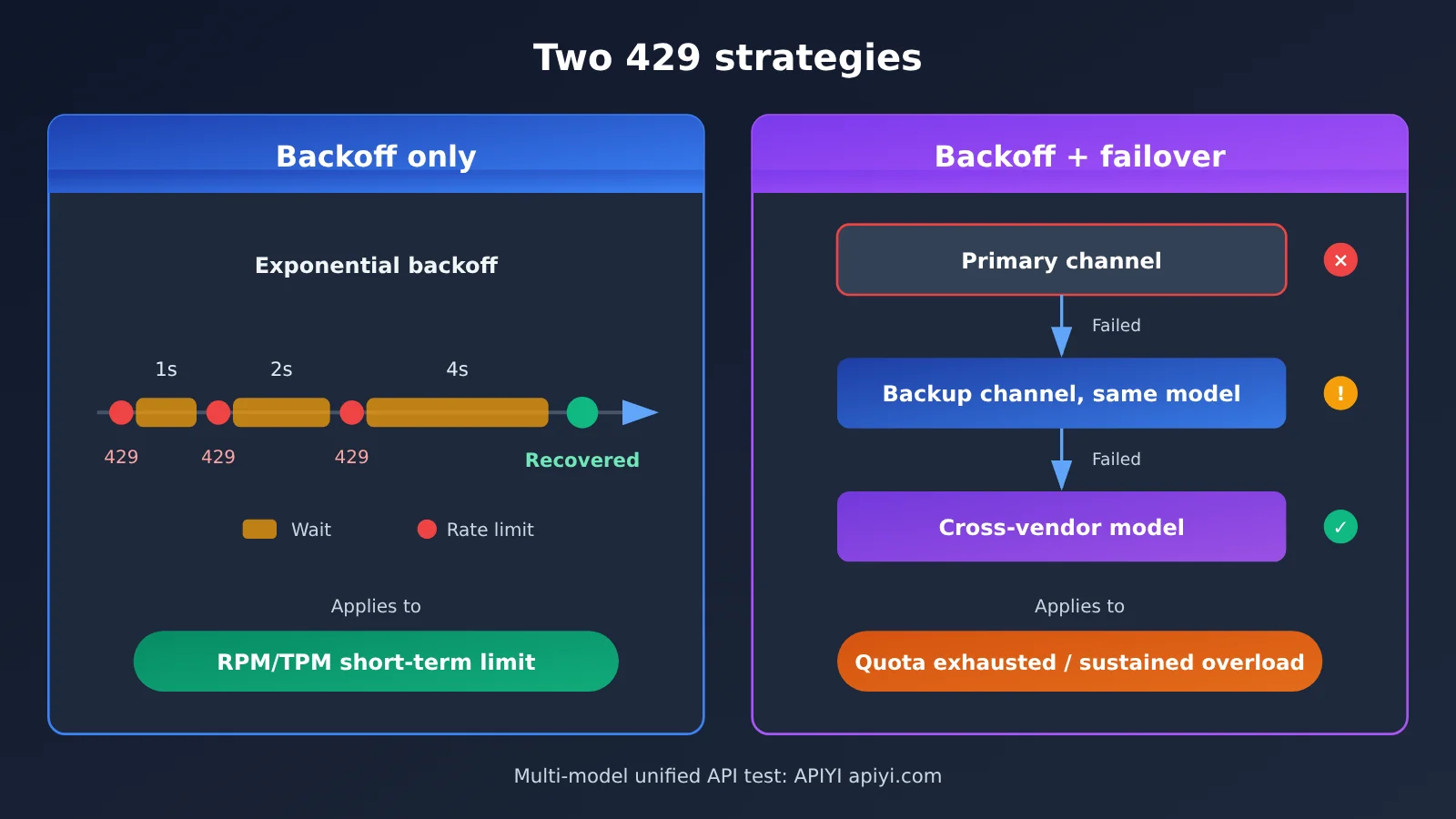
Both strategies compared above can be validated in a real project through the same unified endpoint. On a platform like APIYI that’s compatible with both OpenAI and Anthropic API formats, a single codebase can switch to a backup model by changing only the model parameter — far less hassle than maintaining a separate SDK for each vendor.
429 Rate Limiting: Quick Start
Here’s the earlier material condensed into a configuration checklist you can follow and put into practice directly. There’s no code involved—treat it as a checklist for code review or ops configuration.
5-Point Configuration Checklist
- Logging: Log the full response body and headers, including at minimum the status code, error type, error message,
Retry-After, and the variousratelimitfields. - Classification: On the client side, sort errors into three buckets: “retryable with backoff” (429 rate-limit types, 529, 503), “switch required” (quota exhausted, persistent failures), and “do not retry” (400, 401, 403).
- Backoff: Configure exponential backoff with full jitter using the parameter table above, honor
Retry-Afterfirst, and set a max retry count plus an overall timeout budget. - Fallback chain: Build your backup list in the order “same model, different channel → same vendor, different tier → different vendor, different model,” and validate prompt behavior on each fallback model ahead of time.
- Circuit breaking and alerting: Set failure thresholds and cooldown periods per channel, and alert on the 429 rate—if it stays high, that’s a sign you need a quota increase or concurrency tuning.
Example Fallback Model Chain
The table below sketches a typical three-tier fallback chain. Refer to the platform’s model list for exact model names and to the pricing page for billing; this article doesn’t list specific unit prices.
| Tier | Selection rationale | API format | Available platforms | Pricing basis |
|---|---|---|---|---|
| Primary | The flagship model that performs best for your use case | OpenAI or Anthropic format | APIYI apiyi.com, official API | See docs.apiyi.com/models |
| First fallback | Another channel or group for the same model | Same as primary | APIYI apiyi.com, official API | See docs.apiyi.com/models |
| Second fallback | A lightweight model from the same vendor, or an equivalent model from another vendor | OpenAI-compatible format | APIYI apiyi.com and other aggregation platforms | See docs.apiyi.com/models |
As for integration: if you’re using the official OpenAI or Anthropic SDK, you usually just point base_url at the address the platform provides and swap api_key for your platform key. For the exact endpoint addresses and per-model invocation details, trust the APIYI documentation center at docs.apiyi.com—don’t copy unverified URLs from the internet.
🚀 Quick start: When building a 429-tolerant chain, it’s worth wiring both your primary and fallback models through APIYI apiyi.com using the same codebase. The platform provides API access to the mainstream models covered in this article, compatible with both OpenAI and Anthropic interface formats—switching models is just a matter of changing the
modelparameter. Integration docs are at docs.apiyi.com; for per-model input/output prices, cache pricing, and billing rules, rely on the actual data on the pricing page at docs.apiyi.com/models.
Frequently Asked Questions (FAQ)
Q1: What is a 429 rate limit error?
429 is the Too Many Requests status code in the HTTP standard, meaning the caller has exceeded the allowed number of requests, tokens, concurrency, or total quota within a given time window. It tells you that “you’ve been limited” — not that the model itself is broken.
Q2: How does 429 differ from 529 and 503?
429 points to a quota problem on the caller’s side — the fault lies in “you’re using too much.” 529 is Anthropic’s overload error, and 503 means the service is temporarily unavailable; both are on the server’s capacity side. For the former, prioritize backoff and adjusting your usage; for the latter, a brief backoff followed by a direct failover works better.
Q3: What’s the fastest way to tell whether a 429 comes from the upstream provider or the gateway?
Start with the error body wording: errors with a provider-specific error type usually come from upstream, while those mentioning accounts, groups, or channels usually come from the gateway. Then check the response headers: if a vendor-prefixed `ratelimit` field appears with a remaining value of 0, you can basically confirm the upstream is rate limiting.
Q4: Why doesn’t the 429 go away even after backing off many times?
The most common cause is misjudging the limiting dimension. If it’s a daily quota or exhausted free credits, backoff is doomed to fail; if it’s concurrency being exceeded, the client is still sending at high concurrency, so backoff only softens the blow. In these cases, you should lower concurrency or go straight to failover.
Q5: How do I quickly build a multi-model failover chain?
I recommend validating on a platform that offers a unified multi-model interface:
1. Register an account at APIYI apiyi.com and get an API key;
2. Configure `base_url` according to the docs at docs.apiyi.com, and connect using either the OpenAI or Anthropic format;
3. Configure primary and backup model lists in your client, and switch by changing the `model` parameter.
This way the primary and backup models share a single codebase, which makes testing the failover chain much cheaper.
Q6: Will failover cause costs to spiral?
It’s possible. Backup models may differ from the primary in unit price, context length, and caching strategy, so frequent switching changes your billing structure. I’d suggest checking prices for each backup model in advance — always based on the actual data on the APIYI pricing page at docs.apiyi.com/models — and setting alerts on your switch ratio.
Q7: What are the known limitations of these 429 handling approaches?
Backoff adds request latency, so it’s not suitable for scenarios with extremely strict real-time requirements; switching across providers can introduce differences in output style and format, so regression testing is needed in advance; and some providers only show limits in their console with incomplete response header info, leaving you to rely on error wording and monitoring data when troubleshooting.
429 Rate Limiting: Key Takeaways
- A 429 only tells you that you’re being limited: it doesn’t say who’s doing the limiting or what’s being limited, so it’s not the same thing as a model failure.
- Read the actual error message first: the wording of the error body is the fastest clue for telling apart the upstream provider, the gateway, and a free tier.
- Then look at the response headers: vendor-prefixed
ratelimitfields andRetry-Afterare your second chain of evidence. - Fix the right dimension: for RPM, even out the request rate; for TPM, shrink the context; for concurrency, cap your workers; if the quota is used up, just switch.
- Back off before you switch: exponential backoff with full jitter,
Retry-Aftertakes priority, and retries need a hard ceiling. - Build the fallback chain in layers: switch channels for the same model first, fall back to a model from another vendor as the safety net, and pair it with a circuit breaker.
- Cut costs with a unified interface: APIYI’s interface, compatible with both OpenAI and Anthropic formats, lets you manage primary and backup models with a single set of code.
Summary
When you hit a 429, the right order is “find the source → identify the dimension → back off → switch,” not reaching for a different model the moment it happens:
- Find the source: the error body wording plus the response headers tell you whether it’s the upstream vendor, the gateway, or a free tier.
- Identify the dimension: work out whether it’s request count, token count, concurrency, or the total quota — that decides whether backing off will actually help.
- Set up fault tolerance: exponential backoff with jitter as the first line of defense, layered failover plus a circuit breaker as the second.
Bake this flow into your logging, error classification, and client configuration, and 429s go from a “3 a.m. wake-up call” to a predictable, self-healing routine event.
To quickly verify how well your primary and backup models switch over, try APIYI at apiyi.com. Setup instructions are at docs.apiyi.com, and for the model pricing and billing details involved, refer to docs.apiyi.com/models.
📚 References
- Rate Limit Reached in Claude Code: What Each 429 Message Means: Interpreting the meaning behind each 429 error message in Claude Code
- Link:
ofox.ai/blog -
Description: Explains how to tell apart Anthropic, gateway, and free-tier rate limiting based on the server’s own wording
-
Claude Code fallbackModel: 3-Tier Failover Setup: Configuring fallback models in Claude Code
- Link:
ofox.ai/blog -
Description: Points out that fallbackModel kicks in on 529 overload, with a maximum of 3 models, rather than on 429
-
LLM API Rate Limits Compared: A side-by-side comparison of rate limiting rules across 5 major Large Language Model vendors
- Link:
ofox.ai/blog -
Description: Compares different rate limiting criteria, such as per-token, per-concurrency, and console-display-only
-
APIYI Documentation Center and Pricing Page: Integration instructions and model billing
- Link:
docs.apiyi.comanddocs.apiyi.com/models - Description: The API format, base_url configuration, and actual pricing of each model are subject to these pages
Author: APIYI Technical Team
Technical Discussion: Feel free to reach out to us through the APIYI apiyi.com homepage to discuss rate limiting and fault-tolerance practices. For more integration resources, visit the docs.apiyi.com documentation center