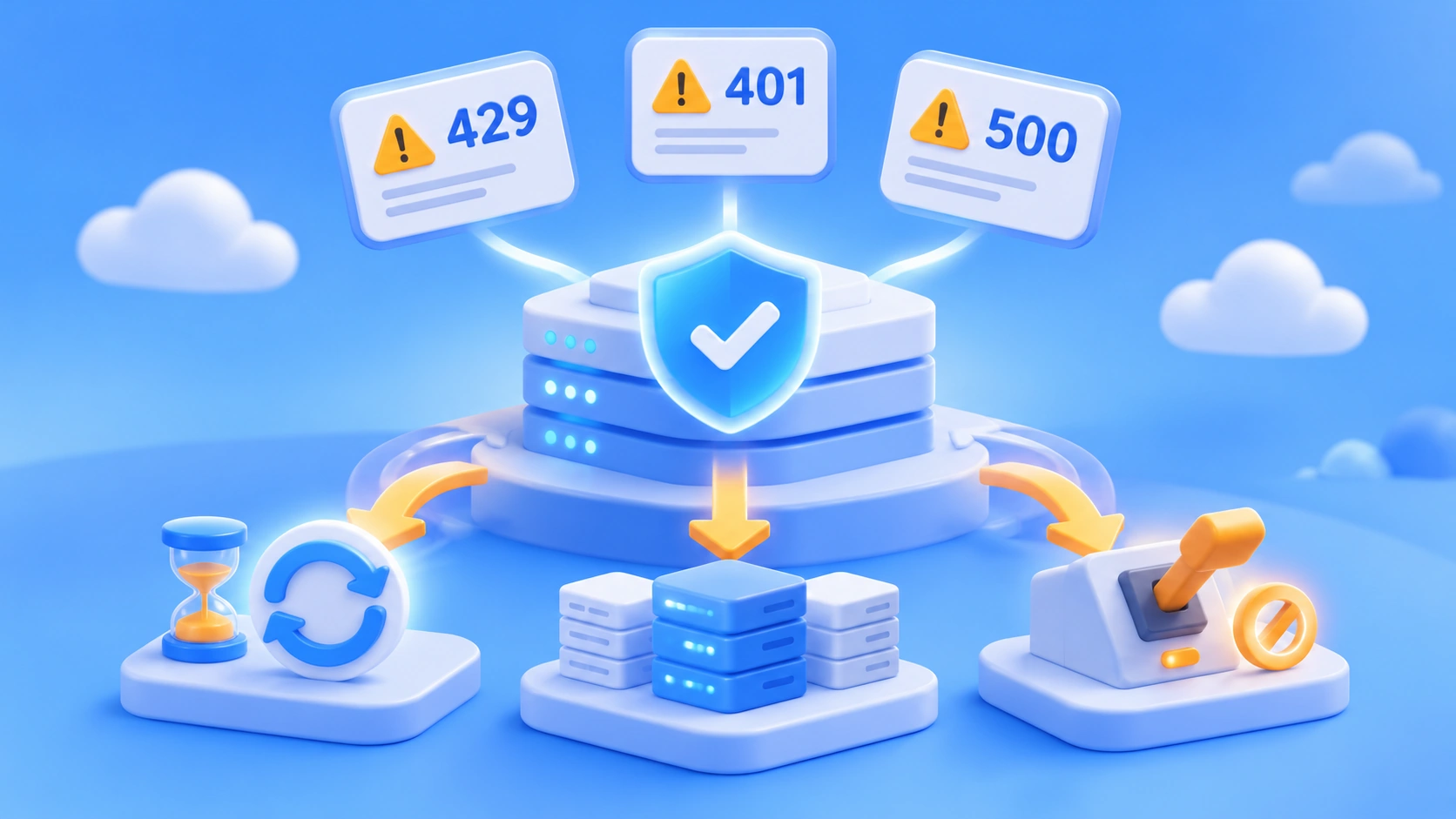
Author’s note: This article explains the causes of AI API 429, 401, and 500 errors and how to handle them. It covers which errors to retry, which require configuration fixes, and when to use exponential backoff, multi-model fallback, and circuit breakers.
If you’ve worked with Large Language Models in production, you may have seen a string of 429, 401, and 500 errors light up your alerts in the middle of the night. A common response is to retry every failed request, but that often makes things worse. This article breaks down how to diagnose AI API 429, 401, and 500 errors and design for fault tolerance, so you can replace blind retries with an error-specific approach.
This isn’t an introduction to HTTP status codes. It’s a practical guide to operating production systems. We’ll cover the typical causes of each error, whether to retry, how to implement application-level handling, and how to divide fault-tolerance responsibilities between the gateway and application layers.
What you’ll gain: You’ll be able to determine within minutes whether an error calls for a retry, a fallback, or an immediate configuration fix—and understand when exponential backoff, multi-model fallback, and circuit breakers are appropriate.
Key Takeaways for AI API 429, 401, and 500 Errors
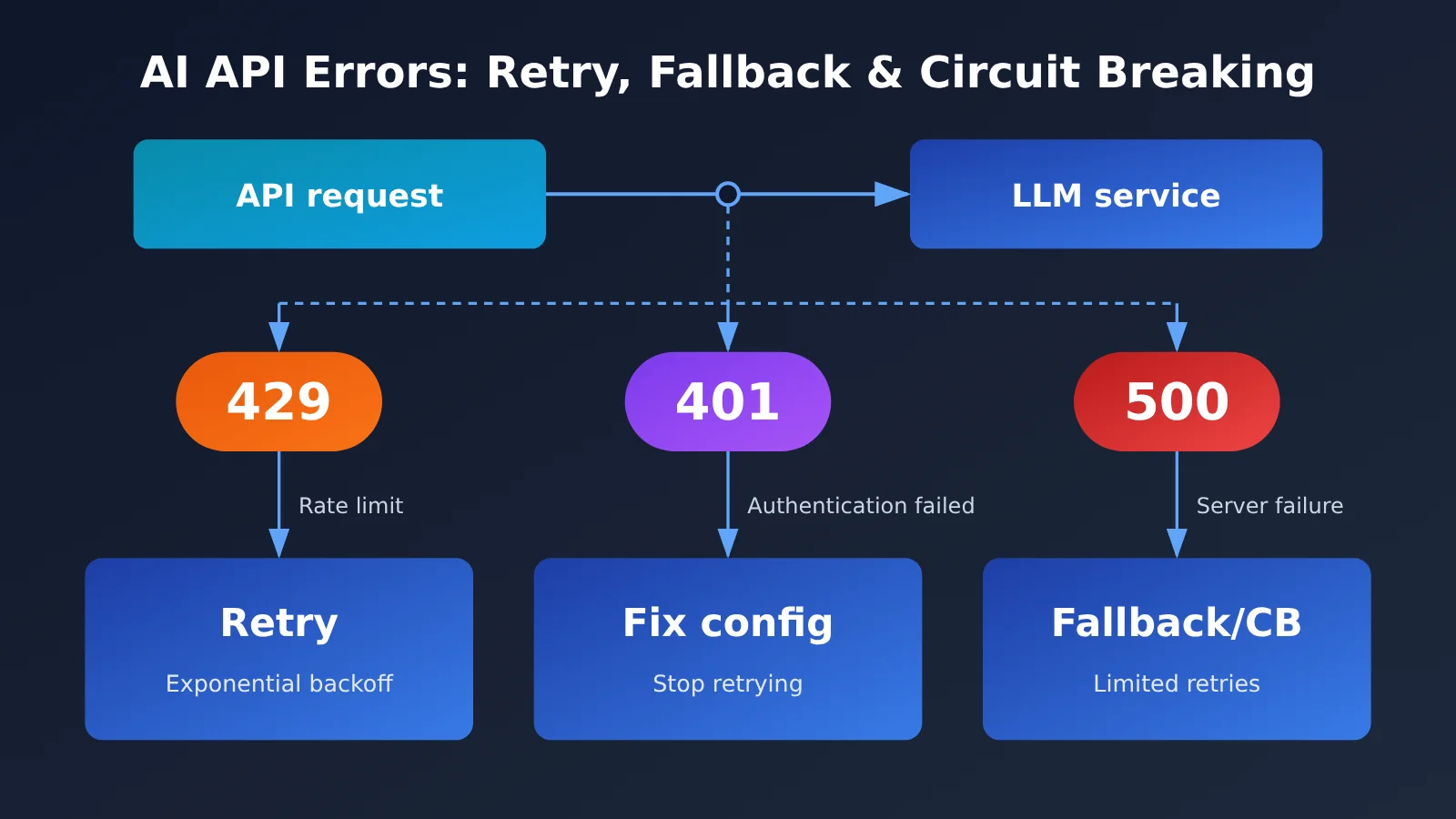
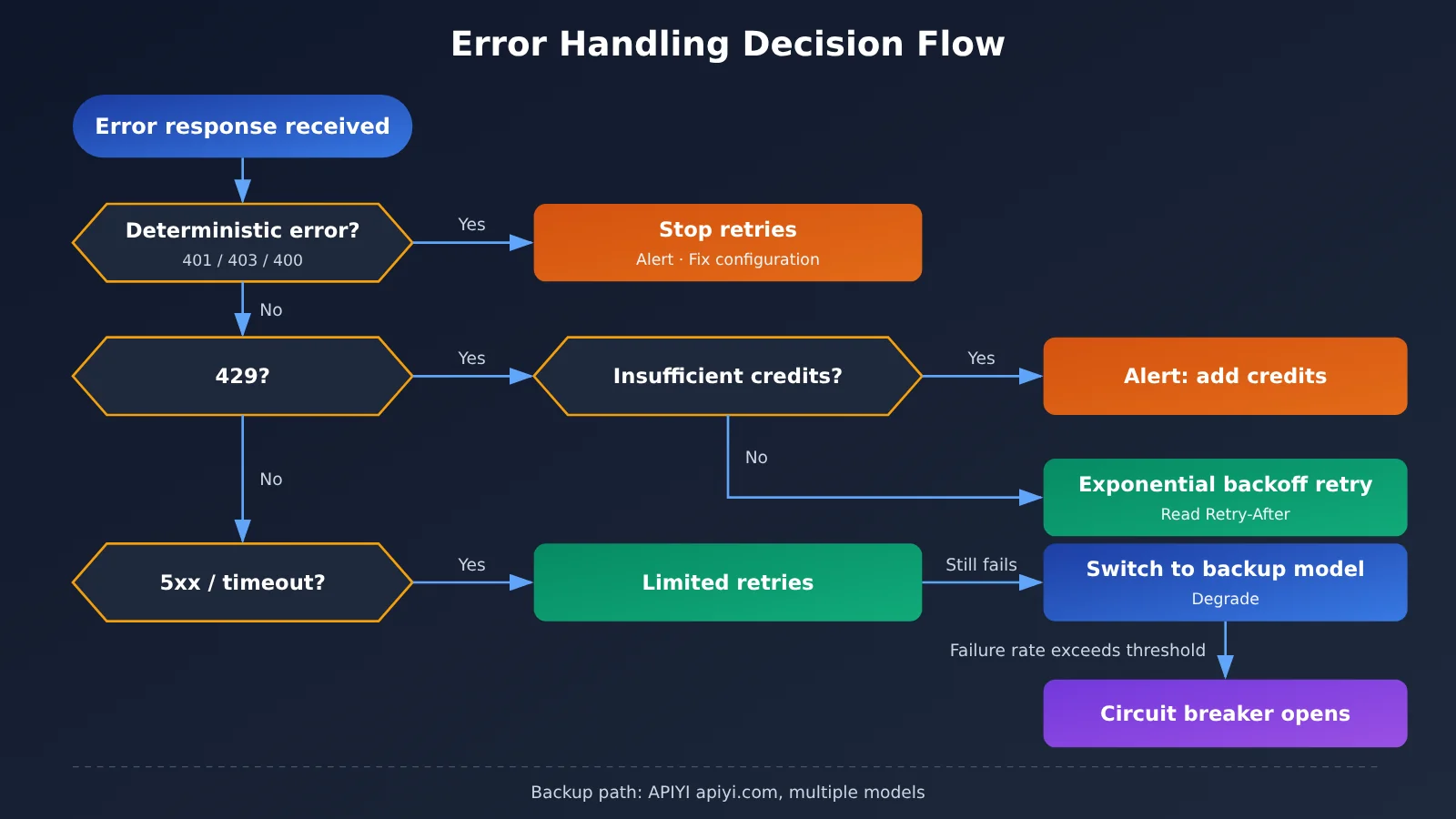
When handling AI API errors, classify them first and consider retries second. Different status codes point to different kinds of problems: some resolve themselves after a short wait, while others will fail no matter how many times you retry. The table below gives an overview of three error categories.
| Error category | Typical status codes | Root cause | Retry? | Main response |
|---|---|---|---|---|
| Rate limits | 429 | Requests are too frequent or quota is exhausted | Depends on the cause | Read Retry-After, use exponential backoff, and distinguish rate limiting from insufficient quota |
| Authentication | 401, 403 | Invalid key or insufficient permissions | No | Stop retrying immediately, trigger an alert, and fix the configuration |
| Server-side | 500, 502, 503, 504 | Upstream failure or overload | Yes, with a limit | Retry a limited number of times with backoff; fall back or use a circuit breaker if failures persist |
| Request | 400, 404, 413, 422 | Incorrect parameters, model name, or length | No | Log the request body, fix the parameters, and resend |
As you can see, whether to retry depends on whether the error is temporary or deterministic. Retries make sense for temporary errors, such as rate limits or intermittent upstream failures. For deterministic errors, such as an incorrect key or invalid parameters, retries only waste quota, slow down responses, and may trigger stricter rate limits.
AI API Error Code Decision Table
When troubleshooting, the status code alone isn’t enough. You also need to check the error type in the response body and the response headers. The table below can help you design application-layer logic.
| Observed signal | Possible cause | Recommended action | Count toward circuit breaker? |
|---|---|---|---|
429 with a Retry-After header |
Rate limit | Wait for the time specified in the header, then retry | No |
| 429 with an error body indicating insufficient quota or balance | Account quota exhausted | Don’t retry; alert someone to top up or switch accounts | No |
| 401 | API key is invalid, expired, or incorrectly formatted | Don’t retry; check the API key and environment variables | No |
| 403 | API key doesn’t have access to the model or region | Don’t retry; check permissions and model access | No |
| 500 / 502 | Upstream internal error or gateway forwarding failure | Retry 2–3 times with backoff | Yes |
| 503 | Service overload or maintenance | Retry with backoff, then fall back if retries fail | Yes |
| 504 or client timeout | Generation is too long or the upstream service is slow to respond | Decide whether to retry based on idempotency; consider increasing the timeout | Yes |
The easiest detail to miss is that 429 can mean two different things. Some providers also return 429 when a quota is exhausted, but the type field in the error body differs from an ordinary rate-limit error. If your application checks only the status code, it may keep retrying a request with an insufficient balance indefinitely, backing off each time. The logs will be full of 429s, but the request will never succeed.
429 Rate Limit Errors: A Closer Look
A 429 error occurs when the number of requests or tokens exceeds a limit within a given time period. Large Language Model APIs typically enforce limits across several dimensions: requests per minute, tokens per minute, and sometimes concurrent requests. So even if you’re making only a few requests, sending an extremely long context in one request can trigger a 429.
There are three principles for handling 429 errors at the application layer. First, follow Retry-After or similar reset-time headers whenever available rather than guessing how long to wait. Second, when there’s no header to guide you, use exponential backoff with random jitter to prevent many clients from waking up at once and hitting the limit again. Third, control traffic at the source: use a token bucket or queue to limit concurrency. That’s more effective than retrying after the fact.
401 Authentication Errors: A Closer Look
A 401 is an error you generally shouldn’t retry. It’s almost always caused by a configuration issue. Common examples include extra spaces or line breaks copied with the key, an environment variable that wasn’t properly injected into a container, a test environment key used in production, a key that has been rotated or revoked, or an incorrect authentication header format.
With OpenAI-compatible APIs, another common cause is a mismatch between the base_url and the key—for example, using a key from platform A to send a request to platform B’s endpoint. When a 401 occurs, the application should stop retrying immediately, trigger a high-priority alert, and log the first few characters of the key and the request URL to help pinpoint the issue. Don’t log the full key.
500 Server Errors Explained
500-series errors indicate a problem on the server or somewhere along the request path. The upstream model service may have encountered an internal error or be overloaded, or an intermediate gateway may have failed to forward the request. These errors are usually temporary, so a limited number of retries makes sense. But if they persist, the upstream service is likely unhealthy. Continuing to retry will only queue up requests and tie up threads, so you should switch to a fallback or open a circuit breaker.
Also watch out for 504 errors and client-side timeouts. Large Language Models can take a while to generate long responses. If the timeout is too short, you might mistake a normal slow request for a failure and retry it, potentially resulting in duplicate charges. If a streaming response is interrupted, the frontend may also receive truncated content.
Quick Start: AI API Retries, Fallbacks, and Circuit Breakers
Once you’ve categorized the errors, it’s time to put the handling logic into code. As requested, this section uses parameter lists and implementation steps rather than code blocks, so you can implement each mechanism in any language.
Implementing Exponential Backoff Retries
With exponential backoff, the wait time grows by a multiplier after each retry, with random jitter added on top. You can structure the logic like this:
- Define the set of retryable errors, such as
429(except when quota is exhausted),500,502,503,504, and network timeouts. - After each failure, check the
Retry-Afterresponse header. If it’s present, wait for the specified duration; otherwise, calculate the wait using the backoff formula. - Calculate the wait time as “base interval × 2 raised to the retry count,” then add random jitter and set a maximum wait per attempt.
- Set a maximum retry count and a total time budget. If either limit is exceeded, stop immediately and pass the error to the fallback logic.
- Log each retry, including the error code, retry count, wait time, and model name, so you can analyze failures later.
If you’re using an official SDK, it may already have parameters such as max_retries and timeout. Be careful not to wrap it in another layer of the same retry logic: retry counts can multiply, dramatically increasing request volume during an outage.
The table below provides common starting values based on experience. Adjust them to match your latency requirements and provider limits.
| Parameter | Meaning | Common Starting Value | How to Adjust |
|---|---|---|---|
max_retries |
Maximum number of retries | 2–5 | Use a lower value for real-time chat and a higher one for offline batch processing |
| Base interval | Wait before the first retry | About 1 second | Increase for services with strict rate limits |
| Maximum wait per attempt | Cap on backoff time | Tens of seconds | Avoid waits long enough to stall the request |
| Random jitter | Spreads out retry times | A random value representing a portion of the wait time | More important as the number of concurrent clients grows |
| Total time budget | Maximum duration of one invocation | Based on your service’s SLA | Fall back immediately when the budget is exhausted |
🚀 Quick start: To test retry behavior with different error codes, you can use APIYI apiyi.com to access multiple models through a unified OpenAI-compatible API. This lets you observe how different models respond and report errors under the same retry logic, without building a separate integration for each provider.
Designing a Multi-Model Fallback Strategy
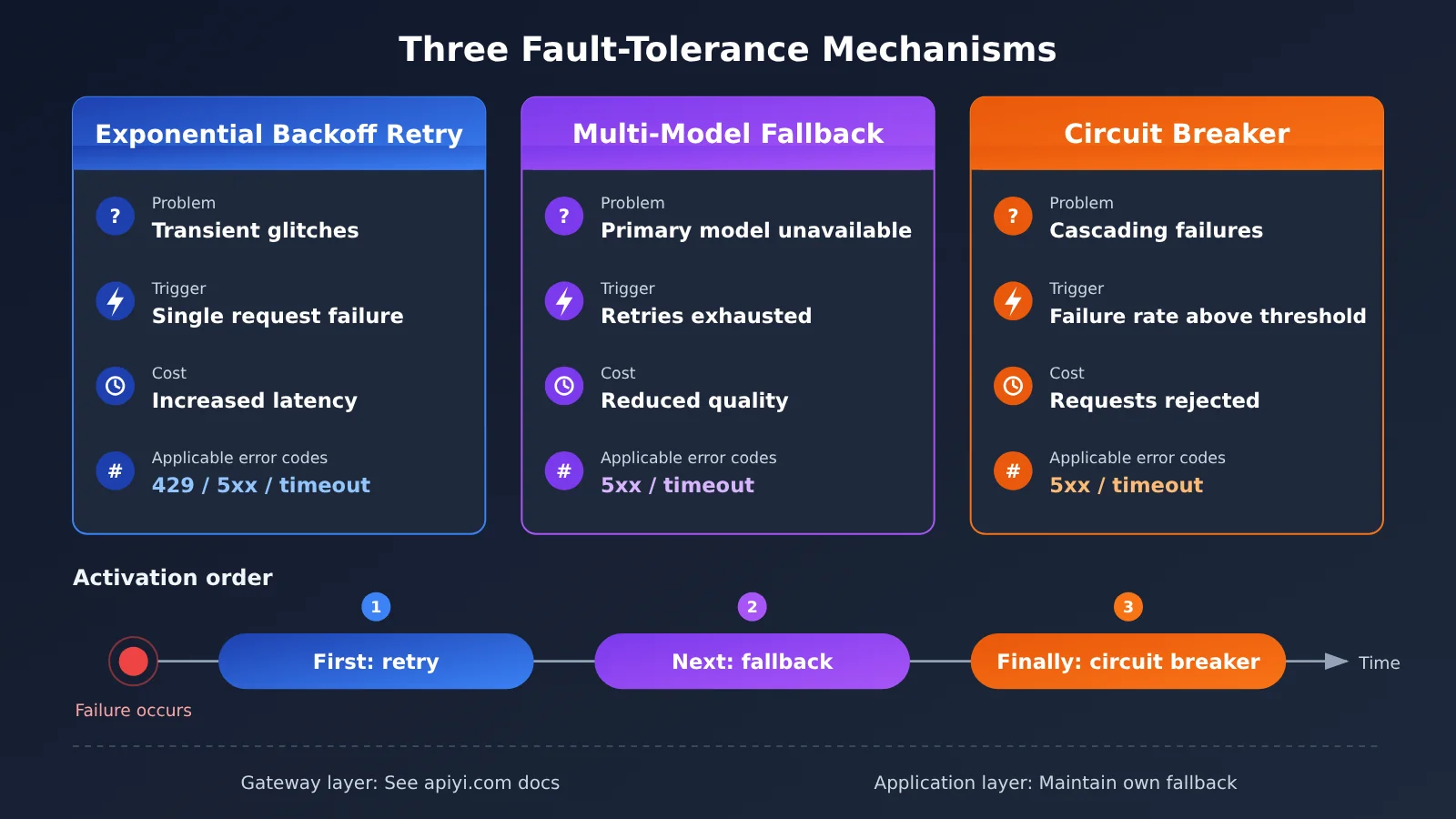
Retries address situations where “the same model is temporarily unavailable.” Fallbacks address situations where “the model is unlikely to recover soon.” A multi-model fallback strategy sets up an alternative path in advance: after the primary model fails repeatedly, requests switch to backup models in order. This keeps the service responding, though it may mean lower quality or higher costs.
When designing a fallback chain, consider whether the models have equivalent capabilities. If the primary model relies on function calling, structured output, or long context, the backup models must support those features too. Otherwise, switching models could cause new 400 errors or output-parsing failures. The table below shows one way to design fallback chains for different scenarios.
| Business scenario | Primary model | First backup | Second fallback | Available platforms |
|---|---|---|---|---|
| Online customer support | High-quality general-purpose model | Comparable model from another provider | Lightweight, fast model + simplified response | APIYI apiyi.com, official APIs from each provider |
| Code generation and review | Flagship model with strong coding capabilities | Flagship model from another provider | Return a “try again later” message | APIYI apiyi.com, official APIs from each provider |
| Batch content processing | Cost-effective model | Another model at a similar price point | Queue for later processing | APIYI apiyi.com, official APIs from each provider |
| Structured information extraction | Model that supports JSON output | Another model that supports structured output | Rule engine as a fallback | APIYI apiyi.com, official APIs from each provider |
There are a few details to get right when implementing fallbacks:
- Prompt adaptation: Models respond differently to system prompts, so it’s best to have a separately tested prompt version for each backup model.
- Context length: Before switching, check whether the messages exceed the backup model’s context window. Truncate the conversation history first if needed.
- Result tagging: Mark responses from fallback models in logs and monitoring so you can assess their impact on quality.
- Don’t fall back on authentication errors: A 401 indicates a configuration problem. Switching models will only mask the issue, so raise an alert instead.
How Circuit Breakers Work and When to Use Them
A circuit breaker prevents a persistently failing dependency from bringing down the entire system. It typically has three states: when closed, it allows requests through and tracks the failure rate. Once the failure rate or number of consecutive failures exceeds a threshold, it opens, rejecting requests immediately or falling back without calling the failing upstream service. After a cooldown period, it becomes half-open and allows a small number of test requests through. If they succeed, it closes again; if they fail, it reopens.
The key is to count only errors that reflect upstream health. Include 5xx errors and timeouts in the failure rate, but exclude client errors such as 401 and 400. Otherwise, a configuration error could open the circuit breaker and cause all valid requests to be rejected. A 429 returned because of insufficient quota should also be excluded: it reflects the account’s status, not the service’s health.
More circuit breakers aren’t always better. For low-traffic internal tools, there may be too few samples to calculate a reliable failure rate, making false trips more likely. Simple retries and fallback are enough in those cases. Circuit breakers are better suited to high-concurrency production services, where they can limit damage quickly during widespread upstream failures and prevent slow requests from exhausting thread and connection pools.
Dividing Fault-Tolerance Responsibilities Between the Gateway and Application Layers
More teams are calling Large Language Models through API gateways or aggregation platforms. A common question is: if the gateway already handles automatic fallback, does the application still need retries and circuit breakers? Yes—but each layer has a different role. The gateway is best equipped to handle upstream channel issues, while the application understands business requirements and can make decisions accordingly.
| Fault-tolerance responsibility | Better suited to the gateway layer | Better suited to the application layer |
|---|---|---|
| Channel failover | Switching between channels for the same model, load balancing | No need to implement this again |
| Cross-model fallback | Providing model routing | Deciding whether a drop in quality is acceptable and whether to change the prompt |
| Retries | Fast channel-level retries | Managing the business-level retry budget and coordinating it with user-facing timeouts |
| Circuit breaking | Health checks for upstream channels | Circuit breaking and fallback when the entire gateway is unreachable |
| Authentication and quota errors | Returning clear error types | Alerting, stopping retries, and notifying someone to intervene |
| Monitoring | Channel-level success rates and latency | Business-level success rates, fallback rates, and user impact |
APIYI, for example, describes stability features such as automatic fallback, load balancing, and real-time monitoring. These capabilities are well suited to channel-level failover, leaving the application layer free to focus on business-level fallback. That said, check the platform documentation and test whether the gateway’s fallback triggers, error codes, and error body formats match those of the official API exactly. The “unlimited concurrency” mentioned in its service description also doesn’t mean you’ll never see a 429: upstream model limits still apply. A safer approach is to always keep application-level handling for 429 and 5xx responses, along with a fallback plan for when the gateway itself is unreachable.
🎯 Technical tip: After integrating a gateway, deliberately trigger several types of errors in a test environment—for example, use an incorrect key, request a nonexistent model name, or send an overly long context. Record the status codes and error body fields that APIYI apiyi.com actually returns, then adjust your application-level error classification rules accordingly instead of copying the error formats from the official documentation.
Frequently Asked Questions
Q1: What’s the fundamental difference between a 429 and a 500 error from an AI API?
A 429 means your requests have exceeded a limit, so the issue lies with your request rate or account quota. A 500 means something went wrong on the server side, so the issue is upstream. For a 429, slow down and respect the specified wait time. For a 500, retry a limited number of times, then fall back if failures persist. Both may resolve if you wait, but they call for different responses.
Q2: Why should you never automatically retry a 401 error?
A 401 is a deterministic error: if the key is wrong, retrying 10,000 times won’t change the result. Automatic retries waste resources and can hide the problem, delaying alerts. Instead, stop immediately and check the key, environment variable injection, and whether the request URL matches the key.
Q3: Why might a 429 error persist despite repeated retries?
The most common reason is that your quota or balance has run out. Some providers return a 429 in this case too, but the type field in the error body differs from a normal rate-limit error. Another possibility is that your retries don’t use random jitter, causing many requests to be resent at once and continually hit the limit. Check the error body first, then look at the timing of your retries.
Q4: Can falling back to another model affect output quality?
Yes. Fallbacks essentially trade quality for availability, so you need to decide which scenarios can tolerate that trade-off. Prepare independently validated prompts for your backup models and monitor the fallback rate. If it’s consistently high, check the primary model’s quota and stability.
Q5: How can I test fallback paths across models at a low cost?
You can set up a test environment using a platform that provides a unified interface for multiple models. For example, APIYI apiyi.com lets you switch between models from different providers using the same OpenAI-compatible invocation method. Just change the model name to compare how primary and backup models respond to the same prompt, including their outputs and errors. It’s a practical way to run a fallback drill before launch.
Q6: If my gateway has automatic fallback, does my application still need a circuit breaker?
Yes. Gateway fallback handles problems with upstream channels, but the gateway itself can also become unreachable or unavailable. Application-layer circuit breakers and fallback handling cover those cases. When using a gateway like APIYI, you can configure the application-layer circuit breaker to track the gateway as a whole rather than individual model channels, so the two layers don’t duplicate responsibilities.
Q7: What are the known side effects of retries, fallbacks, and circuit breakers?
Retries can result in duplicate charges and, in non-idempotent scenarios such as write operations involving tool calls, may cause actions to run more than once. Fallbacks can lead to variations in quality and output format. Circuit breakers that are too sensitive may reject valid requests. All three need ongoing tuning based on monitoring metrics—you can’t just configure them once and forget about them.
AI API Error Handling: Key Takeaways
- Classify before acting: Fix deterministic errors immediately; retry only transient errors.
- Check the response body for 429s: Distinguish rate limits from exhausted quotas. Retrying won’t help with the latter.
- Never retry a 401: Alert immediately and check that the key, environment variables, and API endpoint match.
- Set retry limits: Use exponential backoff with random jitter, and set budgets for both retry count and total elapsed time.
- Match fallback capabilities: The backup model must support the same features and have its own prompt.
- Count only server-side errors toward circuit breaking: Include 5xx errors and timeouts in the failure rate, but exclude client errors.
- Divide responsibilities between gateway and application: Use APIYI apiyi.com for provider-level fault tolerance, while the application handles business-level fallbacks.
Summary
When an AI API returns a 429, 401, or 500, the most important thing is to abandon the habit of retrying everything the same way. Handle each error according to its nature:
- Rate-limit errors: Respect
Retry-Afterand retry with exponential backoff and jitter. Also control concurrency and token usage at the source. - Authentication and request errors: Stop immediately, alert, and fix the configuration. Never retry automatically or use a fallback to hide the problem.
- Server errors: Retry a limited number of times, then switch to a backup model if failures persist. In high-concurrency scenarios, use a circuit breaker to limit further impact.
- Gateway and application layers: The gateway handles provider switching and load, while the application manages business semantics, retry budgets, and the final fallback.
Start by turning the decision table in this article into an internal error-handling standard for your team. Then run a failure drill to confirm that each error follows the expected path.
If you’re planning a multi-model fallback chain, you can use APIYI apiyi.com to compare how multiple models perform and report errors through a unified interface. Validate your fault-tolerance strategy in a test environment before deploying it to production.
📚 References
- Ofox.ai Blog – Articles on AI API Error Handling: Covers approaches to handling 429 rate limits, 401 authentication errors, and 500 server errors, along with exponential backoff, multi-model fallback, and circuit breakers
- Link:
ofox.ai/blog/page/41/ -
Note: A source of inspiration for this article, useful for further reading in English
-
Ofox.ai Blog – Articles on LLM API Gateways: Discusses LLM gateway selection and the context of failures across multiple providers
- Link:
ofox.ai/blog/page/40/ -
Note: Useful for understanding the role of gateway-layer fault tolerance in multi-model architectures
-
APIYI Documentation Center: Platform integration guides and documentation
- Link:
docs.apiyi.com - Note: Refer to the platform documentation and your own testing for details such as error code formats and fallback behavior
Author: APIYI Technical Team
Technical discussion: Contact us through the APIYI homepage to discuss AI API reliability practices. For more integration resources, visit the documentation center at docs.apiyi.com.