
Author’s note: This compares the tiered input list prices for GPT-6.2 Sol and GPT-6.1 Sol on APIYI, uses a 300K-token long-document example to show how input costs differ once you cross the threshold, and gives you a checklist for verifying the bill.
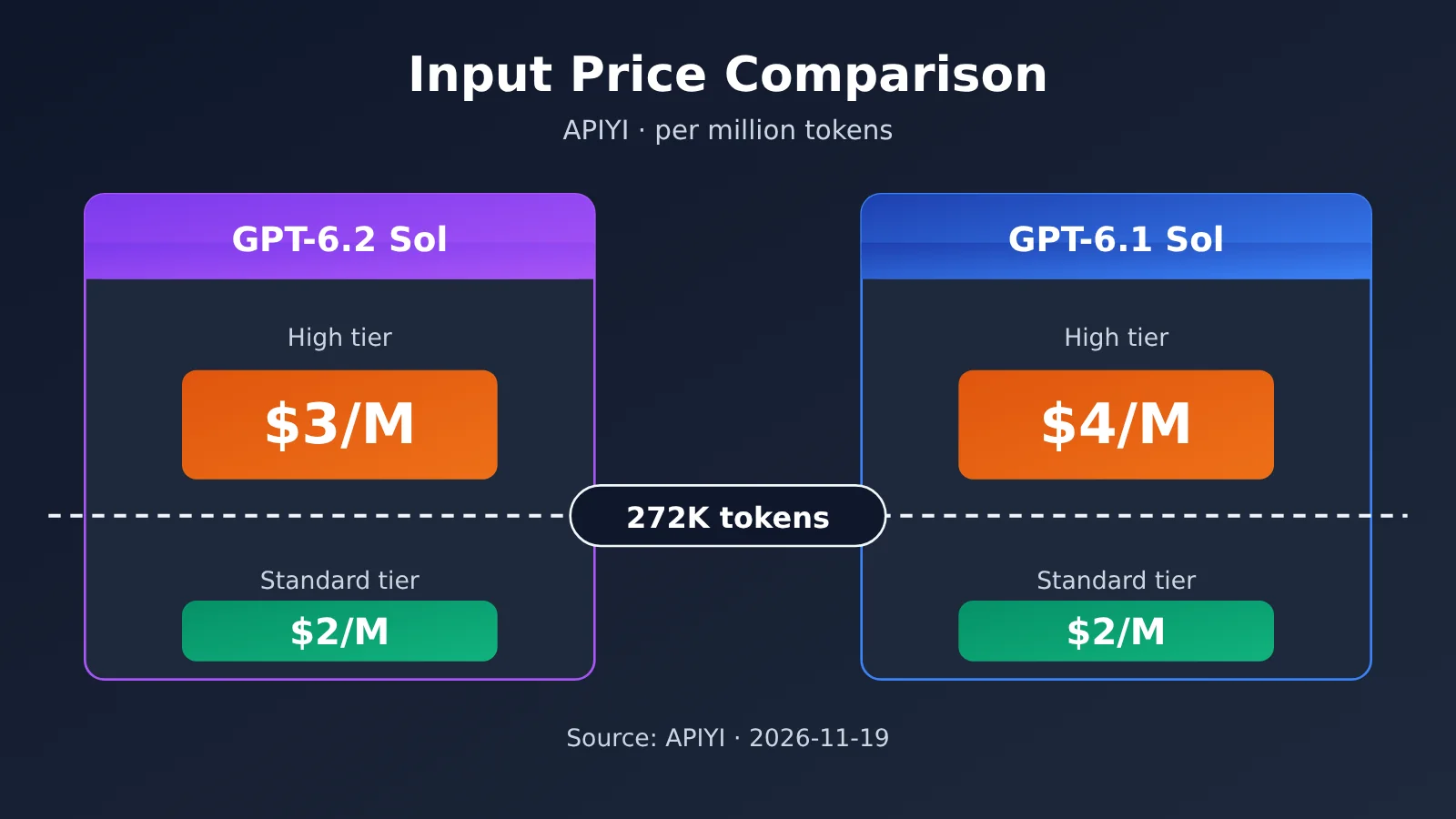
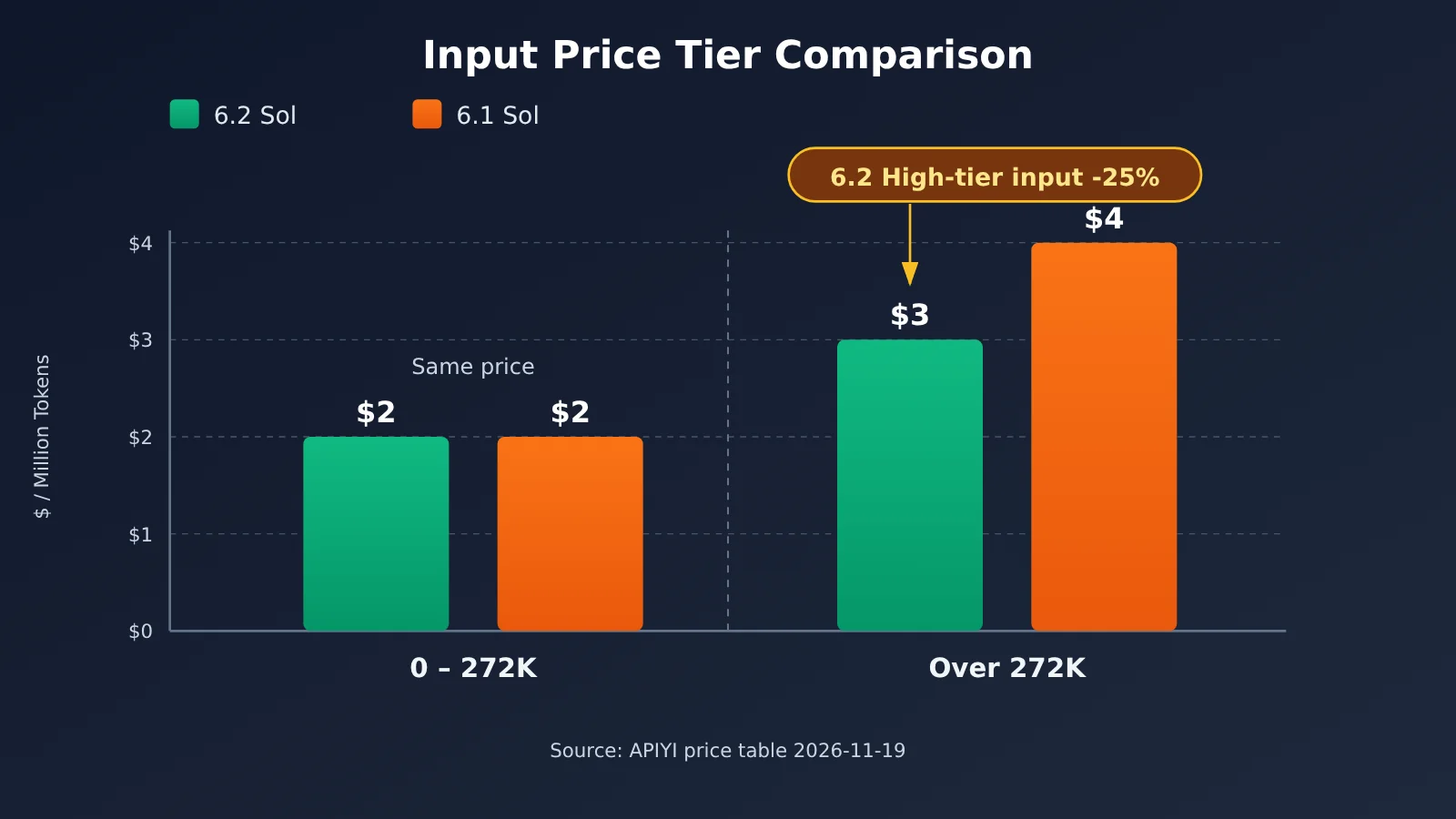
Let’s start with the bottom line: for a single input up to 272,000 tokens, GPT-6.2 Sol and GPT-6.1 Sol both list at $2 per million tokens on APIYI, so neither one saves you money on this rate. The difference only appears in the higher tier above 272,000 tokens. APIYI’s master pricing table lists the high-tier input rates as $3 for 6.2 Sol and $4 for 6.1 Sol per million tokens, which makes 6.2 Sol’s high-tier list price 25% lower.
This is not a measured bill. Every number in this article comes from APIYI’s model pricing table at apiyi.com, queried on 2026-11-19. The 300K-token example is just an illustration of input fees under specific billing assumptions—it doesn’t represent a full invoice, and it excludes output and caching charges.
Why it matters: after reading this, you’ll be able to tell whether your long-document workloads will land in the high tier, calculate the input-fee gap between GPT-6.2 Sol and 6.1 Sol, and know which line items to check before you go live.
GPT-6.2 Sol vs 6.1 Sol: The Core Difference Is Tiered Input Pricing
Both models use tiered pricing on APIYI, with the breakpoint at 272,000 tokens. The table below lines up the input list prices on either side of that threshold; the figures come from the tiered-pricing notes in APIYI’s master model price table, queried on 2026-11-19.
| Input range | gpt-6.2-sol input list price | gpt-6.1-sol input list price | Difference | Data source |
|---|---|---|---|---|
| 0 – 272,000 tokens | $2 per million tokens | $2 per million tokens | Same | APIYI apiyi.com master price table |
| Over 272,000 tokens | $3 per million tokens | $4 per million tokens | 6.2 is 25% lower | APIYI master price table |
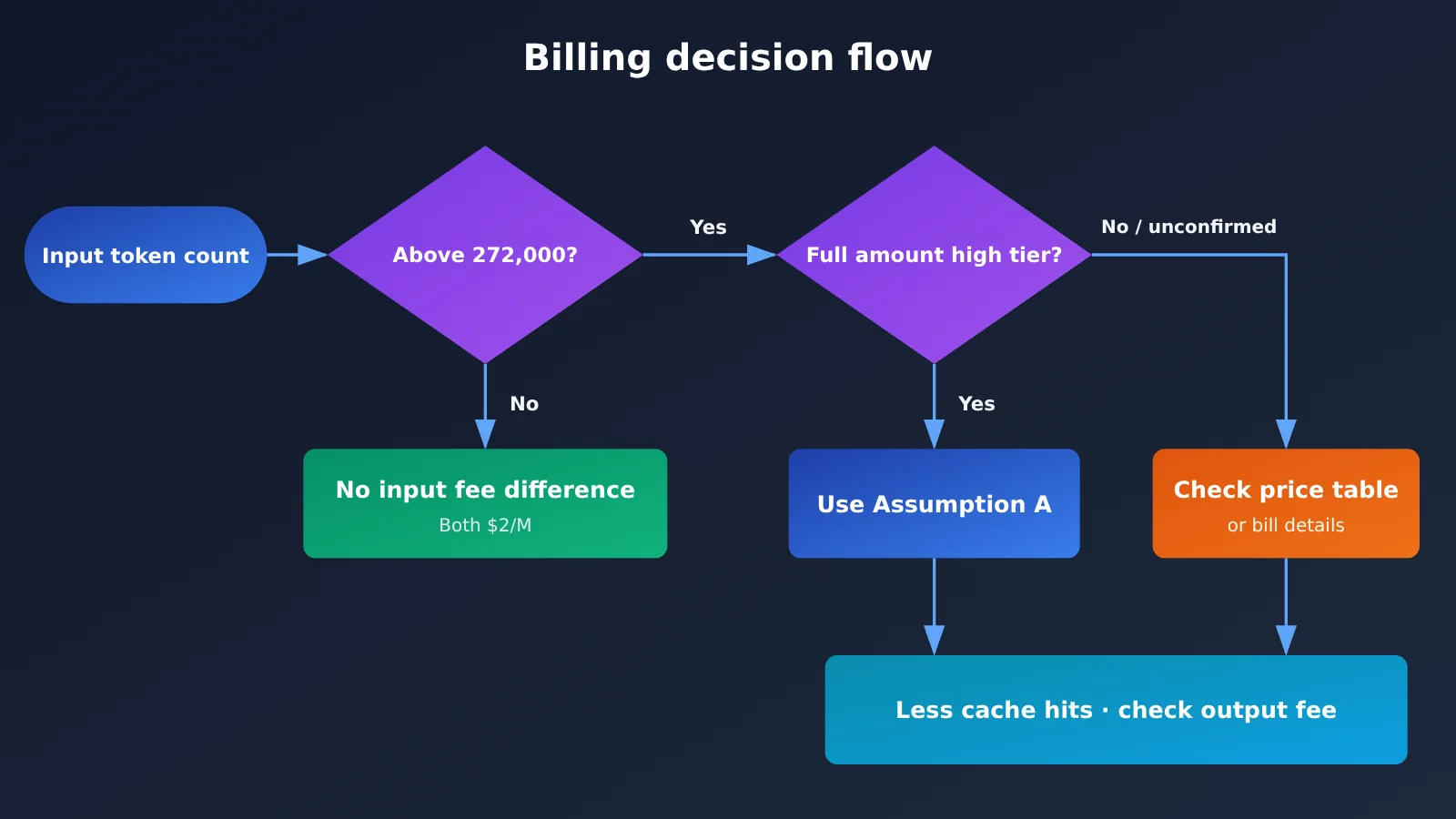
One thing to keep in mind: this table only covers input rates. APIYI’s public master table doesn’t confirm that the higher tier gets applied to the whole order across every group, and this note doesn’t give higher-tier rates for output or caching either. So “6.2 Sol is 25% cheaper on high-tier input” doesn’t automatically mean “the whole invoice is 25% cheaper” — you’d have to check that against the actual bill for your group.
Separately, OpenAI’s official model card has its own tier notes for gpt-6.2-sol. Vendor rules and APIYI platform list prices are two different accounting bases, and this article doesn’t mix them — every number here is an APIYI platform list price. If you want the vendor’s rules, look them up in the official model card separately.
GPT-6.2 Sol vs. 6.1 Sol: A 300K-Token Input Cost Example
Suppose a single request has an input of 300,000 tokens, and none of it is cached. That’s already above the 272,000 threshold. The key question is how the platform applies the higher-tier rate to this request. There are two common ways to interpret tiered pricing; the table below shows the results for each.
| Billing assumption | gpt-6.2-sol input cost | gpt-6.1-sol input cost | Difference | Status |
|---|---|---|---|---|
| A: Higher-tier rate applied to the full input | 0.3 × $3 = $0.90 | 0.3 × $4 = $1.20 | $0.30 | Illustrative calculation from the reference material; routing needs confirmation |
| B: Higher-tier rate applied only to the excess | 0.272 × $2 + 0.028 × $3 = $0.628 | 0.272 × $2 + 0.028 × $4 = $0.656 | $0.028 | Pure mathematical derivation; not confirmed by the platform |
If the APIYI route you’re using is confirmed to apply the higher-tier rate to the entire input, then the difference for a single 300,000-token uncached input is $0.30. Assumption B is only meant to illustrate that “different interpretations can make the difference vary by an order of magnitude”—it isn’t a published platform rule. Before you budget, confirm which interpretation your pricing group uses—that matters more than any example calculation.
Three Distinctions for Long-Document Budgets: Tokens, Character Count, and the Bill
Many budget discrepancies don’t come from the rates—they come from mixing up concepts. When budgeting for long documents with GPT-6.2 Sol or 6.1 Sol, you need to keep these three pairs of concepts separate.
| Easily Confused Concept | Correct Understanding | Impact on Budget |
|---|---|---|
| Character count vs. tokens | Billing is based on tokens; there’s no fixed conversion ratio between character count and tokens—it varies with language and content | You can’t take a “300,000-character” figure and plug it straight into the 300,000-token example |
| Document tokens vs. per-request input tokens | A single input also includes the system prompt, conversation history, tool definitions, and more | The document itself may be under the threshold, but adding context can push it past 272,000 |
| Theoretical input cost vs. actual bill | The theoretical value is the list price multiplied by the token count; the actual bill is also affected by cache hits, pricing-group interpretation, and output cost | The example can only serve as an upper-bound reference; rely on the billing details |
The most reliable approach is to read the usage field returned by the API directly and use the actual prompt_tokens to determine whether the threshold has been crossed—not to estimate from character count.
How to Estimate Long-Document Input Costs for GPT-6.2 Sol and 6.1 Sol
Minimal Example: Read the Actual Input Token Count
Send one request first to get the input token count this long document actually consumes in a real call:
import openai

client = openai.OpenAI(
    api_key="YOUR_API_KEY",
    base_url="https://api.apiyi.com/v1"  # APIYI unified endpoint
)

doc = open("long_doc.txt", encoding="utf-8").read()
resp = client.chat.completions.create(
    model="gpt-6.2-sol",
    messages=[{"role": "user", "content": "请总结以下文档:\n" + doc}]
)
print("prompt_tokens:", resp.usage.prompt_tokens)
View the full implementation code: estimating input cost under two billing assumptions
import openai

# Price snapshot: APIYI price table, queried 2026-11-19, unit: USD per million tokens
# Input rates only; for output and cache rates, refer to the platform price table and your bill
PRICES = {
    "gpt-6.2-sol": {"low": 2.0, "high": 3.0},
    "gpt-6.1-sol": {"low": 2.0, "high": 4.0},
}
THRESHOLD = 272_000

def estimate_input_cost(model: str, input_tokens: int, cached_tokens: int = 0,
                        mode: str = "full") -> float:
    """
    Estimate the theoretical input cost for the uncached portion of the input
    mode="full":     once over the threshold, apply the high rate to the entire input
                     (you'll need to confirm whether your group is billed this way)
    mode="marginal": apply the high rate only to the portion above the threshold
                     (an assumed interpretation, not confirmed by the platform)
    cached_tokens is deducted from the calculation only; cache fees must be verified separately
    """
    p = PRICES[model]
    uncached = max(input_tokens - cached_tokens, 0)
    if input_tokens <= THRESHOLD:
        return uncached / 1e6 * p["low"]
    if mode == "full":
        return uncached / 1e6 * p["high"]
    low_part = min(uncached, THRESHOLD)
    high_part = max(uncached - THRESHOLD, 0)
    return low_part / 1e6 * p["low"] + high_part / 1e6 * p["high"]

client = openai.OpenAI(
    api_key="YOUR_API_KEY",
    base_url="https://api.apiyi.com/v1"
)

doc = open("long_doc.txt", encoding="utf-8").read()
resp = client.chat.completions.create(
    model="gpt-6.2-sol",
    messages=[{"role": "user", "content": "请总结以下文档:\n" + doc}]
)

usage = resp.usage
cached = 0
details = getattr(usage, "prompt_tokens_details", None)
if details is not None and getattr(details, "cached_tokens", None):
    cached = details.cached_tokens

for m in PRICES:
    for mode in ("full", "marginal"):
        cost = estimate_input_cost(m, usage.prompt_tokens, cached, mode)
        print(f"{m} [{mode}] 未缓存输入费估算: ${cost:.4f}")
Plug in input_tokens=300_000 and cached_tokens=0, and full mode returns $0.90 and $1.20 — matching example A above. The prices in the script are a snapshot from the day of the query, so you’ll need to update them whenever the platform adjusts its rates.
🚀 Quick start: Start by running a real long document through APIYI at apiyi.com using the free trial credits for new users. Once you’ve got the
prompt_tokensand the billing breakdown, then set your budget — it’s far more reliable than estimating from word count alone.
GPT-6.2 Sol vs. 6.1 Sol: Scenario Recommendations
The table below offers recommendations based solely on input rates. It doesn’t cover differences in model quality or speed — you’ll need to test those against your own tasks.
| Your long-document scenario | Verdict from an input-rate perspective | Recommended action |
|---|---|---|
| Single input consistently within 272,000 tokens | Both are priced at $2 per million tokens — no rate difference here | Choose based on results and other cost items; don’t count on input fees to save money |
| Single input frequently exceeds 272,000 tokens | 6.2 Sol’s premium input tier is priced 25% lower | After confirming the billing rules for your group, prioritize evaluating 6.2 Sol |
| Input fluctuates around the threshold | The difference depends on the share of requests that cross the threshold | Collect a period of prompt_tokens distribution data, then decide |
| The same document gets asked about repeatedly | Cache hits will change your actual bill | Check the cached portion’s rates separately; don’t extrapolate from uncached rates |
Typical cases for choosing GPT-6.2 Sol
- You need to stuff extra-long material — contracts, financial reports, code repositories — into the context in one go, and input regularly crosses 272,000 tokens.
- Premium input fees eat up most of your budget, and you’ve already confirmed the billing rules for your group.
Typical cases for sticking with GPT-6.1 Sol
- Your task inputs stay within the threshold long-term, where this rate matches 6.2 Sol — switching won’t save you any input fees.
- Your existing pipeline already runs stably on 6.1 Sol, and you need to evaluate quality differences before migrating.
GPT-6.2 Sol vs 6.1 Sol: Decision Guidance and Reconciliation Checklist
The decision logic boils down to one sentence: stay under the threshold and this rate won’t save you money; cross the threshold and you need to check the group, the cache, and the output all at once. Before you ship long-document tasks, it’s worth walking through the checklist below item by item.
| Reconciliation item | Question to confirm | How to verify |
|---|---|---|
| Single-request input tokens | Does it really exceed 272,000? Does that count include the system prompt and history? | Read usage.prompt_tokens from the response |
| Group billing basis | Once you’re over the threshold, is the higher tier applied to the whole amount, or is there some other rule? | Check the tiered pricing notes in the APIYI master price list, and ask the platform if it’s unclear |
| Cache hits | How much of the input hits the cache, and how is the cached portion billed? | Check the cached_tokens field and the billing details |
| Output fee | Is output also tiered, and at what rate? | Defer to the platform price list; this article doesn’t quote unverified output prices |
| Price validity | The snapshot date for this article is 2026-11-19 — has the price changed since? | Re-check the master price list before you call |
| Consistency of basis | Are you mixing the vendor’s official tiers with the platform’s listed prices in one calculation? | Flag vendor rules separately, and use only one basis for budgeting |
💡 Recommendation: If your long-document tasks really do cross the threshold often, run the same document through both gpt-6.2-sol and gpt-6.1-sol on APIYI apiyi.com, then compare the two billing statements before deciding whether to migrate. You can switch models with the same API key, which makes this kind of side-by-side comparison easy.
Frequently Asked Questions (FAQ)
Q1: Where exactly does the input pricing differ between GPT-6.2 Sol and 6.1 Sol?
Only in the high tier. According to APIYI’s price table, both are $2 per million tokens for input from 0 to 272,000 tokens; past 272,000, 6.2 Sol is $3 and 6.1 Sol is $4 — so 6.2 Sol is 25% lower.
Q2: Does a 300,000-character document equal 300,000 tokens?
No. There’s no fixed conversion ratio between character count and tokens, and a single input also includes the system prompt and conversation history. Use the `prompt_tokens` returned by the API to judge whether you’ve crossed the threshold.
Q3: Will a 300,000-token input with 6.2 Sol definitely save $0.30?
Not necessarily. The $0.30 is just an illustrative input fee calculated on the assumption of “full input at the high tier with zero cache hits.” If the grouping differs or there are cache hits, the gap will change — and this doesn’t include output fees.
Q4: Can I say 6.2 Sol is 25% cheaper than 6.1 Sol on the whole bill?
No. The 25% is only the gap in the high-tier input list price. APIYI’s public price table doesn’t confirm whole-bill billing rules for every group based on that, and it doesn’t publish high-tier rates for output or caching either. The whole-bill difference has to be checked against your actual invoice.
Q5: How can I quickly verify my long-document cost on APIYI?
1. Register at APIYI (apiyi.com) and get an API key — new users get free test credits
2. Using the code in this article, set `base_url` to `https://api.apiyi.com/v1` and send a real long document
3. Record `prompt_tokens` and `cached_tokens`, then compare them with the platform’s billing details
Q6: What are the limitations of the data in this article?
The numbers here come only from the platform price table queried on 2026-11-19. They aren’t measured bills, and they don’t cover output pricing, model quality, or speed. The vendor’s official model card tier rules and the platform’s list prices are different scopes, and this article doesn’t mix them together. If prices change, refer to the latest price table.
GPT-6.2 Sol vs 6.1 Sol: Key Takeaways
- Same price under the threshold: Within 272,000 tokens, both list the same input price at $2 per million tokens.
- The higher tier differs: Once you go past the threshold, 6.2 Sol is $3 and 6.1 Sol is $4 — the former is 25% lower.
- The worked example has assumptions: If everything hits the high tier with no caching, a 300k-token input differs by $0.30.
- Tokens aren’t characters: Use
prompt_tokensto decide whether you’ve crossed the threshold. - Theory isn’t the bill: Caching, grouping rules, and output fees all change what you actually pay.
- Test first, then budget: Run a real document through APIYI apiyi.com once and compare it against the bill before deciding.
Summary
Here’s the core of the GPT-6.2 Sol vs 6.1 Sol comparison on long-document input costs:
- No difference under the threshold: When input stays under 272,000 tokens, switching models won’t save you anything on this line item.
- Past the threshold, look at the high-tier rate: 6.2 Sol’s high-tier input list price is 25% lower than 6.1 Sol’s; with 300k tokens all at the high tier and no caching, that’s a $0.30 difference.
- Let the bill set your budget: Check grouping rules, cache hits, and output fees at the same time — the example only illustrates input cost.
If your work really does involve very long documents on a regular basis, try running real requests against both models on APIYI apiyi.com and compare the billing details, then use that to decide on model choice and your monthly budget.
📚 References
-
APIYI Model Price List: tiered pricing notes
- Link:
docs.apiyi.com/models - Note: This is the source for all input prices cited in this article, queried on 2026-11-19. Please re-confirm before making any calls.
- Link:
-
OpenAI Official Model Card – gpt-6.2-sol: official vendor tier descriptions
- Link:
developers.openai.com/api/docs/models/gpt-6.2-sol - Note: Vendor rules and platform pricing follow different standards, so treat this as a separate reference only — don’t mix it with the numbers in this article.
- Link:
Author: APIYI Technical Team
Technical Discussion: Feel free to reach us via the APIYI homepage. For more billing and integration materials, head over to the docs.apiyi.com documentation center.