Author’s note: They all have “Flash” in the name, but their input modalities, endpoints, and group multipliers are all different. This article walks through how to pick a Flash model in a fixed order: check the model page first, then compare pricing, then choose by task.
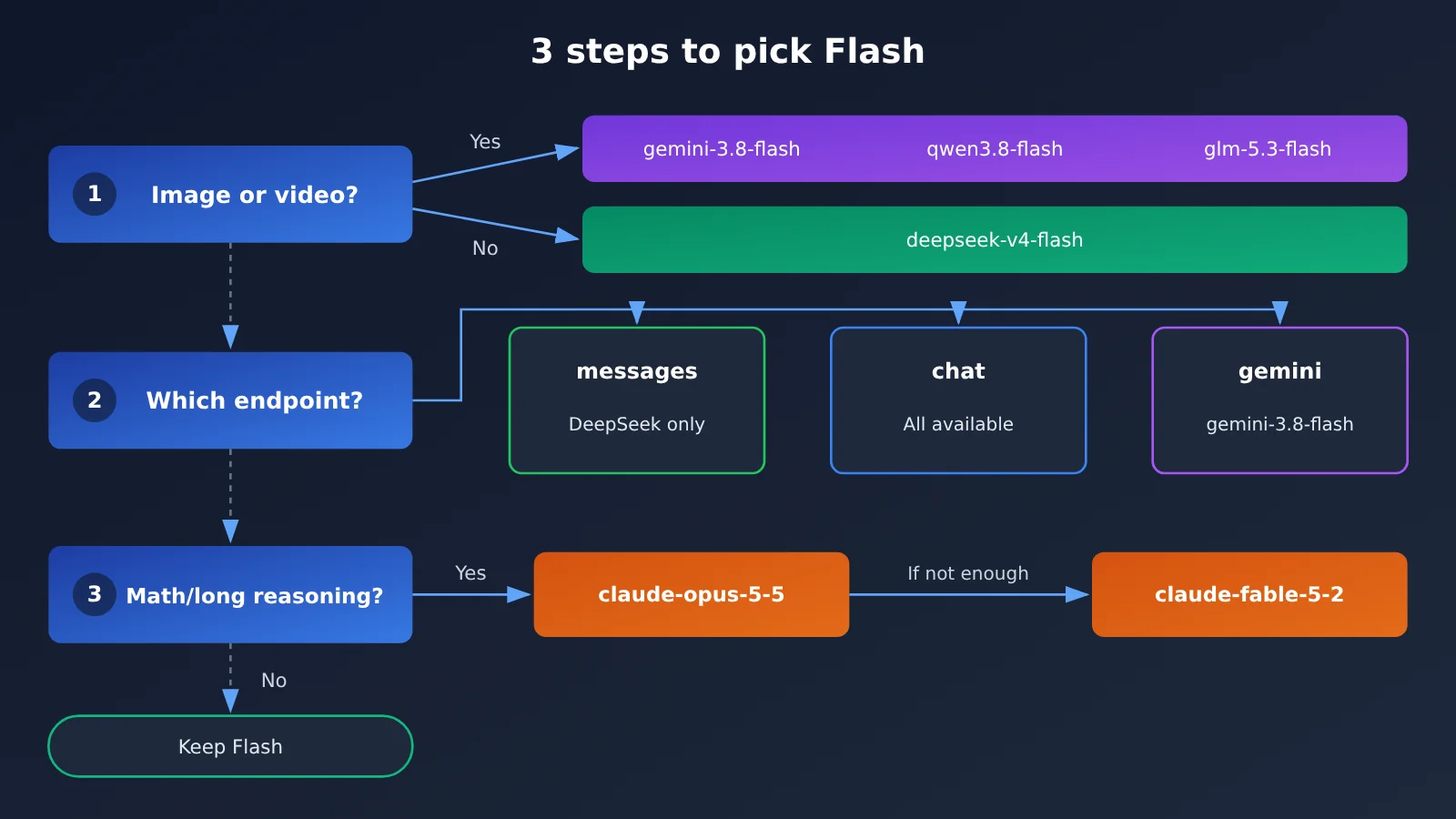
A lot of people pick a Flash-tier model like this: if “Flash” is in the name, they assume “fast and cheap,” and then they hand coding, image reading, and formula crunching to the same model. The problem with that approach: models with “Flash” in the name don’t share the same input modalities or the same available endpoints. Some only take text, some can read images and video, and some can’t even get through /v1/messages.
This isn’t a “who’s the strongest” leaderboard. This article doesn’t declare any one model universally better or cheaper. It just gives you a set of practical steps for choosing a Flash model: first look at the input types and use cases listed on the model page, then compare input price, output price, and cache reads, and finally land on a specific model based on the task.
The core value: after reading this, you’ll be able to pick a Flash model whose modality actually matches your input type (plain text, chart screenshots, long video). You’ll also know which heavy-reasoning tasks you shouldn’t hand to Flash by default.
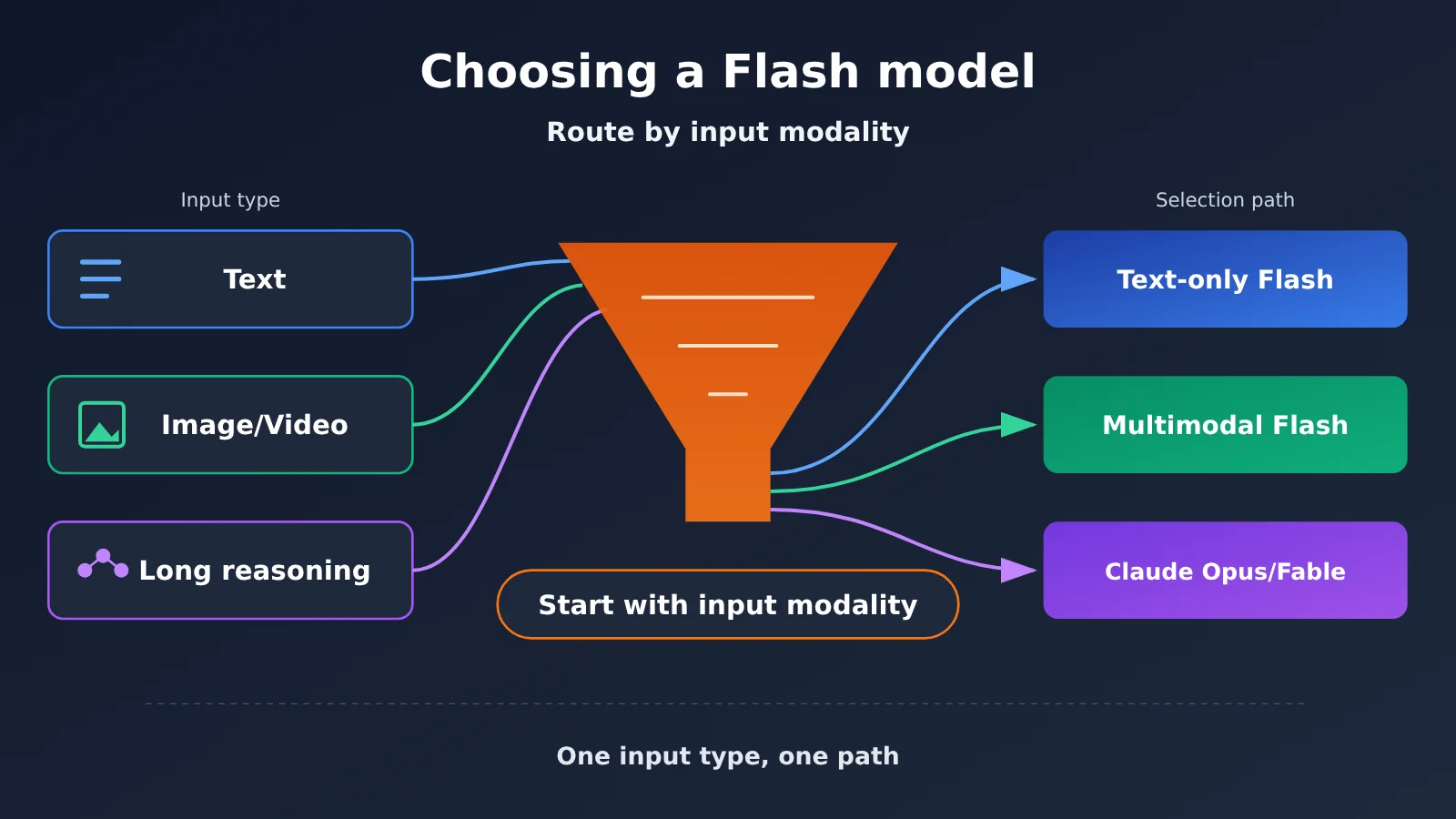
Key Points for Choosing a Flash Model
| Point | Description | Value |
|---|---|---|
| Start with the input modality | The input types listed on the model page (text/image/video/audio) determine whether it can accept your data | Avoid sending screenshots to a text-only model |
| Then check the endpoint | Support for chat, messages, and Gemini endpoints varies by model | Avoid API errors as soon as you switch models |
| Compare all three prices | Look at input price, output price, and cache-read price together, then apply the group multiplier | Your bill estimate gets closer to reality |
| Route tasks by type | Use a Flash model with matching modalities for chart reading and short code edits | Keeps costs manageable for high-volume workloads |
| Choose another model for heavy reasoning | Don’t default to Flash for formulas, proofs, or long-chain technical work | Leave hard problems to higher-tier models |
Why you can’t pick a Flash model by name alone
“Flash” is just the name a vendor gives to one tier of models, and vendors don’t define it the same way. On the APIYI model page (docs.apiyi.com/models.md), you’ll see several models all named Flash, with input modalities ranging from “text only” to “text, image, video, and audio.” Endpoints range from “chat plus messages” to “chat only.”
So when you’re picking a Flash model, the name only helps you narrow it down to “this is a tier built for high volume and low latency.” What actually determines whether it works for you is the three-column info on the model page: input types, supported endpoints, and group multiplier. All the data below comes from the model page and the model master table. Verification date is 2026-11-17, and the master table was updated at 2026-11-16 09:39 (UTC+8). Prices are default list prices per million tokens.
Flash Model Input Modalities and Endpoint Comparison
This table puts the input modalities and endpoints of several Flash models side by side. The first step in model selection is to rule out the models where the modality or endpoint doesn’t match, right here.
| Model ID | Input modality | Output | Endpoint | Other notes on the model page |
|---|---|---|---|---|
deepseek-v4-flash |
Text only | Text | chat, messages | Structured output is not supported; supports tool calling, optional deep thinking, and prompt caching |
deepseek-v4.1-flash |
No separate model page | — | chat, messages | Only one row in the overview table; capabilities are subject to later official documentation |
gemini-3.8-flash |
Text, image, video, audio | Text | chat, gemini (no messages) | Deep thinking is on by default; thinking levels are low/medium/high; official specs haven’t been published yet |
qwen3.8-flash |
Text, image, video | Text | chat only | Context 1,000,000, max output 131,072 |
glm-5.3-flash |
Text, image, video | Text | chat only | Context 1,000,000, max output 128,000; deep thinking is on by default |
Two points need special attention. First, deepseek-v4-flash‘s “text only”, context 1,048,576, and max output 393,216 all come from the v4 model page, and must not be carried over to deepseek-v4.1-flash. v4.1 currently has only one row in the overview table; if the capabilities aren’t spelled out, don’t assume them. Second, if your project uses the Anthropic-style /v1/messages interface, none of the multimodal Flash models will work — you’ll need to switch to the chat endpoint.
How to Match Flash Model Pricing and Token Groups
Once modality and endpoints check out, it’s time to compare pricing. Switching models changes your bill directly, and the list price isn’t the same as what you’ll actually be charged—because APIYI apiyi.com token groups carry multipliers. The table below shows the default list prices and the groups noted on each model page.
| Model ID | Input price | Output price | Cache read | Group and multiplier |
|---|---|---|---|---|
deepseek-v4-flash |
$0.44 | $1.32 | $0.01408 | ClaudeCode 0.95×; CodexResponses, Default, SVIP 1× |
deepseek-v4.1-flash |
$0.3 | $1.2 | $0.006 | ClaudeCode, CodexResponses, Default, SVIP |
gemini-3.8-flash |
$0.75 | $3.75 | $0.075 | Gemini_Reverse 0.5×; Default, SVIP 1× |
qwen3.8-flash |
$0.114 | $0.3876 | $0.01425 | Default, SVIP 1× |
glm-5.3-flash |
$0.15 | $0.5 | $0.03 | CodexResponses, Default, SVIP |
claude-opus-5-5 |
$4 | $20 | $0.2 | See the model summary table |
claude-fable-5-2 |
$8 | $40 | $0.2 | No Claude_Reverse group |
Three points to reconcile your Flash model bill
This article won’t decide for you which model is cheaper, because the actual cost depends on your input/output ratio and cache hit rate. I recommend checking it yourself in three steps:
- Look at the input/output ratio: For image-viewing and document-reading tasks, input is large and output is small, so input pricing carries more weight. For tasks that generate long code or long reports, output pricing carries more weight.
- Look at cache read: In scenarios with a fixed system prompt and repeated calls, the cache read price can significantly affect your total bill.
- Multiply by the group multiplier: The same
gemini-3.8-flashsettles at 0.5× through the Gemini_Reverse group and 1× through Default—so the bill isn’t the same number.
💰 Cost tip: Which group a token is bound to directly changes the charge. Before switching models, check the current token’s group in the APIYI apiyi.com console, then estimate by multiplying the list price above by the multiplier—so you don’t discover the billing change only after launch.
Pick Flash Models by Task
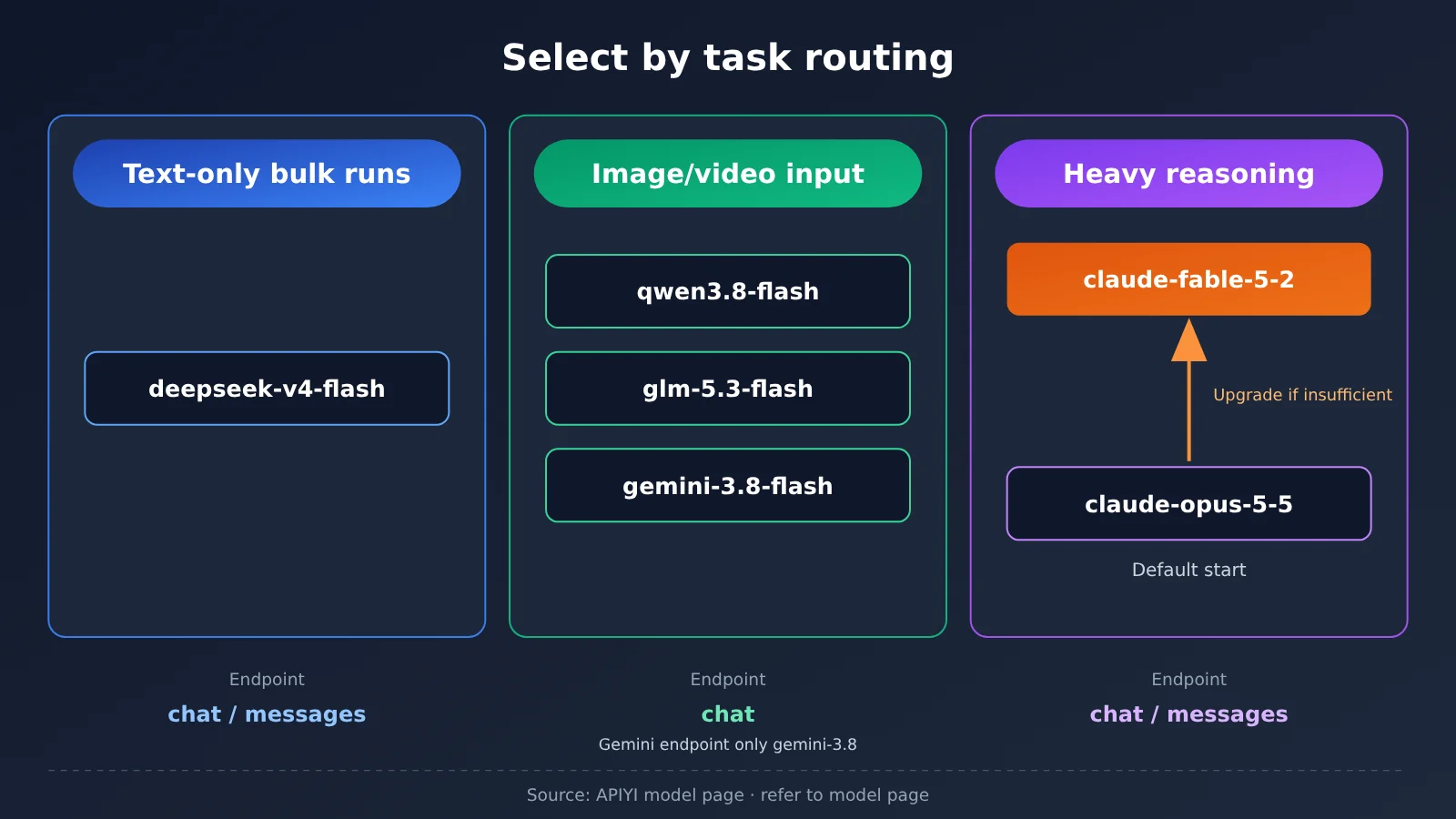
Once you’ve compared modalities, endpoints, and pricing, you can start mapping models to tasks. The table below offers a task-based selection approach. The division of labor here is based on information from the model pages—always check the model page for exact capabilities.
| Task type | Input characteristics | Candidate models | Rationale |
|---|---|---|---|
| Short code edits, high-concurrency text processing | Text only | deepseek-v4-flash |
The model page says it targets high concurrency and low latency; supports the messages endpoint |
| Edit code from screenshots, read charts | Text + images | qwen3.8-flash, glm-5.3-flash, gemini-3.8-flash |
Input modalities include images; supports visual understanding |
| Document and long-video analysis | Text + video | qwen3.8-flash, glm-5.3-flash, gemini-3.8-flash |
Input modalities include video; the qwen model page specifically calls out high-volume workloads like these |
| Inputs that include audio | Text + audio | gemini-3.8-flash |
It’s the only one among these whose model page lists audio input |
| Formulas, proofs, and long, multi-step technical work | Derivation-heavy | claude-opus-5-5 → claude-fable-5-2 |
None of the four Flash model pages calls out scientific computing as a dedicated strength |
Flash Model Selection for Coding Tasks
If the input is just code and written instructions, the modality match is deepseek-v4-flash. Its model page says, “284B total parameters, 13B active parameters, MoE, built for high concurrency and low latency”—that’s from the model page, not data measured in this article. It supports both the chat and messages endpoints, so changes are minimal when plugging it into an Anthropic-style client. One thing to note: its structured output field is marked as unsupported, so if you rely on JSON Schema to constrain output, you’ll need to handle that separately.
If the coding task includes screenshots—say, “update the frontend to match this design mockup”—you’ll need to switch to a multimodal Flash model. The qwen3.8-flash model page says it’s “suitable for visual coding, document analysis, and long-video analysis—high-volume workloads like these.” The glm-5.3-flash model page lists 320B total parameters, 18B active parameters, and a Terminal-Bench 2.1 score of 84.3. Both sets of numbers come from the model page, not from tests run for this article, and they don’t mean it beats every other model across the board.
Flash model choices for chart reading and long video
Chart reading, parsing PDF screenshots, analyzing long videos — all three multimodal Flash models cover these modalities. The differences come down mainly to endpoints and feature sets: gemini-3.8-flash additionally supports audio input and code execution, and can go through the gemini endpoint, while qwen3.8-flash and glm-5.3-flash only have the chat endpoint. Deep thinking is on by default for gemini-3.8-flash and glm-5.3-flash, so keep that in mind for latency-sensitive high-volume runs.
Don’t reach for a Flash model by default on heavy derivation tasks
Let’s be clear about where the line sits: it’s not that Flash can’t do computation at all — it’s that none of the four model pages list scientific computing, proofs, or physics as a specialization, so you shouldn’t hand those tasks to it by default. In its 2026-11-09 announcement, Anthropic positioned Claude Fable 5.2 for the hardest technical work, and recommended starting most coding and knowledge tasks on Opus 5.5, moving up to Fable only when that isn’t enough.
Both are already available on APIYI, with model IDs claude-opus-5-5 and claude-fable-5-2. Their list prices are clearly higher than the Flash tier, so the more sensible approach is routing: high-volume tasks go to Flash, and only formula derivation, proofs, and long-chain technical analysis get the upgrade.
Flash Models Quick Start
Once you’ve picked a model, integration is straightforward. APIYI offers an OpenAI-compatible interface, so a single API key lets you call all the models above. Here are the key configuration points, laid out the way the help docs present them.
Step 1: Configure the base_url and endpoints for Flash models
- In your client, set the base_url to
https://api.apiyi.com/v1, and put the token you created in the console into the API key field. - Choose the path based on the model: all models can go through
/v1/chat/completions; onlydeepseek-v4-flash(anddeepseek-v4.1-flash, as noted in the summary table) can go through/v1/messages;gemini-3.8-flashcan also use the Gemini endpoint. - Put the model ID in the
modelfield of the request body, for exampleqwen3.8-flash.
Step 2: Organize Flash model requests by input modality
- Plain text: just put
roleand textcontentinmessages— this works fordeepseek-v4-flash. - With images: in the chat format, write
contentas an array — settypetotextfor text items andtypetoimage_urlfor image items. Only send these to models that support image input. - Enable streaming: set
streamtotrue— great for high-concurrency scenarios where you need the first token back fast.
Step 3: Checklist before switching Flash models
- Does the new model support the endpoint you’re currently using? If you’re a messages user switching to a multimodal Flash model, you’ll have to move over to chat.
- Does the new model support the features you rely on? For example, structured output is marked as unsupported on
deepseek-v4-flash. - What’s the rate multiplier for the new model under your current token group?
🚀 Quick start: We recommend starting with the free trial credits for new users on APIYI apiyi.com — send the same batch of real inputs to two or three candidate Flash models, compare output quality and token usage, and then decide on the official switch. You only need to change the
modelfield to switch between different models.
FAQ
Q1: What does “Flash model” actually mean?
Flash is just a name vendors give to a tier of models tuned for higher throughput and lower latency — it’s not a unified standard. Flash models from different vendors vary widely in input modalities, endpoints, and feature support, so when you’re picking one, read the model page, not just the name.
Q2: Can deepseek-v4-flash and deepseek-v4.1-flash be swapped for each other?
Don’t assume that. Right now v4.1 has only a single row in the master table: input $0.3, output $1.2, cache read $0.006, with chat and messages endpoints. The parameter count, context length, and “text-only” constraint of v4 don’t carry over to v4.1 — check the master table and any follow-up model notes before swapping.
Q3: Why can’t my Claude-style client call gemini-3.8-flash?
Because `gemini-3.8-flash` only exposes the chat and gemini endpoints — no messages. `qwen3.8-flash` and `glm-5.3-flash` are chat-only too. If you need the messages endpoint, the only candidates left are the deepseek Flash models.
Q4: Why does the same model cost different amounts depending on the token?
Because the group multipliers differ. For example, `gemini-3.8-flash` is 0.5× in the Gemini_Reverse group and 1× in Default. For how tokens relate to groups, see the APIYI docs at docs.apiyi.com/faq/token-and-groups.md.
Q5: How do I call these Flash models quickly through the API?
Sign up at APIYI (apiyi.com) and create a token, set `base_url` to `https://api.apiyi.com/v1`, pick the chat or messages path depending on the model, and put the matching ID in `model`. New users get free test credits, so you can validate with a small batch first.
Q6: Can Flash models handle math derivation or scientific computing?
They can handle everyday calculations, but none of the model pages list scientific computing, proofs, or physics as a specialty. For formulas, proofs, and long-chain technical work, start with `claude-opus-5-5` and move up to `claude-fable-5-2` if that’s not enough.
Q7: Can I use the Terminal-Bench score on the model page directly as a selection criterion?
The `glm-5.3-flash` model page states a Terminal-Bench 2.1 score of 84.3 — that’s the model page’s own wording, not something measured here. It’s a useful reference signal, but it doesn’t mean the model is stronger on every task, so it’s still best to validate with your own real data.
Flash Model Selection: Key Takeaways
- The name doesn’t tell you what it can do: models with Flash in their names differ in both input modality and endpoint.
- Step one, check the modality: for pure text, pick
deepseek-v4-flash; for images and video, pick a multimodal Flash. - Step two, check the endpoint: the messages endpoint is only supported by the deepseek family, and most multimodal Flash models only run on chat.
- Step three, check the bill: look at input price, output price, and cache reads together, then multiply by your group multiplier.
- Cite the source for numbers on the model page: parameter counts, Terminal-Bench scores, and “good for visual coding” all come straight from the model page text.
- Don’t default to Flash for heavy reasoning: start formula proofs with
claude-opus-5-5, and move up toclaude-fable-5-2if that isn’t enough. - Validate on a small batch before switching: run real inputs through APIYI’s free quota first, then decide on a full switch.
Summary
Picking a Flash model really comes down to one sentence: match on input modality, don’t one-size-fits-all by name.
- Check the model page first: confirm input types, endpoints, and feature support, and rule out the models that don’t line up.
- Then compare prices: weigh input price, output price, and cache reads against your own call mix, and multiply by the token group multiplier.
- Split work by task: high-volume chart reading and small code edits go to a Flash whose modality matches; heavy reasoning goes to Claude Opus 5.5 or Fable 5.2.
Prices and capabilities both change, so treat the model page of the day as the source of truth when you pick. We recommend using a single API key on APIYI at apiyi.com to run a small side-by-side batch across a few candidate models, then making your decision based on your own bill and output quality.
📚 References
-
Anthropic announcement – Claude Fable and Mythos 5.2: where Fable 5.2 fits, plus advice on starting out with Opus 5.5
- Link:
anthropic.com/claude-fable-and-mythos-5-2 - Note: background on how the models split the work for reasoning-intensive tasks
- Link:
-
Claude model overview: Anthropic’s official model list and usage notes
- Link:
platform.claude.com/docs/en/about-claude/models/overview - Note: Opus and Fable usage guidance that matches the announcement
- Link:
-
APIYI model table and individual model pages: pricing, groups, endpoints, and input modalities
- Link: the models.md page in the docs center plus each model page (deepseek-v4-flash, gemini-3-8-flash, qwen3-8-flash, glm-5-3-flash)
- Note: this is the source for every price and capability figure in this article — always check the latest version before picking a model
Author: APIYI Technical Team
Technical discussion: Feel free to reach us through the APIYI website homepage; for more details on models and groups, head over to the docs.apiyi.com documentation center