作者注:深度解析 Gemini Nano Banana Pro API 的 overloaded 和 service unavailable 錯誤,包括報錯原因、時間規律、實戰解決方案和生產環境最佳實踐
2026 年 1 月 16 日凌晨 00:18,大量開發者報告 Gemini Nano Banana Pro API (模型名 gemini-3-pro-image-preview) 出現 「The model is overloaded. Please try again later.」 甚至 「The service is currently unavailable.」 錯誤。這並非代碼問題,而是 Google 服務端計算容量瓶頸導致的系統性故障。
核心價值: 讀完本文,你將理解這兩類報錯的根本原因、時間規律和技術機制,掌握 5 種實戰解決方案,並學會構建生產級容錯策略。
Gemini Nano Banana Pro API 報錯核心要點
| 要點 | 說明 | 影響 |
|---|---|---|
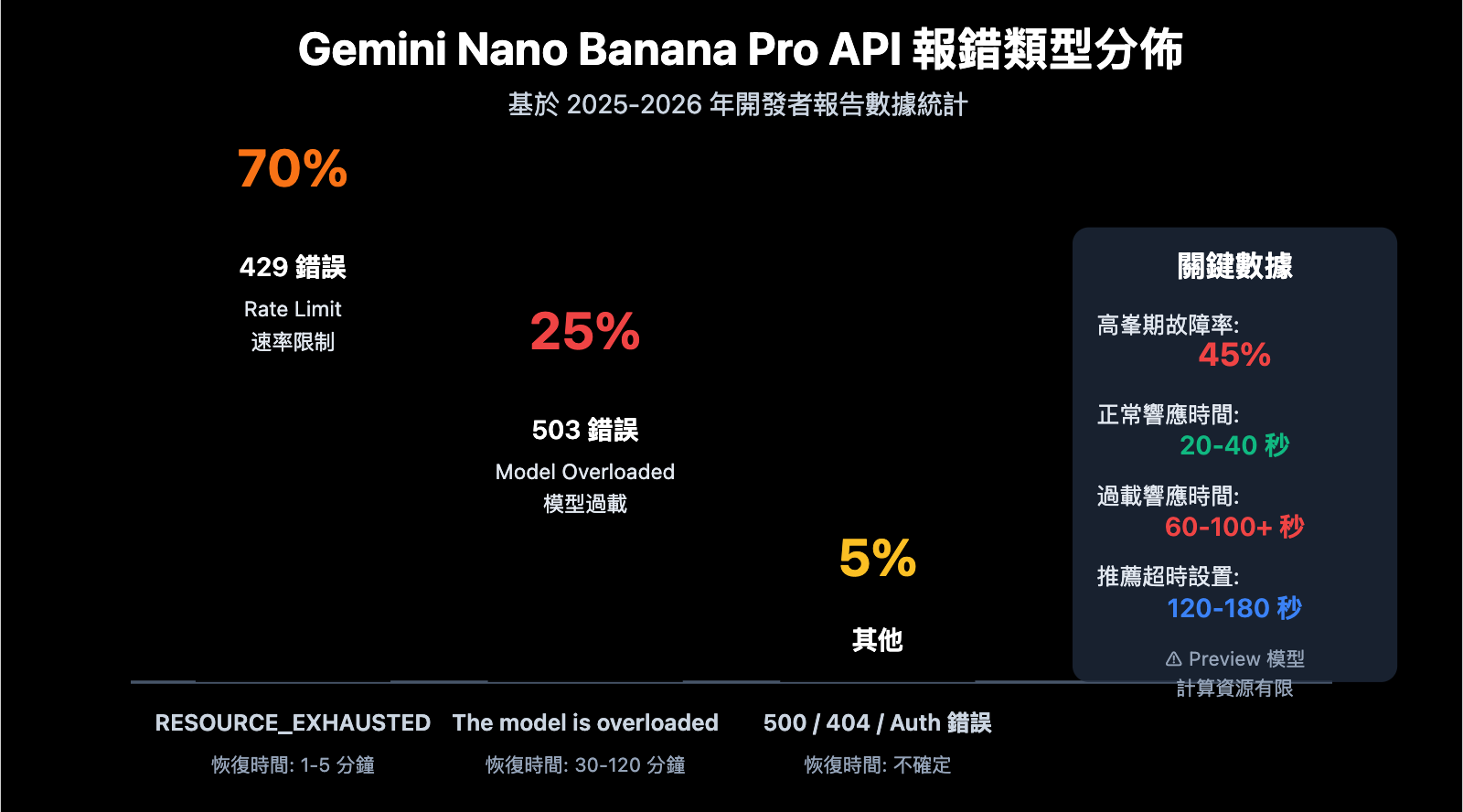
| 503 Overloaded 錯誤 | 服務端計算資源不足,非代碼問題 | 高峯期 45% 的 API 調用會失敗 |
| 503 vs 429 錯誤 | 503 是容量問題,429 是速率限制 | 503 恢復需 30-120 分鐘,429 僅需 1-5 分鐘 |
| Preview 模型限制 | Gemini 3 系列仍處於預覽階段 | 計算資源有限,動態容量管理不穩定 |
| 時間規律性 | 北京時間凌晨和晚高峯故障率最高 | 需避開高峯期或實現降級策略 |
| 響應時間激增 | 正常 20-40 秒,故障時 60-100+ 秒 | 需設置更長的超時時間 (120s+) |
Gemini Nano Banana Pro 報錯重點詳解
什麼是 Nano Banana Pro?
Gemini Nano Banana Pro 是 Google 最高質量的圖像生成模型,對應的 API 模型名爲 gemini-2.0-flash-preview-image-generation 或 gemini-3-pro-image-preview。作爲 Gemini 3 系列的旗艦圖像生成模型,它在圖像質量、細節還原、文字渲染等方面顯著優於 Gemini 2.5 Flash Image,但也因此面臨更嚴重的計算資源瓶頸。
爲什麼頻繁報錯?
根據 Google AI 開發者論壇的討論數據,Nano Banana Pro 的報錯問題從 2025 年下半年開始頻繁出現,至 2026 年初仍未完全解決。核心原因包括:
- 預覽階段資源限制: Gemini 3 系列模型仍處於 Pre-GA (General Availability 之前) 階段,Google 分配的計算資源有限
- 動態容量管理: 即使未達到速率限制 (Rate Limit),系統也可能因整體負載過高返回 503 錯誤
- 全球用戶競爭: 所有開發者共享同一計算資源池,高峯期需求遠超供給
- 模型計算密集: 高質量圖像生成需要大量 GPU 計算,單次請求耗時 20-40 秒,遠超文本模型
503 vs 429 錯誤的區別
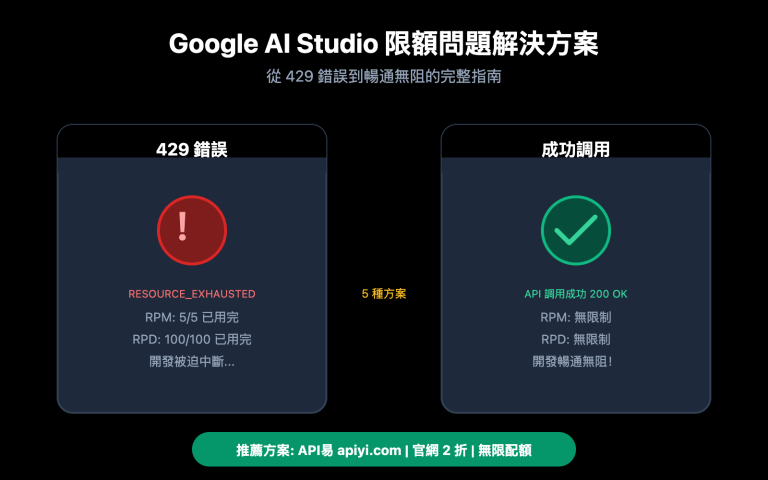
| 錯誤類型 | HTTP 狀態碼 | 錯誤信息 | 根本原因 | 恢復時間 | 佔比 |
|---|---|---|---|---|---|
| Overloaded | 503 | The model is overloaded |
服務端計算容量不足 | 30-120 分鐘 | 約 25% |
| Rate Limit | 429 | RESOURCE_EXHAUSTED |
超過用戶配額 (RPM/TPM/RPD) | 1-5 分鐘 | 約 70% |
| Unavailable | 503 | Service unavailable |
系統性故障或維護 | 不確定 (可能數小時) | 約 5% |
Gemini Nano Banana Pro 報錯時間規律分析
高峯故障時段
根據多位開發者的報告數據,Nano Banana Pro API 的故障存在明顯的時間規律:
北京時間高風險時段:
- 00:00 – 02:00: 美國西海岸工作時間 (08:00-10:00 PST),歐美開發者高峯
- 09:00 – 11:00: 中國大陸工作開始時間,亞洲開發者高峯
- 20:00 – 23:00: 中國大陸晚高峯 + 歐洲下午時段疊加
相對穩定時段:
- 03:00 – 08:00: 全球用戶最少時段
- 14:00 – 17:00: 中國下午 + 美國深夜,負載較低
案例驗證: 2026 年 1 月 16 日凌晨 00:18 的大規模故障,正好處於美國西海岸上班時間 (1 月 15 日 08:18 PST),印證了時間規律的準確性。
5 種解決 Gemini Nano Banana Pro 報錯的方法
方法 1: 實現指數退避重試策略
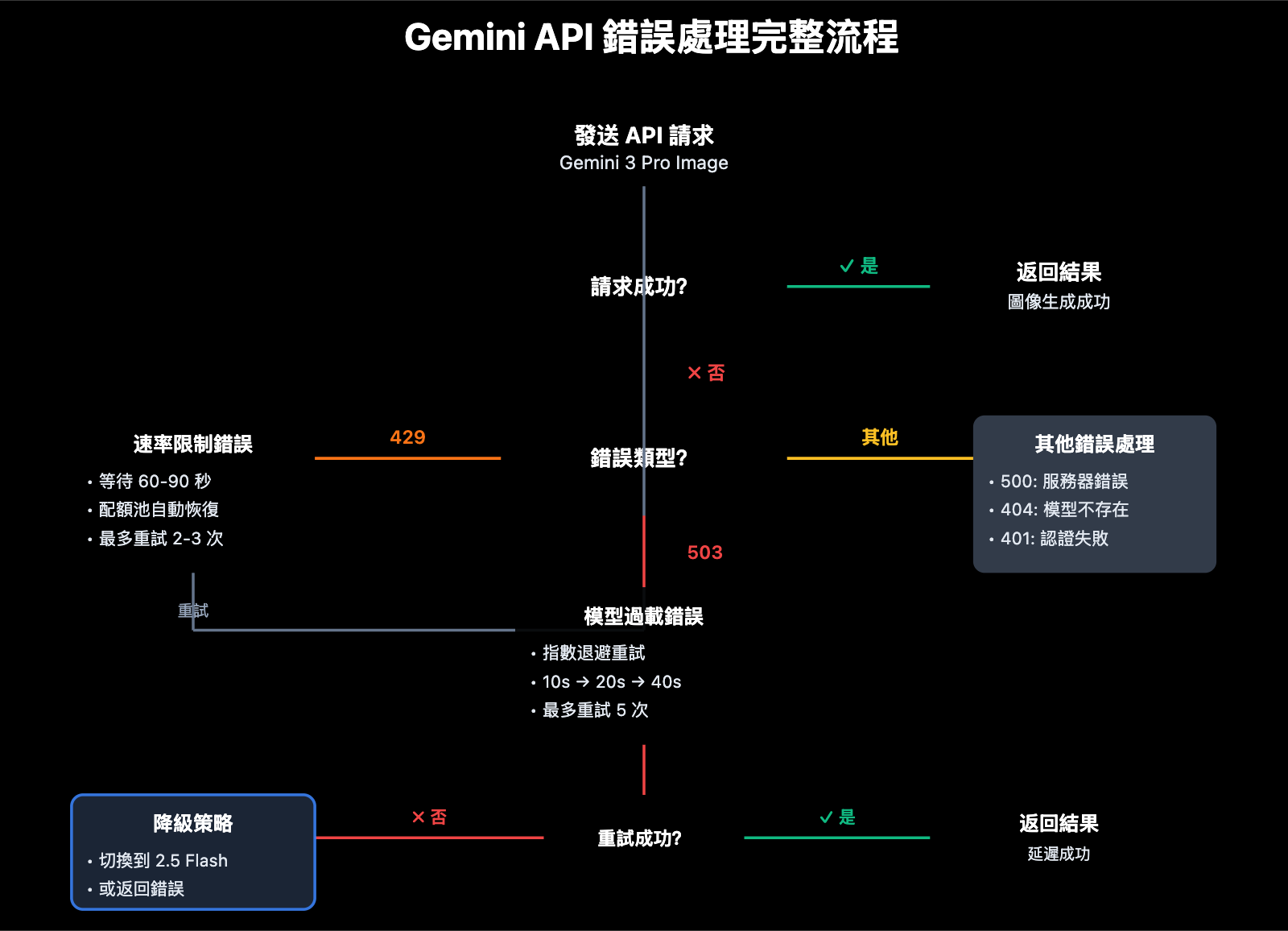
這是應對 503 錯誤的最基礎方案。以下是推薦的重試邏輯:
import time
import random
from openai import OpenAI

client = OpenAI(
    api_key="YOUR_API_KEY",
    base_url="https://vip.apiyi.com/v1"
)

def generate_image_with_retry(
    prompt: str,
    model: str = "gemini-3-pro-image-preview",
    max_retries: int = 5,
    initial_delay: int = 10
):
    """
    帶指數退避的圖像生成函數
    """
    for attempt in range(max_retries):
        try:
            response = client.images.generate(
                model=model,
                prompt=prompt,
                timeout=120  # 增加超時時間
            )
            return response

        except Exception as e:
            error_msg = str(e)

            # 503 錯誤: 指數退避重試
            if "overloaded" in error_msg.lower() or "503" in error_msg:
                if attempt < max_retries - 1:
                    delay = initial_delay * (2 ** attempt) + random.uniform(0, 5)
                    print(f"⚠️ 模型過載,{delay:.1f}秒後重試 (嘗試 {attempt + 1}/{max_retries})")
                    time.sleep(delay)
                    continue
                else:
                    raise Exception("❌ 達到最大重試次數,模型持續過載")

            # 429 錯誤: 短暫等待重試
            elif "429" in error_msg or "RESOURCE_EXHAUSTED" in error_msg:
                print("⚠️ 速率限制,60秒後重試")
                time.sleep(60)
                continue

            # 其他錯誤: 直接拋出
            else:
                raise e

    raise Exception("❌ 所有重試均失敗")

# 使用示例
result = generate_image_with_retry(
    prompt="A futuristic city at sunset, cyberpunk style",
    max_retries=5
)
查看生產級完整代碼
import time
import random
from typing import Optional, Dict
from openai import OpenAI
from datetime import datetime, timedelta

class GeminiImageClient:
    """
    生產級 Gemini 圖像生成客戶端
    支持重試、降級、監控
    """

    def __init__(self, api_key: str, base_url: str = "https://vip.apiyi.com/v1"):
        self.client = OpenAI(api_key=api_key, base_url=base_url)
        self.error_log = []
        self.success_count = 0
        self.failure_count = 0

    def generate_with_fallback(
        self,
        prompt: str,
        primary_model: str = "gemini-3-pro-image-preview",
        fallback_model: str = "gemini-2.5-flash-image",
        max_retries: int = 3
    ) -> Dict:
        """
        帶降級策略的圖像生成
        """
        # 嘗試主模型
        try:
            result = self._generate_with_retry(prompt, primary_model, max_retries)
            self.success_count += 1
            return {
                "success": True,
                "model_used": primary_model,
                "data": result
            }
        except Exception as e:
            print(f"⚠️ 主模型 {primary_model} 失敗: {str(e)}")

            # 自動降級到備用模型
            try:
                print(f"🔄 降級到備用模型 {fallback_model}")
                result = self._generate_with_retry(prompt, fallback_model, max_retries)
                self.success_count += 1
                return {
                    "success": True,
                    "model_used": fallback_model,
                    "fallback": True,
                    "data": result
                }
            except Exception as fallback_error:
                self.failure_count += 1
                self.error_log.append({
                    "timestamp": datetime.now(),
                    "primary_error": str(e),
                    "fallback_error": str(fallback_error)
                })
                return {
                    "success": False,
                    "error": str(fallback_error)
                }

    def _generate_with_retry(self, prompt: str, model: str, max_retries: int):
        """內部重試邏輯"""
        for attempt in range(max_retries):
            try:
                response = self.client.images.generate(
                    model=model,
                    prompt=prompt,
                    timeout=120
                )
                return response
            except Exception as e:
                if attempt < max_retries - 1:
                    delay = 10 * (2 ** attempt) + random.uniform(0, 5)
                    time.sleep(delay)
                else:
                    raise e

    def get_stats(self) -> Dict:
        """獲取統計數據"""
        total = self.success_count + self.failure_count
        success_rate = (self.success_count / total * 100) if total > 0 else 0
        return {
            "total_requests": total,
            "success_count": self.success_count,
            "failure_count": self.failure_count,
            "success_rate": f"{success_rate:.2f}%",
            "recent_errors": self.error_log[-5:]
        }

# 使用示例
client = GeminiImageClient(api_key="YOUR_API_KEY")

result = client.generate_with_fallback(
    prompt="A magical forest with glowing mushrooms",
    primary_model="gemini-3-pro-image-preview",
    fallback_model="gemini-2.5-flash-image"
)

if result["success"]:
    print(f"✅ 生成成功,使用模型: {result['model_used']}")
else:
    print(f"❌ 生成失敗: {result['error']}")

# 查看統計
print(client.get_stats())
技術建議: 在實際生產環境中,建議通過 API易 apiyi.com 平臺進行接口調用。該平臺提供統一的 API 接口,支持 Gemini 3 Pro 和多種圖像生成模型,當 Nano Banana Pro 過載時可快速切換到 Gemini 2.5 Flash 或其他備用模型,確保業務連續性。
方法 2: 增加超時時間和請求配置
Nano Banana Pro 的正常響應時間爲 20-40 秒,但在過載時可能達到 60-100 秒甚至更長。默認的 30 秒超時設置會導致大量誤判。
推薦配置:
from openai import OpenAI

client = OpenAI(
    api_key="YOUR_API_KEY",
    base_url="https://vip.apiyi.com/v1",
    timeout=120,  # 增加全局超時到 120 秒
    max_retries=3  # SDK 自動重試 3 次
)

# 或在單次請求中指定
response = client.images.generate(
    model="gemini-3-pro-image-preview",
    prompt="Your prompt here",
    timeout=150  # 單次請求超時 150 秒
)
關鍵參數說明:
timeout: 單次請求的最大等待時間,建議設置爲 120-180 秒max_retries: SDK 層面的自動重試次數,建議 2-3 次keep_alive: 保持連接活躍,避免長請求中斷
方法 3: 避開高峯時段
如果業務允許異步處理,根據時間規律調度任務可顯著提高成功率:
推薦調度策略:
- 高優先級任務: 部署在北京時間 03:00-08:00 或 14:00-17:00
- 批量生成任務: 使用任務隊列在低峯期自動執行
- 實時任務: 必須實現降級策略,不能依賴單一模型
Python 任務調度示例:
from datetime import datetime

def is_peak_hour() -> bool:
    """判斷當前是否爲高峯時段 (北京時間)"""
    current_hour = datetime.now().hour

    # 高峯時段: 0-2, 9-11, 20-23
    peak_hours = list(range(0, 3)) + list(range(9, 12)) + list(range(20, 24))

    return current_hour in peak_hours

def smart_generate(prompt: str):
    """智能生成: 高峯期自動降級"""
    if is_peak_hour():
        print("⚠️ 當前爲高峯時段,使用備用模型")
        model = "gemini-2.5-flash-image"
    else:
        model = "gemini-3-pro-image-preview"

    return generate_image(prompt, model)
方法 4: 實現模型降級策略
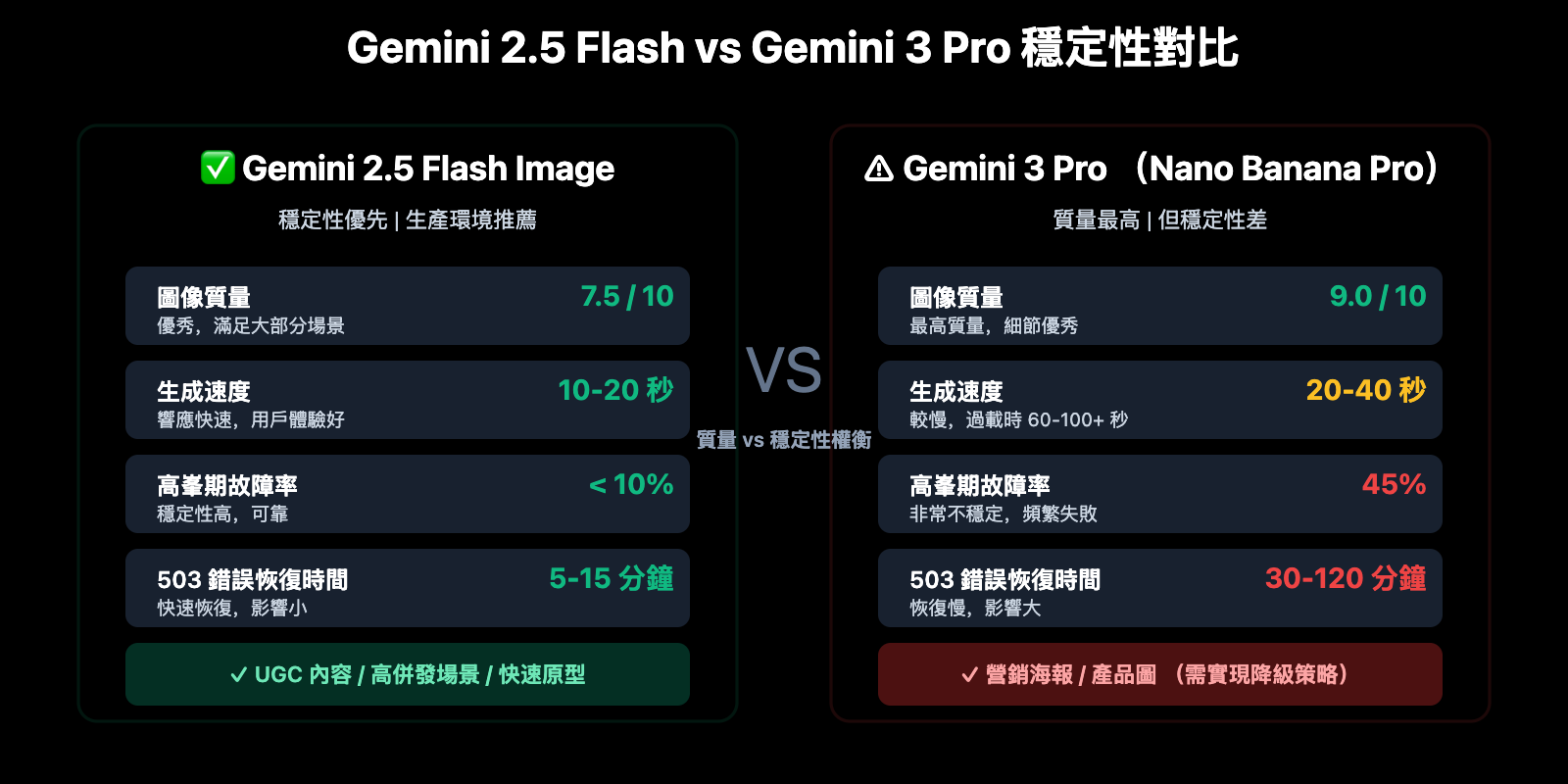
Google 官方建議在遇到過載時切換到 Gemini 2.5 Flash。以下是對比數據:
| 指標 | Gemini 3 Pro (Nano Banana Pro) | Gemini 2.5 Flash Image |
|---|---|---|
| 圖像質量 | 最高 (9/10) | 優秀 (7.5/10) |
| 生成速度 | 20-40 秒 | 10-20 秒 |
| 穩定性 | 高峯期 45% 失敗率 | 高峯期 <10% 失敗率 |
| 503 恢復時間 | 30-120 分鐘 | 5-15 分鐘 |
| API 成本 | 較高 | 較低 |
方案建議: 對於質量敏感場景 (營銷海報、產品圖等),優先使用 Gemini 3 Pro,失敗後降級到 2.5 Flash。對於高併發場景 (UGC 內容、快速原型),直接使用 2.5 Flash 提高穩定性。建議通過 API易 apiyi.com 平臺進行模型對比測試,該平臺支持一鍵切換模型並提供成本和質量對比數據。
方法 5: 監控和告警系統
生產環境必須實現完善的監控,及時發現和響應故障:
關鍵監控指標:
- 成功率: 過去 5 分鐘 / 1 小時 / 24 小時的成功率
- 響應時間: P50 / P95 / P99 響應時間
- 錯誤分佈: 503 / 429 / 500 等錯誤的佔比
- 降級觸發次數: 主模型失敗導致的降級次數
簡單監控實現:
from collections import deque
from datetime import datetime

class APIMonitor:
    """API 調用監控器"""

    def __init__(self, window_size: int = 100):
        self.recent_calls = deque(maxlen=window_size)
        self.error_counts = {"503": 0, "429": 0, "500": 0, "other": 0}

    def log_call(self, success: bool, response_time: float, error_code: str = None):
        """記錄 API 調用"""
        self.recent_calls.append({
            "timestamp": datetime.now(),
            "success": success,
            "response_time": response_time,
            "error_code": error_code
        })

        if not success and error_code:
            if error_code in self.error_counts:
                self.error_counts[error_code] += 1
            else:
                self.error_counts["other"] += 1

    def get_success_rate(self) -> float:
        """計算成功率"""
        if not self.recent_calls:
            return 0.0
        success_count = sum(1 for call in self.recent_calls if call["success"])
        return success_count / len(self.recent_calls) * 100

    def should_alert(self) -> bool:
        """判斷是否需要告警"""
        success_rate = self.get_success_rate()

        # 成功率低於 70% 觸發告警
        if success_rate < 70:
            return True

        # 503 錯誤超過 30% 觸發告警
        total_errors = sum(self.error_counts.values())
        if total_errors > 0 and self.error_counts["503"] / total_errors > 0.3:
            return True

        return False

# 使用示例
monitor = APIMonitor(window_size=100)

# 每次調用後記錄
start_time = time.time()
try:
    result = client.images.generate(...)
    response_time = time.time() - start_time
    monitor.log_call(success=True, response_time=response_time)
except Exception as e:
    response_time = time.time() - start_time
    error_code = "503" if "overload" in str(e) else "other"
    monitor.log_call(success=False, response_time=response_time, error_code=error_code)

# 定期檢查告警
if monitor.should_alert():
    print(f"🚨 告警: API 成功率降至 {monitor.get_success_rate():.2f}%")
Gemini API 配額和速率限制詳解
2025 年 12 月配額調整
2025 年 12 月 7 日,Google 調整了 Gemini API 的配額限制,導致大量開發者遇到意外的 429 錯誤。
當前配額標準 (2026 年 1 月):
| 配額維度 | 免費版 (Free Tier) | 付費版 Tier 1 | 說明 |
|---|---|---|---|
| RPM (每分鐘請求數) | 5-15 (視模型而定) | 150-300 | Gemini 3 Pro 限制更嚴格 |
| TPM (每分鐘 Token 數) | 32,000 | 4,000,000 | 文本模型適用 |
| RPD (每天請求數) | 1,500 | 10,000+ | 共享配額池 |
| IPM (每分鐘圖像數) | 5-10 | 50-100 | 圖像生成模型專用 |
關鍵注意事項:
- 配額限制基於 Google Cloud Project 級別,而非單個 API Key
- 同一項目下創建多個 API Key 不會增加配額
- 超過任何一個維度的限制都會觸發 429 錯誤
- 使用 Token Bucket 算法強制執行,突發流量會被限制
成本優化: 對於預算敏感的項目,可以考慮通過 API易 apiyi.com 平臺調用 Gemini API。該平臺提供靈活的按需付費方式,無需購買 Google Cloud 訂閱,適合中小團隊和個人開發者快速測試和小規模部署。
常見問題
Q1: 如何區分 503 overloaded 和 429 rate limit 錯誤?
兩者的區別在於根本原因和恢復時間:
503 Overloaded:
- 錯誤信息:
The model is overloaded. Please try again later. - HTTP 狀態碼: 503 Service Unavailable
- 根本原因: Google 服務端計算資源不足,與你的配額無關
- 恢復時間: 30-120 分鐘 (Gemini 3 Pro),5-15 分鐘 (Gemini 2.5 Flash)
- 應對策略: 指數退避重試、切換到備用模型、避開高峯時段
429 Rate Limit:
- 錯誤信息:
RESOURCE_EXHAUSTED或Rate limit exceeded - HTTP 狀態碼: 429 Too Many Requests
- 根本原因: 你的 API 調用超過了配額限制 (RPM/TPM/RPD/IPM)
- 恢復時間: 1-5 分鐘 (配額池自動恢復)
- 應對策略: 降低請求頻率、升級到付費版、請求提高配額
快速判斷方法: 檢查 Google AI Studio 的配額使用情況,如果接近或達到上限則是 429,否則是 503。
Q2: 爲什麼凌晨 00:18 會出現大規模故障?
2026 年 1 月 16 日北京時間凌晨 00:18 的大規模故障,對應美國西海岸時間 1 月 15 日 08:18 PST,正好是美國工作日上班時間。
時間規律分析:
- 美國西海岸 (硅谷) 開發者在 08:00-10:00 PST 開始工作,對應北京時間 00:00-02:00
- 歐洲開發者在 14:00-18:00 CET 工作高峯,對應北京時間 21:00-01:00
- 中國開發者在 09:00-11:00 CST 和 20:00-23:00 CST 高峯
這三個時段疊加,導致 Nano Banana Pro API 負載遠超容量,觸發大規模 503 錯誤。
建議: 如果你的業務主要面向中國用戶,可以將批量任務調度到北京時間 03:00-08:00 (美國深夜 + 歐洲凌晨),此時全球負載最低。
Q3: 生產環境應該如何選擇模型?
根據業務需求選擇合適的模型策略:
策略 1: 質量優先 (營銷、產品圖)
- 主模型: Gemini 3 Pro Image Preview (Nano Banana Pro)
- 備用模型: Gemini 2.5 Flash Image
- 實現: 主模型失敗 3 次後自動降級到備用模型
- 預期成功率: 92-95% (含降級)
策略 2: 穩定性優先 (UGC、高併發)
- 主模型: Gemini 2.5 Flash Image
- 備用模型: 其他圖像生成模型 (DALL-E 3, Stable Diffusion XL)
- 實現: 直接使用 2.5 Flash,故障時切換到第三方模型
- 預期成功率: 95-98%
策略 3: 成本優先 (測試、原型)
- 使用免費版 Gemini 2.5 Flash
- 接受偶爾的 429 和 503 錯誤
- 不實現複雜的容錯邏輯
推薦方案: 通過 API易 apiyi.com 平臺快速測試不同模型的效果和成本,該平臺提供統一接口調用多種圖像生成模型,便於對比和切換。
總結
Gemini Nano Banana Pro API 報錯的核心要點:
- 503 Overloaded 是系統性問題: 與你的代碼無關,是 Google 服務端計算資源不足導致,高峯期 45% 的調用會失敗
- 時間規律明顯: 北京時間 00:00-02:00、09:00-11:00、20:00-23:00 是高風險時段,需避開或實現降級策略
- 實現容錯至關重要: 必須實現指數退避重試、增加超時時間 (120s+)、模型降級 (2.5 Flash 備用) 三層防護
- 監控和告警: 生產環境必須監控成功率、響應時間、錯誤分佈,及時發現和響應故障
- 理解配額限制: 429 錯誤與你的 API 配額有關,503 錯誤與 Google 整體負載有關,兩者應對策略不同
作爲預覽階段模型,Nano Banana Pro 的穩定性問題在短期內難以根本解決。推薦通過 API易 apiyi.com 快速驗證你的圖像生成需求,平臺提供免費額度和多模型統一接口,支持 Gemini 3 Pro、Gemini 2.5 Flash、DALL-E 3 等主流圖像生成模型,確保業務連續性。
📚 參考資料
⚠️ 鏈接格式說明: 所有外鏈使用
資料名: domain.com格式,方便複製但不可點擊跳轉,避免 SEO 權重流失。
-
Nano Banana Errors & Troubleshooting Guide: 完整的報錯參考手冊
- 鏈接:
www.aifreeapi.com/en/posts/nano-banana-errors-troubleshooting-guide - 說明: 涵蓋 429、502、403、500 等所有 Nano Banana Pro 錯誤代碼的完整解決方案
- 鏈接:
-
Google AI 開發者論壇: Gemini 3 Pro overloaded 錯誤討論
- 鏈接:
discuss.ai.google.dev/t/gemini-3-pro-nano-banana-tier-1-4k-image-503-unavailable-error-the-model-is-overloaded/110232 - 說明: 開發者社區關於 503 錯誤的實時討論和經驗分享
- 鏈接:
-
Gemini API Rate Limits 官方文檔: 配額和速率限制說明
- 鏈接:
ai.google.dev/gemini-api/docs/rate-limits - 說明: Google 官方的 API 配額文檔,包含 RPM/TPM/RPD/IPM 詳細說明
- 鏈接:
-
Gemini 3 Pro Image Preview Error Codes: 錯誤代碼完整指南
- 鏈接:
www.aifreeapi.com/en/posts/gemini-3-pro-image-preview-error-codes - 說明: 2025-2026 年 Gemini 3 Pro 所有錯誤代碼的排查和解決方法
- 鏈接:
作者: 技術團隊
技術交流: 歡迎在評論區討論 Gemini API 使用經驗,更多故障排查資料可訪問 API易 apiyi.com 技術社區